

-
Posts
26 -
Joined
-
Last visited
Content Type
Profiles
Warranty Claims
Downloads
Forums
Store
Services
Downloads Plus Support
DOWNLOADS EXTRA
Reels
Everything posted by ParadiseRust
-
 Super ecostystém. Připravený na force wipy včas.
- 165 comments
-
- 1
-

-
- #serverpanel
- #info
- (and 33 more)
-
 Pecka
Pecka- 72 comments
-
- 1
-
-
- #ultimateleaderboard
- #leaderboard
- (and 22 more)
-
 Funguje tak jak potřebuji. Rychlé aktualizace při wipu.
 -
 Carbon works great; I can't complain about it.
 -
 I made an update, so take a look and see if it's what you wanted.
 -
I will try to update as soon as possible.
-
Version 1.4.5
77 downloads
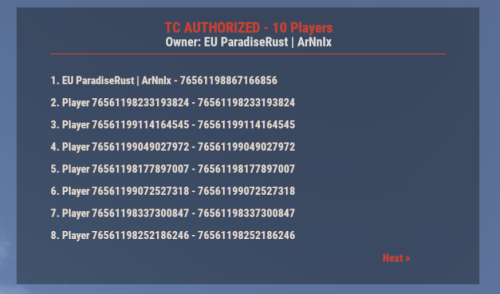
UI for displaying authorized players on the Tool Cupboard, Auto Turret, and Code Lock, including the entity owner. This plugin adds a simple, clean UI that shows you exactly who is authorized on the building or deployable you're looking at. Features: - Tool Cupboard: Displays a list of all authorized players and the owner. - Auto Turret: Displays a list of all authorized players and the owner. - Code Lock: Displays the owner, the lock code, and a list of whitelisted (Main) and Guest players. - Other Entities: If you look at any other player-placed entity (furnace, box, etc.), it will display the owner's name. - Pagination: If the list of players is longer than 8, you can use the "Next" and "Previous" buttons to browse. - Copyable Text: All information displayed in the UI (player names, Steam IDs, codes) can be selected and copied by the admin for easy use. - Player Team Info: If you look at a player, the UI will display their team information, including the team leader, all team members, and their Steam IDs. - Permission-based: Use the permission `adminauth.use` to control who can see the UI. How to use: 1. Grant the permission to a player or a group. 2. The player types the chat command `/aauth` to toggle the UI on or off. 3. Simply look at a Tool Cupboard, Turret, Code Lock, any other entity, or a player. The UI will appear with the relevant information. 4. To copy any information (like a Steam ID or Name), simply select the text in the UI with your mouse and copy it (Ctrl+C). Commands: - /aauth - Toggles the AdminAuthorizedUI on and off. Permissions: - adminauth.use - Required to use the /aauth command and see the UI.$13.80 -
Version 1.0.1
18 downloads
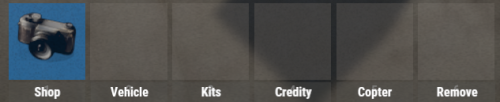
UIButtons is a Rust plugin that adds customizable UI buttons to your server. Players can click these buttons to execute commands like /shop, /kit, and more. The buttons are fully configurable through the UIButtons.json file, where you can set button text, commands, and button colors. Features: * Custom Buttons: Easily add buttons with text and commands. * Color Customization: Set button color using RGBA format. * Automatic UI: UI displays automatically when players join. * Configurable: Modify button settings via a simple config file. Example Configuration: { "IsUIVisible": true, "ButtonColor": "0.3568628 0.3568628 0.345098 0.4705882", "Buttons": [ { "Text": "Shop", "Command": "chat.say /shop" }, { "Text": "Vehicle", "Command": "chat.say /menu_vehicle" }, { "Text": "Kits", "Command": "chat.say /kit" }, { "Text": "Credits", "Command": "chat.say /credits" }, { "Text": "Copter", "Command": "chat.say /cb copter" }, { "Text": "Remove", "Command": "chat.say /remove" } ] }$3.49 -
Version 1.0.3
18 downloads
ForceRecycler is a plugin that ensures all recyclers on the map always give 60%, regardless of safe zones or visual differences. It works immediately after server initialization and does not require any additional plugins. Installation is simple – just place the file in oxide/plugins & carbon/plugins.$1.99-
- 1
-
-
- #recycler
- #recycler60
- (and 3 more)
-
 The best tool currently on the market. There is no better one. 10 out of 10!!
- 17 comments
-
- 1
-
-
- #cui
- #cui editor
- (and 2 more)
-
Hello, I have a problem on the server in that I can't find a place to put the pumpjack... I've been trying for about 6 wipes now and still nothing... What should I do?
-
hi, server.pve is false = I have set but I can't raid through walls when I'm at a raidable base. I don't know what other plugin could be blocking it on pve, I don't have anything else EDIT: Sorry I found it. I didn't have a rule created for raidbase.
-
That's what I use and how I have it set up. The problem is that when it's set up like that, players can't raid walls in the raid base. It is carbon.
-
Hello I have the Raidable Bases plugin and I want to have PVE on my server. The problem is that when I enable PVE on the server, people can raid, but only doors. However, I need them to be able to raid walls and other things in those raidable bases. Can anyone advise me on how to do this, please? I need players to be unable to raid other players' bases. But I need them to be able to raid bases from raidable bases. Where do I need to change the settings? Thank you in advance.