Jump to content

RIPJAWBONES

Creator
  • Posts

    94
  • Joined

  • Last visited

  • Days Won

    2

Everything posted by RIPJAWBONES

  1. Yes already does this. You have to set the bags/spawn locations the first time so it has the locations you want then it and saves the locations. In the next update there will be some default locations.
  2. Version 1.0.0

    25 downloads

    This plugin enables administrators to set up multiple respawn points for all players with permission using sleeping bags you can place them at monuments and custom locations. It offers features such as bag placement automation, permissions, cooldown between uses, removing hostility, random kit fetching upon respawn, and more. Admins can manage respawn points dynamically, even across map changes, and players benefit from custom spawn locations. Commands: /setbag - places a bag /setspawn - sets spawn point
    $5.00
  3. Hello, video coming soon.
  4. Version 1.0.6

    79 downloads

    Ready to elevate your modded Rust server by allowing players to spawn a variety of vehicles through chat commands? With this plugin, players gain the ability to spawn vehicles, you can use any vehicle prefab in the game that you want making exploration and transportation within the game effortlessly convenient. The plugin comes with optional restrictions to balance gameplay, including limits on the number of vehicles a player can have and cooldown timers and blocks to prevent spamming at certain timers or certain areas. Customization options are extensive, allowing server admins to adjust spawning methods and spawn distances, fuel amounts, and even specific permissions for different vehicles. Additionally, the plugin supports UI customization for a seamless integration with your server's interface. Whether for rapid movement across the map or just adding fun elements to your server, Vehicle Spawner ensures that your adventures in Rust are never a dull moment. Key Features Spawn any vehicle prefab in the game you can add or remove any that you want to the config. Limit the number of vehicles per player to maintain server balance. Customizable vehicle spawn settings, spawn method options, cooldowns and permissions. UI support for easy vehicle management for players, no commands needed. Special conditions for vehicle spawning, including safe zone, authorized, raid and combat block checks. Permissions vehiclespawner.use vehiclespawner.ui Key bind input BUTTON.FIRE_THIRD ( Middle mouse button ) Press/click it to toggle the Vehicle Menu UI on screen. Hold it down while menu is minimized to fully open it. Commands /vehiclemenu Allows players to toggle UI. /no <Config Chat Command> Allows players to remove a vehicle type by placing /no before the chat command from the config. /destroyall Allows player to remove all there vehicles at once. Default Configuration: Note: you can add as many vehicles as you want using the prefab path. { "MsgSettings": { "Message Icon SteamID": "76561197960839785", "Message Prefix": "[VehicleSpawner]", "Message Prefix Color": "#5af" }, "Prefabs": { "Attack Helicopter": { "AutoMount": false, "BlockButAllowInBuildingAuthorized": false, "BlockButAllowInSafeZone": false, "BlockInAuthorizedArea": true, "BlockInBuildingBlocked": true, "BlockInSafeZone": true, "BlockOnLand": false, "ChatCommands": [ "attack", "myattack", "attackheli", "myattackheli", "attackhelicopter", "myattackhelicopter", "atkheli", "atk", "myatk", "myatkheli" ], "CooldownTimer": 180.0, "DisableUIButton": false, "FuelAmount": 0, "LockFuel": false, "Permission": "vehiclespawner.attackhelicopter", "PrefabPath": "assets/content/vehicles/attackhelicopter/attackhelicopter.entity.prefab", "Rotation": { "x": 0.0, "y": 90.0, "z": 0.0 }, "SkySpawn": false, "SkySpawnHeight": 50.0, "SpawnDelay": 10.0, "SpawnDistance": 8.0, "SpawnHeight": 3.0, "SpawnOption": 1, "UseTracks": false }, "Balloon": { "AutoMount": false, "BlockButAllowInBuildingAuthorized": false, "BlockButAllowInSafeZone": false, "BlockInAuthorizedArea": true, "BlockInBuildingBlocked": true, "BlockInSafeZone": true, "BlockOnLand": false, "ChatCommands": [ "balloon", "myballoon", "hotairballoon", "myhotairballoon", "myhab", "hab" ], "CooldownTimer": 120.0, "DisableUIButton": false, "FuelAmount": 0, "LockFuel": false, "Permission": "vehiclespawner.balloon", "PrefabPath": "assets/prefabs/deployable/hot air balloon/hotairballoon.prefab", "Rotation": { "x": 0.0, "y": 90.0, "z": 0.0 }, "SkySpawn": false, "SkySpawnHeight": 50.0, "SpawnDelay": 10.0, "SpawnDistance": 12.0, "SpawnHeight": 3.0, "SpawnOption": 1, "UseTracks": false }, "Car": { "AutoMount": false, "BlockButAllowInBuildingAuthorized": false, "BlockButAllowInSafeZone": false, "BlockInAuthorizedArea": true, "BlockInBuildingBlocked": true, "BlockInSafeZone": true, "BlockOnLand": false, "ChatCommands": [ "sedan", "mysedan", "car", "mycar" ], "CooldownTimer": 180.0, "DisableUIButton": false, "FuelAmount": 0, "LockFuel": false, "Permission": "vehiclespawner.car", "PrefabPath": "assets/content/vehicles/sedan_a/sedantest.entity.prefab", "Rotation": { "x": 0.0, "y": 0.0, "z": 0.0 }, "SkySpawn": false, "SkySpawnHeight": 50.0, "SpawnDelay": 10.0, "SpawnDistance": 6.0, "SpawnHeight": 3.0, "SpawnOption": 1, "UseTracks": false }, "Chinook": { "AutoMount": false, "BlockButAllowInBuildingAuthorized": false, "BlockButAllowInSafeZone": false, "BlockInAuthorizedArea": true, "BlockInBuildingBlocked": true, "BlockInSafeZone": true, "BlockOnLand": false, "ChatCommands": [ "chinook", "mychinook", "ch47", "mych47" ], "CooldownTimer": 180.0, "DisableUIButton": false, "FuelAmount": 0, "LockFuel": false, "Permission": "vehiclespawner.chinook", "PrefabPath": "assets/prefabs/npc/ch47/ch47.entity.prefab", "Rotation": { "x": 0.0, "y": 240.0, "z": 0.0 }, "SkySpawn": false, "SkySpawnHeight": 50.0, "SpawnDelay": 10.0, "SpawnDistance": 10.0, "SpawnHeight": 3.0, "SpawnOption": 1, "UseTracks": false }, "Horse": { "AutoMount": false, "BlockButAllowInBuildingAuthorized": false, "BlockButAllowInSafeZone": false, "BlockInAuthorizedArea": true, "BlockInBuildingBlocked": true, "BlockInSafeZone": true, "BlockOnLand": false, "ChatCommands": [ "horse", "myhorse" ], "CooldownTimer": 180.0, "DisableUIButton": false, "FuelAmount": 0, "LockFuel": false, "Permission": "vehiclespawner.horse", "PrefabPath": "assets/rust.ai/nextai/testridablehorse.prefab", "Rotation": { "x": 0.0, "y": 0.0, "z": 0.0 }, "SkySpawn": false, "SkySpawnHeight": 50.0, "SpawnDelay": 10.0, "SpawnDistance": 5.0, "SpawnHeight": 3.0, "SpawnOption": 1, "UseTracks": false }, "Minicopter": { "AutoMount": false, "BlockButAllowInBuildingAuthorized": false, "BlockButAllowInSafeZone": false, "BlockInAuthorizedArea": true, "BlockInBuildingBlocked": true, "BlockInSafeZone": true, "BlockOnLand": false, "ChatCommands": [ "mini", "mymini", "minicopter", "myminicopter" ], "CooldownTimer": 0.0, "DisableUIButton": false, "FuelAmount": 0, "LockFuel": false, "Permission": "vehiclespawner.minicopter", "PrefabPath": "assets/content/vehicles/minicopter/minicopter.entity.prefab", "Rotation": { "x": 0.0, "y": 90.0, "z": 0.0 }, "SkySpawn": false, "SkySpawnHeight": 50.0, "SpawnDelay": 0.0, "SpawnDistance": 5.0, "SpawnHeight": 3.0, "SpawnOption": 1, "UseTracks": false }, "RHIB": { "AutoMount": false, "BlockButAllowInBuildingAuthorized": false, "BlockButAllowInSafeZone": false, "BlockInAuthorizedArea": true, "BlockInBuildingBlocked": true, "BlockInSafeZone": true, "BlockOnLand": true, "ChatCommands": [ "rhib", "myrhib", "mybigboat", "bigboat" ], "CooldownTimer": 10.0, "DisableUIButton": false, "FuelAmount": 0, "LockFuel": false, "Permission": "vehiclespawner.rhib", "PrefabPath": "assets/content/vehicles/boats/rhib/rhib.prefab", "Rotation": { "x": 0.0, "y": 0.0, "z": 0.0 }, "SkySpawn": false, "SkySpawnHeight": 50.0, "SpawnDelay": 5.0, "SpawnDistance": 10.0, "SpawnHeight": 3.0, "SpawnOption": 1, "UseTracks": false }, "Row Boat": { "AutoMount": false, "BlockButAllowInBuildingAuthorized": false, "BlockButAllowInSafeZone": false, "BlockInAuthorizedArea": true, "BlockInBuildingBlocked": true, "BlockInSafeZone": true, "BlockOnLand": true, "ChatCommands": [ "rowboat", "row", "myrow", "myrowboat", "boat", "myboat" ], "CooldownTimer": 10.0, "DisableUIButton": false, "FuelAmount": 0, "LockFuel": false, "Permission": "vehiclespawner.rowboat", "PrefabPath": "assets/content/vehicles/boats/rowboat/rowboat.prefab", "Rotation": { "x": 0.0, "y": 0.0, "z": 0.0 }, "SkySpawn": false, "SkySpawnHeight": 50.0, "SpawnDelay": 3.0, "SpawnDistance": 9.0, "SpawnHeight": 3.0, "SpawnOption": 1, "UseTracks": false }, "Scrap Transport Helicopter": { "AutoMount": false, "BlockButAllowInBuildingAuthorized": false, "BlockButAllowInSafeZone": false, "BlockInAuthorizedArea": true, "BlockInBuildingBlocked": true, "BlockInSafeZone": true, "BlockOnLand": false, "ChatCommands": [ "scrap", "myscrap", "heli", "myheli", "helicopter", "myhelicopter", "scrappy", "myscrappy", "scraptransport" ], "CooldownTimer": 10.0, "DisableUIButton": false, "FuelAmount": 0, "LockFuel": false, "Permission": "vehiclespawner.scraptransporthelicopter", "PrefabPath": "assets/content/vehicles/scrap heli carrier/scraptransporthelicopter.prefab", "Rotation": { "x": 0.0, "y": 180.0, "z": 0.0 }, "SkySpawn": false, "SkySpawnHeight": 50.0, "SpawnDelay": 5.0, "SpawnDistance": 8.0, "SpawnHeight": 3.0, "SpawnOption": 1, "UseTracks": false } }, "Settings": { "AmountOfPrefabsAllowedAtOnce": 2, "BlockNearPlayer": { "IgnoreTeam": true, "PlayerDistance": 5.0, "UsePlayerDistance": true }, "DestroyOnDeath": true, "DestroyOnDisconnect": true, "GlobalSpawnCooldownTimer": 10.0, "UseCombatBlocked": true, "UseRaidBlocked": true }, "UiPermission": "vehiclespawner.ui", "UsePermission": "vehiclespawner.use" } PREVIEW / TUTORIAL VIDEOS COMING SOON!
    $5.00
  5. Hey, just updated the plugin it now supports scrap helicopters and attack helicopters also it creates sleeping bags for players when you grant them the permission now. Set the FuelAmount in config to 0 if your using a unlimited fuel plugin.
  6. Hey, It creates there sleeping bag when they connect to the server so after you give perm they would need to reconnect for there bag to be created or you can reload the plugin after you grant perm to a group. Update coming today for starting fuel amount .
  7. Version 1.0.8

    55 downloads

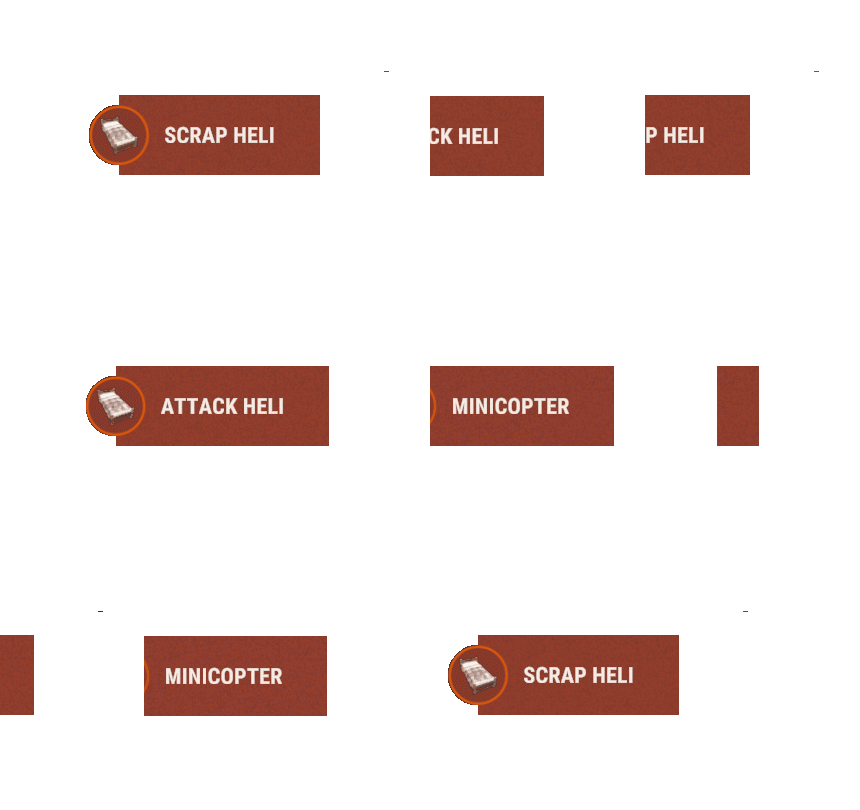
    NEW PERFORMANCE UPDATE COMING SOON Add new respawn options for players on your Rust server with Helicopter Respawn. This plugin automatically deploys sleeping bags named "Minicopter", "Scrap Heli" and "Attack Heli" for players at randomized locations, when players respawn using the custom sleeping bag they are automatically mounted on a flying helicopter. Say goodbye to tedious respawn processes and hello to swift returns. Sweet revenge awaits, with Helicopter Respawn keeping players engaged in the game. Automatically places sleeping bags for players. Spawns a helicopter and mounts the player on it upon respawn. Randomly selects a location for sleeping bag placement. Customizable sleeping bag name and respawn time in config. Customizable sleeping bag height and randomize spawn kits in config. Permissions: helicopterrespawn.minicopter helicopterrespawn.scraphelicopter helicopterrespawn.attackhelicopter
    $5.00
  8. Hey, sorry for late response, plugin update coming soon it will have this fixed.
  9. B is not available but press E + R at the same time would work press middle mouse button would work press e and middle mouse at the same time would work press shift and middle mouse would work
  10. Use it on my 60-100 pop server no issues, not bad on performance with or without the cooldowns. Every time someone shoots would be using the primary attack which the plugin does not include but does include the fire third which would be the middle mouse button. Even if it was primary attack button and every time they shoot it still would not cause performance issues unless the server is on a very low performance vps or dedicated machine. I included blocks for the binds and commands from being spammed.
  11. Add me on discord, I will send you a custom version that you can set the respawn locations. RIPJAWBONES#0001
  12. Is it a custom outpost your using ?
  13. Version 2.0.0

    130 downloads

    Allows players to run commands using configured key combinations. These custom key binds provide a convenient way for players to interact with commands. Permissions: keybinds.use keybinds.player keybinds.minicopter keybinds.scraptransporthelicopter keybinds.attackhelicopter keybinds.ch47 Command: /keybinds Players can use this command to disable or enable the key binds. Configuration Example: { "Global Settings": { "Auto Enable Key Binds": true, "Global Cooldown Enabled": true, "Global Cooldown Time": 1.0, "Global Cooldown Message Enabled": true, "Global Cooldown Message": "You must wait {seconds}s before using any keybind.", "Enable Player Key Bind Notifications": true, "Message Settings": { "Message Icon SteamID": "76561197960839785", "Message Prefix": "[Key Bind Manager]\n", "Message Prefix Color": "#5af" } }, "Player Keybinds": { "FIRE_THIRD": { "Command": "/menu", "Permission": "keybinds.player", "Cooldown": 0.0, "Enabled Cooldown Message": true, "Cooldown Message": "Cooldown! You must wait {seconds}s to use the {command} key bind." }, "SPRINT_AND_FIRE_THIRD": { "Command": "", "Permission": "keybinds.player", "Cooldown": 0.0, "Enabled Cooldown Message": true, "Cooldown Message": "Cooldown! You must wait {seconds}s to use the {command} key bind." }, "USE_AND_FIRE_THIRD": { "Command": "/shop", "Permission": "keybinds.player", "Cooldown": 0.0, "Enabled Cooldown Message": true, "Cooldown Message": "Cooldown! You must wait {seconds}s to use the {command} key bind." }, "USE_AND_RELOAD": { "Command": "/kit", "Permission": "keybinds.player", "Cooldown": 0.0, "Enabled Cooldown Message": true, "Cooldown Message": "Cooldown! You must wait {seconds}s to use the {command} key bind." } }, "Minicopter": { "DUCK": { "Command": "/takeoff", "Permission": "keybinds.minicopter", "Cooldown": 0.0, "Enabled Cooldown Message": true, "Cooldown Message": "Cooldown! You must wait {seconds}s to use the {command} key bind." }, "FIRE_PRIMARY": { "Command": "", "Permission": "keybinds.minicopter", "Cooldown": 0.0, "Enabled Cooldown Message": true, "Cooldown Message": "Cooldown! You must wait {seconds}s to use the {command} key bind." }, "FIRE_SECONDARY": { "Command": "", "Permission": "keybinds.minicopter", "Cooldown": 0.0, "Enabled Cooldown Message": true, "Cooldown Message": "Cooldown! You must wait {seconds}s to use the {command} key bind." }, "FIRE_THIRD": { "Command": "", "Permission": "keybinds.minicopter", "Cooldown": 0.0, "Enabled Cooldown Message": true, "Cooldown Message": "Cooldown! You must wait {seconds}s to use the {command} key bind." }, "RELOAD": { "Command": "/radio", "Permission": "keybinds.minicopter", "Cooldown": 0.0, "Enabled Cooldown Message": true, "Cooldown Message": "Cooldown! You must wait {seconds}s to use the {command} key bind." }, "SPRINT": { "Command": "/hover", "Permission": "keybinds.minicopter", "Cooldown": 0.0, "Enabled Cooldown Message": true, "Cooldown Message": "Cooldown! You must wait {seconds}s to use the {command} key bind." }, "USE": { "Command": "", "Permission": "keybinds.minicopter", "Cooldown": 0.0, "Enabled Cooldown Message": true, "Cooldown Message": "Cooldown! You must wait {seconds}s to use the {command} key bind." }, "SPRINT_AND_FIRE_THIRD": { "Command": "", "Permission": "keybinds.minicopter", "Cooldown": 0.0, "Enabled Cooldown Message": true, "Cooldown Message": "Cooldown! You must wait {seconds}s to use the {command} key bind." }, "USE_AND_FIRE_THIRD": { "Command": "", "Permission": "keybinds.minicopter", "Cooldown": 0.0, "Enabled Cooldown Message": true, "Cooldown Message": "Cooldown! You must wait {seconds}s to use the {command} key bind." }, "USE_AND_RELOAD": { "Command": "", "Permission": "keybinds.minicopter", "Cooldown": 0.0, "Enabled Cooldown Message": true, "Cooldown Message": "Cooldown! You must wait {seconds}s to use the {command} key bind." } }, "Scrap Transport Helicopter": { "DUCK": { "Command": "/takeoff", "Permission": "keybinds.scraptransporthelicopter", "Cooldown": 0.0, "Enabled Cooldown Message": true, "Cooldown Message": "Cooldown! You must wait {seconds}s to use the {command} key bind." }, "FIRE_PRIMARY": { "Command": "", "Permission": "keybinds.scraptransporthelicopter", "Cooldown": 0.0, "Enabled Cooldown Message": true, "Cooldown Message": "Cooldown! You must wait {seconds}s to use the {command} key bind." }, "FIRE_SECONDARY": { "Command": "", "Permission": "keybinds.scraptransporthelicopter", "Cooldown": 0.0, "Enabled Cooldown Message": true, "Cooldown Message": "Cooldown! You must wait {seconds}s to use the {command} key bind." }, "FIRE_THIRD": { "Command": "", "Permission": "keybinds.scraptransporthelicopter", "Cooldown": 0.0, "Enabled Cooldown Message": true, "Cooldown Message": "Cooldown! You must wait {seconds}s to use the {command} key bind." }, "RELOAD": { "Command": "/radio", "Permission": "keybinds.scraptransporthelicopter", "Cooldown": 0.0, "Enabled Cooldown Message": true, "Cooldown Message": "Cooldown! You must wait {seconds}s to use the {command} key bind." }, "SPRINT": { "Command": "/hover", "Permission": "keybinds.scraptransporthelicopter", "Cooldown": 0.0, "Enabled Cooldown Message": true, "Cooldown Message": "Cooldown! You must wait {seconds}s to use the {command} key bind." }, "USE": { "Command": "", "Permission": "keybinds.scraptransporthelicopter", "Cooldown": 0.0, "Enabled Cooldown Message": true, "Cooldown Message": "Cooldown! You must wait {seconds}s to use the {command} key bind." }, "SPRINT_AND_FIRE_THIRD": { "Command": "", "Permission": "keybinds.scraptransporthelicopter", "Cooldown": 0.0, "Enabled Cooldown Message": true, "Cooldown Message": "Cooldown! You must wait {seconds}s to use the {command} key bind." }, "USE_AND_FIRE_THIRD": { "Command": "", "Permission": "keybinds.scraptransporthelicopter", "Cooldown": 0.0, "Enabled Cooldown Message": true, "Cooldown Message": "Cooldown! You must wait {seconds}s to use the {command} key bind." }, "USE_AND_RELOAD": { "Command": "", "Permission": "keybinds.scraptransporthelicopter", "Cooldown": 0.0, "Enabled Cooldown Message": true, "Cooldown Message": "Cooldown! You must wait {seconds}s to use the {command} key bind." } }, "Attack Helicopter": { "DUCK": { "Command": "/takeoff", "Permission": "keybinds.attackhelicopter", "Cooldown": 0.0, "Enabled Cooldown Message": true, "Cooldown Message": "Cooldown! You must wait {seconds}s to use the {command} key bind." }, "FIRE_PRIMARY": { "Command": "", "Permission": "keybinds.attackhelicopter", "Cooldown": 0.0, "Enabled Cooldown Message": true, "Cooldown Message": "Cooldown! You must wait {seconds}s to use the {command} key bind." }, "FIRE_SECONDARY": { "Command": "", "Permission": "keybinds.attackhelicopter", "Cooldown": 0.0, "Enabled Cooldown Message": true, "Cooldown Message": "Cooldown! You must wait {seconds}s to use the {command} key bind." }, "FIRE_THIRD": { "Command": "", "Permission": "keybinds.attackhelicopter", "Cooldown": 0.0, "Enabled Cooldown Message": true, "Cooldown Message": "Cooldown! You must wait {seconds}s to use the {command} key bind." }, "RELOAD": { "Command": "/radio", "Permission": "keybinds.attackhelicopter", "Cooldown": 0.0, "Enabled Cooldown Message": true, "Cooldown Message": "Cooldown! You must wait {seconds}s to use the {command} key bind." }, "SPRINT": { "Command": "/hover", "Permission": "keybinds.attackhelicopter", "Cooldown": 0.0, "Enabled Cooldown Message": true, "Cooldown Message": "Cooldown! You must wait {seconds}s to use the {command} key bind." }, "USE": { "Command": "", "Permission": "keybinds.attackhelicopter", "Cooldown": 0.0, "Enabled Cooldown Message": true, "Cooldown Message": "Cooldown! You must wait {seconds}s to use the {command} key bind." }, "SPRINT_AND_FIRE_THIRD": { "Command": "", "Permission": "keybinds.attackhelicopter", "Cooldown": 0.0, "Enabled Cooldown Message": true, "Cooldown Message": "Cooldown! You must wait {seconds}s to use the {command} key bind." }, "USE_AND_FIRE_THIRD": { "Command": "", "Permission": "keybinds.attackhelicopter", "Cooldown": 0.0, "Enabled Cooldown Message": true, "Cooldown Message": "Cooldown! You must wait {seconds}s to use the {command} key bind." }, "USE_AND_RELOAD": { "Command": "", "Permission": "keybinds.attackhelicopter", "Cooldown": 0.0, "Enabled Cooldown Message": true, "Cooldown Message": "Cooldown! You must wait {seconds}s to use the {command} key bind." } }, "CH47 Helicopter": { "DUCK": { "Command": "/takeoff", "Permission": "keybinds.ch47", "Cooldown": 0.0, "Enabled Cooldown Message": true, "Cooldown Message": "Cooldown! You must wait {seconds}s to use the {command} key bind." }, "FIRE_PRIMARY": { "Command": "", "Permission": "keybinds.ch47", "Cooldown": 0.0, "Enabled Cooldown Message": true, "Cooldown Message": "Cooldown! You must wait {seconds}s to use the {command} key bind." }, "FIRE_SECONDARY": { "Command": "", "Permission": "keybinds.ch47", "Cooldown": 0.0, "Enabled Cooldown Message": true, "Cooldown Message": "Cooldown! You must wait {seconds}s to use the {command} key bind." }, "FIRE_THIRD": { "Command": "", "Permission": "keybinds.ch47", "Cooldown": 0.0, "Enabled Cooldown Message": true, "Cooldown Message": "Cooldown! You must wait {seconds}s to use the {command} key bind." }, "RELOAD": { "Command": "/radio", "Permission": "keybinds.ch47", "Cooldown": 0.0, "Enabled Cooldown Message": true, "Cooldown Message": "Cooldown! You must wait {seconds}s to use the {command} key bind." }, "SPRINT": { "Command": "/hover", "Permission": "keybinds.ch47", "Cooldown": 0.0, "Enabled Cooldown Message": true, "Cooldown Message": "Cooldown! You must wait {seconds}s to use the {command} key bind." }, "USE": { "Command": "", "Permission": "keybinds.ch47", "Cooldown": 0.0, "Enabled Cooldown Message": true, "Cooldown Message": "Cooldown! You must wait {seconds}s to use the {command} key bind." }, "SPRINT_AND_FIRE_THIRD": { "Command": "", "Permission": "keybinds.ch47", "Cooldown": 0.0, "Enabled Cooldown Message": true, "Cooldown Message": "Cooldown! You must wait {seconds}s to use the {command} key bind." }, "USE_AND_FIRE_THIRD": { "Command": "", "Permission": "keybinds.ch47", "Cooldown": 0.0, "Enabled Cooldown Message": true, "Cooldown Message": "Cooldown! You must wait {seconds}s to use the {command} key bind." }, "USE_AND_RELOAD": { "Command": "", "Permission": "keybinds.ch47", "Cooldown": 0.0, "Enabled Cooldown Message": true, "Cooldown Message": "Cooldown! You must wait {seconds}s to use the {command} key bind." } } } Leave the command empty to disable the key bind.
    Free
  14. Version 1.0.2

    1,114 downloads

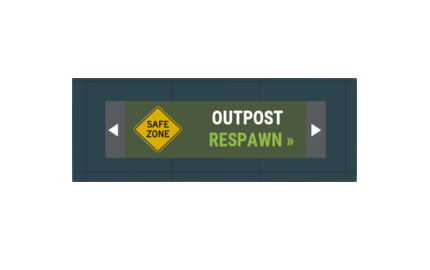
    Allows players to respawn at the Outpost or Bandit Camp upon death you can choose between sleeping bags or custom UI buttons. Support for permissions, adjustable cooldowns, hostility clearing, configurable UI offsets, UI sizes, UI images, and color. You can disable or enable Outpost or Bandit Camp respawns. View all options in the config example below. Configuration Example: { "Options": { "Enable Sleeping Bags (Disables UI)": false, "Enable Permissions": true, "Enable Outpost": true, "Enable Bandit": true, "Enable Cooldown": true, "Enable Auto Wake Up": true }, "Outpost": { "Use Permission": true, "Cooldown": 300.0, "Unlock Timer": 0.0, "Remove Hostility": true, "Use Auto Wake Up": true, "Outpost UI Settings": { "Button Title Text": "Outpost", "Button Respawn Text": "RESPAWN »", "Button Cooldown Text": "COOLDOWN!", "Button Color": "0.34 0.39 0.21 0.8", "Button UI Image URL": "https://i.imgur.com/nqFeINB.png", "Button UI Size": 1.0, "Button Horizontal Offset": 0.0, "Button Vertical Offset": 0.0 }, "Outpost Sleeping Bag Settings": { "Sleeping Bag Name": "Outpost", "Bag Location Cycle": false, "Respawn At Sleeping Bag": false } }, "Bandit Camp": { "Use Permission": true, "Cooldown": 300.0, "Unlock Timer": 0.0, "Remove Hostility": true, "Use Auto Wake Up": true, "Bandit Camp UI Settings": { "Button Title Text": "Bandit Camp", "Button Respawn Text": "RESPAWN »", "Button Cooldown Text": "COOLDOWN!", "Button Color": "0.34 0.39 0.21 0.8", "Button UI Image URL": "https://i.imgur.com/nqFeINB.png", "Button UI Size": 1.0, "Button Horizontal Offset": 0.0, "Button Vertical Offset": 0.0 }, "Bandit Camp Sleeping Bag Settings": { "Sleeping Bag Name": "Bandit Camp", "Bag Location Cycle": false, "Respawn At Sleeping Bag": false } } }
    Free
    Works great! There has been a issue with Rust since they added Bradley to launch site if players disconnect in certain locations at launch site Bradley shoots rockets non stop above the disconnected player and they do not kill them causing very annoying explosion sounds across the server until the player is manually killed, this plugin fixes that issue! Also very helpful if you run day time only on your server this plugin gets rid of all the sleepers at the safezones!
  15. Hey, I'll be updating the plugin with your requested feature added to the config in a moment Along with some other config settings
  16. Hey, I'll try to implement this now
  17. Version 1.02

    39 downloads

    This plugin brings a unique feature to rust allowing binoculars to scan bases. When scanning bases with the base scanner binoculars it displays detailed lists of items found during scans, enabling players to plan their next moves or share their discoveries with others, this is very useful for frustrated raiders. Player must look through the binoculars and press the USE button to scan bases. You can add the custom binocular item to your shop or kits plugin and you also have the ability to allow players to find the Base Scanner binoculars in loot crates, check the config. Skin ID: 3055785790 Console command for shop or kits plugin: giveplayer.binoculars "SteamID" Detected scannable contrainers: Large Wood Box Wood Storage Box Coffins Toolcupboards Furnances Vending Machines Drop Boxes Camp Fires Fridges Lockers +more Permission: basescanner.use - Allows players to use the binocular scanning feature. Configuration: { "PlayerBuiltBaseOnly": true, "CooldownSeconds": 30, "ScanRadius": 1.3, "SpawnInLootCrate": true, "LootCratePrefabName": "assets/bundled/prefabs/radtown/crate_normal.prefab", "Chance": 10.0 } Console Commands: giveplayer.binoculars "SteamID" Credits: Thanks to "TRAP BOX" for the creation of the Custom Skin for the binoculars.
    $5.00
  18. Version 2.0.2

    379 downloads

    This is a great addition to Rust servers that provides players with a convenient respawn option. Upon death, players are presented with buttons on the death screen that allows them to respawn at the outpost or bandit camp, offering a strategic advantage in gameplay. This feature enhances the overall player experience by streamlining the respawn process and encouraging outpost and bandit camp utilization. This plugin has been used since 2019 on some popular servers, players enjoy the option of spawning in a safe zone. If you cannot afford to pay for this plugin wishlist it and send me a message asking for it and I will give it to you for free. Features: Supports your own set spawn locations. Supports all monuments and custom monuments. Supports custom map locations. Player cooldowns. Removes players hostile timer when they respawn at outpost or bandit camp. Ability to set the players spawn Health, Calories and hydration when they respawn using the custom button. Ability to set a spawn kit or multiple spawn kits for when players respawn at the outpost or bandit camp, must be using a Kits plugin. (If you choose to have multiple spawn kits in the config it will choose a random one when a player respawns using the custom button.) User-Friendly UI: The respawn button is presented in an intuitive and visually appealing manner, ensuring ease of use for players. Optimized Performance: The plugin is designed with efficiency in mind to ensure minimal impact on server performance. Permissions: outpostrespawn.outpost Players with this permission can respawn at the outpost. outpostrespawn.bandit Players with this permission can respawn at the bandit camp. Admin Chat Commands: /savemonument - This saves the monument that the admin is standing at to the config. /setmonument - This saves the monument spawn location the admin is standing at to the config. /setcustommonument - This saves the custom monument spawn location the admin is standing at to the config. /setcustomspawn - This saves the custom map location the admin is standing at to the config.
    $8.00
  19. Version 1.01

    28 downloads

    Players can activate a nitro boost for their Helicopters, temporarily increasing their speed. This plugin enhances the Rust gameplay experience by introducing a dynamic feature for Helicopters, providing players with the option to engage in high-speed flight with strategic considerations. Features: Permission: Players must have the minicopternitros.use permission to activate the nitro boost. Enabled: If set to false it will disable the plugin functions for that helicopter. ModifiedHelicopterSpeed: Adjusts the modified speed of the Helicopter during nitro boost. VelocityModifier: Sets the additional velocity applied in the forward direction when nitro is activated. NitroDurationSeconds: Determines the duration of the nitro boost in seconds. CooldownSeconds: Sets the cooldown period (in seconds) before a player can use nitro again. NitroButton: Specifies the button used to activate nitro. EffectPrefab: Allows customization of the nitro effect using a specified prefab. MinimumGroundDistance: Blocks the usage of the nitro boost if the player is too close to the ground. Chat Command: Players can trigger the nitro boost using the chat command /nitro. Cooldown: The plugin has cooldown timers for each player to prevent spamming of the nitro feature. Players receive feedback on the remaining cooldown time if they attempt to use nitro during this period. Effect Visuals: When nitro is activated, an effect prefab is displayed to indicate the nitro boost. If you cannot afford to pay for this plugin wishlist it and send me a message asking for it and I will give it to you for free. If you need any help add me on discord RIPJAWBONES#0001 and send me a message. Configuration: { "Helicopters": { "minicopter.entity": { "CooldownSeconds": 30, "EffectPrefab": "assets/prefabs/npc/patrol helicopter/effects/rocket_fire.prefab", "Enabled": true, "MinimumGroundDistance": 15.0, "ModifiedHelicopterSpeed": 2.0, "NitroButton": 128, "NitroDurationSeconds": 2, "VelocityModifier": 5.0 }, "scraptransporthelicopter": { "CooldownSeconds": 30, "EffectPrefab": "assets/prefabs/npc/patrol helicopter/effects/rocket_fire.prefab", "Enabled": true, "MinimumGroundDistance": 15.0, "ModifiedHelicopterSpeed": 2.0, "NitroButton": 128, "NitroDurationSeconds": 2, "VelocityModifier": 5.0 } } } Keybind Options: DUCK = 64, SPRINT = 128, USE = 256, FIRE_PRIMARY = 1024 FIRE_SECONDARY = 2048, RELOAD = 8192, FIRE_THIRD = 134217728, You can adjust the NitroButton number in the config to another available key listed above, be sure to use the number.
    $5.00
  20. Hi, I will post a video soon.
  21. Version 1.0.1

    45 downloads

    This plugin brings a new unique aspect to the cargo ship, it allows it to start sinking! Explosions cause the cargo ship to start sinking and players are notified. The time the cargo ship starts to sink can be set in the config its currently set to 30 minutes as default so the cargo ship can circle the map and players have a chance to loot it before it sinks. Note: This is a simple plugin that sinks the cargo ship after a set time. If you cannot afford to pay for this plugin wishlist it and send me a message asking for it and I will give it to you for free. If you need any help add me on discord RIPJAWBONES#0001 and send me a message.
    $5.00
2.3m

Downloads

Total number of downloads.

10.6k

Customers

Total customers served.

153.6k

Files Sold

Total number of files sold.

3.3m

Payments Processed

Total payments processed.

×
×
  • Create New...

Important Information

We have placed cookies on your device to help make this website better. You can adjust your cookie settings, otherwise we'll assume you're okay to continue.