

Mevent
-
Posts
3,532 -
Joined
-
Last visited
-
Days Won
53
Content Type
Profiles
Warranty Claims
Downloads
Forums
Store
Services
Downloads Plus Support
DOWNLOADS EXTRA
Reels
Everything posted by Mevent
-
You need to turn off the option "Use own economic system?" in plugin config: "Use own economic system?": false,
-
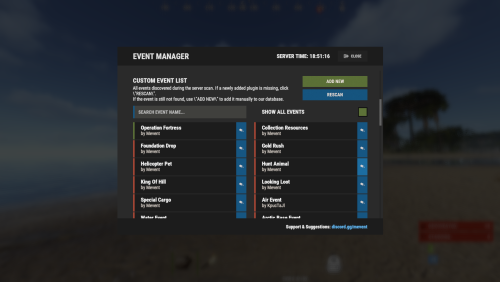
Version 4.3.10
10,750 downloads
EventsManager runs official Facepunch events and events from custom plugins through one in-game interface. Instead of scattered timers, you build event rotations and tune your wipe schedule in a single menu to keep players engaged. Features of Events Manager Multi-Event Support: Manage multiple events, each with its own settings. Customizable Display: Assign distinct names, commands, and colors for UI buttons to each event. Scheduling Flexibility: Schedule events to run on specific days and at designated hours. Administrative Control: Admins can launch events with commands. Enhanced Player Experience: Run regular events to keep players engaged. Random Event Start: Let the plugin pick events at random from a pool, so players get a surprise. Integration of Facepunch Events: Popular Facepunch events are included in the plugin. Commands /em: Set up events, including start time and day. eventmanager.convert.v2: Migrates V2 data to V3 (console only) Permissions eventsmanager.use: Lets users open the menu and manage events. Video Overview Web Config Editor Manage the EventsManager settings in our web config editor. You change the config in a browser form instead of editing files on the server by hand. P.S. The web config editor is open to members of the "EventsManager" group in our Discord server. Join at https://discord.gg/mevent and ask for the group. FAQ Q: Where can I see an example of a config? A: Config Q: Do I need to configure anything special for events? A: Yes, disable autostart in your events when you use EventsManager. The plugin schedules and starts events itself, so autostart can cause conflicts or unexpected behavior.$24.95- 343 comments
- 26 reviews
-
- 15
-

-

-
- #eventmanager
- #manager
- (and 5 more)
-
Changed Status from Pending to Closed Changed Fixed In to 1.1.12
-
@P.PAdded in version 1.1.12
-
Do you get any errors? Perhaps in the log files (not in the console)
-
Hi! This can be changed in the lang files (oxide/lang/en/Kits.json)
-
Hi! You may have created kits with a resolution (by default kits are created with "kits.default"). Try to give the players that permission: oxide.grant group default kits.default
-
 Vending machines used as ATMs do not allow you to sell items in them. But, this has no effect on regular vending machines.
-
You need to turn off the "Use own economic system?" option in the config, for example: "Economy Settings": { "Use own economic system?": false, "Plugin name": "Economics", "Balance add hook": "Deposit", "Balance remove hook": "Withdraw", "Balance show hook": "Balance" },
-
Changed Status from Pending to Closed Changed Fixed In to 1.1.1
-
Changed Status from Pending to Closed Changed Fixed In to 1.1.2
-
You want a command without specifying clantag?
-
Hi! Try this: clans.manage kick [clanTag] [name/userId] - kicks a member from a clan
-
 Oh, sorry, I just checked and it turns out that Clans with uMod started storing data differently from version 0.2.2. I'll add the conversion for the new version of data storage in Clans from uMod in an upcoming update