-
Posts
281 -
Joined
-
Last visited
Content Type
Profiles
Warranty Claims
Downloads
Forums
Store
Services
Downloads Plus Support
DOWNLOADS EXTRA
Reels
Everything posted by RustFlash
-

can you please add the new industrial.torch
RustFlash replied to DrayTemplar's Support Report in Support
Changed Status from Work in Progress to Closed -
Changed Status from Pending to Closed
-
Changed Status from Pending to Closed
-
[Closed] No response
-
 It is not possible to prohibit other events in the monument while one is already active; you as the admin have to plan that. I don't quite understand what you mean by crate visibility? Aren't the crates visible on the map?
 -
I chose a 1536 × 1024 resolution for my demo graphic because it offers several advantages. When using HD or Full HD resolution, simply ensure that the graphics are rendered small but at a high resolution. Ideally, they should be under 500KB so that the image library can process them efficiently and quickly.
-
Changed Status from Work in Progress to Closed
-
Changed Status from Pending to Work in Progress Changed Fixed In to Next Version
-
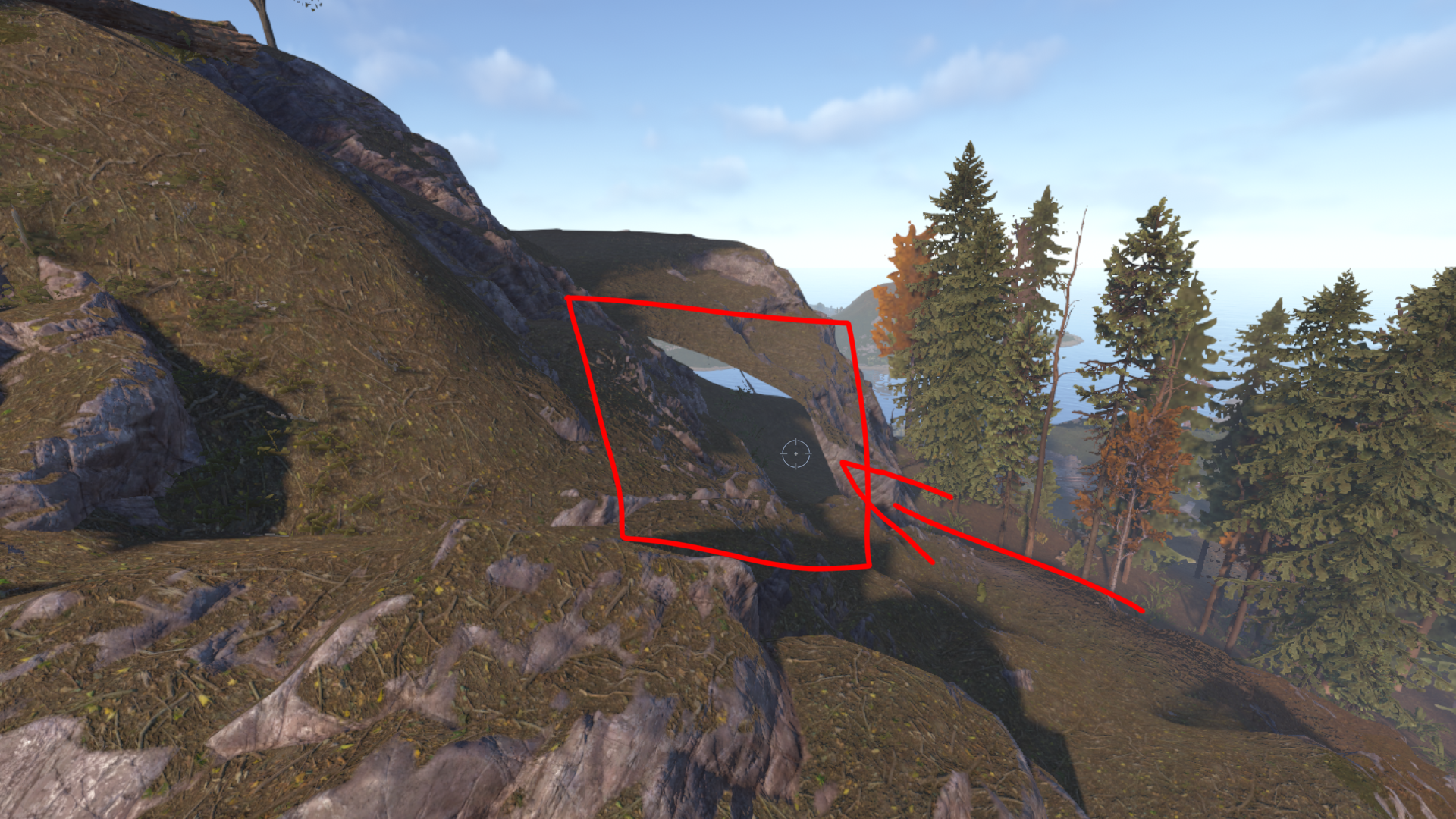
Hey, just so it's documented. Players complained that there's a hole in the rock pretty much in the middle of y16. Perhaps it can be fixed in future updates.

-
 Thanks @DrayTemplar for your reply. Unfortunately, we don't get notifications for discussions only for support requests. That's why I usually don't see them. So the lots aren't plotted. Instead, I use the MyHouse plugin, which has additional features for the house. Otherwise, there would be complications.
 -

Version 1.14.0
43 downloads
Halloween Event Project details Project: HalloweenEvent Dev Language: C# (Oxide/uMod) Plugin Language: English Author: @RustFlash Description Halloween Event runs a lightweight, fast-paced Jack-o’-Lantern shooting event. After a short countdown, each online player gets their own target pair (Scarecrow + Jack-o’-Lantern) spawned in a configurable ring around the player. Hit Happy pumpkins to score and drop candy; Angry ones yield no points. Entities auto-expire after a short lifetime and are immediately respawned to keep the arena populated. Features Event Flow Global countdown, then timed event window. Per-player spawns; scoring tracked and top players announced at the end. Candy drop on valid hits (configurable item shortname/amount). Smart Spawning (Ring) Spawns strictly around the player (between MinDistanceFromPlayer and SpawnRadius). Progressive search: strict → medium → relaxed → last-resort to always find a ring position (works on terrain, monuments, bases). Auto-Respawn On destroy or on lifetime timeout, the plugin spawns RespawnCountOnDestroy new targets for that player. Health Watcher Global health check every 2s: cleans up half-broken pairs and triggers respawn, keeping the loop stable. Lightweight Event-only build: just the commands you need, minimal logging, no test/debug commands. Commands Chat & Console Command Description Permission /flashhalloweenevent Start the countdown & event halloweenevent.use /stophalloweenevent Stop countdown/event & clean up halloweenevent.use The same names exist as console commands: flashhalloweenevent, stophalloweenevent. Permissions halloweenevent.use - Allows starting/stopping the event Configuration (excerpt) { "CountdownMinutes": 3, "EventDurationSeconds": 60, "SpawnRadius": 10.0, "MinDistanceFromPlayer": 4.0, "ScarecrowLifetime": 3.0, "RespawnCountOnDestroy": 2, "HappyJackChance": 0.6, "JackHeightOnScarecrow": 1.2, "CandyItemShortname": "halloween.candy", "CandyReward": 1, "MaxActivePerPlayer": 20, "MaxVerticalOffsetUpFromPlayer": 1.5, "MaxVerticalOffsetDownFromPlayer": 5.0, "SampleAttempts": 72, "AngleSweeps": 2, "FallbackJitter": 8 } Notes Increase SampleAttempts/AngleSweeps if your map has many dense structures. Reduce MinDistanceFromPlayer if players often stand under roofs/overhangs. RespawnCountOnDestroy controls how many new pairs spawn after a hit and after lifetime expiry. Multilingual Support: The plugin supports multiple languages. Language files are located in the lang folder and can be edited or expanded as needed. Currently supported languages: default: EN DE | FR | ES | IT | TR | RU | UK Please note that the language files were translated using the DeepL Language Tool load, run, enjoy$8.99 -
 No, the player sets the height at the start. A configuration description is not yet available. Please don't post in discussions; as developers, we only receive notifications for support requests here. We simply don't see them. Sorry for the late reply!
 -
Changed Status from Pending to Closed
-
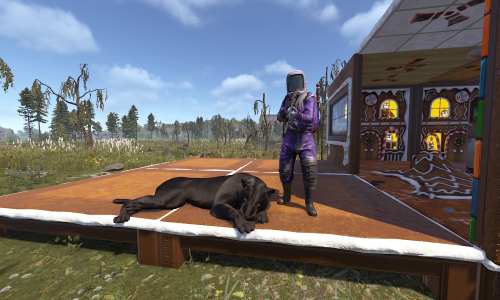 I hope you don't take this the wrong way, but I'm really wondering why something like this is allowed on the platform. I've noticed that one AI plugin after another has been released on the platform lately. That's why I thought I'd just check this out. First of all, I’m wondering why someone would do something like this if they have no idea what they’re doing. (I assume they won't understand it when I see the code.) My second question was: Why is this being released on this platform in this state? The plugin has critical performance issues maybe you should let customers know that in the description. - The update runs every frame and schedules work per frame - At line 1593, PantherComponent.Update=) runs every frame. But the tick gate isn’t set until line 1791, which means everything before that runs unthrottled at full frame rate “PER” TIER! - I don’t even want to talk about the NextTick closure - Reflection iterates through all components every 5 seconds per tier via reflection and re-deactivates FSM/NavMesh - According to the code, all tiers are somehow invulnerable and spam the chat every time, and this happens with every hit. I don’t understand it, but I don’t want to test the plugin right now either -.- - Then there’s occasional data loss on restart, qwipe, whatever definitely not intended either - Some things are iterated through all server entities via LINQ - A fragile God Mode hack; NaN/network risks, and at some point I just stopped looking into it...
 -
Works?
-
Good morning, this isn't a plugin issue, but a problem with the image management system (ImageLibrary). This explains exactly what's happening: First PNG uploaded -> ImageLibrary saves it under "afk_screen" -> you replace the PNG or the URL -> the plugin reloads -> ImageLibrary says: “I already have ‘afk_screen’” -> the old image remains. Renaming the PNG file doesn’t help either. For example, if you change from afk.png to afk_new.png but continue to use the same ImageName = “afk_screen” in the configuration or code, ImageLibrary doesn’t care about the filename. The internal key remains “afk_screen.” You can temporarily fix the problem by deleting the /data/ImageLibrary folder once (be sure to deactivate the plugin first). This shouldn’t result in any data loss; the next time you load the plugin, your ImageLibrary will be cleaned up, and unnecessary images that aren’t being used will be removed.
-

Version 3.4.0
17 downloads
MyBank offers a call money account for Scrap or other currencies with dynamic, randomized interest rates, a modern UI and optional banker NPC in the Compound. Players can deposit Scrap (skin-based), earn daily interest, and withdraw the total amount (base + interest, optional different skin). Features Banker NPC @ Compound: Fixed spawn point, rotation/position in code; auto-respawn. Modern UI: Tabs (account balance, deposit, withdrawal, transaction statements, interest rates), pop-up notifications, opens/closes near NPC. Dynamic Daily Interest: Randomized daily rates within a configurable range (min/max percentage). Each day, a new rate is rolled and applied to all accounts. Supports both positive and negative interest. Negative Interest: Optional daily penalty on deposits (e.g., -12% to +5% range). Wipe Interest Penalty: Optional penalty applied to all accounts when a server wipe is detected (e.g., -25% of balance). Interest History: Transaction log showing all interest (positive, negative, and wipe fees) applied to each account. Skin-aware banking: Deposits/withdrawals respect ShortName + SkinId (normal vs. ‘golden’ scrap). Neon signs (optional): Two signs next to the banker; images via ImageLibrary from configured URLs; edit protection. Chat toggle: /mybank command to open/close the UI. Permissions mybank.use – Use of the plugin mybank.editsigns – (optional) Edit signs if protection is relaxed Config Options DailyInterestMinPercent: Minimum daily interest rate (can be negative). Default: -12% DailyInterestMaxPercent: Maximum daily interest rate. Default: 5% WipeInterestPercent: Penalty percentage applied to all accounts on wipe detection. Default: 25% UseNPC: Enable/disable the banker NPC spawn. Default: true NpcName: Display name of the banker NPC. Default: “Banker” NpcClothing: List of clothing items to equip on the NPC (ShortName + SkinId) NeonSign215ImageUrl: Image URL for the 125x215 neon sign NeonSign125ImageUrl: Image URL for the 125x125 neon sign DepositItem: Item definition for deposits (ShortName + SkinId) WithdrawItem: Item definition for withdrawals (ShortName + SkinId) Requirements/dependencies ImageLibrary – For loading and applying neon sign images MonumentFinder – For locating the Compound monument Commands /mybank – Toggle the banking UI (opens when near the banker, closes with button or moving away) Usage Players approach the banker NPC at Compound UI opens automatically when in range Players can deposit scrap, withdraw balance, view transactions, and monitor interest rates Interest is applied automatically every 24 hours with a new random rate On server wipe, an additional wipe penalty is applied to all accounts Load, run, and enjoy!$29.99 -
Version 3.0.0
11 downloads
The MyTutorial plugin offers a fully configurable tutorial system for new players on your server. There's nothing worse than modded servers where you don't understand everything or can't find things. With this useful tutorial, you can have players complete specific tasks once so they learn your server perfectly. The system consists of several Task Groups that build upon each other and use various completion conditions: - Item-based Tasks: Players must obtain specific items - Group-based Tasks: Players must join a specific user group - Command-based Tasks: Players must execute specific chat commands Features: ➔ | Progressive Task Groups: Multiple task groups in sequence ➔ | Flexible Completion Conditions: Items, groups, commands, buildings, locations, playtime ➔ | Player Progress Persistence: Persists through reloads and wipes ➔ | Movable UI: 9 different positions on screen ➔ | Minimized View: Compact "T" button when tutorial is hidden ➔ | Flexible completion conditions (items, groups, commands, buildings, farm routes, locations, playtime) ➔ | Server plugin integration (MyBank, BlackMarket, MoneyWash, ResourceTrader, FarmRoute) → | Automatic completion checks ➔ | Popup notifications FarmRoute integration is now clearly documented with: ➔ | Example for weed:farming, weed:converter, weed:buyer ➔ | Combine multiple routes ➔ | Optional – also works without Commands (not necessary - see UI) Command | Description /toggletutorial | Show hide the tutorial /tutorialposition | Cycle through 9 UI positions /checktutorial | Check and update tutorial progress Permission: mytutorial.use Every player who must complete the tutorial once! Config The configuration file is located at oxide/config/MyTutorial.json. Basic Structure { "TaskGroups": [ { "Tasks": [ { "Description": ["Line 1", "Line 2"], "CompletionCondition": "ItemInInventory", "CompletionType": "shortname", "CompletionValue": "item.shortname" } ] } ], "DefaultPosition": "MiddleLeft" } Please remember that your space is very limited! Config (Detailed) PLEASE READ THE DOCUMENTARY! -> DOCU Data & Persistence Storage Locations Progress Data: oxide/data/MyTutorial/Progress.json Completed Players: oxide/data/MyTutorial/Completed.json DO NOT DELETE THIS OR PLAYERS MUST REDO TUTORIALS! Automatic Saving - Data is saved every 5 minutes or on server save automatically - Player progress persists after plugin reloads - Progress is preserved after a wipe (server restart) load, run, enjoy$15.99 -
Hey, thanks for reaching out! Can you describe the problem in more detail? Is there an error message, or are there any game mechanics involved? Is SimplePvE (i.e., PvE mode) not being disabled, or
-
 It has no influence on that
 -
 Actually, I'm working on something like that right now, but it's not technically feasible. The data has to be deleted in offline mode; otherwise, it will just be restored. Maybe I'll implement a stripped-down version, I'll have to see.
 -
No, what are they referring to? Is it about the server files because of a wipe?
-
# MyTutorial – Complete Documentation > **For:** Server Admins and Plugin Developers > **Purpose:** Introduce players to your server using a progressive tutorial system --- ## What is MyTutorial? MyTutorial is a **progressive tutorial system** designed to help players understand your server mechanics. It presents players with *tasks* that they must complete one after another. **Example:** The goal is to showcase all custom features, commands, locations, and events on your server to new players step by step: 1. Player connects → Task 1 displayed: "Open your inventory" 2. Player opens inventory → Task 1 ✓, Task 2 displayed: "Gather 100 Wood" 3. Player gathers wood → Task 2 ✓ → Tutorial completed --- ## How to Create a Tutorial ### Step 1: Open the Config Open `oxide/config/MyTutorial.json` ### Step 2: Understand the Structure The config file uses this **basic structure**: ```json { "TaskGroups": [ { "Tasks": [ { "Description": ["Task description text"], "CompletionCondition": "ConditionType", "CompletionType": "DataType", "CompletionValue": "ValueToCheck" } ] } ], "DefaultPosition": "MiddleLeft" } ``` **What does this mean?** - **TaskGroups**: Groups of tasks (multiple groups act as different "chapters" in your tutorial) - **Tasks**: Individual tasks within a group - **Description**: What the player sees in the UI (supports multiple lines) - **CompletionCondition**: What action or state the player must fulfill to complete the task - **DefaultPosition**: Where the tutorial window appears on the screen --- ## Task Types (CompletionCondition) Choose a condition type based on **what you want the player to do**: ### 1. ItemInInventory – Item in Inventory **Player must possess a specific item** ```json { "Description": ["⇨ Gather 5 Wood", " ⇝ Walk to a tree and cut it down"], "CompletionCondition": "ItemInInventory", "CompletionType": "shortname", "CompletionValue": "wood" } ``` **Multiple Items (OR condition):** ```json "CompletionValue": "wood,stone,ore" ``` → Completed if the player has **any one** of these items. --- ### 2. Command – Execute Chat Command **Player must type a chat command** ```json { "Description": ["⇨ Open your character menu", " ⇝ Type /char"], "CompletionCondition": "Command", "CompletionType": "command", "CompletionValue": "/char" } ``` **Important:** The check matches as long as the command **starts with** the specified word. - `/char` also fulfills: `/char builder`, `/char add`, etc. **Multiple Commands (OR condition):** ```json "CompletionValue": "/char,/character,/skills" ``` --- ### 3. BuildingPlaced – Place Building / Entity **Player must place a building piece or entity** ```json { "Description": ["⇨ Place a Workbench", " ⇝ Use building placement"], "CompletionCondition": "BuildingPlaced", "CompletionType": "shortname", "CompletionValue": "workbench1" } ``` --- ### 4. Group – Player in Oxide Group **Player must belong to a specific Oxide group** ```json { "Description": ["⇨ Become a VIP Member", " ⇝ Purchase a VIP package"], "CompletionCondition": "Group", "CompletionType": "group", "CompletionValue": "vip" } ``` **Multiple Groups (OR condition):** ```json "CompletionValue": "vip,donor,supporter" ``` --- ### 5. LocationVisit – Visit Location **Player must enter a specific area** ```json { "Description": ["⇨ Visit the Marketplace", " ⇝ Head to the center"], "CompletionCondition": "LocationVisit", "CompletionType": "location", "CompletionValue": "0,100,0,50" } ``` **Format:** `X,Y,Z,Radius` - **X, Y, Z**: Coordinates of the location - **Radius**: Detection area size in meters *Tip:* Use `printpos` in-youur F1 Console to get your current coordinates. **Multiple Locations (OR condition):** ```json "CompletionValue": "0,100,0,50,500,200,0,40" ``` --- ### 6. Playtime – Required Playtime **Player must have played for X seconds** ```json { "Description": ["⇨ Play for 1 Hour", " ⇝ Spend time on the server"], "CompletionCondition": "Playtime", "CompletionType": "seconds", "CompletionValue": "3600" } ``` **Examples:** - `60` = 1 Minute - `3600` = 1 Hour - `86400` = 24 Hours --- ### 7. FarmRoute – Complete Farm Route Plugin: https://codefling.com/plugins/farm-route **Player must complete/interact with a FarmRoute zone** (requires FarmRoute plugin) ```json { "Description": ["⇨ Collect Weed", " ⇝ Go to the Weed Farm and harvest"], "CompletionCondition": "FarmRoute", "CompletionType": "route", "CompletionValue": "weed:farming" } ``` **Format:** `routename:type` - **routename**: Name of the route in FarmRoute (lowercase!) - **type**: `farming`, `converter`, or `buyer` **Multiple Routes (OR condition):** ```json "CompletionValue": "weed:farming,hemp:farming" ``` --- ### 8. Plugin Integration – Special Server Menus **Player must open a specific server plugin menu** (e.g., Bank, Black Market) ```json { "Description": ["⇨ Visit the Bank", " ⇝ Open the Bank menu"], "CompletionCondition": "Command", "CompletionType": "command", "CompletionValue": "mybank" } ``` **Available Plugin Integrations:** - `mybank` – MyBank UI opened - `openblackmarket` – Black Market UI opened - `openmoneywash` – Money Wash UI opened - `opentrader` – Resource Trader UI opened *(You can find my plugins on my profile)* --- ## Practical Examples ### Example 1: Beginner Tutorial (First 5 Minutes) ```json { "TaskGroups": [ { "Tasks": [ { "Description": [ "⇨ Welcome to our server!", " ⇝ This is your first tutorial task", " ⇝ Open your inventory (TAB)" ], "CompletionCondition": "ItemInInventory", "CompletionType": "shortname", "CompletionValue": "wood,stone" }, { "Description": [ "⇨ Gather some more wood", " ⇝ Cut down a tree" ], "CompletionCondition": "ItemInInventory", "CompletionType": "shortname", "CompletionValue": "wood" } ] } ], "DefaultPosition": "MiddleLeft" } ``` ### Example 2: Intermediate Tutorial (Base Building) ```json { "TaskGroups": [ { "Tasks": [ { "Description": [ "⇨ Build your house", " ⇝ Place a Tool Cupboard (TC)" ], "CompletionCondition": "BuildingPlaced", "CompletionType": "shortname", "CompletionValue": "cupboard.tool" }, { "Description": [ "⇨ Secure your base", " ⇝ Place a metal double door" ], "CompletionCondition": "BuildingPlaced", "CompletionType": "shortname", "CompletionValue": "door.double.hinged.metal" } ] } ], "DefaultPosition": "Center" } ``` ### Example 3: Economy Tutorial (Bank + Farming) ```json { "TaskGroups": [ { "Tasks": [ { "Description": [ "⇨ Open your bank account", " ⇝ Type /bank or open the menu" ], "CompletionCondition": "Command", "CompletionType": "command", "CompletionValue": "mybank" } ] }, { "Tasks": [ { "Description": [ "⇨ Farm Weed", " ⇝ Go to the Weed Farming Zone", " ⇝ Gather the seeds" ], "CompletionCondition": "FarmRoute", "CompletionType": "route", "CompletionValue": "weed:farming" }, { "Description": [ "⇨ Process Weed", " ⇝ Go to the Converter Zone" ], "CompletionCondition": "FarmRoute", "CompletionType": "route", "CompletionValue": "weed:converter" } ] } ], "DefaultPosition": "TopRight" } ``` --- ## UI Positions Use `DefaultPosition` to define where the tutorial window appears on screen: ``` TopLeft TopCenter TopRight MiddleLeft Center MiddleRight BottomLeft BottomCenter BottomRight ``` **Example:** ```json "DefaultPosition": "TopRight" ``` --- ## Commands for Players Players can use these commands (Permission: `mytutorial.use`): | Command | Description | | -------------------- | ----------------------------------------- | | `/toggletutorial` | Toggle tutorial UI display (show/hide) | | `/checktutorial` | Manually refresh/check progress | | `/tutorialposition` | Cycle through UI positions | --- ## Permissions Add this permission to your `permissions.cfg` or `groups.cfg` file: ``` mytutorial.use ``` --- ## Frequently Asked Questions (FAQ) ### Q: The tutorial isn't showing up! **A:** Please check: 1. Does the player have the `mytutorial.use` permission? 2. Is the config file free of syntax errors? (Validate JSON) 3. Was the plugin reloaded? (`oxide.reload MyTutorial`) ### Q: How many tasks should a tutorial have? **A:** - **Beginner Tutorial:** 3–5 tasks - **Complete Tutorial:** 10–20 tasks - Tutorials that are too long get tedious; overly short ones aren't helpful. ### Q: Can I use HTML/colors in the text? **A:** **Yes!** You can use standard Rust text tags: ```json "Description": [ "⇨ <color=#ffed00>Gather Wood</color>", " ⇝ <size=16>Cut down a tree</size>" ] ``` **Common Tags:** - `<color=#ffed00>` (Yellow) - `<color=red>` (Red) - `<color=green>` (Green) - `<size=18>` (Size) ### Q: Is progress saved? **A:** **Yes!** Player progress is saved automatically: - On server restart - On plugin reload - Upon completing a task ### Q: Can I have multiple tutorials? **A:** No, there is one tutorial active per server. However, you can include many TaskGroups within a single config. ### Q: What happens if a player skips a task? **A:** Tasks cannot be skipped. The tutorial is progressive — tasks must be completed in order. --- ## Troubleshooting & Debugging ### JSON Error? Use an online **JSON Validator**, e.g., https://jsonlint.com/ ### Plugin not loading? Check the server **Console**: ``` [MyTutorial] Error: ... ``` ### Tasks not completing? 1. Verify **CompletionValue** – must match exactly 2. Verify **CompletionType** – must fit the condition type 3. Use `/checktutorial` in-game to trigger a manual check --- ## Workflow: New Tutorial in 5 Steps 1. **Open Config:** `oxide/config/MyTutorial.json` 2. **Add TaskGroups** with your tasks 3. **Save** 4. **Reload Plugin:** `oxide.reload MyTutorial` 5. **Test In-Game:** Reconnect and test the tutorial sequence --- ## Tips & Best Practices **Do:** - Short, clear descriptions - Logical task order - Colors for highlighting key words - Structural icons/arrows (⇨, ⇝) **Don't:** - Overly long task lists - Confusing or ambiguous language - Impossible tasks (non-existent item names, etc.) - Too many tasks all at once --- ## Support & More Info If you have questions: https://discord.gg/2ftdtaTQ6S Good luck with your tutorial!
-
I'm currently working through my to-do list in order of priority. I recently became a dad and my time is limited.