


-
Posts
259 -
Joined
-
Last visited
Content Type
Profiles
Warranty Claims
Downloads
Forums
Store
Services
Downloads Plus Support
DOWNLOADS EXTRA
Everything posted by RustFlash
-
Did you update it while the server was running, were there any problems after the restart?
-

Version 1.0.0
85 downloads
SkinFinder is an admin tool with which you can pull the SkinID of certain objects. The nice side effect is that the short name and the NetID are also displayed. More Free Plugins: If you are looking for more useful free plugins, please have a look at my Discord, you only have to choose the Flash role when you join. Support Discord Permission: To use the plugin, you need the .use permission. skinfinder.use load, run, enjoyFree -
 Hey, I took over the plugin because M&B is no longer active. I am in the process of reprogramming the plugin from scratch. It should get more features. Thanks anyway for your suggestion
 -
 Hey, I'm sorry that you had to wait so long for an answer. That's why I left the green message above. Unfortunately we don't get any notifications here on Codefling. This makes support a lot more difficult. You can always contact us via Discord Ticket. To your question. It is predefined in the current version and cannot simply be moved or reduced in size. It currently only works with Minicopter
 -
Changed Status from Work in Progress to Closed
-
Done, I would be very happy about a review if everything goes well
-
Hey, thanks for letting me know. There seems to be problems with an update, I'll fix it and upload it to you right away.
-
Changed Status from Pending to Work in Progress Changed Fixed In to Next Version
-
 I can't guarantee that, contact me in discord via a ticket.
 -
Unfortunately I can't answer that, I don't know the Koch plugin code lines... I don't think there will be any problems since you can determine the containers. But I can't say for sure.
-
![More information about "Raidable Sleeper Event [Works with HallOfShame]"](https://codefling.com/uploads/monthly_2025_12/RaidableSleeper_Ico.thumb.jpg.3237bb1a5776dcc724aa1f0af7a481da.jpg)
Version 2.0.0
39 downloads
The RaidableSleepers plugin allows players to loot sleeping players that appear on the map. These sleepers appear randomly and contain valuable loot that can be stolen by the active players. The sleepers spawn automatically at set intervals and disappear again after a certain amount of time. Features: Random Sleeper Spawns: Sleeping players spawn at random locations on the map. Loot distribution: Each sleeper is filled with random items from the preconfigured loot list. Cooldown mechanism: There is a configurable cooldown time between sleeper spawns. Loot Notification: Players will receive a notification when a Sleeper has been looted. Admin commands: Admins can manually spawn, test or delete sleepers. Cluster spawns: Multiple sleepers can be spawned in a certain radius around a central position. Commands: /spawnsleepers - Spawns a random sleeper on the map cooldown 5 minutes for this command /testsleepers - Spawn a test sleeper at your position /clearallsleepers - Removes all sleepers on the map /clearsleepers - Removes the sleeper you are looking at Permissions: raidablesleepers.admin - Allows admins to spawn, test and delete sleepers. raidablesleepers.raid - Allows players to raid sleeping players. Config: { "NumberOfSleepers": 10, // Maximum number of sleepers on the map "AvailabilityDuration": 600.0, // Minutes when position change if not found "CooldownDuration": 300.0, // Minutes when a new sleeper should spawn if the NumberOfSleepers is not reached "EnableLootNotification": true, // Chat message who loots a sleeper? "ItemsToSpawn": [ { "Shortname": "ammo.rifle.explosive", "SkinId": 0, "MinimumAmount": 100, "MaximumAmount": 256 }, { "Shortname": "explosive.timed", "SkinId": 0, "MinimumAmount": 1, "MaximumAmount": 2 }, { "Shortname": "wood", "SkinId": 0, "MinimumAmount": 2000, "MaximumAmount": 6000 } ] } --- load, run, enjoy Support Discord$4.99 -
![More information about "Hall Of Shame [Works with RaidableSleeper]"](https://codefling.com/uploads/monthly_2025_12/HallOfShame_Icon.thumb.jpg.526347798b80a17ca18b1018615e8c44.jpg)
Version 2.4.4
62 downloads
HallOfShame is an entertaining and interactive plugin that records the most "embarrassing” statistics of the players and presents them in the chat. Features: Diverse statistics: Currently records the following player statistics, including: - Deaths by animals - Suicides - Helicopter crashes - Deaths from turrets - Starvation - Disconnections - Bans and kicks - Scientists - Cactus deaths - Radiation Deaths From version 2.0.0 there is the option to send the stats in Discord via a webhook! Automatic announcements: Sends funny "Shame” messages to the server chat at regular intervals. Multilingual support: Fully localized for multiple languages, including English, German, French, Spanish, Italian, Turkish, Russian and Ukrainian. Configurable: Easy to customize settings, including the frequency of announcements and the ability to exclude certain users or groups. Persistent data: Stores player statistics so that player "fame” is preserved beyond server restarts. Admin test command: Administrators can trigger test messages with the /shametest command. The player with the highest number is always presented in the chat! Commands: /shametest Permission: hallofshame.use - Players with this authorization are included in the statistics. hallofshame.admin - Enables the use of the test command. Config: { "AnnouncementInterval": 3600.0, "DiscordAnnouncementInterval": 86400.0, "DiscordWebhook": "https://discord.com/api/webhooks/YOURWEBHOOKLINK", "ExcludedGroups": [], "ExcludedUsers": [], "RaidableSleepersEnabled": true, "ShowAnimalDeaths": true, "ShowBans": false, "ShowCactusDeaths": true, "ShowDisconnections": false, "ShowHelicopterCrashes": true, "ShowKicks": false, "ShowRadiationDeaths": true, "ShowRaidableSleeperThefts": true, "ShowScientistDeaths": true, "ShowStarvation": true, "ShowSuicides": true, "ShowTurretDeaths": true } Multilingual Support: The plugin supports multiple languages. Language files are located in the lang folder and can be edited or expanded as needed. Currently supported languages: default: EN DE | FR | ES | IT | TR | RU | UK Please note that the language files were translated using the DeepL Language Tool --- load, run, enjoy load, run, enjoy Support Discord$6.99- 8 comments
- 1 review
-
- 1
-

-
- #hall of shame
- #hallofshame
- (and 8 more)
-
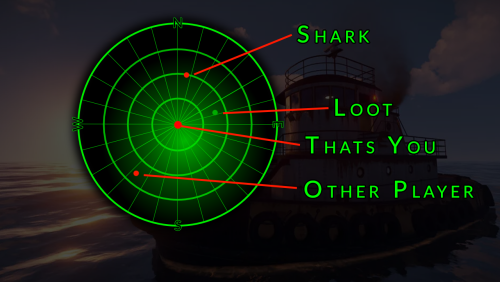
Version 1.0.0
8 downloads
Hey friends, welcome to my boat! Today I have something really nice for you: My plugin for the Tug boat offers you numerous additional options. It's perfect for farming, but also for monitoring your own protection! As soon as you start the engine, you have access to the boat radar. If you move away or switch off the engine, the radar is closed. You can use the radar to move through the world. The position and direction of travel are displayed based on the compass direction. You can also use the radar to scan the underwater world using sound - just like a real boater. Enemy players, sharks and, of course, underwater loot are displayed on your radar based on the position on the radar. Make the water world more interesting for your players! I hope you have a lot of fun with this plugin. If you want, you are welcome to join our support discord. This plugin works perfectly with our TugFarm plugin! Features: UI - A real-time radar Compass - Display of the compass direction Loot - Detection of underwatercrates Sharks - Detection of sharks NPCs - Uncovering NPCs Commands: You have no Commands Permissions: mytugboat.use Allows to use this Plugin. load, run, enjoy$10.99 -

Version 2.2.0
22 downloads
Description The Townhall plugin introduces a new level of realism to Rust by requiring players to own a plot of land before building. Players can claim land by setting up a mailbox. This can be done creatively, such as placing a vending machine in a safe zone or having an NPC distribute mailboxes in a town hall. Once a mailbox is placed, the plot of land is protected immediately: only the owner and the owner's Rust team may build inside the plot, everyone else is blocked. Building is also blocked everywhere outside of an owned plot, so a mailbox is the only way onto the map. Every plot owner gets a small management UI to rename their plot, control who gets ejected, manage a whitelist, and pick a color for the plot's visual boundary dome. Townhall enhances gameplay for RP servers and is versatile enough for PvE and mixed-variant servers. Dependencies Townhall requires two other plugins to be installed and loaded: - ZoneManager by k1lly0u - ZoneDomes by k1lly0u Townhall waits up to 30 seconds after startup for both plugins to load before it initializes. To limit your mailboxes on the server, you can use Entity Limit. Functions - Must own a plot of land (a placed mailbox) in order to build anywhere on the map - Only the plot owner and the owner's Rust team may build inside that plot, all other players are rejected - Plot boundaries are shown as a colored dome for a configurable duration - The plot boundary can be shown again at any time with the /myplot command - Owners can pick the dome color for their own plot from five colors (Standard, Red, Blue, Green, Purple) directly in the management UI, the change applies instantly if the dome is currently visible - Owners can rename their plot from the management UI - Owners can toggle ejecting non-whitelisted players from the plot - Owners can toggle ejecting sleeping players from the plot - Owners can add and remove players from a whitelist per plot - Plot size, dome duration and messages can all be set in the config - Optional mailbox pickup system: owners can pick their mailbox back up with a hammer, which removes the plot and returns the mailbox as an item - Mailboxes carried on death are safely returned to the player on respawn instead of being lost to the corpse Permissions townhall.myplotofland Chat Commands - /myplot shows the boundary dome of the nearest owned plot - /townhallhelp opens the plot management UI when standing near an owned plot - /mailboxpickup shows a short info message about the pickup feature (only available if mailbox pickup is enabled in the config) Config { "Show Zone Messages": true, "Mailbox Check Radius": 50.0, "Zone Dome Visibility Duration (seconds)": 60.0, "Zone Update Interval (seconds)": 300.0, "Default Zone Radius": 50.0, "UI Panel Color": "0.106 0.114 0.129 0.98", "UI Surface Color": "0.145 0.157 0.184 1.0", "UI Border Color": "0.204 0.224 0.263 1.0", "UI Button Color": "0.169 0.180 0.212 1.0", "UI Button Hover Color": "0.216 0.231 0.271 1.0", "UI Accent Color": "0.290 0.560 0.960 1.0", "UI Text Color": "0.902 0.922 0.949 1.0", "UI Muted Text Color": "0.549 0.580 0.639 1.0", "UI Danger Color": "0.859 0.361 0.380 1.0", "UI Default Position": "Center", "Enable Mailbox Pickup": true, "Require Ownership for Pickup": true, "Show Pickup Messages": true, "Enable Zone List Teleport": true } UI Default Position determines where the plot management UI appears on the screen by default. Players can cycle through the position using a button in the UI itself; this value is only the starting value. Possible values: Center Bottom Left Top Left Top Right Bottom Right Attention this plugin works and harmonizes perfectly with our MyHouse plugin load, run, enjoy$13.99 -

Version 1.8.0
8 downloads
"MyHouse" is an extensive plugin for Rust that enhances and improves the house management system in the game. It offers players the ability to name, find, and manage their houses, as well as use additional features like doorbells and mailboxes. The plugin aims to enhance the social player experience in Rust by providing players with more opportunities to personalize their houses and interact with others. It adds an extra layer of community and competition to the game by encouraging players to build impressive houses and share them with others. Features: House Naming: Players can name their Tool Cupboards (TCs) to make their houses easier to identify. House Searching: Players can find named houses of other players on the map by searching for the player’s name. Doorbells: Install and manage doorbells with 7 different sound options. Mailboxes: Enhanced functionality for mailboxes, displaying information about the house. House Rating System: A complex rating system that considers various factors like player votes, house statistics, house age, and number of owners. UI System: A user-friendly interface for managing and displaying all house functions. Commands: /myhouse <name> - Names the Tool Cupboard the player is looking at. /rename <name> - Renames an already named Tool Cupboard. /removemyhouse - Removes the name from a Tool Cupboard, making it unsearchable by other players. /findhouse <player name> - Finds and marks the named houses of another player on the map. /myhousehelp - Opens the help menu with an overview of all commands. /addbell - Adds a doorbell at the location the player is looking at. /removebell - Removes an installed doorbell. /set bell [1-7] - Changes the doorbell sound. Permissions: myhouse.use - Allows basic use of the plugin (house naming, house searching). myhouse.doorbell - Allows installation and management of doorbells. myhouse.mailbox - Allows use of advanced mailbox functions. Config: The plugin settings can be adjusted in the MyHouse.json file in the config folder. Here you can change properties like cooldown times, sound effects, and default language. { "CooldownSeconds": 20.0, "EggActiveDuration": 20.0, "DefaultSound": "assets/prefabs/misc/easter/painted eggs/effects/egg_upgrade.prefab", "DefaultLanguage": "en" } Multilingual Support: The plugin supports multiple languages. Language files are located in the lang folder and can be edited or expanded as needed. Currently supported languages: default: EN DE | FR | ES | IT | TR | RU | UK Please note that the language files were translated using the DeepL Language Tool load, run, enjoy Join my Discord pick the Role -> Flash and find Free Plugins Support Discord$35.00 -
 I'm sorry but I'm changing my rating from 5 stars to 1 star. The plugin is still a helpful addition and the developer has made an effort to fix bugs. I bought the plugin when it was released. 3 days later the plugin was taken offline. It wasn't a lot of money but it's about the principle, so 1 star. I hope the developer does not take this badly and tests for future plugins whether he can offer bug support or not. Have a nice Sunday anyway
 -
 Hey, I adopted the plugin a few days ago and plan to maintain it in the future. I'm currently reading into the code and making sure it's up to date and works cleanly. Contact me via ticket and please let me know your experience with this plugin. https://discord.gg/2ftdtaTQ6S
 -
 Something like that is very special and probably not desired by the masses. Writing plugins is time-consuming and maintenance and care is even more time-consuming. That's why you always have to make sure that the plugins are interesting for the general public. Feel free to submit a ticket in Discord with this idea. This function will not be available in Sleep for the time being. I'm sorry.
 -
Can we reopen the topic, as Anton says, it doesn't seem to work. I specified Random Start with times and defined which events come into question. Unfortunately, an event random is never selected - it says in the console every time: Logs: [Event Manager] 1 [Event Manager] 2 2 [EventManager] START [EventManager] 4 flight installations begin Can you fix this promptly? I know they just adopted it, but it would still be nice if this feature worked too.
-
No Support
-
.thumb.png.263ff4531dafb3e6683636cd8bdd8129.png) I specified Random Start with times and defined which events come into question. Unfortunately, an event random is never selected - it says in the console every time: Logs: [EventManager] 1 [EventManager] 2 2 [EventManager] RANDOM START [EventManager] 4 airevent start Can you fix this promptly? I know they just adopted it, but it would still be nice if this feature worked too.
I specified Random Start with times and defined which events come into question. Unfortunately, an event random is never selected - it says in the console every time: Logs: [EventManager] 1 [EventManager] 2 2 [EventManager] RANDOM START [EventManager] 4 airevent start Can you fix this promptly? I know they just adopted it, but it would still be nice if this feature worked too.- 350 comments
-
- 1
-
-
- #eventmanager
- #manager
- (and 5 more)
-
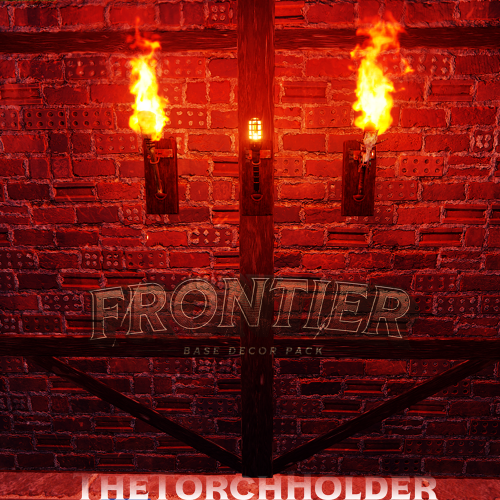
Version 1.4.0
64 downloads
TheTorchHolder is a plugin designed to manage the protection of torches within a TorchHolder. Players receive the TorchHolder in the Frontier Packet! This plugin protects torches held by players within a TorchHolder from damage as long as they remain inside it. If a player takes a torch out of the holder and uses it, normal damage will still occur. This means that the plugin is performance-friendly and does not have to query as many hooks, which has a positive effect on the operation of the server! Features: - Protects torches from damage as long as they remain in the TorchHolder. - When torches are used outside of the TorchHolder, normal damage is incurred. New from version 1.4.0, compatible with Industrial update load, run, enjoy Support Discord *If you need a free alternative that follows a simple logic by making torches generally immortal, I would be happy if they use the NoTorchDamage plugin by my colleague Kaho.$1.99 -
![More information about "[PayNow] Scientist-Template"](https://codefling.com/uploads/monthly_2024_08/scientist-template_Thumb.thumb.png.6056ed64e0270e983df410cf57cec043.png)
Version 1.0.2
19 downloads
Features You can simply download the free Scientist template and integrate it into your existing PayNow store. It is complete and contains all modules. Simply mark the upload as currently active and all your existing store entries will be seamlessly transferred. Join my Discord for more free templates plugins or other beneficial features Support Discord Install - Webstore -> Create Template: -> Name: Scientist-Template -> Compatibility Mode: None (PayNow) -> Click Create button - New Site: -> Click upload template button and add the .zip D O N E D E M O SEE A DEMO load, run, enjoy$10.99 -
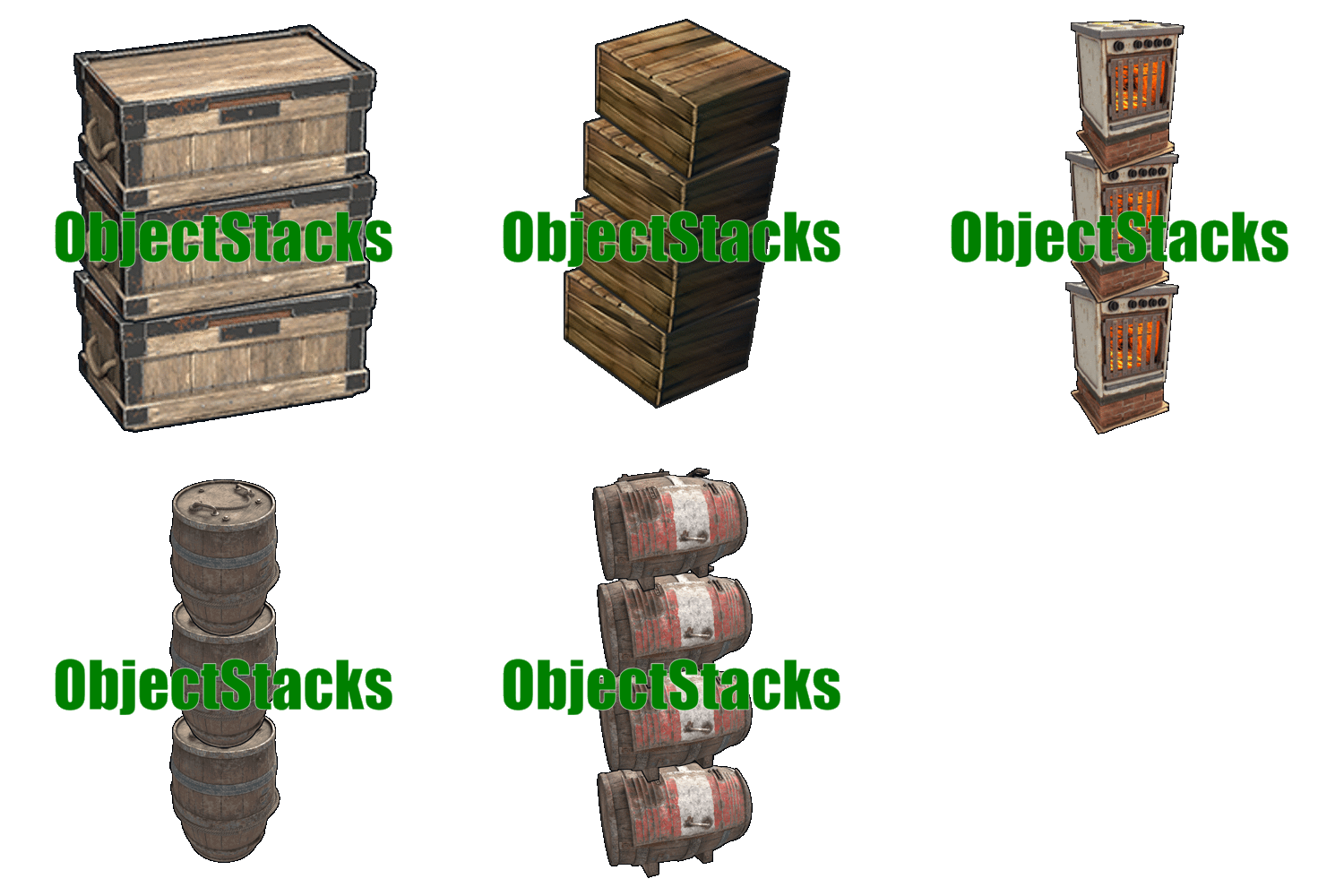 I have had other stack plugins and I have to say this one is the best. I am glad that this community has a developer like MundB. Thanks for your mature plugins.
 -
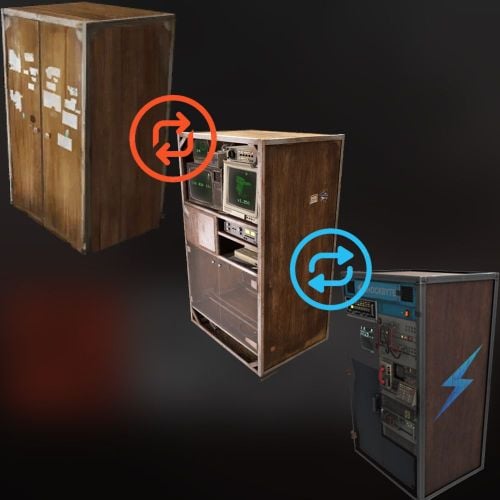
Version 1.0.0
187 downloads
CupboardSwitcher allows players to switch between different types of tool cabinets through an easy-to-use interface. So you don't have to open a server EXTRA at shockbyte.com to get this great TC! Feel free to join my Discord and choose the role Flash. I have a lot of free plugins. Support Discord Features: - UI to switch cabinets: A graphical user interface that allows players to choose between different cabinet types. - Multiple locker types: Supports switching between normal, retro and shockbyte tool lockers. - Permission-based access: Only players with the appropriate permission can use the command to switch cabinets. - Simple commands: Easy to use chat and console commands for interacting with the plugin. Permission: cupboardswitcher.use Allows the use of the /cupboards command and interface.$0.99

