
Craft
-
Posts
451 -
Joined
-
Last visited
-
Days Won
3
Content Type
Profiles
Warranty Claims
Downloads
Forums
Store
Services
Downloads Plus Support
DOWNLOADS EXTRA
Everything posted by Craft
-
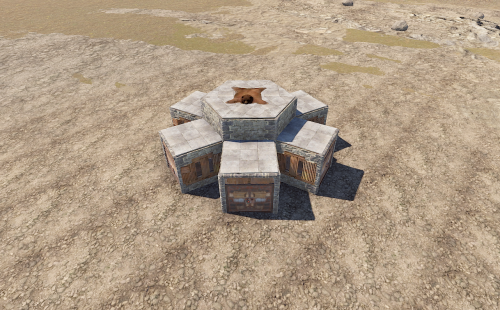 You need to extend the corresponding level in the level configuration of the plugin. Then put the new base in the copypaste folder and keep the file name the same as in the plugin config
 -
The turret needs to be set to no power mode in the plugin config As you said, all bases are specially designed, and the things hidden inside are unexpected
-
.thumb.png.c7f4bb064c82c82a091c981534225577.png) That is very unfree, and it will take up server resources when no players are playing. It is the best choice to let players buy events freely.
That is very unfree, and it will take up server resources when no players are playing. It is the best choice to let players buy events freely. -
No, I think this is what every event plugin should do
-
HI, you are free to use anyone's loot table, if you want the chests in these bases to be empty before the loot is spawned, set this in the plugin settings: "Empty All Containers Before Spawning Loot": true, if You like these bases, please give me a five star review, thank you
-
Hi! These bases are complete
-
Version 1.0.9
310 downloads
This pack contains 60 raid bases, each of which is hand-built. These bases are complete, with automatic turrets, traps, loot boxes, etc. Some base designs are built in PVP mode, and some are anti-human designs! Excellent! They all run on my own server and are loved by players! 1 Easy Bases. 19 Hard Bases. 8 Medium Bases. 9 Expert Bases. 23 Nightmare Bases. Time is money, you don't have to waste a lot of time during installation, just copy and paste the files I provided to you onto the server! Including bases and spoils!$50.00 -
 Same
Same -
Version 1.1.1
370 downloads
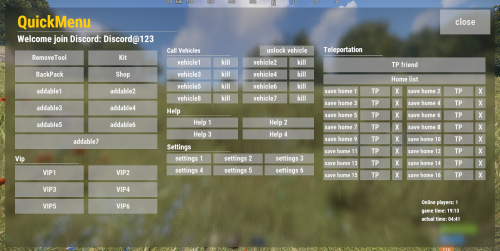
Stop fiddling with commands! This plugin allows you to create arbitrary buttons and give each button a different command! After installing this plugin, players can open this menu with just one command, and then conveniently click buttons to execute various commands! At the same time, this plugin also supports the middle mouse button function, allowing you to open menus without complicated binding of any key! I have created an initial template just like the picture Honestly, I've been using it for over a year, it's very convenient Let's take a look at its details: characteristic: - When the button is clicked, there will be a click sound effect - QuickMenu supports the middle mouse button to open the menu by default(Also applies when closed). If you don't want to use this function, you can enter the chat command /z to close. Of course, it only works for a single player, just like the DATA example below - After disabling the middle mouse button function, you can also enter bind J chat.say /q in the F1 console to bind the J key shortcut to open the Quick Menu(Also applies when closed), where the J key can be replaced with other keys. Chat command: /q - Open QuickMenu /z - Middle mouse button function true/false Config: { "title text size": 45, "Title text content": "<color=#FFcc00>QuickMenu</color>", "title min offset": "0.025 0.9", "title max offset": "0.65 0.98", "background min offset": "0.025 0.05", "background max offset": "0.975 0.95", "background color": "0 0 0 .5", "Discord": "<size=26><color=#FFFFFFFF>Welcome join Discord: Discord@123</color></size>", "Left title": "<size=20><color=#FFFFFFFF>Vip</color></size>", "middle title 1": "<size=18><color=#FFFFFFFF>Call Vehicles</color></size>", "middle title 2": "<size=20><color=#FFFFFFFF>Help</color></size>", "middle title 3": "<size=20><color=#FFFFFFFF>Settings</color></size>", "right title": "<size=20><color=#FFFFFFFF>Teleportation</color></size>", "Image URL": "", "Image min offset": "0.4 0.02", "Image max offset": "0.55 0.2", "Image color": "1 1 1 0.8", "close button text size": 26, "close button text": "close", "close button color": "1 1 1 .7", "close button min offset": "0.888 0.888", "close button max offset": "0.99 0.99", "Middle button function": true, "= = = = = = = = = = = = = [ button settings] = = = = = = = = = = = = =": [ { "button text size": 14, "button color": "0.8 0.8 0.8 0.6", "button text": "", "button text color": "1 1 1 0.9", "Button Min Offset": "0.025 0.899", "button max offset": "0.35 0.9", "button command": "" }, { "button text size": 19, "button color": "0.8 0.8 0.8 0.6", "button text": "RemoveTool", "button text color": "1 1 1 0.9", "Button Min Offset": "0.02 0.76", "button max offset": "0.16 0.82", "button command": "/remove" }, { "button text size": 19, "button color": "0.8 0.8 0.8 0.6", "button text": "Kit", "button text color": "1 1 1 0.9", "Button Min Offset": "0.17 0.76", "button max offset": "0.31 0.82", "button command": "/kit" }, { "button text size": 19, "button color": "0.8 0.8 0.8 0.6", "button text": "BackPack", "button text color": "1 1 1 0.9", "Button Min Offset": "0.02 0.69", "button max offset": "0.16 0.75", "button command": "/backpack" }, { "button text size": 19, "button color": "0.8 0.8 0.8 0.6", "button text": "Shop", "button text color": "1 1 1 0.9", "Button Min Offset": "0.17 0.69", "button max offset": "0.31 0.75", "button command": "/shop" }, { "button text size": 19, "button color": "0.8 0.8 0.8 0.6", "button text": "addable1", "button text color": "1 1 1 0.9", "Button Min Offset": "0.02 0.62", "button max offset": "0.16 0.68", "button command": "/kit" } ] } DATA: { "MiddleMouseButtonEnable": { "76561199161744587": true, "76561199161742450": false } }$12.00- 23 comments
- 1 review
-
- 1
-

-
- #uipanel
- #quickmenu
- (and 4 more)
-
Version 1.0.4
81 downloads
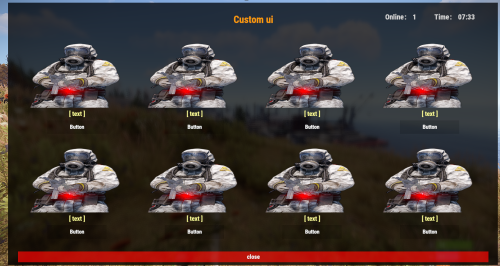
This is a custom UI plugin:Can display the number of online players and game time The image quality of this plugin will not be affected by game quality adjustments. Don't worry about the low quality of the picture in the game settings, and you will see blurry pictures! Customizable: text, button, picture, title, overall UI size, etc. All customizable content can be changed arbitrarily in the configuration file. You need to manually create a folder named CustomUI in Oxide-data,The image is placed in png format, and the file name is consistent with the configuration Chat command: /ctui Use your imagination and adjust it freely!$6.99