
TheDragonessesLair's Wishlist
-
$19.95
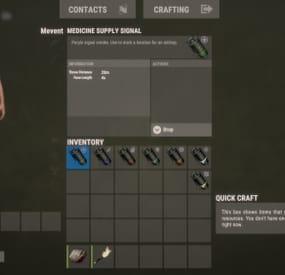
Helpful Supply
Adds supply signals to your server, split into loot categories such as medicine, weapons, clothing, explosives, and others.
Features
Performance (algorithms are optimized, data are cached) Item customization (icons, display name, etc.) Loot customization (amount of items in the container, the chance of items, custom items) Drop customization (supply signal can spawn in barrels, containers, etc.) Fall customization (supply signal can fall at a different rate)
Commands
hsupply.give [name/steamid] [supply name] [amount] (give a player a supply signal)
Video
⚙️ Web Config Editor
Manage the HelpfulSupply settings in our web config editor. You change the config in a browser form instead of editing files on the server by hand.
P.S. The web config editor is open to members of the "HelpfulSupply" group in our Discord server. Join at https://discord.gg/mevent and ask for the group.
Config
{ "Supplies": [ { "Name": "heal", "Item Settings": { "Display Name": "Medicine Supply Signal", "ShortName": "supply.signal", "Skin": 2912968568 }, "Loot Settings": { "Speed": { "Enabled?": false, "Incoming Space Delivery Supply Drop velocity": 120.0, "Parachute deploy distance from ground": 120.0 }, "Amount": { "Minimal amount": 2, "Maximum amount": 12 }, "Items": [ { "Amount": { "Minimal amount": 2, "Maximum amount": 4 }, "Chance": 70.0, "Display Name": "", "ShortName": "antiradpills", "Skin": 0 }, { "Amount": { "Minimal amount": 5, "Maximum amount": 10 }, "Chance": 50.0, "Display Name": "", "ShortName": "bandage", "Skin": 0 }, { "Amount": { "Minimal amount": 1, "Maximum amount": 2 }, "Chance": 60.0, "Display Name": "", "ShortName": "largemedkit", "Skin": 0 }, { "Amount": { "Minimal amount": 1, "Maximum amount": 2 }, "Chance": 60.0, "Display Name": "", "ShortName": "syringe.medical", "Skin": 0 }, { "Amount": { "Minimal amount": 10, "Maximum amount": 15 }, "Chance": 20.0, "Display Name": "", "ShortName": "bandage", "Skin": 0 }, { "Amount": { "Minimal amount": 10, "Maximum amount": 12 }, "Chance": 5.0, "Display Name": "", "ShortName": "largemedkit", "Skin": 0 }, { "Amount": { "Minimal amount": 15, "Maximum amount": 25 }, "Chance": 10.0, "Display Name": "", "ShortName": "syringe.medical", "Skin": 0 } ] }, "Drop Settings": { "Enabled": false, "Containers": [ { "Prefab": "assets/bundled/prefabs/radtown/crate_normal.prefab", "Chance": 5.0, "Amount": { "Minimal amount": 1, "Maximum amount": 1 } }, { "Prefab": "assets/bundled/prefabs/radtown/loot_barrel_2.prefab", "Chance": 5.0, "Amount": { "Minimal amount": 1, "Maximum amount": 1 } }, { "Prefab": "assets/bundled/prefabs/radtown/loot_barrel_1.prefab", "Chance": 5.0, "Amount": { "Minimal amount": 1, "Maximum amount": 1 } } ] } }, { "Name": "guns", "Item Settings": { "Display Name": "Guns Supply Signal", "ShortName": "supply.signal", "Skin": 2912968440 }, "Loot Settings": { "Speed": { "Enabled?": false, "Incoming Space Delivery Supply Drop velocity": 120.0, "Parachute deploy distance from ground": 120.0 }, "Amount": { "Minimal amount": 2, "Maximum amount": 12 }, "Items": [ { "Amount": { "Minimal amount": 1, "Maximum amount": 1 }, "Chance": 15.0, "Display Name": "", "ShortName": "rifle.ak", "Skin": 0 }, { "Amount": { "Minimal amount": 1, "Maximum amount": 1 }, "Chance": 15.0, "Display Name": "", "ShortName": "rifle.lr300", "Skin": 0 }, { "Amount": { "Minimal amount": 1, "Maximum amount": 1 }, "Chance": 5.0, "Display Name": "", "ShortName": "rifle.l96", "Skin": 0 }, { "Amount": { "Minimal amount": 1, "Maximum amount": 1 }, "Chance": 10.0, "Display Name": "", "ShortName": "rifle.bolt", "Skin": 0 }, { "Amount": { "Minimal amount": 1, "Maximum amount": 1 }, "Chance": 15.0, "Display Name": "", "ShortName": "rifle.m39", "Skin": 0 }, { "Amount": { "Minimal amount": 1, "Maximum amount": 1 }, "Chance": 25.0, "Display Name": "", "ShortName": "rifle.semiauto", "Skin": 0 }, { "Amount": { "Minimal amount": 1, "Maximum amount": 1 }, "Chance": 20.0, "Display Name": "", "ShortName": "pistol.m92", "Skin": 0 }, { "Amount": { "Minimal amount": 1, "Maximum amount": 1 }, "Chance": 25.0, "Display Name": "", "ShortName": "pistol.python", "Skin": 0 }, { "Amount": { "Minimal amount": 1, "Maximum amount": 1 }, "Chance": 25.0, "Display Name": "", "ShortName": "pistol.revolver", "Skin": 0 }, { "Amount": { "Minimal amount": 1, "Maximum amount": 1 }, "Chance": 20.0, "Display Name": "", "ShortName": "pistol.semiauto", "Skin": 0 } ] }, "Drop Settings": { "Enabled": false, "Containers": [ { "Prefab": "assets/bundled/prefabs/radtown/crate_normal.prefab", "Chance": 5.0, "Amount": { "Minimal amount": 1, "Maximum amount": 1 } }, { "Prefab": "assets/bundled/prefabs/radtown/loot_barrel_2.prefab", "Chance": 5.0, "Amount": { "Minimal amount": 1, "Maximum amount": 1 } }, { "Prefab": "assets/bundled/prefabs/radtown/loot_barrel_1.prefab", "Chance": 5.0, "Amount": { "Minimal amount": 1, "Maximum amount": 1 } } ] } }, { "Name": "explosive", "Item Settings": { "Display Name": "Explosive Supply Signal", "ShortName": "supply.signal", "Skin": 2912968298 }, "Loot Settings": { "Speed": { "Enabled?": false, "Incoming Space Delivery Supply Drop velocity": 120.0, "Parachute deploy distance from ground": 120.0 }, "Amount": { "Minimal amount": 2, "Maximum amount": 6 }, "Items": [ { "Amount": { "Minimal amount": 1, "Maximum amount": 2 }, "Chance": 70.0, "Display Name": "", "ShortName": "explosive.satchel", "Skin": 0 }, { "Amount": { "Minimal amount": 8, "Maximum amount": 12 }, "Chance": 55.0, "Display Name": "", "ShortName": "explosive.satchel", "Skin": 0 }, { "Amount": { "Minimal amount": 20, "Maximum amount": 20 }, "Chance": 15.0, "Display Name": "", "ShortName": "explosive.satchel", "Skin": 0 }, { "Amount": { "Minimal amount": 1, "Maximum amount": 1 }, "Chance": 50.0, "Display Name": "", "ShortName": "explosive.timed", "Skin": 0 }, { "Amount": { "Minimal amount": 4, "Maximum amount": 8 }, "Chance": 15.0, "Display Name": "", "ShortName": "explosive.timed", "Skin": 0 }, { "Amount": { "Minimal amount": 4, "Maximum amount": 8 }, "Chance": 5.0, "Display Name": "", "ShortName": "explosive.timed", "Skin": 0 }, { "Amount": { "Minimal amount": 10, "Maximum amount": 20 }, "Chance": 60.0, "Display Name": "", "ShortName": "explosives", "Skin": 0 }, { "Amount": { "Minimal amount": 20, "Maximum amount": 30 }, "Chance": 10.0, "Display Name": "", "ShortName": "explosives", "Skin": 0 }, { "Amount": { "Minimal amount": 64, "Maximum amount": 128 }, "Chance": 75.0, "Display Name": "", "ShortName": "ammo.rifle.explosive", "Skin": 0 }, { "Amount": { "Minimal amount": 128, "Maximum amount": 256 }, "Chance": 40.0, "Display Name": "", "ShortName": "ammo.rifle.explosive", "Skin": 0 }, { "Amount": { "Minimal amount": 256, "Maximum amount": 512 }, "Chance": 10.0, "Display Name": "", "ShortName": "ammo.rifle.explosive", "Skin": 0 }, { "Amount": { "Minimal amount": 1, "Maximum amount": 4 }, "Chance": 40.0, "Display Name": "", "ShortName": "ammo.rocket.basic", "Skin": 0 }, { "Amount": { "Minimal amount": 10, "Maximum amount": 20 }, "Chance": 10.0, "Display Name": "", "ShortName": "ammo.rocket.basic", "Skin": 0 }, { "Amount": { "Minimal amount": 1, "Maximum amount": 1 }, "Chance": 45.0, "Display Name": "", "ShortName": "rocket.launcher", "Skin": 0 }, { "Amount": { "Minimal amount": 4, "Maximum amount": 12 }, "Chance": 55.0, "Display Name": "", "ShortName": "ammo.grenadelauncher.he", "Skin": 0 }, { "Amount": { "Minimal amount": 4, "Maximum amount": 16 }, "Chance": 60.0, "Display Name": "", "ShortName": "grenade.beancan", "Skin": 0 }, { "Amount": { "Minimal amount": 16, "Maximum amount": 24 }, "Chance": 25.0, "Display Name": "", "ShortName": "grenade.beancan", "Skin": 0 } ] }, "Drop Settings": { "Enabled": false, "Containers": [ { "Prefab": "assets/bundled/prefabs/radtown/crate_normal.prefab", "Chance": 5.0, "Amount": { "Minimal amount": 1, "Maximum amount": 1 } }, { "Prefab": "assets/bundled/prefabs/radtown/loot_barrel_2.prefab", "Chance": 5.0, "Amount": { "Minimal amount": 1, "Maximum amount": 1 } }, { "Prefab": "assets/bundled/prefabs/radtown/loot_barrel_1.prefab", "Chance": 5.0, "Amount": { "Minimal amount": 1, "Maximum amount": 1 } } ] } }, { "Name": "clothes", "Item Settings": { "Display Name": "Clothes Supply Signal", "ShortName": "supply.signal", "Skin": 2912968179 }, "Loot Settings": { "Speed": { "Enabled?": false, "Incoming Space Delivery Supply Drop velocity": 120.0, "Parachute deploy distance from ground": 120.0 }, "Amount": { "Minimal amount": 2, "Maximum amount": 12 }, "Items": [ { "Amount": { "Minimal amount": 1, "Maximum amount": 2 }, "Chance": 70.0, "Display Name": "", "ShortName": "coffeecan.helmet", "Skin": 0 }, { "Amount": { "Minimal amount": 1, "Maximum amount": 1 }, "Chance": 60.0, "Display Name": "", "ShortName": "hazmatsuit", "Skin": 0 }, { "Amount": { "Minimal amount": 1, "Maximum amount": 1 }, "Chance": 80.0, "Display Name": "", "ShortName": "hoodie", "Skin": 0 }, { "Amount": { "Minimal amount": 1, "Maximum amount": 1 }, "Chance": 80.0, "Display Name": "", "ShortName": "pants", "Skin": 0 }, { "Amount": { "Minimal amount": 1, "Maximum amount": 1 }, "Chance": 80.0, "Display Name": "", "ShortName": "shoes.boots", "Skin": 0 }, { "Amount": { "Minimal amount": 1, "Maximum amount": 1 }, "Chance": 50.0, "Display Name": "", "ShortName": "roadsign.jacket", "Skin": 0 }, { "Amount": { "Minimal amount": 1, "Maximum amount": 1 }, "Chance": 50.0, "Display Name": "", "ShortName": "roadsign.kilt", "Skin": 0 }, { "Amount": { "Minimal amount": 1, "Maximum amount": 1 }, "Chance": 25.0, "Display Name": "", "ShortName": "metal.facemask", "Skin": 0 }, { "Amount": { "Minimal amount": 1, "Maximum amount": 1 }, "Chance": 25.0, "Display Name": "", "ShortName": "metal.plate.torso", "Skin": 0 }, { "Amount": { "Minimal amount": 1, "Maximum amount": 1 }, "Chance": 15.0, "Display Name": "", "ShortName": "heavy.plate.jacket", "Skin": 0 }, { "Amount": { "Minimal amount": 1, "Maximum amount": 1 }, "Chance": 15.0, "Display Name": "", "ShortName": "heavy.plate.pants", "Skin": 0 } ] }, "Drop Settings": { "Enabled": false, "Containers": [ { "Prefab": "assets/bundled/prefabs/radtown/crate_normal.prefab", "Chance": 5.0, "Amount": { "Minimal amount": 1, "Maximum amount": 1 } }, { "Prefab": "assets/bundled/prefabs/radtown/loot_barrel_2.prefab", "Chance": 5.0, "Amount": { "Minimal amount": 1, "Maximum amount": 1 } }, { "Prefab": "assets/bundled/prefabs/radtown/loot_barrel_1.prefab", "Chance": 5.0, "Amount": { "Minimal amount": 1, "Maximum amount": 1 } } ] } }, { "Name": "cash", "Item Settings": { "Display Name": "Cash Supply Signal", "ShortName": "supply.signal", "Skin": 2912967918 }, "Loot Settings": { "Speed": { "Enabled?": false, "Incoming Space Delivery Supply Drop velocity": 120.0, "Parachute deploy distance from ground": 120.0 }, "Amount": { "Minimal amount": 2, "Maximum amount": 4 }, "Items": [ { "Amount": { "Minimal amount": 5, "Maximum amount": 10 }, "Chance": 75.0, "Display Name": "RUSTNote", "ShortName": "sticks", "Skin": 2536195910 }, { "Amount": { "Minimal amount": 10, "Maximum amount": 20 }, "Chance": 70.0, "Display Name": "RUSTNote", "ShortName": "sticks", "Skin": 2536195910 }, { "Amount": { "Minimal amount": 20, "Maximum amount": 50 }, "Chance": 40.0, "Display Name": "RUSTNote", "ShortName": "sticks", "Skin": 2536195910 }, { "Amount": { "Minimal amount": 50, "Maximum amount": 150 }, "Chance": 20.0, "Display Name": "RUSTNote", "ShortName": "sticks", "Skin": 2536195910 }, { "Amount": { "Minimal amount": 150, "Maximum amount": 300 }, "Chance": 5.0, "Display Name": "RUSTNote", "ShortName": "sticks", "Skin": 2536195910 } ] }, "Drop Settings": { "Enabled": false, "Containers": [ { "Prefab": "assets/bundled/prefabs/radtown/crate_normal.prefab", "Chance": 5.0, "Amount": { "Minimal amount": 1, "Maximum amount": 1 } }, { "Prefab": "assets/bundled/prefabs/radtown/loot_barrel_2.prefab", "Chance": 5.0, "Amount": { "Minimal amount": 1, "Maximum amount": 1 } }, { "Prefab": "assets/bundled/prefabs/radtown/loot_barrel_1.prefab", "Chance": 5.0, "Amount": { "Minimal amount": 1, "Maximum amount": 1 } } ] } }, { "Name": "cars", "Item Settings": { "Display Name": "Cars Supply Signal", "ShortName": "supply.signal", "Skin": 2912968057 }, "Loot Settings": { "Speed": { "Enabled?": false, "Incoming Space Delivery Supply Drop velocity": 120.0, "Parachute deploy distance from ground": 120.0 }, "Amount": { "Minimal amount": 1, "Maximum amount": 2 }, "Items": [ { "Amount": { "Minimal amount": 1, "Maximum amount": 1 }, "Chance": 40.0, "Display Name": "RUSTSharing Ferrari", "ShortName": "box.wooden.large", "Skin": 2591806406 }, { "Amount": { "Minimal amount": 1, "Maximum amount": 1 }, "Chance": 40.0, "Display Name": "RUSTSharing Mazda", "ShortName": "box.wooden.large", "Skin": 2591806406 }, { "Amount": { "Minimal amount": 1, "Maximum amount": 1 }, "Chance": 40.0, "Display Name": "RUSTSharing Skoda", "ShortName": "box.wooden.large", "Skin": 2591806406 }, { "Amount": { "Minimal amount": 1, "Maximum amount": 1 }, "Chance": 40.0, "Display Name": "RUSTSharing Opel", "ShortName": "box.wooden.large", "Skin": 2591806406 } ] }, "Drop Settings": { "Enabled": false, "Containers": [ { "Prefab": "assets/bundled/prefabs/radtown/crate_normal.prefab", "Chance": 5.0, "Amount": { "Minimal amount": 1, "Maximum amount": 1 } }, { "Prefab": "assets/bundled/prefabs/radtown/loot_barrel_2.prefab", "Chance": 5.0, "Amount": { "Minimal amount": 1, "Maximum amount": 1 } }, { "Prefab": "assets/bundled/prefabs/radtown/loot_barrel_1.prefab", "Chance": 5.0, "Amount": { "Minimal amount": 1, "Maximum amount": 1 } } ] } }, { "Name": "lucky", "Item Settings": { "Display Name": "Lucky Supply Signal", "ShortName": "supply.signal", "Skin": 2912968671 }, "Loot Settings": { "Speed": { "Enabled?": false, "Incoming Space Delivery Supply Drop velocity": 120.0, "Parachute deploy distance from ground": 120.0 }, "Amount": { "Minimal amount": 2, "Maximum amount": 12 }, "Items": [ { "Amount": { "Minimal amount": 1000, "Maximum amount": 3000 }, "Chance": 60.0, "Display Name": "", "ShortName": "sulfur", "Skin": 0 }, { "Amount": { "Minimal amount": 3000, "Maximum amount": 9000 }, "Chance": 20.0, "Display Name": "", "ShortName": "sulfur", "Skin": 0 }, { "Amount": { "Minimal amount": 50, "Maximum amount": 100 }, "Chance": 60.0, "Display Name": "", "ShortName": "metal.refined", "Skin": 0 }, { "Amount": { "Minimal amount": 100, "Maximum amount": 250 }, "Chance": 15.0, "Display Name": "", "ShortName": "metal.refined", "Skin": 0 }, { "Amount": { "Minimal amount": 1000, "Maximum amount": 3000 }, "Chance": 55.0, "Display Name": "", "ShortName": "gunpowder", "Skin": 0 }, { "Amount": { "Minimal amount": 3000, "Maximum amount": 9000 }, "Chance": 15.0, "Display Name": "", "ShortName": "gunpowder", "Skin": 0 }, { "Amount": { "Minimal amount": 3000, "Maximum amount": 9000 }, "Chance": 50.0, "Display Name": "", "ShortName": "metal.fragments", "Skin": 0 }, { "Amount": { "Minimal amount": 9000, "Maximum amount": 15000 }, "Chance": 30.0, "Display Name": "", "ShortName": "metal.fragments", "Skin": 0 }, { "Amount": { "Minimal amount": 150, "Maximum amount": 300 }, "Chance": 50.0, "Display Name": "", "ShortName": "scrap", "Skin": 0 }, { "Amount": { "Minimal amount": 300, "Maximum amount": 900 }, "Chance": 25.0, "Display Name": "", "ShortName": "scrap", "Skin": 0 }, { "Amount": { "Minimal amount": 1, "Maximum amount": 1 }, "Chance": 45.0, "Display Name": "", "ShortName": "autoturret", "Skin": 0 } ] }, "Drop Settings": { "Enabled": false, "Containers": [ { "Prefab": "assets/bundled/prefabs/radtown/crate_normal.prefab", "Chance": 5.0, "Amount": { "Minimal amount": 1, "Maximum amount": 1 } }, { "Prefab": "assets/bundled/prefabs/radtown/loot_barrel_2.prefab", "Chance": 5.0, "Amount": { "Minimal amount": 1, "Maximum amount": 1 } }, { "Prefab": "assets/bundled/prefabs/radtown/loot_barrel_1.prefab", "Chance": 5.0, "Amount": { "Minimal amount": 1, "Maximum amount": 1 } } ] } } ] }
-

$25.00
RaidableBases DataBase SQL
Discover the brand new RaidableBasesDB plugin that takes your gaming experience to the next level!
This innovative plugin automatically stores a player's Raidable Ladder statistics in the SQL database after each successful raid, making it easy to track player progress.
You can also manually update player statistics using the "rb.update" command, with the SteamID option allowing for targeted updates to individual players.
The RaidableBasesDB plugin is an essential addition to the Nivex RaidableBases plugin, providing an efficient and effortless way to keep track of your players' statistics.
Easy to configure and use, this plugin offers server administrators a powerful tool for managing player statistics.
And the best part is, I'm already working on an Azuriom RaidableBases plugin that will be released soon!
The RaidableBases Azuriom Plugin is now available. Display your RaidableBases data on your Azuriom site. Interested? DM me!
Plugin commands at a glance:
rb.update: Updates the statistics of all players. rb.update <SteamID>: Updates the statistics of a single player with the specified SteamID. rb.wipe: Deletes all content in the database.- #raidablebasesdb
- #raidablebases
- (and 8 more)
-
$17.99
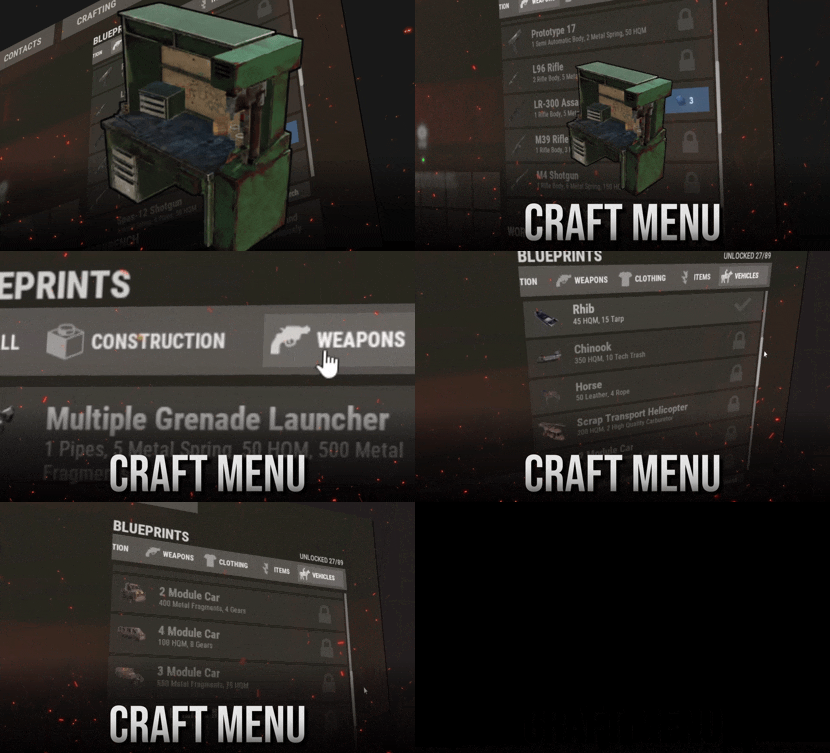
Craft Menu
DISCORD · SUPPORT & CUSTOM REQUESTS
RustPlugins ● 1,200 members
Bug reports, setup questions, or custom development? Reach out to us on Discord. Join Discord Features Your own blueprints, right at the workbench. Players research and craft custom items in a menu that looks like Rust's own crafting screen. That includes uncraftable vanilla items, skinned custom items, vehicles, and deployables. Feels like vanilla Players open a workbench and the menu is there, with categories, search, and a crafting queue they can reorder. Players never need to type a command. Any item, any recipe For each blueprint you set the name, icon, skin, category, tier, research cost, ingredients, craft time, and craft limit. Ingredients can be skinned custom items. Web editor, no JSON Build blueprints in the browser and copy the share code. Run one command in game and the server downloads the config and applies it. You don't need to restart or reload. One-click import Running Portable Vehicles or Place Anything? Pick their items from a list and they become blueprints with the right skin and tier. Click an item again to remove it. Getting Started Up and running in four steps 1 Install Drop CraftMenu.cs into your plugins folder. The config comes with a set of normally uncraftable items, so the menu works right away. 2 Grant the permission DON'T SKIP Players without this permission see the normal workbench.
oxide.grant group default craftmenu.use 3 Open a workbench Players see blueprints for that bench's tier and every tier below it. Higher-tier blueprints are marked TIER REQUIRED. 4 Research, then craft Players research each blueprint once. By default it costs scrap at tier 1, basic fragments at tier 2, and advanced fragments at tier 3. Optional plugins: Image Library lets you use image URLs for icons, and Rust Translation API shows ingredient names in each player's language. Permissions Who can do what craftmenu.use Shows the menu at workbenches. Every player who should use CraftMenu needs it. craftmenu.import Opens the Portable Vehicles and Place Anything import menu. Admins have it automatically. craftmenu.config Imports and exports the config with share codes. Admins have it automatically. craftmenu.<category> Lets the player craft from one category, for example craftmenu.vehicles. These only exist when category permissions are turned on. Commands For admins only Players never need these. Tags show where each command works. CONFIG & IMPORT /craftmenu import
CHAT Opens the import menu for Portable Vehicles and Place Anything items. /craftmenu export
CHAT Shows your current config in a copyable field so you can paste it into the web editor. craftmenu config <code>
CHAT CONSOLE Downloads a config from the web editor and applies it immediately. PLAYER BLUEPRINTS craftmenu_admin wipeall
CHAT CONSOLE Removes every player's unlocked blueprints. In chat, use /craftmenu wipeall. craftmenu_admin wipe <steamid>
CHAT CONSOLE Removes one player's unlocked blueprints. In chat, use /craftmenu wipe. craftmenu_admin unlock <steamid>
CHAT CONSOLE Unlocks every blueprint for one player. In chat, use /craftmenu unlock. Configuration Main settings worth knowing Wipe Blueprints at Map Wipe Resets all research on a new map. Off by default. Maximum items in queue How many timed crafts one player can queue at once. The default is 10. Default maximum amount per craft The highest amount per craft. The default is 99, and each blueprint can override it. Categories The category tabs and their icons. Icons can be Rust asset paths, or URLs when Image Library is on. Permissions required for each category Puts each category behind its own permission. Use it for VIP-only items. Admins ignore research and craft costs Lets admins test new blueprints without collecting the resources. Translate resource item names Shows ingredient names in each player's language. Requires Rust Translation API. Sound Effects Plays click and craft sounds in the menu. On by default. FAQ Frequently asked questions Q. Players open a workbench but the menu doesn't show. Why? They're missing craftmenu.use. Grant it to the default group. The menu also stays hidden on the workbench upgrade screen, which is expected. Q. How do I edit blueprints without touching JSON? Use the web editor at tools.rustplugins.net/craftmenu and copy the share code. Then run /craftmenu config <code> in game. To keep editing your live config, run /craftmenu export first and paste the result into the editor. Q. How do I give an item a custom icon? Icons come from skin IDs. Upload your image as a Workshop skin with SkinUploader.zip, then put the skin ID on the blueprint. The crafted item gets that skin too. Q. Can custom items be crafting ingredients? Yes. In the blueprint's resources, use the item's skin ID instead of a shortname. CraftMenu then only accepts items with that exact skin. Q. How do craft times work? A blueprint with a craft time of 0 crafts instantly. Anything above 0 goes into a queue that works like Rust's own: players can cancel jobs or move them to the front. A player's queue is cleared when they die or disconnect. Q. Can I make some items VIP only? Yes. Put them in their own category, turn on category permissions, and grant craftmenu.<category> to your VIP group. Other players still see the items but can't craft them. Q. Do unlocked blueprints carry over between wipes? By default, yes. Turn on Wipe Blueprints at Map Wipe to reset them with each new map. You can also wipe them manually with craftmenu_admin wipeall. Have more questions?
Reach out to us on Discord if you need support or have a custom request. -

$30.00
Water Patrol
A plugin that spawns in NPC controlled RHIBS which act as stationary patrols in the ocean and along the coastline waiting and looking for players. Once engaged, players have the choice to attack them for loot or flee for their lives!
Description
This plugin will spawn RHIBs with NPCs on your server that will act as stationary patrols, they will remain in place and search for players that enter their sight, at which point they will pursue the player.
The player has the option of escaping the patrol, or they can fight the NPCs and if successful and victorious, you can take the loot they hold in their boat!
Should the player have a base on the beach, or decide to hide inside anywhere near the waters edge, the NPCs will not hesitate to pull out their rocket launchers and go to work trying to raid their defensive positions!
In the configuration for the plugin you can create several patrol presets, each having their own population on the map. Adjust also the amount of NPCs in the boat, their clothing and weapons, all of their parameters for difficulty and challenge, as well as adjust and customize the loot table for each preset, including custom spawn locations for the stationary patrols.
The best map for the plugin to work is a map with a lot of sea. I can recommend the maps of the Mad Mappers team developers.:
Land Of Enmity Arhipelago
Dependencies Required
NpcSpawn
Plugin Config
en - example of plugin configuration in English ru - example of plugin configuration in Russian
My Discord: KpucTaJl#8923
Join the Mad Mappers Discord here!
Check out more of my work here!
- #boat
- #facepunch
- (and 15 more)
-

$10.00
Picklock
Is a simple but interesting plugin to add lock picking to the game!
Description
The picklocks can be used to open door locks and code locks (can be edited in the configuration).
It is possible to change the time and probability of opening the door with a picklock (can be edited in the configuration).
It is possible to change the spawn of picklocks in the crates if it is necessary.
If you want to open the door with the picklock you need to go to the door, take the picklock in the player’s hands, and press the middle button of the mouse. The process of breaking the door will start.
Console commands
givepicklock {steamid} {amount} - gives the player with {steamid} a certain number of picklocks ({amount} pieces) in his inventory
Plugin Config
en – example of plugin configuration in English ru – example of plugin configuration in Russian
My Discord: KpucTaJl#8923
Join the Mad Mappers Discord here!
Check out more of my work here!
- #code lock
- #door
- (and 12 more)