
AlaEddineYahia's Wishlist
-

$19.99$15.99F15 Crash Event
Adds the "F15 Crash" event to your server! An F15 jet crashes, spawning crates containing valuable loot at the crash site. Pilots eject and land near the crates, protecting the loot. Easy to set up. Excellent customization options in the config
Commands(admin only):
f15ce_start - start an event
f15ce_start {steamID/name} - the event will start and will be reserved for one player
f15ce_stop - force stop an event
f15ce_addzone <radius> <name> - adds an additional crash zone
f15ce_displayZones - shows all crash zones
f15ce_removeAllZones - removes all crash zones
Hooks:
void F15CrashEventStarted() - called when the event starts
void F15CrashEventEnded() - called when the event has ended
F15CrashEventWinner(BasePlayer player) - called at the end of the event, returns the event winner
config:
{ "PVE mode (crates can only be looted by the player who first dealt damage to the NPC)": false, "Time after which the owner of the event will be deleted if he left the dome or left the server (for PVE mode)": 300, "Dome transparency (the higher the value, the darker the dome, 0 - the dome is disabled)": 0, "Dome radius": 100, "Do not allow other players into the event(only for PVE mode if there is a dome) Be careful, if the crash site is near the player's base and the player is not the owner of the event, he will be ejected from his base outside the dome": false, "Autostart event(disable if you want to trigger the event only manually)": true, "Minimum time between events(in seconds)": 3600, "Maximum time between events(in seconds)": 7200, "Minimum event duration(in seconds)": 2000, "Maximum event duration(in seconds)": 3000, "Extend event duration if NPCs is attacked (if less time left, extend to set time (in seconds))": 600, "Complete the event if all crates were destroyed after looting and all NPCs were destroyed": true, "Minimum time after which the F15 will go to the crash point(in seconds)": 60, "Maximum time after which the F15 will go to the crash point(in seconds)": 120, "F15 altitude": 400, "Minimum number of online players to trigger an event": 1, "Event marker on the map": true, "Event marker name": "F15 crash site", "Event marker transparency(0-1)": 0.55, "Event marker radius": 0.5, "Event marker color.R(0-1)": 1.0, "Event marker color.G(0-1)": 0.0, "Event marker color.B(0-1)": 0.0, "Display event owner name on marker": true, "Display the time remaining until the end of the event on the marker": true, "SteamID for chat message icon": 0, "Crash zones list": [ { "position": { "x": 0.0, "y": 0.0, "z": 0.0 }, "radius": 2200.0, "name": "0" } ], "Fireballs amount": 5, "NPCs min amount": 1, "NPCs max amount(maximum 6)": 2, "NPCs displayName(for SimpleKillFeed/DeathNotes plugin)": "F15 pilot", "NPCs damage scale": 1.0, "NPCs health": 100.0, "NPCs attack range": 100.0, "NPCs accuracy(the lower the value, the more accurate, 0 - maximum accuracy)": 2.0, "List of clothes for NPCs": [ { "name": "hazmatsuit", "skin": 0 } ], "NPCs weapon": "pistol.m92", "Radius of chasing the player(NPCs will chase the player as soon as he comes closer than the specified radius, must be no greater than the attack range)": 60.0, "Maximum distance at which NPCs can take damage from players": 75.0, "Minimum crates amount": 3, "Maximum crates amount": 4, "Use rigidbody for crates": true, "Crates on fire time(in seconds)": 300, "Remove crates after being looted by a player(in seconds)": 300, "Crate simple loot table name(plugin SimpleLootTable is required)": "", "Minimum number of items in a crate(plugin SimpleLootTable is required)": 1, "Maximum number of items in a crate, maximum 12(plugin SimpleLootTable is required)": 2, "Own loot table(there can be a maximum of 12 items in a crate)": { "useOwnLootTable": false, "minAmount": 2, "maxAmount": 4, "itemsList": [ { "name": "metal.fragments", "dropChance": 100, "minAmount": 50.0, "maxAmount": 300.0, "displayName": "", "skinID": 0 }, { "name": "metal.refined", "dropChance": 100, "minAmount": 5.0, "maxAmount": 10.0, "displayName": "", "skinID": 0 }, { "name": "scrap", "dropChance": 100, "minAmount": 10.0, "maxAmount": 20.0, "displayName": "", "skinID": 0 }, { "name": "techparts", "dropChance": 50, "minAmount": 1.0, "maxAmount": 2.0, "displayName": "", "skinID": 0 } ] } }
-
$17.99
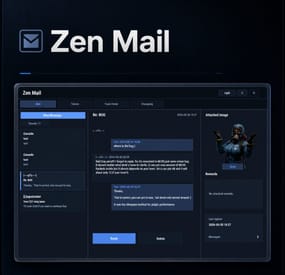
Zen Mail
Zen Mail is an in-game mail and notification system for Rust servers, allowing players to send “emails” to online and offline players. Admins will also benefit from being able to include attachments such as items, commands, and economy rewards. With permission, players can also attach images via URL.
Designed for wipes, announcements, rewards, crash compensation, support, and direct communication, Zen Mail ensures both online and sleeping players receive admin messages, while also providing threaded conversations—replies are appended to the original message, so players can follow the full back-and-forth via a simple UI they can access at any time.
Perfect For
Admin announcements Server rules and new player welcome messages Compensations Reward delivery Event prizes Player to Player communication
Core Features
Persistent inbox per player
Messages are delivered even when players are currently offline Configurable inbox limits per player - oldest message deleted if limit exceeded. Optional wipe-based inbox clearing Simple message creation
Ability to input subject and message content Recipient can be easily selected via a player picker UI, with unique colors and tags for Online/Sleeper/Staff Images can be attached to messages through either image URLs pre-configured, or by supplying an image URL (permission required) Clean scrollable UI and configurable max length for long messages. Admins can easily include a combination of items, economies, or commands ran against the recipient. Messages and attachments can also be created via console commands, perfect for use in other plugins. Unread notifications
Notification delivery and visual/audible cue driven by Zen Panel
Attachments & Rewards
Each message can include any combination of:
Item rewards Multiple items per message Custom display names Optional skin IDs Inventory-safe claiming Image from a pre-configured list or directly via an image URL Command rewards
Ability to run server commands on claim Supports placeholders to ensure command is run against the recipient (%steamid%) Repeatable command execution via amount entry Economy rewards
Economics ServerRewards TCBank each handled independently, with clear failure feedback if unavailable or failed Players claim attachments directly from the inbox with a single click
Admin & Console Tools
Send messages with attachments:
Using In-game UI Using Console commands Attach items and pre-configured images using simple flag-based commands Ability to include item/command/economy attachments is admin permission based Target:
Individual players All players (Online and Sleepers) Online players only
Customization/Config
Customize HUD icon and unread indicators via Zen Panel Configure which user groups are displayed as Staff Add pre-configured images (samples included) Configure max subject/message lengths Configure maximum amount of threads for a player inbox to hold Configure if messages are cleared on server wipe.
Chat Commands:
/inbox - Opens the Inbox UI where players can view and send/reply messages
/sendmail "PlayerName" - optional chat command to send message to specific player without going through inbox/player picker
/inbox_top - Admin command to view players with largest inbox sizes
/inbox_clear "PlayerName" - Admin command to clear a specific player's inbox
Permissions:
zenmail.send - required to be able to send messages
zenmail.admin - required to add attachments via UI and run admin commands
zenmail.imageurl - required to attach images through a URL
🤖 Console command functionality
Console commands can be used for both messaging and attachment delivery using flags, with included option to select which image will appear in the message
Basic command structure is as follows:
mail.send <playername OR SteamID> "<subject>" "<content>" [flags] mail.sendall "<subject>" "<content>" [flags] Available flags are desribed below and may be used multiple times and in any order:
Image Flag:
-img <number> Sets the message image.
Uses the image list from the config Index starts at 0 0 = first image, 1 = second, etc. _______________________________
Item Flag:
-item <shortname> <amount> <skinId> optional:"displayName" Adds an item attachment.
skinId may be 0 Custom name is optional If omitted, the item’s default name is used _______________________________
Commands Flag:
-cmd "<name>" "<command>" <amount> Runs a server command when claimed.
amount specified how many time to run the command. It defaults to 1 Supports %steamid% and %name% wildcards - useful when sending to all players or via other plugins. "name" is what the player will see as the attachment name (instead of seeing the command itself) _______________________________
Economy Flag:
-eco <type> <amount> Adds a currency attachment.
Supported types: Economics ServerRewards TCBank _______________________________
❔Example Console Commands:
Below are some example console commands.
Note you can use \n\n for following text to start as a new paragraph Simple message only to single player(with image)
mail.send PlayerName "Welcome!" "Welcome to the server. Enjoy your stay!" -img 0 Simple message only to all players (with image)
mail.sendall "Server Notice" "Welcome to the server everyone!" -img 0 Single item attachment (with image)
mail.send PlayerName "Resource Gift" "Here are some materials to get you started." -img 1 -item wood 2000 0 Item attachment with custom display name and specific skinID (with image)
mail.send PlayerName "Special AK" "You have received skinned HV pistol ammo." -img 2 -item rifle.ak 1 987654321 "Very Cool AK" Multiple items (with image)
mail.send PlayerName "Supply Drop" "A mix of useful resources." -img 0 -item wood 3000 0 -item stones 2000 0 -item metal.fragments 500 0 Command attachment (with image)
mail.send PlayerName "Starter Kit" "Claim this message to receive your starter kit." -img 1 -cmd "Starter Kit" "kit give %steamid% starter" Economy reward (Economics) (with image)
mail.send PlayerName "Welcome Bonus" "You have received a currency reward." -img 0 -eco Economics 1000 Mix of Items + Economics (with image)
mail.send PlayerName "Builder Pack" "Resources and money to help you build." -img 2 -item wood 4000 0 -item stones 4000 0 -eco Economics 2500 Mix of Items and Command (TWO vip kits) (with image)
mail.send PlayerName "VIP Trial" "Enjoy a one time VIP kit." -img 1 -item scrap 250 0 -cmd "VIP Kit" "kit give %steamid% VIP" 2 Full mixed attachments (items + command + economy) (with image)
mail.send PlayerName "Welcome Package" "Everything you need to get started." -img 0 -item wood 3000 0 -item ammo.pistol.hv 100 0 -cmd "Starter Kit" "kit give %steamid% starter" -eco Economics 1500 Full mixed attachments to all players (note using \n\n to create a new paragraph within message content) (with image)
mail.sendall "Attention Citizens!" "Thank you for being awesome.\n\nAttached some gifts." -img 0 -item wood 3000 0 -item ammo.pistol.hv 100 0 -cmd "Starter Kit" "kit give %steamid% starter" -eco Economics 1500
If using the commands within a JSON (config) file, you will need to ensure you escape the quotes with a backslash (place a backslash before any quote sign), for example:
mail.send %SteamID% \"Welcome!\" \"Welcome to the server!\n\n This is a mail system used to message online and offline players and for admins to share important information, changes or updates during the wipe\n\nWe hope you have a great time\" -item ammo.pistol.hv 100 0 \"\" -img 1
If you’re looking for a modern replacement for chat spam, manual kit commands, or unreliable reward delivery, Mail System provides a polished, user-friendly solution that players will instantly understand and appreciate.
I have done my best to document the full functionality, but if any doubt do not hesitate to open a support request.
-

$24.99
NPC Dancers
What is it?
Transform your server into an unforgettable experience with this innovative plugin! Whether you want to host epic dance parties or add immersive NPC actions to your RPG adventures, this plugin is designed to bring life and fun to your community. Let your players team up with their new animated companions and turn mundane gameplay into extraordinary moments. Perfect for dance parties and roleplay events; there's no limit to the creativity this plugin enables!
Usage
Make yourself or let players make the BEST dance parties ever!
Also can be used for various actions for example on RPG servers (You can make NPC keep pointing somewhere etc..)
Commands
Main command /npcd -- Opens the menu (user friendly, contains/has the same or even better abilities than all the other chat commands) Spawn options: /npcd spawn (id) -- Spawns certain group /npcd despawn (id) -- Despawns certain group Group options: /npcd create -- Creates certain group /npcd remove (id) -- Removes certain group /npcd manage (id) -- Start managing certain group /npcd list -- Displays all dance groups Group Manage options: /npcd dancer add -- Adds new dancer with your current position and rotation to the group /npcd dancer remove (id) -- Removes certain dancer /npcd dancer list -- Displays all the dancers from the managed group /npcd group name (name) -- Changes managed group's name to the new one --Dancer's settings-- /npcd dancer manage (id) name (New Dancer's name) -- Changes dancer's name /npcd dancer manage (id) random (true/false) -- Turn ON or OFF to make dancer use random dance /npcd dancer manage (id) dance (Dance Name) -- Set's dance for the dancer Available: The Twist, Cabbage Patch, Raise the Roof, Clap, Friendly, Hurry, Ok, Point, Shrug, ThumbsUp, ThumbsDown, Victory, Wave, Chicken, Drink, Push, Kick /npcd dancer manage (id) clothing add (clothing name) -- Adds new clothing for the dancer /npcd dancer manage (id) clothing remove -- Removes clothing from the dancer /npcd dancer manage (id) god (on/off) -- Turns ON or OFF god for the dancer /npcd dancer manage (id) hp (amount) -- Set's the spawn HP for the dancer
Permissions
npcdancers.use -- Gives player permission to use the plugin npcdancers.god -- Gives player permission to turn ON or OFF godmode for dancers npcdancers.hp -- Gives player permission to change dancer's spawn HP npcdancers.admin -- Has all permissions, bypasses all limits in config + can manipulate with other's dance groups
UI Features
Dance Groups
Owner OwnerID Amount of Dancers Group name Add Dancer button Spawn/Despawn button Remove button Dancers
Name HP God Random Dance Clothing Remove button
Config
{ "Max groups per player": 3, "Max dancers per group": 5 }
Localization
{ "Syntax": "----- Spawn Options -----\n/npcd spawn (id) -- Spawns the group\n/npcd despawn (id) -- Despawns the group\n----- Manage Options -----\n/npcd create -- Creates new group\n/npcd remove (id) -- Removes the group\n/npcd manage (id) -- Let's you manage the group\n/npcd list -- Displays all dance groups", "Created": "Successfully created dancers group: {0}", "Removed": "Successfully removed dancers group: {0}", "NotFound": "Couldn't find a dance group with this id.", "NoGroups": "There are not any groups yet.", "NoDancers": "There are not any dancers yet.", "GroupList": "ID:{1} {0} - {2} dancers", "Managing": "----- Managing {0}'s group -----\nID: {1}\nGroup name: {2}\nDancers: {3}\n----- Manage Group -----\n/npcd dancer add -- Adds new dancer\n/npcd dancer remove (id) -- Removes the dancer\n/npcd dancer list -- Shows current dancers for this group\n/npcd group name (name)\n----- Dancer's settings -----\n/npcd dancer manage (id) name (Set Dancers Name)\n/npcd dancer manage (id) random (true/false) -- Dancer will choose random dance\n/npcd dancer manage (id) dance (Dance Name) -- Available: The Twist, Cabbage Patch, Raise the Roof, Clap, Friendly, Hurry, Ok, Point, Shrug, ThumbsUp, ThumbsDown, Victory, Wave, Chicken, Drink, Push, Kick\n/npcd dancer manage (id) clothing add (clothing shortname) -- Add specific clothing to the dancer\n/npcd dancer manage (id) clothing remove -- Removes all clothes from dancer\n/npcd dancer manage (id) god (on/off)\n/npcd dancer manage (id) hp (amount)", "NoManaging": "You are not managing any group right now.", "DancerAdded": "Successfully added new dancer:\nName:{0}\nID:{1}\nDance name:{2}\nRandom dance? {3}\nPos: X:{4} Y:{5} Z:{6}", "DancerRemoved": "Successfully removed Dancer: {0}(ID:{1})", "DancerNotFound": "Couldn't find dancer with that id", "DancerRename": "Renamed dancer:{0} to {1}", "DancerChangeDance": "Changed {0}'s dance to: {1}", "InvalidDance": "Invalid dance name! Changed {0}'s dance to: {1}", "NoPerms": "You don't have permissions to manipulate with other's groups!", "NoGodPerms": "You don't have permissions to toggle dancer's godmode", "NoDancersSpawn": "There are no dancers to spawn!", "GroupNotSpawned": "This group is not spawned", "GroupDespawn": "Group despawned", "SpecifyClothing": "You must specify the clothing", "SpecifyGod": "You must specify on or off for god mode", "SpecifyHp": "You must specify the amount of hp", "ToggleGod": "Dancer's godmode: {0}", "NoHpPerms": "You don't have permissions to set dancer's hp!", "SetHp": "Dancer's hp set to: {0}", "AddedClothing": "{0} added to the dancer", "RemovedClothing": "Removed dancer's clothes", "ClothingList": "Dancer's clothes: {0}", "GroupLimit": "Cannot create new dancer group! (Group limit reached!)", "GroupName": "Group name changed to: {0}", "DancerLimit": "Cannot add new dancer! (Dancer per group limit reached!)", "CUI YourGroups": "Your\nGroups", "CUI AllGroups": "All\nGroups", "NotExistWear": "{0} is non existing or not wearable item!", "NoMoreClothing": "This dancer can't take any more clothing!", "CUI SelectDancer": "Select Dancer", "CUI SelectedDancer": "Selected Dancer:\nID: {0}\nName: {1}", "CUI Name": "Name:", "CUI Random": "Random:", "CUI Dance": "Dance:", "CUI HP": "HP:", "CUI God": "God:", "CUI Owner": "Owner:", "CUI OwnerId": "OwnerID:", "CUI DancersAmount": "Amount of Dancers: {0}", "CUI Add": "Add Dancer", "CUI Remove": "Remove", "CUI NoDancers": "There are not any dancers yet", "CUI Spawn": "Spawn", "CUI Despawn": "Despawn", "CUI Dances": "The Twist, Cabbage Patch, Raise the Roof, Clap, Friendly, Hurry, Ok, Point, Shrug, ThumbsUp, ThumbsDown, Victory, Wave, Chicken, Drink, Push, Kick", "CUI ClothingAdd": "Add clothing:", "CUI ClothingList": "Current clothing:", "CUI CreateGroup": "Create\nGroup" }
-
$24.99
War Mode PVP/PVE
Allows both PVE and PVP players to exist on a server at the same time. PVE players will have certain configurable protections and restrictions. You can have players use a command to flag themselves as PVP/PVE or you can assign it to them when they first spawn. If you have ZoneManager you can also designate specific zones to force player's to be PVE or PVP. Plugin is also compatible with SimpleStatus.
Note: Video is outdated, see documentation for a full list of new features!
Documentation:
A full readme including permissions, commands, and config options is available in this google doc link.
Disclaimer:
Like all of my plugins - this plugin is sold as is. I will be happy to take feature requests into consideration but make no guarantees about which ones get implemented. Please refer to the feature list before you make your purchase!
Developer API:
API Methods
// Returns the mode of the given entity. Also takes into account if the entity is in a forced mode zone. string GetEntityMode(BaseEntity entity); // Returns the group name for the given mode. For example if given 'pve' will return 'warmodepve' string GetModeGroup(string modeId); // Returns the target type for a given entity. Target types are the category that an entity falls into. // For example, if given a BasePlayer entity, it will return 'players'. If given a horse entity is will // return 'horses'. string GetEntityTargetType(BaseEntity entity); Hooks - place these in your plugin and WarMode will call them.
// Called when a player's mode has been updated or config changes have ocurred that may affect the mode. private void WarMode_PlayerModeUpdated(string userid, string modeId) // Used to override WarMode logic for taking damage. // If true/false is returned then WarMode logic will be skipped. Return null to continue WarMode logic. private object CanEntityTakeDamage(BaseCombatEntity target, HitInfo info) // Used to override WarMode logic for targeting. // If true/false is returned then WarMode logic will be skipped. Return null to continue WarMode logic. private object CanEntityBeTargeted(BasePlayer target, BaseEntity attacker, bool skipVendingCheck) // Used to override WarMode logic for triggering a trap. // If true/false is returned then WarMode logic will be skipped. Return null to continue WarMode logic. private object CanEntityTrapTrigger(BaseTrap trap, BasePlayer basePlayer) // Used to override WarMode logic for looting an entity. // If true/false is returned then WarMode logic will be skipped. Return null to continue WarMode logic. private object CanEntityLoot(BasePlayer looter, BaseEntity target, bool skipVendingCheck)
FREE Extension Plugins:
War Mode Admin Panel
Use the /warmode.config or /wmc command to open a panel that allows admins to update mode rules in game without having to reload the pluign. Requires the warmode.admin permission to use.
I HIGHLY recommend you use this extension!
WarModeAdminPanel.cs
War Mode Spawn UI
Provides a UI that is shown to players when they first spawn that prompts them to choose whether they want to be PVP or PVE. Also supports custom modes. Localization and config options available. This can also be configured to appear when players use the /flag command.
WarModeSpawnUI.cs
War Mode Rules UI
Using the /rules command (which is configurable) players can see a list of what restrictions they have for their current mode. These ruling will update dynamically based on your config settings.
WarModeRulesUI.cs
War Mode Badges
Customizable UI elements that will appear on the player's HUD to indicate what their current mode is.
WarModeBadges.cs
-

$24.99$19.99Health Boost
Take full control of health values across your Rust server from one powerful and easy-to-use interface
HealthBoost allows administrators to customize player health, food, water, medical items, consumables, building health, defensive deployables, Tool Cupboards, and Raidable Bases health settings without manually editing configuration files
Create unique server experiences, balance gameplay for different ranks, and fine-tune every aspect of survivability through a clean in-game management panel
Take Your Rust Server to the Next Level
Premium performance, lightning-fast support, and an exclusive 30% OFF using code KHALED
Features:
Commands:
/hb - open the admin control panel /hbadd - admin command to add the entity being looked at to the Custom Deployables list /hbremove - admin command to remove the entity being looked at from the Custom Deployables list
Building Health Control:
Separate health multipliers for:
Deployable Health Control:
Raidable Bases Support:
One plugin. Complete control over player health, buildings, deployables, defensive systems, medical items, consumables, and Raidable Bases health settings
Whether you're running a Vanilla+, PvE, Hardcore, Modded, or custom gameplay server, HealthBoost gives you complete control over every health-related aspect of your server from one place