
-
Posts
118 -
Joined
-
Last visited
-
Days Won
1
Content Type
Profiles
Warranty Claims
Downloads
Forums
Store
Services
Downloads Plus Support
DOWNLOADS EXTRA
Reels
Everything posted by SiCkNeSs
-
https://botreaper.com/cart.php?a=confproduct&i=1 i have tested it on the base configuration of the python bod you will need to upload the rustsyncbot.zip, un-archive it then go to Startup on the top, scroll down and find "App py file" and change it from app.py to main.py
-
 Hi there, this tool is for syncing your files across multiple servers: for example, you have a server that is mirrored to europe (same plugins and setup etc, but for EU players instead of NA players) if you have the plugins directory monitored, when you upload load a new plugin to the main server (Server_1) it will automatically copy the files over after the interval time. This allows you to only have to worry about making changes to 1 of your servers, and then having it sync automatically. You could also have it sync your admin users file so that its the same across your servers. The bot only needs to be installed on 1 server, and connects over SFTP to access and transfer files between the servers. if you have multiple pairs of servers, for example: vanilla US and vanilla EU 2x US and 2x EU 10x US and 10x EU you just need to make 1 configuration file for each pair of servers
 -
Changed Status from Pending to Closed Changed Fixed In to 1.0.6
-
thank you :). if you have any other issues, questions, etc, just let me know
-
hey there Lukas, the command is setup as a console command (needs to be typed either from the RCON console, or from the F1 console), there is no chat command variant setup (this will be added in the next planned update though) as for the "command already exists" this pops up if the plugin is reloaded, because the command is already associated from the previous load try typing that command: adminvideo luckylooter rickroll into either RCON, or your F1 terminal (you need to make sure you have permissions added if you type it from the F1 console) give that a try, and get back to me
-
Version 1.0.5
27 downloads
Are you tired of having to change configurations and plugins manually on multiple Rust servers that run the same configurations? (eg. a mirrored US and EU version of your server) Then this is just what you are looking for! Introducing RustSyncBot—your ultimate solution for seamless server synchronization. Designed with ease of use in mind, RustSyncBot is an easy-to-install Pterodactyl egg that effortlessly keeps your game servers in sync across multiple machines. Whether you're running a network of Rust servers or any other setup requiring consistency across servers, RustSyncBot is here to simplify your workflow. With RustSyncBot, you can easily specify the directories and files that need to be mirrored from a main server to one or more secondary servers. The bot’s robust configuration options allow you to manage multiple pairs of servers, ensuring your server network stays perfectly synchronized at all times. Key Features: Easy Installation: Install and set up within minutes with our user-friendly Pterodactyl egg. Seamless Synchronization: Automatically sync specified directories and files from your main server to secondary servers. Multi-Server Management: Configure multiple server pairs to maintain consistency across your entire server setup. Efficiency Boost: Streamline your server management, making it easier than ever to run the same server setup across multiple servers. RustSyncBot takes the hassle out of server synchronization, letting you focus on what matters most—delivering an exceptional gaming experience to your community. Tested and working with "BotReaper Python Discord Bot" node. You just need to modify the "APP PY FILE" to be "main.py" instead of "app.py" Pterodactyl is NOT needed, you can run this bot through normal python on any server or even windows machine with python installed! Installation Instructions: How to install: 1. Create a new server using the provided egg called "egg-rust-sync-bot.json". 2. Upload the "rustsyncbot.zip" archive to the server's Files section. Once uploaded, you can unzip the file or trigger a reinstall in the server's Settings section. 3. Navigate to the Files section and modify the .env file if you would like to change the sync time (default 120 seconds) (do not set it too low, as then you will have alot of network requests often, test and set to your needs) 4. Navigate to the config directory and look through the "example.yaml" file, you will need to setup your configuration files to connect to your servers, specify what files/folders you would like to sync (I recommend using https://yamlchecker.com/ OR https://jsonformatter.org/yaml-formatter/ to verify that your syntax is correct) 5. Start the server. All dependencies will be installed on startup, and bot will automatically start. (The bot will ONLY copy files that have a newer modified date from server_1 over to server_2. so make sure your files are the latest version on server_1) 6. Leave server running, bot will recheck files based on the SYNC_INTERVAL you have set in the .env file NOTE: All directories/files are RELATIVE to the starting location of your SFTP login. this means that you should NOT put /home/container/ before each of your folder/file locations I have made a tool to help with generating the correct information for the configuration. It can be found at: https://rustsync.rustvideo.com/ Sample Configuration: # MAIN server server_1_name: Server 1 Display Name server_1_url: ip:port # eg 192.168.1.1:2022 using sftp://domain.com:2022 "should" work also server_1_user: username.shortcode server_1_pass: panelpassword server_1_sftp: True # do not change, for future functionality # SECONDARY server server_2_name: Server 2 Display Name server_2_url: ip:port # eg 192.168.1.1:2022 using sftp://domain.com:2022 "should" work also server_2_user: username.shortcode server_2_pass: panelpassword server_2_sftp: True # do not change, for future functionality delete_missing_remote: True # set to True or False. if it is missing, it defaults to True for backwards compatability # directories for the bot to keep in sync CASE SENSITIVE # directories are listed as key/pair. where the key is the directory on the main server, and value is the directory # on the secondary server eg. # oxide/plugins: carbon/plugins # # will sync the directory of oxide/plugins on server_1 to the carbon/plugins directory on server_2 # you can use trailing slashes and preceding slashes. eg. # /oxide/plugins , /oxide/plugins/, and oxide/plugins are all valid options # CASE SENSITIVE directories_to_sync: oxide/plugins: oxide/plugins oxide/config: oxide/configs oxide/data/copypaste: oxide/data/copypaste # files for the bot to keep in sync CASE SENSITIVE # files are listed as key/pair. where the key is the location on the main server, and value is the location on the secondary server # eg. # oxide/plugins/ZoneManager.cs carbon/plugins/ZoneManager.cs # # will sync the individual file of "oxide/plugins/ZoneManager.cs" on server_1 to the location of "carbon/plugins/ZoneManager.cs" on server_2 # CASE SENSITIVE files_to_sync: steam_appid.txt: steam_appid.txt # directories for the sync bot to ignore, it will ignore these directories if the path is found within the sync, eg, if you are syncing carbon/data, it will # ignore the following # - carbon/data/AdminMenu # CASE SENSITIVE directories_to_ignore: - carbon/data/AdminMenu - carbon/data/Shop - carbon/data/Backpacks # files for the sync bot to ignore, it will ignore these files if the path is found within the sync, eg, if you are syncing carbon/config, it will # ignore the following # - carbon/configs/AbandonedBases.json # CASE SENSITIVE files_to_ignore: - carbon/configs/AbandonedBases.json - carbon/configs/RaidableBases.json$10.00- 4 comments
- 2 reviews
-
- 1
-

-
- #sync
- #pterodactyl egg
- (and 7 more)
-
 the video player UI is the built in one with rust that was added with one of the twitch rivals. it does not have a close button. but i will see if i can implement a custom close button
 -
Changed Status from Pending to Closed Changed Fixed In to 1.0.8
-
it would have been a combination of both, but mostly the dynamicPVP change. another person also had the issue, but i wasnt having the issue, as i had already made that change back on July 6, so it was all working for me already
-
I am pushing an update that "should" fix this shortly, there will need to be a slight modification to the DynamicPVP plugin, it looks like because it hasnt been updated for the July 6 2024 update, it throws an error sometimes on Oxide when trying to fire the hook, causing it to disappear, and on Carbon it fires the error all the time DynamicPVP: (BOTH CARBON AND OXIDE) Line 1627 find: Interface.CallHook("OnPlayerAddedToPVPDelay", player.userID, zoneId, baseEvent.PvpDelayTime); Change to: Interface.CallHook("OnPlayerAddedToPVPDelay", player.UserIDString, zoneId, baseEvent.PvpDelayTime); doing this change on dynamicPVP seems to make the hook fire every time, on both carbon and oxide. i will keep monitoring and testing also
-
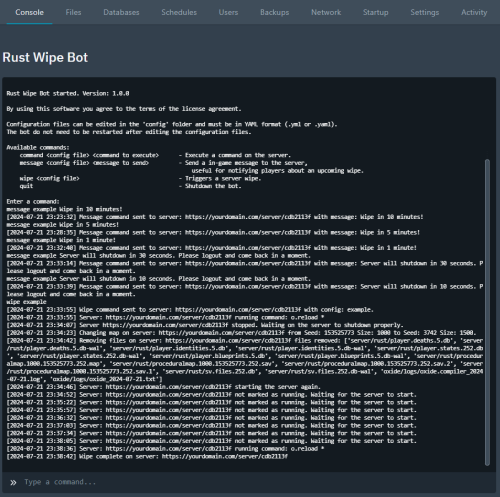 easy to setup, and does a decent amount for the price. easy to schedule out for an automatic wipe, and automatically run commands after the wipe Pros: easy setup easy to use lightweight easily expandable if you know Python Cons: not able to schedule restarts with it, but should be soonTM (will update afterwards) by default Pterodactyl only supports 10 tasks (not related to this app). I recommend editing the pterodactyl config file and increasing that amount (NOTE: you can only do this if you have access to the webserver files that host the Pterodactyl panel) Find this in config/pterodactyl.php (usually installed around: /var/www/pterodactyl/config/pterodactyl.php) 'per_schedule_task_limit' => env('PTERODACTYL_PER_SCHEDULE_TASK_LIMIT', 10), change 10 to a higher number, eg. 'per_schedule_task_limit' => env('PTERODACTYL_PER_SCHEDULE_TASK_LIMIT', 20),
 -
Version 1.0.8
102 downloads
Want to troll cheaters you have on your server? Maybe you have taken a clip of them cheating, or want to rick roll them. Maybe you want to show an advertisement to your players? Then this is the plugin for you! A friend had wanted to know how he could send a video to play on a cheaters screen, because this person was streaming while cheating, and he had clipped it. This plugin integrates with Rust's built in "client.playvideo" command, but with the added benefit of being able to just supply a Youtube URL, or a Twitch URL. The integration with the Twitch and Youtube API is offloaded onto my web server, to minimize outside web calls, and to minimize load on your server. WARNING! Be careful of the length of the video that you add! Player will have NO input, will NOT be able to F1 kill, or even log out of server until the video is completed! They will need to ALT+F4 if they want to leave before video finishes. Known Issues: Video "could” be closed by a player if they know the client commands and send a video to themselves thinking of implementing a "close” button that you can enable on ads etc to allow the user to close the video Any comments, concerns, questions, or suggestions are greatly appreciated To show video on first join of wipe: Config set both Show a welcome video, Show welcome video ONLY on first join of the wipe to true. Make sure to delete the file "data/AdminVideo.json" each wipe "Show a welcome video": true, "Show welcome video ONLY on first join of the wipe": true, "Welcome Video URL": "https://www.youtube.com/shorts/hT5BqdjT1Hs", Links Supported: Direct .mp4 link - eg. https://archive.org/download/rick-roll/Rick Roll.mp4 Youtube Video Link - eg. https://www.youtube.com/watch?v=OvQkif96CTg - Currently fixing due to an api change Youtube Shorts Link - eg. https://www.youtube.com/shorts/8sTHiZI_tus - Currently fixing due to an api change Twitch Clip Link - eg. https://www.twitch.tv/camomo_10/clip/NastySleepyCockroachFutureMan-ihrWpONnkxv4ayv4 Command works from both ingame console, and RCON console. Safety Checks: Commands with safety checks will only send video if the player is: In a SafeZone AND not mounted (such as on a mini) OR TC Authorized and INSIDE AND not mounted (such as on a mini) AND Has not been in combat for at least 20 seconds These are to limit the possibility of players being killed while frozen and unable to move. Additional safety checks can be added if needed Command format: Send a forced video to a player (no safety checks, perfect for forcing on cheaters): adminvideo {steam_id|displayname} {url|shortname} Send a video to all players (has some safe checks): adminvideo all {url|shortname} Send a video to all players (has NO safe checks): adminvideo allunsafe {url|shortname} Send an ad video to a player (has some safe checks): adminvideo ad {steam_id|displayname} {url|shortname} Send an ad video to all players (has some safe checks): adminvideo ad all {url|shortname} Add a video shortname into the config: adminsavevideo add {shortname} {url} Remove a video shortname from the config: adminsavevideo remove {shortname} eg. Send video to specified steamID (no safety checks) adminvideo 123456789 https://www.youtube.com/shorts/8sTHiZI_tus Send video to player name (no safety checks) adminvideo sickness https://www.youtube.com/shorts/8sTHiZI_tus Send RickRoll video to player name based on saved shortname adminvideo sickness rickroll Send RickRoll video to all online players based on saved shortname (has safety checks) adminvideo all rickroll Send ad video to specific player (has safety checks) adminvideo ad sickness https://www.youtube.com/shorts/8sTHiZI_tus Send ad video to all online players (has safety checks) adminvideo ad all https://www.youtube.com/shorts/8sTHiZI_tus Add a video shortname into the config: adminsavevideo add boom https://www.youtube.com/shorts/8sTHiZI_tus Remove a video shortname from the config: adminsavevideo remove boom Permissions: adminvideo.use - to be able to issue videos to players adminvideo.admin - allows you to use the shortname creation command adminvideo.adbypass - allows you to bypass "ad" videos Default Config: { "Admin Bypass Ads/Welcome": false, "Show a welcome video": false, "Show welcome video ONLY on first join of the wipe": false, "Welcome Video URL": "https://www.youtube.com/watch?v=ScMzIvxBSi4", "ShortNameVideos": { "rickroll": "https://archive.org/download/rick-roll/Rick Roll.mp4" } } (Note: Video player auto resizes to fit the content aspect ratio) Shoutout to @ELF for the original idea and for some live testing NOTICE: The backend API for converting youtube/twitch videos, is to be used by the Admin Video Plugin. Using it for any other purposes, eg. integrating into a bot, or integrating it into another plugin, without express consent/permission from SiCkNeSs, can result in blocking of access to the IP address's/services that are integrating it, with no notice, or refund.$10.00 -

Version 1.1.2
60 downloads
Features: Tested on Carbon and Oxide Uses SimpleStatus to make a sleek customizable UI to show PVxStatus (PVE, PVP, PVPCooldown) Each UI Component can be individually toggled off or on Color settings allow for both: html color codes or rust colors (eg. #3AC916 OR 0.23 0.79 0.09 1 ) (NOTE: You will need to use the Rust color codes, if you would like to use transparency) Includes PVPDelay display and checking that integrates with: DynamicPVP, AbandonedBases, RaidableBases PVPDelay display should work with any plugin that utilizes DynamicPVP (eg. https://codefling.com/plugins/convoy) As long as the ZoneManger zone's name includes "pvp", the pvp tag will show up Option in config to enable Automatic FullPVP, if there are no PVE plugins detected (TruePVE, RealPVE, NextGenPVE, SImplePVE) Integrates with TruePVE pvp schedule (I will work on integrating schedules for other PVE plugins also) Specify additional PVE zones by including "pve" in the zone's name Command to mark the whole server as PVP, regardless of zones (such as PURGE on PVE servers (this setting saves and persists on server restart, you will need to re-issue the command, or edit the settings file to revert back) Customizable information for all 3 PVxStatus UI (Title, Text, Icon, and colors) Ability to use Rust icons, on the UI (eg. assets/icons/weapon.png) Ability to use Rust item images on the UI (eg. itemid:1055319033) NOTE: the itemID MUST have itemid: at the beginning Custom image from URL, and item images instead of only being able to use Icons (NOTE: URL MUST contain http:// OR https:// otherwise it will be seen as invalid) Integrates with DynamicPVP, AbandonedBases, RaidableBases for PVPDelay time remaining to allow for a live update of PVPDelay status with a draining UI bar (NOTE: "Separate UI Icon" AND "PVPDelay Countdown" need to be set to true to take advantage of this new UI Setting Commands: From the RCON, Console, or chat as an admin, you can type: pvpall (/pvpall for chat) to toggle the server to PVP displayed everywhere Planned Features: Languages to provide multi-language support proper integration with other PVE plugins Known Issues: PVP zone will still display, even if you are in a "Safe Zone", with FullPVP enabled Recommended: Set the Default color as needed: eg. if you have PVE hidden, and PVP shown, set the default color to PVP (this is caused by an issue where the UI will flash to the default color scheme when showing the UI) Recommend setting RaidableBases DelayUI to disabled in your RaidableBases config file Tips: Using "Separate UI Icon": true in the config file will give you a slightly different design Using "PVPDelay Countdown": true in the config will give you a counting down timer/bar for your PVP delay RaidableBases config: Delay UI": { "Enabled": false, Default Config { "Mark whole server as PVP Zone": false, "Default Colors (PVE, PVP, or PVPDelay)": "PVE", "FullPVP if no PVE Plugins Found": false, "Enable Schedule (TruePVE)": false, "Scheduled PVP mapping": "pvp", "Separate UI Icon": false, "PVPDelay Countdown": false, "Pvx UI Settings": { "PVE": { "Show on UI": true, "Title": "PVE Zone!", "Title Color": "#FFFFFF", "Text": "SAFE", "Text Color": "#FFFFFF", "Icon": "assets/icons/weapon.png", "Icon Color": "#FFFFFF", "Background Color": "#738D45" }, "PVP": { "Show on UI": true, "Title": "PVP Zone!", "Title Color": "#FFFFFF", "Text": "UNSAFE", "Text Color": "#FFFFFF", "Icon": "assets/icons/weapon.png", "Icon Color": "#FFFFFF", "Background Color": "#C44D43" }, "PVPDelay": { "Show on UI": true, "Title": "PVP Cooldown!", "Title Color": "#FFFFFF", "Text": "UNSAFE", "Text Color": "#FFFFFF", "Icon": "assets/icons/weapon.png", "Icon Color": "#FFFFFF", "Background Color": "#B35F1E" } } } Shoutout to @ELF for deciding to YOLO and live pre widget$10.00 -
enjoying testing this out, it is working well after setup. it would be good if along with the command, wipe, message, if a restart function could be implemented. i have already modified mine to include the restart feature, but it would be nice to be supported out of the box
-
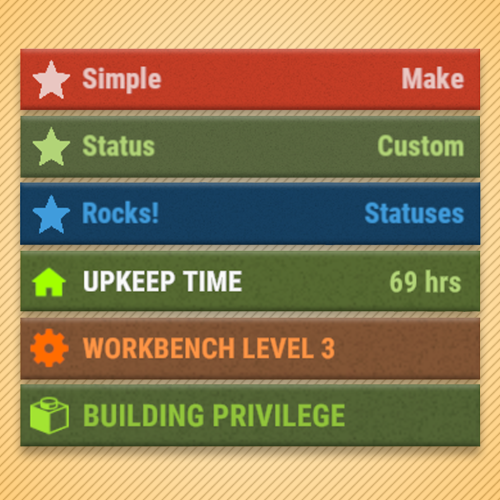 are you able to add in the ability to define a draining bar? eg health/hunger. like a value that we can pass through with our update of a percentage (eg, 35 would have 35% of the bar filled with the background color etc). also the ability to not have BG color behind icon (like health, hunger, thirst)
 -
I developed a new plugin that utilizes SimpleStatus. The integration was simple and seamless. The sample plugin included was a great help, as was the clear examples in the description
-
 upgrade to stone**
 -

Version 1.1.0
38 downloads
About Prime Prime is a plugin that allows the players to accumilate coins and then spend them at the dedicated vending machine at Outpost for items,weapons & armour. Coins gathered depends on a Risk VS Reward setup with Prime items providing BUFFS as the player progresses and buys bigger/better gear. Includes a lottery system,gambling, powerful Stones to collect & upgrade and all fully configurable! Hardcore Mode Activation When hardcore is active a Prime Vending Machine will spawn at Out Post allowing players access to Items to earn Prime Coins and Buffs ranging from increase in coins, incoming damage reduction, output damage increase. Players will only be able to progress thier Prime accounts by using items purchased from this vending machine, however if hardcore is NOT active.. players are free to use normal items and weapons to progress accounts and still have lottery active. With hardcore set to 'false' there is no vending machine, no items and no HOF.. you will also not be able to aquire stones. Stones: Requires Green Berries With each tier increase the stones provide a buff in coin yield starting at a base rate of 5% and maxing out at 75%, along with this in the later tiers the stones also provide the user with a increase in damage output.. however the stone needs to be in your inventory.. so it can be taken from you or lost. GREEN -[ Emerald I (5%) , Emerald II (10%), Emerald III (15%), Emerald IV (20%), Emerald V (25%) ] - Hidden Perks = Metabolism & Environment Buffs PURPLE - [ Mystic I (30%) , Mystic II (35%) , Mystic III (40%), Mystic IV (45%), Mystic V (50%) ] - Hidden Perks = Increase in Lottery Chance RED/BLACK - [ Unstable I (55%), Unstable II (60%), Unstable III (65%), Unstable IV (70%), Unstable V (75%) ] - Hidden Perks = Increase in Outgoing Damage by X% Fusion : In order to create the next type of stone youll need x2 Tier 5 Stones The higher the type and tier of the stone the more likely of a failure will occur in ther proccess resulting in the stones exploding..and you losing them..having to restart the process again. Config : Setting up Vending costs & Reward System The config file covers everything from: - Prime item costs at the vending maching - Coins rewarded for each individual task from smashing a barrel to killing an NPC - Coins rewarded for looting - Stone Drop Chance - Amount of Berries required to polish stones - Personal ID for chat (set to server icon) - Lottery chance % Plus much more Discord - Nferno#7163$14.99 -
Version 1.0.2
15 downloads
Overview: This plugin adds an additional twist to PVP within monuments by giving items within player inventories a chance to perma break on death meaning the looter might not get that shiny gun they were hoping to get. Each monument has a tier structure and the tiers break chance % can be modified to suit your playstyle , or if there are certain items you dont want to be apart of the item table you can add them to the white list. # Note - This will only affect items that have a condition/durability bar. Newly Added: Configurable option to set the Loot Breaker to the entire map rather than just Monuments! White listed: - Option to set up a white list that disregards items placed into list that have a condition (shortnames). Chat Command: - "/breakitems" - Test the plugin by breaking every item in your inventory that has a condition. Permissions: - "lootbreaker.exempt" - Use this permission if you want exemption from the plugin. Config Access: - The break chance is by % , changing these numbers below will set a new % rate for that monument tier. - Ability to set the monuments register size, currently set at 100m$4.99- 3 comments
-
- 1
-

-
- #loot
- #durability
- (and 2 more)