-
Posts
118 -
Joined
-
Last visited
-
Days Won
1
Content Type
Profiles
Warranty Claims
Downloads
Forums
Store
Services
Downloads Plus Support
DOWNLOADS EXTRA
Reels
Everything posted by SiCkNeSs
-
[SetupFurnaces] Automatically Harmony patched 'BaseOven.Cook_Patch5' (BaseOvenHarmony) method [AfterPluginInit]. [SetupFurnaces] Automatically Harmony patched 'BaseOven.ConsumeFuel_Patch4' (BaseOvenHarmony) method [AfterPluginInit]. [SetupFurnaces] Failed to automatically Harmony patch 'CycleCookPatch' [AfterPluginInit] (Patching exception in method static System.Void ItemModCookable::CycleCooking(Item item, System.Single delta)) at void HarmonyLib.PatchClassProcessor.ReportException(Exception exception, MethodBase original) at List<MethodInfo> HarmonyLib.PatchClassProcessor.Patch() at bool Carbon.Base.BaseHookable.ApplyOrderedPatches(Orders order, string category) in /home/runner/work/Carbon/Carbon/src/Carbon.Components/Carbon.Common/src/Base/BaseHookable.cs:line 296 Inner exception: System.Reflection.TargetInvocationException: Exception has been thrown by the target of an invocation. ---> System.InvalidOperationException: Failed to find target instructions. at IEnumerable<CodeInstruction> Oxide.Plugins.SetupFurnaces+CycleCookPatch.TryMultiplyCookedAmount(IEnumerable<CodeInstruction> instructions, ILGenerator generator) in /home/container/carbon/plugins/SetupFurnaces.cs:line 974 at object System.Reflection.RuntimeMethodInfo.Invoke(object obj, BindingFlags invokeAttr, Binder binder, object[] parameters, CultureInfo culture) --- End of inner exception stack trace --- at object System.Reflection.RuntimeMethodInfo.Invoke(object obj, BindingFlags invokeAttr, Binder binder, object[] parameters, CultureInfo culture) at object System.Reflection.MethodBase.Invoke(object obj, object[] parameters) at List<CodeInstruction> HarmonyLib.CodeTranspiler.GetResult(ILGenerator generator, MethodBase method)+(MethodInfo transpiler) => { } at void System.Collections.Generic.List<System.Reflection.MethodInfo>.ForEach(Action<MethodInfo> action) at List<CodeInstruction> HarmonyLib.CodeTranspiler.GetResult(ILGenerator generator, MethodBase method) at List<CodeInstruction> HarmonyLib.MethodBodyReader.FinalizeILCodes(List<MethodInfo> transpilers, bool stripLastReturn, out bool hasReturnCode, out bool methodEndsInDeadCode, List<Label> endLabels) at List<CodeInstruction> HarmonyLib.MethodCopier.Finalize(bool stripLastReturn, out bool hasReturnCode, out bool methodEndsInDeadCode, List<Label> endLabels) at ValueTuple<MethodInfo, Dictionary<int, CodeInstruction>> HarmonyLib.MethodCreator.CreateReplacement() at MethodInfo HarmonyLib.PatchFunctions.UpdateWrapper(MethodBase original, PatchInfo patchInfo) at void HarmonyLib.PatchClassProcessor.ProcessPatchJob(Job job) Inner exception: System.InvalidOperationException: Failed to find target instructions. at IEnumerable<CodeInstruction> Oxide.Plugins.SetupFurnaces+CycleCookPatch.TryMultiplyCookedAmount(IEnumerable<CodeInstruction> instructions, ILGenerator generator) in /home/container/carbon/plugins/SetupFurnaces.cs:line 974 at object System.Reflection.RuntimeMethodInfo.Invoke(object obj, BindingFlags invokeAttr, Binder binder, object[] parameters, CultureInfo culture) Loaded plugin SetupFurnaces v2.4.1 by tofurahie [246ms] Using Carbon, the patches fail when the plugin loads, and the output multipliers no longer work, speed still works properly
- 1 reply
-
- 1
-

-
youtube videos should be fixed now. the first time a video is sent to someone, it may take longer (due to youtube throttling video downloads), after that, it will be cached to my remote server, and it should be almost instant for anyone else it is sent to. I will work on fixing the twitch clip integration, it has broken with a recent twitch api update
-
I will look at this after work today. Seems like a dns routing issue must have messed something up on the backend
-
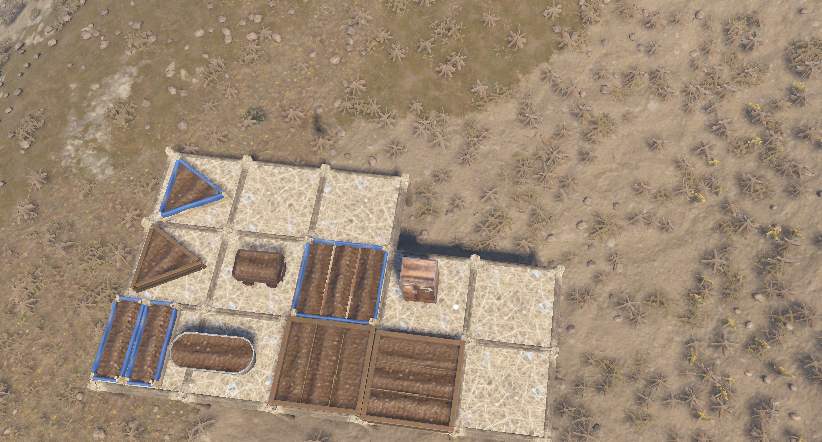
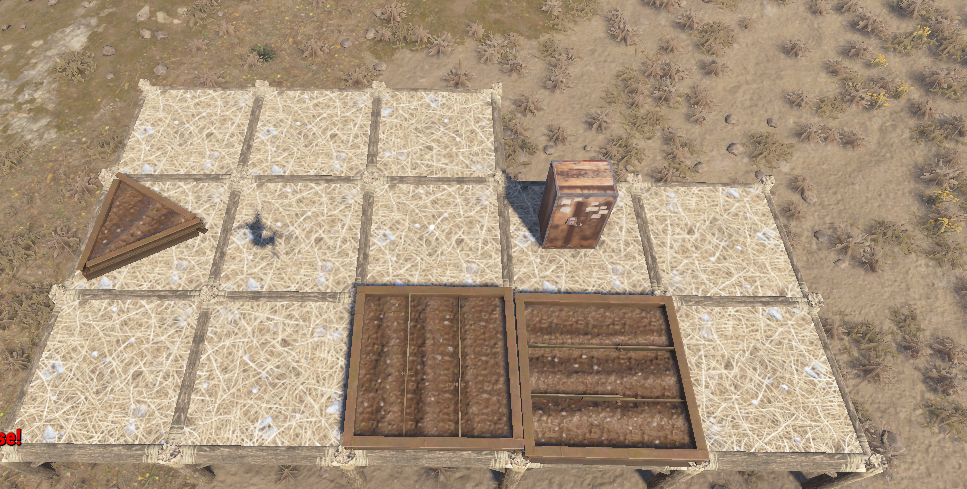
I have attached the configuration. the first image with all of the planters is the little test base i setup. the one with only the 3 railroad planters are the planters that are left once a raidable base spawns nearby (100-125 ish meters away). If UltimateIndustrialFarm is unloaded, the planters did NOT despawn, when the base was spawned in the exact same location. UltimateIndustrialFarm.json

-
Currently on our server, planters will despawn from peoples bases if a Raidable Base spawns nearby the base. Upon unloading the plugin, they do not despawn, no matter how near the raidable base spawns, and the problem returns when the plugin is loaded again Note: This issue has only popped up since the beginning this wipe, everything was working properly as expected last wipe
-
 this has been added in the latest update
 -
Yeah it sbould be able to. I will add it in this week, currently away from home camping
-
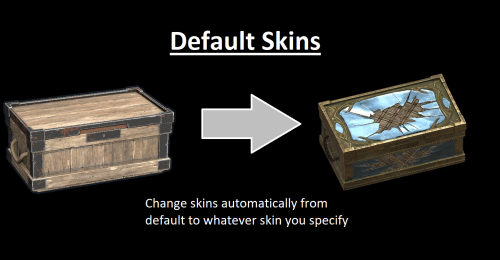 if you are talking about skins that have been uploaded to the steam market place, but are not approved skins (eg through an app, or the skin creator on rust home menu). yes (example: https://steamcommunity.com/sharedfiles/filedetails/?id=3713597966 , https://steamcommunity.com/sharedfiles/filedetails/?id=3406393471) if that is not what you are talking about, let me know
 -
added in the option to skin items on spawn, and on loot (from player or a container)
-
Changed Status from Pending to Closed
-
@Brad Copp ok i looked into this, the prefab name is different for deployed and for items in the inventory (woodbox_deployed is the deployed prefab name). So you would need to add both box.wooden (to catch the crafted one), and woodbox_deployed to catch the deployed one
-
Can you send me your config file
-
Yeah ill add in a config option to reskin items on respawn if they are in the list and dont have a skin on them
-
fixed in the newly updated version
-
Note: the issue has been fixed. Waterbases removed the hook. but putting in a ticket with the developer to add it back in [HookMethod(nameof(CheckWaterFoundation))] public bool CheckWaterFoundation(BuildingBlock block) { return IsWaterFoundation(block); }
-
i will check it out this weekend. got a new PC and i am currently re setting up my dev environment
-
 The instructions would start from number 2 basically, extract the .zip, configure your config files and .env file, and then run the app.py file (python app.py) no arguments etc are passed Should work fine under linux/windows, as it was tested under both
- 4 comments
-
- 1
-
-
- #sync
- #pterodactyl egg
- (and 7 more)
-
 truepve is fairly simple to setup just with the default config. there is just alot of customization. if you join Nivex's discord, he is real helpful if you have any questions. but its getting a bit off topic for purgefx chat. you can DM me or message me on discord if you have any questions that i can help you with
 -
i use truepve, but there are some other options also. just note, that you wont be able to use TruePVE on a community server, it will need to be modded.
-
Thats exactly what i use it for. You can use it to unload plugins temporarily, and then they will reload when the time expires. it will stay displaying exactly as it is, since the "PVE" listing that you see on the menu, is from using the tag "PVE" for your server
-
Yeah same issue here. When the plugin loads, the plugins listed un the unload, all unload, and then load. and then it repeats that afterwards Config: { "Force Server Language Override": "", "Discord Webhook Purge Start Message": " **Purge is now active! Prepare for chaos!** ", "Discord Webhook Purge End Message": " **Purge has ended! The world is safe again... for now.**", "Use @everyone in Discord Webhook": true, "Discord Webhook URL": "", "GMT Offset": 0.0, "Console command for Purge": "startpurge", "Chat command for Purge": "startpurge", "Console command for End Purge": "endpurge", "Chat command for End Purge": "endpurge", "Command for Purge Time Reminder": "purgetime", "Console command for force wipe": "", "Console command for other wipes": "", "List of plugins that will be unloaded on purge start": [ "RaidableBases", "AbandonedBases", "ZoneManager", "PVxZoneStatus", "MonumentEvents", "AutoRestart", "TruePVE", "DynamicPVP" ], "Prefab name to play on purge start": "assets/bundled/prefabs/fx/invite_notice.prefab", "Sound Library API support. To play original Sound prefab, leave it empty. Example command: audio.message sendall fileName ": "", "Purge Start Hour": 18, "Purge Start Minute": 0, "Purge End Hour": 18, "Purge End Minute": 0, "Server Wipe Hour": 18, "Server Wipe Minute": 0, "Use 24-Hour Time Format For Chat": true, "Date Format for Chat": "MM/dd/yyyy", "Auto Display Interval (minutes)": 60, "Display Purge Start Date in Chat": true, "Display Purge End Date in Chat": true, "Display Server Wipe Date in Chat": true, "Hex Color for Purge Start Message": "#FFA500", "Hex Color for Purge End Message": "#AB8509", "Hex Color for Server Wipe Message": "#B00707", "Use SimpleStatus Plugin": true, "SimpleStatus Color": "0.77255 0.23922 0.15686 1", "SimpleStatus Title": "Purge Is Currently Active!", "SimpleStatus Title Color": "1 1 1 1", "SimpleStatus Icon": "assets/icons/warning.png", "SimpleStatus Icon Color": "1 1 1 1", "Use Notify Plugin for Messages": false, "Notification Type for Notify Plugin": 0, "Debug": false, "Weeks of the month, when the purge will run": [ 1 ], "Days of the week, when the purge will run": [ "Wednesday", "Tuesday" ], "Days of the week for purge to end": [ "Thursday" ], "Weeks of the month for purge to end": [ 1 ], "Days of the week for server wipe": [ "Thursday" ], "Weeks of the month for server wipe": [ 1 ] } Data File: { "IsPurgeActive": false, "CachedPurgeStartDate": "2025-12-02T18:00:00", "CachedPurgeEndDate": "2025-12-04T18:00:00", "CachedWipeDate": "2025-12-04T18:00:00" }
-
both would be best. there are alot of people that use PayNow now a-days, but lots of hold-outs using Tebex still, due to the extra KYC involved with PayNow
-
https://docs.tebex.io/plugin/endpoints/gift-cards#create-a-gift-card https://docs.paynow.gg/management/management-api/giftcards#post-v1-stores-storeid-giftcards is the API documentation for them
-
For the raffle prize, if you could specify for it to generate a gift card and dm the user with the code. This way role management etc for packages can be handled by the store platform Paynow/Tebex api support for creation of giftcard codes
-
Changed Status from Pending to Fixed Changed Fixed In to Next Version