
Knockcree
-
Posts
78 -
Joined
-
Last visited
-
Days Won
7
Content Type
Profiles
Warranty Claims
Downloads
Forums
Store
Services
Downloads Plus Support
DOWNLOADS EXTRA
Everything posted by Knockcree
-
Version 2.0.0
56 downloads
This will allow map makers to create their own unique style of the main monuments by adding or modifying the prefabs. Big thanks to all from KBEdits for the work on helping to make these prefabs. Due to the size of the monument, its been uploaded by itself on a map, after its been fully tested it will also be created as a prefab. Whats on the map Complete IO Puzzle, Game Radiation Zones and Loot Spawn Points same as standard Sewer-Branch that can be modified by the user to suit their needs. Original version of Sewer-Branch and broken version. The original version on the side can me moved with movement snap of 10 when selected and overlays on the broken version, when creating a prefab overlay the original and then when placed on the map use the original for the prefab modifiers and then delete the original. If you notice anything missing or out of place please let us know via pm or on our Discord. Left in a map for users to create their own prefabs. Tested on Live server. (May) Tested on RustEdit v-1-1-37 Prefab count 763. We ask that you leave in the text saying Supplied by Knockcree and Codefling.com as a way of helping support us. If you need any help or more info then feel free to join our Discord https://discord.gg/3DYPGMxG5s$9.95 -
Version 2.0.0
74 downloads
This will allow map makers to create their own unique style of the main monuments by adding or modifying the prefabs. Big thanks to all from KBEdits for the work on helping to make these prefabs. Whats on the map. An original version of Junk-Yard and a broken down version using the existing prefabs within RustEdit. The original version has been moved to the side on a movement of 10. After modification of the broken version move the original FP Junkyard over the top and save as a prefab, this allows you to use the original FP Junkyard prefab modifiers. Due to issues with the Magnetcrane Entity being added with Rustedit for broken versions, this version does not contain one and a plugin will be required to spawn the magnetcrane or manually spawn one after map has been loaded. We hope this issue will be resolved soon. Rad and no build zones will have to modified to suit your needs. If you notice anything missing please let us know. Left in a map for users to create their own prefabs. Tested on Live server. Tested on RustEdit v-1-1-37 Prefab count 1024. Includes Crate and Barrel Spawns, these can be modified to suit your needs in Rustedit. Join KBEdits Discord for latest updates https://discord.gg/3DYPGMxG5s Please be aware of the licence agreement prior to downloading.$9.95 -
Version 1.0.0
413 downloads
With help from the community we have broken out the official FP monuments and tried to recreate them to as near as possible. There are some prefabs missing from the list so we had to improvise with prefabs to replace them with. This will allow map makers to create their own unique style of the main monuments by adding or modifying the prefabs. Big thanks to all from KBEdits for the work on helping to make these prefabs. To support us via a donation https://paypal.me/kbedits?locale.x=en_US Join our Discord for latest updates https://discord.gg/3DYPGMxG5s Whats on the map Due to the size of the monuments some are grouped and some are not. Original version of Hapis-Puzzles broken without IO. Informed that the puzzles were breaking some servers so here is the broken version. If you rebuild the IO please let me know and can add it to the original with credits given. Rad and no build zones will have to modified to suit your needs. After HDRP update the IO elements will be included in a new update, if you notice anything missing please let us know. Left in a map for users to create their own prefabs Tested on Staging Branch Live server Tested on RustEdit v-1-1-37b2 Prefab count 701.Free -
Version 2.0.0
91 downloads
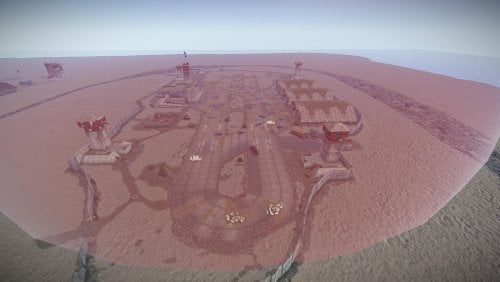
This will allow map makers to create their own unique style of the main monuments by adding or modifying the prefabs. Big thanks to all from KBEdits for the work on helping to make these prefabs, also to EndlessDisorder for the research and help. Due to the size of the monument, its been uploaded by itself on a map, after its been fully tested it will also be created as a prefab. Whats on the map. Complete IO Puzzle, Metal ore in the mines and Loot Spawn Points same as standard Airfield that can be modified by the user to suit their needs. Original version of Airfield and broken version. The original version on the side can me moved with movement snap of 10 when selected and overlays on the broken version, when creating a prefab overlay the original and then when placed on the map use the original for the prefab modifiers and then delete the original. If you notice anything missing or out of place please let us know via pm or on our Discord. Left in a map for users to create their own prefabs. Tested on Live server. (May) Tested on RustEdit v-1-1-37 Prefab count 1719. We ask that you leave in the text saying Supplied by Knockcree and Codefling.com as a way of helping support us. If you need any help or more info then feel free to join our Discord https://discord.gg/3DYPGMxG5s$9.95 -
 Hi zulg, for the most part alot of the prefabs have a readme file that explains how to place on a map. Normally after you have purchased the prefab just copy the prefab folder to your rustedit custom prefab folder and drop and drag the prefab to where you would like it to be and if there is prefab modifiers then apply them if required. if you need any further help then just ask in the prefab discussion or in the codefling discord general help. knock
 -
Version 2.0
7 downloads
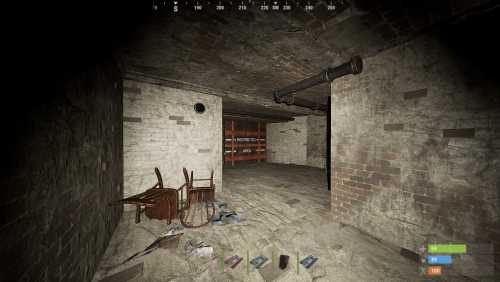
Doomsday-Vault is a wealthy families abandoned hide away for dangerous times, hidden in plain sight deep in the forest. They disappeared under mysterious circumstances and the vault door require's a coded call to open the main blast door. Inside is military grade weapons and ammo with loot that was to keep them safe. Introducing a new twist to electrical puzzles with telephone calls. Very small topside entrance and ideal to be placed as an extra puzzle for your players to find and explore. Contains 2 versions of the Prefab. Summer and Winter Green, Blue and Red card puzzle including a new way to use telephones. Contains Elite, military and assortment of useful loot crates. Red card spawn. Prefab Count: 692 Read me file included for easy installation$18.95 -
Version 1.0.0
19 downloads
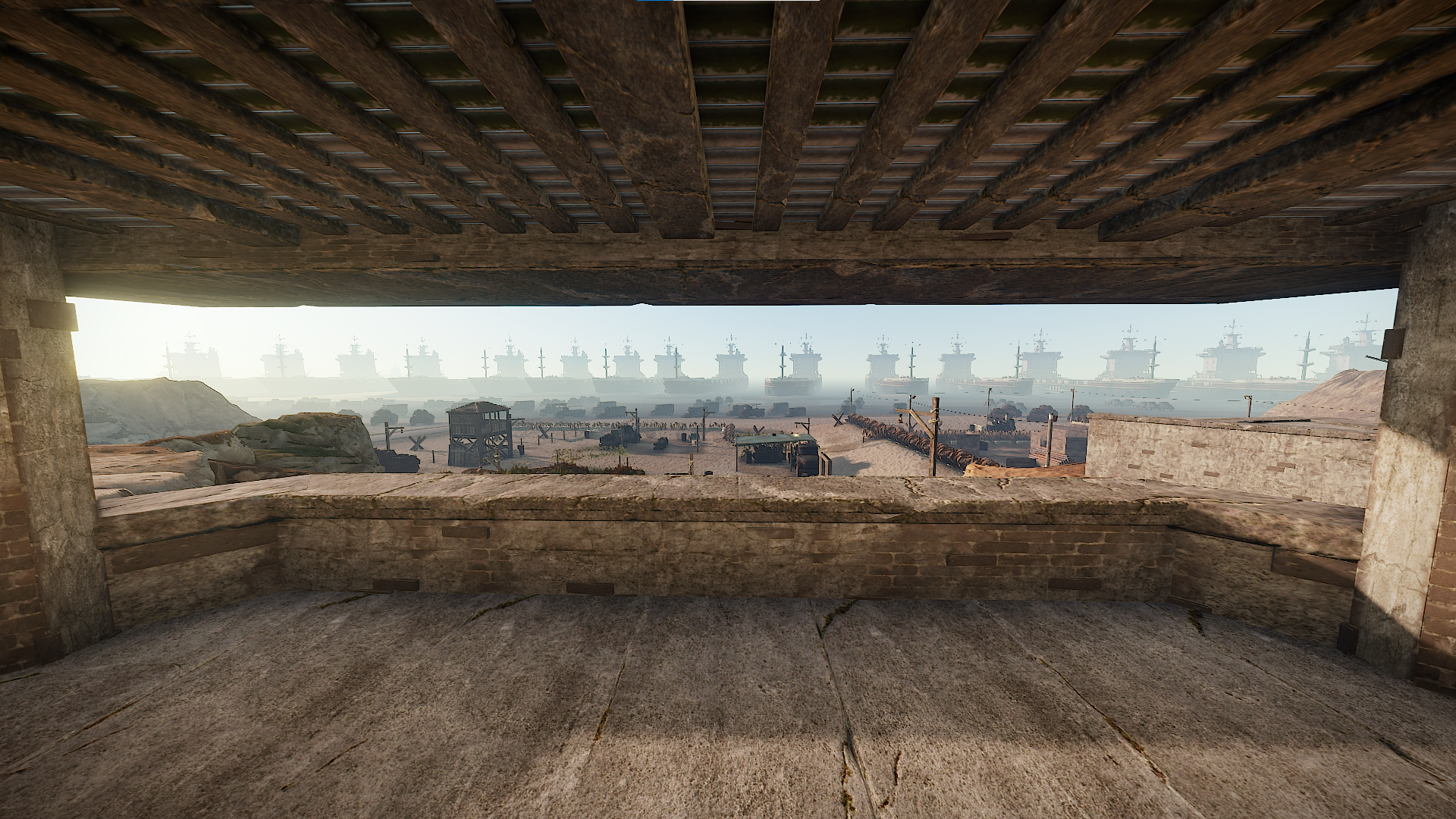
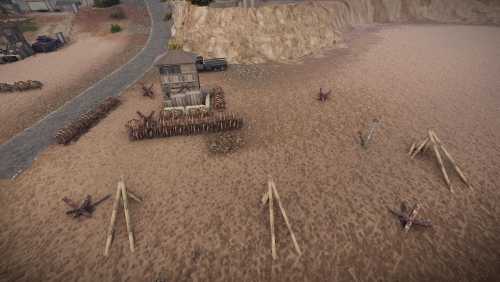
Custom watch-tower with beach obstacles that can be used both on the beach and around any map. To Install:- Place any of the prefabs on your map and adjust the height. These prefab's have been created in a way that allows the map creator to place with ease and may need just a few changes to blend into any existing map. Prefab Count: Watchtower 159 If you have any issues or questions then feel free to join us on our discord channelhttps://discord.gg/3DYPGMxG5s$9.95 -
Version 2.0
7 downloads
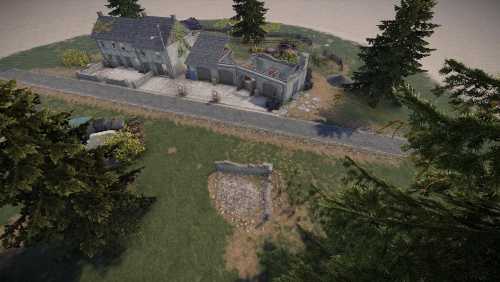
Stolla-Petrol This version of a petrol station can be used as a mini monument or roadside monument. Stolla-Petrol offers your players some-place new to explore and recycle their components after a road run. The buildings have standard loot and a recycler with plenty of places to defend from. The surrounding area allows for players to hide and attack anyone within the Station or passing by. The prefab has a broken garage and abandoned buildings attached, the previous owners abandoned the garage after it attracted the wrong type of clientele and was the center off to many killings. Multi-Level buildings with crates and barrels both inside and outside. The Station can be added to any map both with a road or without. Three versions Summer, Autumn and Winter. To Install:- Place the prefab in a flattish area and apply the prefab modifiers, the prefab has been created in a way that allows the map creator to place with ease and may need just a few changes to blend into any existing map. Prefab Count: 1704 If you have any issues or questions then feel free to join us on our discord channel https://discord.gg/3DYPGMxG5s$18.95-
- 1
-

-
- #prefab
- #world war ii prefab
- (and 7 more)
-
Version 1.0.0
7 downloads
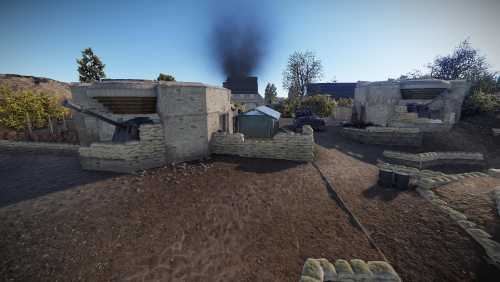
World War II Gun Bunkers We are happy to say that KBEdits are releasing their range of WWII prefabs/monuments and mini arenas, so we are starting with this Three Bunker pack including the 150mm cannon. Based upon gun emplacements on Omaha and Normandy beach, these ready made Gun Bunkers will bring life to any style of map and pave the way for new places to explore. The Bunkers come in 3 build styles and are ready to place on any part of an existing map or new map. Some loot spawns have been added and can be modified at the discretion of the customer so their players have a reward for exploring new and existing areas of their map. These new attractions will add a different start to waking up on the beach. Simply place the bunkers where you wish and then alter the terrain to blend with it, it only requires minor terrain changes and use the floor of the bunker as a guide on the level when placing. Due to the unlimited number of usage for these prefabs they DO NOT come with height/splat/bio or topology additions within the actual prefabs. Placement of the prefabs is up to the customer and screenshots show some of the possible ways the prefabs maybe used. If you have any issues or questions then feel free to join us on our discord channel https://discord.gg/3DYPGMxG5s Disclaimer: Some images have been added to show potential usage of the prefabs and do not reflect the actual prefab itself. The video link is used to show the prefabs in a unique setting within the Rust game. Enjoy the Prefabs KBEdits Team$18.95-
- 2
-
-
- #world war ii bunker
- #world war ii prefab
- (and 9 more)
-
Version 2.0.0
32 downloads
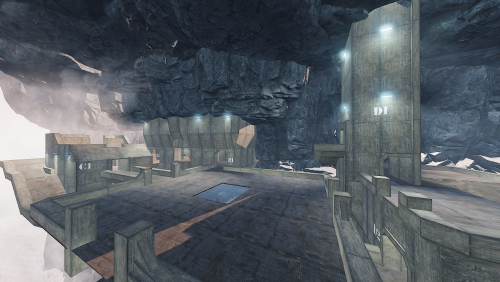
This is an arena style prefab based on Halo 2's Lockout map. Prefrab Count: 4130 Great nostalgia for any Halo fan. I wanted to re-create this for rust to try and bring both worlds together. I did this Arena as a challenge for myself, I learned a tremendous amount while putting this together. Was frustrating at times but the end result was better than expected. This includes: 1. Prefab a. .prefab b. prefab.alpha c. prefab.biome d. prefab.heights e. prefab.splat0 f. prefab.splat1 g. prefab.topology ATTENTION: To place and move Arena where you need it inside RustEdit, please follow these instructions carefully. 1. Update RustEdit. 2. Place the prefabs in your "custom prefabs" folder. 3. In RustEdit, load your own map, create a new map, or use the map provided. 4. Bring up your Scene Hierarachy - View > Sene Hierarachy. or Press H. 5. Click on Prefab List on the top right. 6. Under custom select "Kbedits-Halo-2-Lockout-Arena-v102". 7. Once placed and loaded, BEFORE moving it, break the prefab. 8. Immeadiately after breaking the prefab, in your scene hierarachy a. click on "All" b. at the bottom click Select All 9. Once everything has been selected click on "Disconnect Prefabs". 10. If done correctly you are now free to move the arena anywhere you want with out it breaking. ATTENTION: Protecting your map and your prefabs. 11. Once placed in your map use the prefab list, at the bottom Click Create custom Prefab. a. Radius: 275 b. Fade: 10 c. check all boxes d. In each drop down select "Everything" e. Make sure "Convert Selection To Group" IS CHECKED. d. Enter a new name for the prefab itself. f. Then click on Save Prefab. After this is all done, click "Edit" at the top left. Select "Password" Set a new password for your map and do not share it with anyone. Do not forget your password or you wont be able to edit your map. This prevents people from downloading your map and taking free prefabs from it. Repeat step 11. for your entire map, to protect everything on your map. If players complain about lag while playing in this arena, Try to distance the arena itself from any other major occupied areas in your map. Works best as a stand-alone. Alot of players don't have beefy computers, and this arena does have a lot of Lights. You can remove all the lights from the arena to help improve fps. a. Scene Hierarachy b. Search "Plight" or "Spotlight" c. Select all and then delete the prefabs by pressing your "Delete" key. (make sure your mouse isn't over any of the RustEdit UI's. This will delete all the lights used. If you have any issues, please post in the support section of this download.$30.00 -

Version 1.0.1
10 downloads
This DIY pack is to help teach people how to set up electricals inside Rust Edit. Create security door access via fuses and colour cards, 3 colour coded security doors with electrical kickstart for rust. Allowing players to exit monuments via press button. ATTENTION: WHEN USING THIS PREFAB PACK PLEASE ENSURE YOU ARE USING THE MOST UPDATED Oxide.Ext.RustEdit.dll https://github.com/k1lly0u/Oxide.Ext.RustEdit This pack includes the following. 1. Two-way Triple Door/Fusebox prefabs. a. All prefabs needed to set up a 3 Door, 3 Card reader and 3 Fusebox setup. 2. Easy to use Test Area. 2. "README.txt" to help you make the proper electrical connections. 3. "Visual Diagram" to help you make the proper electrical connections. What do I do with this? 1. Open the "Visual Diagram" that came with the download. 2. Open the "README.txt" that came with the download. (Use both of these as references) 3. Place the downloaded prefab pack somewhere in your map on RustEdit. 4. Start at step 1, use the visual references to guide you along. 5. Once all electrical connections have been made, use the Test Area. 6. Drag all non-interactable prefabs into the back right of the Test Area. a. All Generator Static b. All Orswitch, Andswitch, Timerswitch, etc.. 7. Drag all interactable prefabs into the Test Area. a. Security Doors(s) b. Card Reader(s) c. Door Manipulator(s) d. Fusebox(s) 8. Once everything is in place group all your prefabs using the "Make Custom Prefab" 9. Set a password on your map that you'll remember. 10. Load up your map and test your electricals. (in rare cases an autosave and restart are needed for electrics to work) Any Issues, bugs, broken or missing prefabs, questions, etc... Please refer to the support section where you downloaded this pack. Want to hang out with KBEdit's Team! Feel free to use the discord link below. Kbedits Discord https://discord.gg/7PQAwsU Kbedits Website https://kbedits.io$9.99 -

Version 1.0.0
5 downloads
This DIY pack is to help teach people how to set up electricals inside Rust Edit. Create security door access via fuses and colour cards, 2 colour coded security doors. Allowing players to exit monuments via press button. ATTENTION: WHEN USING THIS PREFAB PACK PLEASE ENSURE YOU ARE USING THE MOST UPDATED Oxide.Ext.RustEdit.dll https://github.com/k1lly0u/Oxide.Ext.RustEdit This pack includes the following. 1. Two-way Double Door/Fusebox prefabs. a. All prefabs needed to set up a 2 Door, 2 Card reader and 2 Fusebox setup. 2. Easy to use Test Area. 2. "README.txt" to help you make the proper electrical connections. 3. "Visual Diagram" to help you make the proper electrical connections. What do I do with this? 1. Open the "Visual Diagram" that came with the download. 2. Open the "README.txt" that came with the download. (Use both of these as references) 3. Place the downloaded prefab pack somewhere in your map on RustEdit. 4. Start at step 1, use the visual references to guide you along. 5. Once all electrical connections have been made, use the Test Area. 6. Drag all non-interactable prefabs into the back right of the Test Area. a. All Generator Static b. All Orswitch, Andswitch, Timerswitch, etc.. 7. Drag all interactable prefabs into the Test Area. a. Security Doors(s) b. Card Reader(s) c. Door Manipulator(s) d. Fusebox(s) 8. Once everything is in place group all your prefabs using the "Make Custom Prefab" 9. Set a password on your map that you'll remember. 10. Load up your map and test your electricals. (in rare cases an autosave and restart are needed for electrics to work) Any Issues, bugs, broken or missing prefabs, questions, etc... Please refer to the support section where you downloaded this pack. Want to hang out with KBEdit's Team! Feel free to use the discord link below. Kbedits Discord https://discord.gg/7PQAwsU Kbedits Website https://kbedits.io$7.95 -

Version 1.0.0
421 downloads
Create a security door with access via fuse and colour cards. Allowing players to exit monuments via press button. This DIY pack is to help teach people how to set up electricals inside Rust Edit. ATTENTION: WHEN USING THIS PREFAB PACK PLEASE ENSURE YOU ARE USING THE MOST UPDATED Oxide.Ext.RustEdit.dll https://github.com/k1lly0u/Oxide.Ext.RustEdit This pack includes the following. 1. Two-way Single Door/Fusebox prefabs. a. All prefabs needed to set up a Green Door/Card reader and Fusebox. b. All prefabs needed to set up a Blue Door/Card reader and Fusebox. c. All prefabs needed to set up a Red Door/Card reader and Fusebox. 2. Easy to use Test Area. 2. "README.txt" to help you make the proper electrical connections. 3. "Visual Diagram" to help you make the proper electrical connections. What do I do with this? 1. Open the "Visual Diagram" that came with the download. 2. Open the "README.txt" that came with the download. (Use both of these as references) 3. Place the downloaded prefab pack somewhere in your map on RustEdit. 4. Start at step 1, use the visual references to guide you along. 5. Once all electrical connections have been made, use the Test Area. 6. Drag all non-interactable prefabs into the back right of the Test Area. a. All Generator Static b. All Orswitch, Andswitch, Timerswitch, etc.. 7. Drag all interactable prefabs into the Test Area. a. Security Doors(s) b. Card Reader(s) c. Door Manipulator(s) d. Fusebox(s) 8. Once everything is in place group all your prefabs using the "Make Custom Prefab" 9. Set a password on your map that you'll remember. 10. Load up your map and test your electricals. (in rare cases an autosave and restart are needed for electrics to work) Any Issues, bugs, broken or missing prefabs, questions, etc... Please refer to the support section where you downloaded this pack. Want to hang out with KBEdit's Team! Feel free to use the discord link below. Kbedits Discord https://discord.gg/7PQAwsU Kbedits Website https://kbedits.ioFree -
Version 1.0.0
4 downloads
Create security door access via fuses and colour cards, 3 colour coded security doors with electrical kickstart for rust. Allowing players to exit monuments via press button. ATTENTION: WHEN USING THIS PREFAB PACK PLEASE ENSURE YOU ARE USING THE MOST UPDATED Oxide.Ext.RustEdit.dll - https://github.com/k1lly0u/Oxide.Ext.RustEdit Brought to you by KBedits, this prefab pack allows you to quickly setup triple-door/fuse monument puzzles. The electrical connections made in this prefab pack are NOT meant to be broken. If any electrical connections are broken by disconnecting Input/Output's can break the entire electrical set up. If you are curious on how to do these yourself, please refer to our DIY prefab packs. This pack includes the following. 1. Two-way Triple Security Door setups. a. Green Door/Card Reader to Blue Door/Card Reader to Red Door/Card Reader, Fusebox and Electric connections. b. Red Door/Card Reader to Blue Door/Card Reader to Red Door/Card Reader, Fusebox and Electric connections. Timerswitch included, to allow more time to pass, than standard fuse time. c. Green Door/Card Reader to Green Door/Card Reader to Green Door/Card Reader, Fusebox and Electric connections. Timerswitch included, to allow more time to pass, than standard fuse time. 2. Electrical Kickstart a. Start electrical flow to prevent electrical failure. b. Some components need to be triggered to work, this is that solution. What does this do? This allows setting up triple door puzzles. a. Player puts fuse in, and opens first door. b. Player puts 2nd fuse in, and opens second door. c. Player puts 3rd fuse in, and opens third door. What do I do with this? 1. Place downloaded prefab in rust edit and break the prefab. 2. Adjust Card Reader duration to specific time needed. (default: 10 seconds) 3. Adjust Timerswitch duration to specific time needed. (default: 10 seconds) 4. Depending on your needs, you will need to adjust times depending on the distance between each door. 5. Move Interactable prefabs. a. Security Doors(s) b. Card Reader(s) c. Door Manipulator(s) d. Fusebox(s) 6. Hide Power sources and switches to a place a player will not interact with. a. Hide Kickstarter (Source of Power) b. All Orswitch, Andswitch, Timerswitch, etc... c. Any and all prefabs the player should NOT interact with. All electrical prefabs in this pack have been tested and are working. If you have ANY issues, please post in the support section.$5.99 -
Version 1.0.0
4 downloads
Create security door access via fuses and colour cards, 2 colour coded security doors. Allowing players to exit monuments via press button. ATTENTION: WHEN USING THIS PREFAB PACK PLEASE ENSURE YOU ARE USING THE MOST UPDATED Oxide.Ext.RustEdit.dll - https://github.com/k1lly0u/Oxide.Ext.RustEdit Brought to you by KBedits, this prefab pack allows you to quickly setup double-door monument puzzles. The electrical connections made in this prefab pack are NOT meant to be broken. If any electrical connections are broken by disconnecting Input/Output's can break the entire electrical set up. If you are curious on how to do these yourself, please refer to our DIY prefab packs. This pack includes the following. 1. Two-way Double Security Door setups. a. Green Door/Card Reader to Green Door/Card Reader, Fusebox and Electric connections. b. Green Door/Card Reader to Blue Door/Card Reader, Fusebox and Electric connections. c. Blue Door/Card Reader to Red Door/Card Reader, Fusebox and Electric connections. What do I do with this? 1. Place downloaded prefab in rust edit and break the prefab. 2. Move Interactable prefabs. a. Security Doors(s) b. Card Reader(s) c. Door Manipulator(s) d. Fusebox(s) 3. Hide Power sources and switches to a place a player will not interact with. a. All Generator Static b. All Orswitch, Andswitch, Timerswitch, etc.. All electrical prefabs in this pack have been tested and are working. If you have ANY issues, please post in the support section.$4.99 -
Version 1.0.0
399 downloads
Create security door access via fuses and colour cards, 1 colour coded security door. Allowing players to exit monuments via press button. ATTENTION: WHEN USING THIS PREFAB PACK PLEASE ENSURE YOU ARE USING THE MOST UPDATED Oxide.Ext.RustEdit.dll https://github.com/k1lly0u/Oxide.Ext.RustEdit Brought to you by KBedits, this prefab pack allows you to quickly setup basic monument puzzles. The electrical connections made in this prefab pack are NOT meant to be broken. If any electrical connections are broken by disconnecting Input/Output's can break the entire electrical set up. If you are curious on how to do these yourself, please refer to our DIY prefab packs. This pack includes the following. 1. Two-way Single Security Door w/Fusebox setups. a. Green Security/Card Reader, Fusebox and Electric connections. b. Blue Security/Card Reader, Fusebox and Electric connections. c. Red Security/Card Reader, Fusebox and Electric connections. What do I do with this? 1. Place downloaded prefab in rust edit and break the prefab. 2. Move interactable prefabs. a. Security Doors(s) b. Card Reader(s) c. Door Manipulator(s) d. Fusebox(s) 3. Hide Power sources and switches to a place a player will not interact with. a. All Generator Static b. All Orswitch, Andswitch, Timerswitch, etc.. All electrical prefabs in this pack have been tested and are working. If you have ANY issues, please post in the support section.Free