
Mevent
-
Posts
3,532 -
Joined
-
Last visited
-
Days Won
53
Content Type
Profiles
Warranty Claims
Downloads
Forums
Store
Services
Downloads Plus Support
DOWNLOADS EXTRA
Reels
Everything posted by Mevent
-
Changed Status from Pending to Closed
-
Changed Fixed In to 1.5.22
-
Changed Status from Pending to Closed
-
Changed Status from Work in Progress to Closed
-
Changed Status from Pending to Closed Changed Fixed In to 1.5.28
-
Changed Status from Pending to Closed Changed Fixed In from 1.5.22 to 1.5.28
-
 I'll see what I can do about that. But, uh. Why delete all the awards? O.o
-
Okay, I'll fix it!
-
Version 1.1.35
8,872 downloads
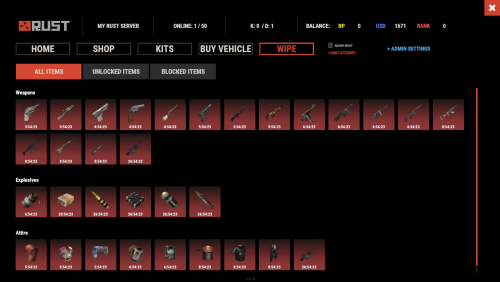
Daily Rewards helps Rust admins keep players engaged until the end of the wipe. Players get a different reward for each day they log in, which livens up the game and gets them to play longer. It also helps you draw in new players and keep the ones who come back. Features of Daily Rewards Beautiful and user-friendly interface Daily rewards for logging in Gives players a reason to stay in the game longer Keeps players on the server until the end of the wipe Compatibility with many plugins Edit rewards and config via in-game interface (no JSON editing required) By default, the plugin supports English, Russian, and Chinese languages Cooldown time before receiving an award Rewards are saved in the plugin's inventory Players can't claim rewards from the inventory while under a build block, raid block, or combat block Commands daily: open the daily rewards interface dailyrewards.wipe: wipe player data dailyrewards.top [format: csv, empty (default)] [limit (10 is default)]: list players with the reward day each one has reached. dailyrewards.manage: manage daily reward settings dailyrewards.manage playtime set <steam_id> <amount>: sets the playtime for the specified player. dailyrewards.template [fullscreen/inmenu] [target_template]: sets the interface template for daily rewards. Parameters: [fullscreen/inmenu]: Type of interface template to set. Valid values: fullscreen or inmenu. [target_template]: For the inmenu template, you must specify the template number (1 or 2). Permissions dailyrewards.use: lets you open the DailyRewards menu dailyrewards.edit: lets you enable edit mode Video Web Config Editor Manage the DailyRewards settings in our web config editor. You change the config in a browser form instead of editing files on the server by hand. P.S. The web config editor is open to members of the "DailyRewards" group in our Discord server. Join at https://discord.gg/mevent and ask for the group. FAQ Q: Where can I see an example of a config? A: Config Q: How do I add DailyRewards to the ServerPanel menu? A: You can do this directly from the ServerPanel in-game: 1. Open the ServerPanel menu in-game. 2. If you have permission to edit, switch the panel to edit mode so you can see the blue "EDIT CATEGORY" and "EDIT PAGES" buttons. 3. Choose the category where you want DailyRewards to appear and click the "EDIT CATEGORY" button for that category. 4. While you are in this category in the ServerPanel, click the "EDIT PAGES" button to create a new page (or edit an existing one) for DailyRewards. 5. For that page, set these exact parameters: Type: Plugin Plugin Name: DailyRewards Plugin Hook: API_OpenPlugin 6. Save the changes. The DailyRewards button will now appear in the ServerPanel in the category you selected.$34.95 -
 Already working on it
- 337 comments
-
- 1
-

-
- #building
- #foundation
- (and 28 more)
-
Version 1.0.12
247 downloads
Plugin Description "Auto Recycler" is a Rust plugin with extra recycling features for players: automatic item recycling, a virtual recycler, and special recycling crates. With admin permission, you can set which items players cannot recycle automatically. Features Automatic Recycling: Players can set specific items for automatic recycling. These items will be recycled automatically when they enter their inventory. Virtual Recycler: Players can open a virtual recycler and recycle items from anywhere in the game. Recycling Crate: A special item that works as a portable recycler. Customizable Configuration: The config lets you exclude specific items from recycling or allow them. Permissions autorecycler.admin: Grants access to all admin functions of the plugin. autorecycler.autorec: Allows players to use automatic recycling. autorecycler.recvirtual: Provides access to the virtual recycler. autorecycler.characteristics: Allows modification of item characteristics related to recycling. autorecycler.recboxbuy: Enables the purchase of the Recbox. Chat Commands /ar: Allows players to use the automatic recycler. /vrec: Allows players to use a virtual recycler (configurable command). /recbox: Displays information about the costs of purchasing a Recbox. /recboxbuy: Allows players to buy a Recbox if they have the required resources. NEW /autorectoggle turns the AutoRecycler on and off Additional Information All features are available through the UI. The plugin saves player data, so automatic recycling settings carry over between sessions. In the configuration file, admins can change how the plugin behaves, including Recbox costs and the recycling properties of items. Note Make sure players have the right permissions to use the plugin's features. If you have any questions or problems, join my discord https://discord.gg/D2zTWCEnrN Web Config Editor Manage the AutoRecycler settings in our web config editor. You change the config in a browser form instead of editing files on the server by hand. P.S. The web config editor is open to members of the "AutoRecycler" group in our Discord server. Join at https://discord.gg/mevent and ask for the group.$21.95 -

Version 1.1.3
157 downloads
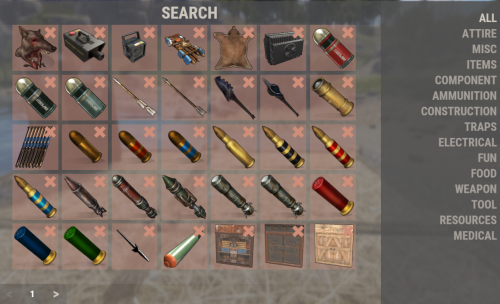
The "F1 Item Menu" plugin lets players open a menu with a command, pick Rust items and add them to their inventory. The menu has a search field and page navigation for browsing the items. Command: /f1menu: opens the F1 item menu, where the player selects items and adds them to their inventory. Permissions: f1itemmenu.f1: required to use the /f1menu command. How to use the plugin: 1. To open the menu, the player enters the /f1menu command, provided they have the f1itemmenu.f1 permission. 2. In the menu, the player can search for items by entering a search term and clicking "Search." 3. The player can navigate through the available items by clicking the arrow buttons (< and >) to go to the previous or next page. 4. After selecting an item, the player is presented with another menu to specify the quantity of the chosen item. 5. The player can then choose the desired quantity (1, 10, 100, 1000, 10000) and click "Close" to exit the menu. 6. The selected item is automatically added to the player's inventory. { "Enable Discord Webhook": true, "Webhook URL": "", "Username": "Rust Server", "Avatar URL": "", "Discord Message Format": "Player **{playerName}** has taken **{quantity}** of **{itemName}**." } Web Config Editor Manage the F1ItemMenu settings in our web config editor. You change the config in a browser form instead of editing files on the server by hand. P.S. The web config editor is open to members of the "F1ItemMenu" group in our Discord server. Join at https://discord.gg/mevent and ask for the group.$15.95- 5 comments
- 2 reviews
-
- 1
-

-
- #spawnitems
- #f1console
- (and 3 more)
-

Suggestion and [Error] Newtonsoft.Json.JsonReaderException:
Mevent replied to DeutscherRitterPlatz's Support Report in Support
Changed Status from Pending to Work in Progress -
@m3dus4 If you have any questions or concerns, please feel free to contact me. I am always ready to help. If you have a moment, I would really appreciate it if you could leave feedback on the plugin. Your feedback helps me improve and grow, and helps other customers make informed decisions about the plugin. Best regards, Mevent
-
Changed Status from Pending to Closed
-
Changed Status from Pending to Closed Changed Fixed In to 1.2.16
-
The only thing is that I would not make the frequency too frequent, because it loads the server, especially if there are many players on the server
-
Changed Status from Pending to Closed
-
Changed Status from Pending to Closed
-
 Hi! You can customize the Events position in the config
-
Changed Status from Pending to Work in Progress
-
Hi, I've added this to my ToDo list and will try to get to it soon. However, I would like to warn you that due to the large number of requests, the response time to a ticket may increase.
-
Hi! What kind of problems are you experiencing? It is important to remember that Top Players are refreshed once every N seconds ("Top Refresh Rate" from the config)