
Vinni_TV_'s Wishlist
-

$2.50
Suggestion Bot (simple)
By The Donk in Discord Bots
A super simple Discord bot that:
- watches ONE channel (your suggestions channel)
- whenever someone sends a message there:
- makes a thread with the same title as the message
- reacts with 👍 and 👎
- #bot
- #suggestion
- (and 2 more)
-
$3.99
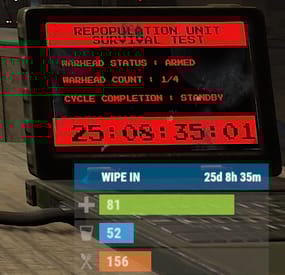
Wipe Status
The plugin displays the time until the next wipe in the status bar. Depends on AdvancedStatus plugin.
The ability to display the remaining time until the wipe: If there are N days left. Configurable in the configuration file; If player is in a safe zone or building privilege zone; The option to choose between a server wipe and a manually specified wipe; The ability to automatically generate language files for different languages(filled in English); The ability to customize the status bar for each of wipes; The ability to specify the order of the bar; The ability to change the height of the bar; The abillity to customize the color and transparency of the background; The ability to set a material for the background; The ability to switch between CuiRawImageComponent and CuiImageComponent for the image; The ability to get images from the local folder(*SERVER*\oxide\data\AdvancedStatus\Images); The abillity to set own image and customize the color and transparency of the image; The abillity to set sprite instead of the image; The ability to customize the color, size, font and outline of the text.
wipestatus.admin - Provides the ability to set custom date of wipe.
{ "Chat command": "wipe", "Is it worth enabling GameTips for messages?": true, "List of language keys for creating language files": [ "en" ], "Is it worth displaying the wipe timer only when players in the safe zone or building privilege?": false, "The number of days before the wipe when the status bar will start to display. A value of 0 enables constant display": 0, "Bar settings key for a vanilla wipe": "_default", "Custom wipe dates list. Format: yyyy-MM-dd HH:mm. Example: 2025-12-25 13:30": {}, "List of status bar settings. Leave empty or null to recreate the default list": { "_default": { "Progress_Main_Color(Hex or RGBA)": "1 1 1 0.15", "Progress_Main_Transparency": 0.15, "BarType(TimeProgressCounter or TimeCounter)": "TimeCounter", "Order": 10, "Height": 26, "Main_Color(Hex or RGBA)": "#0370A4", "Main_Transparency": 0.7, "Main_Material(empty to disable)": "", "Image_Url": "https://i.imgur.com/FKrFYN5.png", "Image_Local(Leave empty to use Image_Url)": "WipeStatus_Default", "Image_Sprite(Leave empty to use Image_Local or Image_Url)": "", "Image_IsRawImage": false, "Image_Color(Hex or RGBA)": "#0370A4", "Image_Transparency": 1.0, "Is it worth enabling an outline for the image?": false, "Image_Outline_Color(Hex or RGBA)": "0.1 0.3 0.8 0.9", "Image_Outline_Transparency": 1.0, "Image_Outline_Distance": "0.75 0.75", "TextKey": "Bar_default", "Text_Size": 12, "Text_Color(Hex or RGBA)": "#FFFFFF", "Text_Font(https://umod.org/guides/rust/basic-concepts-of-gui#fonts)": "RobotoCondensed-Bold.ttf", "Text_Offset_Horizontal": 0, "Is it worth enabling an outline for the text?": false, "Text_Outline_Color(Hex or RGBA)": "#000000", "Text_Outline_Transparency": 1.0, "Text_Outline_Distance": "0.75 0.75", "SubText_Size": 12, "SubText_Color(Hex or RGBA)": "#FFFFFF", "SubText_Font": "RobotoCondensed-Bold.ttf", "Is it worth enabling an outline for the sub text?": false, "SubText_Outline_Color(Hex or RGBA)": "0.5 0.6 0.7 0.5", "SubText_Outline_Transparency": 1.0, "SubText_Outline_Distance": "0.75 0.75", "Progress_Reverse": false, "Progress_Color(Hex or RGBA)": "#0370A4", "Progress_Transparency": 0.7, "Progress_OffsetMin": "0 0", "Progress_OffsetMax": "0 0" } }, "Version": { "Major": 0, "Minor": 1, "Patch": 10 } }
EN: { "CmdMainAdmin": "Available admin commands:\n\n<color=#D1CBCB>/wipe</color> <color=#D1AB9A>bar</color> <color=#D1CBCB>*booleanValue*(optional)</color> - Toggle the wipe bar display\n<color=#D1CBCB>/wipe</color> <color=#D1AB9A>time</color> - Current time based on server's timezone\n<color=#D1CBCB>/wipe</color> <color=#D1AB9A>add</color> <color=#D1CBCB>*wipeDate* *barId*(optional) *numericValue*(optional) *numericValue*(optional)</color> - Add a custom wipe date. Optionally, you can specify the style of the status bar, interval/spacing between wipes, and the number of intervals. Date format: yyyy-MM-dd HH:mm\n<color=#D1CBCB>/wipe</color> <color=#D1AB9A>add bar</color> <color=#D1CBCB>*wipeDate* *barID*(optional) *newBarId*(optional) *targetBarId*(optional)</color> - Add new status bar settings. Optionally, specify the ID of an existing bar to copy from\n<color=#D1CBCB>/wipe</color> <color=#D1AB9A>update</color> <color=#D1CBCB>*wipeDate* *newBarId*</color> - Update the status bar settings key for the specified custom wipe date. Use 'vanilla' instead of a wipe date to select the vanilla wipe\n<color=#D1CBCB>/wipe</color> <color=#D1AB9A>clear</color> - Clear all custom wipe dates\n\n--------------------------------------------------", "CmdMain": "Available commands:\n\n<color=#D1CBCB>/wipe</color> <color=#D1AB9A>bar</color> <color=#D1CBCB>*booleanValue*</color>(optional) - Toggle the wipe bar display\n\n--------------------------------------------------", "CmdServerTime": "Current real server time: '{0}'", "CmdNewDateAdded": "The new date '{0}' has been successfully added!", "CmdNewDateRangeAdded": "The list of dates was successfully added!", "CmdNewDateAddFailed": "Invalid format or the date is earlier than the current one. Example: '{0}'", "CmdUpdateFailed": "Failed to add/update status bar settings for '{0}'!", "CmdClearDates": "Custom dates list has been successfully cleared!", "CmdBarEnabled": "Displaying the wipe bar is enabled!", "CmdBarDisabled": "Displaying the wipe bar is disabled!", "Bar_default": "WIPE IN" } RU: { "CmdMainAdmin": "Доступные админ команды:\n\n<color=#D1CBCB>/wipe</color> <color=#D1AB9A>bar</color> <color=#D1CBCB>*булевоеЗначение*(опционально)</color> - Переключение отображения вайп бара\n<color=#D1CBCB>/wipe</color> <color=#D1AB9A>time</color> - Текущее время по часовому поясу сервера\n<color=#D1CBCB>/wipe</color> <color=#D1AB9A>add</color> <color=#D1CBCB>*датаВайпа* *айдиБара*(опционально) *числовоеЗначение*(опционально) *числовоеЗначение*(опционально)</color> - Добавление кастомной даты вайпа. Опционально можно указать стиль статус бара, интервал/отступ между вайпами и кол-во интервалов. Формат даты: yyyy-MM-dd HH:mm\n<color=#D1CBCB>/wipe</color> <color=#D1AB9A>add bar</color> <color=#D1CBCB>*айдиНовогоБара* *айдиЦелевогоБара*(опционально)</color> - Добавление новых настроек статус бара. Опционально можно указать айди исходного статус бара для копирования\n<color=#D1CBCB>/wipe</color> <color=#D1AB9A>update</color> <color=#D1CBCB>*датаВайпа* *новоеАйдиБара*</color> - Обновление ключа настроек статус бара для указанной даты вайпа. Используйте 'vanilla' вместо даты вайпа для выбора ванильного вайпа\n<color=#D1CBCB>/wipe</color> <color=#D1AB9A>clear</color> - Очистка всех кастомных дат вайпа\n\n--------------------------------------------------", "CmdMain": "Доступные команды:\n\n<color=#D1CBCB>/wipe</color> <color=#D1AB9A>bar</color> <color=#D1CBCB>*булевоеЗначение*</color>(опционально) - Переключение отображения вайп бара\n\n--------------------------------------------------", "CmdServerTime": "Текущее реальное серверное время: '{0}'", "CmdNewDateAdded": "Новая дата '{0}' успешно добавлена!", "CmdNewDateRangeAdded": "Список дат был успешно добавлен!", "CmdNewDateAddFailed": "Не верный формат или дата меньше текущей. Пример: '{0}'", "CmdUpdateFailed": "Не удалось добавить/обновить настройки статус бара для '{0}'!", "CmdClearDates": "Список дат был успешно очищен!", "CmdBarEnabled": "Отображение вайп бара включено!", "CmdBarDisabled": "Отображение вайп бара выключено!", "Bar_default": "ВАЙП ЧЕРЕЗ" }
bar *booleanValue*(optional) - Toggle wipe bar visibility; time - Current time based on server's timezone. Permission "wipestatus.admin" required; add *wipeDate* *barID*(optional) *numberValue*(optional) *numberValue*(optional) - Add a custom wipe date. Optionally, you can specify the style of the status bar, interval/spacing between wipes, and the number of intervals. Date format: yyyy-MM-dd HH:mm. Permission "wipestatus.admin" required; add bar *wipeDate* *barID*(optional) *newBarId*(optional) *targetBarId*(optional) - Add new status bar settings. Optionally, specify the ID of an existing bar to copy from. Permission "wipestatus.admin" required; update *wipeDate* *newBarId* - Update the status bar settings key for the specified custom wipe date. Use 'vanilla' instead of a wipe date to select the vanilla wipe. Permission "wipestatus.admin" required; clear - Clear all custom wipe dates. Permission "wipestatus.admin" required. Example:
/wipe add "2023-12-28 15:16" /wipe add bar "test" "_default" /wipe add "2024-07-16 19:00" "test" 7 20 - Starting from the date 2024-07-16 19:00, 7 days will be added 20 times, with "test" status bar style. /wipe update "vanilla" "test" /wipe update "2025-12-25 13:30" "test"
-
$9.99
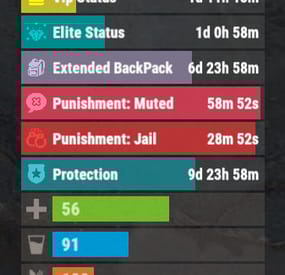
Permissions Status
The plugin that displays temporary permissions and groups in the status bar. Depends on AdvancedStatus plugin.
The ability to display temporary and permanent permissions; The ability to display temporary and permanent groups; The ability to display temporary and permanent permissions from groups; The ability to automatically generate language files for different languages(filled in English); The ability to customize the bar for each permission and group; The ability to choose between bar types(TimeCounter and TimeProgressCounter); The ability to specify the order of the bar; The ability to change the height of the bar; The abillity to customize the color and transparency of the background; The ability to set a material for the background; The ability to switch between CuiRawImageComponent and CuiImageComponent for the image; The ability to get images from the local folder(*SERVER*\oxide\data\AdvancedStatus\Images); The abillity to set own image and customize the color and transparency of the image; The abillity to set sprite instead of the image; The ability to customize the color, size, font and outline of the text.
{ "Chat command": "pstatus", "Is it worth enabling GameTips for messages?": true, "List of language keys for creating language files": [ "en" ], "Is it worth clearing saved settings for permissions and groups upon detecting a wipe?": false, "Is it worth displaying the status bar only when players are in the safe zone or have building privilege?": false, "Default display mode for new permissions(Disabled, Temporary, UntilWipe, Permanent, All)": "Temporary, UntilWipe", "Default display mode for new groups(Disabled, Temporary, UntilWipe, Permanent, All)": "Temporary, UntilWipe", "Wipe ID": null, "Version": { "Major": 0, "Minor": 1, "Patch": 4 } } P.S. The default status bar configuration can be adjusted in *SERVER*\oxide\data\PermissionsStatus\BarsConfig.json under the key "_default".
EN: { "CmdFailed": "The entered command is incorrect! Try '/{0} display'", "CmdDisplayEnabled": "Displaying the bar is enabled!", "CmdDisplayDisabled": "Displaying the bar is disabled!", "BarUntilWipe": "Until wipe", "BarPermanent": "Permanent" } RU: { "CmdFailed": "Введена не верная команда! Попробуйте '/{0} display'", "CmdDisplayEnabled": "Отображение бара включено!", "CmdDisplayDisabled": "Отображение бара выключено!", "BarUntilWipe": "До вайпа", "BarPermanent": "Постоянный" } The language file is generated during the plugin initialization process. Additionally, when creating a new permission or group, a key for it will be automatically added.
Note: You can also specify in the configuration file the generation of language files for other languages besides en and ru.
In the "\data\PermissionsStatus\" folder, there are three files:
BarsConfig.json - stores status bar settings with their unique keys. GroupsConfig.json - contains settings for groups. PermissionsConfig.json - contains settings for permissions. -
$14.99$9.99Advanced Recycler
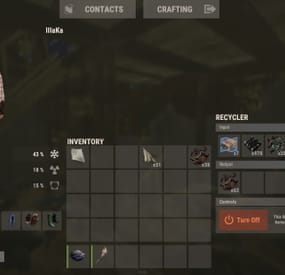
An excellent plugin for item recycling with extensive functionality.
The ability to log successful recycling; The ability to create new permissions; The ability to customize permissions flexibly, including both new and existing ones; The ability to have multiple permissions at the same time, with the selection of the best limits from the available permissions; The ability to configure the recycling efficiency for each permission; The ability to configure the scrap return percentage when recycling blueprints for each permission; The ability to configure the chance to return the original item when recycling blueprints for each permission; The ability to configure forbidden items for recycling for each permission; The ability to configure the recycling speed for each permission; The ability to configure the recycling cycle limit per use for each permission; The ability to configure the recycling slot limit for each permission; The ability to configure the recycling cooldown for each permission; The ability to purchase a bypass for the recycle cooldown; The ability to configure the daily recycling limit for each permission; The ability to purchase additional recycles after reaching the daily limit; The ability to count recycling only when at least one item is successfully recycled; The ability to forbid recycling when wounded; The ability to forbid recycling while swimming; The ability to forbid recycling while mounted on certain seats; The ability to forbid recycling in specified monuments, by name or by monument type; The ability to forbid recycling in someone else's building privileges; The ability to forbid recycling when taking damage; The ability to forbid recycling during a combat block; The ability to forbid recycling during a raid block; The ability to automatically generate language files for specified languages(with content filled in English); The ability to display a status bar while waiting for a cooldown; The ability to choose between bar types(TimeCounter and TimeProgressCounter); The ability to specify the order of the bar; The ability to change the height of the bar; The ability to customize the color and transparency of the background; The ability to set a material for the background; The ability to switch between CuiRawImageComponent and CuiImageComponent for the image; The ability to get images from the local folder(*SERVER*\oxide\data\AdvancedStatus\Images); The ability to set own image and customize the color and transparency of the image; The ability to set sprite instead of the image; The ability to customize the color, size and font of the text.
{ "Chat command": "rec", "Is it worth enabling GameTips for messages?": true, "Is it worth using Notify plugins for messages instead of the vanilla UI?": false, "Specify the regular message type for notify": 0, "Specify the warning message type for notify": 1, "Is it worth using the AdvancedStatus plugin?": true, "Is it worth saving recycling logs to a file?": true, "List of language keys for creating language files": [ "en" ], "Is it worth allowing blueprint recycling based on permissions?": true, "Price to skip 60 seconds of recycler cooldown": 10.0, "List of mount names where recycling is prohibited": [ "horsesaddle", "horsesaddlerear", "bikedriverseat", "bikepassengerseat", "motorbikedriverseat", "motorbikepassengerseat", "modularcardriverseat", "modularcarpassengerseatleft", "modularcarpassengerseatright", "modularcarpassengerseatlesslegroomleft", "modularcarpassengerseatlesslegroomright", "modularcarpassengerseatsidewayleft", "miniheliseat", "minihelipassenger", "transporthelipilot", "transporthelicopilot", "attackhelidriver", "attackheligunner", "submarinesolodriverstanding", "submarineduodriverseat", "submarineduopassengerseat", "snowmobiledriverseat", "snowmobilepassengerseat", "snowmobilepassengerseat tomaha", "workcartdriver", "locomotivedriver", "craneoperator", "batteringramseat", "ballistagun.entity" ], "Status. Bar - Display time in seconds. A value of 0 keeps it visible until the cooldown ends": 15.0, "Status. Bar - Type(TimeProgressCounter or TimeCounter)": "TimeCounter", "Status. Bar - Height": 26, "Status. Bar - Order": 10, "Status. Background - Color(Hex or RGBA)": "#EFC570", "Status. Background - Transparency": 0.7, "Status. Background - Material(empty to disable)": "", "Status. Image - Url": "https://gitlab.com/IIIaKa/images/-/raw/main/StatusBars/AdvancedStatus_SandClock.png", "Status. Image - Local(Leave empty to use Image_Url)": "AdvancedStatus_SandClock", "Status. Image - Sprite(Leave empty to use Image_Local or Image_Url)": "", "Status. Image - Is raw image": false, "Status. Image - Color(Hex or RGBA)": "#EFC570", "Status. Image - Transparency": 1.0, "Status. Image Outline - Color(Hex or RGBA)": "0.1 0.3 0.8 0.9", "Status. Image Outline - Transparency": 1.0, "Status. Image Outline - Distance(Leave empty to disable). Example '0.75 0.75'": "", "Status. Text - Size": 12, "Status. Text - Color(Hex or RGBA)": "#FFFFFF", "Status. Text - Transparency": 1.0, "Status. Text - Font(https://umod.org/guides/rust/basic-concepts-of-gui#fonts)": "RobotoCondensed-Bold.ttf", "Status. Text - Offset Horizontal": 0, "Status. Text Outline - Color(Hex or RGBA)": "#000000", "Status. Text Outline - Transparency": 1.0, "Status. Text Outline - Distance(Leave empty to disable)": "", "Status. SubText - Size": 12, "Status. SubText - Color(Hex or RGBA)": "#FFFFFF", "Status. SubText - Transparency": 1.0, "Status. SubText - Font": "RobotoCondensed-Bold.ttf", "Status. SubText Outline - Color(Hex or RGBA)": "0.5 0.6 0.7 0.5", "Status. SubText Outline - Transparency": 1.0, "Status. SubText Outline - Distance(Leave empty to disable)": "", "Status. Progress - Background Color(Hex or RGBA)": "1 1 1 0.15", "Status. Progress - Background Transparency": 0.15, "Status. Progress - Reverse": true, "Status. Progress - Color(Hex or RGBA)": "#EFC570", "Status. Progress - Transparency": 0.7, "Status. Progress - OffsetMin": "0 0", "Status. Progress - OffsetMax": "0 0", "List of recycling permissions": [ { "Permission Name": "advancedrecycler.default", "Item recycling time(seconds)": 8.0, "Item recycling efficiency": 0.4, "Blueprint recycling efficiency. A value of 0 disables this ability": 0.0, "Chance(0.0 – 1.0) of the original item dropping when recycling a blueprint": 0.001, "Is it worth giving scrap if the original item drops when recycling a blueprint?": false, "Number of available recycling slots": 2, "Cooldown time(in seconds) before next recycling": 600.0, "Daily recycling limit. A value of 0 disables the limit": 50, "Price to purchase a recycling after exceeding the daily limit. A value of 0 disables the purchase": 5.0, "Item recycling limit per session(per command use). A value of 0 disables the limit": 15, "Is it worth forbidding recycling if the player is in a wounded state?": true, "Is it worth forbidding recycling if the player is swimming?": true, "Is it worth forbidding recycling if the player is mounted?": true, "Is it worth forbidding recycling if the player is in someone else's building privilege area?": true, "Is it worth forbidding recycling if the player has taken damage?": true, "Is it worth forbidding recycling if the player has combat block?": true, "Is it worth forbidding recycling if the player has raid block?": true, "List of monuments where recycling is forbidden": null, "List of monument types where recycling is forbidden": [ "RadTown", "RadTownWater", "RadTownSmall", "TunnelStation", "Custom" ], "List of forbidden recycling items": [ "blood" ] }, { "Permission Name": "advancedrecycler.vip", "Item recycling time(seconds)": 5.0, "Item recycling efficiency": 0.6, "Blueprint recycling efficiency. A value of 0 disables this ability": 0.15, "Chance(0.0 – 1.0) of the original item dropping when recycling a blueprint": 0.15, "Is it worth giving scrap if the original item drops when recycling a blueprint?": true, "Number of available recycling slots": 4, "Cooldown time(in seconds) before next recycling": 450.0, "Daily recycling limit. A value of 0 disables the limit": 100, "Price to purchase a recycling after exceeding the daily limit. A value of 0 disables the purchase": 2.5, "Item recycling limit per session(per command use). A value of 0 disables the limit": 50, "Is it worth forbidding recycling if the player is in a wounded state?": true, "Is it worth forbidding recycling if the player is swimming?": true, "Is it worth forbidding recycling if the player is mounted?": true, "Is it worth forbidding recycling if the player is in someone else's building privilege area?": true, "Is it worth forbidding recycling if the player has taken damage?": true, "Is it worth forbidding recycling if the player has combat block?": true, "Is it worth forbidding recycling if the player has raid block?": true, "List of monuments where recycling is forbidden": null, "List of monument types where recycling is forbidden": [ "RadTown", "RadTownWater", "TunnelStation" ], "List of forbidden recycling items": [ "blood" ] }, { "Permission Name": "realpve.vip", "Item recycling time(seconds)": 4.0, "Item recycling efficiency": 0.65, "Blueprint recycling efficiency. A value of 0 disables this ability": 0.5, "Chance(0.0 – 1.0) of the original item dropping when recycling a blueprint": 0.3, "Is it worth giving scrap if the original item drops when recycling a blueprint?": true, "Number of available recycling slots": 6, "Cooldown time(in seconds) before next recycling": 300.0, "Daily recycling limit. A value of 0 disables the limit": 0, "Price to purchase a recycling after exceeding the daily limit. A value of 0 disables the purchase": 0.0, "Item recycling limit per session(per command use). A value of 0 disables the limit": 0, "Is it worth forbidding recycling if the player is in a wounded state?": false, "Is it worth forbidding recycling if the player is swimming?": false, "Is it worth forbidding recycling if the player is mounted?": false, "Is it worth forbidding recycling if the player is in someone else's building privilege area?": false, "Is it worth forbidding recycling if the player has taken damage?": false, "Is it worth forbidding recycling if the player has combat block?": false, "Is it worth forbidding recycling if the player has raid block?": false, "List of monuments where recycling is forbidden": [ "oilrig_1" ], "List of monument types where recycling is forbidden": null, "List of forbidden recycling items": [ "blood" ] } ], "Version": { "Major": 0, "Minor": 1, "Patch": 3 } }
EN: { "CmdNotAllowed": "You do not have permission to use this command!", "CmdEconomicsNotEnough": "Not enough funds!", "CmdMain": "Available commands for the recycler:\n\n<color=#D1CBCB>/rec</color> - Request access to the remote recycler\n<color=#D1CBCB>/rec</color> <color=#D1AB9A>bars *boolValue*(optional)</color> - Toggle status bar display\n<color=#D1CBCB>/rec</color> <color=#D1AB9A>limits</color> - View your usage limits\n<color=#D1CBCB>/rec</color> <color=#D1AB9A>buy limits *amount*(optional)</color> - Purchase additional uses of the remote recycler\n<color=#D1CBCB>/rec</color> <color=#D1AB9A>buy cd *amount*(optional)</color> - Purchase a 60 second(* by amount) cooldown skip for remote recycler\n\n--------------------------------------------------", "CmdBarsEnabled": "Status bar display enabled!", "CmdBarsDisabled": "Status bar display disabled!", "CmdDailyLimitExtra": "You have exceeded the daily limit({0}) for using the remote recycler!\n<size=10>However, you can buy additional uses with the <color=#D1AB9A>/rec buy limits</color> command for <color=#D1CBCB>${1}</color></size>", "CmdDailyLimit": "You have exceeded the daily limit ({0}) for using the remote recycler!", "CmdCooldownSkip": "You must wait {0} seconds before using the remote recycler again!\n<size=10>However, you can skip the cooldown using the <color=#D1AB9A>/rec buy cd</color> command for <color=#D1CBCB>${1}</color> per 60 seconds</size>", "CmdCooldown": "You must wait {0} seconds before using the remote recycler again!", "CmdWoundBlock": "You can't use the remote recycler while wounded!", "CmdSwimming": "You can't use the remote recycler while swimming!", "CmdMountBlock": "You can't use the remote recycler while mounted here!", "CmdMonumentBlock": "You can't use the remote recycler at '{0}'!", "CmdBuildingBlock": "You can't use the remote recycler inside someone else's base!", "CmdDamageBlock": "You can't use the remote recycler while taking damage!", "CmdCombatBlock": "You can't use the remote recycler during combat block!", "CmdRaidBlock": "You can't use the remote recycler during a raid block!", "CmdAlredyHave": "You already have an active remote recycler!", "CmdPurchaseNotLimited": "You haven't reached your daily limit yet!", "CmdPurchaseHaveExtra": "You still have {0} additional remote recycler uses! Use them before purchasing more.", "CmdPurchaseLimitsNotAllowed": "Purchasing additional remote recycler uses is unavailable!", "CmdPurchasedLimits": "You have successfully purchased <color=#D1CBCB>{0}</color> remote recycler uses!\n<size=10>Now you have <color=#D1CBCB>{1}</color> additional uses</size>", "CmdPurchaseNoCooldown": "You don't have a cooldown for remote recycler usage!", "CmdPurchaseCooldownNotAllowed": "Purchasing a cooldown skip for remote recycler usage is not available!", "CmdPurchasedCooldown": "You have successfully purchased a cooldown skip for <color=#D1CBCB>{0} seconds</color> for remote recycler usage!\n<size=10>Now you need to wait <color=#D1CBCB>{1} seconds</color></size>", "CmdMyLimits": "Your remote recycler limits:\n\n<color=#D1CBCB>Efficiency</color> - <color=#D1AB9A>{0}%</color>\n<color=#D1CBCB>Blueprint efficiency</color> - <color=#D1AB9A>{1}%</color>\n<color=#D1CBCB>Blueprint original item return</color> - <color=#D1AB9A>{2}%</color>\n<color=#D1CBCB>Cycle Time</color> - <color=#D1AB9A>{3}</color>\n<color=#D1CBCB>Usage Cycles</color> - <color=#D1AB9A>{4}</color>\n<color=#D1CBCB>Cooldown</color> - <color=#D1AB9A>{5} sec</color>\n<color=#D1CBCB>Daily Limit</color> - <color=#D1AB9A>{6}</color>\n\n--------------------------------------------------", "UiRecycleEfficiency": "EFFICIENCY {0}%, {1} SEC", "UiRecycleEfficiencyBp": "EFFICIENCY {0}%, BP {2}%, {1} SEC", "UiSessionLimit": "Recycling cycles: {0}", "BarCooldown": "Recycler cooldown:", "MsgSessionLimit": "You have exceeded the limit of {0} recycling cycles per session." } RU: { "CmdNotAllowed": "У вас недостаточно прав для использования этой команды!", "CmdEconomicsNotEnough": "Не достаточно средств!", "CmdMain": "Доступные команды для переработчика:\n\n<color=#D1CBCB>/rec</color> - Запросить доступ к удалённому переработчику\n<color=#D1CBCB>/rec</color> <color=#D1AB9A>bars *булевоеЗначение*(опционально)</color> - Переключение отображения статус баров\n<color=#D1CBCB>/rec</color> <color=#D1AB9A>limits</color> - Узнать свои лимиты\n<color=#D1CBCB>/rec</color> <color=#D1AB9A>buy limits *количество*(опционально)</color> - Докупить дополнительное количество доступа к удалённому переработчику\n<color=#D1CBCB>/rec</color> <color=#D1AB9A>buy cd *количество*(опционально)</color> - Купить пропуск 60 секунд(* на количество) задержки перед повторным использованием удалённым переработчиком\n\n--------------------------------------------------", "CmdBarsEnabled": "Отображение статус баров включено!", "CmdBarsDisabled": "Отображение статус баров выключено!", "CmdDailyLimitExtra": "Вы превысили допустимую дневную норму({0}) на использование удалённого переработчика!\n<size=10>Но вы можете купить дополнительные использования удалённого переработчика с помощью команды <color=#D1AB9A>/rec buy limits</color> за <color=#D1CBCB>{1}$</color></size>", "CmdDailyLimit": "Вы превысили допустимую дневную норму({0}) на использование удалённого переработчика!", "CmdCooldownSkip": "Перед повторным использованием удалённого переработчика вам необходимо подождать {0} секунд!\n<size=10>Но вы можете купить пропуск задержки с помощью команды <color=#D1AB9A>/rec buy cd</color> за <color=#D1CBCB>{1}$</color> за каждые 60 секунд</size>", "CmdCooldown": "Перед повторным использованием удалённого переработчика вам необходимо подождать {0} секунд!", "CmdWoundBlock": "Вам запрещено пользоваться удалённым переработчиком в предсмертном состоянии!", "CmdSwimming": "Вам запрещено пользоваться удалённым переработчиком в воде!", "CmdMountBlock": "Вам запрещено пользоваться удалённым переработчиком сидя в данном месте!", "CmdMonumentBlock": "Вам запрещено пользоваться удалённым переработчиком в '{0}'!", "CmdBuildingBlock": "Вам запрещено пользоваться удалённым переработчиком в чужой базе!", "CmdDamageBlock": "Вам запрещено пользоваться удалённым переработчиком при получении урона!", "CmdCombatBlock": "Вам запрещено пользоваться удалённым переработчиком во время боя!", "CmdRaidBlock": "Вам запрещено пользоваться удалённым переработчиком во время рейда!", "CmdAlredyHave": "У вас уже имеется активный удалённый переработчик!", "CmdPurchaseNotLimited": "Вы ещё не исчерпали свой дневной лимит!", "CmdPurchaseHaveExtra": "У вас ещё есть {0} дополнительных использований удалённого переработчика! Используйте их прежде, чем покупать новые.", "CmdPurchaseLimitsNotAllowed": "Покупка дополнительных использований удалённого переработчика недоступна!", "CmdPurchasedLimits": "Вы успешно докупили <color=#D1CBCB>{0}</color> использований удалённого переработчика!\n<size=10>Теперь у вас <color=#D1CBCB>{1}</color> дополнительных использований</size>", "CmdPurchaseNoCooldown": "У вас нет задержки на использование удалённого переработчика!", "CmdPurchaseCooldownNotAllowed": "Покупка пропуска задержки на использование удалённого переработчика недоступна!", "CmdPurchasedCooldown": "Вы успешно купили пропуск на <color=#D1CBCB>{0} секунд</color> задержки для использования удалённого переработчика!\n<size=10>Теперь вам нужно подождать <color=#D1CBCB>{1} секунд</color></size>", "CmdMyLimits": "Ваши лимиты удалённого переработчика:\n\n<color=#D1CBCB>Эффективность</color> - <color=#D1AB9A>{0}%</color>\n<color=#D1CBCB>Эффективность(чертежи)</color> - <color=#D1AB9A>{1}%</color>\n<color=#D1CBCB>Шанс возврата(чертежи)</color> - <color=#D1AB9A>{2}%</color>\n<color=#D1CBCB>Время цикла</color> - <color=#D1AB9A>{3}</color>\n<color=#D1CBCB>Циклов использований</color> - <color=#D1AB9A>{4}</color>\n<color=#D1CBCB>Время задержки</color> - <color=#D1AB9A>{5} сек</color>\n<color=#D1CBCB>Дневной лимит</color> - <color=#D1AB9A>{6}</color>\n\n--------------------------------------------------", "UiRecycleEfficiency": "ЭФФЕКТИВНОСТЬ {0}%, {1} СЕК", "UiRecycleEfficiencyBp": "ЭФФЕКТИВНОСТЬ {0}%, ЧЕРТЕЖИ {2}%, {1} СЕК", "UiSessionLimit": "Циклы переработки: {0}", "BarCooldown": "Задержка переработчика:", "MsgSessionLimit": "Вы превысили лимит в {0} циклов переработки за одно использование." }
/rec - Request access to the remote recycler. /rec bars *boolValue*(optional) - Toggle status bar display. /rec limits - View your usage limits. /rec buy limits *amount*(optional) - Purchase additional uses of the remote recycler. /rec buy cd *amount*(optional) - Purchase a 60 second(x by amount) cooldown skip for remote recycler. Example:
/rec limits /rec buy limits 1 /rec buy limits 0.5 -

$19.99
Extended Stats
A plugin for collecting game statistics with database support, compatible with both SQL and web API methods.
This functionality empowers website owners to display the desired statistics from the database on their sites. Moreover, it offers the capability to send data via API, which proves highly beneficial in scenarios where your gaming server and database reside on separate machines and the database restricts connections beyond localhost.
Please note that an instruction manual will be included in the downloaded file and it is imperative for users to read it thoroughly.
Collecting(The full list is available below in the section Collected Data) : Server information; Team information; Clan information; Feedback(F7) information; Report(F7) information; Player information. Sending data through: direct MySQL; via API(POST query) to MySQL.
extendedstats.admin - Provides access to command estats.
{ "Chat command": "estats", "Is it worth enabling GameTips for messages?": true, "Unique ID of the current server": 0, "Database upload method(Disabled, WebAPI, MySQL)": "WebAPI", "Interval in seconds at which an attempt to load changes into the database will occur": 300.0, "Is it worth logging messages to the console when uploading to the database?": true, "API - Service URL": "https://localhost/ExtendedStats/index.php", "API - Service access key": "GlBRw-elM6v-gjko3-cxSDk-Tsy7B", "API - Timeout": 5.0, "MySQL - Host": "localhost", "MySQL - Port": 3306, "MySQL - Database name": "db_playrust", "MySQL - Username": "root", "MySQL - Password": "root", "Database table name - Servers": "db_servers", "Database table name - Teams": "db_teams", "Database table name - Clans": "db_clans", "Database table name - Feedbacks": "db_feedbacks", "Database table name - Reports": "db_reports", "Database table name - Players": "db_players", "Database table name - Players Balances": "db_players_balances", "Database table name - Players Stats": "db_players_stats", "Database table name - Players Farms": "db_players_farms", "Database table name - Players Gambling": "db_players_gambling", "Database table name - Players Kills": "db_players_kills", "Database table name - Players Explosions": "db_players_explosions", "Database table name - Players Raids": "db_players_raids", "Is it worth clearing saved statistics when a wipe is detected?": true, "Is it worth clearing the database when a wipe is detected?": true, "List of statistic categories to clear when a wipe is detected. Leave empty to recreate defaults": [ "players", "teams", "clans", "feedbacks", "reports" ], "List of language keys for creating language files": [ "en" ], "Wipe ID": null, "Version": { "Major": 0, "Minor": 1, "Patch": 6 } }
EN: { "CmdMain": "Available commands:\n\n<color=#D1CBCB>/estats</color> <color=#D1AB9A>upload</color> - Initialize a forced data upload to the database\n<color=#D1CBCB>/estats</color> <color=#D1AB9A>save</color> - Save data to a local file on the server\n\n--------------------------------------------------", "CmdDBNotSelected": "Database connection method not selected!", "CmdAlreadyUploading": "You can't initialize a data upload to the database because there is already an active upload!", "CmdUpload": "You have successfully started a forced data upload to the database.", "CmdSave": "Saving data to a local file on the server:\n\n<color=#D1CBCB>/estats save</color> <color=#D1AB9A>clans</color> - Save all clans to a local file on the server\n\n--------------------------------------------------", "CmdSaveNotEnough": "Not enough records to save!", "CmdSaveClans": "Successfully saved {0} clans!" } RU: { "CmdMain": "Доступные команды:\n\n<color=#D1CBCB>/estats</color> <color=#D1AB9A>upload</color> - Инициализация принудительной загрузки данных в базу данных\n<color=#D1CBCB>/estats</color> <color=#D1AB9A>save</color> - Сохранение данных в локальный файл на сервере\n\n--------------------------------------------------", "CmdDBNotSelected": "Метод подключения к базе данных не выбран!", "CmdAlreadyUploading": "Вы не можете инициализировать загрузку данных в базу данных, так как уже существует активная загрузка!", "CmdUpload": "Вы успешно начали принудительную инициализацию загрузки данных в базу.", "CmdSave": "Сохранение данных в локальный файл на сервере:\n\n<color=#D1CBCB>/estats save</color> <color=#D1AB9A>clans</color> - Сохранение все кланы в локальный файл на сервере\n\n--------------------------------------------------", "CmdSaveNotEnough": "Не достаточно записей для сохранения!", "CmdSaveClans": "Успешно сохранено {0} кланов!" }
Admin commands. Permission "extendedstats.admin" required:
upload - Initialize a forced data upload to the database; save - Save data to a local file on the server: clans - Save all clans to a local file on the server;
Example:
/estats upload /estats save clans
ServerData: ServerName ServerIdentity ServerIP ServerPort QueryPort ServerDescription ServerHeader ServerURL ServerTime ServerTags GameTags MaxPlayers ServerEntities ServerFPS ServerAvgFPS ServerUptime ServerMap MapSize MapSeed FirstSave LastSave WipeID ServerVersion ServerProtocol RconPort RconPassword TeamData: TeamID TeamName CreatorID LeaderID TeamMembers ClanData: ClanID ClanName ClanNameNormalized CreatorID CreatedTime ClanLogo LogoColor Motd MotdTimestamp MotdAuthor ClanRoles ClanMembers Score FeedbackData(Since the corresponding Oxide hook has shifted, not all types of feedback are processed) : ID UserID Subject Type Message Time ReportData: ID UserID TargetID TargetName Subject Type Message Time PlayerData: Info: UserID DisplayName Flags Language GroupsList TeamID ClanID BanReason Connection: PlayedTime - requires the PlaytimeTracker/PlayTimeRewards plugins IdleTime - requires the PlaytimeTracker/PlayTimeRewards plugins Connections Ping FirstConnectionIP LastConnectionIP FirstConnectionDate LastConnectionDate Balance: Balance - requires the Economics plugin Points - requires the ServerRewards plugin BankBalance - requires the BankSystem plugin IQBalance - requires the IQEconomic plugin Experience Reputation - requires the ReputationMaster plugin Statistics: TimeAlive - updates only after the player's death TimeSleeping - updates only after the player's death DistanceWalked - updates only after the player's death DistanceRun - updates only after the player's death TimeWilderness - updates only after the player's death TimeInBase - updates only after the player's death TimeInMonument - updates only after the player's death TimeSwimming - updates only after the player's death TimeFlying - updates only after the player's death TimeBoating - updates only after the player's death TimeDriving - updates only after the player's death Wounded WoundsInflicted WoundAssisted WoundRecovered DamageInflicted DamageTaken - updates only after the player's death Healed - updates only after the player's death ShotsFired - updates only after the player's death ShotsHit RentedAptPenthouses RentedAptStandards RentedAptBasements RentedShops OutbidShops BreakInAptPenthouses BreakInAptStandards BreakInAptBasements BreakInShops HalloweenVisits XmasVisits DeepSeaVisits ExcavatorStarts HeavyFusesInserted BearTrapInflicted BearTrapSteps MineInflicted MineSteps HandcuffsApplied Handcuffed PhoneCalls PhoneCallsTimeout MissionsStarted MissionsSucceeded MissionsFailed DeployedsList MonumentsList - requires the MonumentsWatcher plugin Farming: Barrels UnderWaterCrates ShreddedEntities DetectResourceFlags GreenDoors BlueDoors RedDoors FishAttempts Guts Supplies ExcavatorSupplies TropicalSupplies Chinooks Surveys ChickensHatched ChickenEggs BeehiveXP Blueprints CraftList GatherList RecycleList BuyerPurchaseList BuyerSpentList SellerSalesList SellerRevenueList CratesList FishList Gambling: BWG_Spins BWG_WinSpins BWG_SpendScraps BWG_WinScraps Slot_Spins Slot_WinSpins Slot_SpendScraps Slot_WinScraps Poker_Games - Placeholder Poker_WinGames - Placeholder Poker_SpendScraps - Placeholder Poker_WinScraps - Placeholder BlackJ_Games BlackJ_WinGames BlackJ_StandoffGames BlackJ_SpendScraps BlackJ_WinScraps RPS_Wins RPS_Losses RPS_Draws Kills: Kills FriendlyKills Deaths Suicides Beehives Chickens FarmChickens Snakes Boars Stags Horses Wolves Bears Polarbears Panthers Tigers Crocodiles Sharks PlayerNPCs Scientists Zombies Patrols Bradleys KillVehicles: PedalBikes MotorBikes Cars RowBoats RHIBs SubmarinesSolo SubmarinesDuo Tugs MiniHelis AttackHelis ScrapHelis Balloons Trains TrainWagons TrainCabooses Snowmobiles Ballistas BatteringRams Catapults SiegeTowers HitParts KillParts KillWeapons Explosions: Rockets RocketsHV RocketsIncendiary RocketsSmoke RocketsMissile RocketsMLRS Torpedoes ExplosiveAmmo Ammo40mmExplosive Ammo40mmSmoke GrenadesF1 GrenadesMolotov GrenadesFlash GrenadesSmoke GrenadesBean SatchelCharges C4Explosives PropaneBombs FireBombs CannonBalls MortarShells MortarFragShells Raids: Cupboards Doors Windows Foundations Ceilings Walls Doorways WindowFrames Stairs Hatches ExtWoodenGates ExtWoodenWalls ExtStoneGates ExtStoneWalls ExtIceWalls ExtIceShortWalls RaidedConstructionsList RaidedDeployableConstructionsList RaidableBases
- #rust
- #reputation
- (and 26 more)