
EffYouh17's Wishlist
-
$14.99
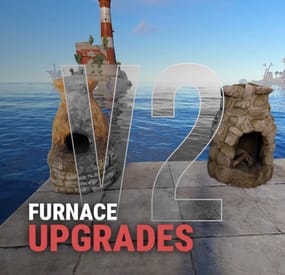
Furnace Upgrades
By Iftebinjan in Plugins
Upgrades your furnaces, ovens, refinery, mixing table & etc to beyond.
⭐ Key Features
Upgrade each attribute of your furnace; Supports different oven types; It is possible to define default attributes for all ovens on the server; You can set a default value for all base ovens (replacing quicksmelt); You can enable/disable any features you want; Option to keep attributes when removing the furnace; Option to auto split ores; Automatic fuel calc based on the upraded oven attributes; Now BBQ and Campfire can also be improved; Option so that only the furnace owner can upgrade it; Option so that only owner's teammates can upgrade it; A new completely redesigned UI; NEW Supports Mixing Table NEW Permission based upgrade furnaces 🎬 Video Showcase
📜 Permissions
furnaceupgrades.use - This is the unique permission. required for all players to upgrade furnaces ⚙️ Configuration
💬 Support
-
$14.99
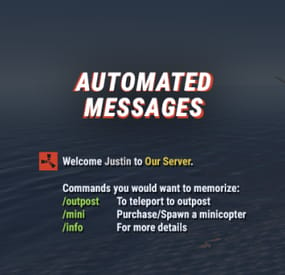
Automated Messages
Automated chat messages based on chat keywords, advanced scheduling modes, or various other triggers. In addition to sending messages, the plugin can also automatically run server console commands when an action triggers.
Admin UI — easy-to-use editor for complete setup Scheduling — Interval, Server Time, Game Time and Countdown modes Localization — localized replies for every language the game supports Targeting — send messages only to specific Groups or Permissions Player toggle — players can turn messages on/off if they don't find them useful Video
Supported Triggers
Scheduling & Chat — Timed · ChatCommand · AutoReply Connection — NewPlayerJoined · PlayerConnected · PlayerDisconnected Permissions & Groups — PermissionGranted · PermissionRevoked · AddedToGroup · RemovedFromGroup Gameplay — PlayerDead · CrateHacked Deep Sea — EnteredDeepSea · LeftDeepSea Zones — EnteredZone · LeftZone Monuments — EnteredMonument · LeftMonument Tip
If what you need isn't listed here but still falls within the scope of the plugin, reach out to me.
Commands
Command Description Permission /am.edit Opens the Admin UI for complete setup automatedmessages.admin /tips Lets players toggle messages on/off (command name configurable) — Message Localization
You can switch between languages in the Admin UI to set up localized replies for every language the game supports. See Config Settings below for how to add languages.
Game Tips
You can use Rust's native game tip UI to show specific messages instead of, or alongside, sending them to chat.
Variables
Variables can be included in message text to show additional info based on the trigger or player. The plugin also supports Placeholder API and its extensive list of variables.
Variable Description {playername} Player name {playerid} Player Steam ID {playercountry} Player country {online} Number of players online {sleeping} Number of players sleeping {joining} Number of players joining {target} The target string associated with the triggered action {hacklocation} Location of the hacked crate (CrateHacked only) {wipetimeremaining} Time until wipe, like 2d 5h {wipetimeremaining:d} Days until wipe {wipetimeremaining:h} Hours until wipe (0–23) {wipetimeremaining:th} Total hours until wipe {countdown} Live time remaining (Countdown scheduling mode) {countdown:m} Minutes remaining (0–59) {countdown:s} Seconds remaining (0–59) {countdown:tm} Total minutes remaining {countdown:ts} Total seconds remaining Wipe time is based on Rust convar settings if a Missile Silo monument is present.
Config Settings
Note
Only settings not available in the Admin UI are listed below. It's highly recommended to edit triggers and actions using /am.edit.
Setting Description Replies Server Languages Languages your server will support (see list below) Default Server Language Fallback language if the player's client language has no available replies Warning
You must have at least one reply in the Default Server Language for an action to work.
Available Languages
af Afrikaans · ar Arabic · ca Catalan · cs Czech · da Danish · de German · el Greek · en English · en-PT Pirate English · es-ES Spanish · fi Finnish · fr French · hu Hungarian · it Italian · ja Japanese · ko Korean · nl Dutch · no Norwegian · pl Polish · pt-PT Portuguese · pt-BR Portuguese (Brazil) · ro Romanian · ru Russian · sr Serbian · sv Swedish · tr Turkish · uk Ukrainian · vi Vietnamese · zh-CN Chinese (Simplified) · zh-TW Chinese (Traditional)
-
$35.00
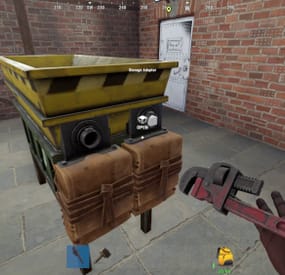
Industrial Recycler
Industrial Recycler | Automated Recycling for Rust
Put recycling to work inside your players' bases.
Connect storage, feed in recyclable items and send the materials back into your industrial network. Industrial Recycler gives your players a recycling line they can build into their base, with automatic item transfers, dedicated input and output storage, and control over processing speed and efficiency.
The same plugin also includes standard placeable recyclers, personal virtual recycling and an in-game purchase menu. Offer convenient recycling to your community, then choose the costs, access rules and group benefits that fit your server.
Industrial automation · 48-slot input + 48-slot output · Standard and virtual recyclers · Configurable speed and efficiency · In-game purchases
Watch Industrial Recycler in action
Build a recycling line into the base
An industrial recycler comes with dedicated input and output containers and storage adapters for Rust's industrial piping system.
Feed the input. Add recyclable items manually or connect the input adapter to your industrial network. Let it process. The plugin transfers items into the recycler and starts recycling automatically. Collect the materials. Recycled output goes into the attached output container, ready to be moved through your network. Each attached container has 48 item slots, giving the setup room for incoming items and outgoing materials. Players can leave the inventory screen and let the placed industrial recycler handle the work.
Useful handling is built in: the industrial recycler unloads ammunition and removes weapon attachments into output storage before recycling the weapon. Items without a recycling blueprint are routed from input toward output storage.
Three ways to offer recycling
Recycler type Player experience Best fit Industrial A placed recycler with automatic transfers, input/output storage and industrial adapters Players building automated bases Standard A familiar recycler that players place and operate manually Convenient recycling at home Virtual A personal recycler opened with /irec or /virtualrec Command-based convenience for permitted groups Standard recyclers also support tugboat placement. Industrial recyclers are placed on supported building surfaces.
An owner with the appropriate permission can upgrade a standard recycler using /upgraderecycler, adding the industrial storage and adapters to the existing recycler.
Give resources another purpose
Let players work toward their own recycler through the built-in shop. /buyrecycler opens the standard recycler purchase screen; /buyindustrialrecycler opens the industrial option.
Set a different cost for each type using one or several in-game items. Charge Scrap alone, or combine it with materials such as Metal Fragments, Sheet Metal and High Quality Metal. The menu shows the requirements before the player confirms the purchase.
Purchase permissions are separate, so you can offer one type to everyone and reserve another for a chosen group. Purchase limits count both placed recyclers and matching recycler items in the player's inventory.
The screenshots show example settings and layouts. Purchase costs and storage appearance are configurable.
Build group benefits around features players use
Choose how recycling changes as players gain access to different permission groups:
Processing speed: four configurable cycle-duration tiers for placed recyclers. Recycling efficiency: four configurable efficiency tiers for placed recyclers. Virtual recycling settings: dedicated speed and efficiency tiers for virtual use. Ownership limits: separate standard and industrial limits for regular players, VIP1 and VIP2. For example, give a group access to virtual recycling, allow another group to own more industrial recyclers, or assign a shorter recycling cycle. You choose the values and permissions; the plugin applies the recycler owner's settings.
Fit the setup to the base
Choose between two adapter layouts and configure attached storage to be visible or hidden. Players with the layout permission can switch arrangements after disconnecting the pipes.
Inventory navigation buttons let players move between the recycler, input and output containers. You can also adjust the main recycler UI position and configure distinct item skins for standard and industrial recyclers.
For shared bases, restrict access to the owner or allow Rust teammates and friends. Friend access uses the optional Friends plugin. Permitted players with access can pick up a recycler using a hammer.
Keep virtual convenience under control
Virtual recycling has its own permission and checks the player's situation before opening. Use is blocked while swimming, falling or flying, mounted, or in the supported cargo ship, hot air balloon and elevator checks.
With the optional NoEscape integration, you can also block virtual recycling during raid block or combat block.
The virtual recycler is a temporary session: items left inside are dropped at the player when the session closes. Use a placed industrial recycler for an ongoing automated setup.
Before you buy
Are other plugins required?
No additional plugin is required for the core features. Friends and NoEscape are optional integrations. Connecting to an industrial network uses Rust's industrial components.
Can purchases use Economics or ServerRewards?
The built-in shop uses configured in-game item costs. It does not include a balance integration with Economics or ServerRewards.
Does a standard recycler include automation?
The standard version is manually operated. The industrial version adds the attached storage, adapters and automatic transfers. The permission-controlled upgrade command converts an owned standard recycler.
Can I change speed without changing efficiency?
Yes. Speed and efficiency use separate permissions and configuration values. Dedicated virtual permissions let you tune virtual use as well.
What happens when a recycler is picked up or destroyed?
Remaining contents are dropped into the world. Hammer pickup returns a recycler item to the player; dropping a recycler item on destruction is a separate configuration option, disabled by default.
Which languages are included?
Default messages are included in English, Brazilian Portuguese, German and Spanish.
Setup and reference
Getting started on Oxide
Place IndustrialRecycler.cs in oxide/plugins and let it load. Review oxide/config/IndustrialRecycler.json, including purchase costs, ownership limits and access settings. Grant the permissions for the features you want to offer. To let the default group buy both recycler types, run these commands in the server console: oxide.grant group default industrialrecycler.buystandard oxide.grant group default industrialrecycler.buyindustrial Reload the plugin after configuration changes with oxide.reload IndustrialRecycler. Use /buyindustrialrecycler to purchase an item, place it on a supported building surface, and connect the input and output adapters to your industrial setup. For a purchase-only setup, use the purchase permissions. industrialrecycler.give also allows free recycler grants to yourself or another player; it is not required to buy or place a purchased recycler.
Player commands
Default chat command Action Permission /buyrecycler Open the standard purchase menu industrialrecycler.buystandard /buyindustrialrecycler Open the industrial purchase menu industrialrecycler.buyindustrial /irec or /virtualrec Open a personal virtual recycler industrialrecycler.virtual /upgraderecycler Upgrade an owned standard recycler within reach industrialrecycler.give /togglerecycler Switch the viewed industrial recycler's adapter layout; disconnect its pipes first industrialrecycler.toggle /industrialrecycler [player] Give an industrial recycler without purchase cost industrialrecycler.give /standardrecycler [player] Give a standard recycler without purchase cost industrialrecycler.give /giveindustrialrecycler and /givestandardrecycler are additional default chat aliases. Purchase, give and virtual command aliases are configurable. The upgrade command does not charge the industrial purchase cost.
Console and RCON commands
giveindustrialrecycler STEAM_ID givestandardrecycler STEAM_ID These commands give a recycler item to an online player without charging a purchase cost. Player-issued console use requires industrialrecycler.admin; server console and RCON can issue them directly.
Permissions and tier settings
Permission Purpose industrialrecycler.pickup Hammer pickup, subject to access checks industrialrecycler.toggle Switch adapter layout industrialrecycler.vip Apply VIP1 ownership limits industrialrecycler.vip2 Apply VIP2 ownership limits industrialrecycler.admin Unlimited ownership limit, owner-access bypass and player-console give access; other feature permissions remain separate Tier Placed speed permission Virtual speed permission Default cycle duration 1 industrialrecycler.speed1 industrialrecycler.virtualspeed1 4 seconds 2 industrialrecycler.speed2 industrialrecycler.virtualspeed2 3 seconds 3 industrialrecycler.speed3 industrialrecycler.virtualspeed3 2 seconds 4 industrialrecycler.speed4 industrialrecycler.virtualspeed4 1 second Tier Placed efficiency permission Virtual efficiency permission Default efficiency setting 1 industrialrecycler.efficiency1 industrialrecycler.virtualefficiency1 0.50 2 industrialrecycler.efficiency2 industrialrecycler.virtualefficiency2 0.60 3 industrialrecycler.efficiency3 industrialrecycler.virtualefficiency3 0.70 4 industrialrecycler.efficiency4 industrialrecycler.virtualefficiency4 0.80 All listed tier values are configurable. Higher-numbered permissions take priority within each family. Virtual speed permissions take precedence; if none is assigned, the plugin checks regular speed permissions and uses the corresponding virtual duration. Virtual efficiency uses its own permission family.
The plugin's efficiency fallback is 0.60 when no matching efficiency permission is assigned. Tier 1's default 0.50 is lower than that fallback, so choose your values deliberately when designing group benefits. Cycle duration describes a recycling cycle, not the time to empty a full input container.
Default ownership limits are 1 standard and 1 industrial recycler for regular players, 2 of each for VIP1 and 3 of each for VIP2. These limits are configurable; VIP2 takes precedence over VIP1.
Optional integrations
Plugin Adds Friends Friend access to owned recyclers when enabled NoEscape Raid-block and combat-block checks before opening a virtual recycler Give your players a base upgrade they can put to work every day. Add automated industrial recycling, convenient personal access and group settings you control with Industrial Recycler.
- #recycler
- #industrial
- (and 9 more)
-
![More information about "Raidable Sleeper Event [Works with HallOfShame]"](https://codefling.com/cdn-cgi/image/width=285,height=275,quality=80,fit=cover,format=webp/https://codefling.com/uploads/monthly_2024_09/RaidableSleeper_Ico.thumb.jpg.2042e2f935013d513f9f4e4d0cc5f3e5.jpg)
$4.99
Raidable Sleeper Event [Works with HallOfShame]
The RaidableSleepers plugin allows players to loot sleeping players that appear on the map. These sleepers appear randomly and contain valuable loot that can be stolen by the active players. The sleepers spawn automatically at set intervals and disappear again after a certain amount of time.
Features:
Random Sleeper Spawns: Sleeping players spawn at random locations on the map.
Loot distribution: Each sleeper is filled with random items from the preconfigured loot list.
Cooldown mechanism: There is a configurable cooldown time between sleeper spawns.
Loot Notification: Players will receive a notification when a Sleeper has been looted.
Admin commands: Admins can manually spawn, test or delete sleepers.
Cluster spawns: Multiple sleepers can be spawned in a certain radius around a central position.
Commands:
/spawnsleepers - Spawns a random sleeper on the map cooldown 5 minutes for this command
/testsleepers - Spawn a test sleeper at your position
/clearallsleepers - Removes all sleepers on the map
/clearsleepers - Removes the sleeper you are looking at
Permissions:
raidablesleepers.admin - Allows admins to spawn, test and delete sleepers.
raidablesleepers.raid - Allows players to raid sleeping players.
Config:
{ "NumberOfSleepers": 10, // Maximum number of sleepers on the map "AvailabilityDuration": 600.0, // Minutes when position change if not found "CooldownDuration": 300.0, // Minutes when a new sleeper should spawn if the NumberOfSleepers is not reached "EnableLootNotification": true, // Chat message who loots a sleeper? "ItemsToSpawn": [ { "Shortname": "ammo.rifle.explosive", "SkinId": 0, "MinimumAmount": 100, "MaximumAmount": 256 }, { "Shortname": "explosive.timed", "SkinId": 0, "MinimumAmount": 1, "MaximumAmount": 2 }, { "Shortname": "wood", "SkinId": 0, "MinimumAmount": 2000, "MaximumAmount": 6000 } ] } ---
load, run, enjoy💝
Support Discord
- #raidable base
- #raidable
- (and 8 more)
-
$14.99
TC Upgrades
By Iftebinjan in Plugins
TC Upgrades
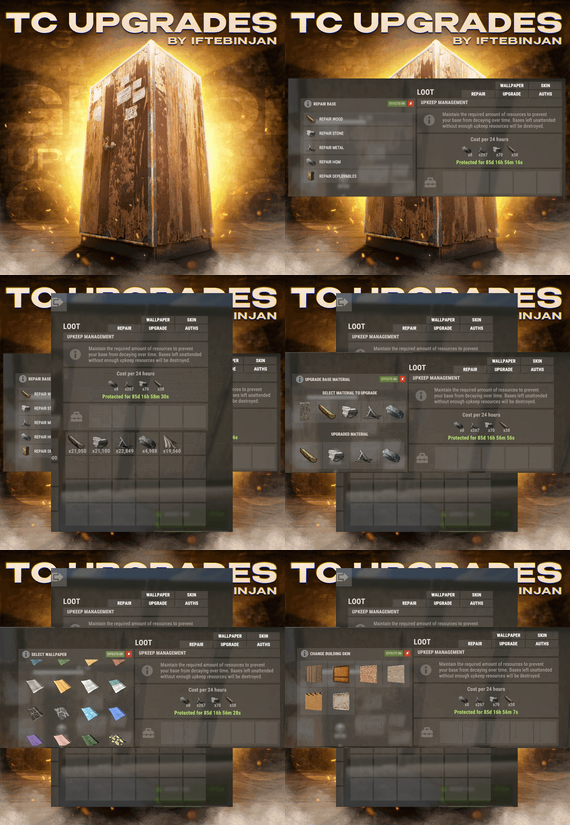
Manage your whole base from the Tool Cupboard. Upgrade every block, repair the base, change building skins, put up wallpapers, skin every door and manage who's authorized. It all runs from buttons right on the TC, with costs shown before you pay.
No more running around with a hammer for 20 minutes. Open the cupboard, click once, done.
Warning
Requires ImageLibrary. TC Upgrades unloads itself if ImageLibrary isn't installed.
Video Showcase
Features
⬆️ Upgrade
Upgrade the whole base to Wood, Stone, Metal or HQM in one click. Paid from the TC. Resources come from the cupboard's inventory. You see the full cost before starting. Remembers your skin. With auto-upgrade on, hammer upgrades automatically use the building skin you picked in the TC. 🔧 Repair
Repair by material. Wood, Stone, Metal, HQM, or all deployables (doors, boxes, turrets…). Cost shown up front for each repair. Fair. Blocks damaged in the last 30 seconds can't be repaired, the same as in vanilla. 🎨 Skins
Building skins. Reskin every block in the base at once, including the newest skins (Crypt stone, Jungle and more). Metal gets random colours. Tool Cupboard skins. Change the look of the TC itself. External wall and gate skins. Legacy wood and adobe high walls and gates. Door skins. Pick a skin once and it goes on every matching door in the building: wood, metal, armored (single and double) and garage doors. 🖼️ Wallpapers
Walls, floors and ceilings. Both sides at once (permission). Wallpaper the inside and outside of a wall in one go. Custom wallpapers. Add any Workshop wallpaper ID in the config. A big set comes ready. Costs cloth, shown before you apply it. 👥 Auth list
See everyone authorized on the cupboard. Remove players with one click (optionally owner only). ⚙️ For server owners
Multi-TC support. Bases with several cupboards work correctly. Permission for every feature, grade and skin type. Sell them as VIP perks. VIP speed and discounts. Each permission can get a faster process and lower costs. Free-use permissions for upgrades, repairs, reskins and wallpapers. DLC respected. Players only see the DLC skins and wallpapers they own (with PlayerDLCAPI support for newer packs). Raid and combat block. NoEscape and BetterNoEscape support. Cancel anytime. A cancel button stops a running process. Effects and sides toggles on the TC. Move the buttons in game with /tcuadmin. No guessing offsets in the config. Notifications by chat, GameTip, Toastify or Notify. Every UI text is in the lang file. How it works
Open your Tool Cupboard. New buttons appear: AUTHS · UPGRADE · REPAIR · SKIN · WALLPAPER. Pick what you want, for example UPGRADE → Stone. Check the required materials, then confirm. The base updates block by block, paid from the TC. Press CANCEL at any time to stop. Tip
Players only see the buttons they have permission for, so you can give everyone Repair and keep Skins and Wallpapers for VIPs.
Permissions
Feature buttons
Permission Shows tcupgrades.authlist AUTHS button (authorization list) tcupgrades.upgrade UPGRADE button tcupgrades.repair REPAIR button tcupgrades.skin SKIN button tcupgrades.wallpaper WALLPAPER button Grades
Permission Allows tcupgrades.default All of the below at once (Wood, Stone, Metal, HQM and deployables) tcupgrades.wood Wood tcupgrades.stone Stone tcupgrades.metal Metal tcupgrades.hqm High Quality Metal tcupgrades.deploy Repairing deployables Skins and wallpapers
Permission Allows tcupgrades.tcskin Tool Cupboard skins tcupgrades.wallandgates External high wall and gate skins tcupgrades.doorskins Door skins tcupgrades.wallpaper_bothsides Wallpapering both sides of a wall at once Free use
Permission No resources needed for tcupgrades.upgrade.nocost Upgrading tcupgrades.repair.nocost Repairing tcupgrades.reskin.nocost Reskinning tcupgrades.wallpaper.nocost Wallpapers VIP and admin
Permission Allows tcupgrades.vip / tcupgrades.mvp Faster processing and cheaper costs (set in the config, and you can add your own) tcupgrades.admin /tcuadmin button editor and /tcaddskin Note
"Give default permission to all default user on Load" is on by default. On every load it gives the default group every button, every grade, and Tool Cupboard, wall and door skins. That's great for a quick start, but turn it off before setting up your own permissions, or permissions you revoke come back on the next reload.
Commands
Command Permission Description /tcuadmin tcupgrades.admin Turn the button editor on or off. Open a TC to move the buttons, and positions save to the config /tcaddskin <door shortname> <skin id> tcupgrades.admin Add a Workshop skin to a door type's list, for example /tcaddskin door.hinged.metal 3741220976 VIP speed and discounts
Every feature (upgrade, skin, wallpaper, repair) has its own speed and cost settings:
Setting Default Example VIP Example MVP Seconds per block 1.5 1.0 0.5 Cost modifier 1.0 (full price) 0.5 (half price) 0.2 (80% off) A cost modifier of 1.5 means 50% more expensive. Add as many permission tiers as you like. Each one is registered automatically.
Hosting partner
Installation
Install ImageLibrary. Upload TCUpgrades.cs to oxide/plugins. Choose how to hand out permissions: Quick start: leave "Give default permission…" on, and everyone gets every feature. Custom: turn that option off, reload, and grant per group, for example: oxide.grant group default tcupgrades.repair oxide.grant group default tcupgrades.default oxide.grant group vip tcupgrades.skin oxide.grant group vip tcupgrades.wallpaper Open a Tool Cupboard. The new buttons are on the TC screen. (Optional) Type /tcuadmin to move the buttons where you like. Warning
Keep "USE DLC SKINS AND WALLPAPERS" set to false on live servers. With it true, every DLC skin is unlocked for everyone, which is only meant for testing.
Configuration
Key settings explained
Setting What it does USE DLC SKINS AND WALLPAPERS true unlocks all DLC for everyone (testing only). Keep false live Only owner can use features of TC Only the TC's owner can use the buttons, not everyone authorized Use Automatic Upgrades on build Hammer upgrades use the skin each player picked in the TC Give default permission… On every load, gives the default group every feature button, grade and skin type. Turn it off to manage permissions yourself Only owner can see the Remove BTN? Only the owner can remove players from the auth list Custom … wallpapers Workshop wallpaper IDs offered in the wallpaper menu (0 = no wallpaper) Custom Door Skins Workshop skin IDs per door type (or add them in game with /tcaddskin) Plugins
Plugin Required? Used for ImageLibrary Yes Icons and skin previews in the UI PlayerDLCAPI Optional DLC ownership checks for newer skin and wallpaper packs NoEscape / BetterNoEscape Optional Blocks the features during raid block or combat block Toastify / Notify Optional Pop-up notifications instead of chat FAQ
Where do the resources come from?
From the Tool Cupboard's inventory. The cost is shown before you start. If the TC doesn't have enough, nothing happens.
Can players use DLC skins they don't own?
No. Players only see DLC skins and wallpapers they own. "USE DLC SKINS AND WALLPAPERS" unlocks everything, so only turn it on for testing.
How do I add my own wallpapers?
Add the Workshop wallpaper IDs to Custom Wall wallpapers, Custom Floor wallpapers or Custom Ceiling wallpapers in the config, then reload.
How do I add more door skins?
Use /tcaddskin <door shortname> <skin id> in game, or add the IDs under Custom Door Skins in the config.
Why can't some blocks be repaired?
Blocks damaged in the last 30 seconds can't be repaired, the same as in vanilla. Wait a moment and try again.
Can I stop an upgrade halfway?
Yes. Press CANCEL on the TC.
The buttons overlap another plugin's UI.
Type /tcuadmin, open a TC and move the buttons. Their positions save to the config.
Can raided players use it to repair mid-raid?
Not if you use NoEscape or BetterNoEscape. The features are blocked during raid or combat block.
Does it work with several TCs in one base?
Yes. Multi-TC bases are supported.
Support
Need help or found a bug? Open a support ticket on this page.
Check out my other plugins
- #upgrade
- #toolcupboard
- (and 7 more)