

-
Posts
249 -
Joined
-
Last visited
-
Days Won
2
Content Type
Profiles
Warranty Claims
Downloads
Forums
Store
Services
Downloads Plus Support
DOWNLOADS EXTRA
Reels
Everything posted by xNullPointer95
-
Edit: I found a way to get a player list even if they weren't tracked because the plugin was just upload. The idea is to fetch all them whoever was connected to your server and if its not in the datafile of xAutoPurge, that steamid gets into the datafile with the current date/time, so nobody is accidentally deleted and we catched the inactives. Please wait for new version
-
For faster communication you can join the discord https://discord.gg/rGm7VS5ERc
-
Hi, thank you for your purchase. The thing is - Your purchase is 13hours ago, so the tracking started 13hours ago and no player is flagged as inactive, it can't purge retroactively inactive players since rust doesn't provide that data somewhere, thats the reason why it needs to be tracked. I guess you have the correct config since its not much to configure and straight forwarded. If you have a list of SteamIDs (even if its 193 players) from the inactive players, you can send it to me in discord and i will prepare you a statement to get those deleted retroactively with oxide/carbon commands once.
-
 Glad to hear
 -
Changed Status from Pending to Not a Bug
-
-
@Lumin Unfortunately i didn't receive any response yet. I added some presets at the plugin page. The plugin works fine as expected and designed.
-
Version 1.0.5
56 downloads
xWirelessPower xWirelessPower transforms how players interact with electrical devices (IO Entities). Instead of running back to switches, rewiring circuits, or building complex control rooms, players can directly toggle supported powered entities simply by looking at them and using a command or even with doing a clap gesture - Creating a smoother, more responsive way to manage base systems. In short: You can simply use electrical item (IO Entities) like ceiling light, sprinkler, auto turret etc. without requireing any wire or power. Features Instant Wireless Control Turn configured devices (IO Entities) ON or OFF just by looking at them with using a command or even using the clap gesture - No switches or wiring changes needed. Optional Team Access Let teammates manage shared systems for easier group gameplay. Perfect for Base Management Quickly control turrets, lights, signs, sprinklers, and more without running around your base. Faster Reaction During Raids Activate defenses or adjust systems instantly when every second counts. Fully Customizable Server owners can choose which devices are controllable and how the system behaves through config or even with chatcommadn "whoami". ShortPrefabName gets printed and saves it automatically to the confing with default value "false". Permission Support Grant access to specific groups like VIPs, admins, or trusted players. Optional Auto Power On Devices can automatically turn on when placed for smoother setup. Performance Friendly Runs efficiently with minimal impact on server performance. Plugin Preview Chat Commands /power - Toggle the IOEntity you’re looking at. /powerall - Toggles all IO entities you’re looking at. For example, when powerall is turned on and you look at an auto turret, all auto turrets will be turned off. /whoami - Prints the looked-at entity’s ShortPrefabName and adds it to your IOEntities list in config (default value = true). Permission xwirelesspower.toggle - If 'UsePermission' is true, permission is needed. Config { "ToggleCommand": "power", "PowerAllCommand": "powerall", "GetItemNameCommand": "whoami", "UsePermission": false, "PermissionName": "xwirelesspower.toggle", "AllowTeamToggle": false, "RequireToolCupboard": false, "MaxDistanceToggle": 5.0, "AutoTurnOn": true, "TurnOnOffWithClappingGesture": true, "IOEntities": { "autoturret_deployed": true, "ceilinglight.deployed": true, "neonsigntr.deployed": true, "electric.sprinkler.deployed": true }, "PermissionBasedIOEntities": { "xwirelesspower.vip": [ "fridge.deployed" ], "xwirelesspower.vip2": [ "electricfurnace.deployed", "electricfurnace.io" ] } } - You can add as many IOEntities as you want, to get the correct name of it, just spawn/place it -> Look at it -> Use ChatCommand '/whoami' and add that shortname to your IOEntities list. ToggleCommand - Chat command players use to turn IO Entity on/off. PowerAllCommand - Chat command players can toggle to turn all IO Entities from same name on/off. GetItemNameCommand - Admin command to see the IO Entity internal name (ShortPrefabName), also saves that viewed at IOEntity automatically to config with default value "false". UsePermission - If ON, only players with permission has access to this wireless power system. PermissionName - The permission name. AllowTeamToggle - Lets teammates toggle each other’s IO Entities. RequireToolCupboard - Wirless Power does only work if within a tool cupboard. MaxDistanceToggle - How close you must be to toggle (in meters). AutoTurnOn - Devices turn on automatically when placed. TurnOnOffWithClappingGesture - As the config says, use any gesture to toggle IO Entity. IOEntities - List of devices that wireless power works with (true = enabled). Localization (If you want to disable a message just use empty value "") { "NotAllowed": "You are not allowed to use this command.", "LookAtEntity": "You're not looking at an entity.", "AddedConfigEntries": "Added to config with default value true: {0}", "DetectedShortnames": "Detected shortnames: {0}", "PowerAllNoEntity": "You're not looking at a valid wireless entity, or you lack the required permission.", "PowerAllNoMatches": "No matching IOEntities could be toggled.", "PowerAllResult": "{0}: {1} entities are now {2}.", "NoEnabledEntity": "No enabled wireless IO entity was found for that deployable, or you lack the required permission.", "NotOwner": "You can only toggle your own IOEntity.", "NoEntitiesToggled": "No IOEntities could be toggled.", "ToggleAllResult": "{0}: {1} entities are now {2}.", "ToggleSingleResult": "{0} is now {1}.", "DisabledInConfig": "{0} is disabled in config.", "CupboardRequired": "A nearby tool cupboard is required to use wireless power." }$11.99 -
DUPLICATE.
-
DUPLICATE.
-
Changed Status from Pending to Closed
-
I think you didnt understand how it works, how should it come with preloaded Hex Codes if it depends on SteamId. The config of this plugin does only have "MaxPrefixes" not more, so i dont know what youre talking about. You just have to use ingame/console commands - If you added a prefix to a player it will be shown in the Ui. /addprefix <STEAMID> <PREFIXNAME> <#HEX> <#HEX> <#HEX>... and then the player can see and select it in the Ui. Please explain exactly whats your issue, then i can help you.
-
Changed Status from Pending to Closed Changed Fixed In to 1.0.0
-
test
-

Version 1.0.1
20 downloads
xFuelGenerator xFuelGenerator lets server owners easily customize Fuel Generator (Small Generator) behavior by adjusting its power output, fuel consumption, fuel tick rate, and whether generators should automatically turn on when they receive fuel - all via a simple config. Settings can be applied automatically to newly spawned generators and, optionally, to all existing generators. Features Customize generator power output Adjust fuel consumption amount Change fuel consumption tick rate Option to run generators without fuel Auto-turn on generators when fuel is added Automatically apply settings to newly spawned generators Optionally update all existing generators on the map Reload command to reapply settings instantly Console Command xfuelgenerator.reload - Reload config and update generators Config { "ApplyToExistingGenerators": true, "AutoTurnOnGenerator": false, "UseFuel": true, "FuelConsumption": 1.0, "FuelTickRateSeconds": 3.0, "OutputEnergy": 35 } ApplyToExistingGenerators - Apply settings to generators that already exist on the map. AutoTurnOnGenerator - Generator turns on automatically when fuel is added. UseFuel - If false, generators run without consuming fuel. (If false the config 'FuelConsumption' gets ignored) FuelConsumption - How much fuel is used per tick. FuelTickRateSeconds - How often fuel is consumed. OutputEnergy - How much power the generator produces.$8.99 -
 Hi, currently from left to right
 -
Version 1.0.3
14 downloads
xMegaphone xMegaphone is a powerful megaphone broadcast system for Rust servers that allows players and/or admins to submit custom announcements through an intuitive UI. Messages can be displayed globally as either animated sliding text or clean static text, making it perfect for announcements, events, advertisements, community communication or even selling megaphones to your players for real money. The plugin is optimized for performance and designed to run smoothly on most servers. For maximum flexibility, you can choose between two display modes depending on your server’s needs: Type 0 - Sliding Text: Eye-catching animated ticker that scrolls across the screen. Type 1 - Static Text: Performance-friendly message displayed in the center without animation (recommended for very high population servers). This allows you to balance visual impact and performance with a simple configuration change. ■ Inspired by the classic megaphone system from the game "Combat Arms" (when it wasn't dead lol), bringing that nostalgic broadcast experience to your server. Plugin Preview Permission xmegaphone.use - Needed to use the /xmp command xmegaphone.admin - Needed to use admin commands </> Chat Commands (Players) /xmp - Opens the xMegaphone UI ⌨ Chat/Console Commands (Admins) /xmp - Opens the xMegaphone UI /xmp give <steamId|partialName> <amount> - Adds megaphone uses to a player. /xmp set <steamId|partialName> <amount> - Sets a player’s megaphone uses to an exact number. /xmp reset <steamId|partialName> - Resets a player’s uses back to your configured StartingMegaphoneUses value. Config { "Uses": { "StartingMegaphoneUses": 0 }, "Message": { "MaxLength": 80 }, "Ticker": { "MegaphoneType": 0, "DurationSecondsType0": 20.0, "DurationSecondsType1": 8.0, "FontSize": 18, "ShowSender": true, "PrefixText": "[MEGAPHONE]", "PrefixColor": "#cffc03", "SenderColor": "#75ff9a", "TextColor": "#ffffff" } } ^ "StartingMegaphoneUses" = How many megaphones a player receives when added to datafile for first time.$9.99- 2 comments
-
- 1
-

-
- #server
- #megaphone
- (and 21 more)
-
 Youre welcome
 -
The initial reason for it was that AutoDoors from uMod didn't work anymore when i made this and last update was 2 years ago before. I used it on my own server before, and made this so i had my own working AutoDoors again. Anyways - Imo its to much config (also each door has to be configured) - Some people might prefer this or this, i just offer it, nobody is forced to buy it.
-
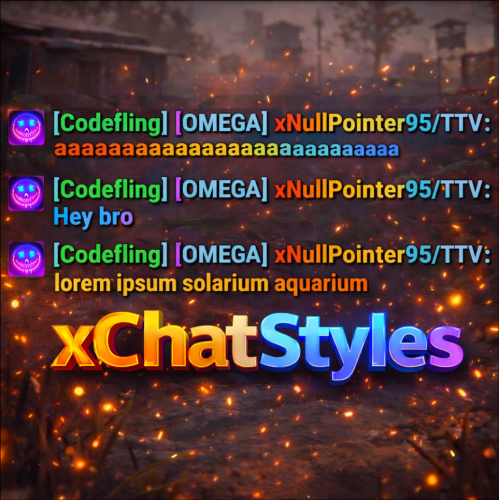
Version 1.3.4
234 downloads
xChatStyles xChatStyles adds smooth gradient colors to player names, prefixes, and chat messages, giving your server a premium, modern look without clutter or spam. It’s clean, readable, and designed to enhance chat - not overpower it. It lets you customize how players appear in chat using animated-looking color gradients. Perfect for VIPs, staff, donators, or special roles. No flashy UI. No complicated setup. Just beautiful chat. Features Gradient Names & Messages Smooth color gradients instead of flat colors, but you can also use a solid color Player names Chat messages Prefixes (VIP, Admin, etc.) Looks great without hurting readability Styled Mentions (@PLAYERNAME) Multiple Prefix Support Players can have more than one prefix Each prefix can have its own color style Great for VIP & Donator Perks Instantly makes VIP ranks feel premium Visual reward without gameplay imbalance Easy to sell as a cosmetic perk Trade System for Prefixes (REQUIRES Economics if you want to use trade feature) Server Friendly No lag or spam Optimized to run smoothly on live servers Works quietly in the background Supports permission-based style, not just permanent chat style. xChatStyles Web Editor Plugin Preview Permissions (Custom Tab) xchatstyles.customtab - Ability to see the "Custom" Tab in /xcs xchatstyles.customprefix - Ability to see and select "Prefix" in "Custom" Tab xchatstyles.custommessagecolor - Ability to see and select "Message" in "Custom" Tab xchatstyles.customusernamecolor - Ability to see and select "Username" in "Custom" Tab Chat Commands (Player) /xcs - Opens the Ui /xcs <PLAYERNAME/STEMAID> - Opens the Ui with the view of the target player and you can remove owned styles from that user. Chat & Console Commands (Admin) /* Add chat styles without permission */ /addprefix <STEAMID> <PREFIXNAME> <#HEX> <#HEX> <#HEX>... /addmessagecolor <STEAMID> <#HEX> <#HEX> <#HEX>... /addusernamecolor <STEAMID> <#HEX> <#HEX> <#HEX>... /addall <STEAMID> <PREFIXNAME> <#HEX> <#HEX> <#HEX>... [This will add a prefix with provided color(s), message style with provided color(s) and username style with provided color(s) with just 1 command.] /* Add chat styles without permission */ /* Add chat styles WITH permission */ /addprefix <xchatstyles.PERMISSIONNAME> <PrefixName> <#HEX> <#HEX> <#HEX> ... /addall <xchatstyles.PERMISSIONNAME> <PrefixName> <#HEX> <#HEX> <#HEX> ... /addmessagecolor <xchatstyles.PERMISSIONNAME> <#HEX> <#HEX> <#HEX> ... /addusernamecolor <xchatstyles.PERMISSIONNAME> <#HEX> <#HEX> <#HEX> ... /* Add chat styles WITH permission */ ---> As long as the player has permission, they can select it with /xcs ---> Automatically removed when permission is revoked ---> Permission-Based ChatStyles has (Permission) indicator in /xcs ---> The permission must start with 'xchatstyles.*'. Example: /addall <xchatstyles.vip> VIP <#HEX> <#HEX> <#HEX> ... /*********************************************************************************************************/ /* Use 1 #HEX Color (Example: #fcba03) for a single color, use multiple #HEX Colors for a color gradient */ /* */ /* Example: /addprefix 76561198412496844 OMEGA #32a852 #71a67f */ /* */ /*********************************************************************************************************/ /removeprefix <steamid> <index|PrefixName> /removemessagecolor <steamid> <index> /removeusernamecolor <steamid> <index> Recommended Plugin for >TIMED< PERMISSION: Config { "MaxPrefixes": 3, "DefaultUsernameColor": "#55aaff", "DefaultMessageColor": "#ffffff", "DefaultSize": 15, "AllowSelectingDuplicatePrefixNames": true, "NotifyOnStyleReceived": true, "PrefixBrackets": "[]", "ShowPrefixBracketsWithSizeTag": true, "Trade": { "AllowTrading": false, "PlayerCanSellPermissionBasedPrefix": false, "UseCurrencySign": true, "CurrencySign": "$", "AnnounceNewPrefixSaleGlobally": true, "AnnouncePrefixPriceUpdateGlobally": true }, "PermissionStyles": {} }$24.99 -

Version 1.0.0
16 downloads
xDisablePlayerBoats + Timed Event for Player-made Boat Building/Editing xDisablePlayerBoats lets you block players from building/editing player made boats (Rust's NAVAL Update) either completely or only during a configurable ingame time window (perfect for “boat building events”). This plugin hooks into Rust’s build system and prevents placement of key boat-building items, including: Boat Building Station Boat Building Plan Steering Wheel Small Boat Engine Sail When blocked, players receive a clear chat message explaining whether boat building/editing is fully disabled or only allowed during event hours. Permission xdisableplayerboats.bypass - Players with this permission can build boats even when restrictions are active. Config { "EventEnabled": false, "StartHour": 18, "EndHour": 23, "EventStartMessageText": "» Boat building event is now active! You can build/edit boats now.", "EventEndMessageText": "» Boat building event is now over! Boat building/editing is disabled now." } EventEnabled = false → Boat building is always disabled (INGAME-TIME!) EventEnabled = true → Boat building is only allowed between StartHour–EndHour (INGAME-TIME!) Supports wrap-around hours (example: 22 → 06) Ideal for: Servers that want to reduce water/boat spam PvP servers that want controlled boat availability Running scheduled boat-building events Enforcing progression/economy balance$8.99 -
 No, the plugin is as described on the plugin page... If "RequirePermission" is true and you grant a user Permission "xmarktoteleport.use" he can use it and the config gets considered. If "RequirePermission" is false all can you use the plugin by default. If you wish that there are more features you can suggest it. Im always open for it
 -
Or something without tons of perks
-
I rather have legit points.
-
I think there are alot around lol