


About Chat Styles (Names, Messages & Prefixes)
xChatStyles
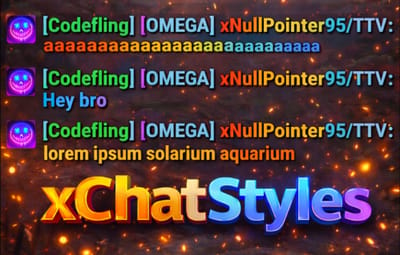
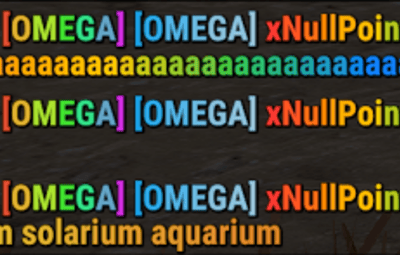
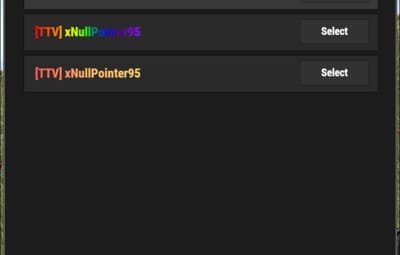
xChatStyles adds smooth gradient colors to player names, prefixes, and chat messages, giving your server a premium, modern look without clutter or spam.
It’s clean, readable, and designed to enhance chat - not overpower it.
It lets you customize how players appear in chat using animated-looking color gradients. Perfect for VIPs, staff, donators, or special roles. No flashy UI. No complicated setup. Just beautiful chat.
 Features
 Gradient Names & Messages
- Smooth color gradients instead of flat colors, but you can also use a solid color
- Player names
- Chat messages
- Prefixes (VIP, Admin, etc.)
- Looks great without hurting readability
- Styled Mentions (@PLAYERNAME)
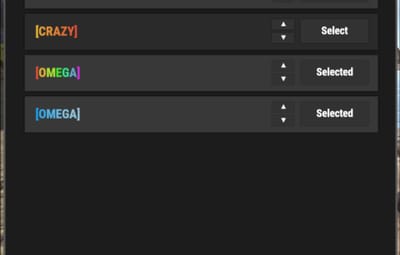
 Multiple Prefix Support
- Players can have more than one prefix
- Each prefix can have its own color style
 Great for VIP & Donator Perks
- Instantly makes VIP ranks feel premium
- Visual reward without gameplay imbalance
- Easy to sell as a cosmetic perk
 Trade System for Prefixes (REQUIRES Economics if you want to use trade feature)
 Server Friendly
- No lag or spam
- Optimized to run smoothly on live servers
- Works quietly in the background
 Supports permission-based style, not just permanent chat style.

 Plugin Preview
 Permissions (Custom Tab)
xchatstyles.customtab - Ability to see the "Custom" Tab in /xcs
xchatstyles.customprefix - Ability to see and select "Prefix" in "Custom" Tab
xchatstyles.custommessagecolor - Ability to see and select "Message" in "Custom" Tab
xchatstyles.customusernamecolor - Ability to see and select "Username" in "Custom" Tab
 Chat Commands (Player)
/xcs - Opens the Ui
/xcs <PLAYERNAME/STEMAID> - Opens the Ui with the view of the target player and you can remove owned styles from that user.
Chat & Console Commands (Admin)
/* Add chat styles without permission */
/addprefix <STEAMID> <PREFIXNAME> <#HEX> <#HEX> <#HEX>...
/addmessagecolor <STEAMID> <#HEX> <#HEX> <#HEX>...
/addusernamecolor <STEAMID> <#HEX> <#HEX> <#HEX>...
/addall <STEAMID> <PREFIXNAME> <#HEX> <#HEX> <#HEX>... [This will add a prefix with provided color(s), message style with provided color(s) and username style with provided color(s) with just 1 command.]
/* Add chat styles without permission */

/* Add chat styles WITH permission */
/addprefix <xchatstyles.PERMISSIONNAME> <PrefixName> <#HEX> <#HEX> <#HEX> ...
/addall <xchatstyles.PERMISSIONNAME> <PrefixName> <#HEX> <#HEX> <#HEX> ...
/addmessagecolor <xchatstyles.PERMISSIONNAME> <#HEX> <#HEX> <#HEX> ...
/addusernamecolor <xchatstyles.PERMISSIONNAME> <#HEX> <#HEX> <#HEX> ...
/* Add chat styles WITH permission */
---> As long as the player has permission, they can select it with /xcs
---> Automatically removed when permission is revoked
---> Permission-Based ChatStyles has (Permission) indicator in /xcs
---> The permission must start with 'xchatstyles.*'. Example: /addall <xchatstyles.vip> VIP <#HEX> <#HEX> <#HEX> ...


/*********************************************************************************************************/
/* Use 1 #HEX Color (Example: #fcba03) for a single color, use multiple #HEX Colors for a color gradient */
/*									 				 */
/* Example: /addprefix 76561198412496844 OMEGA #32a852 #71a67f						 */
/*									 				 */
/*********************************************************************************************************/

/removeprefix <steamid> <index|PrefixName>
/removemessagecolor <steamid> <index>
/removeusernamecolor <steamid> <index>
 Recommended Plugin for >TIMED< PERMISSION:
 Config
{
  "MaxPrefixes": 3,
  "DefaultUsernameColor": "#55aaff",
  "DefaultMessageColor": "#ffffff",
  "DefaultSize": 15,
  "AllowSelectingDuplicatePrefixNames": true,
  "NotifyOnStyleReceived": true,
  "PrefixBrackets": "[]",
  "ShowPrefixBracketsWithSizeTag": true,
  "Trade": {
    "AllowTrading": false,
    "PlayerCanSellPermissionBasedPrefix": false,
    "UseCurrencySign": true,
    "CurrencySign": "$",
    "AnnounceNewPrefixSaleGlobally": true,
    "AnnouncePrefixPriceUpdateGlobally": true
  },
  "PermissionStyles": {}
}







![More information about "Automatic Plugin Release/Update Notifier [Discord]"](https://codefling.com/cdn-cgi/image/width=285,height=285,quality=80,fit=cover,format=webp/https://codefling.com/uploads/monthly_2026_05/plugin_psd.thumb.png.9f7e3b7f17f5eb44b54090c7a8820870.png)