aimacak
-
Posts
1,311 -
Joined
-
Last visited
-
Days Won
9
Content Type
Profiles
Warranty Claims
Downloads
Forums
Store
Services
Downloads Plus Support
DOWNLOADS EXTRA
Everything posted by aimacak
-
 Hello, I clarified this, yes you are right. And if you are a developer, you can contact KpucTaJI on discord so that he can add you to the developer chat, where he posts such moments and helps if someone needs help with something. Mad Mappers Discord Server
 -
Cant get the loot to behave, could use a little direction.
aimacak replied to PistOffBastd's Support Report in Support
Nice. You also can use this in server console for mass edit: NpcEdit "LootTable.IsAlphaLoot" true NpcEdit "LootTable.AlphaLootPreset" Elite NpcEdit "LootTable.IsLoottablePlugin" false NpcEdit "LootTable.CustomLootPreset" MyPreset NpcEdit "LootTable.ClearDefaultLoot" true NpcEdit "LootTable.PrefabsTable.IsEnabled" true NpcEdit "LootTable.PrefabsTable.MinPrefabsAmount" 1 NpcEdit "LootTable.PrefabsTable.MaxPrefabsAmount" 3 NpcEdit "LootTable.PrefabsTable.Prefabs" null NpcEdit "LootTable.ItemsTable.IsEnabled" true NpcEdit "LootTable.ItemsTable.DisableMinMax" false NpcEdit "LootTable.ItemsTable.MinItemsAmount" 2 NpcEdit "LootTable.ItemsTable.MaxItemsAmount" 5 NpcEdit "LootTable.ItemsTable.Items" null -
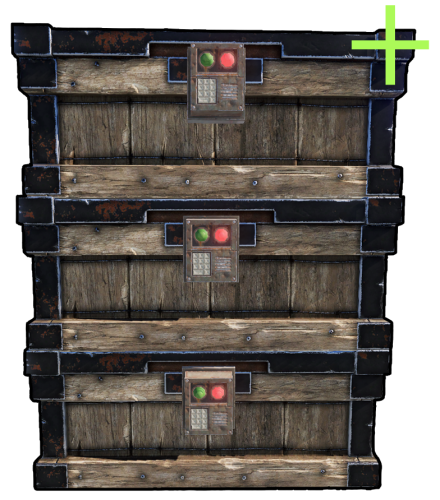 @supreme Thanks for update Are there any serious reasons to prohibit us from putting different crates on top of each other?
 -
And if you can, work on changing their skin, I think there may be some difficulties with this, because the new boxes have a new shortname
-
Hm, everything works fine for me with your files..
-
Hello, the first thing that catches my eye is the lowercase in your names, but maybe you just spelled it that way. Can you send /data/BetterNpc/ and data/NpcSpawn/Preset/ folders? You can also attach your old files before updating, they may be useful.
-
 @SLATE All I could understand now is that this behavior is only with Kits, if you give them the equipment from the NpcSpawn GUI, then they behave correctly. I'll pass this on to KpucTaJI, thanks for the information.
 -
Hello, send one of the npc presets with this behavior.
-
Hello, most likely you have not transferred the data from the archive with the plugin that you downloaded from codefling to your server, the plugin is being unloaded because there are no images for the GUI.
-
Добрый. Нет, это заблуждение, как раз именно для этого и сделаны пресеты, чтобы вы сделали себе определённое количество и буквально по памяти могли их вписывать при настройке Монументов (Спавн Поинтов). При обновлении старых файлов нет другого способа корректно перенести все данные разных пользователей, кроме как добавлять идентификатор, он мог быть любого вида, но он в любом случае должен быть. Если у вас после обновления есть несколько почти одинаковых пресетов, которые отличаются только окончанием (например: -b8054c), это значит, что у вас были одинаковые имена НПЦ, но они имели какое-либо отличие в снаряжении / луте. В такой ситуации да, неоспоримо придётся потратить некоторое время на приведение это в порядок, и у каждого он будет свой. Вы можете создавать папки со своими именами в data/NpcSpawn/Preset/, чтобы у вас всё было упорядочено, KpuctaJI добавил множество команд для массового редактирования и параметров и пресетов, можно указать отдельные папки. Можно даже переименовать, например Desert-Sniper-b8054c в MySniper, и этот файл будет переименован, и во всех файлах BetterNpc, где использовался этот пресет его имя так же будет изменено на новое. Если вам нужна помощь в чём-то конкретно, скажите в чём, т.к. я думаю, что в этом сообщении мне нет смысла пытаться сделать методичку на все возможные случаи От себя могу добавить, что после привыкания и понимания всего этого устройства, всё делается элементарно и быстро. Мне так же есть с чем сравнивать, т.к. пару лет назад я полностью настраивал BetterNpc с нуля, изменяя всех нпц, все их парамеры, снаряжение и лут. Единственный недочёт в данный момент это отсутствие GUI для настройки Prefabs и Items, но над им уже ведётся работа.
-
The problem has been solved on the Mad Mappers server discord.
-
 Hello, the logs indicate that there are no images included with the plugin. Copy the data folder/ from the archive with the plugin to the oxide folder/ on your server.
- 116 comments
-
- 1
-

-
- #barricade
- #ch47
- (and 27 more)
-
But my English is not perfect and I use a translator, apparently you did not consider this option when you replied to my message. Thanks for the advice, but I shouldn't do anything about the attitude of people who come to me for help, because I treat everyone normally and try to solve the problem of everyone who comes to me or asks for help in general chats/discussions. I'm sorry that I'm not a developer who, as a rule, can draw conclusions faster and more accurately from the error code and offer the most correct solution. I do not know what you did not like in my answer, people come with different experiences in the field of servers, and even experienced ones make mistakes, so I clarify and explain something too much, I do not see anything wrong with it, I am surprised that it can offend someone. I think it's worth clarifying right away that I don't consider myself the smartest, most experienced, and the one who never makes mistakes As for my questions and requests to send files, I ask them and ask to send files only so that I have an accurate understanding of your situation, after which I can understand what are the possible solutions. And no, now I don't even understand if you need any help, or if your problem was solved back when you saw the preset files in data/NpcSpawn/Preset.
-
The problem was solved in discord, on the Mad Mappers server, it was necessary to manually create a Custom folder (data/BetterNpc/Custom/), because by default this folder is empty, and the user's hosting did not transfer the empty folder to the server when installing the plugin.
-
Для чего вы из раза в раз пишите разного рода негативные сообщения, которые даже не несут в себе никакого смысла? Куда продуктивнее было бы поделиться своими текущие проблемами, неудобствами или чем-то еще, и попытаться их решить. Если ваша основная проблема это та, которую вы указали в своём отзыве на NpcSpawn - потеря всех конфигураций при каком-то обновлении, то как бы грубо это не звучало, учитывая все нюансы, но это ваша ошибка как администратора сервера, было бы здорово иметь резервные копий своих настроек, на которые вы потратили такое количество сил и времени. К тому же ваша текущая стратегия поведения на форуме не вернёт вам утерянных файлов.
-
Unfortunately, I didn't understand your situation any more, because you didn't specify the plugin versions as I asked, and I also don't understand if you did a clean install after my response, or in your attempt to update, after which you wrote the first message with errors in the server logs Excuse me again, perhaps this is a language barrier, I would be grateful for a more detailed explanation specifying the versions and your sequence of actions during the update. Also, can you tell me if you have a backup of your old data/BetterNpc/ files? And you can attach some files and folders (if exist): config/NpcSpawn.json config/BetterNpc.json data/BetterNpc/ data/BetterNpc_old/ data/NpcSpawn/Preset/
-
Hello, tell us in more detail how exactly did you update and from which versions to which? The first error that you attributed to NpcSpawn, judging by the logs, refers to BetterNpc. Can you send any file from data/BetterNpc/Monument/ and the NpcSpawn preset file specified in this file from data/NpcSpawn/Preset/?
-
Я же объяснил, что тип сетки это непосредственно параметр каждого НПЦ, и иногда в разных частях одной локации эта сетка нужна разная, и всю историю существования типа сетки в BetetrNpc она присваивалась именно пресету НПЦ, которые ранее были внутри файлов BetterNpc, а сейчас эти пресеты, как и тип сетки, переехали в отдельные файлы пресетов в NpcSpawn. К тому же не понимаю, о какой "массе" одинаковых файлов вы говорите, скорее речь идёт о нескольких лишних файлах. Скоро выйдет обновление, в котором вы сможете одной командой изменить имя пресета в data/NpcSpawn/Preset/ и она же поменяет этот пресет на новый во всех файлах BetterNpc, где использовался пресет, имя которого вы меняете, что позволит быстро и удобно назначить удобные для вас имена пресетам, например Аэропорт, Аэропорт_красная_комната, или как-нибудь еще.
-
Добрый. Ну давайте по порядку: Раньше НПЦ были затупками относительно их референса, т.е. стандартных НПЦ, о которых вы так же упомянули, и я проверил в очередной раз этих двух НПЦ, стандартного НПЦ у мусорок с Береттой, и кастомного с NpcSpawn, тоже с Береттой, стреляют они одинаково. Т.е. тут больше играет роль момент привычки, что на фоне старых текущие выглядят "не так, как мы привыкли". На сколько я знаю, данную настройку добавить нельзя по определённым причинам. Настройки, на которые вы сослались отвечают за типа навигационной сетки и работают они только в купе друг с другом, они устанавливаются каждому НПЦ при спавне, т.е. никаким образом присвоить их к монументу не получится, иначе это уже давно было бы сделано. Два одинаковых файла с разными суффиксами как раз потому, что в этой локации разные пресеты имеют разный тип навигационной сетки, чтобы и те и другие могли передвигаться на своих точках спавна.
-
 When will you be online so that we can look at their behavior?
 -
 It's an interesting situation, but can you add me to the discord? @shrpndfcsd
 -
I can call this misleading, because you are the only one with this problem, but in the review it looks like everyone has it, and no one refuses to support you. How can this ticket be unrelated if it's your only ticket in this plugin and it says something about the same thing? (you don't have to answer) Could you tell me your nickname on Discord so that KpucTaJI can review the information you provided? You can't blame me for not becoming a moderator in October, but only in December, but understanding the whole situation, I apologized to you for this, although it wasn't my fault. I've contacted users personally on CF a couple of times, but in general this idea will lead to complete confusion in private messages. I didn't attack you, if that's what it seemed to you, then I'm sorry for that, too, and I'll immediately add that neither in the past nor in the current message do I have a goal to reproach or accuse you of anything. In the previous post, I just explained how I see this situation from my own eyes, nothing more. Can I add you to the discord? or you can add me - @shrpndfcsd
-
As far as I understand, the AI of all NPCs is the same, only some parameters change, in NpcSpawn 3.0.0 KpucTaJI made its own Sense class, which greatly improved performance, the new Ai you are talking about is Scientist 2? What makes you think that your situation will improve? Yes, they will crouch and move in this position, yes, they will make fewer sounds, yes, they will be waiting for you around the corner, but they still use all the same parameters that the old NPCs use, they move using the same NavMesh, which has 2 types in Rust, and in some places the NPC will not be able to run across the grass or enter the room, because this action is only possible with a different NavGridType, as far as I know, it is impossible to dynamically change the grid, it is set when the Npc spawns. About the new parameters. BetterNpc does not have Ai, the Ai of the NPC in all plugins and events that use NpcSpawn is NpcSpawn itself. And all these plugins use the new NpcSpawn and all its parameters, but at the moment it is possible to change new parameters only in BetterNpc, naturally in the future it will be added to all plugins. I tried to log into your server, I do not know if you answered me in the chat or not, but it is absurd to evaluate the behavior of Bosses by an ordinary player, I will run to him for an hour and a half and just die, it makes no sense. Unfortunately, I do not know how to solve abstract situations, there are some functions in the Boss presets, for example, invisibility, which can also be used so that the Bosses are not so easy to catch. You can all add me to the discord and we will try to evaluate your situations individually - @shrpndfcsd, or join the KpucTaJI - Mad Mappers discord and create tickets there, whichever is more convenient for you. You can also send a video with a specific situation and a data file of this Boss so that I can reproduce it for myself.
- 472 comments
-
- 1
-

-
- #abilities
- #boss
- (and 16 more)
-
This is an automatic check for newer versions of the plugin, it's okay, sometimes this happens. You can try to reload the plugin a couple of times, will you get this message every time the plugin is reloaded?