



About AutoRestart
[ ! ] The zip contains a DLL extension that goes into RustDedicated_Data/Managed. Some hosts do not allow uploading DLLs - check with your host before buying. [ ! ]

AutoRestart restarts your Rust server on a schedule and makes sure nobody is caught by surprise. Pick the restart times in your own time zone, skip them on wipe days, and every player is warned on the channels you choose: a notification panel, the game's own toast, chat, a sound, the vanilla restart banner and a row in the vitals stack.
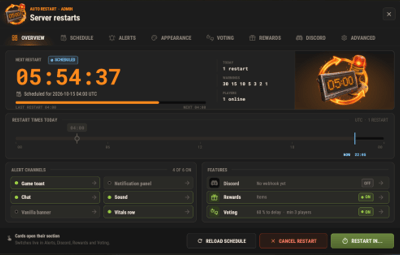
The admin window is one window with eight tabs across the top: Overview, Schedule, Alerts, Appearance, Voting, Rewards, Discord and Advanced. Every tab slides in as you open it. A draft only saves when you press Save, Preview on screen puts the real panel and countdown strip on your HUD so you can drag them where you want, and two admins can work at the same time.
Players can vote to delay a restart that comes at a bad time, and the players who come back afterwards can claim a reward in items, Economics or ServerRewards. Your Discord hears about it too: a countdown, the final restart and the server coming back online, each one an embed you design.
| Works on Oxide and Carbon | Needs CrashExtensions 1.12.9 or newer (included) |
|---|---|
| Six alert channels, each on its own switch | Seven languages built in |
Jump to: Features · How it plays · Screenshots · Trailer · Admin window · Commands · Permissions · Install · Configuration · Test server · FAQ · API
 Features
For players
- Warnings in their language. Seven languages are built in: English, Spanish, Italian, Russian, Ukrainian, French and Brazilian Portuguese. Each player sees the alerts in their own.
- The last minute on screen. The notification panel counts the final minute down by itself, and an optional countdown strip shows MM:SS and a progress line from a trigger time you choose.
- A say in the timing. When a restart is close, a vote panel lets players vote to delay or to continue. If enough of them agree, the restart waits.
- Late joiners see it too. Players who connect or respawn during a countdown get the strip, the vote panel and the last-minute panel straight away.
- A reward for coming back. Players who reconnect within the claim window get their items, Economics money or ServerRewards points.
-
Always know when.
/restartshows when the next restart is.
For server owners
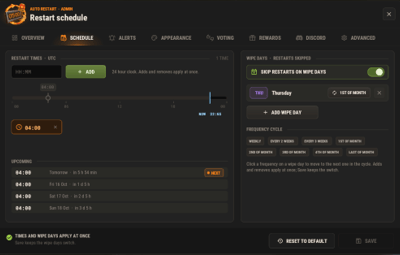
- Restart times in your time zone. As many a day as you want, in UTC or any zone you set (Asia/Tokyo, Europe/Berlin, UTC+9...), daylight saving included. Every time players see is shown in that zone. Wipe days skip them on their own cycle: weekly, every 2 or 3 weeks, the 1st to 4th, or the last of the month.
- Restart in... A one-off restart from the window, chat or RCON. Cancelling it brings your schedule straight back.
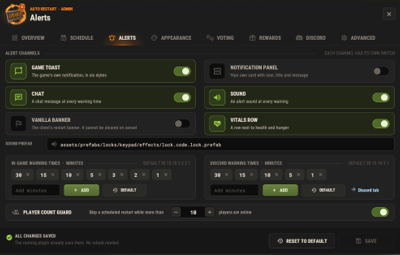
- Warning times you set. Chips for the game and for Discord, set apart. The defaults are 30, 15, 10, 5, 3, 2 and 1 minutes in game, and 30, 15, 10, 5 and 1 on Discord.
- A player count guard. A scheduled restart is skipped while more players than your limit are online. A restart you start yourself always goes ahead.
- Your panel, your look. A notification panel with one of 137 game icons, colours with opacity, a solid or gradient background, a border, your own title and message. Five position presets, or drag it anywhere.
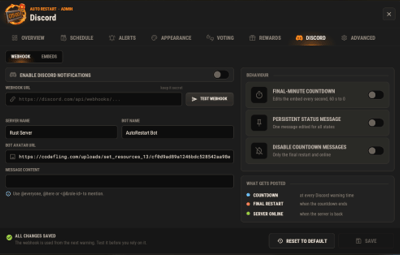
- Discord. A webhook with three embeds (countdown, final restart, server online), a live Discord style preview while you edit them, and a test button.
- Animations on one switch. Slides and fades everywhere, or none at all.
- Safe config. Values out of range are repaired on load, and a broken file is left untouched. The window saves only what its own section holds.
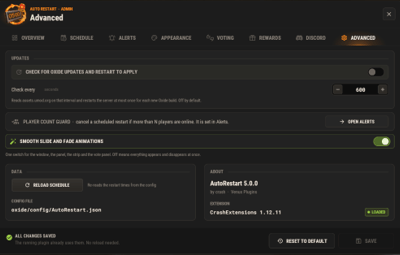
- An optional update check. Restart the server when a new Oxide build is out. It is off by default.
For developers
-
Hooks and a status call.
OnRestartScheduled,OnRestartWarning,OnRestartInitiatedandOnRestartCancelled, plusGetRestartStatusfor the pending restart. See the API. -
Console and RCON.
autorestart status,cancel,nowandset <time>work from the console, RCON and your own tools.
 How it plays
- Warnings. At every warning time you set, players get the alerts on your channels: the toast, the chat line, the sound and the panel.
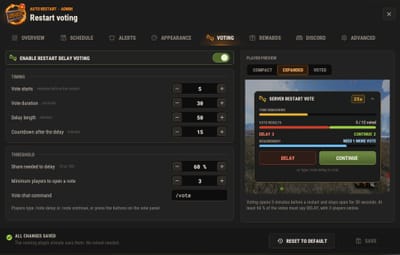
- The vote. Five minutes before the restart, the vote panel opens for 30 seconds. If 60% of the players vote to delay, with at least 3 players online, the restart waits 50 minutes and then runs a new 15 minute countdown.
- The strip. Once the time is inside its trigger (30 minutes by default), the countdown strip stays on screen with MM:SS and a progress line.
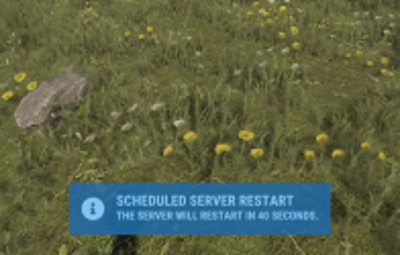
- The final minute. The panel counts the last minute down on its own, so every player sees the seconds.
- The restart. Players get a plain message to reconnect in 3 to 5 minutes. The server saves, shuts down cleanly and quits, and your host starts it again.
- Back online. The server online embed goes to Discord if you turned it on. Players who reconnect within the claim window (5 minutes by default) get their rewards: money at connect, items when they wake.
 Screenshots
Every screen below is AutoRestart running in Rust.

|
|---|
| The Overview: the next restart, the alert channels and the features at a glance |

|

|
|---|---|
| The final minute, as players see it | Alerts: every channel and warning time |

|

|
|---|---|
| Schedule: restart times and wipe days | Appearance: the panel, its size and its position |

|

|
|---|---|
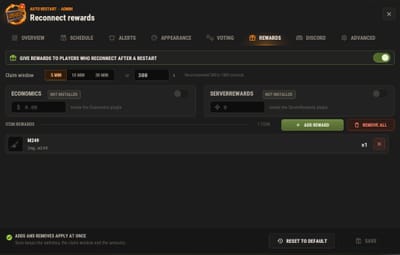
| Voting: the share, the window and the delay | Rewards: items, Economics and ServerRewards |

|

|
|---|---|
| Discord: webhook, message and embeds | Advanced: the update check, the reload and the animations |
 Trailer
The AutoRestart 5.0 trailer (click to play, 57 seconds)

 In-Game Admin Window
No file editing needed. /restart config opens every setting in one window. Each section is a draft: an unsaved section shows a dot on its tab, Save applies only the section you are on, and closing with unsaved changes asks first.
- Overview - a live clock to the next restart, what is on at a glance, today's restart times, and Restart in..., Cancel restart and Reload schedule.
- Schedule - restart times and wipe days.
- Alerts - the channels, the in-game and Discord warning times and the player count guard.
- Appearance - the notification panel, its text, the countdown strip, the toast style and the background (solid or gradient), with Preview on screen.
- Voting - the share, the vote window, the delay and the chat command.
- Rewards - the claim window, Economics, ServerRewards and an item list.
- Discord - webhook, bot, message and the three embeds, with a live preview.
- Advanced - the update check, the animations switch and the reload button.
 Commands
Players
- /restart - when the next restart is
- /restart status - detailed restart info
- /restart help - the command list
- /vote delay, /vote continue - vote on a restart in progress (the command name is set in the Voting section)
Admin
- /restart config - the admin window
-
/restart set <time>or/restart <time>- restart in 30s, 5m, 1h or a plain number of seconds. Write5m, not5 minutes. - /restart cancel - cancel the running restart. A scheduled one skips to the next slot
- /restart now - restart right away
- /restart reload - reload the schedule and forget the skipped slots
Console and RCON
-
autorestart,autorestart status,autorestart cancel,autorestart nowandautorestart set <time>(or justautorestart <time>) -
autorestart.testdiscord- send a test message to your webhook -
autorestart.forceonline- post the server online embed now
 Permissions
-
autorestart.use -
/restart,/restart statusand/restart helpfor players. Grant it to your default group if you want everyone to see when the next restart is. - autorestart.admin - the admin window and every command that changes something. Staff only.
Voting and rewards need no permission: every online player can vote and claim.
oxide.grant group admin autorestart.admin
oxide.grant group default autorestart.use
 Install
-
Install the extension, once per server. Stop the server, copy
Oxide.Ext.CrashExtensions.dllintoRustDedicated_Data/Managed(Carbon:carbon/extensions) and start it again. The console printsLoaded extension CrashExtensionswith its version. The extension is one shared file for all our plugins, so an older copy is simply overwritten. Host does not allow DLL uploads? CopyCrashExtInstaller.cs(in the zip) intooxide/pluginsinstead and runcrashext.installonce in the server console. -
Install the plugin. Copy
AutoRestart.csintooxide/plugins(Carbon:carbon/plugins). It compiles on its own and creates its config, data and language files. -
Grant the permissions and add your restart times. Give yourself
autorestart.admin, open/restart configand add your times in Schedule. A new install has no restart times. The game toast, chat and sound alerts start on. The notification panel, the countdown strip, Discord and rewards wait until you turn them on.
Plugin does not compile? The extension is missing or too old: check the folder and restart again. On a hosting panel, upload the DLL with the file manager or SFTP while the server is stopped.
Updating from 4.0.0, 4.0.1 or 4.0.2? Install the extension (step 1) if it is not 1.12.9 or newer yet, then replace
AutoRestart.cs. Your config, rewards and Discord state load as they are. Before the first start the plugin keeps your old config asAutoRestart.json.v<old version>.bak, and the default look moves to the 5.0 style only while it still holds the old default.
Updating from 3.x? Replace
AutoRestart.csand install the extension (step 1). Your config, the pending reconnect rewards and the Discord state carry over, and old values migrate on load. Image Library and Player DLCAPI are no longer needed, and theautorestart.votepermission is gone because voting is open to everyone. Back up your config first.
 Configuration
Everything lives in oxide/config/AutoRestart.json, and the admin window edits all of it. Claimed rewards and the last "server online" message are kept in oxide/data, and the texts in oxide/lang/<language>/AutoRestart.json.
Config sections (click to expand)
- Restart - restart times, wipe days, chat alerts and the alert sound
- Alerts - the in-game and the Discord warning times
- PlayerRestrictions - the player count guard
- UI - the channels (toast and its style, notification panel, vanilla banner, vitals row), the animations, and the panel and strip design
- Voting - on or off, the share needed (60%), the vote window (30 seconds, opening 5 minutes before the restart), the delay (50 minutes), the new countdown (15 minutes), the minimum players (3) and the chat command
- Rewards - the claim window (5 minutes), Economics, ServerRewards and the item list
- Discord - webhook, server name, bot name and avatar, message content and the three embeds
- UpdateCheck - the Oxide update check and its interval
 Test server
Available on the new Meowcraft test server. Type /restart in chat to see the restart status there. Restarts are turned off on this test server.
client.connect 91.229.114.54:28015
 FAQ
FAQ
Q: I run AutoRestart 4.x. What changes when I update?
A: Install the extension, then replace AutoRestart.cs. Your config, rewards and Discord state load as they are, in the new window. Time values are stricter: write 5m, not 5 minutes. A Discord webhook must be the plain https://discord.com/api/webhooks/<id>/<token> form, and the default message content is empty.
Q: Does it start the server again after the restart?
A: AutoRestart saves and shuts the server down cleanly, and your host brings it back. Tested on Pterodactyl and Wisp. On a Windows machine, make sure your .bat starts the server again when it exits.
Q: What is the extension for, and what if I do not want one?
A: AutoRestart draws its interface with the Oxide.Ext.CrashExtensions extension. The DLL is in the zip, and if your host does not allow DLL uploads, CrashExtInstaller.cs (also in the zip) installs it with one console command, crashext.install. If you would rather not run an extension, stay on 3.9.3: it does not need it and keeps working as before.
Q: Does it work on Carbon?
A: Yes. The DLL goes into carbon/extensions instead of RustDedicated_Data/Managed, then restart once. Everything else is the same.
Q: I am on 3.x. Do I lose my settings?
A: No. Your config, the pending reconnect rewards and the Discord state carry over, and old values migrate on load.
Q: Can players stop a restart?
A: They can vote to delay it. Voting opens 5 minutes before the restart and stays open for 30 seconds. When 60% of the players agree, with at least 3 players online, the restart waits 50 minutes and then runs a new 15 minute countdown. Every number is in the config, and voting can be turned off.
Q: What does Cancel do?
A: On a restart you set with Restart in..., it removes it and brings your schedule back at once. On a scheduled restart, it skips that slot (and any earlier one) and arms the next. Reload schedule forgets the skips.
Q: Can I skip a restart while the server is busy?
A: Yes. Turn on the player count guard and a scheduled restart is skipped while more players than your limit are online. A restart you start yourself always goes ahead.
Q: Do I need Economics or ServerRewards?
A: Only to pay rewards in money or points. Item rewards need nothing else.
Q: Does it contact any outside service?
A: Only what you turn on. The plugin downloads the pictures it draws (about 80 small icons and images) once from cdn.crashplugins.space, which your server then caches. The Oxide update check and the Discord webhook are off by default. CrashExtInstaller downloads the extension from GitHub only when you run crashext.install, and never checks for updates.
Q: Can I translate it?
A: Seven languages are built in and each player sees their own. For another one, copy oxide/lang/en/AutoRestart.json into your language folder and translate it.
Q: How heavy is it?
A: Built and load tested for 500+ player servers. Every animation can be turned off with one switch.
 API / Hooks
void OnRestartScheduled(int seconds, bool isCustom)
void OnRestartWarning(int secondsLeft)
void OnRestartInitiated()
void OnRestartCancelled(string reason, int secondsRemaining)
Read the pending restart from any plugin:
[PluginReference] private Plugin AutoRestart;

var status = AutoRestart?.Call("GetRestartStatus") as Dictionary<string, object>;
// HasRestart is always there. With a restart pending you also get IsDelay, IsCustom,
// SecondsRemaining, RestartTime and FormattedTime.

Questions, ideas or bug reports? Use the Support tab of this file or join our Discord.