
Vinni_TV_'s Wishlist
-

$14.99
Checkpoint Event
Checkpoint Event
Checkpoint Event is a fully featured PvE event for Rust, transforming ordinary procedural roads into dangerous, heavily fortified military combat zones filled with valuable rewards.
During the event, a military checkpoint spawns on a randomly selected road section, protected by armed NPC guards, snipers, auto-turrets, and occasionally a Patrol Helicopter. The encounter is driven by a new dynamic Difficulty System, meaning the size of the base layout, the number of guards, the presence of a helicopter, and the final loot will scale based on the randomly selected difficulty.
Players must breach the perimeter, fight through the defenders, and loot the crates. The event utilizes a unique Competitive Scoring System: players earn points for killing NPCs, destroying turrets and helicopters, and looting crates. The event is successfully completed only when all guards are eliminated and every crate is looted. The player with the highest score at the end of the event is declared the winner!
This creates an intense PvE and PvP experience where players must fight not only the military but potentially each other for the highest score.
Features
Random road location selection (automatically avoids monuments). Dynamic Expandable Difficulty System (Easy, Normal, Hard, Nightmare by default, but completely customizable — add, remove, or edit as many levels as you want!). Difficulty-based Scaling: Each difficulty dictates its own base layout size (Small, Medium, Large), guard counts, crate quantities (Regular, Military, Elite), loot tables, and whether a Patrol Helicopter spawns. Competitive Scoring System: Awards points to players for specific actions (kills, looting). Custom Defenses: Checkpoints are fortified with high stone walls, gates, watchtowers, sandbags, and auto-turrets deployed on junkpiles. Notify Plugin Support for modern UI announcements. Customizable Chat Prefix with color support. Fully customizable crate loot per difficulty. Option to remove the default crate loot. Dynamic Map Markers: Vending machine and radius markers displaying a live countdown timer until the event expires. Automatic event completion once all NPCs are cleared and all crates are fully looted. Automatic event scheduling and cleanup timers. Manual event control through chat and console commands. Oxide permission support. Fully configurable through the configuration file. Commands
/checkpoint start [difficulty] - Chat command checkpointevent start [difficulty] - Console command Starts the event. You can optionally specify a difficulty name (e.g., Easy, Normal) to force a specific tier.
/checkpoint stop - Chat command checkpointevent stop - Console command Stops and completely despawns the currently active event.
Permissions
checkpoint.admin
(Used only when permission checks are enabled in the config to control who can manually start/stop the event).
API & Hooks
Checkpoint Event provides API hooks that allow server owners and developers to easily integrate the event with external UI plugins, custom reward managers, or economy systems:
OnCheckpointEventStarted - Called when the checkpoint event successfully spawns on the map. OnCheckpointEventStopped - Called when the event is forcefully stopped or cleaned up. OnCheckpointEventCompleted(BasePlayer winner, string difficultyName) - Called when the event is successfully completed (all guards dead, all crates looted). Returns the player with the highest score and the name of the completed difficulty. Localization
The plugin includes full localization support for:
English
Russian
All in-game messages are fully translated and automatically displayed according to the server language.
Configuration
The configuration file allows you to customize almost every aspect of the event, including: Custom Difficulty Profiles (Add/Remove difficulties, adjust spawn chances, layouts, and helicopter presence). Difficulty-Specific Loot Tables: Complete loot control per crate type (Regular, Military, Elite) per difficulty (item amounts, drop chances, and skin IDs). Scoring Values: Adjust how many points players receive for killing NPCs, turrets, helicopters, and looting crates. Chat & UI Customization: Chat Prefix settings and Notify Information Type ID support. Automatic event interval & Event lifetime. Map marker radius and names. Guard & Sniper NPC presets. Option to remove the default crate loot. Permission requirement for chat commands. CONFIG EXAMPLE
PvE Mode Support
The plugin features full built-in compatibility with PveMode. When PveMode is installed on your server, the event automatically generates a dedicated PVE zone upon spawning. You can fully customize all PVE rules, permissions, damage scaling, crate looting restrictions, and owner status settings directly through the plugin configuration file.
Dependencies Required Dependency:
NPC Spawn: Checkpoint Event requires the NPC Spawn plugin to function. The event relies on it to spawn all NPC guards and snipers. Without NPC Spawn, the plugin will not work.
Note: You must configure your own NPC presets or use default ones in the NpcSpawn data folder that match the preset names defined in the Checkpoint config.
TELEGRAM CHANNEL
- #event
- #checkpoint
- (and 5 more)
-
.thumb.gif.45f4378b983323fd385d637297d61d33.gif)
$39.99$19.99Outpost Overrun Event
By Code Brothers in Plugins
Turn one of Rust’s safest zones into a high-risk combat hotspot. Outpost Overrun dynamically transforms the Outpost into a fortified hostile zone, featuring elite scientists, high-tier loot crates, and a full lockdown protocol that forces players into intense, close-quarters PvP and PvE combat.
Watch as the Outpost shifts from a neutral trading hub into a secured military zone. Scientists take control, entrances are watched, and valuable crates are deployed inside key buildings. Players must fight through coordinated AI defenses and survive the chaos to secure the rewards before the lockdown is lifted.
Features
• Converts Outpost into a hostile lockdown zone
• Scientists with unique weapons and behaviors
• Locked crates
• Dynamic map marker and player notifications
• Controlled AI roaming and area defense
• Configurable lockdown radius and duration
• Optional automated event triggering
• Server-side UI tracking for event progress
• Automatic cleanup and reset to safe zone
• Admin-triggered or scheduled events
• Fully configurable values
Chat Commands (Admin Only)
/outpostevent
Toggles the Outpost Lockdown admin control panel
Permissions
outpostevent.use
Required to start, stop, or manage Outpost Lockdown events
Configuration
{
"Auto": false,
"AutoInterval": 90,
"LockdownDuration": 900,
"EventRadius": 120,
"CrateCount": 3,
"UseMapMarker": true,
"NotifyPlayers": true,
"HackableCrates": true,
"MaxAttempts": 10
}
Default values are optimized for balanced gameplay, performance, and a cinematic experience.
Notes
This plugin is designed to flip the expectation of safety at Outpost, creating a high-risk, high-reward event that encourages player interaction, PvP, and strategic combat. It blends naturally into Rust’s environment while delivering a unique, server-defining experience.
Perfect for servers looking to add intensity without relying solely on random world events.
Created by CodeBrothers
Check out our other work on Codefling
-
$7.99
MultiTool
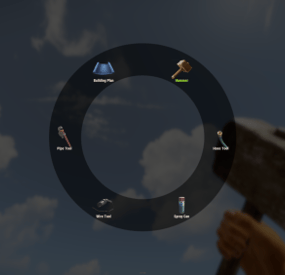
Building tools Seven tools, one belt slot Building a base means a hammer, a plan, wire, pipes, a hose, a spray can and a wallpaper tool — and a belt with nothing left in it. This is one item that becomes any of them. Hold it, hit a shortcut, a radial menu opens around your crosshair, click a tool and it's already in your hand, in the same slot. Nothing wears out, nothing takes up space, and each tool can be locked behind its own permission.
7 Tools in the wheel by default 7 Shortcuts to pick from 1 Belt slot for all of them 0 Durability ever lost ✓ Radial menu at the crosshair — one shortcut, one click, tool swapped ✓ A permission per tool — the wallpaper tool for VIP, the hammer for everyone ✓ Any item can go in the wheel — it isn't limited to building tools ✓ Closes itself when you're hit — a menu never gets you killed ✓ English and Russian included — and every label in the wheel is your own text Video See it in action 01 — The wheel Open, click, build — without leaving the wall you're on The whole interaction is one shortcut and one click. No inventory, no dragging, no hunting for the right slot while your teammate holds the wall up.
Seven shortcuts, pick the one that fits your hand Shift + E, Shift + left or right click, Ctrl + E, Ctrl + left or right click, or the middle mouse button. Or skip shortcuts entirely and have the wheel open the moment the tool comes into your hands. Laid out by itself Icons are spaced evenly around the circle from however many tools that player can actually see — three tools or twelve, the ring stays balanced. The tool currently in your hands is highlighted in green. The slot doesn't move Picking a tool replaces the item in the same belt position and puts it straight back in your hands. Your belt layout survives a hundred swaps unchanged. Gets out of the way on its own Take a single point of damage and the menu closes instantly. Switch to another item and it closes too. Nobody dies staring at a UI because a raider walked in. Sized to the screen One scale value shrinks or grows the whole wheel, and it can be drawn on the unscaled overlay layer so it looks the same regardless of a player's UI scale setting. 02 — The tools Your list, not a fixed one Seven building tools come set up and ready. The list itself is just items, so it holds anything you want it to.
Preloaded with the full building set Hammer, building plan, wire tool, pipe tool, hose tool, spray can and wallpaper tool — the seven items that otherwise eat most of a belt. A permission on any of them Leave a tool's permission empty and everyone sees it; fill it in and only that group does. The wheel is built per player, so a default player and a VIP holding the same item get different menus. Permissions are registered for you on load. Any item ID, any skin, your own label A tool entry is an item id, an optional skin, a name shown under the icon and a permission. Add a torch, a codelock, a custom skinned hammer — anything you can name by id belongs in the wheel, under whatever text you like. Nothing in the wheel ever wears out Tools carried as part of the multi-tool lose no durability at all, so a player never loses their hammer mid-raid-repair and never has to craft a replacement. 03 — Handing it out A skinned item you can sell, gift or script The multi-tool is an ordinary building plan wearing a specific skin. That makes it trivial to distribute however your server already distributes things.
Give it from chat, console or any other plugin A chat command for admins and holders of the give permission, a server console command that names a player, and — because it's just an item with a skin — a shop lot, a kit or an event reward with no integration work at all. Optional free building One switch lets anyone holding the multi-tool place structures without paying resources — built for creative and event servers. Left off by default, and it applies to every holder, so hand the tool out accordingly. Your own skin, if you have one The skin id is a config value. Swap in a workshop skin of your own and the plugin recognises it as the multi-tool from then on. Reliability Built to be left alone ✓ Oxide and Carbon — on Carbon the built-in image database is used and nothing else is needed ✓ Nothing is stored — the tool is a normal item, so there is no data file to corrupt and nothing to lose on a wipe ✓ Clean unload — open menus are closed for every player; items already in belts keep working as ordinary items ✓ Idle cost is nothing — unused hooks are unsubscribed on boot, so features you turned off don't run at all ✓ Misconfiguration is called out — enable two shortcuts and the console tells you which one it used instead of failing quietly Commands & permissions Two commands, and the tool permissions you invent /give_mt Give yourself a multi-tool. Admins, or anyone with the give permission give_mt <player> Server console and RCON — give one to a named player, online or sleeping multitool.give Use the chat command multitool.hosetool The one gated tool in the default config — an example you can copy onto any other tool, or delete Questions Before you buy What do I need installed? On Oxide, ImageLibrary — it's free, and the plugin says so in console if it's missing. On Carbon, nothing at all. How do players get one? However you hand out items. It's a building plan with a set skin, so a shop lot, a kit, a rank reward or the console command all work — no integration needed. Can I put non-building items in the wheel? Yes. Any item id works, with any skin and any label. The default seven are building tools because that's the pain everyone has, not because it's a limit. Can VIPs get more tools than everyone else? Yes — give those entries a permission. The wheel is assembled per player from what they're allowed to see, and the layout adjusts to however many that is. Does the menu get me killed? It closes the instant you take damage, and again if you switch off the tool. There's also a close button in the middle of the ring. Can I use a different shortcut, or none? Seven combinations are available and exactly one is active. Alternatively, switch on "open when the tool is equipped" and the wheel appears as soon as the item reaches the player's hands. Does free building apply to everyone? To everyone holding a multi-tool, yes — it's a server-wide switch, off by default, meant for creative and event servers. If you only want some players building for free, control it by who has the tool.- #multi-tool
- #tool
- (and 2 more)
-
$10.00
Furnace
Per-appliance smelting speeds, permission-based profiles and optional inventory controls for Rust servers.
Furnace lets you tune each appliance on your Rust server and give permission groups their own speed profiles. Keep campfires at the default rate, speed up electric furnaces, or build distinct VIP tiers. Change profile values from /furnace without reloading the plugin.
Independent controls: small, large and electric furnaces, oil refineries, BBQs, campfires, mixing tables and cooking workbenches. Permission-based profiles: assign speeds to your existing player groups. In-game editing: admins edit profiles; players see a read-only view of their effective values. Inventory shortcuts: optional Take All / Put All buttons for the furnace a player is actively looting. Fuel choice: keep native fuel use or enable proportional consumption with native byproduct rules.
1x is the baseline, 2x doubles the configured smelting rate, and 0.5x halves it over time. Values from 0.01 to 100 are supported. Appliances have different underlying rates and recipes, so identical multipliers do not mean identical item throughput.
Fractional speeds are averaged across native cooking ticks. Mixing tables use their native tick interval, so very short recipes are still limited by the game. A running mix keeps the speed selected when that batch started.
Create a profile under Roles, reload Furnace once to register its permission, then grant furnace.speed.<rank> to a group. For example, VIP could receive 3x electric and 2x small-furnace speed, while Elite receives 5x and 3x.
Precedence matters: the highest granted profile value wins independently for each appliance. Global Multiplier* settings are the fallback only when no profile matches. If a player has both a 0.5x slow profile and a 1x normal profile, the 1x value wins. Selecting a profile in the admin editor does not grant that profile to the admin.
While an oven is open, the active looter's permissions determine its speed. After looting ends, the owner's profile applies again. Furnace updates ovens on relevant events and refreshes lit ovens every five seconds.
Place Furnace.cs in your framework's plugins folder. For Oxide/uMod this is oxide/plugins. Grant furnace.use to players who should open the panel. Grant furnace.admin only to trusted administrators who should edit profiles. Optionally grant furnace.buttons.use for inventory shortcuts. Open /furnace and tune your profiles. New installations start electric furnaces at 2x and other appliances at 1x. oxide.grant group default furnace.use oxide.grant user <steam-id> furnace.admin oxide.grant group vip furnace.buttons.use oxide.grant group vip furnace.speed.vip
Create the vip profile before granting its permission. Existing configuration and role names are retained on upgrade. Back up your config and test updates on a staging server before replacing a production copy.
ScaleFuelConsumptionWithSpeed defaults to false. Enable it to scale fuel use with the multiplier, including fractional and slow speeds. Furnace uses native fuel and byproduct handling, so charcoal follows the appliance's normal rules instead of a guaranteed custom output ratio.
Take All / Put All require both permission and a valid, nearby loot session. Put All can use remaining space in existing stacks. Items that cannot be transferred stay in their original inventory.
Furnace targets Oxide/uMod and Carbon and does not require ImageLibrary. Supported campfire variants are included; custom prefabs outside the known appliance patterns are not automatically supported. Avoid overlapping speed-control plugins unless you have tested their interaction.
Run furnace.debug from the console with admin permission while the oven inventory is open to inspect its speed decision. For support, include your framework version, relevant error output and the diagnostic result. The gallery shows the existing in-game interface; the multiplier animation is an explanatory diagram.
- #smeltingspeed
- #furnace
- (and 4 more)
-
$12.99
Simple Build
The Simple Build plugin for Rust enhances the building experience by providing players with advanced building options and UI elements. It allows players to easily manage building configurations, such as wall stacking, custom gaps, and floor stacking, directly from an intuitive UI. This plugin is designed to streamline the building process, making it more efficient and user-friendly.
Integrates seamlessly into Simple Symmetry, but can be used as a stand alone building tool
FEATURES:
• Advanced Building Options: Supports various build types including Wide Gap, Wall Stack, Custom Gap, Custom Floor Stack, Floor Stack Up, and Floor Stack Down.
• User Interface: Provides an in-game UI for players to easily toggle and configure building options.
• Wall Stacking: Automatically stack walls to a specified height with configurable spacing.
• Custom Gaps and Offsets: Allows players to set custom gaps and offsets for precise building placement.
• Symmetry Integration: Automatically shows or hides the build options UI based on the visibility of the symmetry UI.
• Resource Management: Automatically deducts resources from the player’s inventory when building stacked walls.
USAGE:
1. Grant the simplebuild.use permission
2. Activate UI: Equip a planner, hammer, or toolgun to automatically display the build options UI.
3. Configure Options: Use the UI buttons to configure your building options as needed.
4. Build: Start building with the configured options, and the plugin will handle the rest.
This plugin is ideal for players who want more control and efficiency in their building process, making it easier to create complex structures with minimal effort.
COMMANDS:
/sbb – Toggle the simple build UI /wg – Toggle Wide Gap on / off /ws – Toggle Wall Gap on / off /gap {value} – Set the custom gap spacing (100 = full block) /fs {value} – set the custom gap height (100 – full block height) /entkill – Kill entity player is looking at (requires simplebuild.entkill permission) PERMISSIONS:
simplebuild.use – Allows players to use simple build
simplebuild.entkill – Allows players to use entkill command (admins only)
DEMO VIDEO
Note: Does not include "Simple Symmetry”, Images shown with Symmetry include both plugins for demonstration.