
SuperKitten's Wishlist
-
$32.50
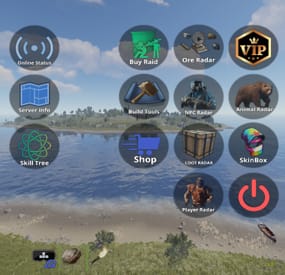
Augmented Reality Glasses - HUD Panel
With AR Glasses , you can now make the boring old Sunglasses play a vital role in information when your players roam your Server.
REQUIRES IMAGE LIBRARY TO LOAD IMAGES
When equipped, the AR Glasses can trigger Preset Commands, and even Custom Commands, for example, set a custom image and command to a button, and have it run whatever you like.
Preset commands are able to be set on Cooldown.
When a Preset command is ran, it can send crucial data such as existing loot crates in the configurable range, but to combat this being OP, we introduce reducing the items condition and range, This is also configurable.
LIST OF COMMANDS / PRESET BUTTONS
Commands can be ran via chat or via AR Panel Button
/arn - Shows NPCs within a specified range.
/arl - Marks all loot containers within a specified range.
/arp - Displays nearby online players.
/arore - Highlights ore nodes within a specified range.
/ara - Detects animals within a specified range.
/ArServer - Shows current server statistics.
/arglasses - Grants the player a pair of AR glasses. - IF PLAYER HAS PERMISSION
/arinfo - Displays information about available AR commands and functionalities.
For Suggestions Send a PM or contact me at
{ "UI Location (top right | top left | bottom right hotbar | default | custom)": "default", "Custom UI Position": { "Custom AR Button Anchor Min": "0.5 0", "Custom AR Button Anchor Max": "0.5 0", "Custom AR Button Offset Min": "-263.87 18.889", "Custom AR Button Offset Max": "-203.331 79.111" }, "AR Glasses Shortname": "sunglasses", "AR Glasses SkinID": 3182747023, "AR Panel Transparency": 0, "AR Text Size": 40, "AR Text Position": { "x": 0, "y": 2, "z": 0.8 }, "AR Command Cooldown": 30, "How Long to Keep Pings Visible in Seconds?": 60, "Decrease Ar Glasses Durability By This Much Per AR Command Use": 15, "Ore Detection Range": 80, "NPC Detection Range": 80, "Animal Detection Range": 80, "Loot Container Detection Range": 80, "Online Player Detection Range": 80, "Custom Button 1 Enabled?": false, "Custom Button 1 Command": "chat.say /info", "Custom Button 1 Image": "https://www.dropbox.com/scl/fi/qscxb6uxszldma7d5lazx/Placeholder.png?rlkey=ad60m0xd8zq89xrj7repwlb60&dl=1", "Custom Button 2 Enabled?": false, "Custom Button 2 Command": "chat.say /info", "Custom Button 2 Image": "https://www.dropbox.com/scl/fi/qscxb6uxszldma7d5lazx/Placeholder.png?rlkey=ad60m0xd8zq89xrj7repwlb60&dl=1", "Custom Button 3 Enabled?": false, "Custom Button 3 Command": "chat.say /info", "Custom Button 3 Image": "https://www.dropbox.com/scl/fi/qscxb6uxszldma7d5lazx/Placeholder.png?rlkey=ad60m0xd8zq89xrj7repwlb60&dl=1", "Custom Button 4 Enabled?": false, "Custom Button 4 Command": "chat.say /info", "Custom Button 4 Image": "https://www.dropbox.com/scl/fi/qscxb6uxszldma7d5lazx/Placeholder.png?rlkey=ad60m0xd8zq89xrj7repwlb60&dl=1", "Custom Button 5 Enabled?": false, "Custom Button 5 Command": "chat.say /info", "Custom Button 5 Image": "https://www.dropbox.com/scl/fi/qscxb6uxszldma7d5lazx/Placeholder.png?rlkey=ad60m0xd8zq89xrj7repwlb60&dl=1", "Custom Button 6 Enabled?": false, "Custom Button 6 Command": "chat.say /info", "Custom Button 6 Image": "https://www.dropbox.com/scl/fi/qscxb6uxszldma7d5lazx/Placeholder.png?rlkey=ad60m0xd8zq89xrj7repwlb60&dl=1", "Custom Button 7 Enabled?": false, "Custom Button 7 Command": "chat.say /info", "Custom Button 7 Image": "https://www.dropbox.com/scl/fi/qscxb6uxszldma7d5lazx/Placeholder.png?rlkey=ad60m0xd8zq89xrj7repwlb60&dl=1" }
-
$42.90
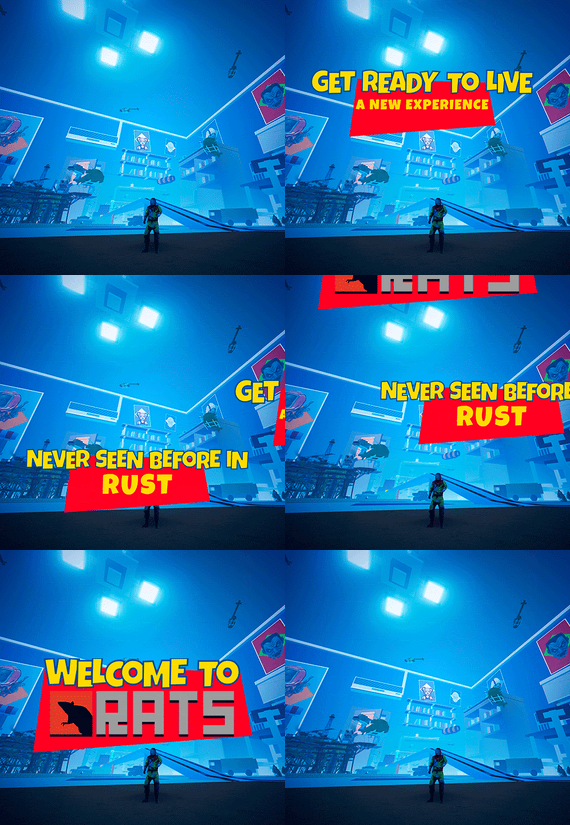
RATS
Check out RATS, a custom Rust map that brings a whole new gameplay vibe. Dive into an epic adventure in miniature and discover fun, fresh challenges around every corner. It's Rust, but with a cool, unique twist!
- FEATURES
• Size: 3000.
• Objects: 101245.
• Map protection plugin included.
• The map can be edited: Yes.
- CONTAINS ALL OFFICIAL MONUMENTS
• Apartment complex
• Ferry Terminal
• Nuclear missile silo
• Large oil platform
• Small oil platform
• Submarine laboratories
• Harbor
• Large fishing villages
• Fishing villages
• Launch site
• Satellite dish
• The Dome
• HQM Quarry
• Stone quarry
• Sulfur quarry
• Arctic Research Base
• Sewer Branch
• Train yard
• Junkyard
• Abandoned military bases
• Military tunnel
• Caves
• Large barns
• Ranch
• Bandit camp
• Power plant
• Swamp
• Airfield
• Giant excavation
• Outpost
• Lighthouse
- PREFABS AND CUSTOM MONUMENTS
• Zeppelin (Puzzle-parkour).
• Ghostbusters Barracks, this is a faithful monument to the fire station used by the ghostbusters, contains puzzles, traps, loot, npc, ghostbusters logo.
• Civil Guard Barracks, a construction zone for the server administrator. This monument-zone contains helicopter respawns and loot.
• Camping, it contains tents and inside you will find loot, the land is surrounded by a kind of Creepers.
• Snowball, this large glass dome contains two floors to build, plus on the top floor you will find resources.
• Cargo Ship model, full of loot, but watch your step sailor because you will find enemies on board.
• Zone for events, a huge space rocket with two floors, on the second floor you can use the Zone Manager plugin to place an event or if you prefer you can use this area for the Raideable Bases plugin. On the second floor players can build, also on this second floor you will find several helicopter respawns.
• Crafting areas, these areas are scattered throughout the map, you will find these areas easily, they are marked with a star.
• Cake, a huge and delicious chocolate cake, inside you will find a not very pleasant surprise.
• Lamps, there are 4 lamps on the map, two are located on the roof (one you will find on the roof, in the center of the map, it contains: Loots, NPCS and a tank), the other lamps you will have to find them, in these three remaining lamps you will be able to build your house.
• Train Stations, with waiting room, loot and NPC, with secondary rail respawn.
• Mars Attack Arena, an impressive flying saucer, inspired by the movie Mars Attacks, this huge monument is surrounded by multiple fighter planes, inside you will find two floors with a sci-fi style. Use this monument to create an Arena for your players to fight each other.
• Fishbowl, a huge aquatic area, contains a great variety of fish, in this area you will find the laboratory among other things.
• Pots, in the upper part you will find resources, in the lower part you can build your house.
• Trash garbage can, if you need resources this will be a good place to collect them.
• Zeppelin with dish, if you need a place far away from your enemies this is a good option to build your house, besides it is located in the air.
• Underwater Domes, large spheres located in various places on the map, use these cupolas to build your house.
"In RATS you will find many hidden areas that have not been mentioned, so equip yourself and explore this great miniature adventure"
- TIPS
• Climb through walls, furniture and ceilings.
• Take advantage of any area with total freedom to build your home.
• Have fun 🙂
- #rats
- #miniature
- (and 24 more)
-
$20.00$12.40Geodes
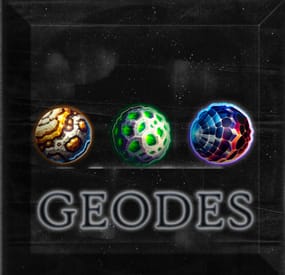
Geodes
Looking to add another layer of gameplay for your players?
Or just to keep them a little busier gathering geodes and having "Rockhound" crack them open for some "Fair Trades"?
Now you can add your own Customizable Geodes to your Server.
When a player mines a node, you can configure drop rate and loot content.
When a player picks up ore, you can enable or disable a chance of them finding a geode, based on your geodes spawn rate.
You can also configure for a chance for the geode to be empty like in the "Real World"
Jackhammer harvest is also configurable.
You can blacklist tools as needed.
Spawn the Geode Shed Via Copy Paste, MarkerManager & ZoneManager Or AutoSpawn at Outpost Automatically with Copy Paste to handle paste, ZoneManager to handle decay and looting prevention etc.
MarkerManager via Umod can be used to mark the NPCS Location on the map.
NPC SETUP
Use /SpawnRockhound to set the NPC Trader Position
To remove
Use /RemoveRockhound
On new save, the data will clear to prevent any floaters.
NPC clothing is configurable, I set it up with some basic clothing with Skins as an Example, You can also use Kits to Set up your NPC as you wish.
NPC SHED SETUP
Use /pastegeodes to set the npc shed. Relies on Copypaste, and ZoneManager to handle decay and other flags.
OTHER COMMANDS
Use /givegeodes to spawn all custom geode items in your inventory, good for testing trade and crack open item pulls.
Demo Vid for Paste Instructions
Lang
{ "RockhoundCooldownMessage": "[<color=#70b8db>Rockhound</color>] Give me <color=#9370db>{0}</color> seconds, Let me rest my swinging arm...", "EmptyGeodeMessage": "[<color=#9370db>Geodes</color>] Your <color=#db9370>{0}</color> was empty!", "NoPerms": "[<color=#9370db>Geodes</color>] You don't have permission to run this command!", "GeodeInteractionNoGeodes": "[<color=#70b8db>Rockhound</color>] :nervous: \n\nCome back when you have enough <color=#db9370>Geodes</color>.\n\n Until then! \n\n:happy:", "GeodeInteractionTradeMessage1": "[<color=#70b8db>Rockhound</color>] :nervous: \n\nI can give you...", "GeodeInteractionTradeMessage2": "\nin exchange for your <color=#db9370>Geode(s)</color>.\n\nSeems like a fair trade to me! \n\n:happy:", "GeodeHarvestMessage": "[<color=#9370db>Geodes</color>] <color=#db9370>{0}</color> Harvested!", "GeodeHarvestMessage1": "[<color=#9370db>Geodes</color>] A <color=#db9370>{0}</color> was found on the <color=#db9370>ground</color>!", "GeodeInteractionFullInventory": "[<color=#70b8db>Rockhound</color>] Your <color=#9370db>Inventory</color> is full, I'll place the Item(s) on the <color=#db9370>ground</color>.", "GeodesSpawned": "[<color=#9370db>Geodes</color>] All Custom <color=#db9370>Geode</color> Items sent to your Inventory." }
Config
{ "Discord Webhook URL": "INSERTURLHERE", "Chat Icon": 0, "Position of Building for Outpost Spawn": { "x": -80.45, "y": 0, "z": -35.73 }, "Rotation Correction of The Building": -77, "NPC Positioning If using Outpost Spawn": { "x": -80.3, "y": 0.2, "z": -34.34 }, "Rotation Correction of The NPC": 90, "Dynamic (Outpost) Spawn Of The NPC Building and NPC Enabled?(CopyPaste Req. MarkerManager & Zone Manager Recommended)": true, "Enable Harvest Message?": true, "Enable Harvest On Collectable Pickup(Stone, Sulfur, Metal Ore)?": true, "Tool Blacklist": [ "icepick.salvaged", "knife.bone" ], "Ability To Harvest With Jackhammer?": true, "Maximum Amount of Like Geodes Traded at a Time": 3, "NPC Interaction Cooldown (seconds)": 3, "Enable Marker Manager from UMOD, To Mark Rockhound Location?": true, "Enable NPC Kit": false, "NPC Kit Name": "", "Geode Types": [ { "Geode Name": "Magnetite Geode", "Geode SkinID": 3157464677, "Geode Harvest Probability - 100 = 100%": 5, "Minimum Items on Trade": 1, "Maximum Items on Trade": 2, "Geode Loot Table on Crack": [ { "Shortname": "lowgradefuel", "Skin": 0, "Custom Name": "", "Amount Min": 10, "Amount Max": 20, "Chance to be given this Item upon Cracking (1.0 = 100%)": 0.5 }, { "Shortname": "hq.metal.ore", "Skin": 0, "Custom Name": "", "Amount Min": 5, "Amount Max": 20, "Chance to be given this Item upon Cracking (1.0 = 100%)": 0.5 } ], "Geode Loot Table on Trade": [ { "Shortname": "scrap", "Skin": 0, "Custom Name": "", "Amount Min": 50, "Amount Max": 100, "Chance to be given this Item on Trade (1.0 = 100%)": 0.5 }, { "Shortname": "ammo.pistol.fire", "Skin": 0, "Custom Name": "", "Amount Min": 2, "Amount Max": 4, "Chance to be given this Item on Trade (1.0 = 100%)": 0.5 } ] }, { "Geode Name": "Septarian Geode", "Geode SkinID": 3157464875, "Geode Harvest Probability - 100 = 100%": 5, "Minimum Items on Trade": 1, "Maximum Items on Trade": 2, "Geode Loot Table on Crack": [ { "Shortname": "scrap", "Skin": 0, "Custom Name": "", "Amount Min": 10, "Amount Max": 20, "Chance to be given this Item upon Cracking (1.0 = 100%)": 0.5 }, { "Shortname": "metal.fragments", "Skin": 0, "Custom Name": "", "Amount Min": 6, "Amount Max": 15, "Chance to be given this Item upon Cracking (1.0 = 100%)": 0.5 } ], "Geode Loot Table on Trade": [ { "Shortname": "metalspring", "Skin": 0, "Custom Name": "", "Amount Min": 1, "Amount Max": 2, "Chance to be given this Item on Trade (1.0 = 100%)": 0.5 }, { "Shortname": "roadsigns", "Skin": 0, "Custom Name": "", "Amount Min": 1, "Amount Max": 3, "Chance to be given this Item on Trade (1.0 = 100%)": 0.5 } ] }, { "Geode Name": "Irradiated Geode", "Geode SkinID": 3157465353, "Geode Harvest Probability - 100 = 100%": 3, "Minimum Items on Trade": 1, "Maximum Items on Trade": 2, "Geode Loot Table on Crack": [ { "Shortname": "lowgradefuel", "Skin": 0, "Custom Name": "", "Amount Min": 10, "Amount Max": 20, "Chance to be given this Item upon Cracking (1.0 = 100%)": 0.5 }, { "Shortname": "hq.metal.ore", "Skin": 0, "Custom Name": "", "Amount Min": 4, "Amount Max": 12, "Chance to be given this Item upon Cracking (1.0 = 100%)": 0.5 } ], "Geode Loot Table on Trade": [ { "Shortname": "ammo.rocket.hv", "Skin": 0, "Custom Name": "", "Amount Min": 1, "Amount Max": 2, "Chance to be given this Item on Trade (1.0 = 100%)": 0.5 }, { "Shortname": "ammo.pistol.hv", "Skin": 0, "Custom Name": "", "Amount Min": 1, "Amount Max": 3, "Chance to be given this Item on Trade (1.0 = 100%)": 0.5 } ] } ], "NPC Clothing Options": [ { "Shortname": "pants", "Skin": 2919986425 }, { "Shortname": "tshirt", "Skin": 844217778 }, { "Shortname": "shoes.boots", "Skin": 2090776132 }, { "Shortname": "hat.cap", "Skin": 812550226 }, { "Shortname": "metal.facemask", "Skin": 905114071 } ] }
Thanks for viewing! - Wrecks
Thanks to @imthenewguy for the tips!
& to @Luuxen for the help testing.
-
.thumb.gif.adec26ee7eb38920883767a8a783c768.gif)
$29.99$18.59Zombie Hunter Reanimated
Unlock another (Frightening) lane of economic gameplay with Zombie Hunter.
Celebrating 2 years since drop we are here with Version 2.0.0 of Zombie Hunter.
This is a complete rewrite for features, spawn flex, QOL and Much more.
Get licensed, hunt Zombies, sell brains and profit.
Zombies spawn automatically & Randomly at FP Monuments.
You can also save your own custom spawn points via command.
Set a License fee so players have to "Legally" cash out Zombie Brains. The license is optional and the command name is configurable for shop integration.
Build as many Zombie tiers as you want. Each tier has its own settings for Aura - Stats - Combat Settings - Weapon (Melee Only) - Outfit - Marker. You can easily make a High Tier Target stand out from a Low Tier.
Per tier Aura effects let zombies deal radiation, heat, cold, electric or poison effects on nearby players.
An aura can also emit and players are notified when in range.
Top Zombie Hunters leaderboard broadcasts at your interval or players can see it via command.
Players cash out at the Zombie Hunter Cashout Npc. The Npc now features a UI that tries to match the native feel.
Within config you can set the sell amounts via the steps.
Use Economics, Server Rewards, or pay out items to your players.
Discord webhook can track all sales.
View Config below for more info.
ZombieHunter.Admin ZombieHunter.LifetimeLicense
Admin Commands /spawnzombiehunter requires Admin permission and spawns a Zombie Hunter NPC at your current position. /removezombiehunter requires Admin permission and removes the Zombie Hunter NPC you are currently looking at. /az saves a custom spawn point in the data file for zombies to spawn at. Player Commands /buyzl lets a player purchase a Zombie Hunter License if they have sufficient funds. The license requirement can be disabled or bypassed in the config. The command name is configurable. Console / Shop buyzl can also be used as a console command targeting a specific player's Steam ID, which makes it usable for shop plugins to sell licenses to your players. Usage: buyzl id
OnZombieActive() - Called when the field changes from no zombies to atleast one. OnZombieInactive() - Called when no zombies are on the field. OnZombieHunterKill(BasePlayer player) - Called when a player kills a ZH Zombie. OnZombieHunterTrade(BasePlayer player) - Called when a player trades with the Npc. HasZombieLicense(ulong playerID) - Checks if the player has a valid license. GetZombieStats() Returns a Dictionary<ulong, int> - Determines player stats.
{ "Spawn Zombies On Plugin Reload?": false, "Amount to Spawn On Plugin Reload? (Must be less than Max Active Zombies)": 1, "Announce Top Zombie Hunters To Chat Every x Seconds (0 To Disable)": 600, "Enable Spawn Time Restriction?": false, "What time to allow Zombies to Spawn?": 18, "What time should we be over for the Zombies to stop Spawning?": 5, "Clear Kill Counters on Wipe?": false, "Discord Webhook URL": "INSERT_WEBHOOK_URL", "Enable Skill Tree Xp Gain?": false, "Require License for Xp Gain?": true, "Enable Monument Spawns?": true, "Monument Exclusion List - ShortPrefab": [ "tunnel-entrance", "substations" ], "Enable Custom Spawns?": false, "Clear Custom Spawns File On Wipe?": false, "Chat Icon": 0, "Maximum Active Zombies": 3, "Drop Zombie Brains In Pouch?": true, "Base Item for the Zombie Brains?": "blood", "Brains Marketable to the Zombie NPC?": true, "Console Command to Purchase a Zombie License? (For GUI Shops)": "buyzl", "Chat Command to Purchase a Zombie License?": "buyzl", "Require a Zombie License To Cash In Drops to the Zombie Hunter NPC?": true, "Price to Purchase a Zombie Hunter License?": 10000, "Lose Zombie Hunter License on Death?": true, "Clear Licenses on Wipe?": false, "Dynamic Spawn at this Monument": "assets/bundled/prefabs/autospawn/monument/medium/bandit_town.prefab", "Dynamic Spawn Points (Relative to Monument)": [ { "x": 6.74, "y": 1.4, "z": -40.78 }, { "x": -25.3, "y": 2.02, "z": -3.45 } ], "Dynamic Spawn Rotation Correction": 45.0, "Dynamic Spawn Of The Zombie Hunter NPC Enabled?": true, "Economy Plugin - 1 Economics - 2 Server Rewards - 3 Items": 1, "Item Economy Shortname (If Economy Plugin = 3)": "scrap", "Item Economy Skin (If Economy Plugin = 3)": 0, "Item Economy Custom Display Name": "", "Quick Sell Quantity Buttons (max 3 visible)": [ 1, 5, 25 ], "NPC Interaction Cooldown In Seconds": 3.0, "NPC Kit Enabled?": false, "NPC Kit Name?": "", "Amount of Time In Seconds Between Zombie Spawns": 750, "Amount of Time In Seconds for a Zombie to Despawn": 1240, "Enable Spawn SFX?": true, "Enable Despawn SFX?": true, "Announce to Chat When Zombie is Active?": true, "Announce to Chat When Zombie is Claimed?": true, "Enable Bonus Damage In Blight Zones?": false, "Blight Zone Damage Multiplier": 2.0, "Enable Bonus Loot On Death In Blight Zones?": false, "Blight Zone Loot Multiplier": 2.0, "Enable Bonus Health For Zombies Spawned In Blight Zones?": false, "Blight Zone Health Multiplier": 2.0, "Enable Bonus Skill Tree XP For Kills In Blight Zones?": false, "Blight Zone XP Multiplier": 2.0, "Enable Marker Manager from UMOD, To Mark Zombies?": true, "Enable Marker Manager from UMOD, To Mark NPC Location?": true, "Zombie Tiers": [ { "Zombie Name": "Low Tier Zombie", "Skill Tree Xp Value": 100.0, "Zombie Clothing Options": [ { "Shortname": "gloweyes", "Skin": 0 }, { "Shortname": "hat.boonie", "Skin": 818908416 }, { "Shortname": "attire.hide.skirt", "Skin": 807540775 }, { "Shortname": "tshirt", "Skin": 876665516 }, { "Shortname": "burlap.gloves", "Skin": 827694932 }, { "Shortname": "wood.armor.pants", "Skin": 0 } ], "Zombie Total Health": 150, "Zombie Damage Scaling": 1.0, "Seconds Between Attacks": 2.0, "Sense Range": 20.0, "Weapon to Equip?": "longsword", "Weapon Skin ID": 924880337, "Equip Beancans?": true, "Amount of Beancans to Equip?": 5, "Zombie Drop Name": "Low Tier Zombie Brain", "Zombie Drop Skin": 3254396871, "Is the Drop Marketable to the Zombie Hunter NPC?": true, "Sale Price?": 1000.0, "Min Item Drop": 1, "Max Item Drop": 3, "Min Brains Per Kill": 1, "Max Brains Per Kill": 1, "Marker Style": { "Radius": 0.3, "Color": "4E7334", "Outline": "606060", "Alpha": 0.75 }, "Zombie Optional Drops": [ { "Shortname": "humanmeat.spoiled", "Skin": 0, "Custom Name": "", "Amount Min": 3, "Amount Max": 10, "Chance to Drop": 20.0 }, { "Shortname": "ammo.shotgun.slug", "Skin": 0, "Custom Name": "", "Amount Min": 5, "Amount Max": 30, "Chance to Drop": 30.0 }, { "Shortname": "radiationremovetea.advanced", "Skin": 0, "Custom Name": "", "Amount Min": 1, "Amount Max": 2, "Chance to Drop": 40.0 } ], "Aura Effects": [ { "Effect Type (None, Radiation, Heat, Cold, Electric, Poison)": "Radiation", "Enable Proximity Aura?": false, "Enable On Attack Effect?": false, "Aura Radius": 5.0, "Proximity Damage Per Tick": 2.0, "Proximity Duration (seconds)": 8.0, "Proximity Tick Rate (seconds)": 1.0, "Proximity Check Interval (seconds)": 3.0, "On Attack Damage": 5.0, "Enable Aura Sphere?": false, "Aura Sphere Color (Blue, Green, Red, Purple)": "Green" } ] }, { "Zombie Name": "Mid Tier Zombie Target", "Skill Tree Xp Value": 200.0, "Zombie Clothing Options": [ { "Shortname": "hat.gas.mask", "Skin": 0 }, { "Shortname": "tshirt", "Skin": 965885061 }, { "Shortname": "attire.hide.pants", "Skin": 2960205521 }, { "Shortname": "burlap.gloves.new", "Skin": 0 }, { "Shortname": "jacket", "Skin": 834233801 }, { "Shortname": "gloweyes", "Skin": 0 } ], "Zombie Total Health": 225, "Zombie Damage Scaling": 1.5, "Seconds Between Attacks": 1.5, "Sense Range": 30.0, "Weapon to Equip?": "longsword", "Weapon Skin ID": 924880337, "Equip Beancans?": true, "Amount of Beancans to Equip?": 5, "Zombie Drop Name": "Mid Tier Zombie Brain", "Zombie Drop Skin": 3254397311, "Is the Drop Marketable to the Zombie Hunter NPC?": true, "Sale Price?": 2000.0, "Min Item Drop": 1, "Max Item Drop": 3, "Min Brains Per Kill": 1, "Max Brains Per Kill": 1, "Marker Style": { "Radius": 0.4, "Color": "a64242", "Outline": "606060", "Alpha": 0.8 }, "Zombie Optional Drops": [ { "Shortname": "humanmeat.spoiled", "Skin": 0, "Custom Name": "", "Amount Min": 3, "Amount Max": 10, "Chance to Drop": 30.0 }, { "Shortname": "scrap", "Skin": 0, "Custom Name": "", "Amount Min": 120, "Amount Max": 230, "Chance to Drop": 30.0 }, { "Shortname": "maxhealthtea.advanced", "Skin": 0, "Custom Name": "", "Amount Min": 10, "Amount Max": 15, "Chance to Drop": 40.0 } ], "Aura Effects": [ { "Effect Type (None, Radiation, Heat, Cold, Electric, Poison)": "Radiation", "Enable Proximity Aura?": false, "Enable On Attack Effect?": false, "Aura Radius": 7.0, "Proximity Damage Per Tick": 3.0, "Proximity Duration (seconds)": 10.0, "Proximity Tick Rate (seconds)": 1.0, "Proximity Check Interval (seconds)": 3.0, "On Attack Damage": 8.0, "Enable Aura Sphere?": false, "Aura Sphere Color (Blue, Green, Red, Purple)": "Green" } ] }, { "Zombie Name": "High Tier Zombie Target", "Skill Tree Xp Value": 300.0, "Zombie Clothing Options": [ { "Shortname": "gloweyes", "Skin": 0 }, { "Shortname": "pants", "Skin": 2228727332 }, { "Shortname": "attire.hide.vest", "Skin": 0 }, { "Shortname": "mask.bandana", "Skin": 2839354901 }, { "Shortname": "attire.hide.poncho", "Skin": 2949395842 }, { "Shortname": "hat.boonie", "Skin": 2963365014 }, { "Shortname": "shoes.boots", "Skin": 1669982744 } ], "Zombie Total Health": 325, "Zombie Damage Scaling": 2.0, "Seconds Between Attacks": 1.0, "Sense Range": 40.0, "Weapon to Equip?": "longsword", "Weapon Skin ID": 924880337, "Equip Beancans?": true, "Amount of Beancans to Equip?": 5, "Zombie Drop Name": "High Tier Zombie Brain", "Zombie Drop Skin": 3254397772, "Is the Drop Marketable to the Zombie Hunter NPC?": true, "Sale Price?": 3200.0, "Min Item Drop": 1, "Max Item Drop": 3, "Min Brains Per Kill": 1, "Max Brains Per Kill": 1, "Marker Style": { "Radius": 0.6, "Color": "39FF14", "Outline": "000000", "Alpha": 0.9 }, "Zombie Optional Drops": [ { "Shortname": "metal.refined", "Skin": 0, "Custom Name": "", "Amount Min": 200, "Amount Max": 500, "Chance to Drop": 30.0 }, { "Shortname": "scrap", "Skin": 0, "Custom Name": "", "Amount Min": 440, "Amount Max": 600, "Chance to Drop": 30.0 }, { "Shortname": "supertea", "Skin": 0, "Custom Name": "", "Amount Min": 1, "Amount Max": 1, "Chance to Drop": 40.0 } ], "Aura Effects": [ { "Effect Type (None, Radiation, Heat, Cold, Electric, Poison)": "Radiation", "Enable Proximity Aura?": false, "Enable On Attack Effect?": false, "Aura Radius": 10.0, "Proximity Damage Per Tick": 5.0, "Proximity Duration (seconds)": 12.0, "Proximity Tick Rate (seconds)": 1.0, "Proximity Check Interval (seconds)": 3.0, "On Attack Damage": 12.0, "Enable Aura Sphere?": false, "Aura Sphere Color (Blue, Green, Red, Purple)": "Green" } ] } ], "NPC Weapon": "rifle.ak", "NPC Weapon Skin": 3047277939, "Marker Settings": { "Zombie Hunter NPC Marker Style": { "Radius": 0.3, "Color": "038C7F", "Outline": "606060", "Alpha": 0.75 }, "Zombie Hunter NPC Marker Display Name": "Zombie Hunter Cashout" }, "NPC Clothing Options": [ { "Shortname": "pants", "Skin": 2630171764 }, { "Shortname": "hoodie", "Skin": 2630170972 }, { "Shortname": "shoes.boots", "Skin": 547978997 }, { "Shortname": "coffeecan.helmet", "Skin": 1894381558 }, { "Shortname": "roadsign.jacket", "Skin": 1894379005 }, { "Shortname": "roadsign.kilt", "Skin": 1894376712 } ] }
{ "NoPerms": "[<color=#4E7334>Zombie Hunter</color>] You do not have permission to run this <color=#312E8C>Command</color>!", "NoBrains": "You have no <color=#4E7334>Zombie Brains</color> on you that I can pay you for. \nBe safe out there, please come back soon!", "Cooldown": "[<color=#4E7334>Zombie Hunter</color>] :angry: Wait <color=#a642b5>{0}</color> second(s)!, I think I heard a <color=#4E7334>Zombie</color>...", "SellSuccess": "[<color=#4E7334>Zombie Hunter</color>] :eyes: \n\n I can afford to give you {0} for your <color=#038C7F>{1}x</color> <color=#a642b5>{2}</color>(s).", "SellAllSuccess": "[<color=#4E7334>Zombie Hunter</color>] :eyes: \n\n Sold everything marketable: <color=#038C7F>{1}</color> brain(s) for {0}.", "SaleDisabled": "[<color=#4E7334>Zombie Hunter</color>] <color=#038C7F>Sales</color> are Disabled in the Config, Enable and Try again.", "NoLicense": "[<color=#4E7334>Zombie Hunter</color>] :eyebrow: Are you out there Hunting Zombies without a <color=#038C7F>License</color>? \nUse <color=#038C7F>/{0}</color> to purchase one.", "AlreadyLicensed": "[<color=#4E7334>Zombie Hunter</color>] You already have a <color=#312E8C>Zombie Hunter License</color>.", "BuySuccess": "[<color=#4E7334>Zombie Hunter</color>] <color=#312E8C>Zombie Hunter License</color> Obtained. \nYou were charged {0}, Stay Safe, <color=#312E8C>{1}</color>!", "InsufficientFunds": "[<color=#4E7334>Zombie Hunter</color>] You don't have enough funds to purchase a <color=#4E7334>Zombie Hunter License</color>. \nIt costs {0}.", "Despawn": "[<color=#4E7334>Zombie Hunter</color>] The <color=#038C7F>{0}</color> has <color=#312E8C>escaped</color> our hunting parties.", "ZombieSpotted": "[<color=#4E7334>Zombie Hunter</color>]\n\n A <color=#038C7F>{0}</color> has been seen attacking a local near <color=#038C7F>{1}</color>.", "ZombieEliminated": "[<color=#4E7334>Zombie Hunter</color>] The <color=#038C7F>{0}</color> was <color=#4E7334>Eliminated</color> by <color=#312E8C>{1}</color>!", "ZombieDrop": "[<color=#4E7334>Zombie Hunter</color>] The <color=#038C7F>{0}</color> dropped a pouch! Open it and deliver the <color=#038C7F>Zombie Brain</color> to the Zombie Hunter for your Reward!", "Revoked": "[<color=#4E7334>Zombie Hunter</color>] Your <color=#038C7F>Zombie License</color> has been <color=#038C7F>Revoked</color> be wary of Death next time!", "AuraWarning": "[<color=#4E7334>Zombie Hunter</color>] You are caught in <color=#ff7c35>{0}</color>'s aura! <color=#ff4535>Get out before it's too late!</color>", "BlightedZombieEliminated": "[<color=#4E7334>Zombie Hunter</color>] The <color=#39FF14>blighted</color> <color=#ff4444>{0}</color> was <color=#c0c0c0>purged</color> by <color=#ffd700>{1}</color>!" }
-
$24.00$19.20Radtown Event
By The_Kiiiing in Plugins
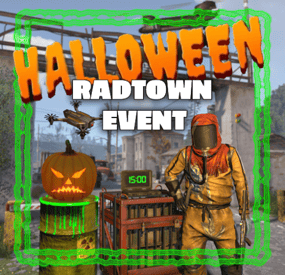
This plugin adds a high-risk, high-reward element to the newly introduced Radtown Monument. This dynamic event spawns a hazardous shipping container filled with valuable loot but surrounded by dangerous radioactive material. The challenge is twofold: not only must players manage the intense radiation levels, but they must also defend the container from relentless attack drones that aim to destroy it.
New with version 1.1.0: Drones can now target players with a configurable chance
Key Features:
Valuable Loot: The container holds rare and powerful resources, making it a highly coveted prize.
Multiple drone attack waves: Drones attack in mul
Intense Radiation: High levels of radiation require careful planning and protective gear to approach safely.
Drone Defense: As players attempt to claim the loot, AI-controlled drones will attack the container. Players must defend it until the crate unlocks.
Catastrophic Explosion: If players fail to protect the container or take too long, it will trigger a massive explosion, devastating the area and killing any nearby players.
Configuration options:
Drone wave count, drone count per wave Drone health and damage Container health Crate Loot and much more ...
This plugin enhances the Radtown Monument with intense, timed gameplay, rewarding those who can outlast both the environment and the drones—but punishing failure with explosive consequences!
Permissions:
radtownevent.admin - Required to run admin commands
Commands:
radtown start - Start the event radtown stop - Stop the event
Developer Api:
void OnRadtownEventContainerDelivered() // Called when the container has been delivered and the event is ready to start void OnRadtownEventStart() // Called when the locked crate inside the container has been hacked void OnRadtownEventWin(ulong steamId) // Called when the event was successfully completed by a player void OnRadtownEventEnd(bool success) // Called when the event is over. Success is false when the container exploded
Configuration:
{ "Custom chat prefix": null, "Use Notify instead of chat messages": false, "Notify notification type": 0, "Time between events (minutes)": 60, "Crate hack time (seconds; drone waves will spawn until the crate is fully hacked)": 600, "Container health": 8000, "Container position": { "x": 0.0, "y": 0.0, "z": 0.0 }, "Container rotation": { "x": 0.0, "y": 30.0, "z": 0.0 }, "Time before despawn after event has been completed (seconds)": 300, "Time before despawn if event is not started (minutes)": 30, "Make event zone visible": false, "Radiation duration after the event failed in seconds (this also affects the fog duration)": 60, "Radiation amount per second after the event failed": 100, "Drone damage scale factor (damage increases by this multiplier every time a drone deals damage)": 1.3, "Drone wave configuration": [ { "Wave number": 1, "Preparation time before drones spawn (seconds)": 5, "Maximum number of concurrent drones": 3, "Explosive drone configuration": { "Number of attack drones to spawn (0 to disable)": 20, "Drone health": 100, "Damage per shell": 40, "Player targeting chance (1 = always target players, 0 = never target players)": 0.0 }, "Kamikaze drone configuration": { "Number of kamikaze drones to spawn (0 to disable)": 0, "Drone health": 100, "Damage on explosion": 60, "Player targeting chance (1 = always target players, 0 = never target players)": 0.3 } }, { "Wave number": 2, "Preparation time before drones spawn (seconds)": 20, "Maximum number of concurrent drones": 4, "Explosive drone configuration": { "Number of attack drones to spawn (0 to disable)": 20, "Drone health": 150, "Damage per shell": 50, "Player targeting chance (1 = always target players, 0 = never target players)": 0.2 }, "Kamikaze drone configuration": { "Number of kamikaze drones to spawn (0 to disable)": 30, "Drone health": 150, "Damage on explosion": 60, "Player targeting chance (1 = always target players, 0 = never target players)": 0.4 } }, { "Wave number": 3, "Preparation time before drones spawn (seconds)": 20, "Maximum number of concurrent drones": 5, "Explosive drone configuration": { "Number of attack drones to spawn (0 to disable)": 40, "Drone health": 200, "Damage per shell": 40, "Player targeting chance (1 = always target players, 0 = never target players)": 0.3 }, "Kamikaze drone configuration": { "Number of kamikaze drones to spawn (0 to disable)": 40, "Drone health": 200, "Damage on explosion": 60, "Player targeting chance (1 = always target players, 0 = never target players)": 0.5 } }, { "Wave number": 4, "Preparation time before drones spawn (seconds)": 20, "Maximum number of concurrent drones": 8, "Explosive drone configuration": { "Number of attack drones to spawn (0 to disable)": 40, "Drone health": 250, "Damage per shell": 70, "Player targeting chance (1 = always target players, 0 = never target players)": 0.4 }, "Kamikaze drone configuration": { "Number of kamikaze drones to spawn (0 to disable)": 40, "Drone health": 250, "Damage on explosion": 80, "Player targeting chance (1 = always target players, 0 = never target players)": 0.6 } }, { "Wave number": 5, "Preparation time before drones spawn (seconds)": 20, "Maximum number of concurrent drones": 8, "Explosive drone configuration": { "Number of attack drones to spawn (0 to disable)": 40, "Drone health": 250, "Damage per shell": 70, "Player targeting chance (1 = always target players, 0 = never target players)": 0.5 }, "Kamikaze drone configuration": { "Number of kamikaze drones to spawn (0 to disable)": 40, "Drone health": 250, "Damage on explosion": 80, "Player targeting chance (1 = always target players, 0 = never target players)": 0.7 } } ], "Locked crate loot table": { "Enabled": false, "Minimum items": 4, "Maximum items": 8, "Item list": [ { "Short name": "scrap", "Min amount": 12, "Max amount": 48, "Chance (1 = 100%)": 1.0, "Skin id": 0, "Custom name": "" } ] }, "Chance for drone to drop loot box (%)": 100.0, "Drone loot table": { "Enabled": true, "Minimum items": 1, "Maximum items": 4, "Item list": [ { "Short name": "gunpowder", "Min amount": 10, "Max amount": 30, "Chance (1 = 100%)": 0.2, "Skin id": 0, "Custom name": "" }, { "Short name": "sulfur", "Min amount": 10, "Max amount": 30, "Chance (1 = 100%)": 0.4, "Skin id": 0, "Custom name": "" }, { "Short name": "charcoal", "Min amount": 20, "Max amount": 60, "Chance (1 = 100%)": 0.7, "Skin id": 0, "Custom name": "" }, { "Short name": "metal.fragments", "Min amount": 10, "Max amount": 60, "Chance (1 = 100%)": 0.5, "Skin id": 0, "Custom name": "" }, { "Short name": "explosives", "Min amount": 1, "Max amount": 2, "Chance (1 = 100%)": 0.08, "Skin id": 0, "Custom name": "" } ] }, "Disable map marker": false }
NEW: Halloween Update
The Halloween update adds pumpkin drones and spooky decorations to the container