
MARKUS's Wishlist
-
$11.99
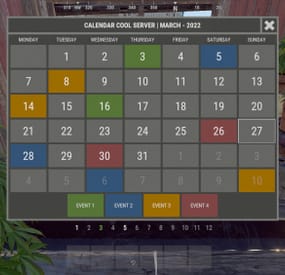
XWipeCalendar
XWipeCalendar - beautiful calendar for your server.
- Optimization of the interface for different monitor resolutions.
- There is a lang ru/en/uk/es.
- Automatic calendar generation.
- Display for one day several events.
- Possibility to create N events.
- Possibility to set the calendar for the whole year.
- Ability to view customized months.
Permissions
xwipecalendar.use - permission to view the calendar. Commands
/wipe, /calendar - open calendar. Config
{ "General settings": { "Close the calendar by tapping anywhere on the screen": false, "Timezone - UTC+0:00": 0, "Use local computer/hosting time. [ Requests to an external time service and time zone will be disabled ]": true }, "Settings GUI": { "Background color_1": "0.517 0.521 0.509 0.95", "Background color_2": "0.217 0.221 0.209 0.95", "The color of the numbers of the current month": "1 1 1 0.75", "The color of the numbers of the next month": "1 1 1 0.1", "Block color": "0.417 0.421 0.409 0.95" }, "List of events. Description of events - oxide/lang/(ru/en/uk/es)": { "1": [ ... ], "2": [ ... ] }, "Time": "2024-00-00T00:00:00.00" } -
$24.99
Chat Styles (Names, Messages & Prefixes)
By xNullPointer95 in Plugins
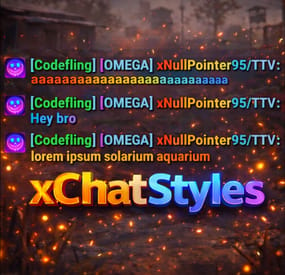
xChatStyles
xChatStyles adds smooth gradient colors to player names, prefixes, and chat messages, giving your server a premium, modern look without clutter or spam.
It’s clean, readable, and designed to enhance chat - not overpower it.
It lets you customize how players appear in chat using animated-looking color gradients. Perfect for VIPs, staff, donators, or special roles. No flashy UI. No complicated setup. Just beautiful chat.
⭐ Features
🎨 Gradient Names & Messages
Smooth color gradients instead of flat colors, but you can also use a solid color Player names Chat messages Prefixes (VIP, Admin, etc.) Looks great without hurting readability Styled Mentions (@PLAYERNAME) 🏷️ Multiple Prefix Support
Players can have more than one prefix Each prefix can have its own color style 👑 Great for VIP & Donator Perks
Instantly makes VIP ranks feel premium Visual reward without gameplay imbalance Easy to sell as a cosmetic perk 🪙 Trade System for Prefixes (REQUIRES Economics if you want to use trade feature)
⚡Server Friendly
No lag or spam Optimized to run smoothly on live servers Works quietly in the background 🔑 Supports permission-based style, not just permanent chat style.
🌍 xChatStyles Web Editor
📌 Plugin Preview
🔐 Permissions (Custom Tab)
xchatstyles.customtab - Ability to see the "Custom" Tab in /xcs xchatstyles.customprefix - Ability to see and select "Prefix" in "Custom" Tab xchatstyles.custommessagecolor - Ability to see and select "Message" in "Custom" Tab xchatstyles.customusernamecolor - Ability to see and select "Username" in "Custom" Tab
💬 Chat Commands (Player)
/xcs - Opens the Ui /xcs <PLAYERNAME/STEMAID> - Opens the Ui with the view of the target player and you can remove owned styles from that user.
💬 Chat & Console Commands (Admin)
/* Add chat styles without permission */ /addprefix <STEAMID> <PREFIXNAME> <#HEX> <#HEX> <#HEX>... /addmessagecolor <STEAMID> <#HEX> <#HEX> <#HEX>... /addusernamecolor <STEAMID> <#HEX> <#HEX> <#HEX>... /addall <STEAMID> <PREFIXNAME> <#HEX> <#HEX> <#HEX>... [This will add a prefix with provided color(s), message style with provided color(s) and username style with provided color(s) with just 1 command.] /* Add chat styles without permission */ /* Add chat styles WITH permission */ /addprefix <xchatstyles.PERMISSIONNAME> <PrefixName> <#HEX> <#HEX> <#HEX> ... /addall <xchatstyles.PERMISSIONNAME> <PrefixName> <#HEX> <#HEX> <#HEX> ... /addmessagecolor <xchatstyles.PERMISSIONNAME> <#HEX> <#HEX> <#HEX> ... /addusernamecolor <xchatstyles.PERMISSIONNAME> <#HEX> <#HEX> <#HEX> ... /* Add chat styles WITH permission */ ---> As long as the player has permission, they can select it with /xcs ---> Automatically removed when permission is revoked ---> Permission-Based ChatStyles has (Permission) indicator in /xcs ---> The permission must start with 'xchatstyles.*'. Example: /addall <xchatstyles.vip> VIP <#HEX> <#HEX> <#HEX> ... /*********************************************************************************************************/ /* Use 1 #HEX Color (Example: #fcba03) for a single color, use multiple #HEX Colors for a color gradient */ /* */ /* Example: /addprefix 76561198412496844 OMEGA #32a852 #71a67f */ /* */ /*********************************************************************************************************/ /removeprefix <steamid> <index|PrefixName> /removemessagecolor <steamid> <index> /removeusernamecolor <steamid> <index>
⏳ Recommended Plugin for >TIMED< PERMISSION:
⚙️ Config
{ "MaxPrefixes": 3, "DefaultUsernameColor": "#55aaff", "DefaultMessageColor": "#ffffff", "DefaultSize": 15, "AllowSelectingDuplicatePrefixNames": true, "NotifyOnStyleReceived": true, "PrefixBrackets": "[]", "ShowPrefixBracketsWithSizeTag": true, "Trade": { "AllowTrading": false, "PlayerCanSellPermissionBasedPrefix": false, "UseCurrencySign": true, "CurrencySign": "$", "AnnounceNewPrefixSaleGlobally": true, "AnnouncePrefixPriceUpdateGlobally": true }, "PermissionStyles": {} } -
$9.99
Scaled Collectables
By imthenewguy in Plugins
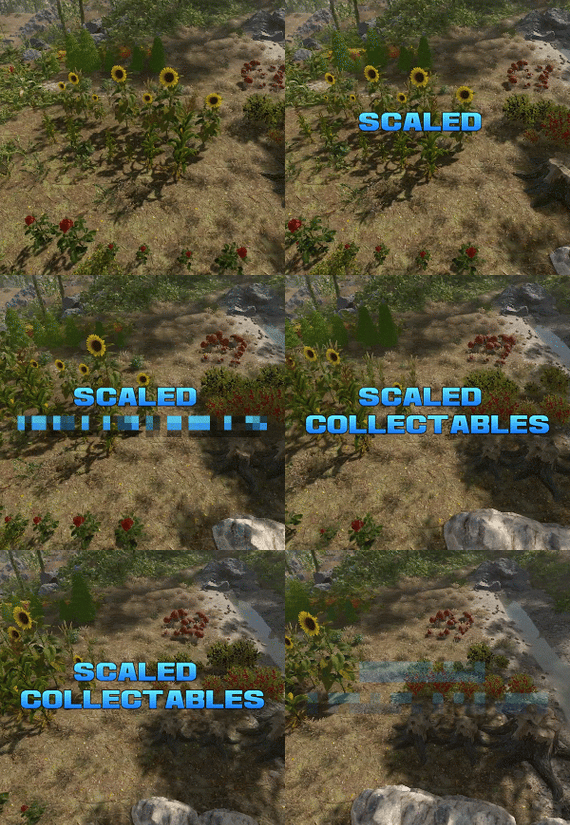
Scaled Collectables dynamically adjusts the size and yield of map-generated collectable entities—such as mushrooms, hemp, and pumpkin patches—to create a more immersive and varied gathering experience.
Each collectable spawns with a random scale within a configurable range (default: 0.6x to 2.0x). The size directly affects the yield — for instance, harvesting a hemp plant that’s twice as large as normal will reward twice the usual amount of cloth.
You can configure scaling values for each collectable type individually, allowing fine-tuned control over balance and gameplay on your server.
Note: Collectable scales are reset when the plugin is unloaded, and are adjusted again when it is reloaded.
Config example: https://pastebin.com/BEMsVHHZ
-
$40.00$20.00Chernobyl Exclusion zone map by TuToFire5
Rust Chernobyl Exclusion zone
Hello everyone
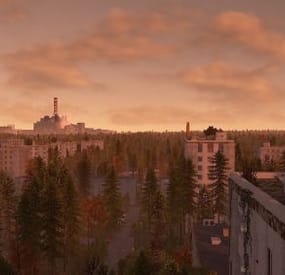
I would like to present you my Chernobyl exclusion map in Rust.
This map was created almost 1 by 1 to real life exclusion zone in Chernobyl. It took me about a years to work on this map and now it is in playeble phase like early access. This map is include many custom monument and special places. On this map you will also fing a large fields and very deep forest with a lots of bushes and also contains a railway and roads, small roads, panel roads and dirt roads.
I tryed optimalized this map as i can but now this map has almost 180k prefabs so when you start your server you can have around 200k entitys.
Monuments
Chernobyl Nuclear Powerplant Duga radar Many villages Stone, Sulfur and HQM quarry Water wells Ranch Caves Lake Shopping safe zone Farms Unfinished reactor number 5 and 6 Pripyat town Lot of small and tiny monuments Secret places with loot
Chernobyl Nuclear Powerplant
Main map monument created 1 by 1 to real life powerplant. This monument include unloading station for trains and lots of loot. There is lots of NPCs you can fight with and many custom puzzles with green, blue and red cards with best loots. Also this monument is a most radioactive place on the map. There is alsa a airwolf shop in the water side of this monument.
Duga Radar
Duga radar (Chernbyl 2) is a massive Soviet radar system based on exclusion zone of Chernobyl. This monument have a little bit of NPCs and green puzzle.
Shopping safe zone
This is like normal Outpost but little bit differen. This is custom safe zone with wending machines like you can normaly found on outposts but there is a one machine where you can buy you own quarry and Survey Charge.
Map Features
There is railway track on this map. it is no circle but you can take a train and wagons and unload items in Chernobyl Nuclear Powerplant in unloading station. Some monument have a custom puzzles and npc scientist This map is have a default quarry types thet you can use or you can buy your own quarry in safe zone and deployed it near your base. Radiation levels. In nuclear powerplant there is lot of radiation levels and if you are closer and closer to exploded reactor number 4 you have more and more radiation and in extreamly close range it have a very high heat level. This map is not build on normal sea level. everything around this map is lakes so you MUST disable cargo ship event in your server There is a lot of zones where players spawn and this zones must include beach topology. This mean you MUST disable boad spawning on your server (motorrowboat.population 0) In this map there is same hints about secret underground cave world with lots of good loot so enjoy founding it. Its not that easy. New powergrid compatibility (Small fuse box in Jupiter factory, Large fuse box is in unite 3). Satelite crash control room is in control building in Duga Radar.
Wanna try this map ?
Official server : Chernobyl Exclusion zone in Rust
client.connect 185.172.175.236:28105
I try to make map updates every month (fixes and add more things or rebalance)
Last updated 2D Map
- #stalker
- #chernobyl
- (and 10 more)
-
$7.98
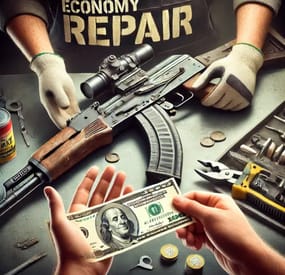
Economy Repair
Compliment your in game economy system by allowing players to repair weapons using their currency.
Economy Repair offers a solution that lets players repair their damaged weapons using in-game currency of your choice. With this plugin, your worn-out AKs, tools, and gear can be repaired through a simple new option in the repair bench, making sure you're always prepared for the next battle!
Key Features:
Multiple Currency Support: Use popular Rust plugins like Economics or ServerRewards to pay for repairs using your in-game currency. You can even set up custom item-based currencies for repairs!
Condition Loss: Condition loss can be disabled, or the scale of it modified.
VIP Discounts: Offer VIP players reduced repair costs, providing an extra incentive for premium members of your community.
Customizable Repair Costs: Tailor the repair prices for different items, ensuring fair costs for everything from weapons to tools. Repair cost can be set globally, and per item.
Clean UI: Enjoy a sleek almost vanilla like repair button that appears when interacting with a repair bench. Instantly know the cost to restore your item and confirm the repair with just a click.
Repair Blacklist: Administrators can blacklist certain items from being repaired, maintaining control over game balance and preventing unintended item restorations.
How It Works:
1. Interact with a repair bench.
2. Insert item normally into the repair bench
3. See the cost, click the repair button!
Economy Repair is your perfect choice for expanding the usefulness of economy on your server. Keep your equipment in top shape without the hassle of searching through boxes to try and find the correct components.
PERMISSIONS:
economyrepair.use - Required to see and use the economy repair option economyrepair.VIP - Required for VIP discount feature CONFIG EXAMPLE:
{ "Default Max Repair Cost": 100.0, // default repair cost for all items "Reduce Durability On Repair": true, // should the item lose durability if repaired with currency? "Durability Loss Scaling Factor": 1.0, // play with this to increase/reduce how much durability is lost "Currency System (Economics, ServerRewards, Item, TCBank)": "Economics", //which currency system to use "VIP Discount Percentage": 0.0, // percentage discount for players with VIP permission "Currency Item": { // If using "Item" as currency, specify item details here "ItemID": 0, "SkinID": 0, "Display Name": "Currency" }, "Custom Repair Costs": { // customize repair cost for individual items "hatchet": 50.0, "pickaxe": 75.0 }, "Repair Blacklist": [ // list of items which cannot be repaired using currency "minigun", "fuse" ], "Blacklisted SkinIDs": [ 3380502905, 987654321 ], "Debug Messages Enabled": false }
LANG EXAMPLE:
{ "RepairCostLabel": "Economy Repair: {0} {1}", "CurrencyLabel": "$", "RepairButtonLabel": "Repair", "NoValidItem": "No valid item to repair.", "MaxDurability": "This item is already at full durability.", "NotEnoughCurrency": "You do not have enough {0} to repair this item.", "RepairSuccess": "Item successfully repaired.", "RepairFailed": "Failed to repair the item. Please try again.", "ItemBlacklisted": "This item cannot be repaired." }