Jump to content

13 Screenshots

  • 220.8k
  • 8.7k
  • 52.47 kB
  • Update details
    v4.3.3
    Released
    Download size 52.47 kB
    Total versions 66
    Typical update pace About every 5 days
    Freshness Updated 2 days ago

This area is for discussion and questions. Please use the support area for reporting issues or getting help.

Recommended Comments


Duke23er

Posted

Hello,

I noticed that when the airdrop event starts, no plane appears in the sky. The airdrop spawns directly in the sky and flies with its parachute.

Is it possible to modify the .cs file so that we see and hear a plane again when the event starts?

  • Confused 1
steampunkvalley

Posted

I don't know if I'm missing a setting somewhere, but can we prevent an event from starting when it's already active?? This happens quite frequently.

The Airfield Event on our server is 90 minutes. Junkyard and Power Plant Events are both 60 minutes. 

Examples from Events Manager logs:

[2025-05-06 21:21:00] [05/06/2025 21:21:00] Event started: AirfieldEvent
[2025-05-06 21:57:01] [05/06/2025 21:57:01] Event started: AirfieldEvent
[2025-05-02 03:16:06] [05/02/2025 03:16:06] Event started: Junkyard Event
[2025-05-02 04:09:00] [05/02/2025 04:09:00] Event started: Junkyard Event
[2025-05-04 01:55:03] [05/04/2025 01:55:03] Event started: Power Plant Event
[2025-05-04 02:08:04] [05/04/2025 02:08:04] Event started: Chinook 47
[2025-05-04 02:40:06] [05/04/2025 02:40:06] Event started: Power Plant Event


Duke23er

Posted (edited)

I think your events starts by Events Manager and by itself.

If you want to manage your events by the Events Manager only, you should look in the config of each event for something like this:

Junkyard Event config:

Is active the timer on to start the event? [true/false]": false

Set this to false and it will not start by itself. 

It will only start when the Events Manager use the start command for the event by a time you set to the Events Manager

Edited by Duke23er
steampunkvalley

Posted

They are all false. These are in the Events Manager log file, so the Events Manager plugin initiated the event, correct?

Airfield:

"Random time to event start": false,

Junkyard:

"Is active the timer on to start the event? [true/false]": false,

Power Plant:

"Is active the timer on to start the event? [true/false]": false,


steampunkvalley

Posted

On 5/6/2025 at 5:25 PM, Duke23er said:

I think your events starts by Events Manager and by itself.

If you want to manage your events by the Events Manager only, you should look in the config of each event for something like this:

Junkyard Event config:

Is active the timer on to start the event? [true/false]": false

Set this to false and it will not start by itself. 

It will only start when the Events Manager use the start command for the event by a time you set to the Events Manager

Should I submit a support ticket for this then?

Duke23er

Posted

I would do so. 

Reedsie412

Posted

is there a way to Remove creators? i have a select few events and i want to condense the UI a little 

ManOWar

Posted

Hello @Mevent

Does this plugin have a Discord webhook integration? So that when the plugin starts an event, it also sends a message via Discord webhook and posts that X event has started? If not, is that something you would consider adding? I have players on my server requesting a server event feed in Discord so they can better track when events are happening and they're not logged in or are AFK. Also, if it could differentiate that it is Convoy, Cargo, Patrol Heli, Armored Train, Ferry Terminal, etc., that would be amazing!

Ultimate RCON+ does this to an extent, but it really only knows how to handle the native Facepunch events. It doesn't do anything for most of the custom events. The ones it does, it doesn't do properly. As you can see in the screenshot, it sends a notice for a Medium Convoy as two Bradley APCs. Anyways, thank you for your time!


CleanShot2025-07-16at00_00.17@2x.png.5bb455e8419955863c5163eea5d1c800.png

MeventSupport

Posted

On 7/16/2025 at 7:06 AM, ManOWar said:

Hello @Mevent

Does this plugin have a Discord webhook integration? So that when the plugin starts an event, it also sends a message via Discord webhook and posts that X event has started? If not, is that something you would consider adding? I have players on my server requesting a server event feed in Discord so they can better track when events are happening and they're not logged in or are AFK. Also, if it could differentiate that it is Convoy, Cargo, Patrol Heli, Armored Train, Ferry Terminal, etc., that would be amazing!

Ultimate RCON+ does this to an extent, but it really only knows how to handle the native Facepunch events. It doesn't do anything for most of the custom events. The ones it does, it doesn't do properly. As you can see in the screenshot, it sends a notice for a Medium Convoy as two Bradley APCs. Anyways, thank you for your time!


CleanShot2025-07-16at00_00.17@2x.png.5bb455e8419955863c5163eea5d1c800.png

Yes! EventManager already has Discord webhook integration built-in.


Simply add your Discord webhook URL to the "Discord web hook" setting in the EventManager configuration file (EventsManager.json). Once configured, it will automatically send Discord notifications whenever any event starts (Convoy, Cargo, Helicopter, etc.).


No additional plugins needed - just add your webhook URL and you're ready to go!

  • Like 1
ManOWar

Posted

On 7/17/2025 at 8:13 AM, MeventSupport said:

Yes! EventManager already has Discord webhook integration built-in.


Simply add your Discord webhook URL to the "Discord web hook" setting in the EventManager configuration file (EventsManager.json). Once configured, it will automatically send Discord notifications whenever any event starts (Convoy, Cargo, Helicopter, etc.).


No additional plugins needed - just add your webhook URL and you're ready to go!

Amazing! Thank you and sold!

ManOWar

Posted

Hello @MeventSupport

I've tried to edit both the "EventName" and the "StartMessage" then saved and reloaded the plugins, but it's still reverting to the default for each. What do I need to do to make the changes stick? Thank you!


CleanShot2025-07-22at09_52.27@2x.png.f5d046a5cf5f2c3b30e27fdf3ba0d557.png

steampunkvalley

Posted

On 7/22/2025 at 8:56 AM, ManOWar said:

Hello @MeventSupport

I've tried to edit both the "EventName" and the "StartMessage" then saved and reloaded the plugins, but it's still reverting to the default for each. What do I need to do to make the changes stick? Thank you!


CleanShot2025-07-22at09_52.27@2x.png.f5d046a5cf5f2c3b30e27fdf3ba0d557.png

In the EventsManager config (not EventsManagerNotifier), change "Disable vanilla auto events?" to True.


ManOWar

Posted

1 hour ago, steampunkvalley said:

In the EventsManager config (not EventsManagerNotifier), change "Disable vanilla auto events?" to True.


Thank you for the reply! Unfortunately, I had already set that to True prior to posting my first message. What I'm trying to accomplish is changing the event messages that appear on the screen in-game to what you see in the screenshot above. I'm not a fan of the default generic messages. Is there anything else you'd recommend or that I can check? Thank you!

steampunkvalley

Posted

1 hour ago, ManOWar said:

Thank you for the reply! Unfortunately, I had already set that to True prior to posting my first message. What I'm trying to accomplish is changing the event messages that appear on the screen in-game to what you see in the screenshot above. I'm not a fan of the default generic messages. Is there anything else you'd recommend or that I can check? Thank you!

Interesting. The only difference I can see comparing our config files is the event names.

{
  "Type 0 - chat, 1 - GUIAnnouncements": 0,
  "Events": [
    {
      "MessagesActive": false,
      "EventName": "Airdrop",
      "StartCommand": "em_spawn assets/prefabs/misc/supply drop/supply_drop.prefab",
      "StartMessage": ""
    },
    {
      "MessagesActive": false,
      "EventName": "Chinook 47",
      "StartCommand": "em_spawn assets/prefabs/npc/ch47/ch47scientists.entity.prefab",
      "StartMessage": "A <color=#59BBB9>chinook 47</color> has started making its rounds around the valley"
    },
    {
      "MessagesActive": false,
      "EventName": "Cargoship",
      "StartCommand": "em_spawn assets/content/vehicles/boats/cargoship/cargoshiptest.prefab",
      "StartMessage": "A <color=#59BBB9>cargo ship</color> has set sail to deliver goods to the valley"
    },
    {
      "MessagesActive": false,
      "EventName": "Helicopter",
      "StartCommand": "em_spawn assets/prefabs/npc/patrol helicopter/patrolhelicopter.prefab",
      "StartMessage": "A <color=#59BBB9>patrol helicopter</color> has begun its hunt for blood in the valley"
    }
  ]
}


  • Like 1
Mankus

Posted (edited)

It must be a difference in the "EventName" then, 
are these represented by a key in the config?

If they are then make sure the event names match in the lang files + data files to the config names,
also if you are running a Linux server then these are also CaseSensitive.

I recommend unloading a plugin before editing the data or langfiles. Instead of editing then reloading.

Edited by Malkizid
MeventSupport

Posted

16 hours ago, Wile E. said:

This is a bit of weird question perhaps. I can't say when exactly this happens but I regularly get spammed in Console with many lines like this:

[FileSystem] Not Found: assets/content/ui/ui.background.tiletex.psd (UnityEngine.Sprite)

I thought it was because of Dynamic Monuments but that plugin does not use this at all. However, it appears that EventsManager does.

It has been recommended to ignore this unless I notice some graphic missing but that has been difficult to track down.

I manage to always stress about things like this and with the server challenges I have faced in the last number of weeks I hate ignoring anything that appears to be abnormal

It's just a warning, you can ignore it

Tage2

Posted

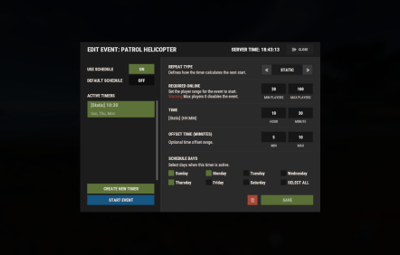
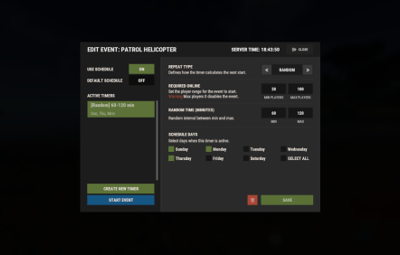
I'd like to set up a schedule where events started every 20 minutes, randomly, from a list of 5 specific events.  But I'm completely unclear on how to set that up?   Can anyone explain to me what to do to achieve this?

Mankus

Posted (edited)

I manage this plugin for another owner.
Its always problematic, for years.  

Even upon a fresh install, load and serverstart with an empty data file and fresh config.
The data files often get corrupted, since May the latest problem has been this:

There is still one major bug, each time the plugin loads, or reloads or when the server starts, a new category of Creator  "Mevent" is added, slowly making infinite Mevent categories. Please fix this as soon as you can, it makes it impossible to use the plugin.

If all events are added and configured, they usually work but after say 10 restarts or reloads the admin can no longer see their creator lists of the plugisn they use.  Just infinite categoriesof Mevent with no information in every column.

This is not critscism, its frustrated feedback, on a problem that has not been looked at for months.
and is based around an issue that has re-surfaced within the last couple of years on many updates / releases

I hope it can be resolved.

Because then the plugin would be very nice and I believe would work as intended.

Regards,
Manky

Edited by Malkizid
Evil_Orko

Posted

On 8/8/2025 at 9:02 PM, Tage2 said:

I'd like to set up a schedule where events started every 20 minutes, randomly, from a list of 5 specific events.  But I'm completely unclear on how to set that up?   Can anyone explain to me what to do to achieve this?

I have 4 blocks that run every 15 mins and it chooses 1 out of the 2 or 3 of those in each section.  I set up one hour in the GUI and then just opened the config and copy/pasted it for the other 23 hours manually.  I can send you my config if you send me a DM

Mevent

Posted

5 hours ago, Malkizid said:

I manage this plugin for another owner.
Its always problematic, for years.  

Even upon a fresh install, load and serverstart with an empty data file and fresh config.
The data files often get corrupted, since May the latest problem has been this:

There is still one major bug, each time the plugin loads, or reloads or when the server starts, a new category of Creator  "Mevent" is added, slowly making infinite Mevent categories. Please fix this as soon as you can, it makes it impossible to use the plugin.

If all events are added and configured, they usually work but after say 10 restarts or reloads the admin can no longer see their creator lists of the plugisn they use.  Just infinite categoriesof Mevent with no information in every column.

This is not critscism, its frustrated feedback, on a problem that has not been looked at for months.
and is based around an issue that has re-surfaced within the last couple of years on many updates / releases

I hope it can be resolved.

Because then the plugin would be very nice and I believe would work as intended.

Regards,
Manky

Are you sure you're using the latest version of the Plugin?

  • Like 1
Mankus

Posted (edited)

15 hours ago, Mevent said:

Are you sure you're using the latest version of the Plugin?

Heya Mevent, thanks for the reply.

Yes of course, we are using the latest version.
This has happened on several versions.

I tried running it on a local windows test servers and a similar set up on a live linux server.

As I mentioned the plugin works, its the GUI that messes up, making adding new entries or creators impossible.
When the plugin is loaded with a new config and empty data and empty lang files, it works.

However upon server restart or plugin reload, the data file gets messed up.
And overwrites or adds new entries to the creators, usually duplicating your default entries that are prepared on first set up.
These are duplicated with Empty ones.

I cant tell but it must be a discrepency with the CaSe of the data file names.

I see data files for EventsManager but the plugin is EventManager,
Linux systems are  cAsE SeNsitive in oxide, maybe that's why there is a mismatch too, I usually account for this and rename any relevant files
but the same issue occurs on the windows based test servers.

I'm not complaining,
I simply have no idea why this is happening and its been an ongoing issue for us in several versions.

EDIT - I see you uploaded another version after I wrote the message yesterday, we have not used version 3.3.8
was anything else changed other than a new event entry in the default events? 


Of course I will make sure to test this new version from 18 hours ago.

Edited by Malkizid
MeventSupport

Posted

8 minutes ago, Malkizid said:

Heya Mevent, thanks for the reply.

Yes of course, we are using the latest version.
This has happened on several versions.

I tried running it on a local windows test servers and a similar set up on a live linux server.

As I mentioned the plugin works, its the GUI that messes up, making adding new entries or creators impossible.
When the plugin is loaded with a new config and empty data and empty lang files, it works.

However upon server restart or plugin reload, the data file gets messed up.
And overwrites or adds new entries to the creators, usually duplicating your default entries that are prepared on first set up.
These are duplicated with Empty ones.

I cant tell but it must be a discrepency with the CaSe of the data file names.

I see data files for EventsManager but the plugin is EventManager,
Linux systems are  cAsE SeNsitive in oxide, maybe that's why there is a mismatch too, I usually account for this and rename any relevant files
but the same issue occurs on the windows based test servers.

I'm not complaining,
I simply have no idea why this is happening and its been an ongoing issue for us in several versions.

EDIT - I see you uploaded another version after I wrote the message yesterday, we have not used version 3.3.8
was anything else changed other than a new event entry in the default events? 


Of course I will make sure to test this new version from 18 hours ago.

Can you record a video please, I've checked, it works for me

Mankus

Posted

I'm glad it works for you, 

I will send visual evidence as soon as I have time.
 

  • Love 1
Mankus

Posted (edited)

17 minutes ago, MeventSupport said:

Can you record a video please, I've checked, it works for me

I cant record a video, it takes too long and I dont have the bandwidth.

Please take a look at the screenshots I have attached below.

Files:
"Em1.jpg" so this is what happens after a plugin reload. 
"Em2.jpg" a data file modified by the plugin, this is what happens in the oxide/data/EventManager/CreatorSettings.json 
"Em3.jpg" is showing the default unmodified event entries of the Mevent events.

This is with version 3.3.7. 

Nothing has been modified. 
Fresh install, again shows normal Entries for creator Mevent, of Mevent's events.

after reload this happens and keeps happening and adding blank entries, 
Then the GUi can not be used in the creator area.

Unloading the plugin, Modifying the entries in the data files and reloading or in the GUI have the same result.

Any suggestions?


Em2.jpg.ab0b2183e97cc956ba031f176f1bd05f.jpgem3.jpg.4026816af835c4a08515b63aadb1dd07.jpgEM1.jpg.e2ee18d62f19a99fe3d650d6f1b1f86c.jpg

Edited by Malkizid
MeventSupport

Posted

36 minutes ago, Malkizid said:

I cant record a video, it takes too long and I dont have the bandwidth.

Please take a look at the screenshots I have attached below.

Files:
"Em1.jpg" so this is what happens after a plugin reload. 
"Em2.jpg" a data file modified by the plugin, this is what happens in the oxide/data/EventManager/CreatorSettings.json 
"Em3.jpg" is showing the default unmodified event entries of the Mevent events.

This is with version 3.3.7. 

Nothing has been modified. 
Fresh install, again shows normal Entries for creator Mevent, of Mevent's events.

after reload this happens and keeps happening and adding blank entries, 
Then the GUi can not be used in the creator area.

Unloading the plugin, Modifying the entries in the data files and reloading or in the GUI have the same result.

Any suggestions?


Em2.jpg.ab0b2183e97cc956ba031f176f1bd05f.jpgem3.jpg.4026816af835c4a08515b63aadb1dd07.jpgEM1.jpg.e2ee18d62f19a99fe3d650d6f1b1f86c.jpg

you need to use version 3.3.9

  • Like 1

Create an account or sign in to comment

You need to be a member in order to leave a comment

Create an account

Sign up for a new account in our community. It's easy!

Register a new account

Sign in

Already have an account? Sign in here.

Sign In Now
  • Like 5
  • Love 10

Mevent's Collection

User Feedback

About Us

Codefling is the largest marketplace for plugins, maps, tools, and more, making it easy for customers to discover new content and for creators to monetize their work.

Downloads
3.1m
Total downloads
Customers
12.2k
Customers served
Files Sold
172.8k
Total sales
Payments
3.8m
Processed total
×
×
  • Create New...

Important Information

We have placed cookies on your device to help make this website better. You can adjust your cookie settings, otherwise we'll assume you're okay to continue.