Jump to content
Message added by Krungh Crow,

The 2.0.0 Rewrite will need you to backup your old cfgs (especially lootprofiles) since the cfg will be having Custom tiers .
same Goes for the Language files


For the 2.0.1 patch remove the old language files and make the plugin generate a fresh one.

3 Screenshots

  • 242.3k
  • 8.4k
  • 66.99 kB
  • Update details
    v2.0.6
    Released
    Download size 66.99 kB
    Total versions 29
    Typical update pace About every 7 days
    Freshness Updated 223 days ago

This area is for discussion and questions. Please use the support area for reporting issues or getting help.

Recommended Comments


Painfully Ordinary

Posted

Is it possible to have Skill Tree rewards as experience points (XP) rather than skill points (SP)?

  • Like 1
ThaCandyMan

Posted

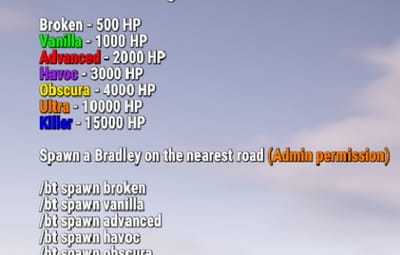
Just wondering. I just installed this plugin... Does this spawn tiered bradleys at the launch site when the "Vanilla" bradley is supposed to spawn?

Stark

Posted

1 hour ago, ThaCandyMan said:

Just wondering. I just installed this plugin... Does this spawn tiered bradleys at the launch site when the "Vanilla" bradley is supposed to spawn?

It can yes. And everywhere else, pending on events that have the bradley

  • Like 1
Papa Bear

Posted

On 4/29/2026 at 7:15 AM, ThaCandyMan said:

Just wondering. I just installed this plugin... Does this spawn tiered bradleys at the launch site when the "Vanilla" bradley is supposed to spawn?

I've run this on our server for years.  This is one of the best no cost plugins you can get for your server.  Where as any plugin uses a Bradley, at least on my server, it is always a Tier version, except for the Bradley Drops (paid) plugin.  Even Heavy Cargo Event, Airfield Event and the last day of wipe, all Tiered Bradleys.


Papa Bear

Posted

Spoiler
On 4/25/2026 at 3:20 AM, Painfully Ordinary said:

Is it possible to have Skill Tree rewards as experience points (XP) rather than skill points (SP)?


This is already available in Skill Tree's (ver. 1.7.9, line 528 in Config) listed under "Experience sources - Set xp value to 0 to disable for that type":  Just use BradleyACP and it will cover all of them.


  • Like 1
Samael777

Posted

Maybe a command to list all currently available bradleys? Something like:
Launch Site Bradley - Medium
Road Bradley - Hard
Road Bradley - Easy

  • Love 1
Scientist86

Posted

Hi! Does this setting violate facepunch’s rules?
"Use Random Skins (internal)": true,
 Where do the skins come from? Can I use it without worry?

Papa Bear

Posted

On 9/5/2026 at 4:27 PM, Samael777 said:

Maybe a command to list all currently available bradleys? Something like:
Launch Site Bradley - Medium
Road Bradley - Hard
Road Bradley - Easy

I'm not sure where I got it, but Developer has already designed a companion plugin called Bradley Tiers Map.  I belong to his discord, so I'm pretty sure that's where I got it.  It works great, it's free and it can work (or be blocked) from Wipe Day Bradleys.  Also, works with my Airfield Event that spawns a Bradley (shows up as a Tiered version via the Bradley Tiers Plugin.

Here is the codefling page that shares his Discord Link.
 

https://codefling.com/krungh-crow?tab=field_core_pfield_1

Papa Bear

Posted

21 hours ago, Scientist86 said:

Hi! Does this setting violate facepunch’s rules?
"Use Random Skins (internal)": true,
 Where do the skins come from? Can I use it without worry?

That depends on you..  You're the one that enters the skinID (ideally from a non-market skin) from the Steam Workshop.  I suggest you download the  

https://codefling.com/tools/editor-for-skins-plugins

because this will flag your config for Market Skins. Now, there is no format for Bradley Tiers, but there is for the Free Plugin, Skins (UMod).

(internal) means within this JSON file. This would only be set to True if you were also to use the lootsysystem (internal) " true.
},
"Loot Settings": {
"Use lootsystem (internal)": false,
"Use Random Skins (internal)": false,
"Use AlphaLoot": false
},

{

      "probability": 0.1,
      "shortname": "rifle.l96",
      "name": "",

          "skin": 0,  You can drop any Skin ID here. 
"amountMin": 1,
"amount": 1
},
I advise you to review these skins manually, if you have concerns a skin gets picked up.  This week on my server, I had six skins get picked up this week and four last week.  I am very active using skins workshop for my server and it seems the more I add, the more that gets approved.  

Scientist86

Posted

1 hour ago, Papa Bear said:
That depends on you.. You're the one that enters the skinID (ideally from a non-market skin) from the Steam Workshop. I suggest you download the

I’m asking because that’s not the case.
The skin identifier is always 0 — and when the feature is enabled, the skins change to random ones. I’ve already found the code in the plugin that handles this, and it seems to check itself what’s allowed and what isn’t. But I want to make sure of this.

Create an account or sign in to comment

You need to be a member in order to leave a comment

Create an account

Sign up for a new account in our community. It's easy!

Register a new account

Sign in

Already have an account? Sign in here.

Sign In Now
  • Like 3
  • Love 10

User Feedback

About Us

Codefling is the largest marketplace for plugins, maps, tools, and more, making it easy for customers to discover new content and for creators to monetize their work.

Downloads
3.2m
Total downloads
Customers
12.3k
Customers served
Files Sold
173.8k
Total sales
Payments
3.8m
Processed total
×
×
  • Create New...

Important Information

We have placed cookies on your device to help make this website better. You can adjust your cookie settings, otherwise we'll assume you're okay to continue.