
Vinni_TV_'s Wishlist
-

$30.00$27.00Boss Scorpion
Scorpion - A New Threat on the Ground
Bring a giant mechanical scorpion to your Rust server. With eight animated legs, massive claws, and an armed tail, Scorpion turns roads, monuments, and custom arenas into dangerous boss encounters.
Players face more than a walking target. Scorpion can intercept rockets and throw them back, launch explosive pursuit drones, retaliate with homing missiles, and fire blowdarts from its tail.
Weapons and Defenses
Rocket interception: The tail's ray gun catches incoming rockets, swings them around, and throws them back toward the attacker. Tail blowdart: Attacks nearby players with configurable detection range and cooldown. Explosive pursuit drones: Sends drones after attackers. Claw-launched homing missiles: Retaliates against players who damage it, with separate cooldowns for each attacker. Helicopter defense: Acquires occupied player helicopters and launches homing missile salvos. Attack helicopters receive three missiles, fired one second apart. Rocket-assisted obstacle recovery: Boosts over obstacles when needed to continue its patrol. Electrical damage effects: Tesla effects activate when health falls to one-third. Walking sounds: Alternating footstep effects give its movement a heavy, mechanical presence. Patrols and Path Editor
Build encounters through the in-game editor.
Record custom patrol routes by placing waypoints. Create local paths or link routes to standard and custom monuments. Configure automatic spawning, population, and respawn delays. Enable random road patrols. Use Ring Road patrols to follow the map's largest closed road continuously, without reversing at the end. Adjust individual spawned Scorpions separately from their saved patrol settings. Receive detailed feedback when a route encounters unsuitable ground or an obstacle. Health and Damage
Configure regular bullet and explosive ammunition damage separately, including pistol ammunition. Increase its health to create a tougher encounter while retaining the ammunition damage scaling.
Loot and Rewards
Reward players with configurable Bradley loot crates, adjustable crate fire duration, and optional currency payouts.
Supported integrations include:
AlphaLoot for custom crate loot profiles. LootTable for preset-based crate contents. Economics for money rewards. ServerRewards for reward points. TruePVE support for combat interaction. Optional reward ownership tracks damage by individual player or combines contributions from a Rust team. Damage contributions expire after a configurable period without further damage, allowing another player or team to take over an abandoned encounter.
Crate ownership locks and currency rewards are configurable. Ownership and combined team damage are disabled by default.
In-Game Configuration
The tabbed editor separates movement, combat, damage, rewards, and player/team ownership settings.
Use different settings for defaults, road patrols, saved paths, and individual spawned Scorpions to create encounters suited to different areas of your server.
Commands
All chat commands require server administrator access or the scorpion.admin permission.
Chat Command Description /Scorpion Opens the configuration and patrol editor. /Scorpion spawn Spawns a Scorpion ahead of you using the default settings. /Scorpion remove Removes the nearest Scorpion within 50 metres. /Scorpion path "Patrol 1" Spawns one Scorpion using the named saved path and its settings. /Scorpion spawnpath "Patrol 1" Alternative command for spawning on a saved path. /Scorpion "Patrol 1" Shortcut for spawning on a saved path. Console / RCON Command
Command Description scorpion.spawnpath "Patrol 1" Spawns one Scorpion on the specified saved path. Replace Patrol 1 with your saved path's name or ID. Keep quotation marks around names containing spaces.
Manual path spawning works when the path's automatic spawning is disabled. The manually spawned Scorpion does not respawn after death, and the command does not change the path's automatic spawning settings.
Permission
scorpion.admin - Grants access to Scorpion's commands and editor.
Developer Integration
Other plugins can spawn and despawn Scorpions through API calls, supply custom settings and waypoint paths, retrieve health information, and respond to damage and death hooks.
Give your players a boss that can send their own rockets back at them.
-
$29.99
Scrap Worm
[ ✓ ] Works on any host. The zip includes a small installer plugin: run crashext.install once and restart. [ ✓ ]
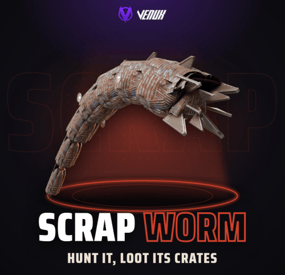
Scrap Worm puts a giant worm made of scrap metal under your map. It hunts inside its own territories, listens for gathering, gunshots and explosions, and breaks out of the ground right under the loudest one. While it is above ground it bites, drags, whips and crushes, and that is the only time you can hurt it.
Its armor takes reduced damage and four glowing cores along its sides take a lot more. Every core you burst strips its segment's armor, which falls behind it as a trail of scrap. Kill it and it collapses into burning heli or Bradley crates and a hackable crate, the top damage dealers get paid, and its plates are left behind for harvesting.
It runs on its own: territories on the map, a hunt on a timer, a boss health bar, chat and Discord announcements. Nothing to install on the client: the worm is built from parts every Rust client already has.
Works on Oxide and Carbon Needs CrashExtensions (included) Automatic event on map territories Top damage rewards Jump to: Features · Screenshots · Trailer · How a hunt goes · Commands · Permissions · Works with · Install · Configuration · Test server · FAQ
🌟 Features
For players
A real boss fight. A worm over 20 metres long breaches out of the ground in a big arc and dives back in. Every breach is different: a low skim, a normal arc or a high leap, at its own pace and heading. It hunts you. Gathering, gunshots and explosions in its territory are noise, and the next breach comes up under the loudest one, or a few metres beside it when it cannot come up there. Firing a rocket somewhere else can pull it where your team wants it. You see it coming. The ground rumbles, dust kicks up and a ring of dirt marks where it will erupt. Stand in the ring and you take the slam. It fights back. It bites the nearest player in reach and drags them into its mouth, whips anyone near its tail, and runs over whoever is in its way. Weak points. The whole body takes reduced damage. Four glowing cores take a lot more, and each one you burst knocks 10% off its health, shared between everyone who damaged that core, and strips that segment's armor plates. Fight it where it can reach you. Hits count only from inside its territory, and only 25% from cover where it cannot come up under you: deep water, a monument, building privilege, beside a base or inside a raid dome. Every weapon works. Bullets, rockets and launcher grenades hit the body, and thrown C4 and grenades stick to it and ride along until they go off. Boss health bar. Name, EXPOSED or BURROWING, the four cores and its health, above the hotbar for everyone near the fight. Track it on the map. A red circle shows where it is while it is above ground, and goes away when it dives. Walls matter. Its tail and body do not hit through walls, and charges stuck to it drop off at a wall or where it dives instead of going through. Loot worth the fight. Burning heli or Bradley crates and a hackable crate where it falls, plus scrap plates you can harvest with a pickaxe, a jackhammer or a rock (metal fragments, charcoal and high quality metal by default, anything you like in the config). For server owners
Set and forget. Three territories are placed on your map by itself (open, dry ground away from monuments, the same spots for the whole wipe), shown as circles on the map, and hunts start on a timer with a minimum player count. Your own territories. Add spots by coordinates with their own name and radius. Or somewhere new every time. RandomLocationEachEvent picks a fresh random spot for each event, away from water, slopes and monuments. Scales with the crowd. Health and core health grow with the players around when it spawns, up to a cap you set. No farming from cover. Hits from outside the territory or from a safe zone do nothing. Hits from cover count at CoverDamageScale (25% by default): water deeper than half a metre, a monument, building privilege, within CoverBaseRadius (10 m) of a base, or inside a RaidableBases dome. A lone sleeping bag or box is not a base. A fight is not cut short. A hunt that is still fighting when LifetimeMinutes runs out stays until it calms down, at most twice as long. Rewards. Economics money and ServerRewards points for the top damage dealers, up to 10 places; a place pays only for a real share of the damage (MinRewardShare, 3% by default). Winner commands. Run your own server commands for the top damage player (if they reached MinRewardShare) with {steamid}, {name} and {grid}: a kit, a group, a shout. A dead or offline winner gets them when they are back, even after a restart. Debris loot you control. Pick the items, the exact amount per piece, which pieces carry them and an optional fixed amount per hit. PvE friendly. An optional loot lock gives the crates to the top damage dealer's team (if they reached MinRewardShare) for as long as you want, and it survives a reload. Bases are safe by default. Building damage is off, and the worm then does not breach through a base or inside building privilege. Turned on, it only hits inside the territory of the running hunt and goes through normal damage, so raid protection still applies. Players who place a Tool Cupboard in a territory get a warning popup. Your own roar. Put an .ogg in the data folder and set RoarSound: players within SoundRadius hear it from the worm's direction. It plays through CrashExtensions' private sound (CUISound), so it needs CrashExtensions 1.12.16 or newer loaded; without a clip the vanilla roar plays. One Colossus at a time. With Scrap Leviathan or Scrap Stormray installed, a hunt waits while one of them is out and tries again 5 to 10 minutes later. Announcements. Chat lines for start, kill and leave, to everyone or only nearby, and an optional Discord webhook. NCP and Notify toasts. Show the hunt messages as NCP 2.0 or Notify toasts, with chat as the fallback. The breach line can be turned off. Works with your loot plugins. The crates are the native ones, so BetterLoot and AlphaLoot fill them, and you can pick an AlphaLoot profile. Every number in the config. Size, speed, arc, health, damage taken, every attack, crates, rewards, timers and territories, each with a safe range. Four languages. English, Spanish, Brazilian Portuguese and Russian built in. For developers
Hooks. OnScrapWormStart, OnScrapWormKilled, and two you can veto: OnScrapWormCrush (protect a block) and OnScrapWormRunOver (spare a player, crate fires included). See the FAQ. 📸 Screenshots
Every screen below is Scrap Worm running in Rust.
It breaches out of the ground in a long arc, with the boss bar above the hotbar It erupts under the loudest noise The glowing cores are its weak points Kill it and it bursts into scrap plates Burning crates and scrap debris where it fell 🎥 Trailer
The Scrap Worm trailer (click to play, 44 seconds)
🪱 How a hunt goes
It starts. A hunt picks one of the territories, everybody gets a chat line with the grid, and the circle on the map turns red. It listens. Gathering, gunshots and explosions inside the territory are noise. The next breach comes up under the loudest one, or 6 to 12 m beside it when it cannot come up there, after a rumble and a ring of dirt. It surfaces. For a few seconds it is out of the ground: it bites and drags, whips its tail and crushes what it runs into. Underground it cannot be hurt. You hit it. The body takes 30% of a hit by default, a core takes double. Each burst core strips its segment's armor, and a stripped segment takes much more. Hits count only from inside the territory, and 25% from cover. It dies. At zero health, or with all four cores burst, it collapses. Burning crates land where it fell (outside a base if it fell inside one), its plates become harvestable debris, chat names the top damage dealer and the rewards are paid. Or it leaves. If nobody is around for 5 minutes, or the 25 minute hunt runs out, it burrows away. A worm that is still fighting when the time runs out stays, for up to 50 minutes in all. The next hunt is scheduled by itself, 90 minutes later by default. 🎮 Commands
Chat, for server owners or a player with scrapworm.admin:
/scrapworm start - start a hunt now in a random territory (or a random spot). /scrapworm spawn - put a worm underground 15 m in front of you, then breach or loop. /scrapworm breach - make it breach once. /scrapworm loop - keep it breaching. /scrapworm stop stops after the current breach. /scrapworm status - its health and cores. /scrapworm territories - list the territories. /scrapworm remove - remove the worm now. Admin
From the server console, RCON or a player with scrapworm.admin:
scrapworm.start - start a hunt now. scrapworm.territories - list the territories with their position and radius. 🛡️ Permissions
scrapworm.admin - the commands above. Server owners can always use them; moderators need this permission. Players need no permission to fight the worm. oxide.grant user YOUR_STEAM_ID scrapworm.admin 🤝 Works with
NCP: free, optional: hunt messages as toasts instead of chat lines Notify: optional: hunt messages as Notify toasts Economics / ServerRewards: optional top damage rewards AlphaLoot: fill the crates from a profile you name BetterLoot: fills the crates by itself (they are the native heli or Bradley crates) TruePVE: works as is: the worm can hurt players and, with DestroyBuildings on, damage buildings (ForceDamageThroughTruePVE, on by default), and players can harvest its debris RaidableBases: raid bases are left alone: no damage inside a raid dome, no breach comes up next to one, and noise inside a dome is ignored Scrap Leviathan / Scrap Stormray: only one of the three is out at a time Carbon: same code path as Oxide ImageLibrary: not needed 📦 Install
Install the extension, once per server. Stop the server, copy Oxide.Ext.CrashExtensions.dll into RustDedicated_Data/Managed (Carbon: carbon/extensions) and start it again. The console prints Loaded extension CrashExtensions with its version. An older copy of the DLL is simply overwritten: it is one shared file for all our plugins. Install the plugin. Copy ScrapWorm.cs into oxide/plugins (Carbon: carbon/plugins). It compiles on its own and creates its config. That's it. The first hunt starts 20 minutes after the server is up. To see it now, stand on open, flat ground and type /scrapworm start. ⚙️ Configuration
Everything lives in oxide/config/ScrapWorm.json. Every value has a safe range: a value out of range keeps the plugin unloaded, leaves your file untouched and tells you in the console what to fix. The full list with every default and range is in the Documentation tab and the README.
Config sections (click to expand)
🧪 Test server
Available on our test server. The worm wakes up 5 minutes after the server starts and then every 20 minutes while someone is online. Its two territories, H7 and J2, show on the map: go there, make noise, and it comes for you.
client.connect 91.229.114.54:28015 📚 FAQ
Q: Do players need a client mod?
A: No. The worm is built from scrap helicopter parts every Rust client already has, so it works on any map with no downloads.
Q: Will it wreck my players' bases?
A: Only if you turn it on. Building damage is off by default. Turned on, it only hits inside the territory of the running hunt and goes through normal damage, so raid protection plugins still apply. RaidableBases bases are always spared (you can turn that off).
Q: Can it hurt players in safe zones?
A: No. Players in a safe zone, sleeping or spectating, and admins in noclip, are never targets. Hits on the worm from a safe zone do not count either.
Q: Can players kill it from somewhere it cannot reach?
A: Not for full credit. Hits count only from inside its territory, and from cover (water deeper than half a metre, a monument, building privilege, within 10 m of a base, a raid dome) they count 25%. CoverDamageScale sets that share: 1 counts them in full, 0 ignores them.
Q: Who gets the rewards?
A: The top damage dealers, place by place. A place pays only if that player dealt at least MinRewardShare of the worm's health (3% by default); places are sorted by damage, so every place after an unpaid one is unpaid too. Below it the top player is still named in the kill notice, but gets no winner commands and no crate lock.
Q: Do I need Economics or ServerRewards?
A: No. They are optional rewards. Without them the worm still drops its crates.
Q: Can I give the winner a kit or a rank?
A: Yes. Put server commands in WinnerCommands, for example inventory.giveto {steamid} scrap 500 or oxide.usergroup add {steamid} wormslayer. Use {steamid} for anything that grants something. If the winner is dead or offline, the commands wait up to 1 hour for them.
Q: Can the messages show as toasts?
A: Yes. Turn on UseNCP (NCP 2.0) or UseNotify (Notify) and pick the type. Players get the chat line whenever a toast can't be shown, and with Notify they need its notify.see permission.
Q: Is it good for PvE?
A: Yes. Turn on the loot lock and the crates belong to the top damage dealer's team for the time you set, as long as they dealt at least MinRewardShare of the worm's health. With TruePVE the worm still hurts players and players can harvest its debris.
Q: It dies too fast or too slow. What do I change?
A: WormHealth, HealthPerExtraPlayer, BodyDamage and CoreDamage. Any attack can be weakened or turned off by setting its damage to 0.
Q: Does it work on Carbon?
A: Yes. The extension goes into carbon/extensions instead of RustDedicated_Data/Managed, and the plugin into carbon/plugins.
Q: How do I translate it?
A: English, Spanish, Brazilian Portuguese and Russian are built in. Edit oxide/lang/en/ScrapWorm.json, or copy it into another language folder and translate its values: each player reads their own game language.
Q: Does it contact any outside service?
A: It downloads three small health bar pictures once from the Venux CDN, rust-cui.crashplugins.space, which your server then keeps. Nothing about your server or your players is sent. The Discord webhook is the only other request, and only if you fill it in.
Q: Can other plugins react to the worm?
A: Yes. Scrap Worm calls void OnScrapWormStart(Vector3 position, string territory) when a hunt starts and void OnScrapWormKilled(Vector3 position, ulong topDamager) when it dies. Return anything but null from object OnScrapWormCrush(DecayEntity entity) to protect a building block, or from object OnScrapWormRunOver(BasePlayer player) to spare a player from its attacks and its crate fires.
Questions, ideas or bug reports? Use the Support tab of this file or join our Discord.
- #scrapworm
- #worm
- (and 18 more)
-

$9.99$7.99Plant Spawn Controller
[ ✓ ] Works on any host. The zip includes a small installer plugin: run crashext.install once and restart. [ ✓ ]
Plant Spawn Controller lets you decide how much grows on your map. Hemp, corn, pumpkins, potatoes, wheat, every berry colour, mushrooms, flowers, the stone, metal, sulfur, wood and HQM pickups, and the wood piles, dead logs and driftwood: each group gets its own density and its own respawn speed, so you can have twice the berries and half the logs with two drags.
It doesn't replace Rust's spawning. It tunes the vanilla populations and lets vanilla do the spawning, so plants keep appearing where they always do, and unloading the plugin puts every vanilla value back. Nothing is written to your server.cfg.
Everything happens in one admin window: pick a preset, drag a slider, weight hemp against corn, scale it all with your player count, give wipe day a boost, refill a group right now or trim the extras, and ping the nearest plants on your map.
Works on Oxide and Carbon Needs CrashExtensions (included) 6 groups, 28 vanilla populations Presets, player curve, wipe boost Jump to: Features · Screenshots · Trailer · Commands · Permissions · Install · Configuration · Test server · FAQ
🌟 Features
Six groups. Crops (hemp, corn, pumpkin, potato, wheat), Berries (five colours, normal and jungle), Mushrooms, Flowers (sunflower, rose, orchid), Pickups (stone, metal, sulfur, wood, HQM) and Stumps & logs (wood piles, dead logs, driftwood). Density per group. From 0x to 5x of vanilla. 0 empties a group, 3x triples it. Respawn speed per group. From 0.25x to 10x, so picked plants come back slower or faster. Weights inside a group. Give hemp more of the Crops share, or make yellow berries rare. The group total stays where the density puts it. Hard cap. A max alive per group, so a high density never runs away on a big map. Player curve. 2 to 5 points on players online: more plants when the server is empty, fewer when it's full, or the other way round. Each group opts in. Wipe boost. An extra multiplier for the first hours after a wipe, on the groups you pick. Presets. Vanilla, Farming, Survival, Cooking, Barren, 2X and Low pop, one click each. Great with cooking plugins that need lots of berries and mushrooms. Refill now. Fills a group up to its new target in small steps, and pauses when the server FPS drops. Trim. Removes the extras over the target, never within 60 m of a player and never inside building privilege. It asks for a second click before it runs. Live counts. Alive and target per group and per population, the mix of each kind, and how many entities you are adding over vanilla. Map markers. /plants show crops pings the nearest plants of a group on your map for 30 seconds. Clean restore. Unload or reload and every vanilla value is back. A group you switch off goes back to vanilla too. Plays nice. Built to run next to Ore Spawn Controller and the other Spawn Controllers, and it warns you if another spawn plugin is loaded. Light on the server. One small update every 30 seconds, refill and trim spread over frames, and the admin pictures only go to admins. 📸 Screenshots
Every screen below is Plant Spawn Controller running in Rust.
OVERVIEW: every group, the entity budget and the presets GROUPS: density, respawn and a weight per crop Berries at x2 with the live mix of every colour CURVE: drag the points, pick the groups, set the wipe boost SETTINGS: updates, markers, refill and trim, safety Type an exact value Trim asks for a second click /plants show crops: the nearest crops on your map 🎥 Trailer
The Plant Spawn Controller trailer (click to play, 55 seconds)
🎮 Commands
Chat:
/plants - open the admin window. /plants show <group> - ping the nearest plants of a group on your map (groups: crops, berries, mushrooms, flowers, pickups, logs). /plants hide - clear the markers. /plants help - list the commands. Console (server console, RCON or an admin in F1):
psc.preset <id> - apply a preset: vanilla, farming, survival, cooking, barren, 2x, lowpop. psc.set <group> <density|respawn|cap|curve|enabled|boost> <value> - change one value of a group, like psc.set berries density 2. psc.set <group> weight <kind> <value> - change one weight, like psc.set crops weight hemp 1.5. psc.refill [group|all] - fill toward the target now. psc.trim [group|all] - remove the extras over the target. psc.report - alive, target and vanilla numbers for every group and population. 🛡️ Permissions
plantspawncontroller.admin - the window, every button in it and the console commands. plantspawncontroller.show - /plants show and /plants hide without the rest (admins have them already). oxide.grant user YOUR_STEAM_ID plantspawncontroller.admin oxide.grant user YOUR_STEAM_ID plantspawncontroller.show 📦 Install
Install the extension, once per server. Stop the server, copy Oxide.Ext.CrashExtensions.dll into RustDedicated_Data/Managed (Carbon: carbon/extensions) and start it again. The console prints Loaded extension CrashExtensions with its version. An older copy of the DLL is simply overwritten: it's one shared file for all our plugins. Install the plugin. Copy PlantSpawnController.cs into oxide/plugins (Carbon: carbon/plugins). It compiles on its own and creates its config. Grant the permission above and type /plants. ⚙️ Configuration
Everything lives in oxide/config/PlantSpawnController.json, and the window sets all of it in game. Changes apply and save the moment you make them.
Config sections (click to expand)
🧪 Test server
Available on our test server. Type /plants in chat to open the window and play with the sliders, presets and map markers. The test server puts its settings back on its own from time to time.
client.connect 91.229.114.54:28015 📚 FAQ
Q: Does it replace Rust's plant spawning?
A: No. Vanilla still does all the spawning, in the same places. The plugin only changes how many of each population vanilla aims for and how fast it brings them back.
Q: What happens when I unload it?
A: Every vanilla value goes back the moment it unloads. Plants that already exist stay until they're picked, and vanilla keeps the map at its normal numbers from there.
Q: I raised a group. Why isn't the map full yet?
A: Vanilla fills toward the new target over time. Press REFILL NOW to get there right away, in small steps that pause when the server FPS drops.
Q: I lowered a group. Do the extras disappear?
A: Not by themselves. Press TRIM EXTRA twice (the second click confirms) and it removes the extras far from players and outside bases.
Q: Does it touch ore nodes?
A: No. The Pickups group is the small stone, metal and sulfur pickups on the ground, not ore nodes. Ore nodes belong to Ore Spawn Controller.
Q: Why does the stone pickup count read 0 during Halloween?
A: That's vanilla: during Halloween the stone pickup population spawns stone, metal, sulfur, wood and bone evenly, so the plain stone row can read low. Your density and weights still apply.
Q: Can I run it with other spawn plugins?
A: It's made to run next to the other Spawn Controllers. If SpawnControl, ServerPopulation or PopulationControl is loaded it warns you in the console, because two plugins changing the same populations will fight.
Q: Does it work on Carbon?
A: Yes. The extension goes into carbon/extensions instead of RustDedicated_Data/Managed, and the plugin into carbon/plugins.
Q: How do I translate it?
A: English is built in. Edit oxide/lang/en/PlantSpawnController.json, or copy it into another language folder and translate its values: each player reads their own game language.
Q: My config file broke. Will it get overwritten?
A: Never. A config that isn't valid JSON is copied aside, left untouched, and the plugin waits for you to fix it and reload.
Q: Does it contact any outside service?
A: Only to download its pictures (about 50 small images) once from the Venux CDN, cdn.crashplugins.space, and only admins receive them. Nothing about your server or your players is sent. You don't need ImageLibrary.
Q: Can other plugins read it?
A: Yes: GetMultiplier(group), GetAlive(group) and the hook OnPlantSpawnControllerApplied(string group, float multiplier).
🌿 The Spawn Controller family
Plant Spawn Controller is the first of a family that tunes Rust's world populations the same way, each with the same window:
Ore Spawn Controller - your own ore grid: spacing per ore, odds per biome, population scaling. Out now. Tree Spawn Controller - forests, palms, cactus and bushes per biome. Coming soon. Loot Spawn Controller - roadside barrels, junkpiles, shore crates and dive sites. Coming soon. Animal Spawn Controller - predators, game, livestock and critters, with a safe wipe start. Coming soon. Vehicle Spawn Controller - minicopters, boats, cars, horses and trains, with late air. Coming soon. They share one engine, take turns so they never refill at the same time, and you can run any mix of them. Want all of them? The Spawn Controller Bundle (all five plus Ore Spawn Controller) is on venuxplugins.com.
Questions, ideas or bug reports? Use the Support tab of this file or join our Discord.
-
$14.99
-
$12.99
JackhammerFlashlight
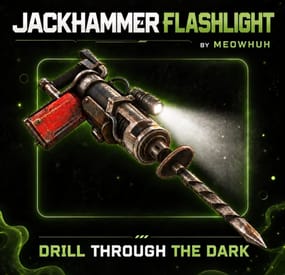
Add a fully functional flashlight to jackhammers in Rust.
Mining in dark caves or at night should not mean constantly switching between your jackhammer and a separate light source.
JackhammerFlashlight adds a toggleable flashlight to jackhammers, allowing players to mine while illuminating the area in front of them. Players can turn the flashlight on or off using the normal Rust flashlight key or simple chat commands, while server owners can configure battery duration, multiple recharge methods, replaceable batteries, support for normal jackhammers, custom item skins, loot container drops, and optional battery status displays.
Perfect for PvE, PvP, Vanilla+, modded, survival, mining, and custom progression Rust servers.
✨ Features
Adds a fully functional flashlight to supported jackhammers. Players can toggle the flashlight using the normal Rust flashlight key (F). Chat commands to toggle the flashlight, turn it on or off, and check battery charge. Flashlight follows the player's aim direction while holding the jackhammer. Special Jackhammer Flashlight item with a configurable display name and skin ID. Optional support for enabling flashlights on normal Rust jackhammers. Configurable battery duration with support for unlimited battery life. Battery charge decreases automatically while the flashlight is enabled. Battery consumption pauses when the flashlight is turned off. Remaining battery charge is preserved when the player switches items or puts the jackhammer away. Flashlight automatically turns off when its battery runs out. Players can check their remaining battery charge using a chat command. Recharge batteries using configurable Rust items and resource costs. Configure multiple recharge items with separate amounts, skin IDs, and charge percentages. Optional automatic battery recharging with configurable charge percentage per minute. Optional workbench recharging with separate rates for Level 1, Level 2, and Level 3 Workbenches. Configurable workbench recharge radius. Recharge batteries using /jf recharge with optional item selection. Optional recharge command cooldown, permission requirement, and item cost settings. Optional free recharge command with a configurable charge percentage. Replace empty batteries using configurable Rust items. Optional automatic battery replacement when the flashlight runs out of charge. Battery capacity is preserved separately from remaining charge to support recharging. Configurable fallback battery capacity for older jackhammers. Optional SimpleStatus integration to display battery information while holding the jackhammer. Optional AdvancedStatus integration with battery countdown support. Battery display supports remaining time, paused charge, unlimited battery, and empty battery states. Configurable command aliases for player flashlight controls. Admin command to give special Jackhammer Flashlight items to online players. Supports giving multiple jackhammers with a single command. Admins can specify a custom battery duration when giving jackhammers. Optional automatic Jackhammer Flashlight drops from configured loot containers. Configurable loot container prefabs, drop chances, and minimum/maximum item amounts. Separate battery duration overrides for individual loot drop configurations. Automatically restores active flashlight functionality when players equip supported jackhammers. English and Russian plugin messages included. 🔦 Flashlight Controls
Players can control their jackhammer flashlight using the regular Rust flashlight key or chat commands.
Control Description F Key Toggles the flashlight on or off while holding a supported jackhammer. /jf Toggles the flashlight on or off. /jf on Turns the flashlight on. /jf off Turns the flashlight off. /jf battery Shows the remaining battery charge. /jf recharge Recharges the battery using the configured recharge settings. /jf recharge <item shortname> Attempts to recharge using a matching configured item. /jf replace Replaces an empty battery using the configured replacement item. Tip
Example: Hold a Jackhammer Flashlight and press F to turn on the light. Press F again to turn it off.
The flashlight follows your aim direction, allowing you to see where you are mining without switching tools.
🔋 Battery System
JackhammerFlashlight includes a configurable battery system that allows server owners to control how long flashlights can remain active and how players restore their charge.
Battery Setting Description Unlimited Battery Flashlight can remain enabled without running out of charge. Limited Battery Flashlight operates for the configured number of seconds. Battery Pause Battery consumption stops when the flashlight is turned off. Battery Depletion Flashlight automatically turns off when its remaining charge reaches zero. Battery Capacity Stores the maximum charge separately from the remaining battery time. Battery Recharge Restores charge through enabled recharge methods without exceeding maximum capacity. Battery Status Players can check their remaining charge using /jf battery. Tip
Example: Set Battery Duration (seconds, 0 = unlimited) to 600 to give newly created Jackhammer Flashlight items 10 minutes of battery usage.
Set the duration to 0 for unlimited battery life.
With a 600-second battery, a recharge that restores 50% capacity adds 300 seconds of charge, up to the battery's maximum capacity.
⚡ Recharge System
JackhammerFlashlight includes multiple configurable recharge methods, allowing server owners to choose how players restore their flashlight batteries.
Recharge Method Description Item Recharge Consume configured Rust items to restore a percentage of battery capacity. Automatic Recharge Gradually recharge batteries over time while the flashlight is off. Workbench Recharge Recharge batteries near Workbenches with configurable rates for each level. Recharge Command Configure command-based recharging with optional permissions, cooldowns, and item requirements. Replaceable Batteries Consume a configured item to replace a completely empty battery. Automatic Replacement Automatically replace an empty battery when the required replacement item is available. Recharge methods can be enabled or disabled separately.
🔧 Item Recharge
Players can recharge their flashlight battery using configurable Rust items.
Configure one or multiple items that can be used for recharging. Set a separate item amount for each recharge option. Configure how much battery capacity each item restores. Optional skin ID requirements for recharge items. Players can recharge using /jf recharge. Players can specify a recharge item using /jf recharge <item shortname>. Required items are consumed from the player's inventory. Recharging cannot exceed the battery's maximum capacity. Tip
Example: Configure 10 Low Grade Fuel to restore 50% of the battery's maximum capacity.
A jackhammer with a 600-second battery receives up to 300 additional seconds of charge when the player uses the configured fuel cost.
The default item recharge configuration already includes 10 Low Grade Fuel for 50% charge.
🔄 Automatic Recharge
Automatically restore battery charge over time without requiring players to use items or commands.
Enable or disable automatic recharging. Configure the battery percentage restored per minute. Recharges supported jackhammers in the player's inventory. Only recharges batteries while their flashlight is turned off. Stops automatically when the battery reaches full capacity. Recharging is processed at regular intervals. Tip
Example: Set Charge Percent per Minute to 20 to recharge 20% of maximum battery capacity per minute while the flashlight is off.
A completely empty battery can reach full charge after approximately 5 minutes when this rate is active without a faster workbench recharge rate.
🛠️ Workbench Recharge
Allow players to recharge flashlight batteries by staying near Rust Workbenches.
Workbench Default Recharge Rate Level 1 Workbench 20% battery capacity per minute. Level 2 Workbench 40% battery capacity per minute. Level 3 Workbench 60% battery capacity per minute. Enable or disable workbench recharging. Configure the maximum recharge distance. Set separate charging rates for each workbench level. Supports deployed Workbenches and supported static Workbenches. Recharges eligible jackhammers in the player's inventory while their flashlight is off. Uses the highest available recharge rate when multiple workbenches or automatic recharge apply. Automatically stops charging when the battery is full. Tip
Example: Set the recharge radius to 3 meters.
Players standing near a Level 3 Workbench can recharge at 60% battery capacity per minute using the default Level 3 rate.
Workbench recharging is disabled by default and must be enabled in the configuration.
⌨️ Recharge Command
The /jf recharge command lets players restore battery charge using the enabled recharge settings.
Recharge the jackhammer currently held by the player. Optional permission requirement using jackhammerflashlight.recharge. Configurable recharge command cooldown. Choose whether recharge command usage requires items. Configure the recharge percentage when item costs are not required. Supports selecting a specific configured recharge item. Prevents recharging while the flashlight is turned on. Prevents recharging batteries that are already full or have unlimited charge. Note
Recharge Command Behavior
Item-based recharging can work with /jf recharge when Item Recharge is enabled, even if the separate Recharge Command setting is disabled.
Enabling Recharge Command activates its additional permission, cooldown, and optional no-item recharge settings.
When Require Items is disabled under Recharge Command, players can use the configured no-item recharge percentage. Specifying an item shortname still selects an item-based recharge.
🔋 Replaceable Batteries
JackhammerFlashlight also supports replacing completely empty batteries using configurable Rust items.
Enable or disable battery replacement. Configure which Rust item is required for replacement. Set the number of items consumed per replacement. Optional skin ID requirement for replacement items. Players can manually replace an empty battery using /jf replace. Replacing a battery restores its full configured capacity. Optional automatic battery replacement when the flashlight runs out. Automatic replacement can restore the light without requiring the player to manually run a command. Tip
Example: Configure weapon.mod.flashlight as the replacement item with an amount of 1.
When the jackhammer battery becomes empty, the player can use /jf replace to consume one Weapon Flashlight item and restore the battery to full capacity.
Enable Automatically Replace When Empty to let the plugin attempt replacement automatically when the battery runs out or the player tries to turn on an empty flashlight.
Warning
Important Recharge Notes
Recharge functionality must be enabled in the main Recharge Settings. Batteries with unlimited charge do not need recharging or replacement. Item and command recharging require the flashlight to be off. Automatic and workbench recharging only affect eligible jackhammers with their flashlights turned off. Manual battery replacement requires the battery to be completely empty. Automatic battery replacement requires the replacement feature and automatic replacement setting to be enabled. Automatic recharge, workbench recharge, recharge command options, and battery replacement are disabled by default. 📊 Battery Status Integration
JackhammerFlashlight supports optional integration with SimpleStatus and AdvancedStatus to display battery information while players hold supported jackhammers.
SimpleStatus
Displays battery information while holding a supported jackhammer. Shows a countdown when the flashlight is running on limited battery. Displays the remaining charge when the flashlight is turned off. Supports unlimited and depleted battery states. Updates when the battery is recharged or replaced while the jackhammer is held. AdvancedStatus
Displays battery information using an AdvancedStatus bar. Supports a countdown for remaining battery duration. Updates the battery display depending on whether the flashlight is enabled or disabled. Reflects battery changes after recharging or replacement. Automatically removes the status when the player stops holding the supported jackhammer. Note
Integration Notes
SimpleStatus and AdvancedStatus are optional integrations. Both integrations can be enabled or disabled in the configuration. When both are enabled and available, SimpleStatus takes priority. Players can still use /jf battery without either status plugin installed. 📦 Loot Container Drops
Server owners can optionally configure special Jackhammer Flashlight items to appear inside Rust loot containers.
Setting Description Enabled Enables or disables the configured loot drop entry. Prefab Specifies the loot container prefab. Chance Sets the chance of adding Jackhammer Flashlight items to the container. Min Amount Minimum number of jackhammers added when the drop succeeds. Max Amount Maximum number of jackhammers added when the drop succeeds. Battery Duration Sets a custom battery duration for jackhammers generated by this entry. Multiple loot drop entries can be configured for different loot container types.
Tip
Example: Enable a loot drop entry for assets/bundled/prefabs/radtown/crate_normal.prefab and set its chance to 10 to give matching crates a 10% chance of receiving the configured Jackhammer Flashlight items when their loot spawns.
Note
Loot Battery Settings
-1 - Uses the default battery duration from the main configuration. 0 - Gives generated jackhammers unlimited battery life. Any positive value - Sets a custom battery duration in seconds for that loot entry. Loot container drops are disabled by default.
⌨️ Commands
/jf - Toggles the flashlight on or off while holding a supported jackhammer.
/jf on - Turns the flashlight on.
/jf off - Turns the flashlight off.
/jf battery - Shows the remaining battery charge.
/jf recharge - Recharges the currently held jackhammer using the configured recharge method.
/jf recharge <item shortname> - Recharges using a matching configured recharge item.
/jf replace - Replaces the empty battery using the configured replacement item.
Player flashlight command aliases are fully configurable.
🛡️ Admin Commands
/jfgive <player name or Steam ID> - Gives one Jackhammer Flashlight to the selected online player.
/jfgive <player name or Steam ID> <amount> - Gives the specified number of Jackhammer Flashlights.
/jfgive <player name or Steam ID> <amount> <battery seconds> - Gives Jackhammer Flashlights with a custom battery duration.
Command Examples
/jfgive PlayerName /jfgive PlayerName 5 /jfgive "Player Name" 3 /jfgive PlayerName 1 600 /jfgive PlayerName 2 0 Note
Admin Command Notes
Player names containing spaces must be placed inside quotation marks. The target player must be online and alive. The default amount is 1. Battery duration uses the main configuration unless explicitly specified. Use 0 as the battery duration for unlimited charge. If the target player's inventory is full, additional jackhammers are dropped at their feet. The /jfgive command is available to Rust admins and players with the required permission. 🔐 Permissions
jackhammerflashlight.give - Allows non-admin players to use /jfgive to give Jackhammer Flashlight items to online players.
jackhammerflashlight.recharge - Required to use /jf recharge when Recharge Command is enabled and its permission requirement is enabled.
No permission is required for normal flashlight controls.
Item-based recharging can be used without the recharge permission when the separate Recharge Command permission requirement is not active.
Rust admins can use /jfgive without being granted the give permission separately.
⚙️ Example Configuration
{ "Commands": [ "jf" ], "Enable Flashlight on Normal Jackhammers": false, "Item Name": "Jackhammer Flashlight", "Skin ID": 0, "Battery Duration (seconds, 0 = unlimited)": 0.0, "Recharge Settings": { "Enabled": true, "Fallback Capacity for Legacy Batteries (seconds)": 300.0, "Item Recharge": { "Enabled": true, "Items": [ { "Item Shortname": "lowgradefuel", "Skin ID (0 = any)": 0, "Amount": 10, "Charge Percent": 50.0 } ] }, "Automatic Recharge": { "Enabled": false, "Charge Percent per Minute": 20.0 }, "Workbench Recharge": { "Enabled": false, "Radius (meters)": 3.0, "Level 1 Charge Percent per Minute": 20.0, "Level 2 Charge Percent per Minute": 40.0, "Level 3 Charge Percent per Minute": 60.0 }, "Recharge Command": { "Enabled": false, "Require Permission (jackhammerflashlight.recharge)": false, "Cooldown (seconds, 0 = none)": 60.0, "Require Items": true, "Charge Percent without Items": 100.0 }, "Replaceable Batteries": { "Enabled": false, "Automatically Replace When Empty": false, "Item Shortname": "weapon.mod.flashlight", "Skin ID (0 = any)": 0, "Amount": 1 } }, "[SimpleStatus] Show Battery While Holding": false, "[AdvancedStatus] Show Battery While Holding": false, "Drop Settings": [ { "Enabled": false, "Prefab": "assets/bundled/prefabs/radtown/crate_normal.prefab", "Chance": 10, "Min Amount": 1, "Max Amount": 1, "Battery Duration (seconds, -1 = use default, 0 = unlimited)": -1.0 } ], "Config Version": { "Major": 1, "Minor": 0, "Patch": 1 } } Note
Configuration Notes
Commands: Configurable aliases for flashlight controls. Normal Jackhammers: Enables flashlight functionality for regular Rust jackhammers instead of only specially created Jackhammer Flashlight items. Item Name: Custom display name for generated Jackhammer Flashlight items. Skin ID: Custom skin ID applied to generated Jackhammer Flashlight items. Battery Duration: Sets the default battery duration in seconds. Use 0 for unlimited charge. Recharge Enabled: Enables or disables the entire recharge system. Legacy Battery Capacity: Sets the fallback maximum battery capacity for older jackhammers without stored capacity information. Item Recharge: Configure item shortnames, amounts, optional skin IDs, and charge percentages. Automatic Recharge: Configure passive battery recharging and the percentage restored per minute. Workbench Recharge: Configure charging distance and different recharge speeds for Level 1, Level 2, and Level 3 Workbenches. Recharge Command: Configure optional recharge command permissions, cooldowns, item requirements, and no-item charging. Replaceable Batteries: Configure the replacement item, required amount, optional skin ID, and automatic replacement behavior. SimpleStatus: Enables battery display integration with SimpleStatus. AdvancedStatus: Enables battery display integration with AdvancedStatus. Drop Settings: Configures optional loot container drops, item amounts, chances, and battery overrides. Warning
Important: When normal jackhammer support is disabled, flashlight functionality is limited to special Jackhammer Flashlight items created by the plugin.
Enable Flashlight on Normal Jackhammers in the configuration if you want regular Rust jackhammers to support the flashlight feature as well.
For rechargeable gameplay, configure a positive battery duration. Unlimited batteries do not need recharging.
Item-based recharging is enabled by default, while automatic recharge, workbench recharge, additional recharge command options, and replaceable batteries must be enabled separately.
💡 Why Choose JackhammerFlashlight?
Mining at night or inside dark caves should not require constantly switching between your tools and a separate light source.
JackhammerFlashlight combines a practical, aim-following flashlight, simple controls, configurable battery duration, multiple recharge methods, replaceable batteries, optional battery status integration, customizable jackhammer items, and loot container drops in one focused plugin.
Whether you want unlimited flashlights for everyday mining, rechargeable batteries that consume resources, automatic charging near workbenches, or replaceable batteries for custom progression, JackhammerFlashlight gives server owners full control over how players use and maintain their mining lights
- #jackhammer
- #light
- (and 5 more)