
Vinni_TV_'s Wishlist
-
$18.99$15.19XFarmRoom
XFarmRoom - farm room of ores for your server. Good donate for players.
- Optimization of the interface for different monitor resolutions.
- Storing player data in - oxide/data/XDataSystem/XFarmRoom
- There is a lang ru/en/uk/es.
- Sound effects when interacting with the menu.
- In the room is forbidden: pick up prefabs that are in the room, install anything in the room, damage the room, use console/chat commands ( customizing commands in the config ).
- Teleport from a room to the place you teleported from.
[ Teleportation from the room works correctly when: leaving the room, death, disconnecting from the server, unloading the plugin, restarting the server ]
- A player is automatically teleported out of the farm room if his permission to access the farm room is revoken away.
- Setting the CD to teleport into a room. [ Permission can be granted to disable the CD.]
- Automatically clear data after a wipe. [ Configure in config ]
- Ability to display room spawn points on the map. [ Administrator only ]
- Ability to set a limit of simultaneously active(occupied rooms) for optimization.
- Ability to customize how many items a player can take into a room.
- The player chooses his own ores from the available ones to mine.
[ For example: the player has all ores available, but in the UI menu he selects a stone and mines only it ]
- Ores can be given out individually, any number on command. [ For example: for sale in the store ]
- The ability to make the ores unlimited for the player.
[ Permissions and number of ores are configurable in the config. Ores can be updated once every N seconds or once per wipe ]
- Room prefabs are spawn without third party plugins.
- Notifications to chat when grant and revoke permission/group with permission to access farm room functionality.
Permissions
xfarmroom.use - access to the room/commands. xfarmroom.nocdtp - allow teleporting into a room without a CD. Commands
/roomtp - to join the room. /roomleave - to leave the room. /roomspawns - display spawn points of farming rooms. [ Administrator only ] xfarmroom_give_ore <SteamID> <ore - [ sulfur-ore | metal-ore | stone-ore ]> <amount - [ 10 | -10 ]> - give ores to the player. xfarmroom_clear_ore <SteamID> - reset the player available ores to zero. API
bool API_PlayerInRoom(ulong userID) - return TRUE/FALSE if the player is in the room. Config
{ "General settings": { "Button placement. [ True - 1 | False - 2 ]": true, "Option to update available ores. ( only with permission to update ). [ True - once per wipe | False - once every N seconds ]": false, "Clear the data after a wipe": true, "Limit the number of items that can be taken into a room": true, "Use UI button to leave the room": true, "Every how many sec. update the number of available ores. ( it is checked only when the player tries to/falls into the room )": 3600, "How many maximum simultaneously active rooms can there be. ( for optimization )": 10, "How many maximum items can be taken into a room": 6, "Room teleportation break sec.": 90, "Chat prefix": "<size=12><color=#FFFFFF50>[</color> <color=#00FF0050>XFarmRoom</color> <color=#FFFFFF50>]</color></size>\n", "Notify the player when he has been granted or revoked away access to the farm room functionality": false, "SteamID profile for custom avatar": 0, "List of allowed console commands in farm room": [ "global.farm_ore" ], "List of allowed chat commands in farm room": [ "roomtp", "roomleave" ] }, "Permission - number of ores. [ Only the value and permission can be changed ]": { "xfarmroom.300": { "sulfur-ore": 300, "metal-ore": 300, "stone-ore": 300 }, "xfarmroom.100": { "sulfur-ore": 100, "metal-ore": 100, "stone-ore": 100 } } } -
$45.99$36.79XStatistics
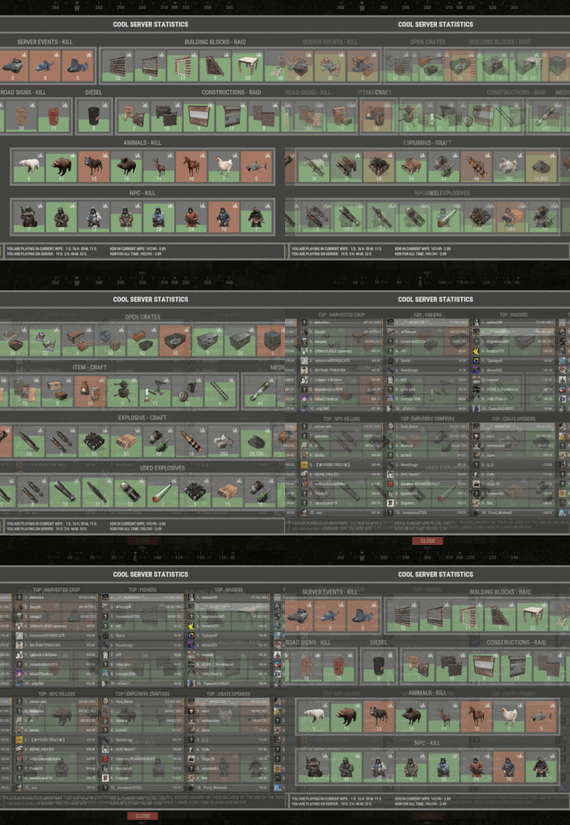
XStatistics - statistics for your server.
- Optimization of the interface for different monitor resolutions.
- Storing player data in - oxide/data/XDataSystem/XStatistics or MySQL or SQLite.
- There is a lang ru/en/uk/es.
- Sound effects when interacting with the menu.
- UI settings in the configuration.
- Display TOPs in game chat.
- Ability to customize the privacy of the default statistics.
- Ability to delete a player's stats after they have been banned.
- Ability to customize grades of building blocks. [ To be recorded in statistics. ]
- Ability to add a player to the blacklist. [ Player's statistics will not be displayed in the TOPs and will not be available to other players. ]
- Ability to use MySQL or SQLite database.
- Ability to automatically give awards and clear data after a WIPE. [ Settings in the configuration. ]
[ Plugin economics or any other. Also [ RU ] GameStores. ]
- A player can hide/open his statistics. [ Need permission. ]
- A player can view the statistics of other players. [ Need permission. ]
- A player can reset their statistics to zero. [ Need permission. ]
- The player can view the entire list of players and search. [ Need permission. ]
- Creating an unlimited number of categories, subcategories and pages.
- Creating custom TOPs, coefficients and awards. [ Unlimited number. ]
- Various admin commands to manage player statistics.
- Support and compatibility with many plugins.
- Server events (Bradley, Chinook, and Patrol Helicopter) count as stats for the player who did the most damage.
- Checking OwnerID of Building blocks, Constructions and other entities.
- Ability to create a Global TOP of your project. [ For this purpose it is enough to enter MySQL data and server name into the configuration.]
[ This TOP can be disabled in the configuration and only the TOP players of the server can be used. Or you can use two TOPs at the same time! ]
- Ability to use pages for categories with subcategories.
- Administrator Mode. [ View hidden player stats, open player search and more ].
- Automatic deletion of statistics of players who have not logged connection the server for N days.
- Ability for players to disable messages with the TOP players in chat.
If your server is visited by more than 500 players, it is recommended to use SQLite or MySQL.
Statistics were tested on a server with 120 online and 5000 players in the database. Excellent result on optimization.
To display player avatars you need to customize the configuration of the ImageLibrary plugin!
What are the statistics at this point?
Global TOP data is manually deleted from the MySQL database. [ It is important that the servers are turned off so that online players data is not written to the database ].
Or after all servers are wiped, run the command - player_stats_reset globaldata null - on one of the servers.
[ Also take into account the servers parameters, for a fair TOP they should be the same! ]
Shortnames to customize statistics
Permissions
xstatistics.use - access to the statistics menu. xstatistics.top - access to the TOPs of subcategories. xstatistics.coefficients - access to view the coefficients. xstatistics.player - access to view player statistics, player list and player search. xstatistics.resetwipe - access to the ability for a player to reset his statistics - WIPE. xstatistics.resetall - access to the ability for a player to reset his statistics - ALL TIME. xstatistics.shstats - access to the ability to hide/open your statistics. [ If the permission has been revoked, the statistics privacy will automatically change to default. ] xstatistics.admin - access to admin mode. Commands
/stat, /stats, /statistic, /statistics - to open the statistics menu. [ Commands can be changed in the config. ] Server console --- Admin commands. stats_ct <customTopName> - to see the top players. [ Custom TOP. ] stats_t <subcategoryName> - to see the top players. [ TOP subcategory. ] player_stats_reset statswipe <steamID> - to reset a player stats to zero - WIPE. player_stats_reset statsall <steamID> - to reset a player stats to zero - ALL TIME. player_stats_reset all <steamID> - to reset a player stats to zero - WIPE and ALL TIME. player_stats_reset global <steamID> - delete a player from the database Global TOP. [ Player must be offline! ] player_stats_reset globaldata null - Delete data from a table in a MySQL database - Global TOP. [ Use this command after all of your servers have been wiped. ] [ The command can be used on any of the Global TOP servers. ] player_actstats global true/false - change statistics privacy for all players. player_actstats <steamID> true/false - change statistics privacy for a player. stats_give_award - start giving out awards for TOPs. stats_clear_data_wipe - to clear all statistics - WIPE. [ Same as after a server wipe ] API
- void API_AddSubcategoryValue(BasePlayer player, string subcategoryName, long amount) - Add a value for the subcategory. player - must be online and not equal to null. - void API_SetSubcategoryValue(BasePlayer player, string subcategoryName, long amount) - Set a value for the subcategory. player - must be online and not equal to null. - bool API_CheckForSubcategory(ulong userID, string subcategoryName) - Check if a subcategory exists. - long API_GetSubcategoryValue(ulong userID, string subcategoryName) - Get the subcategory value. Config
-
$34.99$27.99XPrison
XPrison - prison for your server.
- Optimization of the interface for different monitor resolutions.
- Storing player data in - oxide/data/XDataSystem/XPrison
- There is a lang ru/en/uk/es.
- Sound effects when interacting with the menu.
- Ability to create a prison using the CopyPaste plugin or a custom prefab created in RustEdit.
[ To use a prefab as a prison, you need to specify its coordinates in the config ]
[ The prison is protected from any kind of damage. ]
- Adjustment of attires for the prisoner.
- Setting nicknames for prisoners. [ Random prefix with nickname in chat ]
- Setting allowed console and chat commands. [ The rest will be blocked ]
- Radio tuning for prisoners. [Detailed settings in the spoiler]
- The ability to send the player to life or temporary imprisonment.
- Two options for serving a temporary sentence:
Online. [ The player needs to spend his entire term online in prison ] By date (offline). [ The player will be released after the specified time. He can go offline and wait offline for the end of the term ] - The ability to add prisoners even if they have never been on the server or on the date. [ A file with the prisoner's data will be automatically created ]
- The ability to block slots with clothes. [ To prevent the prisoner from taking off his uniform ]
- Automatic release of prisoners at the end of the term.
- Block damage to prisoners.
- As spawners for prisoners, the - "Tesla Coil" is used. [ If there are no spawners, then the prisoners will spawn around the map, but will not be able to farm and deal damage. There will be appropriate warnings in the server console ]
- As a spawner for admins is used - "Press Plate".
- "Igniter" is used as spawners for visitors.
- Various chat notifications. [ Sending to the prisonand release. The duration of the term. ]
- An admin or a player with a permit is not subject to various prison restrictions.
- The ability to teleport a prisoner to prison (clear his inventory).
[ Or kill the prisoner and he will respawn in prison ]
- Ability to teleport prisoner from prison to Outpost or Bandit Camp (clear his inventory)
[ Or kill the prisoner and he will respawn on the beach ]
- If a prisoner is teleported to and from prison, without clearing his inventory, then you can arrange a quest for them: If you survive in prison, you can save your loot, as well as the loot that you got from other prisoners in prison. 😃
- Mini game. The prisoner can press buttons and reduce his time of detention.
[ Useful for prisoners who are serving time online ]
- Mini game 2. The prisoner can recycle items inside the zone and reduce his time of imprisonment.
- Ability to automatically spawn entities(stone, barrels, etc.) inside the prison. [ When the player breaks them, they will appear automatically after N seconds. ]
- Ability to link a prison to a monument. [ Just set it up once and it's automatic from there! ]
Important! There must already be a building on the monument! And also all elements of the prison OwnerID must be 100001. You can spawn buildings on monuments with the plugin - MonumentAddons
You can get the prison file for the CopyPaste plugin from the developer after purchase.
-> Overview - YouTube <-
Permissions
xprison.admin - access to admin functionality. [ Not required for admin player ] xprison.visitor - access to visiting the prison for ordinary players. xprison.prisonposset - access to the /prisonposset command. Commands
/zonaloc - find out your coordinates and the coordinates of the prison. /zonaloc1 - get coordinates relative to the monument. [ To link the prison to the monument. ] /tpzona - teleport to the prison. [ For Administrators/Visitors ] /zona - check the length of the term. /zonamenu - open the prisoner management menu. /prisonposset false/true - change the prison coordinates in the configuration. ( The player current coordinates are used. false/true - reload the plugin after changing the coordinates. ) /entspawn cfg-key sec - spawn an entity inside the prison with an appearance interval. /entkill - delete a custom entity. [ You have to look at it. ] cmd_prisoner add <SteamID [ 76561100000000000 ]> <Life imprisonment [ True / False ]> <Term duration [ 3600 ]> <Option to serve time [ True - online / False - by date (possibly offline.) ]> - send to the player's zone. ( Regardless of online player or offline ) cmd_prisoner remove <SteamID [ 76561100000000000 ]> false 0 - release the prisoner. ( Regardless of online player or offline ) [ You can, for example, give the opportunity to redeem yourself through the store ] API
bool API_IsOnlinePrisoner(ulong userID) - return TRUE/FALSE if the online player is a prisoner. void API_AddOnlinePrisoner(BasePlayer prisoner, bool life - Life imprisonment [ True / False ], int duration - Term duration [ 3600 ]) - send an online player to the zone. void API_RemoveOnlinePrisoner(BasePlayer prisoner) - free online prisoner. bool API_IsOfflinePrisoner(ulong userID) - return TRUE/FALSE if the offline player is a prisoner. void API_AddOfflinePrisoner(BasePlayer prisoner, bool life - Life imprisonment [ True / False ], int duration - Term duration [ 3600 ]) - send an offline player to the zone. void API_RemoveOfflinePrisoner(ulong userID) - free offline prisoner. string API_GetOnlinePrisonerPrefix(BasePlayer player) - return the prisoner's online prefix. Config
{ "General settings": { "Profile SteamID for custom avatar": 0, "List of allowed console commands on the prison": [ "global.respawn" ], "List of allowed chat commands in the prison": [ "zona" ] }, "Settings prison": { "Prison location coordinates": { "x": 1000.0, "y": 700.0, "z": 0.0 }, "Prison file name for the CopyPaste plugin": "zona606", "Diameter from the point you specify to search for prison structures, spawners, and more": 35.0, "Automatically turn on the boombox after the prison spawns": true, "Use the CopyPaste plugin for the prison [ True - CopyPaste | False - the prison location point you specified, you can use a custom prefab or build the prison manually ]": true, "Allow regular players to visit the prison": false, "Allow ordinary players to visit the prison only with an empty inventory": true }, "Prisoner settings": { "Lock the clothing slots": true, "Lock the slots on the belt": false, "Lock inventory slots": false, "Lock clothing items - [ Player will not be able to discard them ]": true, "Use a nickname prefix for the prisoner - [ Set to False if the prefix should be disabled or the prefix is used by a third party chat plugin ]": true, "Link to prisoner lock screen image": "https://i.imgur.com/SZoYTLt.png", "Layer UI lock screen image - [ Overlay | Hud ]": "Hud", "Use screen lock": false, "Do not kill the prisoner when he enters the prison, but simply teleporting": false, "When a prisoner is teleported to prison, clear his inventory": false, "Do not kill the prisoner when he is released from prison, but simply teleporting to the Outpost or Bandit Camp": false, "When a prisoner teleports out of prison, clear his inventory": false, "[ Mini-game ] Allow prisoners to shorten their time by pressing buttons inside the prison": true, "[ Mini-game ] For pressing one button, how many seconds to reduce the term of imprisonment": 1, "[ Mini-game 2 ] Allow inmates to reduce their incarceration time by recycling items inside the prison": true, "[ Mini-game 2 ] List of items and number of seconds": { "rock": 1 }, "List of prisoner's attires [ Shortname - SkinID ]": { "burlap.headwrap": 2655848185, "burlap.shirt": 2655843517, "burlap.trousers": 2655838948 }, "List of prisoner nicknames": [ "Schellen", "Schilten", "Espadas", "Bastos", "Oros", "Denari", "Rosen", "Copas", "Herz", "Eichel", "Kule", "Laub", "Zelený", "Grün" ] } } -

$14.99
Military Airfield Event
By Iftebinjan in Plugins
As soon as the event starts, several troops (NPCs) are spawned to defend an hackable crate that will be delivered by the CH47. This crate may contain a lot of loot, so the troops have the duty to defend it. For this purpose, there is a variety of troops such as snipers, close-range shooters, and long-range shooters.
If a player manages to initiate the hacking of the crate, all the airfield troops will be relocated to a combat position. In other words, all troops that you haven't seen yet or that are hidden will be moved to the center of the airfield to defend the crate. After a few minutes, a plane will be sent with supply drops containing weapons to assist the troops in defense. However, airborne troops will also be dispatched from the plane to parachute down and aid in defending the crate.
If the crate is looted, all troops will be destroyed, leaving only the crates, supply drops, and bodies to be looted by intruders.
📌 Commands
/ma start to start the event /ma stop to stop the event /ma position to get the current position based in the airfield monument (used to config) 📜 Permissions
militaryairfield.admin to access all commands 🚀 API & Hooks
private void OnMilitaryAirfieldEventStarted(); - // Called when the event starts private void OnMilitaryAirfieldEventEnded(BasePlayer? lootedBy); - // Called when the event ends ⚙️ Configurations
💬 Support
-
.thumb.png.913d4ec299161acf94081154072ade61.png)
$29.99
Armored Train
New Year Update
The New Year is coming and I have prepared for you a new preset customization for the train!After installing the update, customization will be automatically applied to all cars in the configuration of the armored train. To disable this, make the "Customization preset" parameter empty in the config.
You can also disable the customization of certain wagons or change the customization of the NPCs in the file oxide/data/ArmoredTrain/NewYear
New Year's map from the video:
Halloween Update
Have you already prepared your server for Halloween?
On the eve of the Halloween Rust update, I have prepared for customization of all armored train cars.
After installing the update, customization will be automatically applied to all cars in the configuration of the armored train. To disable this, make the "Customization preset" parameter empty in the config.
This plugin will add an armored train to your server, which can travel both in the subway and by rail.
It can consist of any number of wagons. A helicopter can accompany it.
Bradley, npc, turrets, simsites can be installed on the train.
The plugin allows you to create any number of train presets, for which the order of wagons, the helicopter preset, the probability of spawn and the duration of patrolling can be specified. Each wagon or locomotive can be configured separately. Any speed can be set by the locomotive.If there is no spawn of trains on the surface on your custom map, read the section "Custom spawn points”
Custom spawn points
If you are using a custom map in which there are no spawn trains on the surface, but there is a railway, then for the train to work on the surface, you need to add custom spawn points of the train.
Instruction:
Stand at the point where you want the train to spawn Enter the command /atrainpoint If you receive a message that a point has been created, enable "Use custom spawn coordinates [true/false]” in config For correct operation, it is recommended to create several spawn points of the train
Chat commands (only for administrators)
/atrainstart– launches the event in a random configuration /atrainstartunderground - forcibly launches an event underground /atrainstartaboveground - forcibly launches an event aboveground /atrainstart <trainPresetName> – launches the event in the <trainPresetName> configuration /atrainstartunderground <trainPresetName> /atrainstartaboveground <trainPresetName> /atrainstop– stops the event /atrainpoint– creates a custom spawn point of the train in your position
Console commands (RCON only)
atrainstart– launches the event in a random configuration atrainstartunderground - forcibly launches an event underground atrainstartaboveground - forcibly launches an event aboveground atrainstart <trainPresetName> – launches the event in the <trainPresetName> configuration atrainstartunderground <trainPresetName> atrainstartaboveground <trainPresetName> atrainstop – stops the event
Config
en – example of plugin configuration in English ru – example of plugin configuration in Russian
Dependencies (optional, not required)
True PVE PveMode GUI Announcements Notify DiscordMessages AlphaLoot CustomLoot Economics Server Rewards IQEconomic Api
bool IsArmoredTrainActive() bool StopArmoredTrain() bool StartArmoredTrainEvent() bool EndArmoredTrainEvent() bool IsTrainBradley(uint netID) bool IsTrainHeli(uint netID) bool IsTrainCrate(uint netID) bool IsTrainSamSite(uint netID) bool IsTrainWagon(uint netID) bool IsTrainTurret(uint netID) Vector3 ArmoredTrainLocomotivePosition()
Hooks
OnArmoredTrainEventStart OnArmoredTrainEventStop
Contact me in Discord: Adem#955