
BellaaGaming's Wishlist
-
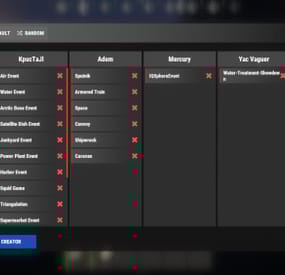
$21.95$15.95Events Manager
Discover the EventsManager plugin, a powerful and flexible tool crafted specifically for Rust game servers. Designed by senyaa & M&B-Studios, this plugin streamlines the management and scheduling of various in-game events, enhancing player engagement and server dynamics.
🌟 Features of Events Manager
Multi-Event Support: Seamlessly manage multiple events, each with customizable settings. Customizable Display: Assign distinct names, commands, and colors for UI buttons to each event. Scheduling Flexibility: Schedule events to run on specific days and at designated hours. Administrative Control: Utilize commands to launch events, providing server admins with ultimate flexibility. Enhanced Player Experience: Introduce regular events to boost player engagement within the Rust environment. Random Event Start: Introduce surprise elements by allowing the plugin to randomly select events from a pool. Integration of Facepunch Events: Enjoy a dynamic gameplay experience with popular Facepunch events now included in the plugin.
🎮 Commands
/em: Set up events, including start time and day. /newevent: Add new events tailored to your preferences, enhancing the versatility of the Event Manager. /newcreator: Easily add new creators to the event manager. eventmanager.convert.v2: Migrates V2 data to V3 (console only)
💬 Permissions
eventsmanager.use: This permission allows users to access the event management features and open the menu.
🎥 Video Overview
📚 FAQ
Q: Where can I see an example of a config?
A: Config
Q: Do I need to configure anything special for events?
A: Yes, it's important to disable autostart in your events when using EventsManager. The plugin handles the scheduling and starting of events, so having autostart enabled could cause conflicts or unexpected behavior.
- #eventmanager
- #manager
- (and 5 more)
-
![More information about "Build Tools [grade/remove/skins]"](https://codefling.com/cdn-cgi/image/width=285,height=275,quality=80,fit=cover,format=webp/https://codefling.com/uploads/monthly_2025_12/v4final.thumb.gif.45df50b470fa522f43059acab6ad0e1e.gif)
$21.95$15.95Build Tools [grade/remove/skins]
Introducing a feature-rich plugin that will take your in-game building experience to new heights - Build Tools!
This plugin is not just a tool, it is the key to creating incredible builds and will make the processes of upgrading, removing and even downgrading buildings easy and fun!
!ATTENTION! After the last update of the game, the additional slot does not work
⭐ Features of Build Tools
Beautiful user interface: Our plugin has a lovely and easy-to-use interface that makes building tasks smooth and functional; Bar progress display: Keep track of your building progress with a clear progress bar, so you can see your upgrades easily; Upgrade of the entire building at once: You can make them stronger and more secure quickly; Interface customization: Personalize the user interface to match your preferences and workflow. Returning an item to remove: Don't worry about losing items when removing structures; our plugin ensures you get them back; Returning items with condition as in the game: Items are returned to the same condition as in the game, with the option to set their condition as a percentage; Blocked list items for remove: You can specify which items should not be removed for precise construction control. Ability to use icons both from the game and your own Work with Clans/Friends/NoEscape Building Skins (+ automatic parsing command) Downgrade: Make structure downgrades simple and adapt your base to changing needs with just a few clicks Edit config via in-game interface (no JSON editing required)
🎮 Commands
/up [1-4] - enable upgrading mode /up all - allows you to upgrade the entire building at once /remove - enable removing mode /remove all - allows you to remove the building at once /down - enable downgrading mode /down all - allows you to downgrade building at once buildtools.parse.skins – allows parsing new building skins from the game + images to them /bskin – open settings menu
🛡️ Permissions
buildtools.all – allows you to upgrade/remove the entire building at once buildtools.free – allows you to upgrade buildings for free buildtools.edit – allows you to enable edit mode buildtools.vision – allows you to toggle the remove mode on in the vision mode
🎥 Video
🧩 Hooks
object canDowngrade(BasePlayer player, BaseEntity entity) object canRemove(BasePlayer player, BaseEntity entity) object CanBuildToolsGiveRefund(BasePlayer player, BaseEntity entity)
📚 FAQ
Q: Where can I see an example of a config?
A: Config
- #building
- #foundation
- (and 27 more)
-
$14.99
TC Upgrades
By Iftebinjan in Plugins
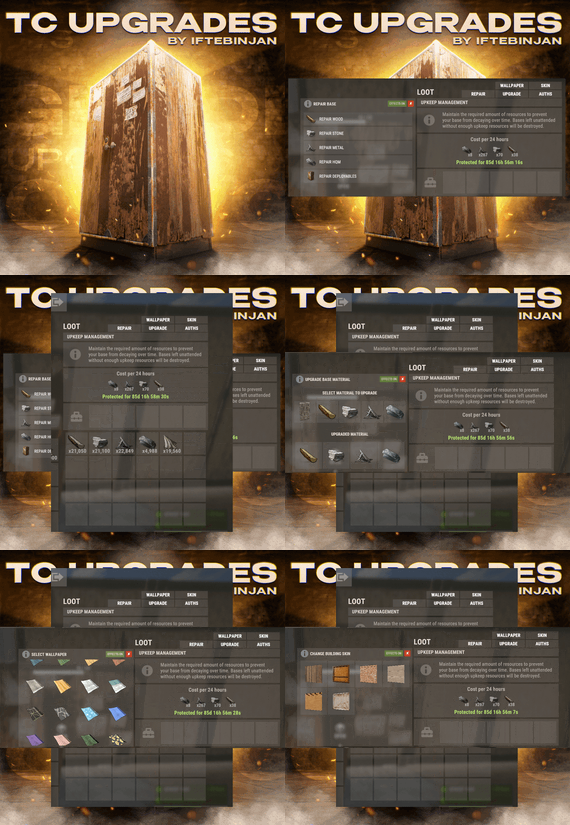
TC Upgrades provides an efficient and optimized way to enhance your base directly from the Tool Cupboard. With this plugin, you can easily change building grades, switch building skins, repair structures or deployables, and even set up wallpapers on your base, streamlining your base management process.
⭐ Key Features
Multi-TC Support Authorization List on Tool Cupboard Upgrade Building Grades Change Building Skins Repair Structures and Deployables Apply Wallpapers Detailed Permissions VIP Features User-Friendly UI 🎬 Video Showcase
📜 Permissions
TCUpgrades.admin- Shows a UI Change button when in admin mode (command: /tcuadmin) TCUpgrades.authlist - Shows Authorization list button on TC TCUpgrades.upgrade - Shows upgrade button on TC TCUpgrades.repair - Shows repair button on TC TCUpgrades.skin - Shows skin button on TC TCUpgrades.wallpaper - Shows wallpaper button on TC TCUpgrades.upgrade.nocost - Allows player to use no resources when upgrading TCUpgrades.repair.nocost - Allows player to use no resources when repairing TCUpgrades.reskin.nocost - Allows player to use no resources when reskining TCUpgrades.wallpaper.nocost - Allows player to use no resources when setting wallpaper TCUpgrades.default - Allows player to use (wood, stone, metal, hqm & deploy) TCUpgrades.wood TCUpgrades.stone TCUpgrades.metal TCUpgrades.hqm TCUpgrades.deploy ⚙️ Configurations
💬 Support
- #upgrade
- #toolcupboard
- (and 7 more)
-
$4.99
Personal Recyclers
By imthenewguy in Plugins
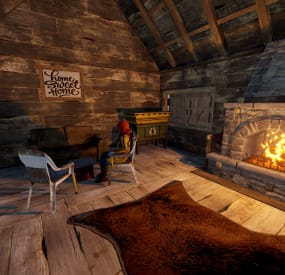
This plugin allows for your players to receive or purchase personal recyclers that they can place inside of their base.
The primary benefit of this plugin vs other similar plugins, is that this plugin will restrict usage of the recyclers to only a user or their team (configurable), and has commands built in that will allow players to purchase it directly via payment gateways like Tebex etc.
It will also work with the VIP Token plugin, allowing for a token to be purchased and traded in game, providing the consumer with a redeemable recycler.
The plugin itself is fairly straight forward - players type the command into chat, which will provide them with a recycler item. This item is a reskinned box, and will be placed using the box prefab, but once deployed, it will spawn a recycler in with the same positioning as the box, then despawn the box. Recyclers can also be picked up using a hammer or toolgun by pressing mouse 3.
Features
Automatically clears data on map wipe. Allows players to keep their unredeemed recyclers between wipes (configurable). Prevents other players from accessing the recycler (configurable). Team mate support (configurable). Configurable starting amount of recyclers. Additional recycler(s) are accrued upon a map wipe, if the player had not redeemed their recycler (configurable). External payment gateway support, allowing for you to sell individual recyclers to your players. VIP Tokens support. Check below for the configuration example. Can pick up own recyclers using your hammer/toolgun and mouse 3. Recyclers will lost max condition each time they are picked up to prevent players from deploying them while grinding the roads (configurable).
Permissions
personalrecycler.use personalrecycler.admin personalrecycler.place
personalrecycler.use commands
/recyclers - will print out how many recyclers a player has left to redeem. /redeemrecycler - will spawn a recycler in the players inventory and deduct a recycler from their redeemable count. /crecycler - Will pickup the targeted recycler (requires a hammer to be wielded) if the player has permission. Players with this permission will automatically get the configured number of starting recyclers upon using the commands for the first time, and will have have recyclers added to their redemption pool at the start of each wipe (configurable).
personalrecycler.admin commands
/addrecycler <player name> - will increase the amount of redeemable recyclers a player has by 1. /clearrecyclers <player name> - will remove all of the saved recycler IDs from the data file, making all of their recyclers publically accessible. /clearrecyclerdata - removes all of the saved recycler IDs from the data file, making all recyclers publically accessible. (Console command) subtractrecycler <target> <optional: amount> - removes recyclers from the players available recyclers pool.
API
This plugin allows for you to add a command to a payment gateway such as Tebex, or via my VIP Tokens plugin.
The command is structured as below:
addrecycler <Steam ID> <quantity> Most payment gateways required the player to log in with their steam ID. An example command using tebex would be:
addrecycler {id} 1 This would add 1 recycler for the steam ID of the account that logged into Tebex.
You can also add this as a VIP Token. See configuration options below:
"recycler": { "name": "Personal Recycler", "days_to_add": 0, "vip_group": null, "vip_description": "Allows you to place a personal recycler that only you can access.", "remove_tokens_on_wipe": false, "token_item": { "name": "Recycler Token", "skin": 2544601457, "item_shortname": "radiationresisttea.pure" }, "_command": { "command": "addrecycler {id} 1", "message": "You redeemed a recycler token.", "public_message": null, "hook": false } } As you can see, the command follows Tebex's variable style, using {id} to capture the players steam ID.
If you require help setting this up with VIP Tokens, or need any assistance with anythign else, feel free to send me a PM.
Enjoy!
- #recycler
- #monetization
- (and 5 more)
-

$11.99$8.99F15 AirStrike
Adds the ability to call an airstrike, the player throws a supply signal in the place where he wants to call an airstrike.
This plugin uses the default supply signal, but the item skin must be 2982472774. Please use only default stack size for supply signal. This is the only way the plugin will work properly.
Since this is not an item that players can usually get through loot, you can use a plugin like BetterLoot to insert a supply signal with skin 2982472774 into your loot tables, and then that player-picked item can be used as a signal to call an airstrike.
There is also support for the plug-in HomingMissiles
Commands (admin only):
/GiveF15AirStrikeSignal <Player or steamID> <number of items> - give the player a supply airstrike signal
/GiveF15AirStrikeSignalToAll <number of items> - give to all players a supply airstrike signal
/adminCallF15 - causes an airstrike to a point with the player's coordinates
Developer API:
(void) CallF15AirStrike(Vector3 pos, BasePlayer player) - launch an airstrike on a point with coordinates pos, player - airstrike initiator(null can be specified)
This plugin uses the permission system
Permissions:
f15AirStrike.use - required to use airstrike
f15AirStrike.vip - for VIP permissions, the "Cooldown time for VIP” setting is available
To assign a permission, use: oxide.grant <user or group> <name or steam id> f15AirStrike.use
To remove a permission, use: oxide.revoke <user or group> <name or steam id> f15AirStrike.use
Config:
{ "F15 flight altitude": 250.0, "Rockets speed": 150, "Attack radius": 150, "Damage scale (1 = 100%)": 1.0, "Rate of fire(number of shots per second)": 2.5, "Time to trigger a signal grenade": 3.0, "Cooldown time": 1.0, "Cooldown time for VIP": 1.0, "Supply signal display name": "SUPPLY SIGNAL F15", "Grenade throw force scaling": 1.0, "Damage to buildings": false, "Always deal damage to Raidable Bases": false, "Attack the initiator": true, "Attack the players": true, "Attack NPCs": true, "Attack the place where the signal supply was thrown (attacks only in the area, not aiming at players and NPCs)": false, "F15 will only attack at right angles above the center of the impact area (only for area targeting)": false, "Attack accuracy (used only when attacking in an area)": 30, "Use homing missiles(need HomingMissiles plugin)": false }