Adem
-
Posts
4,793 -
Joined
-
Last visited
-
Days Won
59
Content Type
Profiles
Warranty Claims
Downloads
Forums
Store
Services
Downloads Plus Support
DOWNLOADS EXTRA
Reels
Everything posted by Adem
-
 Sure
-
Changed Status from Pending to Work in Progress
-
Changed Status from Pending to Work in Progress
-
Hi! I sent you a test version of the plugin in the ticket you opened on the MadMappers Discord. Please test it and let me know if the issue is gone. I wasn’t able to reproduce it on my server, but I found and fixed two possible causes.
-
Changed Status from Pending to Work in Progress
-
Changed Status from Pending to Work in Progress
-
Changed Status from Pending to Closed
-
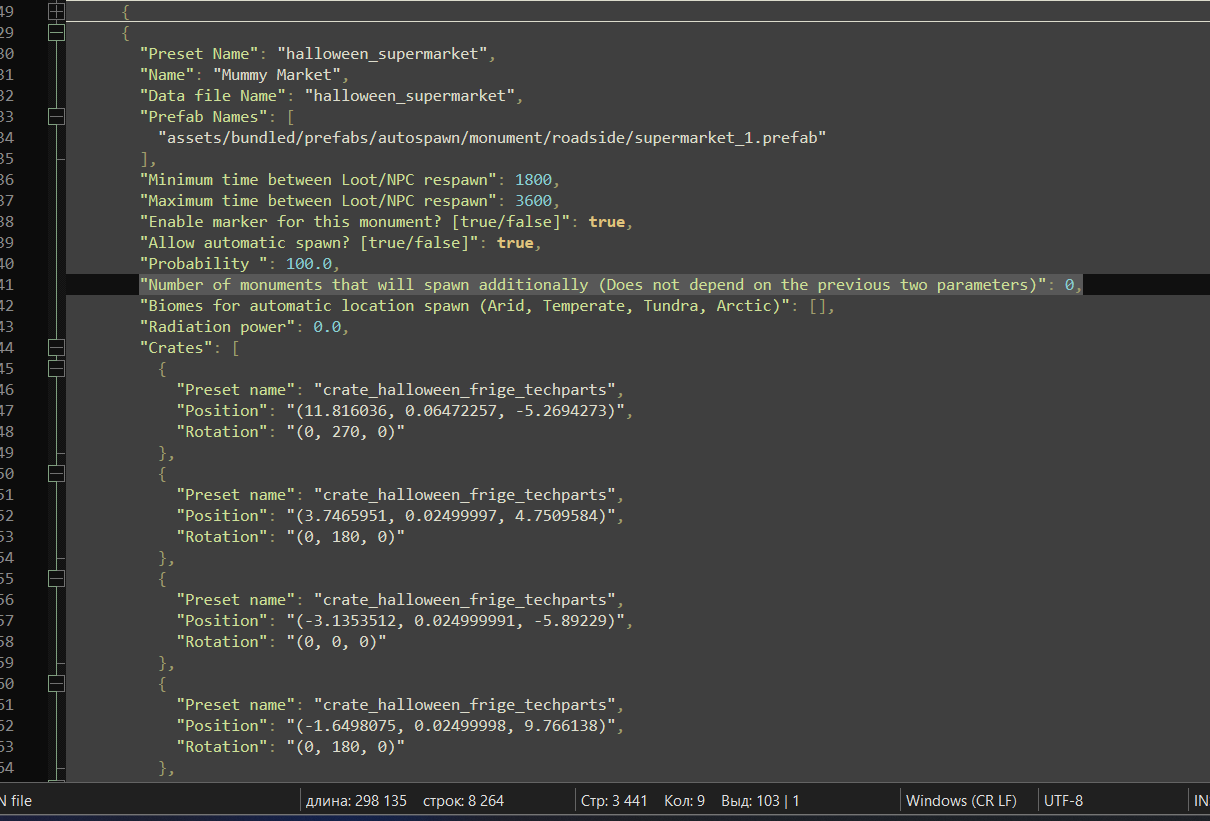
It does not decorate every monument of that type. The number of decorated monuments is controlled in the config. Disable automatic spawning for that monument and set: "Number of monuments that will spawn additionally (Does not depend on the previous two parameters)": 3 or 4, depending on how many decorated Gas Stations, Supermarkets, or Warehouses you want. You need to do this for: halloween_supermarket halloween_gasstation halloween_warehouse

-
Hi. You need to enable these two options in the config: "Replace the poles with Halloween-themed ones? [true/false]" "Replace roadside junk piles with Halloween-themed ones? [true/false]" Only newly spawned junk piles will be customized. The ones that were already spawned before enabling the option will stay unchanged. If new junk piles spawn, they will already use the Halloween version. You can also configure the customization chance for both poles and junk piles next to these options. By default, it is set to 30%, so roughly every third pole and junk pile will be customized.
-
Hi! Unfortunately, this isn’t possible because the blocks are placed on a 1×1×1 meter grid. There’s no guarantee that the bottom of a block will line up with the top of a foundation. I also can’t allow blocks to be placed freely without using the grid, because then player-built structures may not connect correctly if construction was started from different locations.
-
 Hi! I can’t create a bundle because the product has two authors, and revenue sharing doesn’t work correctly with bundles. If you want to buy everything at once, send me a private message and I’ll make you an offer.
-

Version 1.0.0
89 downloads
Note: This is an add-on, not a standalone plugin. It requires the DynamicMonuments plugin to be installed (sold separately). Turn any Rust map into a Halloween-themed world with almost no effort. Just install the add-on, enable the features you want, and let Dynamic Monuments handle the rest — no RustEdit required. Bundle adds 8 unique Halloween locations, themed NPCs, and extra decorations across the map. Locations can spawn automatically, while powerline poles and roadside junk piles can also be replaced with Halloween-themed versions. Features: - 8 unique Halloween locations - Themed NPCs on 7 of 8 locations - Custom decoration for powerline poles - Custom decoration for roadside junk piles - Automatic spawning across the map - No RustEdit required Monuments: - Cursed Mill - Abandoned Hospital - Vampire Gas Station - Slasher Warehouse/ - Plague Church - Scarecrow Ritual - Haunted Crypt - Mummy Market Dynamic spawning Monuments can automatically spawn around the map. They can also respawn in different positions after a server restart, making the map less predictable and giving players new locations to discover. Installation Instructions 1. Make sure you have the latest version of the DynamicMonuments plugin installed 2. Move the contents of the `data/DynamicMonuments` folder from the downloaded archive into the `oxide/data/DynamicMonuments` folder on your server 3. Reload the NpcSpawn plugin 4. Reload the DynamicMonuments plugin Check out the rest of my work: Adem's Codefling Library Join the Mad Mappers Discord!$39.99- 2 reviews
-
- 3
-

-

-
- #halloween
- #dynamic
- (and 15 more)
-
Fixed
-
You can add static NPCs that won’t move to any location on the monument. Or you can add NPCs that will walk around on the ground near the monument. The preset name is the name of the NPC preset in the DynamicMonuments plugin config. /addprefabspawnpoint presetName - adds a spawn point for a static NPC. /addgroundnpcspawnpoint presetName - adds a spawn point for a ground NPC that will walk around the monument. However, if you’re using the new navigation grid, you can add these NPCs directly to the monument, and they will most likely be able to walk around on it. 1
-
Hi! Which monuments do you want to add NPCs to?
-
Hi! Unfortunately, there’s no option for that. You can simply copy the rotation of the crate that is there by default and manually apply it to the crate you want to add.
-
Changed Status from Pending to Closed
-
Hi! This coupon isn’t for purchasing plugins. It’s a coupon for ordering design work from our partner.
-
Changed Status from Pending to Work in Progress
-
Changed Status from Pending to Closed
-
Changed Status from Pending to Closed
-
"OnShipwreckEventWin"
-
Please contact me on Discord http://discordapp.com/users/721754788387094599
-
Changed Status from Pending to Closed