Jump to content

Adem

Creator
  • Posts

    4,272
  • Joined

  • Last visited

  • Days Won

    46

Everything posted by Adem

  1. Adem

    Dynamic Monuments

    Alpha loot is already built into it. There are also NPCs in the most difficult 5 locations.
  2. Adem

    Dynamic Monuments

    Hi. NPCs are located in the 5 most difficult locations where there are card readers.
  3. Adem

    Dynamic Monuments

    I've been working on the respawn system. Now the player is shown information about why he cannot place the monument. Well, it became easier to find a location for the monument spawn. After a couple of days of testing on this plugin, I will migrate this system to BuildingSites.
  4. Version 1.2.8

    3,266 downloads

    DynamicMonuments is a groundbreaking plugin for Rust servers that breathes new life into your maps! Say goodbye to tedious manual map editing or relying on RustEdit. With just a few clicks, your server will be transformed, featuring 18 unique monuments that blend seamlessly into any environment. Key Features: Dynamic Spawning: - Monuments can spawn randomly during wipes or with each server restart (optional) - Customize spawn frequency and zones through the plugin's configuration - A variety of monument complexities, ranging from cozy hideouts to sprawling fortresses 18 Unique Monuments: - Water Monuments - Coastal Monuments - River Monuments - Roadside Monuments - Modifications for Standard Monuments: (Metro entrances, power line towers, substations, quarries, and more). Personalization: - Give players personal monuments Versatility: - Compatible with both custom and procedural maps. - Automatically adapts to terrain, water, and roads. - No RustEdit required! Everything is managed through the plugin's configuration. Giving a monument to a player 9 out of 18 monuments can be given to players for personal placement. The dynamic monument is represented as a flare with a unique skin, which can be given to players in any way, such as through an in-game store. To spawn the monument, the player must hold the flare and find a suitable location, receiving instructions in the chat and notifications. Once placed, the monument is locked to the player, and only they can loot it. Chat commands (admin only) /killmonument - destroys the DynamicMonument you're looking at /replacecrate NewCratePresetName - replaces the crate you're looking at on the location with NewCratePresetName /spawnmonument PresetName - spawns a monument in a random position /spawnmonumentmypos PresetName - spawns the monument in your position /killallmonuments - destroys all DynamicMonuments on the server /respawnmonuments - forcibly launches automatic respawn of DynamicMonuments /givemonument PresetName - give the monument to yourself /addprefabspawnpoint PresetName — adds a crate or static NPC spawn point to a monument at your current position (only for Static Npc and crates) /removemonumententity command — removes entity spawn point you're looking at. (only for StaticNpc/crates/Entities for respawn) Console commands (RCON only) spawnmonument PresetName - spawns a monument in a random position killallmonuments - destroys all DynamicMonuments on the server respawnmonuments - forcibly launches automatic respawn of DynamicMonuments givemonument PresetName userID - give the DynamicMonument to the player Plugin Config en – example of plugin configuration in English ru – example of plugin configuration in Russian Check out the rest of my work: Adem's Codefling Library You can reach out to me in Discord: Adem's Discord Profile Join the Mad Mappers Discord!
    $49.99
  5. Adem

    Armored Train

    The problem is fixed by restarting the server. It can be caused not only by this plugin, but also by some other related to transport and NPCs. Updating the game broke a lot of plugins. The latest version of this plugin does not cause such problems.
  6. Adem

    Building Sites

    Nope
  7. Adem

    Building Sites

    I did not add this to the plugin. You can add items from the config to any other loot plugin. Use the shortname and skin from the config
  8. Adem

    Building Sites

    The marker disappears if you install the cupboard
  9. Adem

    Barges

    Hi. The reason is that this version is for the game update that will be released today. Download the previous version
  10. Adem

    Armored Train

    Hi. There are 8 different trains in the default configuration.
  11. Adem

    Building Sites

    Hi. Yes, we plan to make additions with location in the future. I think the first addon will be released at the end of January.
  12. Adem

    Building Sites

    Fixed
  13. Adem

    Building Sites

    The permissions were added in the latest update. As for own prefabs, I don't think it will ever be possible. Because not all entities from RustEdit can be used there. And scale is also prohibited.
  14. Adem

    Building Sites

    Hi. You can't create your own at the moment. By default, there are markers of vacant building sites on the map.
  15. Adem

    Building Sites

    Version 1.1.8

    2,307 downloads

    This plugin allows you to quickly and easily add unique locations for building houses to any map. There are 17 different locations of three types: ground sites, islands, and flying platforms — choose what suits you best! Key benefits of the plugin: Suitable for any map; No need to use RustEdit; Random automatic spawn after wipe; Ability to give a Building Site to a certain player. With this plugin, you can build the perfect house for yourself and your friends! Spawn locations The plugin has a function for automatically generating spawn points for BuildingSites on any map. You can independently enable and disable the spawning of water, land, and air BuildingSites. For each type, you can set the number of BuildingSites that will appear after the wipe. You can also give players flare to summon a BuildingSite. With their help, players will be able to call the desired BuildingSite anywhere. When the player holds the flyer in their hands, they are shown information about whether their position is suitable for spawning the BuildingSite or not. Players can be given flyers in any way, for example, by kits or in the in-game store. Chat commands (admin only) /respawnsites - forcibly launches automatic respawn of BuildingSites /spawnsite PresetName - spawn the BuildingSite in your position /killsite- destroys the BuildingSite you're looking at /killallsites - destroys all BuildingSites on the server /givesite PresetName - give the BuildingSite to yourself /killsiteentity — look at the object you want to remove and enter the command; this object will no longer spawn at new locations of this type Console commands (RCON only) respawnsites - forcibly launches automatic respawn of BuildingSites killallsites - destroys all BuildingSites on the server givesite PresetName userID - give the BuildingSites to the player Plugin Config en – example of plugin configuration in English ru – example of plugin configuration in Russian Check out the rest of my work: Adem's Codefling Library You can reach out to me in Discord: Adem's Discord Profile Join the Mad Mappers Discord!
    $29.99
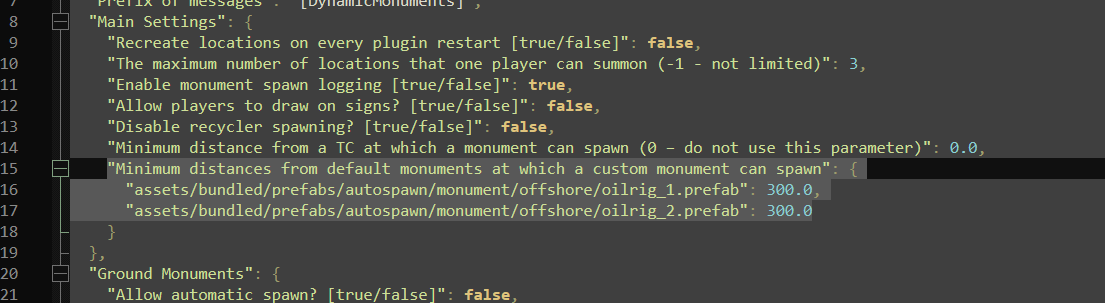
  16. You can find it in the config

About Us

Codefling is the largest marketplace for plugins, maps, tools, and more, making it easy for customers to discover new content and for creators to monetize their work.

Downloads
2.3m
Total downloads
Customers
10.7k
Customers served
Files Sold
154.5k
Marketplace sales
Payments
3.3m
Processed total
×
×
  • Create New...

Important Information

We have placed cookies on your device to help make this website better. You can adjust your cookie settings, otherwise we'll assume you're okay to continue.