
LeroyJenkins420
-
Posts
331 -
Joined
-
Last visited
-
Days Won
2
Content Type
Profiles
Warranty Claims
Downloads
Forums
Store
Services
Downloads Plus Support
DOWNLOADS EXTRA
Reels
Everything posted by LeroyJenkins420
-
Sure this works, could you reach out to me through Discord so we can continue this conversation? @schmenkins
-
There is no issue with the train disappearing after restart, I tested this specifically before releasing the plugin publicly. Likely I suspect their is an issue with the train decaying, I just built a train and restarted my server and it persisted. Can I ask what type of server you have, oxide or Carbon?
-
Gotcha just wanted to make sure. Ill boot up a server now and test/fix this
-
Hey @GreenPhoenix1988, decay should be disabled but let me verify and get back with you. Are you sure no other players could have stolen them or blown them up?
-
to fix this simply restart the server twice, upon loading the second time build on rails will be possible. This is an oxide specific behavior and will be patched out soon.
-
Changed Status from Pending to Not a Bug Changed Fixed In to 1.0.2
-
 Hello @Singularity, first thank you for taking the time to read the license, and apologies if it was too restrictive for your needs. Below is the snippet I believe you are referring to. "You may not modify, adapt, translate, reverse engineer, decompile, or disassemble the Software, except and only to the extent that such activity is expressly permitted by applicable law notwithstanding this limitation" If there is an applicable law in your country you may have the ability to do one of the aforementioned. I would love to hear about what modifications you would like to see made and I'm sure I can add them in. Thank you in advance! Feel free to PM them to me if youd prefer.
- 84 comments
-
- 1
-

-
- #trainserver
- #train
- (and 11 more)
-
Hey Ghost! sorry for my delay here, ive found the cause of this, apparently clans plugins rename the players display name to include the clan tag resulting in not being able to lookup players by partial strings. To fix this, if you are using a clan plug, use the steam ID of the player instead
-
 What is your username and the other persons username? Please open up a support request so I can ensure this gets fixed for you!
 -
Your post is unclear, are you experiencing a bug?
-
 This is badass!
 -
Hey @Forcet i've released an update that is Oxide compatible 1.0.2. I did not increment the version number here
-
Hey @Forcet, I have identified the cause of the issue and I am booting an oxide local server now. Give me a 10-30 minutes and I should have a fix sorry for any inconvenience! Also a friendly reminder to make sure you read the, "How To Use" section before trying to use this best regards, Leroy
-
Hey @Forcet let me check if this is public on Oxide, can you confirm which type of server you are on (Oxide vs Carbon)?
-
Changed Status from Pending to Closed Changed Fixed In to 1.0.beta
-
Hey @ErikaSupremeapologies for my delay in response here, I have tested this on the latest build of Oxide and it has compiled. Please dont hesitate to let me know if you encounter any other issues! Best regards, Leroy
-
I dont think their is a version for Mac. Looks like you'll need to just wait for next wipe. If you have any questions before wiping your server feel free to DM me or @me on discord @schmenkins @0g.Ghost.7373
- 84 comments
-
- 1
-
-
- #trainserver
- #train
- (and 11 more)
-
" Got a console full of this when I installed... [TrainBuildPlugin] Unaccounted for entity in BuildTraintrainwagonunloadable.entity [TrainBuildPlugin] Unaccounted for entity in BuildTraintrainwagonunloadableloot.entity [TrainBuildPlugin] Unaccounted for entity in BuildTraintraincaboose.entity [TrainBuildPlugin] Unaccounted for entity in BuildTraintrainwagonb.entity [TrainBuildPlugin] Unaccounted for entity in BuildTraintrainwagonunloadablefuel.entity [TrainBuildPlugin] Unaccounted for entity in BuildTraintrainwagona.entity " I removed this so you should no longer see it @0g.Ghost.7373
- 84 comments
-
- 1
-
-
- #trainserver
- #train
- (and 11 more)
-
Hey Ghost I just released an update that massive improves performance and fixes some other bugs! Im sorry to hear you missed that steps, no need to worry though, next wipe just make sure you 1. Delete you current map 2. Upload the latest version of the train plugin to your server while its off 3. Turn the server on 4. Rail topo will be generated as building topo instead. if you want to edit your existing map you can also do so in rust edit by removing the rail topology (including rail siding I believe) then re-uploading the map to your server, there is a way to do this without losing player data. SRTBull has a video on it I think but I couldnt find it. Instead here is a Reddit post talking about it
- 84 comments
-
- 1
-
-
- #trainserver
- #train
- (and 11 more)
-
 This plugin is a great addon for any server! I have personally demoed it and thoroughly enjoyed it, the live skinning was personally my favorite part
 -
While I would love to give this out for free I simply could not do that, these plugins take many hours of investigation and work. I will however grant anyone who previously bought it a %50 discount (for a limited time) Ill update the plugin description to include this shortly!
- 84 comments
-
- 2
-

-
- #trainserver
- #train
- (and 11 more)
-
This can be ignored, its just saying that there is an entity in wagona etc that is not accounted for, no issue will be caused by this. I will however remove ths in my next patch. I am releasing an update shortly.
-
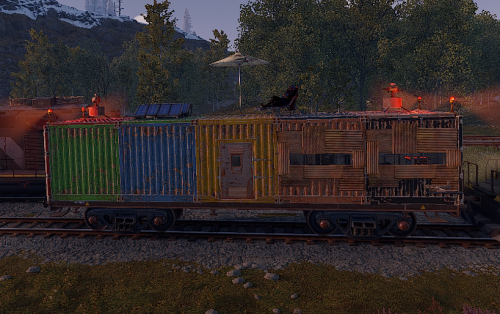
Version 1.3.9
1,034 downloads
This plugin allows any player to find and build on a train directly on the rails in either a 1x5 or 1x3 configuration. Features: Throttle syncing for trains (syncs throttles when updated) Build anything almost anywhere (on trains) Limited to 2x1 or 5x1 carts Can be built inside of some monument (Trainyard, etc) Can be built inside underground tunnels Electrical entities powered by the train Configurable Health Preset Support NO MAP EDITING REQUIRED!!! How To Use: To use this plugin you need to: 1. Put the plugin in your plugins folder and enjoy! Chat Commands: /blacklist: Admin only, will blacklist items in your inventory, this will prevent these items from being placed on the train. /killtrains: Admin only, will kill all trains on the server. Args: All - kills all trains Built - kills only built trains Unbuilt - kills only unbuilt trains Config: Bounds defines the buildable area on the train, default is 1x5 or 1x2 for work carts. Larger building bounds may or may not be supported in the future. Building grade support 0-4 0: twigs 1: wood 2: stone 3: metal 4: high quality { "Version Number": { "Major": 1, "Minor": 1, "Patch": 7 }, "Upgrade Chance (0-100 = %0-100 chance)": 50.0, "Building Grade to spawn as": 3, "Train Wagon Start Health": 5000.0, "Train Engine Force": 250000.0, "Blacklisted Entities (shortnames)": [ "example1", "example2", "For ShortNames Go to:", "https://docs.carbonmod.gg/references/items/", "https://www.corrosionhour.com/rust-item-list/" ], "Sync Train Throttles": true, "Max Train Pop": 24.0, "Max coupled trains": 12, "Max Train Couple Speed": 9.0, "Message Prefix": "<size=18px><color=#51a3f5>[</color><color=#FFFFFF>T</color><color=#FF0000>B</color><color=#51a3f5>]</color></size>" } Note: Presets can be found in a seperate folder (TrainBases > TrainPresets) Please also be aware that at this time bounds are only setup for default types. EX: you can create presets for WagonC, however if you create presets for locomotive the player will be able to build infinitely off the train. Default types meaning train types that come with presets by default (wagonc, wagonb, etc). The bounding system will be re-engineered shortly to allow for dynamic bound creation. Note: weighted chance modifiers can be modified for each preset valid arguments for these modifiers are 0-100 and affect the likelihood of that preset spawning.$40.00- 84 comments
- 12 reviews
-
- 5
-
-
- #trainserver
- #train
- (and 11 more)
-
Hey Erika first thank you for the understanding! Second I have partnered with the Oxide devs and they have graciously updated the staging build, this plugin should be oxide compatible next wipe best regards Leroy
-
Hello @ErikaSupreme, I have found the cause of the issue, Oxide unfortunately does not make some of the fields/methods I use public so as a result it is not compatible with Oxide. I have reached out to the Oxide Devs and asked if they could potentially fix this, otherwise I will have to adjust the code to work here. If you do not wish to wait for a fix please let me know and I can process a refund, for the time being I will be marking this file as Carbon ONLY compatible. Once I receive a response from the Oxide Devs, depending on what they say, I will begin working on a fix for this. Or at that time this may become compatible with Oxide. apologies again for any inconvenience! Best regards, Leroy