
-
Posts
450 -
Joined
-
Last visited
-
Days Won
1
Content Type
Profiles
Warranty Claims
Downloads
Forums
Store
Services
Downloads Plus Support
DOWNLOADS EXTRA
Reels
Everything posted by MichuX
-
 same using more than a year. I use a lot of this plugin. created like 20 syringes types, etc. no errors. Works smoothly
-
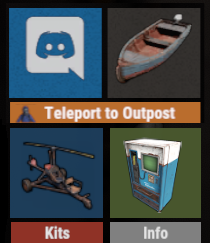 That's one of my big problems... All players, each one they have different views BECAUSE of the User Interface Scale from rust options. If you change your User Interface Scale, It will be so different the position. It should be an option that allows you to lock the position for every scale! Other plugins already does that like backpack button Icon, etc. It's something that is missing this plugin. Regards, MichuX
-
I am using the recent version 2.2.2 I did restart the server, updated the server and the error disappeared but I think as I have this wipe sky islands that players can build. The event maybe might have occur inside of one players base, that is why the error. Maybe adding a check if there are players base nearby before event starts. I can share here the config if still need but nothing big change there
-
 Hello! I would like to ask to introduce SkinID for vending machines, they support SkinID when you sell it when they items have skin on it. Regards, MichuX
-
Hello! This is spamming my console non stop: " NullReferenceException at (wrapper managed-to-native) UnityEngine.Rigidbody.set_isKinematic(UnityEngine.Rigidbody,bool) at Oxide.Plugins.AirEvent+ControllerAirEvent.FixedUpdate () [0x00015] in <b45d2bc1b02f4b3aa8a6024c54d419b0>:0 NullReferenceException at (wrapper managed-to-native) UnityEngine.Rigidbody.set_isKinematic(UnityEngine.Rigidbody,bool) at Oxide.Plugins.AirEvent+ControllerAirEvent.FixedUpdate () [0x00015] in <b45d2bc1b02f4b3aa8a6024c54d419b0>:0 NullReferenceException at (wrapper managed-to-native) UnityEngine.Rigidbody.set_isKinematic(UnityEngine.Rigidbody,bool) at Oxide.Plugins.AirEvent+ControllerAirEvent.FixedUpdate () [0x00015] in <b45d2bc1b02f4b3aa8a6024c54d419b0>:0 NullReferenceException at (wrapper managed-to-native) UnityEngine.Rigidbody.set_isKinematic(UnityEngine.Rigidbody,bool) at Oxide.Plugins.AirEvent+ControllerAirEvent.FixedUpdate () [0x00015] in <b45d2bc1b02f4b3aa8a6024c54d419b0>:0 NullReferenceException at (wrapper managed-to-native) UnityEngine.Rigidbody.set_isKinematic(UnityEngine.Rigidbody,bool) at Oxide.Plugins.AirEvent+ControllerAirEvent.FixedUpdate () [0x00015] in <b45d2bc1b02f4b3aa8a6024c54d419b0>:0 NullReferenceException at (wrapper managed-to-native) UnityEngine.Rigidbody.set_isKinematic(UnityEngine.Rigidbody,bool) at Oxide.Plugins.AirEvent+ControllerAirEvent.FixedUpdate () [0x00015] in <b45d2bc1b02f4b3aa8a6024c54d419b0>:0 NullReferenceException at (wrapper managed-to-native) UnityEngine.Rigidbody.set_isKinematic(UnityEngine.Rigidbody,bool) at Oxide.Plugins.AirEvent+ControllerAirEvent.FixedUpdate () [0x00015] in <b45d2bc1b02f4b3aa8a6024c54d419b0>:0 NullReferenceException at (wrapper managed-to-native) UnityEngine.Rigidbody.set_isKinematic(UnityEngine.Rigidbody,bool) at Oxide.Plugins.AirEvent+ControllerAirEvent.FixedUpdate () [0x00015] in <b45d2bc1b02f4b3aa8a6024c54d419b0>:0 NullReferenceException at (wrapper managed-to-native) UnityEngine.Rigidbody.set_isKinematic(UnityEngine.Rigidbody,bool) at Oxide.Plugins.AirEvent+ControllerAirEvent.FixedUpdate () [0x00015] in <b45d2bc1b02f4b3aa8a6024c54d419b0>:0 NullReferenceException at (wrapper managed-to-native) UnityEngine.Rigidbody.set_isKinematic(UnityEngine.Rigidbody,bool) at Oxide.Plugins.AirEvent+ControllerAirEvent.FixedUpdate () [0x00015] in <b45d2bc1b02f4b3aa8a6024c54d419b0>:0 NullReferenceException at (wrapper managed-to-native) UnityEngine.Rigidbody.set_isKinematic(UnityEngine.Rigidbody,bool) at Oxide.Plugins.AirEvent+ControllerAirEvent.FixedUpdate () [0x00015] in <b45d2bc1b02f4b3aa8a6024c54d419b0>:0 NullReferenceException at (wrapper managed-to-native) UnityEngine.Rigidbody.set_isKinematic(UnityEngine.Rigidbody,bool) at Oxide.Plugins.AirEvent+ControllerAirEvent.FixedUpdate () [0x00015] in <b45d2bc1b02f4b3aa8a6024c54d419b0>:0 NullReferenceException at (wrapper managed-to-native) UnityEngine.Component.get_transform(UnityEngine.Component) at BaseEntity.WorldSpaceBounds () [0x00000] in <0639406c7f0540ea9fcd082648f6903f>:0 at BaseEntity.CenterPoint () [0x00000] in <0639406c7f0540ea9fcd082648f6903f>:0 at SamSite.AddTargetSet (System.Collections.Generic.List`1[T] allTargets, System.Single scanRadius) [0x0001d] in <0639406c7f0540ea9fcd082648f6903f>:0 at SamSite.TargetScan () [0x000c2] in <0639406c7f0540ea9fcd082648f6903f>:0 at InvokeHandlerBase`1[T].DoTick () [0x00138] in <7acd926f609e476fbfd5ca88be554879>:0 at InvokeHandlerBase`1[T].LateUpdate () [0x0000c] in <7acd926f609e476fbfd5ca88be554879>:0 " Thank you in advance, MichuX
-
Server update is a must for the new version Everything working 100% after server update, you might close the ticket support Thank you so much MichuX
-
Hello! After Updating the plugin 1.37.20 gives a new error. I reverted to 1.37.19 again. Error while compiling Battlepass: There is no argument given that corresponds to the required parameter 'index' of 'BurstUtil.Get<T>(in NativeArray<T>, int)' | Line: 2116, Pos: 36 Regards, MichuX
-
Hello! Sorry to disturb you, after the update, players when claim kit they are getting bugged and not getting anything in the kit. Log Error: [Kits] [OG] Ondinake[****] - Received Kit: DailySpecialKit NullReferenceException: Object reference not set to an instance of an object at Item.MoveToContainer (ItemContainer newcontainer, System.Int32 iTargetPos, System.Boolean allowStack, System.Boolean ignoreStackLimit, BasePlayer sourcePlayer, System.Boolean allowSwap) [0x0015f] in <00c367a5d40540858c8bd1a438521d3d>:0 at Oxide.Plugins.Kits+KitItem.GiveItem (BasePlayer player, Item item, ItemContainer cont) [0x0001e] in <da5c59ce99eb4e39bff50d5b69262abf>:0 at Oxide.Plugins.Kits+KitItem.Get (BasePlayer player) [0x00081] in <da5c59ce99eb4e39bff50d5b69262abf>:0 at Oxide.Plugins.Kits+<GiveKitItems>d__95.MoveNext () [0x0003a] in <da5c59ce99eb4e39bff50d5b69262abf>:0 at UnityEngine.SetupCoroutine.InvokeMoveNext (System.Collections.IEnumerator enumerator, System.IntPtr returnValueAddress) [0x00026] in <5f55adde392a4f559fa097c2225879c0>:0
-
I checked the version on .cs, 1.37.18 It is giving this error that I mentioned Error while compiling Battlepass: ; expected | Line: 5731, Pos: 51
-
I did or maybe something wrong with download?
-
I did
-
Error while compiling Battlepass: ; expected | Line: 5731, Pos: 51
-
 true. It was changed last update. I noted that It was reduced in console. Just go to the plugin .cs edit line 152 to: Log($"Set helicopter service ceiling to 300m (default 200m)"); And all minicopters can go there again
-
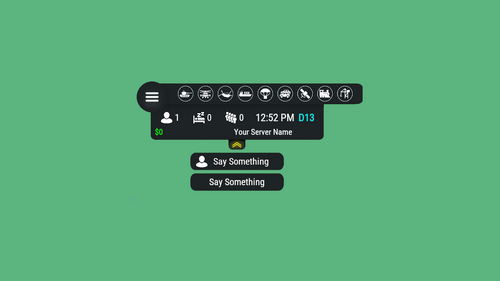 Players who logs in and they have steam offline it doesn't count as a player number. I have tested that when I entered as a steam offline and steam online. Probably not the plugin fault Players who logs as a steam offline
-
 same problem here, I was going to ask too but I saw a comment about it first. claim kits for the bot, the custom item comes with a name, when I kill a bot, custom item comes with default name.
-
Hello! After a several tests I found out the problem. The Image that needs to be upload need to be exactly 512x512 and not less or more. After that the image needs to be normal RGB, on photoshop there are a lot of options about RGB, just need to be a default one. The problem is solved for now Best Regards, MichuX
-
Hello! I recently purchased this tool, when I create some skins, I put in game, after that the skin doesn't load and players start to disconnect. Error: disconnecting: Exception (cs:98779): ArgumentException: Could not create sprite (0, 0, 512, 512) from a 256x256 texture. UnityEngine.Sprite.Create (UnityEngine.Texture2D texture, UnityEngine.Rect rect, UnityEngine.Vector2 pivot, System.Single pixelsPerUnit, System.UInt32 extrude, UnityEngine.SpriteMeshType meshType, UnityEngine.Vector4 border, System.Boolean generateFallbackPhysicsShape, UnityEngine.SecondarySpriteTexture[] secondaryTextures) (at <00000000000000000000000000000000>:0) UnityEngine.Sprite.Create (UnityEngine.Texture2D texture, UnityEngine.Rect rect, UnityEngine.Vector2 pivot, System.Single pixelsPerUnit, System.UInt32 extrude, UnityEngine.SpriteMeshType meshType) (at <00000000000000000000000000000000>:0) Rust.Workshop.Skin+<LoadIcon>d__10.MoveNext () (at <00000000000000000000000000000000>:0) UnityEngine.SetupCoroutine.InvokeMoveNext (System.Collections.IEnumerator enumerator, System.IntPtr returnValueAddress) (at <00000000000000000000000000000000>:0) The skins have no more than 512x512 and all of them around 80.0 KB. Can you help with this error? Thank you in advance, MichuX
-
After the update. I loaded the plugin and I got reports from players that the problem is still the same. First time they call the Tugboat they can start engine but cannot ride (stucks at same place) until they find one in harbor and they go with that. strange because the only thing that is mixed with that is skilltree. still running some tests again to find what exactly it is
-
I decreased very long time ago because with skill tree boost people were flyhacking when ride but If that was the problem why only now did affect for not riding and not 3 or 4 months ago
-
 As a server administrator, managing permissions can often feel like navigating a labyrinth. However, with the Permission Status plugin, that task has become remarkably streamlined and efficient. One of the standout features of this plugin is its user-friendly interface. It provides a comprehensive overview of all permissions within the server, making it easy to identify who has access to what. This transparency is invaluable for maintaining order and security within the server environment. Furthermore, the real-time status updates ensure that I'm always up-to-date with the latest changes. Whether it's granting new permissions or revoking access, I can do so with confidence, knowing that the plugin will accurately reflect these adjustments. The plugin's compatibility with various platforms and its seamless integration make it a versatile tool for any server setup. Additionally, the prompt and responsive support from the developer have been commendable, ensuring that any queries or issues are addressed promptly. In conclusion, the Permission Status plugin has become an indispensable asset in my server management toolkit. Its intuitive interface, real-time updates, and reliable performance make it a must-have for anyone looking to streamline their permission management process. I highly recommend it to fellow administrators seeking greater control and efficiency in their server operations.
- 46 comments
-
- 1
-

-
- #timedpermissions
- #statusbar
- (and 7 more)
-
Very usefull...
-
 I give the Customizable Weapons plugin a 5-star rating. It is the best and number 1 plugin for me and it truly brings my server to life. This plugin offers incredible flexibility, allowing you to choose what to do with your weapons. You can enchant weapons, set weapon levels, create boss weapons, and much more. The extensive customization options enhance gameplay and provide a unique experience for players. The developer provides excellent customer support, always ready to help and interact with users to ensure they get the best out of the plugin. This level of support and engagement makes a huge difference and adds significant value to the plugin. For anyone looking to elevate their Rust server, the Customizable Weapons plugin is an absolute must-have
- 110 comments
-
- 1
-

-
- #custom
- #customizable
- (and 5 more)
-
Yes, It is. Very sorry to bother you! I was able to find the solution and contacted CustomizableWeapon dev to make them working with this plugin.
-
Sorry for late response, my notifications are not working on support section. Players when call Tugboat for 1st time, they turn on the tugboat but they cannot ride, stay stuck at same place. Other random Tugboat works perfectly. I don´t use other plugins related with Tugboats. Just SkillTree that changes the fuel of all boats
-
Thank you for your offering but for now I will keep the plugin off and I will wait for future updates My server doesn't use standard loot, only uses loot from Helpful Supply, so the plugin is no use for my server for now, hopefully it will in the nearest future Best Regards