

-
Posts
139 -
Joined
-
Last visited
-
Days Won
1
Content Type
Profiles
Warranty Claims
Downloads
Forums
Store
Services
Downloads Plus Support
DOWNLOADS EXTRA
Reels
Everything posted by molokatan
-
Changed Status from Pending to Work in Progress
-
Changed Status from Pending to Work in Progress
-
Looking into it today. Guess your error is not related to the button. Planned already another update for buttons in general to give some more advanced options for configurations.
-
I actually do not understand why a rollback of a craft should be possible. When someone is using crafts on an item, they do this on purpose. If a player wants to add a perk to the item, that was removed, they can simply use crafting again. It would also require tracking of changes for items within the plugin. Just thinking about it quickly, i assume it would eat resources and adds lot of complexity to avoid random bugs or duping. For crafting costs, the plugin uses the native items from Item Perks. That kits you get from recycling items with perks. This is required to determine which perk should be removed or added to the item. There is an option in the config to add additional crafting cost per craft type. It supports custom items. Default setup is scrap, but you should be able to use any other item. Maybe i did not understand your request correct, then it would be nice if you could describe it a bit better.
-
TY. I will look into that when i am back home at the weekend.
-
Version 1.0.10
1,680 downloads
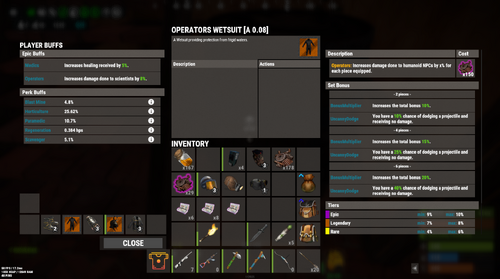
User Interface and advanced crafting options for Item Perks and Epic Loot This plugin will not work without Epic Loot or Item Perks. One of these plugins has to be installed on the server. Features Combined Inventory-like View for Epic and Perk Items Advanced Crafting options for Perk Items Standard Crafting for Epic Items Reuse translations and mod configs Get Started You can drop the plugin onto your server, and you are almost good to go. There are just a few steps to get it running correct. Permissions If you want to use this mod, you should make sure that players dont have permissions listed below. Otherwise, they can bypass costs or functionality from that plugin. Epic Loot Item Perks Configurations We have to make sure that players dont see old UI Buttons anymore. Epic Loot Item Perks Combined Inventory-like View When you open the view the first time, you will notice that it looks similar to the players inventory. One of the main reasons why i implemented that plugin was exactly this feature. You can inspect each item and see additional informations in one place. Player Buff Panel Ever wanted to know all Epic buffs and Perk buffs affecting you? Just check out the full list on the left side. For Perks you can check out descriptions when clicking the info icon (i). Selected Items When you select items, you get a (short) overview of its buffs. For Perk Items it will show a list of all perks and rolls in the description section. When selecting Epic Items, a new Panel will be shown. It contains: - the name of the epic buff - a description - its upgrade costs - the set piece bonus - the tier ranges - the chances to hit a certain tier Quite some information right? Item Actions Following the mission, each possible action is right where you would expect them. Add-, remove- or randomize perks actions are shown in the Action Panel. For Epic Items you will find add- and recycle-action. Items other than Epic and Perk Items are NOT supported and most likely never will be supported. Perk Crafting This plugin supports some more advanced crafting options for perk items. Most actions can run in 2 different modes, weighted and unweighted. Unweighted Crafting for Perks Players have to select 1 Kit when modifying items. The kit defines the perk selected for the desired action and will be consumed. Weighted Crafting for Perks Players can select up to 3 Kits when modifying items. Each kit will add a defined value to the mod weight and increases the chance for the player to hit that mod. The additional mod weight value is based on the configuration for the desired action. You can make the selection of 1 kit mandatory for all weighted actions. Add Perks (For the basics) players can add perks to existing items. By default the player selects a kit and adds the mod. For more advanced usage, you can enabled weighted crafting. This will pick a random mod. Players can add Kits to that process to increase the chances of picking the desired mod. Depending on the configuration, you can enable perk crafting for epic items and "white" items. Crafting of perks respects your defined white- and blacklist from Item Perks. You can define additional costs for this process in the configuration. Remove Perks Players can remove existing perks from an item. By default the player selects a kit and removed the mod. Weighted Crafting will pick a random mod. Players can add Kits to that process to increase the chances of picking the desired mod. You can define additional costs for this process in the configuration. If configured, players can remove ALL mods from an item. Randomize Perk Values Players can reroll the values of perks on an item to (maybe) get better values. You can enable lucky rolls in the configuration. The player will be able to select 1 Kit for each mod to roll twice. The better roll will be used for the item. Commands nothing else needed Permissions You have several options to customize the user experience by giving different permissions. A good example is the permissions to make kit slots available for weighted crafting. Without perk.kit2 or perk.kit3 set, the player can only use 1 kit. You can then give perk.kit2 permission when the player reaches level 20 with skill tree. Configurations The plugin is reading configurations from Epic Loot and Item Perk when starting. All weights, chances and mod ranges are used from this configs. If you change anything on that configurations, you should restart the plugin. Crafting Costs Epic Loot For Epic Loot, the defined upgrade costs are taken from Epic Loot configuration. You dont have to change anything. Item Perks Because of the advanced crafting options for perks, this plugin will have its own cost configurations. You can add default additional costs for each craft type. Simply set the values for "Item to use when ... a perk". The default costs is set to use scrap. Additional costs can be increased for each kit used during crafting process depending on the perk of the kit. Translations You will find out when looking into the language file, that this plugin barely uses translations. One of the reasons is, that it reuses translations from Epic Loot and Item Perks. If you search for mod descriptions or mod names, please check out the language files of those plugins. Troubleshooting If you find issues during item generation processes, payments and views, its most likely caused by this plugin. Any functionality of buff effects remain part of the original plugin. If there is a Buff missing, you can simply check out the code and add it to the enums. And then contact me? Simply join discord of Epic Loot and Item Perks. I will support you right where its needed.Free -
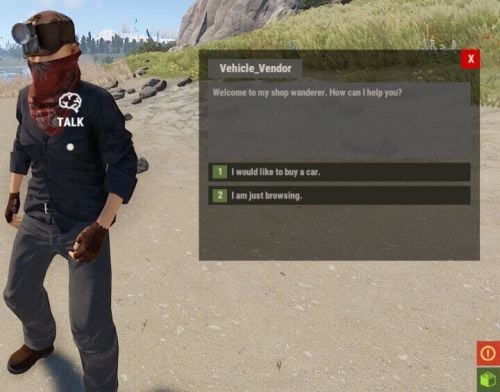 i bought that plugin on lone, but since my comment is stuck there in moderation for over 10 days... ill post my question here: Any chance that you add custom names for currency items? I want to use the same item id and skin with different names to start events via console commands. f.e. this one to start the Ferry Terminal Event should use yellowidtag with custom name "Ferry Terminal Pass” "Server Commands”: [ "ftstart $userID” ], "Price”: 1, "Currency”: { "Item ID”: 81423963, "Skin ID”: 0, "Custom Name": "Ferry Terminal Pass” } Players will find those items on my map during normal gameplay for several events. Some of them will use the same skin, because they mark events for the same difficulty category.
 -
Hi, made now a few tests on my server and realized that your plugin is modifying the base stack size of flashbangs. This is because of this line: empGrenade.info.stackable = 1; if you want to have that in your plugin, can you please make it configurable? Almost everyone is using stack plugins and i bet that there are more ppl that dont like this. Would be cool if i could disable that.
-
 Just bought this plugin and thinking about a way to integrated it into my PVE server setup without bricking stuff for my players. The idea behind that plugin is really nice and can add some utility and usefull powers for them. However, it would be cool if there is an option for nades that can disable functionality against players. F.e. Radiation Nade, DropNGo Nade, Sleeper Nade, Gravity Nade should only work with bots. For Bots the DropNGo Nade is quite to powerfull. Imagine using it on oilrig heavy npcs and all drop their M249 and miniguns. They will not pick them up anymore and players can just grab them. What would be cool, if you remove the weapons for a defined time (default: 5 seconds) from bots and then add them agian to their inventory. This would give them a chance to get back into the fight.
 -
Is it possible that you can add something to prevent other players from mining meteors from a direct shower? I use this on our server as ultimate skill from skill tree. A player that skilled into it has a 6% chance that meteors will drop. Sometimes i can see other players "stealing" the metors. Its not wanted that someone else can loot them. Any chance?
-
Can you add a configurable delay, before events spawn? If you are unlucky, the events can now spawn right in your face, what is not so nice for players. Best would be smth like that: 1. send a notification that an event will spawn at monument in X seconds 2. spawn the event after X seconds X is configurable and default can be 120. Players then have a chance to leave the event area.
-
 I really like how flexible this plugin is. Creating events for monuments is quite easy. You can even have different profiles for a monument to make it feel different each time. To make it the perfect plugin, It might need some additional features. 1. possibility to setup loot NPCs from NPC Spawn always use heavy scientist prefab. Therefore the loot can be quite too powerful. It would be awesome if we could change the prefab that is used when spawning in loot. Also adding additional items to the locked crates to improve rewards would be nice. 2. view spawn points for a monument profile Creating spawn points for NPCs is quite easy, but it could help to see all spawn points to figure out where you already placed one and where you might want to add others. Better NPCs has that kind of view where you see a circle box and the number of the spawn point. Something similar would be awesome. 3. option to add additional loot containers (barrels, military creates, normal crates, food boxes, etc) If we could set additional spawn points for additional crates could help to make loot more versatile. On an event profile with low level NPCs we could f.e. set up some additional barrels and maybe 2-3 military crates. On profiles with more heavy npcs we could add then additional elite crates, diesel barrels etc. So far i am very happy with what you can do. Adding the proposed changes would make this plugin a must have. 100% worth the money so far.
 -
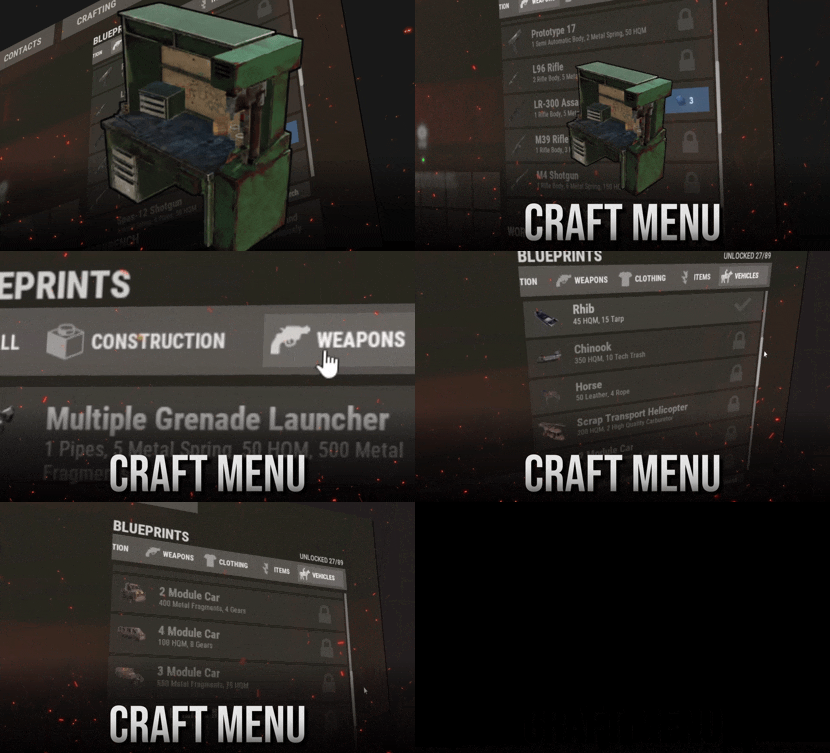 if you ask me. those hacky "solutions" are just producing more issues than needed. @David you should have gone with my proposal. Its easy, keeps the UX just on another prefab and is solid. There is no room for bugs etc. The name of this is CraftMenu. Its not stating that you HAVE to have it on the workbench.
 -
i will join discord now... sorry if i exposed a fix to someone who is not owning the plugin
-
TY, did not know that. So @Davidplease provide a useful fix for your plugin. Otherwise stop selling it, if its not working. Its a pain when such crucial plugin is bricked...
-
sorry, could have been more precise. if you search for the methods CreateBaseCui(BasePlayer player, int tier = 1) its the second line. I changed it for my server to CUIClass.CreatePanel(ref _baseCraftCui, "baseCraft_main", "Overlay", "0 0 0 0.2", $"{db[2]}.{db[1]} 0.{db[23]}", $"{db[10]}.{db[1]} 0.{db[10]}", false, 0.1f, 0f, "assets/content/ui/uibackgroundblur.mat", $"-588 250", $"-210 610"); " 0 0 0 0.2" is the background color of this panel. Together with the change of the asset to "assets/content/ui/uibackgroundblur.mat" its a bit easier to read the content. I also adjusted the size a bit. Instead of 620, i am using now 610 for anchorMax Y value. So its not overlapping with the Name of the player.
-
simply add it to repairbench and check if player has workbench level private void OnLootEntity(BasePlayer player, RepairBench bench) { if (!permission.UserHasPermission(player.UserIDString, "craftmenu.use")) return; if (!config.ct.craftQue) player.gameObject.GetOrAddComponent<CraftingQue>(); if (!playerBps.ContainsKey(player.userID)) { playerBps.Add(player.userID, new PlayerBps()); SavePlayerData(); } if (player.HasPlayerFlag(BasePlayer.PlayerFlags.Workbench1)) { CreateBaseCui(player, 1); ShowBps(player, 1, "all"); } if (player.HasPlayerFlag(BasePlayer.PlayerFlags.Workbench2)) { CreateBaseCui(player, 2); ShowBps(player, 2, "all"); } if (player.HasPlayerFlag(BasePlayer.PlayerFlags.Workbench3)) { CreateBaseCui(player, 3); ShowBps(player, 3, "all"); } } private void OnLootEntityEnd(BasePlayer player, RepairBench bench) { DestroyCui(player); } and move the panel above the player model anchormin: "-588 250" anchormax: "-210 620"
-
With the current version there are a few issues with RaidableBases plugin. 1. it is not possible to set a TC in raidbases with higher building grades 2. TCs in raidbases are effected by capacity -> TC loot is dropping on the floor. you can use following method to check if the current TC i inside a raidbase zone if (Convert.ToBoolean(RaidableBases?.CallHook("EventTerritory", cupboard.transform.position))) // do what ever should happen if its inside the raidbase zone i have added it for my current server already on all relevant places (create tc, upgrade building grades, ...), but would be awesome to have it supported by the plugin. So i dont have to change it everytime an update is popping in.
-
 ` "Enable Random Direct Falling Meteors On Mining Regular Ones": true,` set this to false.
 -
is it possible to have separate permissions for loading, reloading and unloading plugins. I really like that feature, but got mods on my server that should not unload or load plugin. However reloading could be somehow usefull if a plugin had issues. example: sometimes we got issues with GridPower to load generators on server startup. We need to reload that plugin sometimes to make it work correctly. This is something i want my mods being able to do.
-
1. mate added M249 for 1 scrap 2. i bought it 3. he cant claim and error is thrown (15:59:42) | Failed to call hook 'MarketClaimInventoryPageCommand' on plugin 'MarketplacePlus v1.1.2' (NullReferenceException: Object reference not set to an instance of an object) at Oxide.Plugins.MarketplacePlus+MarketController.UpdateItem (Item item, Oxide.Plugins.MarketplacePlus+MarketItem marketItem) [0x0009a] in <e7f74c794ef44d13ab376a1da324ba72>:0 at Oxide.Plugins.MarketplacePlus+MarketController.ClaimPage (BasePlayer player, System.Boolean confirmed) [0x004d2] in <e7f74c794ef44d13ab376a1da324ba72>:0 at Oxide.Plugins.MarketplacePlus.MarketClaimInventoryPageCommand (Oxide.Core.Libraries.Covalence.IPlayer iPlayer, System.String command, System.String[] args) [0x0004a] in <e7f74c794ef44d13ab376a1da324ba72>:0 at Oxide.Plugins.MarketplacePlus.DirectCallHook (System.String name, System.Object& ret, System.Object[] args) [0x00550] in <e7f74c794ef44d13ab376a1da324ba72>:0 at Oxide.Plugins.CSharpPlugin.InvokeMethod (Oxide.Core.Plugins.HookMethod method, System.Object[] args) [0x00079] in <cd9a02fd331347bd82d550bb1a9c8e9f>:0 at Oxide.Core.Plugins.CSPlugin.OnCallHook (System.String name, System.Object[] args) [0x000d8] in <b76ec77c47d1449e92b2baab8603843d>:0 at Oxide.Core.Plugins.Plugin.CallHook (System.String hook, System.Object[] args) [0x00060] in <b76ec77c47d1449e92b2baab8603843d>:0 (15:59:53) | [Marketplace Plus] Error: Slot data is null on item claim, please inform developer
-
 @Razor is it possible to make params from L2887 configurable? nextFireTime = Time.time + UnityEngine.Random.Range(5f, 10f); If i understand it correct, its the time between 2 Attacks of an npc with rockets or C4. Would be nice to have this configured by profiles.
 -
I have modified it for our server, so its working as i described for us. But i thought that this could be part of the plugin directly, so i dont have to fix it over and over again on updates. + others might use it too.
-
Hi, i was searching for a replacement of the SkillTree Ultimate for mining and decided to use this plugin. What i did: 1. added a new permission: onkillshower 2. added hook OnEntityDeath for sulfur, metal and stone nodes to trigger a direct shower - permission validated - chance roll applied 3. on success, i added a new cooldown. My goal is that there are direct showers at the player position when someone is farming ressources. Might be an option to add smth like that to the plugin directly?
-
 Looked it on our test server and looks quite promising. Polished UI and exactly what i am missing on my server. If i have suggestions for improvements, should i create also tickets in support request?

