
Yaki's Wishlist
-

$34.99
Shipwreck
This plugin will allow players to visit the depths of the ocean to discover 3 new locations included in this plugin: a Sunken Cargo Ship, Submerged Ore Farm, and a Shipwrecked Barge.
In the wreckage you will find a high concentration of loot. Just be careful! The COBALT group has already arrived and is exploring the site.
They have submarines and divers already in the water!
Patrol Submarines
Subs do a LOT of damage, but they have low visibility and low accuracy. Very unreliable at Titanic depths. Subs are a serious threat if you arrive in a submarine yourself. Try to sneak up behind them and destroy them, you don't want to be the one to sink, trust me!
Cobalt NPC Divers
High accuracy, but not much armor and don't pack a huge punch. Almost harmless if you arrive in a submarine, but they are still a threat! Keep your eyes on these guys, it might just be you or them!
Killer Sharks
These sharks have smelled all the blood in the water, after being drawn to the area already by all of the disturbance. They are here, they are mad, and they are bloodthirsty and hungry!
The plugin includes 3 locations:
Shipwrecked Cargo Ship
There are three rooms in the Sunken Cargo Ship location that are opened with a keycard. The map type can be selected within the configuration file.
Sunken Barge
A great place to find some Shipping Containers, as well as Killer Sharks! The Cobalt group has been busy in this area, they must have taken this Barge down recently as well.
Submerged Ore Farm
An ore rich location with multiple farmable ore nodes, as well as some other scattered loot including fuel barrels.
Chat commands (only for administrators)
/shipwreckstart – launches the event in a random configuration /shipwreckstart <shipwreckstart> – launches the event in the <eventPresetName> configuration /shipwreckstartmyloc – launches the event in a random configuration in your location /shipwreckstartmyloc<shipwreckstart> – launches the event in the <eventPresetName> configuration in your location /shipwreckstop – stops the event /screatepath– starts recording the route for the npc/shark/sub /ssavepath <npc/shark/subPresetName> – saves route for npcs/sharks/sub /scancelpath – cancels route recording Console commands (RCON only)
shipwreckstart – launches the event in a random configuration shipwreckstart <shipwreckstart> – launches the event in the <eventPresetName> configuration shipwreckstop – stops the event Config
plugin_en – example of plugin configuration in English location_en – example of location configuration in English plugin_ru – example of plugin configuration in Russian location_ru – example of location configuration in Russian Dependencies (optional, not required)
True PVE PveMode GUI Announcements Notify DiscordMessages AlphaLoot CustomLoot Economics Server Rewards IQEconomic Hooks
void OnShipwreckStart() void OnShipwreckStop()
My Discord: adem9554
Join the Mad Mappers Discord here!
Check out more of my work here!
-
$20.00
Admin Map
Admin Map is an innovative plugin for the game of Rust, designed to make server administration easier and improve the quality of the gaming experience. Focused on optimization and functionality, this plugin provides admins with the tools to effectively control players, minimizing the negative impact on the server and other participants.
Main features:
Interactive map with players: Admin Map provides server admins with a detailed and user-friendly map showing the positions of all players. This allows admins to easily monitor player activity and movements, and quickly detect suspicious activity. Large variety of different admin map layers:
- Marker,
- Text , (It's still there, but it no longer looks the same due to the Facepunch update on August 6.)
- Sleeper,
- TC,
- Stash,
- Sleeping Bag Quick Commands on Players: The plugin allows admins to perform quick actions on players directly from the map. Send messages, punish or help players in real time, minimizing reaction time and increasing interaction efficiency. Minimal server load: One of the key features of Admin Map is its low server load. All processing takes place solely on the client side, which means that the plugin will not slow down the server or create additional delays for players. This makes it an ideal choice even for servers with high traffic. Ease of use: The plugin's intuitive user interface provides admins with easy access to functionality. Navigating the map, sending commands and monitoring players is done with minimal effort, making server administration easy. Customization: Admin Map provides admins with the option to customize the functionality to suit their needs. Scanning area, available commands, buttons, permissions and other options. Support in RUST+: You will be able to view players online on the map directly in your phone without going to the server! Admin Map is an innovative solution that combines convenience, functionality and optimization. It provides administrators with tools to effectively manage players without negatively impacting gameplay and other server participants. The Admin Map plugin is an essential asset for any Rust server administrator looking to create a comfortable and safe gaming environment.
Permissions:
adminmap.allow - for use adminmap and hardcore bypass adminmap.<button perm> - any permissions specified in the button settings adminmap.teleport2marker - teleportation by marker via CTRL+RMB adminmap.invis - hide player from the player map adminmap.rust+ - enable rust+ admin map adminmap.rust+.invis - hide from rust+ admin map (recommended in case of giving the map to players)
Commands:
/amap - show sidebar /amap off - disable everything and hide the sidebar
Color designations on the cupboards map:
Default Config:
{ "Auto show sidebar panel": true, "Open the admin menu instead of the action menu": false, "Text Map Settings": { "Font size": 8.0, "Use color generation for teams?": true, "Color for team": "ffaf4d", "Color for solo player": "9bd92f", "Color for sleeper": "404040" }, "Command Buttons": [ { "Permission (adminmap.<perm>)": "", "Label": "TP", "Command": "teleport {steamid}", "Color": "1 1 1 1" }, { "Permission (adminmap.<perm>)": "", "Label": "TP2ME", "Command": "teleport {steamid} {admin.steamid}", "Color": "1 1 1 1" }, { "Permission (adminmap.<perm>)": "", "Label": "INV", "Command": "/viewinv {username}", "Color": "1 1 1 1" }, { "Permission (adminmap.<perm>)": "", "Label": "SPECTATE", "Command": "spectate {steamid}", "Color": "1 1 1 1" }, { "Permission (adminmap.<perm>)": "", "Label": "KILL", "Command": "kill {steamid}", "Color": "0.9 0.1 0.25 1" }, { "Permission (adminmap.<perm>)": "", "Label": "KICK", "Command": "kick {steamid}", "Color": "0.9 0.1 0.25 1" }, { "Permission (adminmap.<perm>)": "", "Label": "SHOW\nTEAMMATES", "Command": "adminmap.cmd show_player_teammates {steamid}", "Color": "1 1 1 1" }, { "Permission (adminmap.<perm>)": "", "Label": "SHOW\nPRIVLIDGES", "Command": "adminmap.cmd show_player_privlidges {steamid}", "Color": "1 1 1 1" }, { "Permission (adminmap.<perm>)": "", "Label": "SHOW\nSLEEPING\nBAGS", "Command": "adminmap.cmd show_player_sleepingbags {steamid}", "Color": "1 1 1 1" }, { "Permission (adminmap.<perm>)": "", "Label": "SHOW\nSTASHES", "Command": "adminmap.cmd show_player_stashes {steamid}", "Color": "1 1 1 1" } ] }
Button Library:
Give item to player for AdminMenu by k1lly0u | Minimum required version 1.0.1 { "Permission (adminmap.<perm>)": "", "Label": "GIVE", "Command": "adminmenu.callback {steamid}.4;adminmenu.callback {steamid}.4", "Color": "1 1 1 1" } Permanent ban
{ "Permission (adminmap.<perm>)": "", "Label": "BAN", "Command": "ban {steamid}", "Color": "1 0 0 1" } View backpack (for Backpack Pro)
{ "Permission (adminmap.<perm>)": "", "Label": "Backpack", "Command": "/b {steamid}", "Color": "1 1 1 1" } View backpack (for Backpacks plugin from uMod)
{ "Permission (adminmap.<perm>)": "", "Label": "Backpack", "Command": "viewbackpack {steamid}", "Color": "1 1 1 1" } Spectate
{ "Permission (adminmap.<perm>)": "", "Label": "SPECTATE", "Command": "spectate {steamid}", "Color": "1 1 1 1" }
If you want to add buttons here, message me on my discord server
-
$19.99
Highrise
By CollapsedOrange in Prefabs
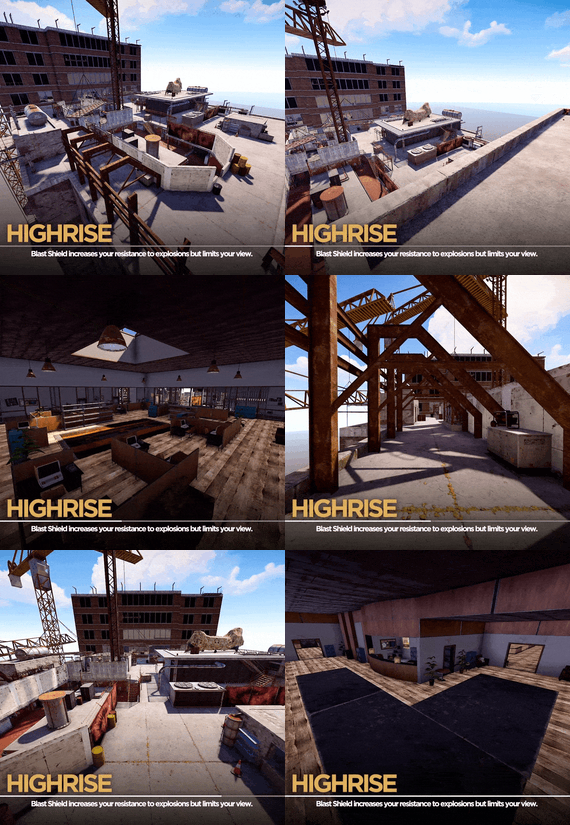
Call of Duty Highrise recreated from Modern Warfare 2
Highrise is set atop a nearly constructed skyscraper with two office buildings on opposite sides of the map. The center of the map is occupied
by an elevated helipad, which many players will try to use to their advantage. Most of the combat on the ground is short to medium range with the construction equipment and in the office buildings. Shotguns and submachine guns are excellent for these offices, but assault rifles are ideal for the sometimes medium-long range combat that occurs in the more open areas. The map is also suitable for sniping, with several vantage points that look over most of, or nearly all of, the map. Highrise is one of the fan-favourite maps of Modern Warfare 2.
Prefab Count – 5545
This is a larger map with plenty of hiding spots and sight lines, also includes all of the original jump points and roof access
-
.thumb.png.0237eb140e8258219b860680c97abe7d.png)
$10.00
RP Fake Deposit (Weed Farm)
It is a roleplay prefab, so don t expects any crates or barrels in it. However, you can add them yourself and transform it in monument.
I hope you guys will enjoy it and have fun with it much love ❤️
Follow for more RP stuff ❤️
Prefabs count: 1138
discord: Turcu'#6178
- #rp
- #buildings
- (and 3 more)
-

$11.99
RolePlaySalary
RolePlaySalary
The RolePlaySalary plugin is designed to enhance the role-playing experience on your Rust server. It allows administrators to set salaries for players based on their permissions and playtime. With seamless integration with the Economics and Notify plugins.
Key Features:
• Compatible CARBON
• Permission-based Salaries: Set different salaries for different permissions, allowing for in-game hierarchy and progression.
• Economics Integration: Directly deposit the salary into the player's bank account if you're using the Economics plugin.
• Notifications: Use the Notify plugin to inform players about their upcoming salary or any other salary-related message.
• Double Salaries: Option to double a player's salary with a special permission.
• ServerRewards : Direcly deposit the salary into the player account using ServerRewards plugin.
• Detailed Logs: Admins can track the salaries given to each player with detailed logs.
Commands :
• /salary : Players can check their current salary and the time remaining until their next payout.
• /giveallsalary : send all salary at all player and reset all timer. (Need permission 'roleplaysalary.admin"
Installation and Configuration: Installation is straightforward. Download the plugin, place it in your Oxide/plugins folder, and restart your server. The configuration file will be auto-generated, where you can set the salary details, permissions, and more.
Config File :
{ "NotifyMessageType": 0, "PermissionSalaries": { "roleplaysalary.salary1": { "Amount": 2500, "DisplayName": "Billet", "ItemShortname": "researchpaper", "SkinID": "3021805080" }, "roleplaysalary.salary2": { "Amount": 2500, "DisplayName": "Billet", "ItemShortname": "researchpaper", "SkinID": "3021805080" } }, "SalaryInterval": 1800.0, "UseEconomics": false, "UseNotify": true, "UseServerRewards": false }
Lang File : EN
{ "NextSalaryNotification": "Next salary in <color=#DAA436>{0}</Color> m and <color=#DAA436>{1}</Color> s.", "PermissionDenied": "You don't have permission to receive a salary.", "PlayerDataNotFound": "Error: Your player data cannot be found.", "SalaryReceivedBank": "You have received your salary in your bank account.", "SalaryReceivedItem": "You have received {0} {1}.", "NoSalaryInfo": "No salary info found for player {0} ({1}).", "SalaryInfo": "Your salary is {0} {1}. Next salary in {2}m and {3}s.", "ServerRewardsReceived": "You have received {0} ServerRewards points as your salary.", "ServerRewardsError": "There was an error giving you ServerRewards points." }
Lang File : FR
{ "NextSalaryNotification": "Prochain salaire dans <color=#DAA436>{0}</Color> m et <color=#DAA436>{1}</Color> s.", "PermissionDenied": "Vous n'avez pas la permission de recevoir un salaire.", "PlayerDataNotFound": "Erreur : vos données de joueur ne peuvent pas être trouvées.", "SalaryReceivedBank": "Vous avez reçu votre salaire de {0} dans votre compte en banque.", "SalaryReceivedItem": "Vous avez reçu {0} {1} comme salaire.", "NoSalaryInfo": "Aucune information de salaire trouvée pour le joueur {0} ({1}).", "SalaryInfo": "Votre salaire est de {0} {1}.\nProchain salaire dans {2}m et {3}s.", "ServerRewardsReceived": "Vous avez reçu {0} points ServerRewards en tant que salaire.", "ServerRewardsError": "Une erreur s'est produite lors de l'attribution des points ServerRewards." }
If you encounter any issues or have suggestions, feel free to reach out me