
Wajeeh Agbariya's Wishlist
-
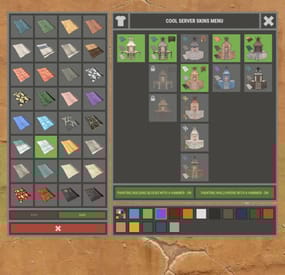
$18.99$15.19XBuildingSkinMenu
XBuildingSkinMenu - building block skins menu for your server.
- Optimization of the interface for different monitor resolutions.
- Storing player data in - oxide/data/XDataSystem/XBuildingSkinMenu
- There is a lang ru/en/uk/es.
- Sound effects when interacting with the menu.
- Possibility to allow only the owner of the cupboard to paint the building blocks of the house.
- Possibility to paint building blocks only when authorized in the cupboard.
- Possibility to paint building blocks with a hit of a hammer.
[ Each player can turn on/off in the main menu for convenience. ]
- Possibility to paint building blocks when upgraded.
- Possibility to use effects when painting.
- Possibility to paint each house separately.
[ You can paint an unlimited number of houses at the same time. ]
- Plugin support - BGrade and IQGradeRemove.
- Chat messages about the started/completed of painting the house.
[ The number of painted building blocks. ]
- Chat messages about the started/completed of painting items/constructions inside the house.
[ The number of painted items/constructions. ]
- Chat messages: the house is already being painted - items/constructions in the house are already being painted.
- To paint the containers, the color chosen by the player through the Spray can is used.
- UI button for easy transition from the XBuildingSkinMenu menu to the XSkinMenu menu. [ And vice versa. ]
- Possibility to choose color in UI.
- Automatic replenishment of the configuration with new skins of building blocks.
- Permissions for each skin.
- Automatically reset selected skins from a player, if revoke away their permission.
Permissions
xbuildingskinmenu.use - access to plugin functionality. [ Skins menu, hammer, building. ] xbuildingskinmenu.painting - access to paint the entire house through the cupboard. xbuildingskinmenu.simpleblock - access to paint high Walls/Gates. [ Hammer hit only. ] xbuildingskinmenu.entity - access to painting items/constructions inside the house. [ Requires XSkinMenu plugin version 1.1.14 and above. ] xbuildingskinmenu.default - default permission for skins. Commands
/bskin - open the building block skins menu. API
ulong GetBuildingSkin(BasePlayer player, string grade) - returns the skin of the building block selected by the player. ulong GetBuildingSkin(BasePlayer player, BuildingGrade.Enum grade) - returns the skin of the building block selected by the player. ulong GetBuildingSkin(BasePlayer player, BuildingBlock block) - returns the skin of the building block selected by the player. Config
{ "General setting": { "Automatically add actual skins of building blocks to the configuration": true, "Only the owner of the cupboard can start painting the house": false, "Use effects when painting home": true, "Use effects when painting items/constructions in the house": true, "Use effects when painting building blocks by hitting a hammer": false, "Enable painting of items/constructions in the house using player skins from the XSkinMenu plugin": false, "Skins for buildings": { "Wood": { "0": { "ImageURL": "", "Permission": "" } }, "Stone": { "0": { "ImageURL": "", "Permission": "" }, "10220": { "ImageURL": "", "Permission": "xbuildingskinmenu.default" }, "10223": { "ImageURL": "", "Permission": "xbuildingskinmenu.default" }, "10225": { "ImageURL": "", "Permission": "xbuildingskinmenu.default" } }, "Metal": { "0": { "ImageURL": "", "Permission": "" }, "10221": { "ImageURL": "", "Permission": "xbuildingskinmenu.default" } }, "TopTier": { "0": { "ImageURL": "", "Permission": "" } } }, "Default skins for new players": { "Wood": 0, "Stone": 0, "Metal": 0, "TopTier": 0 } }, "GUI setting": { "Close the menu by tapping on an empty area of the screen": false, "Material_background_0": "assets/icons/greyout.mat", "Color_background_0": "0 0 0 0", "Color_background_1": "0.517 0.521 0.509 0.95", "Color_background_2": "0.217 0.221 0.209 0.95", "Skin background color": "0.517 0.521 0.509 0.5", "Background color of the selected skin": "0.53 0.77 0.35 0.8", "Close button (icon) color": "1 1 1 0.75", "Color of buttons in cupboard": "0.35 0.45 0.25 1", "Button text color in cupboard": "0.75 0.95 0.41 1", "Hammer button color - On": "0.35 0.45 0.25 1", "Hammer button text color - On": "0.75 0.95 0.41 1", "Hammer button color - Off": "0.65 0.29 0.24 1", "Hammer button text color - Off": "0.92 0.79 0.76 1", "AnchorMin - button 1": "0.5 0", "AnchorMax - button 1": "0.5 0", "OffsetMin - button 1": "395 621.5", "OffsetMax - button 1": "572.5 641.5", "AnchorMin - button 2": "0.5 0", "AnchorMax - button 2": "0.5 0", "OffsetMin - button 2": "395 646.5", "OffsetMax - button 2": "572.5 666.5" } } -
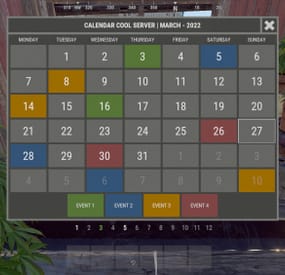
$11.99$9.59XWipeCalendar
XWipeCalendar - beautiful calendar for your server.
- Optimization of the interface for different monitor resolutions.
- There is a lang ru/en/uk/es.
- Automatic calendar generation.
- Display for one day several events.
- Possibility to create N events.
- Possibility to set the calendar for the whole year.
- Ability to view customized months.
Permissions
xwipecalendar.use - permission to view the calendar. Commands
/wipe, /calendar - open calendar. Config
{ "General settings": { "Close the calendar by tapping anywhere on the screen": false, "Timezone - UTC+0:00": 0, "Use local computer/hosting time. [ Requests to an external time service and time zone will be disabled ]": true }, "Settings GUI": { "Background color_1": "0.517 0.521 0.509 0.95", "Background color_2": "0.217 0.221 0.209 0.95", "The color of the numbers of the current month": "1 1 1 0.75", "The color of the numbers of the next month": "1 1 1 0.1", "Block color": "0.417 0.421 0.409 0.95" }, "List of events. Description of events - oxide/lang/(ru/en/uk/es)": { "1": [ ... ], "2": [ ... ] }, "Time": "2024-00-00T00:00:00.00" } -
.thumb.png.3bab5c828e195fc20d9791ab794a009a.png)
$19.99
Auto Wipe
Auto Wipe - This plugin allows to schedule regular wipes, including map, blueprint, and data resets. It offers customizable settings for wipe intervals and automated backups to prevent data loss. This plugin will simplify the maintenance process and reduce administrative workload.
What this plugin can do?
Create specific wipe schedules for daily, weekly and monthly basis. Wipe oxide(config/data/logs/plugins)/map files. Create backups of data/map files. Send discord wipe message using tool: https://discohook.org/ Do files replacements during wipe. (In case if you want to load new config files for new map) Set own startup ConVars such as 'server.seed', 'server.levelurl'. No additional scripts or harmony mods required, everything plugin based.
How it works?
When the wipe preset schedule is enabled and matched, the plugin sends a restart command. During server startup, it deletes all configured files before they are loaded by other plugins or the server itself and executes all commands from the preset. It is recommended to have software or a batch file that will automatically start the server after shutdown because the "restart" command only shuts down the server without restarting it.
What is cron expression and how do I use it?
A cron expression is a string of characters used to schedule tasks to run at specific times or intervals. It is widely used in Unix-based systems for automating repetitive tasks such as backups, updates, and maintenance.
Structure of a Cron Expression
Allowed values Allowed special characters Comment ┌───────────── second (optional) 0-59 * , - / │ ┌───────────── minute 0-59 * , - / │ │ ┌───────────── hour 0-23 * , - / │ │ │ ┌───────────── day of month 1-31 * , - / L W ? │ │ │ │ ┌───────────── month 1-12 or JAN-DEC * , - / │ │ │ │ │ ┌───────────── day of week 0-6 or SUN-SAT * , - / # L ? Both 0 and 7 means SUN │ │ │ │ │ │ * * * * * * Special characters which are supported by plugin now
* (all): Specifies that the event should happen for every time unit. For example, * in the minute field means "every minute." - (range): Specifies a range of values. For example, 10-12 in the hour field means "10th, 11th, and 12th hours." , (values): Specifies multiple values. For example, 10,12 in the hour field means "10th and 12th hours." / (increments): Specifies incremental values. For example, 5/15 in the minute field means "5, 20, 35, and 50 minutes of an hour." Examples of Cron Expressions
0 12 * * * -> At 12:00 p.m. (noon) every day: 0/15 * * * * -> Every 15 minutes every day 0/5 13,18 * * * -> Every five minutes starting at 1 p.m. and ending at 1:55 p.m., and then starting at 6 p.m. and ending at 6:55 p.m., every day 30 9 * * 1-5 -> At 9:30 a.m. every Monday to Friday 0 0 L * * -> At 00:00 AM on the last day of the month 0 0 L-1 * * -> At 00:00 AM the day before the last day of the month 0 0 3W * * -> At 00:00 AM, on the 3rd weekday of every month 0 0 LW * * -> At 00:00 AM, on the last weekday of the month 0 0 * * 2L -> At 00:00 AM on the last tuesday of the month 0 0 * * 6#3 -> At 00:00 AM on the third Saturday of the month 0 0 ? 1 MON#1 -> At 00:00 AM on the first Monday of the January Detailed definition can be found here: Cronos
You can try to use this generator.
If you need help with setting up your own wipe schedule don't hesitate to ask for support! You can use plugin support section or DM me in Discord: metangerine.
CONFIGURATION
COMMANDS
autowipe.run <preset name> - runs auto wipe preset
CONTACTS
Need help or custom plugin for your server?
Contact me using Discord: metangerine
----------------------------------------------------------------------
-

$29.99
Caravan
This plugin will add Caravans to your server that will attempt to transport valuable loot along the roads. Carriages are used to transport goods along the roads as configured, pulled by Horses. These convoys are accompanied by NPCs, Riders, and Balloons! By default, the plugin comes with 3 different caravan presets.
The easiest caravan will be fun for early wipe and allows some basic loot for low effort Caravan raids. In order to rob the most difficult caravan, players will need to be tactical about their ambush and it will be much more challenging! The road selection system can make the Caravan less predictable as the NPCs try to find a safe route.
The Caravan can traverse any road type, including good old country dirty roads. You can set up timers for each preset in the config file, to keep the more difficult Caravan from showing up until later in a wipe!
Riders
These can be very dangerous opponents! Unlike regular NPCs, they will quickly close the gap continually shooting at the players as they ride! Riders can be especially effective using short ranged weapons, they are deadly with a shotgun!
Balloons
These are mobile sniper towers on which several NPCs can be placed. In the config, armor can be added to the balloon, greatly increasing the protection for the Caravan snipers.When the caravan stops, Balloons will start moving around randomly, making it more difficult for players to hide! After defeating all of the snipers, Balloons will fall to the ground and explode.
Required Dependency (must install this free plugin)
NpcSpawn – link is included and can be found in the ReadMe file included with download
Chat commands (admin only)
/caravanstart - launches the event using a random preset based on your configuration /caravanstart PresetName - add the name of a preset from the configuration to launch a specific preset /caravanstop - stops the event /caravanroadblock - the event will not be held on the road where you are standing (clear the Blocked roads section of config when you change maps) /caravanpathstart - stand at starting point and enter command to start recording a custom route /caravanpathsave RoutePresetName - to save a custom route (enter anything you'd like in place of RoutePresetName) /caravanpathcancel - to reset the route
Console commands (RCON only)
caravanstart - launches the event using a random preset based on your configuration caravanstart PresetName - add the name of a preset from the configuration to launch a specific preset caravanstop - stops the event
Plugin Config
en – example of plugin configuration in English ru – example of plugin configuration in Russian
Hooks
void OnCaravanStart() - Сalled when a caravan appears void OnCaravanStop() - Сalled when a caravan disappears void OnCaravanStartMoving(Vector3 position) - Called when the caravan starts moving void OnCaravanStopMoving(Vector3 position) - Called when the caravan stops moving void OnCaravanEventWin(ulong userId)
Check out the rest of my work: Adem's Codefling Library
You can reach out to me in Discord: Adem's Discord Profile
Thanks to Jbird for writing, translation, & support: Jbird's Discord Profile
Join the Mad Mappers Discord!
-

$19.99
Zombie Infection
By imthenewguy in Plugins
Zombie Infection is an arena style plugin that creates an arena high in the sky.
It pits 2 teams against each other: Survivors and Zombies.
All players spawn as Survivors when the game begins. The survivors must find weapons and ammunition to defend themselves from the oncoming Horde.
After 45 seconds (configurable), a random player is selected to become the leader of the Zombies, otherwise known as Zombie Prime. They are re-equipped and are allocated a large amount of health
When a zombie hits a survivor with a melee weapon, that player is infected and is re-spawned as a zombie.
Regular zombies do not have as much health as Zombie Prime, but they will re-spawn an infinite amount of times when killed.
The survivors win by surviving for the entire round (default 10 minutes), or by eliminating Zombie Prime.
The Zombies win by infecting all of the survivors.
It is worth mentioning that only Zombie Prime is rewarded for the zombie team win.
Regular zombies are instead rewarded based on the number of survivors they infect.
Each prize type can be changed via the config.
zistart <arena name> - Manually starts the Zombie Infection game [requires zombieinfection.admin] ziend - Manually ends the game [requires zombieinfection.admin] zisetcentrepoint - Changes the spawn location of the arena [requires zombieinfection.admin] ziwipeoldarena - Manually wipes old arena data [requires zombieinfection.admin] zijoin - Joins an active lobby zileave - Leaves the game and returns the player to their last location with all of their equipment ziprize - Redeems outstanding prizes to the players inventory