
The Real Butter's Wishlist
-
$19.99
Door Frames
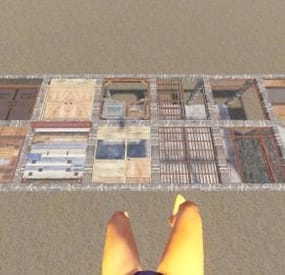
Are you tired of the strict limitations on floor frames, where only ladder hatches are allowed? DoorFrames is here to change that! This plugin introduces the ability to place Wooden Double Doors, Metal Double Doors, Armored Double Doors, and Garage Doors on floor frames, giving players more creative freedom and practical utility in their base designs.
🌟 What Does DoorFrames Do?
By default, Rust restricts floor frames to only accept ladder hatches, limiting design possibilities. DoorFrames overrides this behavior, allowing players to place multiple door types on floor frames, seamlessly integrating them into existing structures.
🔧 Key Features
🚪 Support for All Double Door Types
Players can place the following doors on floor frames:
Wooden Double Doors
Metal Double Doors
Armored Double Doors
Garage Doors
🔒 Permission-Based Access
Control which players can place specific door types using permission system:
doorframes.all: Allows placement of all supported door types.
doorframes.wood: Allows placement of Wooden Double Doors.
doorframes.metal: Allows placement of Metal Double Doors.
doorframes.armored: Allows placement of Armored Double Doors.
doorframes.garage: Allows placement of Garage Doors.
⏲️ Cooldown System for Performance
To ensure smooth server performance, the plugin includes a 0.5-second cooldown for each frame. Additionally, a 100-frame limit is enforced to prevent excessive memory usage. The oldest cooldowns are purged as needed, ensuring stability during heavy server activity. (Those can be changed in the code for optimization.)
🔌 Custom Hook Integration
The FFDoorPlaced hook is triggered every time a door is successfully placed, enabling advanced customization for server developers.
🎮 How It Works
For Developers
Customization via Hook:
The FFDoorPlaced hook allows you to add functionality such as logging, rewards, or additional restrictions. It provides the following parameters:
BasePlayer player: The player placing the door.
Door door: The door entity being placed.
string doorType: The type of door being placed (e.g., door.double.hinged.metal).
For Players
Select a Door: Equip one of the supported doors in your hotbar.
Aim at a Floor Frame: Point at a valid floor frame within a 5-meter range.
Place with a Click: If permissions are granted, the door will automatically align to the frame.
Players who lack the required permission will receive a message in chat, preventing placement.
⚠️ Important Considerations
Performance First: The cooldown system and frame limit ensure no unnecessary server lag or memory usage.
Backup Recommended: Always back up your server before installing new plugins or making major changes.
For Developers:
using Oxide.Core; using UnityEngine; namespace Oxide.Plugins { [Info("FFDoorLogger", "Hakan", "1.0.0")] public class FFDoorLogger : RustPlugin { void FFDoorPlaced(BasePlayer player, Door door, string doorType) { Puts($"{player.displayName} placed a {doorType} on a floor frame."); } } }
Functionality The FFDoorPlaced method is a hook that gets called whenever a door is placed using the DoorFrames plugin. When triggered, it:
Takes three parameters:
player: The BasePlayer who placed the door
door: The Door entity that was placed
doorType: The type of door placed (e.g., wooden, metal)
- #floorstack
- #floorframe
- (and 13 more)
-
$5.00
Shipping Containers
By RIPJAWBONES in Plugins
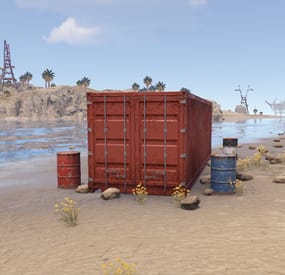
Spawns shipping containers on the beaches around the map with loot crates inside them and barrels around them. Beaches on Rust are currently pretty bare and now with this plugin players can farm the coast and get some worthy loot, this will also help solo players or small teams on high pop servers farm more.
If you cannot afford to pay for this plugin wishlist it and send me a message asking for it and I will give it to you for free.
Configuration:
{ "Max Amount Of Containers": 30, "Space Between Containers": 165.0, "Respawn Timer (Seconds)": 480.0, "Max Respawn Attempts (-1 for infinite)": 3, "Force Loot Respawn After Last Attempt": false, "Prevent Loot Respawn If Player Nearby": true, "Prevent Building Near Containers": true, "Prevent Building Radius": 25.0, "Disable Radiation": true, "Save Locations": true, "Crates and Barrels": [ { "Prefab Paths": [ "assets/bundled/prefabs/radtown/crate_normal.prefab" ], "Spawn Chance (%)": 100, "Position": { "x": -3.8, "y": 0.25, "z": 0.3 }, "Rotation": { "x": 0.0, "y": 90.0, "z": 0.0 } }, { "Prefab Paths": [ "assets/bundled/prefabs/radtown/crate_normal_2.prefab", "assets/bundled/prefabs/radtown/crate_normal_2_food.prefab", "assets/bundled/prefabs/radtown/crate_normal_2_medical.prefab" ], "Spawn Chance (%)": 50, "Position": { "x": 3.8, "y": 0.25, "z": 0.3 }, "Rotation": { "x": 0.0, "y": 90.0, "z": 0.0 } }, { "Prefab Paths": [ "assets/bundled/prefabs/radtown/oil_barrel.prefab" ], "Spawn Chance (%)": 50, "Position": { "x": -3.8, "y": 0.0, "z": 2.5 }, "Rotation": { "x": 0.0, "y": 0.0, "z": 0.0 } }, { "Prefab Paths": [ "assets/bundled/prefabs/radtown/loot_barrel_1.prefab" ], "Spawn Chance (%)": 50, "Position": { "x": -3.8, "y": 0.0, "z": -2.5 }, "Rotation": { "x": 0.0, "y": 0.0, "z": 0.0 } }, { "Prefab Paths": [ "assets/bundled/prefabs/radtown/loot_barrel_2.prefab" ], "Spawn Chance (%)": 50, "Position": { "x": 3.8, "y": 0.0, "z": 2.5 }, "Rotation": { "x": 0.0, "y": 0.0, "z": 0.0 } }, { "Prefab Paths": [ "assets/bundled/prefabs/static/hobobarrel_static.prefab" ], "Spawn Chance (%)": 100, "Position": { "x": 3.8, "y": 0.0, "z": -2.5 }, "Rotation": { "x": 0.0, "y": 0.0, "z": 0.0 } } ] }
-
.thumb.gif.fd4f63b3cef239560c00f8feab94f845.gif)
$39.90
Frontier - American Old West
It’s time for the wild west. This time I will send you far into the past to the real wild west, where everything was solved with the help of weapons and horses were the main means of transportation. This map will completely immerse you in the atmosphere of those times, it is very different from other maps, since there are no Facepunch monuments here, it consists entirely of custom monuments. So this is a closed type of map, that is, there is no ocean here, the game area is located in the grand canyon and you will not get to the surface. This map is a kind of experiment and my long-standing idea is to implement it. Also on the map you will find several familiar monuments made in the style of the wild West. And where is it without a railway, it stretches all over the map and has several branches. Custom garbage cans for loot extraction are located near the roads. Also, there are custom NPCs – traders, and horse traders-near the roads and on the monuments. Recyclers are made in the style of those times. Good luck in surviving in the wild west!
Featured:
The full atmosphere of the Wild West is transmitted (My personal opinion) Map Size – 4000 (Game space 3200-3400) Prefab Count – 98к Very stable FPS despite the number of prefabs Attention:
Please read the full description of the map There is a required plugin included with the download Be sure to add the vending profiles to the editor if you plan to edit the map This map is constantly supported and updated for the current version of the game with all updates! The map’s performance has been tested on a Windows system, problems may arise with the Linux system. Join the Mad Mapper Discord and you can create a ticket to request a preview of the map To expedite the process share your Steam ID when you make the request so that you can be whitelisted You will be granted admin privileges on the server and be able to take a look at the map freely
Custom monuments:
Husky Farm Coal Mining Kennekott (Mini City) George Town (City) Outpost (Safezone City) Train Yard (Large Monument) Oil Wells (Large Monument) Special Purpose Prison (City, Prison) JunkYard (Medium Monument) Rebel Checkpoint (Medium Monument) Thorhill (MiniCity) Coal Mining Plant Ghost Town (City Zombi) Big Joe HomeStead (Manor) Reservation (Indian settlement) Governors Ranch Mansion Warehouse Old Supermarket Station (Several types) Railways Repair Fishing Village A lot of custom garbage cans near roads and ruins with loot Monuments FP:
Cave Quarry Plugins in the archive:
The map comes with 1 plugins (developed by KpucTaJI), which must be installed on the server.
– WildWestCore-this plugin removes the modern from the map, and also interacts with other plugins to fully convey the atmosphere of the Wild West (pictures, etc.).
-
$39.99
Convoy
Set your server apart with a roaming mobile event that has nearly endless configuration options! Configure the loot truck as well as the Convoy of protection vehicles ranging from sedans, module cars, Bradley tanks, motorbikes, vendor trucks, to a patrol helicopter! The plugin runs on custom and procedural generated maps, can use custom routes or let the plugin find a random route based on your configuration.
You can make yours an aggressive or a peaceful Convoy, who shoots first? You can set all kinds of parameters regarding the many pieces of the event, how to beat it, whether destroying the loot truck destroys the loot or not for example. There are many compatible plugins like TruePVE, GUIAnnouncements, Notify, DiscordMessages, and RustCord to name a few. The plugin has a built in UI that will give you important information about the event as you are inside it's zone. Check the map to see the location of the event as a marker and even see the timer on the event! All of the ground vehicles are driven and filled with NPCs. Every vehicle, the NPCs, and the loot as well as all timers can be configured to suit your server. A PvP zone can be created within the event area for those of you who use TruePVE to control damage on your servers. The limits are nearly endless!
If you have some players on your server that you want to really send everything you have at, this is the plugin for you. Watch players crap their pants when they first encounter a full Convoy with multiple tanks and a Patrol Heli all attacking at once. Sit back and delight in their fear as all of the vehicles empty their occupants and NPCs swarm them mercilessly!
Required Dependency (must install this free plugin)
NpcSpawn – link is included and can be found in the ReadMe file included with download
Chat commands (admin only)
/convoystart - launches the event using a random preset based on your configuration /convoystart PresetName - add the name of a preset from the configuration to launch a specific preset /convoystop - stops the event /convoyroadblock - the event will not be held on the road where you are standing (clear the Blocked roads section of config when you change maps) /convoypathstart - stand at starting point and enter command to start recording a custom route /convoypathsave RoutePresetName - to save a custom route (enter anything you'd like in place of RoutePresetName) multiple routes can be added to one route preset, one will be selected at random in this case /convoypathcancel - to reset the route
Console commands (RCON only)
convoystart - launches the event using a random preset based on your configuration convoystart PresetName - add the name of a preset from the configuration to launch a specific preset convoystop - stops the event
Plugin Config
en – example of plugin configuration in English ru – example of plugin configuration in Russian
API
bool IsConvoyVehicle(BaseEntity entity) bool IsConvoyCrate(BaseEntity crate) bool IsConvoyHeli(BaseHelicopter baseHelicopter) bool IsConvoyNpc(ScientistNPC scientistNPC) Hooks
void OnConvoyStart() - яalled when a convoy appears void OnConvoyStop() - яalled when a convoy disappears void OnPlayerEnterConvoy(BasePlayer player) - яalled when a player enters the event area void OnPlayerExitConvoy(BasePlayer player) - яalled when the player leaves the event area void OnConvoyEventWin(ulong userId) - called at the end of the event and informs about its winner void OnConvoyStartMoving(Vector3 convoyPosition) void OnConvoyStopMoving(Vector3 convoyPosition) void OnConvoyAttacked(BasePlayer player, Vector3 convoyPosition)
Check out the rest of my work: Adem's Codefling Library
You can reach out to me in Discord: Adem's Discord Profile
Thanks to Jbird for writing, translation, & support: Jbird's Discord Profile
Join the Mad Mappers Discord!
-

$6.00
Admin Anon
Enables administrators to perform administrative actions anonymously, hiding their identity in chat and in-game, replacing their nickname with a configurable role name (e.g. ADMIN, MOD).
Now supports multiple roles with custom permissions, BetterChat group integration, and advanced control over who can use and toggle anonymity.
Commands
/aa - Admin Anon Enable
/aa - Admin Anon Disable
Permissions
adminanon.use – Allows using Admin Anon Custom permissions per role (configurable)
Optional permission to control who can toggle anonymity
Permission Recommendation: We recommend assigning permissions directly to users rather than groups for better control.
BetterChat Integration / Change Color
This plugin integrates directly with BetterChat. Username color and formatting are controlled by the assigned BetterChat group.
Steps:
Open BetterChat configuration (BetterChat.json)
Edit the desired group (e.g. admin, mod)
Change username color or formatting
Save and reload BetterChat & AdminAnon
Change avatar admin ?
Changing the avatar is not necessary.
This plugin is designed to hide identity, not impersonate other players.
Configuration
{ "Stay Anonymous After Reconnecting": false, "Properties": [ { "Name": "ADMIN", "Better Chat Group": "admin", "Required Permission": "adminanon.use", "Required Permission to toggle on/off": "toggle", "Stay Anonymous After Reconnecting": false }, { "Name": "MOD", "Better Chat Group": "mod", "Required Permission": "mod.use", "Required Permission to toggle on/off": "toggle", "Stay Anonymous After Reconnecting": false } ] }
Data (example)
{ "PlayerData": { "76561198196941415": { "Groups": [ "default", "steam", "admin" ], "Name": "MOD", "Better Chat Group": "mod", "Required Permission": "adminanon.use", "Required Permission to toggle on/off": "toggle", "Stay Anonymous After Reconnecting": false } } }
Language (EN)
{ "No Permission": "<size=12>You don't have permission to use this command</size>", "No Profile Permission": "<size=12>You don't have permission to use this profile</size>", "Admin Anon Enabled": "<size=12>Admin Anon has been <color=#00fa9a>ENABLED</color></size>", "Admin Anon Disabled": "<size=12>Admin Anon has been <color=#00fa9a>DISABLED</color></size>", "Admin Anon Changed": "<size=12>Fake identity has changed to <color=#00fa9a>{0}</color></size>", "Requested Fake Identify Not Found": "<size=12>Requested fake identity is not found</size>", "No Fake Identities Available": "<size=12>No fake identities available</size></size>", "Fake Identify Not Found": "<size=12>Fake identity is not found</size>", "Data Corrupted Up": "<size=12>Data is corrupt</size>", "Cannot Toggle Off": "<size=12>You cannot disable Admin Anon with your current role (missing toggle permission).</size>" }
- #admin
- #administrator
- (and 33 more)