
SLATE's Wishlist
-

$9.99$7.99Mining Event
Adds an exciting event for players to your server. Once the event starts, players will be able to get more loot by mining ore and finding small stashes with loot underneath it. The event has an interface with a table. The event is easily configured and can be triggered automatically or by command. You can reward the winners with special prizes, for example, an item with a unique name and skin (only for items with stacks of size 1).
Commands (admin only):
/mie_start - starts an event
/mie_stop - starts an event
/mie_forcestart - force the event to start
Config:
{ "Autostart event(disable if you want to trigger the event only manually)": true, "Minimum time to event start(in seconds)": 900, "Maximum time to event start(in seconds)": 10800, "Minimum event duration(in seconds)": 300, "Maximum event duration(in seconds)": 900, "Minimum number of online players to trigger an event": 1, "Pre-event message": "Mining event will start in a minute", "Pre-event message time(in seconds)": 60, "Event message": "Mining event has started, go and get all the ore!", "End event message": "Mining event ended", "Display a table with player names": true, "Resource multiplier during the event": 2.0, "Spawn a small stash under the ore": true, "Small stash items list": [ { "prefabName": "scrap", "dropChance": 100, "min": 4, "max": 8, "skinID": 0, "displayName": "" }, { "prefabName": "metal.fragments", "dropChance": 100, "min": 100, "max": 200, "skinID": 0, "displayName": "" } ], "Small stash removal time(in seconds)": 60, "First place prize(items list)": [ { "prefabName": "scrap", "dropChance": 100, "min": 200, "max": 400, "skinID": 0, "displayName": "" }, { "prefabName": "metal.fragments", "dropChance": 100, "min": 1000, "max": 2000, "skinID": 0, "displayName": "" }, { "prefabName": "rifle.ak", "dropChance": 10, "min": 1, "max": 1, "skinID": 809190373, "displayName": "AK" } ], "Second place prize(items list)": [ { "prefabName": "scrap", "dropChance": 100, "min": 100, "max": 200, "skinID": 0, "displayName": "" }, { "prefabName": "metal.fragments", "dropChance": 100, "min": 500, "max": 1000, "skinID": 0, "displayName": "" } ], "Third place prize(items list)": [ { "prefabName": "scrap", "dropChance": 100, "min": 50, "max": 100, "skinID": 0, "displayName": "" }, { "prefabName": "metal.fragments", "dropChance": 100, "min": 250, "max": 500, "skinID": 0, "displayName": "" } ] }
-
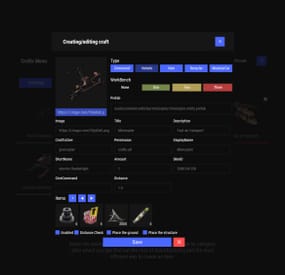
$19.95$11.95Crafts
Crafting system that allows you to create items, cars, vehicles, recyclers, etc!
Commands
craft open interface crafts.setwb [categories: cat1 cat2 ...] set new custom workbench
Permissions
You can set permission in config, for example:
"Permission (ex: crafts.use)": "crafts.use", crafts.setworkbench - allows you to use the "crafts.setwb" command (set custom workbenches)
Craft Types
Command Vehicle Item Recycler ModularCar
How to install a custom workbench
1. Spawn the workbench (for example, in RustEdit or a plugin) 2. In the game, go to him and use the command "crafts.setwb" and specify the necessary categories. Example: /crafts.setwb Misc 3. Go to config (oxide/config/Crafts.json) and configure this workbench (use SafeZone, workbench level, etc.)
VIDEO
FAQ
Q: Where can I see an example of a config?
A: Config
-
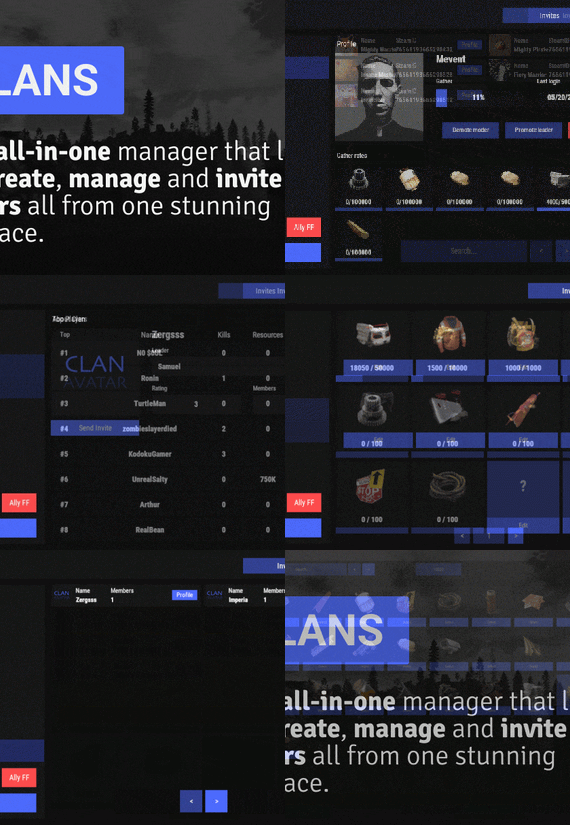
$45.95$31.95Clans
Clans is an all-in-one manager that lets you create, manage and invite players all from one stunning interface. Toggle friendly fire, view clan, and player leaderboards, create and break alliances, modify gather rates for clan members and set clan skins to identify clan members abroad easily.
Features
Beautiful user interface Performance Allied clans Gather rate for players (allows you to set how much each clan member must collect resources. For example: each member of the clan must collect 10 thousand sulfur, so that later it can be used to craft explosives and attack another clan) Clan skins (allows you to set common skins for all clan players. All the clothes on the players of the same clan will be the same, which allows you to distinguish your own from the enemies during the battle) The clan TAG min- and max-length can be defined in the config The clan overview shows offline member names Clan members can toggle friendly-fire protection for clan mates and allies Clan creation can check TAG’s against a blocked word list Clan tagging can be optionally disabled Old (not updated since x days) clans can be automatically purged Clans rating Players rating Setting a personal avatar for your clan Autowipe with wipe (optional)
Commands
clans (display clan menu) clans help (get information about commands) clan create (create a clan) clan leave (leave from your clan) clan join (open UI with invitations) clan ff (toggle friendlyfire status) clan allyff (toggle friendlyfire status for allies) clan invite <name/steamid> (invite a player) clan withdraw <name/steamid> (cancel an invite) clan kick <name/steamid> (kick a member) clan allyinvite <clanTag> (invite a clan to ally) clan allywithdraw <clanTag> (cancel the offer of an alliance) clan allyaccept <clanTag> (accept the offer of an alliance) clan allycancel <clanTag> (cancen the offer of an alliance) clan promote <name/steamid> (promote a member) clan demote <name/steamid> (demote a member) clan disband (disband your clan) clans.loadavatars (download avatars of all players) clans.manage list - lists all clans, their owners and their member-count clans.manage listex - lists all clans, their owners/members and their on-line status clans.manage show [name/userId] - lists the chosen clan (or clan by user) and the members with status clans.manage msg [clanTag] [message] - sends a clan message clans.manage create [name/userId] [clanTag] - creates a clan clans.manage rename [oldTag] [newTag] - renames a clan clans.manage disband [clanTag] - disbands a clan clans.manage invite [clanTag] [name/userId] - sends clan invitation to a player clans.manage join [clanTag] [name/userId] - joins a player into a clan clans.manage kick [clanTag] [name/userId] - kicks a member from a clan clans.manage owner [clanTag] [name/userId] - sets a new owner clans.manage promote [clanTag] [name/userId] - promotes a member clans.manage demote [clanTag] [name/userId] - demotes a member clans.reborn.convert (convert data from Clans Reborn plugin) clans.umod.convert (convert data from uMod Clans (v0.2.2+) plugin) clans.convert.olddata (convert data from old data) clans.convert.old.stats – used to update player data when upgrading from older versions of the game to 1.1.31 and above.
Permissions
clans.cancreate (permission to create a clan) clans.canjoin (permission to join a clan) clans.canleave (permission to leave a clan) clans.candisband (permission to disband a clan) clans.cankick (permission to kick a clan member) clans.admin (permission to use command 'clans.manage')
Loot Types
None – used for disabled loot Gather – used for gathering loot LootCrate – used for a loot crate Look – used to look at loot Kill – used to kill entities Craft – used for crafting items HackCrate – used for hacking a loot crate
FAQ
Q: Where can I see an example of a config?
A: Config
Q: Does the Clans plugin support other plugins?
A: Yes, this Clans plugin has an API similar to other popular clans plugins. If the plugin works with Clans - it works with this plugin too.
Q: How do I enable the display of clan ratings on the screen?
A: You need to install the Clans Top plugin
Q: Does the Clans plugin work with other Rust plugins?
A: The Clans plugin is designed to work with a wide range of other Rust plugins, but compatibility may vary depending on the specific plugins you are using.
-
(1).thumb.png.59d4d814de3c4b23b989d50bf95336ca.png)
$11.95$7.95VirtualRecycler
VirtualRecycler Plugin
The VirtualRecycler Plugin, developed by M&B-Studios, is a powerful tool designed for Rust server administrators and VIP players. This plugin allows players to use virtual recycling machines to quickly and efficiently recycle their surplus items.
Features:
Commands: The plugin offers a set of chat commands that enable players to open and use their virtual recycling machine.
Permissions: Various permissions are supported, including:
virtualrecycler.use: Grants players permission to use the virtual recycling machine.
virtualrecycler.admin: Provides admins with instant recycling capabilities.
virtualrecycler.vip: Offers VIP players a customized recycling speed.
virtualrecycler.raidablebases: Allows players to open the VirtualRecycler only in the raidable bases
Automatic Recycling: When a player opens their virtual recycling machine, the recycling process starts automatically. The recycling speed may vary depending on permissions.
Ease of Use: Operating the virtual recycling machine is straightforward and user-friendly. Players can quickly and conveniently recycle their surplus items.
Efficient Management: The plugin offers efficient management of recycling machines, ensuring that each player can only use their own machine.
With the VirtualRecycler Plugin, you can enhance the recycling experience on your Rust server while simplifying the management and control of recycling machines.
If you have any questions or problems, join my discord
https://discord.gg/D2zTWCEnrN
{ "Commands": [ "vrec", "vr", "virtualrec", "vrecycler", "virtualrecycler" ], "DefaultPermission": "virtualrecycler.use", "DefaultSpeed": 1.0, "AutoStart": false, "PermissionSpeeds": { "virtualrecycler.admin": 0.1, "virtualrecycler.raidablebases": 0.5, "virtualrecycler.vip": 0.5 }, "StaticRecyclerSpeeds": { "virtualrecycler.static1": 1.0, "virtualrecycler.static2": 0.5, "virtualrecycler.vipstatic": 0.1 } }
-

$19.99
Global Event
Global Event plugins allows you to create custom goals for players to achieve like gathering resources or items and kill specific entities. Each player that contributes towards the event will receive the rewards you list. Comes with HUD UI and interactive UI (preview below) for players to view details about the event, goals, rewards, and more..
This plugin was originally created for the XPerience Addon. I have chosen to recreate it as a separate plugin for others to use that don't want the XPerience Addon plugin and remake it to be more customizable.
NOTE: If using the XPerience Addon you must disable the Global Event Feature!
Discord
Join our community discord for fast support and future updates. We have several channels where you can get help, offer suggestions, see what's coming in future updates, and more. Our discord is the fastest way to get the help and info you need! http://discord.rustlevels.com/
Features:
Create kill goals for different entities Create item goals for items or resources (wood, ores, scrap, weapons, and more..) Give Rewards to players that participate (XP, Items, Economics, Server Rewards, Per player Commands, Global Commands) Awards all players that contribute to the event Global Event deposit box for event contributions (obtained by chat command or give button in UI panel) Option to restrict getting a global event box by permission Option to set max number of global event boxes allowed per player Option to show chat notifications when contributions are made and goals are reached Global Event HUD option to show all goals Option to auto reset global event after x amount of hours from completion Option to destroy all global event boxes on event completion Global Event UI with details and statistics for the event and per player Chat Commands: (can change in settings)
/ge - opens Global Event Ui /gestart - starts/resets the global event /gebox - give a global event box to the player
- #event
- #gathering
- (and 1 more)