
Paladin's Wishlist
-
$39.99$29.99Convoy
Set your server apart with a roaming mobile event that has nearly endless configuration options! Configure the loot truck as well as the Convoy of protection vehicles ranging from sedans, module cars, Bradley tanks, motorbikes, vendor trucks, to a patrol helicopter! The plugin runs on custom and procedural generated maps, can use custom routes or let the plugin find a random route based on your configuration.
You can make yours an aggressive or a peaceful Convoy, who shoots first? You can set all kinds of parameters regarding the many pieces of the event, how to beat it, whether destroying the loot truck destroys the loot or not for example. There are many compatible plugins like TruePVE, GUIAnnouncements, Notify, DiscordMessages, and RustCord to name a few. The plugin has a built in UI that will give you important information about the event as you are inside it's zone. Check the map to see the location of the event as a marker and even see the timer on the event! All of the ground vehicles are driven and filled with NPCs. Every vehicle, the NPCs, and the loot as well as all timers can be configured to suit your server. A PvP zone can be created within the event area for those of you who use TruePVE to control damage on your servers. The limits are nearly endless!
If you have some players on your server that you want to really send everything you have at, this is the plugin for you. Watch players crap their pants when they first encounter a full Convoy with multiple tanks and a Patrol Heli all attacking at once. Sit back and delight in their fear as all of the vehicles empty their occupants and NPCs swarm them mercilessly!
Required Dependency (must install this free plugin)
NpcSpawn – link is included and can be found in the ReadMe file included with download
Chat commands (admin only)
/convoystart - launches the event using a random preset based on your configuration /convoystart PresetName - add the name of a preset from the configuration to launch a specific preset /convoystop - stops the event /convoyroadblock - the event will not be held on the road where you are standing (clear the Blocked roads section of config when you change maps) /convoypathstart - stand at starting point and enter command to start recording a custom route /convoypathsave RoutePresetName - to save a custom route (enter anything you'd like in place of RoutePresetName) multiple routes can be added to one route preset, one will be selected at random in this case /convoypathcancel - to reset the route
Console commands (RCON only)
convoystart - launches the event using a random preset based on your configuration convoystart PresetName - add the name of a preset from the configuration to launch a specific preset convoystop - stops the event
Plugin Config
en – example of plugin configuration in English ru – example of plugin configuration in Russian
API
bool IsConvoyVehicle(BaseEntity entity) bool IsConvoyCrate(BaseEntity crate) bool IsConvoyHeli(BaseHelicopter baseHelicopter) bool IsConvoyNpc(ScientistNPC scientistNPC) Hooks
void OnConvoyStart() - яalled when a convoy appears void OnConvoyStop() - яalled when a convoy disappears void OnPlayerEnterConvoy(BasePlayer player) - яalled when a player enters the event area void OnPlayerExitConvoy(BasePlayer player) - яalled when the player leaves the event area void OnConvoyEventWin(ulong userId) - called at the end of the event and informs about its winner void OnConvoyStartMoving(Vector3 convoyPosition) void OnConvoyStopMoving(Vector3 convoyPosition) void OnConvoyAttacked(BasePlayer player, Vector3 convoyPosition)
Check out the rest of my work: Adem's Codefling Library
You can reach out to me in Discord: Adem's Discord Profile
Thanks to Jbird for writing, translation, & support: Jbird's Discord Profile
Join the Mad Mappers Discord!
-
$19.99$15.99Recycler Station
♻️ Recycler Station adds a deployable recycling setup that lets players recycle items from their base without moving materials by hand between the recycler and its boxes.
Place recyclable items in INPUT, and the station automatically processes them and moves the results to OUTPUT.
Connect the boxes with industrial pipes, then let the station handle the rest.
Take Your Rust Server to the Next Level
Premium performance, lightning-fast support, and an exclusive 30% OFF using code KHALED
- Features
- Dedicated INPUT and OUTPUT boxes with industrial connections - Automatic recycling and transfer of results to OUTPUT - Optional Power In connection with a configurable power requirement - Configurable output transfer speed and custom recycling speed - Safe pause and restart when the output is full - Protected station parts and clean removal with /rs remove - Tool Cupboard placement and authorization checks - Purchases using resources, Economics, or ServerRewards - EN and RU language support - Permissions
- recyclerstation.use - Commands
- /rs buy - /rs help - Admin Commands - /rs give <player> [amount] - /rs remove - Config
{ "UseVanillaSpeed": true, "CustomSpeedMultiplier": 1.0, "OutputResumeDelaySeconds": 8.0, "Output Transfer": { "IntervalSeconds": 0.25, "AmountPerStack": 1000 }, "Power": { "Enabled": false, "RequiredPower": 5 }, "Purchase": { "Enabled": true, "UseResources": true, "UseEconomics": false, "UseServerRewards": false, "MaxPurchasesPerPlayer": 2, "ResourcesCost": [ { "Shortname": "scrap", "Amount": 500 }, { "Shortname": "metal.fragments", "Amount": 5000 }, { "Shortname": "metal.refined", "Amount": 50 }, { "Shortname": "gears", "Amount": 10 } ], "EconomicsCost": 2500.0, "ServerRewardsCost": 800 }, "Removal": { "Enabled": true, "RequireOwner": true, "RequireToolCupboardAuth": true, "CostType (None, Economics, ServerRewards)": "Economics", "EconomicsCost (0 = Free)": 250.0, "ServerRewardsCost (0 = Free)": 100, "ReturnStationItem": true }, "Debug": false }
-
$19.99$14.99JetPack
Take your players to new heights in the game of Rust, and get a few laughs watching people try to fly one for the first time! Introducing Jetpack! A plugin that allows your players to soar around like never before in the game of Rust. Grab this plugin and give your players something to talk about! Many functions have already been implemented like the ability to shoot while piloting a jetpack, and the plugin will continue to expand and grow with the community.
You'll find the configuration covers almost anything you can think of, and you'll see a breakdown of the configuration file in the description below. By default you can simply press the middle mouse wheel to equip and remove the jetpack quickly, you can't run around once you've equipped it. You can customize loot crates the jetpack might appear in, and all of the stats from thrust to rotation and all of the other controls. Be sure to check the permission section and feel free to use the command creatively to give jetpacks as an award for completing other tasks on your server using the commands provided. Make sure you have some lowgrade handy, let's take to the skies!
Сontrols
Space bar - thrust W/S keys - pitch axis A/D keys - yaw axis
Chat commands (check config for permissions)
/jet - toggle jetpack on & off /givejetpack - give a jetpack to yourself
Console commands (admin only)
givejetpack - give a jetpack to yourself givejetpack SteamID - give a jetpack to player using their SteamID
Plugin config
en – example of plugin configuration in English
ru – example of plugin configuration in Russian
Check out the rest of my work: Adem's Codefling Library
You can reach out to me in Discord: Adem's Discord Profile
Thanks to Jbird for writing, translation, & support: Jbird's Discord Profile
Join the Mad Mappers Discord!
-

$24.99
Treasure Trails
By imthenewguy in Plugins
Bring the iconic "Clue Scroll" experience from Old School RuneScape directly into Rust! Treasure Trails adds a dynamic, multi-stage reward system that encourages players to explore the map, engage in diverse activities, and hunt for high-tier loot through a series of challenging tasks.
How It Works
Discovery: Players find Clue Scrolls as rare drops from loot sources (barrels & crates), and can effortlessly be added to shops, custom loot plugins etc. The Hunt: Each scroll contains a specific task. Upon completion, the player is granted the next "step" in the trail. The Reward: After completing a set number of steps, the player receives a Reward Casket. Opening a casket grants customizable loot and can even trigger server commands.
Key Features
Fully Customizable Steps: Server owners have total control. Design unique tasks for every step of the trail to fit your server's theme. Dynamic Loot Tables: Reward your players with rare items, blueprints, or currency. Command Integration: Caskets aren't just for items—run any console command upon opening (e.g., granting VIP ranks, economic rewards, server rewards, item perk rewards etc). Immersive Experience: Keeps players moving across the map and interacting with the world in ways they normally wouldn't.
Every trail is a unique journey.
Players will encounter several distinct types of challenges, each requiring a different set of skills to overcome.
Players are given a list of specific clothing or armor pieces they must equip.
Once dressed correctly, they must locate and speak to a specific NPC to receive their next step.
The scroll displays a static image of a location or a hand-drawn style map with a red X.
These clues only appear if the corresponding monument or landmark exists on your current map seed.
Navigate to the exact spot marked on the image to progress.
A scrambled name or phrase appears on the scroll.
Solve the anagram to figure out which NPC the clue is referring to, then find and speak with them.
A direct question regarding Rust lore, game mechanics, or server-specific trivia.
Input or provide the correct answer through the clue interface to unlock the next stage.
A cryptic poem or mysterious description of an NPC.
Use logic and map knowledge to deduce who the riddle describes and track them down.
The clue provides a specific set of world coordinates or grid references.
Players must use their map and compass to reach the exact location.
These commands require the treasuretrails.admin permission to be assigned.
Type: Console
Command: tt.giveclue <target>
Description: Gives a clue scroll to the specified target.
Type: Chat
Command: tt.next
Description: Skips the current clue step.
Type: Chat
Command: tt.rewards
Description: Generates a reward cache.
Type: Chat
Command: tt.showcoordinates
Description: Shows nearby coordinates that the coordinate clues can use.
Type: Chat
Command: tt.addnpc <profile>
Description: Adds an Npc with the specified profile at the player's current location (case sensitive).
Type: Chat
Command: tt.addmonumentnpc <profile>
Description: Adds an Npc with the specified profile at the player's location, and register their position to the closest monument. These Npcs will automatically spawn at this monument at the same relative position if it exists on the map.
Type: Chat
Command: tt.map.pos
Description: Prints the closes monument, the player's local position to that monument, and the monument's custom name (if it's a custom monument).
Type: Chat
Command: tt.shownpcs
Description: Shows all Treasure Trail registered Npcs on the map.
Permissions
- treasuretrail.admin - required to run administrative commands.
- treasuretrail.loot - required to find treasure trail clues from loot sources such as crates, barrels etc.
- #scavenger
- #hunt
- (and 9 more)
-
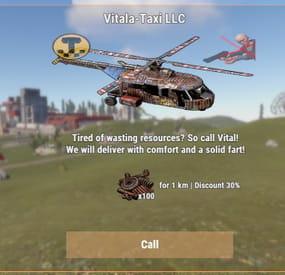
$20.00$11.99Scrap Copter Taxi
This plugin adds a taxi to the server.
About
There can be only 4 taxis in total. Their parking is located on the territory of Peaceful or Bandit city. You can take a taxi there and fly home or to another place you need, as well as using the command /taxi to call one of them
Settings
Changing the name/clothing of the driver's NPC. Change Peaceful or Bandit city or Custom spawns Change in flight speed. The number of taxis on the map (from 1 to 4) The privilege to use a taxi Privileges for discounts Detailed setup of payment for services (Item - regular items, CustomItem - custom item, plugins: Economics, IQEconomic and ServerRewards) Interface configuration Localization
Commands
/ taxi - allows you to call a helicopter to yourself [FOR ADMIN with custom spawn points]
/cpos info - show spawns /cpos add - add spawn /cpos clear - clear all spawns /cpos spawn - respawn all copters
Permissions
You can set permission in config
"Privilege to use a taxi": "coptertaxi.use" "Privileges for discounts": { "coptertaxi.discount10": 10, "coptertaxi.discount20": 20, "coptertaxi.discount30": 30 } Video
https://youtu.be/CKg-2JOFcK
Config
{ "Taxi Settings": { "Name for the taxi driver": "Vitalya", "Taxi driver's clothes": { "hat.cap": 2275597860, "tshirt": 2442749397, "pants": 2346785436, "shoes.boots": 1427198029 }, "How much to create a taxi (from 1 to 4)": 4, "Taxi flight altitude (from 80 to 150) (change with caution!)": 80.0, "Taxi flight speed (change with caution!)": 2.0, "Taxi flight acceleration speed (change with caution!)": 0.2, "Taxi flight deceleration speed (change with caution!)": 0.5, "How long does the taxi driver wait for the player to assign a route (in seconds)": 300, "How often a player can call a taxi (in seconds)": 600, "Privilege to use a taxi": "coptertaxi.use", "Privileges for discounts": { "coptertaxi.discount10": 10, "coptertaxi.discount20": 20, "coptertaxi.discount30": 30 }, "Avatar for notification in the chat (SteamID)": 76561198976168730 }, "Taxi fare settings": { "Payment type for taxi Item, CustomItem, Economics, IQEconomic, ServerRewards": "Item", "The cost of 1km": 100, "Item ShortName (for Item, CustomItem)": "scrap", "Item SkinID (for CustomItem)": 0, "Link to the image of the item/currency (except Item)": "https://i.imgur.com/jBaVKHu.png" }, "Configuring the UI": { "Background color": "0 0 0 0.3", "Outline color": "1.00 0.64 0.28 1.00", "Link to the logo": "https://i.imgur.com/tgSooQl.png", "Color of the 'Call' button": "1.00 0.75 0.50 0.5", "Color of the 'Pay' button": "0.09 0.39 0.14 0.85", "The color of the 'Refuse' button": "0.39 0.09 0.14 0.85" }, "Config version": { "Major": 1, "Minor": 1, "Patch": 2 } } There may be problems on custom maps