
igraes's Wishlist
-

$49.90
Battlefront
A long time ago, in a galaxy far, far away imperial armed forces invaded in the rust island. After the arrival imperial forces ruined a huge amount of civilisation facilities, they showed no mercy, and the life was almost exterminated, however not every habitant was killed. A little bit later valiant dwellers of the island started to develop with the velocity of light, they unified into several clans and repelled the imperial forces. The clans were able to destroy the main invaders’ troops, but there were too many of them. Now, the fate of the Rust island depends only on you, the Warrior. We wish you good luck on the battlefield!
WARNING!
There are a large number of objects on the map that remain visible for a long distance. For a higher and more stable FPS, I advise you not to include a drawing range above 1500.
Features:
About 95k prefabs Map size 4000 Optimal FPS The atmosphere of a very famous media universe 15 large and medium custom monuments with loot Over 5 custom locations for building Сustom locations where you can build are marked with "X” All custom locations have names on the map Combined outpost with a bandit camp Recycler added to fishing villages Compatible with Raidable Bases plugin Custom configuration of BetterNpc for the map is set up How can I view the map?
You can do this in our Discord server by submitting a request for an invitation to our servers. There you will be given the rights of an "administrator” and without any difficulties you will be able to fly around the map and fully familiarize yourself with it.
For which plugins do I provide configuration files?
Defendable Bases
BetterNpc
Custom monuments:
Battle of Hoth (A huge location is a place of battle) Advanced Bunker Space Fighter Base (A large base on the mountainside) Imperial Destroyer (A huge ship of invaders) Bestin City (a city from the planet Tatooine) Fresh Water Generator Rebel Generator (Location with an underground part) Yoda Swamp Oil Plant Intergalactic market (Savezone without turrets) Jabba Ship Sand Crawler Fighter Hangar Space Parts Warehouse Zyabkino Station Green Station Custom zipline points Monuments from Facepunch:
Apartment Complex Launch Site Radtown Ferry Terminal Nuclear Missile Silo Outpost Junkyard Water Treatment Plant Giant Excavator Pit Train Yard Airfield Power Plant OilRig (2) Harbor (2) Sewer Branch Desert Military Base Lighthouse Fishing Village Ranch The Dome Satellite Dish Underground Tunnels Arctic Research Base Underwater Lab Ziggurat- #rust
- #facepunch
- (and 5 more)
-
$15.99$12.79AutoRestart
[ ! ] The zip contains a DLL extension that goes into RustDedicated_Data/Managed. Some hosts do not allow uploading DLLs - check with your host before buying. [ ! ]
AutoRestart restarts your Rust server on a schedule and makes sure nobody is caught by surprise. Pick the restart times in your own time zone, skip them on wipe days, and every player is warned on the channels you choose: a notification panel, the game's own toast, chat, a sound, the vanilla restart banner and a row in the vitals stack.
The admin window is one window with eight tabs across the top: Overview, Schedule, Alerts, Appearance, Voting, Rewards, Discord and Advanced. Every tab slides in as you open it. A draft only saves when you press Save, Preview on screen puts the real panel and countdown strip on your HUD so you can drag them where you want, and two admins can work at the same time.
Players can vote to delay a restart that comes at a bad time, and the players who come back afterwards can claim a reward in items, Economics or ServerRewards. Your Discord hears about it too: a countdown, the final restart and the server coming back online, each one an embed you design.
Works on Oxide and Carbon Needs CrashExtensions 1.12.9 or newer (included) Six alert channels, each on its own switch Seven languages built in Jump to: Features · How it plays · Screenshots · Trailer · Admin window · Commands · Permissions · Install · Configuration · Test server · FAQ · API
🌟 Features
For players
Warnings in their language. Seven languages are built in: English, Spanish, Italian, Russian, Ukrainian, French and Brazilian Portuguese. Each player sees the alerts in their own. The last minute on screen. The notification panel counts the final minute down by itself, and an optional countdown strip shows MM:SS and a progress line from a trigger time you choose. A say in the timing. When a restart is close, a vote panel lets players vote to delay or to continue. If enough of them agree, the restart waits. Late joiners see it too. Players who connect or respawn during a countdown get the strip, the vote panel and the last-minute panel straight away. A reward for coming back. Players who reconnect within the claim window get their items, Economics money or ServerRewards points. Always know when. /restart shows when the next restart is. For server owners
Restart times in your time zone. As many a day as you want, in UTC or any zone you set (Asia/Tokyo, Europe/Berlin, UTC+9...), daylight saving included. Every time players see is shown in that zone. Wipe days skip them on their own cycle: weekly, every 2 or 3 weeks, the 1st to 4th, or the last of the month. Restart in... A one-off restart from the window, chat or RCON. Cancelling it brings your schedule straight back. Warning times you set. Chips for the game and for Discord, set apart. The defaults are 30, 15, 10, 5, 3, 2 and 1 minutes in game, and 30, 15, 10, 5 and 1 on Discord. A player count guard. A scheduled restart is skipped while more players than your limit are online. A restart you start yourself always goes ahead. Your panel, your look. A notification panel with one of 137 game icons, colours with opacity, a solid or gradient background, a border, your own title and message. Five position presets, or drag it anywhere. Discord. A webhook with three embeds (countdown, final restart, server online), a live Discord style preview while you edit them, and a test button. Animations on one switch. Slides and fades everywhere, or none at all. Safe config. Values out of range are repaired on load, and a broken file is left untouched. The window saves only what its own section holds. An optional update check. Restart the server when a new Oxide build is out. It is off by default. For developers
Hooks and a status call. OnRestartScheduled, OnRestartWarning, OnRestartInitiated and OnRestartCancelled, plus GetRestartStatus for the pending restart. See the API. Console and RCON. autorestart status, cancel, now and set <time> work from the console, RCON and your own tools. 🔁 How it plays
Warnings. At every warning time you set, players get the alerts on your channels: the toast, the chat line, the sound and the panel. The vote. Five minutes before the restart, the vote panel opens for 30 seconds. If 60% of the players vote to delay, with at least 3 players online, the restart waits 50 minutes and then runs a new 15 minute countdown. The strip. Once the time is inside its trigger (30 minutes by default), the countdown strip stays on screen with MM:SS and a progress line. The final minute. The panel counts the last minute down on its own, so every player sees the seconds. The restart. Players get a plain message to reconnect in 3 to 5 minutes. The server saves, shuts down cleanly and quits, and your host starts it again. Back online. The server online embed goes to Discord if you turned it on. Players who reconnect within the claim window (5 minutes by default) get their rewards: money at connect, items when they wake. 📸 Screenshots
Every screen below is AutoRestart running in Rust.
The Overview: the next restart, the alert channels and the features at a glance The final minute, as players see it Alerts: every channel and warning time Schedule: restart times and wipe days Appearance: the panel, its size and its position Voting: the share, the window and the delay Rewards: items, Economics and ServerRewards Discord: webhook, message and embeds Advanced: the update check, the reload and the animations 🎥 Trailer
The AutoRestart 5.0 trailer (click to play, 57 seconds)
🗒️ In-Game Admin Window
No file editing needed. /restart config opens every setting in one window. Each section is a draft: an unsaved section shows a dot on its tab, Save applies only the section you are on, and closing with unsaved changes asks first.
Overview - a live clock to the next restart, what is on at a glance, today's restart times, and Restart in..., Cancel restart and Reload schedule. Schedule - restart times and wipe days. Alerts - the channels, the in-game and Discord warning times and the player count guard. Appearance - the notification panel, its text, the countdown strip, the toast style and the background (solid or gradient), with Preview on screen. Voting - the share, the vote window, the delay and the chat command. Rewards - the claim window, Economics, ServerRewards and an item list. Discord - webhook, bot, message and the three embeds, with a live preview. Advanced - the update check, the animations switch and the reload button. 🎮 Commands
Players
/restart - when the next restart is /restart status - detailed restart info /restart help - the command list /vote delay, /vote continue - vote on a restart in progress (the command name is set in the Voting section) Admin
/restart config - the admin window /restart set <time> or /restart <time> - restart in 30s, 5m, 1h or a plain number of seconds. Write 5m, not 5 minutes. /restart cancel - cancel the running restart. A scheduled one skips to the next slot /restart now - restart right away /restart reload - reload the schedule and forget the skipped slots Console and RCON
autorestart, autorestart status, autorestart cancel, autorestart now and autorestart set <time> (or just autorestart <time>) autorestart.testdiscord - send a test message to your webhook autorestart.forceonline - post the server online embed now 🛡️ Permissions
autorestart.use - /restart, /restart status and /restart help for players. Grant it to your default group if you want everyone to see when the next restart is. autorestart.admin - the admin window and every command that changes something. Staff only. Voting and rewards need no permission: every online player can vote and claim.
oxide.grant group admin autorestart.admin oxide.grant group default autorestart.use 📦 Install
Install the extension, once per server. Stop the server, copy Oxide.Ext.CrashExtensions.dll into RustDedicated_Data/Managed (Carbon: carbon/extensions) and start it again. The console prints Loaded extension CrashExtensions with its version. The extension is one shared file for all our plugins, so an older copy is simply overwritten. Host does not allow DLL uploads? Copy CrashExtInstaller.cs (in the zip) into oxide/plugins instead and run crashext.install once in the server console. Install the plugin. Copy AutoRestart.cs into oxide/plugins (Carbon: carbon/plugins). It compiles on its own and creates its config, data and language files. Grant the permissions and add your restart times. Give yourself autorestart.admin, open /restart config and add your times in Schedule. A new install has no restart times. The game toast, chat and sound alerts start on. The notification panel, the countdown strip, Discord and rewards wait until you turn them on. ⚙️ Configuration
Everything lives in oxide/config/AutoRestart.json, and the admin window edits all of it. Claimed rewards and the last "server online" message are kept in oxide/data, and the texts in oxide/lang/<language>/AutoRestart.json.
Config sections (click to expand)
🧪 Test server
Available on the new Meowcraft test server. Type /restart in chat to see the restart status there. Restarts are turned off on this test server.
client.connect 91.229.114.54:28015 📚 FAQ
Q: I run AutoRestart 4.x. What changes when I update?
A: Install the extension, then replace AutoRestart.cs. Your config, rewards and Discord state load as they are, in the new window. Time values are stricter: write 5m, not 5 minutes. A Discord webhook must be the plain https://discord.com/api/webhooks/<id>/<token> form, and the default message content is empty.
Q: Does it start the server again after the restart?
A: AutoRestart saves and shuts the server down cleanly, and your host brings it back. Tested on Pterodactyl and Wisp. On a Windows machine, make sure your .bat starts the server again when it exits.
Q: What is the extension for, and what if I do not want one?
A: AutoRestart draws its interface with the Oxide.Ext.CrashExtensions extension. The DLL is in the zip, and if your host does not allow DLL uploads, CrashExtInstaller.cs (also in the zip) installs it with one console command, crashext.install. If you would rather not run an extension, stay on 3.9.3: it does not need it and keeps working as before.
Q: Does it work on Carbon?
A: Yes. The DLL goes into carbon/extensions instead of RustDedicated_Data/Managed, then restart once. Everything else is the same.
Q: I am on 3.x. Do I lose my settings?
A: No. Your config, the pending reconnect rewards and the Discord state carry over, and old values migrate on load.
Q: Can players stop a restart?
A: They can vote to delay it. Voting opens 5 minutes before the restart and stays open for 30 seconds. When 60% of the players agree, with at least 3 players online, the restart waits 50 minutes and then runs a new 15 minute countdown. Every number is in the config, and voting can be turned off.
Q: What does Cancel do?
A: On a restart you set with Restart in..., it removes it and brings your schedule back at once. On a scheduled restart, it skips that slot (and any earlier one) and arms the next. Reload schedule forgets the skips.
Q: Can I skip a restart while the server is busy?
A: Yes. Turn on the player count guard and a scheduled restart is skipped while more players than your limit are online. A restart you start yourself always goes ahead.
Q: Do I need Economics or ServerRewards?
A: Only to pay rewards in money or points. Item rewards need nothing else.
Q: Does it contact any outside service?
A: Only what you turn on. The plugin downloads the pictures it draws (about 80 small icons and images) once from cdn.crashplugins.space, which your server then caches. The Oxide update check and the Discord webhook are off by default. CrashExtInstaller downloads the extension from GitHub only when you run crashext.install, and never checks for updates.
Q: Can I translate it?
A: Seven languages are built in and each player sees their own. For another one, copy oxide/lang/en/AutoRestart.json into your language folder and translate it.
Q: How heavy is it?
A: Built and load tested for 500+ player servers. Every animation can be turned off with one switch.
🔧 API / Hooks
void OnRestartScheduled(int seconds, bool isCustom) void OnRestartWarning(int secondsLeft) void OnRestartInitiated() void OnRestartCancelled(string reason, int secondsRemaining) Read the pending restart from any plugin:
[PluginReference] private Plugin AutoRestart; var status = AutoRestart?.Call("GetRestartStatus") as Dictionary<string, object>; // HasRestart is always there. With a restart pending you also get IsDelay, IsCustom, // SecondsRemaining, RestartTime and FormattedTime.
Questions, ideas or bug reports? Use the Support tab of this file or join our Discord.
- #restart
- #rustplugin
- (and 19 more)
-
$29.95$21.95Wipe Schedule
A plugin for RUST server owners that schedules server events. You build your own schedules to fit your server.
🌟 Features of Wipe Schedule
Built-in editor: Manage events in-game through the plugin interface. Customizable calendar commands: Set your own commands for players to open the calendar and see upcoming events. Multi-language support: Translate all interface text into any language. Custom events: Add events with their own descriptions, dates and times, for wipes, tournaments or special server events. Easy integration: Quick to install with Server Panels. Flexible week display: Choose between two calendar week formats: Monday-first (ISO standard) or Sunday-first (American style). Recurring events: Create events that repeat on a set schedule instead of scheduling them by hand every week:
✔️ Weekly events.
✔️ Repeats every X days.
✔️ Monthly and annual events. Complex combinations: Combine different repeat types to build your own schedules.
🎮 Commands
/wipe: Open the calendar interface (for players) wipeschedule.time (console): Displays current plugin time with configured timezone offset. Useful for verifying timezone settings. (RCON/Server console only)
🔒 Permissions
wipeschedule.admin: Grants full access to create, edit, and delete scheduled events through the in-game interface.
📨 Video overview
⚙️ Web Config Editor
Manage the WipeSchedule settings in our web config editor. You change the config in a browser form instead of editing files on the server by hand.
P.S. The web config editor is open to members of the "WipeSchedule" group in our Discord server. Join at https://discord.gg/mevent and ask for the group.
🧪 Test Server
Join our test server and try the features yourself.
Copy the IP address below to connect.
connect 155.103.86.38:28015
📚 FAQ
Q: Where can I see an example of a config?
A: Config
Q: How do I add WipeSchedule to the ServerPanel menu?
A: Follow these steps:
1. Open the ServerPanel menu in-game and click the "+ADD CATEGORY" button
2. Set these exact parameters:
Type: Plugin Plugin Name: WipeSchedule Plugin Hook: API_OpenPlugin 3. Click the "SAVE" button to create the category
Q: How can I hide the bottom panel with "/info" command and event color markers?
A: To hide the bottom information panel, edit the UI configuration file located at oxide/data/WipeSchedule/SetupUI and set "Show panel with /info command and event color markers?": false in the Schedule section. The file name depends on your template: UIFullScreen.json for full screen mode, UIMenuV1.json for ServerPanel template V1, or UIMenuV2.json for ServerPanel template V2.
Q: How do I set the calendar to start the week on Monday?
A: By default, the calendar week starts on Monday (ISO standard). If you need to change it, edit the plugin configuration file and set "Start calendar week on Sunday": false to keep Monday as the first day, or set it to true to use Sunday-first format (American style).
- #wipe schedule
- #wipe
- (and 4 more)
-
.thumb.png.bcb832e22f0a48b6833fee517e444bff.png)
$24.95$21.95Events Manager
EventsManager runs official Facepunch events and events from custom plugins through one in-game interface. Instead of scattered timers, you build event rotations and tune your wipe schedule in a single menu to keep players engaged.
🌟 Features of Events Manager
Multi-Event Support: Manage multiple events, each with its own settings. Customizable Display: Assign distinct names, commands, and colors for UI buttons to each event. Scheduling Flexibility: Schedule events to run on specific days and at designated hours. Administrative Control: Admins can launch events with commands. Enhanced Player Experience: Run regular events to keep players engaged. Random Event Start: Let the plugin pick events at random from a pool, so players get a surprise. Integration of Facepunch Events: Popular Facepunch events are included in the plugin.
🎮 Commands
/em: Set up events, including start time and day. eventmanager.convert.v2: Migrates V2 data to V3 (console only)
💬 Permissions
eventsmanager.use: Lets users open the menu and manage events.
🎥 Video Overview
⚙️ Web Config Editor
Manage the EventsManager settings in our web config editor. You change the config in a browser form instead of editing files on the server by hand.
P.S. The web config editor is open to members of the "EventsManager" group in our Discord server. Join at https://discord.gg/mevent and ask for the group.
📚 FAQ
Q: Where can I see an example of a config?
A: Config
Q: Do I need to configure anything special for events?
A: Yes, disable autostart in your events when you use EventsManager. The plugin schedules and starts events itself, so autostart can cause conflicts or unexpected behavior.
- #eventmanager
- #manager
- (and 5 more)
-
$14.99
Server Hud
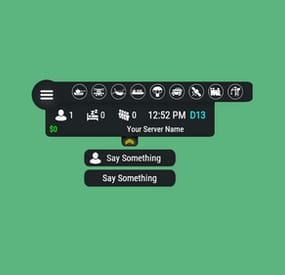
Server HUD · Rust · Oxide · CARBON Your chat is «is heli up?» twelve times an hour Put the answer on screen. Online count, clock, grid square, balance, and a live bar of every event running — Bradley, heli, cargo, airdrop, both oil rigs. Nine events out of the box, set up entirely from a panel in game. How it goes From install to the event you added yourself MINUTE ONE Install and it's on screen It doesn't wait for the next wipe to be useful Install mid-wipe and the heli that's already flying is on the bar. ImageLibrary is the only other plugin you need. Nine events on by default. Bradley, Patrol Heli, CH47, Cargo Ship, Airdrop, Harbor cargo, both Oil Rigs, Deep Sea. Rigs turn red while the crate is being hacked. Players see the fight starting from across the map. Icons are just URLs. Fetched and cached for you. First install reloads once to pick them up — expected, not a fault. No file to edit first. Defaults draw a finished HUD with your server name in it. FROM THEN ON Every player, every day The numbers your chat keeps asking for Updated as they change. A player standing still costs you nothing. K12 or X:-1204 Z:842 Grid square or raw coordinates. Your choice, your colour. Online, sleeping, queue. Admins can be left out of the count. Clock in each player's own format. 12- or 24-hour from their game language, or force one. Two balances, side by side. Economics, ServerRewards or ShoppyStock. Only what's live. One switch hides idle events instead of showing a wall of grey. Info messages on rotation. A random line from your list, any corner, any width. IN THE WAY The player decides Four states, and the choice is remembered Your logo is the button: full panel → events only → hidden. One command removes it entirely. Still set that way after a reconnect. Streamers keep coordinates off camera. One permission drops the position readout. CCTV and drones get a clean screen. Hides on mount, back on dismount, switchable. Any corner, any scale. Pixel offsets, one scale value, and a toggle to show it over the inventory. MONTHS LATER All of it, from in game The config file is optional One command opens an admin panel over every setting there is. Change it, it saves, everyone online sees it. Events from other plugins. A name, an icon, and the hooks it fires. Convoy, Sputnik, Armored Train and Harbor come pre-filled. Adding one rewrites a marked block in the plugin file and reloads it. A drop-down of command buttons. Any chat or console command, own icon, own permission, closes itself after use. Updates don't reset your settings. New events land with defaults; a section you deleted comes back. Or edit the file. Auto reload picks it up the moment you save. The look See it running, then make it yours Every icon is a URL in the config. Take a pack, or draw your own from the blank template. Free custom HUD icons Free Custom HUD icons Paid Server HUD custom icon pack Paid While you're not looking Built to be left alone ✓ A typo in the config won't take the HUD down — it falls back to defaults and says so ✓ Switching a counter off stops the work behind it, not just the display ✓ An economy you enabled but never installed shows 0, and the HUD carries on ✓ Unloading clears every panel off every screen — nothing stuck until relog Reference One chat command, five words after it Setup is admins only. Menu buttons take whatever permission you name in the config. Chat /h Show the command list Chat /h open Full panel — counters, clock, position, balance, events Chat /h events Event bar only Chat /h hide Hide the panels, keep the logo button Chat /h close Remove it entirely Chat /h setup Settings panel — admins only Perm hud.streamer Hides the position readout from whoever holds it Hook object CanHudChangeState(BasePlayer player, string currentState, string nextState) Fires before a state change. Return non-null to stop it. API string API_PlayerHudState(string playerId) Returns full, events, hidden or closed for a player. Straight answers Asked before buying Can players turn it off? Full panel, event bar only, or gone entirely — their choice, and it survives a reconnect. Do I have to edit the config file? No, the in-game panel covers all of it. If you prefer a text editor, auto reload picks the file up as you save. I stream — my coordinates are on screen. Grant yourself the streamer permission. The position readout goes, everything else stays. Can I add an event from another plugin? Yes — name it, give it an icon, and name the hooks it fires. Most plugins list those in their own description. What if I run no economy plugin? Leave it off and the HUD closes the gap. Enable it without the plugin and you get a 0, not a broken HUD. Does it block CCTV and drones? It hides itself in a Computer Station and comes back on dismount. One toggle if you'd rather it stayed. 9 events out of the box 4 states, chosen per player 2 economy balances at once 1 dependency — ImageLibrary