
GangstaPichu's Wishlist
-
.thumb.jpg.932e897294a247030208d18278fdb4ae.jpg)
$3.99
Fight Club
A simple fight arena inspired from boxing & mma, you can climb to go in the ring !
Feel free to message me with any ideas that you would like to see be added.
Height,Splat,Topology... Included in .
-
$3.99
Flying God Status
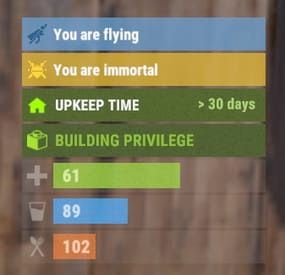
The plugin displays godmode and noclip indicators in the status bar. Depends on AdvancedStatus plugin.
The ability to display godmode and noclip indications in the status bar. The ability to automatically generate language files for different languages(filled in English); The ability to individually toggle the display of status bars; The ability to customize the status bar for each of types; The ability to specify the order of the bar; The ability to change the height of the bar; The abillity to customize the color and transparency of the background; The ability to set a material for the background; The ability to switch between CuiRawImageComponent and CuiImageComponent for the image; The ability to get images from the local folder(*SERVER*\oxide\data\AdvancedStatus\Images); The abillity to set own image and customize the color and transparency of the image; The abillity to set sprite instead of the image; The ability to customize the color, size, font and outline of the text.
{ "Chat command": "fgs", "Is it worth enabling GameTips for messages?": true, "Check interval in seconds": 1.0, "List of language keys for creating language files": [ "en" ], "Status Bar Settings for God": { "Order": 20, "Height": 26, "Main_Color(Hex or RGBA)": "#E3BA2B", "Main_Transparency": 0.8, "Main_Material": "", "Image_Url": "https://i.imgur.com/XmZBOuP.png", "Image_Local(Leave empty to use Image_Url)": "FlyingGodStatus_God", "Image_Sprite(Leave empty to use Image_Local or Image_Url)": "", "Image_IsRawImage": false, "Image_Color(Hex or RGBA)": "#FFD33A", "Image_Transparency": 1.0, "Is it worth enabling an outline for the image?": false, "Image_Outline_Color(Hex or RGBA)": "0.1 0.3 0.8 0.9", "Image_Outline_Transparency": 1.0, "Image_Outline_Distance": "0.75 0.75", "Text_Key": "BarGod", "Text_Size": 12, "Text_Color(Hex or RGBA)": "1 1 1 1", "Text_Font(https://umod.org/guides/rust/basic-concepts-of-gui#fonts)": "RobotoCondensed-Bold.ttf", "Text_Offset_Horizontal": 0, "Is it worth enabling an outline for the text?": false, "Text_Outline_Color(Hex or RGBA)": "#000000", "Text_Outline_Transparency": 1.0, "Text_Outline_Distance": "0.75 0.75", "SubText(Leave empty to disable)": "", "SubText_Size": 12, "SubText_Color(Hex or RGBA)": "1 1 1 1", "SubText_Font": "RobotoCondensed-Bold.ttf", "Is it worth enabling an outline for the sub text?": false, "SubText_Outline_Color(Hex or RGBA)": "0.5 0.6 0.7 0.5", "SubText_Outline_Transparency": 1.0, "SubText_Outline_Distance": "0.75 0.75" }, "Status Bar Settings for Noclip": { "Order": 20, "Height": 26, "Main_Color(Hex or RGBA)": "#66A4D2", "Main_Transparency": 0.8, "Main_Material": "", "Image_Url": "https://i.imgur.com/LY0AUMG.png", "Image_Local(Leave empty to use Image_Url)": "FlyingGodStatus_Noclip", "Image_Sprite(Leave empty to use Image_Local or Image_Url)": "", "Image_IsRawImage": false, "Image_Color(Hex or RGBA)": "#31648B", "Image_Transparency": 1.0, "Is it worth enabling an outline for the image?": false, "Image_Outline_Color(Hex or RGBA)": "0.1 0.3 0.8 0.9", "Image_Outline_Transparency": 1.0, "Image_Outline_Distance": "0.75 0.75", "Text_Key": "BarNoclip", "Text_Size": 12, "Text_Color(Hex or RGBA)": "1 1 1 1", "Text_Font(https://umod.org/guides/rust/basic-concepts-of-gui#fonts)": "RobotoCondensed-Bold.ttf", "Text_Offset_Horizontal": 0, "Is it worth enabling an outline for the text?": false, "Text_Outline_Color(Hex or RGBA)": "#000000", "Text_Outline_Transparency": 1.0, "Text_Outline_Distance": "0.75 0.75", "SubText(Leave empty to disable)": "", "SubText_Size": 12, "SubText_Color(Hex or RGBA)": "1 1 1 1", "SubText_Font": "RobotoCondensed-Bold.ttf", "Is it worth enabling an outline for the sub text?": false, "SubText_Outline_Color(Hex or RGBA)": "0.5 0.6 0.7 0.5", "SubText_Outline_Transparency": 1.0, "SubText_Outline_Distance": "0.75 0.75" }, "Version": { "Major": 0, "Minor": 1, "Patch": 5 } }
EN: { "BarGod": "You are immortal", "BarNoclip": "You are flying", "CmdGodEnabled": "Display of Godmode bar enabled!", "CmdGodDisabled": "Display of Godmode bar disabled!", "CmdNoclipEnabled": "Display of Noclip bar enabled!", "CmdNoclipDisabled": "Display of Noclip bar disabled!" } RU: { "BarGod": "Вы неуязвимы", "BarNoclip": "Вы в полете", "CmdGodEnabled": "Отображение Godmode бара включено!", "CmdGodDisabled": "Отображение Godmode бара выключено!", "CmdNoclipEnabled": "Отображение Noclip бара включено!", "CmdNoclipDisabled": "Отображение Noclip бара выключено!" }
god - toggling personal Godmode bar display. fly - toggling personal Noclip bar display. Example: /fgs god
-
$45.95$31.95Clans
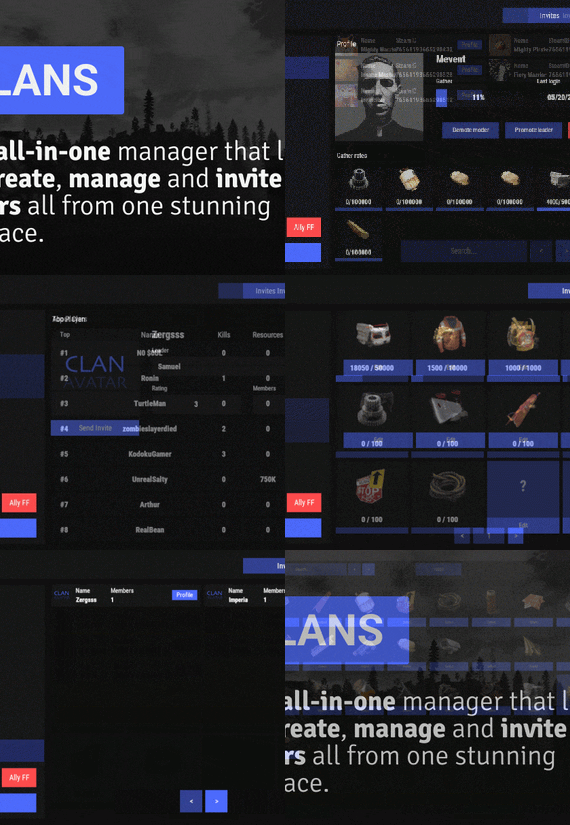
Clans is an all-in-one manager that lets you create, manage and invite players all from one stunning interface. Toggle friendly fire, view clan, and player leaderboards, create and break alliances, modify gather rates for clan members and set clan skins to identify clan members abroad easily.
Features
Beautiful user interface Performance Allied clans Gather rate for players (allows you to set how much each clan member must collect resources. For example: each member of the clan must collect 10 thousand sulfur, so that later it can be used to craft explosives and attack another clan) Clan skins (allows you to set common skins for all clan players. All the clothes on the players of the same clan will be the same, which allows you to distinguish your own from the enemies during the battle) The clan TAG min- and max-length can be defined in the config The clan overview shows offline member names Clan members can toggle friendly-fire protection for clan mates and allies Clan creation can check TAG’s against a blocked word list Clan tagging can be optionally disabled Old (not updated since x days) clans can be automatically purged Clans rating Players rating Setting a personal avatar for your clan Autowipe with wipe (optional)
Commands
clans (display clan menu) clans help (get information about commands) clan create (create a clan) clan leave (leave from your clan) clan join (open UI with invitations) clan ff (toggle friendlyfire status) clan allyff (toggle friendlyfire status for allies) clan invite <name/steamid> (invite a player) clan withdraw <name/steamid> (cancel an invite) clan kick <name/steamid> (kick a member) clan allyinvite <clanTag> (invite a clan to ally) clan allywithdraw <clanTag> (cancel the offer of an alliance) clan allyaccept <clanTag> (accept the offer of an alliance) clan allycancel <clanTag> (cancen the offer of an alliance) clan promote <name/steamid> (promote a member) clan demote <name/steamid> (demote a member) clan disband (disband your clan) clans.loadavatars (download avatars of all players) clans.manage list - lists all clans, their owners and their member-count clans.manage listex - lists all clans, their owners/members and their on-line status clans.manage show [name/userId] - lists the chosen clan (or clan by user) and the members with status clans.manage msg [clanTag] [message] - sends a clan message clans.manage create [name/userId] [clanTag] - creates a clan clans.manage rename [oldTag] [newTag] - renames a clan clans.manage disband [clanTag] - disbands a clan clans.manage invite [clanTag] [name/userId] - sends clan invitation to a player clans.manage join [clanTag] [name/userId] - joins a player into a clan clans.manage kick [clanTag] [name/userId] - kicks a member from a clan clans.manage owner [clanTag] [name/userId] - sets a new owner clans.manage promote [clanTag] [name/userId] - promotes a member clans.manage demote [clanTag] [name/userId] - demotes a member clans.reborn.convert (convert data from Clans Reborn plugin) clans.umod.convert (convert data from uMod Clans (v0.2.2+) plugin) clans.convert.olddata (convert data from old data) clans.convert.old.stats – used to update player data when upgrading from older versions of the game to 1.1.31 and above.
Permissions
clans.cancreate (permission to create a clan) clans.canjoin (permission to join a clan) clans.canleave (permission to leave a clan) clans.candisband (permission to disband a clan) clans.cankick (permission to kick a clan member) clans.admin (permission to use command 'clans.manage')
Loot Types
None – used for disabled loot Gather – used for gathering loot LootCrate – used for a loot crate Look – used to look at loot Kill – used to kill entities Craft – used for crafting items HackCrate – used for hacking a loot crate
FAQ
Q: Where can I see an example of a config?
A: Config
Q: Does the Clans plugin support other plugins?
A: Yes, this Clans plugin has an API similar to other popular clans plugins. If the plugin works with Clans - it works with this plugin too.
Q: How do I enable the display of clan ratings on the screen?
A: You need to install the Clans Top plugin
Q: Does the Clans plugin work with other Rust plugins?
A: The Clans plugin is designed to work with a wide range of other Rust plugins, but compatibility may vary depending on the specific plugins you are using.
-
$49.90
Battlefront
A long time ago, in a galaxy far, far away imperial armed forces invaded in the rust island. After the arrival imperial forces ruined a huge amount of civilisation facilities, they showed no mercy, and the life was almost exterminated, however not every habitant was killed. A little bit later valiant dwellers of the island started to develop with the velocity of light, they unified into several clans and repelled the imperial forces. The clans were able to destroy the main invaders’ troops, but there were too many of them. Now, the fate of the Rust island depends only on you, the Warrior. We wish you good luck on the battlefield!
WARNING!
There are a large number of objects on the map that remain visible for a long distance. For a higher and more stable FPS, I advise you not to include a drawing range above 1500.
Features:
About 95k prefabs Map size 4000 Optimal FPS The atmosphere of a very famous media universe 15 large and medium custom monuments with loot Over 5 custom locations for building Сustom locations where you can build are marked with "X” All custom locations have names on the map Combined outpost with a bandit camp Recycler added to fishing villages Compatible with Raidable Bases plugin Custom configuration of BetterNpc for the map is set up How can I view the map?
You can do this in our Discord server by submitting a request for an invitation to our servers. There you will be given the rights of an "administrator” and without any difficulties you will be able to fly around the map and fully familiarize yourself with it.
For which plugins do I provide configuration files?
Defendable Bases
BetterNpc
Custom monuments:
Battle of Hoth (A huge location is a place of battle) Advanced Bunker Space Fighter Base (A large base on the mountainside) Imperial Destroyer (A huge ship of invaders) Bestin City (a city from the planet Tatooine) Fresh Water Generator Rebel Generator (Location with an underground part) Yoda Swamp Oil Plant Intergalactic market (Savezone without turrets) Jabba Ship Sand Crawler Fighter Hangar Space Parts Warehouse Zyabkino Station Green Station Custom zipline points Monuments from Facepunch:
Apartment Complex Launch Site Radtown Ferry Terminal Nuclear Missile Silo Outpost Junkyard Water Treatment Plant Giant Excavator Pit Train Yard Airfield Power Plant OilRig (2) Harbor (2) Sewer Branch Desert Military Base Lighthouse Fishing Village Ranch The Dome Satellite Dish Underground Tunnels Arctic Research Base Underwater Lab Ziggurat- #rust
- #facepunch
- (and 5 more)
-
$9.99
Hoover Dam
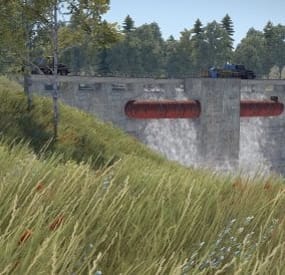
Welcome to Hoover Dam.
This is a great looking monument with one blue card puzzle room.
You will need 1 fuse and a blue keycard to access loot room
1 recycler
1 Hackable crate spawn
1 Red card spawner
Prefab count: 648
Please make yourself aware of the TOS-Restrictions for use.
If you find any bugs or issues contact me on here or discord and il sort them out straight away
DocNorris#5423
- #hoover dam
- #rust
- (and 6 more)