Jump to content

crunch

Creator
  • Posts

    95
  • Joined

  • Last visited

Everything posted by crunch

  1. crunch

    Special item

    Hey Mark, yep The Golden Egg does a lot of that. I’m currently working on an update to allow PVP for the holder of the egg on servers that use TruePVE Then after that I’m working on an update to add some things similar to your buff idea.
  2. crunch

    The Golden Egg

    Yep (only TruePVE though I think, though if there are other similar plugins I can take a look). Basically TruePVE has an api that lets you check, and negate/enable damage. So it doesn’t need a zone at all (other than me needing to check if the egg is in the base or player being attacked)
  3. crunch

    The Golden Egg

    Haha, funny you should mention that! Someone else suggested this and I think I've just got it working today. I've sent it to him to test, all going well I'll push the update soon
  4. crunch

    The Golden Egg

    I've just added this in with version 1.4.1
  5. crunch

    The Golden Egg

    That's actually a different item, however it might suit for our purpose anyway, I'll have a play with it for sure!
  6. crunch

    The Golden Egg

    Hey there, thanks! 1. Should be, yep. I'm going to be adding some things soon to help with competitions and the like, I'll see if I can slip this in as well 2. This one shouldn't be a problem, as I'm not really adding the egg to crates, I'm just spawning it in if the RNG roles an appropriate number each time you open one (gets around problems with other loot plugins) I'm currently experimenting with being able to change the skin, but unfortunately it looks like the egg prefab just isn't skinnable at all. I'm considering adding an option to use a different item if I can find an appropriate (it has to have certain criteria though so it's tricky) that people can use just to add a skin to. Hopefully I can find one as I agree it would be nice to be able to customize it like that.
  7. crunch

    The Golden Egg

    Yep good idea. Can definitely add a config option to add a custom item name (though you’d probably also have to make your own custom image that pops up when they find it (see the screenshots), or worse case I could add an option to disable that and just have a chat message to the player). I’ll play around today with the skins.
  8. crunch

    The Golden Egg

    Hi there, I’m not actually sure! The egg is already an in-game item (it’s just only used at Easter), so I doubt it had any default skins, but I’ll have a play with it for sure. I don’t see why not though, if a skin exists for it (doesn’t look like there’s any currently out there at the moment)
  9. crunch

    The Golden Egg

    Hey mate, hit me up on discord if you like and we can have a chat about it, might take a bit of discussion crunch#0222

  10. Version 1.9.25

    303 downloads

    Generates a special item in random crates that gives optional health/gather buffs when carrying it, or can generate other items (scrap etc) when placed in a box. However its location is permanently marked on the map, making the owner a target. How it works: The majority of the following is configurable, but out of the box here's how it works. Each time a player opens a crate (Locked, Elite, Military or Normal), the egg has a chance to spawn. Once found, the player will receive a UI message with instructions (see screenshot), and a server wide chat message will be broadcast alerting other players. 60 seconds after the egg is found, the players position will be marked on the map for all to see. If the player makes it home, or another player gets home with the egg, it can then be placed in a box and will start generating resources every hour. By default this is scrap, but if another resource is placed in the box with the egg (by default this is hqm, metal frags, or low grade fuel) the egg will instead generate that resource. The egg will only generate one resource at a time, but which resource is up to you. Optionally Sulfur Ore or Cooked Sulfur can be enabled, along with up to three custom items (for example, supply signals, red keycards, 5.56 ammo, etc etc). While in a box, the egg will be permanently marked on the map, making the player a target. The marker is a broad circle, so it will give the general position, but not down to the exact room or box. There is however an optional command for this. Introduced in 1.7.0 are roam buffs, which optionally increase health, pickup and gather rates whilst holding the egg, This helps incentivize players to take the egg out of their base, and can make for some really fun encounters. If at any point the player wishes to remove the marker and get rid of the egg, they can choose to crack it open, which will award the player with one of the following by default: 5 Incendiary and 3 HV Rockets MP5 + Ammo LR300 Rifle M39 + Ammo Multiple Grenade Launcher M249 + Ammo Alternatively, you can use the config option Use custom item list when cracking open the egg and instead add your own list of rewards. The plugin will choose one item at random from your list, and will fallback to the default list above if there are any issues (spelling mistakes etc). You can use the following link to grab the shortnames of the items you want: https://www.corrosionhour.com/rust-item-list/ Once cracked open, or otherwise destroyed/lost, the egg can again be found in crates. There will only ever be one egg available at a time. The plugin will also keep track of the amount of time a player has held the egg (either in their inventory or in a box), along with their team, and an overall team total. In 1.8.2 there's a new custom event included that will drop a configurable amount of crates at a moment which can only be hacked with the egg in your inventory. See the update notes for 1.8.2 for more detail. Features: Highly configurable Server wide message when the egg is found or destroyed Optional webhook to discord when the egg is found or destroyed A "spam check" so players can't just open and close crates really quickly to increase their odds While the egg can be hidden in stashes, it will not generate resources Optional vending marker as well as the circle marker (the vending marker can have a custom name) Data logging for amount of time holding the egg Clear or retain player data on map wipe Leaderboard for the top 5 players Command to place the top player (and team) in an oxide group temporarily (requires Timed Permissions) Option to block cracking open the egg during a raid Option to kill the egg after a certain amount of time Option to stop adding time when the player is in a safe zone / the egg is in a stash / the egg is in a building / between certain hours / under a minimum pop Change the item name, skin and CUI image to your liking Dynamic command name option TruePVE support (see release notes for 1.6.2) Roam Buffs to increase health, pickup and gather rates whilst holding the egg (see 1.7.0 release notes) Custom chinook crate event included Option to blacklist certain commands (eg Teleport, Trade etc) Option to destroy the egg after x seconds in a safe zone or building blocked zone Notes: Default values: The spawn chances look low, but after a lot of testing these values are still hit but pretty rarely, making the egg more valuable when finally found. Increase them to suit if you prefer though. The player marker refresh time of 25 seconds is just about enough time for the player to stay out of the marker at a full sprint, but only just. I found that to be a good value but again, adjust as you see fit. Item Skins: If the item appears but the skin doesn't load, that means that it's an issue at your client end (not the plugin). It may be related to Steam issues, your download speeds or Rust issues. Also, rarely, some skins are just broken in which case they'll never load. The game doesn't give any meaningful feedback on this (occasionally a red unity error on screen), so just try another skin ID (you may need to quit and restart Steam in these cases). To find a skin you want to use, grab the number from the end of the URL on it's workshop page, eg https://steamcommunity.com/sharedfiles/filedetails/?id=2674986096. Approved skins will load faster in game than non-approved. TruePVE: For servers running TruePVE, a new config option allows damage to bases and players if they have the egg in their possession. If the egg is inside a base, the plugin will check for both TC auth and proximity before allowing damage. If the egg is on a player, damage will be allowed within a radius of that player. Roam Buffs: Pickups include items out in the world, but not items grown yourself in a planter. Chinook Event: I'd recommend using this - https://github.com/WheteThunger/BetterChinookPatrol - to properly randomise the monuments that the chinooks visit, rather than have it just pick one and stick to it all wipe. Available Commands (the command name is customisable in the config): /egg find - Will pinpoint the exact position of the egg once found. Requires permissions (thegoldenegg.use) /egg list - Will show the available resource generation options, along with their generation times (dynamic based on your config) /egg time - Will show the remaining time before the next resource generation /egg leader - Will show the top 5 players who have had possession of the egg (and their team total) /egg help - Will show a series of help messages and info /egg kill - Will destroy the egg instantly (admins only) /egg expire - For use along with the "Destroy the egg after x minutes" option. This will print the time remaining until the egg is destroyed. /egg event - To manually kick off the chinook event (admins only) /egg winner – Will place the person who has held the egg the longest (and their team if they have one) in the oxide group you specify for the time you specify (requires Timed Permissions) /egg purge – Will destroy the egg and wipe the data file Default Config: { "Egg spawn chance for Locked Crates (0 to 100)": 0.04, "Egg spawn chance for Elite Crates": 0.04, "Egg spawn chance for Military Crates": 0.03, "Egg spawn chance for Normal Crates": 0.02, "Marker Settings": { "Show map marker when the egg is in a box": true, "Show map marker when the egg is on a player": true, "Player marker refresh time (seconds)": 15, "Box marker refresh time (seconds)": 30, "Initial marker delay when the egg is found": 60, "Marker Radius": 0.7, "Marker Transparency": 0.7, "Marker Color (hex)": "#fa030a", "Marker Border Color (hex)": "#000000", "Add a Vending marker": false, "Vending Marker Name": "The Golden Egg" }, "Resource Settings": { "Resource Spawn Time (seconds)": 3600, "Scrap Spawn Amount (0 to disable)": 50, "HQM Spawn Amount": 25, "Low Grade Spawn Amount": 100, "Metal Frags Spawn Amount": 1000, "Allow Sulfur Ore": false, "Sulfur Ore Spawn Amount": 600, "Allow Cooked Sulfur": false, "Cooked Sulfur Spawn Amount": 400, "Custom Item 1 (use item shortname, eg ammo.rifle, gears, green.berry)": "", "Custom Item 1 Amount": 1, "Custom Item 1 Spawn Time (seconds)": 14400, "Custom Item 2": "", "Custom Item 2 Amount": 1, "Custom Item 2 Spawn Time (seconds)": 10800, "Custom Item 3": "", "Custom Item 3 Amount": 1, "Custom Item 3 Spawn Time (seconds)": 7200 }, "Item Customisation": { "Item Name": "The Golden Egg", "Item Skin ID": 0, "Item Found Image in Game (use an image 1000x400)": "https://i.imgur.com/3Yf5iaD.png", "Chat command": "egg", "Item Found Image for the Discord Webhook": "https://i.imgur.com/Knn0X37.png", "Item Lost Image for the Discord Webhook": "https://i.imgur.com/GxlVNSa.png" }, "Roam Settings": { "Increase health whilst holding the egg": true, "Total health": 150, "Increase ore/wood gather rate whilst holding the egg": true, "Gather multipler": 2.0, "Increase pickup amount whilst holding the egg (hemp/food etc)": true, "Pickup multipler": 2.0, "Don't allow roam bonus while server pop is below (leave at 0 to disable)": 0, "Don't allow roam bonus between certain hours": true, "Start of time period": "1AM", "End of time period": "7AM", "Broadcast a chat message when someone starts roaming": true }, "Event Settings": { "Run the chinook event": true, "Number of crates to drop": 2, "Crate unlock time": 600, "Maximum additional items to add to the crate(s)": 15, "Run the event once, between a certain time": true, "Start of time period": "8PM", "End of time period": "10PM", "Run the event on repeat": false, "Minimum time between events (seconds)": 3600.0, "Maximum time between events (seconds)": 7200.0, "Don't run the event if server pop is below (leave at 0 to disable)": 0, "Show map marker": true, "Marker Radius": 0.5, "Marker Transparency": 0.4, "Marker Color (hex)": "#ecf97f", "Marker Border Color (hex)": "#000000" }, "Let players with permission pinpoint the egg on screen (use /egg find)": true, "Send a webhook when the egg is found/destroyed": "https://support.discordapp.com/hc/en-us/articles/228383668-Intro-to-Webhooks", "Don't add time while the player is in a safe zone": true, "Don't add time while the egg is in a stash": true, "Don't add time while the egg is in a building": false, "Don't add time while server pop is below (leave at 0 to disable)": 0, "Don't add time between certain hours": false, "Start of time period": "1AM", "End of time period": "6AM", "Destroy the egg if in a safe zone for longer than (seconds, leave at 0 to disable)": 0.0, "Destroy the egg if in a building blocked zone for longer than (seconds, leave at 0 to disable)": 0.0, "Destroy the egg if in a Raidable Base zone for longer than (seconds, leave at 0 to disable)": 0.0, "Name of permission group to grant with /egg winner (requires Timed Permissions plugin)": "", "Duration to grant access to group (requires Timed Permissions plugin). Format: 1d12h30m": "28d", "Destroy the egg after x minutes (leave at 0 to disable)": 0, "Block player from cracking open the egg while being raided": true, "Raid block timer": 300, "Data save interval": 300, "Clear data on map wipe": true, "Use custom item list when cracking open the egg": false, "Custom item list (use item shortname, eg rifle.m39, explosive.timed, etc": [ "item.one", "item.two", "etc" ], "Blacklist commands whilst holding the egg": false, "Blacklisted commands": [ "/tp", "/trade", "/shop", "/rw", "/bank", "/home", "/remove" ], "TruePVE Only": { "Enable damage to players and bases if they have the egg": false, "Max distance between players for damage to register": 100.0 } }
    $15.99
  11. crunch

    Solo Notifier

    Oh and make sure you give the uinotify.see permission to the default group, or at least any players you want to send notifications to.
  12. crunch

    Solo Notifier

    Hey mate. Install UINotify, then if you like you can use my UINotify config below and adjust it to your liking. Once UINotify is installed and the config is done, the notifications in Solo Notifier will auto switch to use UINotify instead. With UINotify, under Notifications (type - settings) there are several block entries (0, 1 etc). Solo Notifier is using block 1 so if you want to change anything (color etc) edit it under the block that starts with "1" (or you can change which number it uses in the Solo Notifier config if you prefer) { "Display type (Overlay/Hud)": "Overlay", "Height": 50.0, "Width": 260.0, "X Margin": 20.0, "Y Margin": 5.0, "Y Indent": -50.0, "Notify Cooldown": 25.0, "Notifications (type - settings)": { "0": { "Background Color": { "HEX": "#000000", "Opacity (0 - 100)": 98.0 }, "Enable Gradient?": true, "Gradient Color": { "HEX": "#4B68FF", "Opacity (0 - 100)": 35.0 }, "Sprite": "assets/content/ui/ui.background.transparent.linearltr.tga", "Material": "Assets/Icons/IconMaterial.mat", "Icon Color": { "HEX": "#4B68FF", "Opacity (0 - 100)": 100.0 }, "Icon Text": "!", "Icon Text Color": { "HEX": "#FFFFFF", "Opacity (0 - 100)": 100.0 }, "Title Key (lang)": "Notification", "Title Color": { "HEX": "#FFFFFF", "Opacity (0 - 100)": 50.0 }, "Text Color": { "HEX": "#FFFFFF", "Opacity (0 - 100)": 100.0 }, "Fade Out": 1.0, "Fade In": 0.1, "Sound Effect (empty - disable)": "assets/bundled/prefabs/fx/notice/item.select.fx.prefab", "Image Settings": { "Enabled": false, "Image": "", "AnchorMin": "0 0", "AnchorMax": "0 0", "OffsetMin": "12.5 12.5", "OffsetMax": "37.5 37.5" } }, "1": { "Background Color": { "HEX": "#000000", "Opacity (0 - 100)": 98.0 }, "Enable Gradient?": true, "Gradient Color": { "HEX": "#90EE90", "Opacity (0 - 100)": 35.0 }, "Sprite": "assets/content/ui/ui.background.transparent.linearltr.tga", "Material": "Assets/Icons/IconMaterial.mat", "Icon Color": { "HEX": "#90EE90", "Opacity (0 - 100)": 100.0 }, "Icon Text": "X", "Icon Text Color": { "HEX": "#FFFFFF", "Opacity (0 - 100)": 100.0 }, "Title Key (lang)": "Just a heads up", "Title Color": { "HEX": "#FFFFFF", "Opacity (0 - 100)": 50.0 }, "Text Color": { "HEX": "#FFFFFF", "Opacity (0 - 100)": 100.0 }, "Fade Out": 1.0, "Fade In": 0.1, "Sound Effect (empty - disable)": "assets/bundled/prefabs/fx/notice/item.select.fx.prefab", "Image Settings": { "Enabled": true, "Image": "https://i.imgur.com/vfOfdU9.png", "AnchorMin": "0 0", "AnchorMax": "0 0", "OffsetMin": "12.5 12.5", "OffsetMax": "37.5 37.5" } } } }
  13. crunch

    Solo Notifier

    Version 1.0.1

    465 downloads

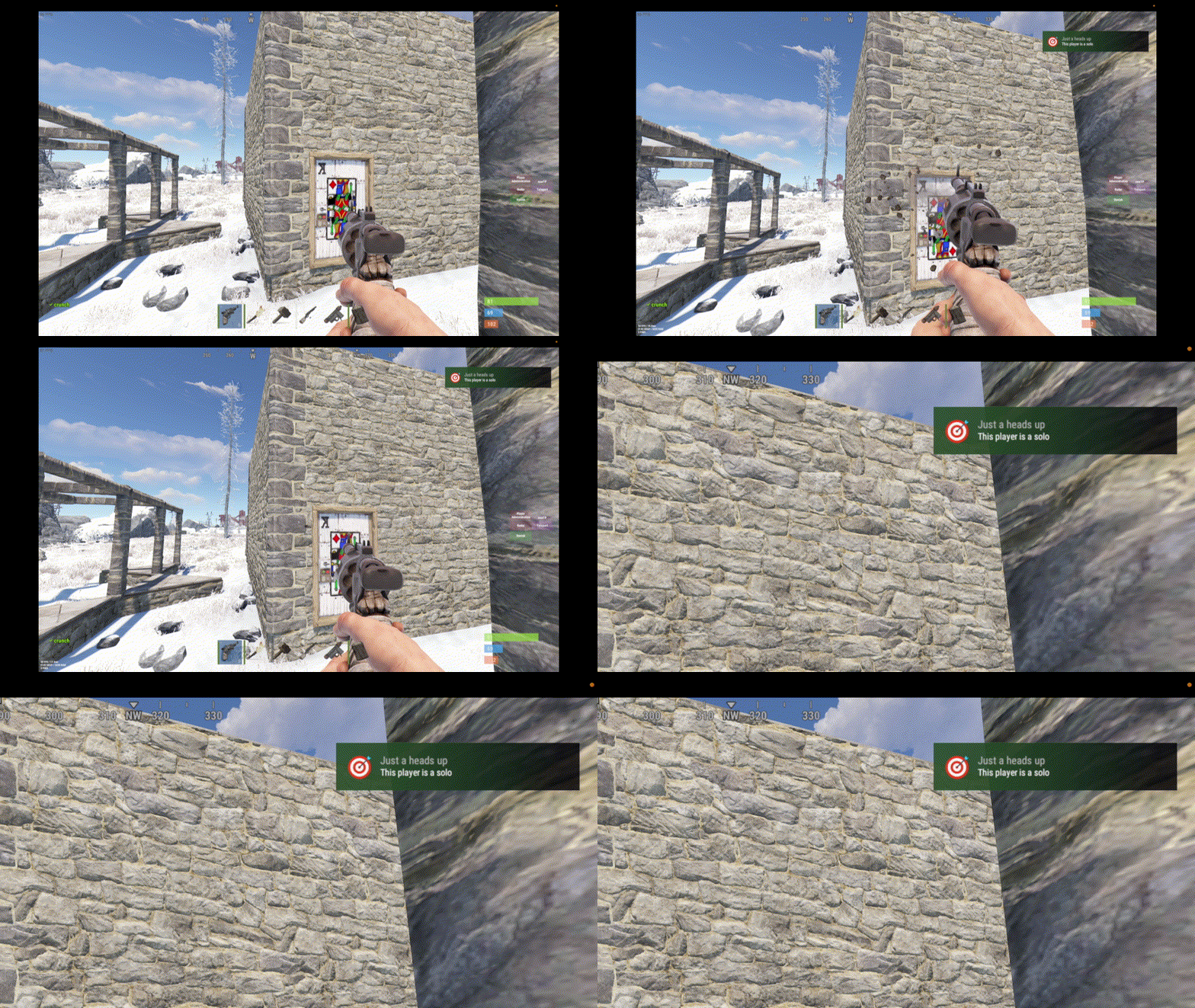
    This is a simple plugin that will notify a player if the base they hit/shoot/damage is owned by a solo player. Often it can be obvious if the player is solo if they're using a key lock, but if they decide to use code locks, or you're using a plugin like Automatic Authorization then it's not always possible to tell. Some players would rather not raid a solo because either: They don't think it'll be worth it They're nice and would rather leave the poor solo's alone (let's face it, it's 1) Optional dependencies: UINotify Notify How does it work? When a player damages a part of a base (wall, door, foundation etc) the plugin will check if the player is solo, and if so pop up the notification. The same player won’t be notified again within the time set in the config. If the attacker owns the prefab, or is authed on the tc, they are ignored. If the base is decaying, it is ignored. Config example "Cooldown time after attack": 300. (When a player is notified, how long to wait until they can be notified again) "Message to attacker": "This player is a solo" (message that will be shown to the attacker in chat or via UINotify) "Log to console when player notified": true (for the server owner to see when a player has been notified) "UINotify Type (see https://umod.org/plugins/ui-notify)": 1 (UINotify specific, and determines which message number to use) "Prefabs to check": [ (a list of prefabs that will trigger a notification when hit. These can be considered a wildcard, so door.hinged includes door.hinged.wood, door.hinged.metal etc) "door.hinged", "door.double.hinged", "window.bars", "floor.ladder.hatch", "floor.frame", "wall.frame", "shutter", "wall.external", "gates.external" ] UINotify Config example This is an example of the UINotify Type section where you would choose the icon, title, color etc of the popup. This is not required if you just want the chat message instead. "Notifications (type - settings)": { "1": { "Background Color": { "HEX": "#000000", "Opacity (0 - 100)": 98.0 }, "Enable Gradient?": true, "Gradient Color": { "HEX": "#90EE90", "Opacity (0 - 100)": 35.0 }, "Sprite": "assets/content/ui/ui.background.transparent.linearltr.tga", "Material": "Assets/Icons/IconMaterial.mat", "Icon Color": { "HEX": "#90EE90", "Opacity (0 - 100)": 100.0 }, "Icon Text": "X", "Icon Text Color": { "HEX": "#FFFFFF", "Opacity (0 - 100)": 100.0 }, "Title Key (lang)": "Just a heads up", "Title Color": { "HEX": "#FFFFFF", "Opacity (0 - 100)": 50.0 }, "Text Color": { "HEX": "#FFFFFF", "Opacity (0 - 100)": 100.0 }, "Fade Out": 1.0, "Fade In": 0.1, "Sound Effect (empty - disable)": "assets/bundled/prefabs/fx/notice/item.select.fx.prefab", "Image Settings": { "Enabled": true, "Image": "https://i.imgur.com/vfOfdU9.png", "AnchorMin": "0 0", "AnchorMax": "0 0", "OffsetMin": "12.5 12.5", "OffsetMax": "37.5 37.5" } }
    Free
  14. crunch

    Player Ranks

    Not sure if it's just my server, but landmines have had a bit of a resurgence Any chance of adding something like "landmines stepped on", or "times exploded" or something like that?
  15. Ok if any other poor soul happens across this, apparently it's just part of the game, something to do with missions.
  16. I've just noticed this in my console as well... it's super sporadic, only shows up really randomly
  17. crunch

    Player Ranks

    Brilliant, thanks, looking forward to it
  18. crunch

    Player Ranks

    Ooh, it was not happy: SaveLeaderboard Failed to call hook 'SaveBoard' on plugin 'PlayerRanks v2.1.9' (NullReferenceException: Object reference not set to an instance of an object) at Oxide.Plugins.PlayerRanks.SaveBoard (ConsoleSystem+Arg arg) [0x00007] in <e810bdb5526b4b5b9babdeec6dc58951>:0 at Oxide.Plugins.PlayerRanks.DirectCallHook (System.String name, System.Object& ret, System.Object[] args) [0x0173d] in <e810bdb5526b4b5b9babdeec6dc58951>:0 at Oxide.Plugins.CSharpPlugin.InvokeMethod (Oxide.Core.Plugins.HookMethod method, System.Object[] args) [0x00079] in <e23ba2c0f246426296d81c842cbda3af>:0 at Oxide.Core.Plugins.CSPlugin.OnCallHook (System.String name, System.Object[] args) [0x000d8] in <50629aa0e75d4126b345d8d9d64da28d>:0 at Oxide.Core.Plugins.Plugin.CallHook (System.String hook, System.Object[] args) [0x00060] in <50629aa0e75d4126b345d8d9d64da28d>:0
  19. crunch

    Player Ranks

    Sorry one more thing (for now :D), I think this has come up before, but would it be possible to get the "create leaderboard" function as a console command? It'd be suuuper handy for automating it for displaying the data on websites etc
  20. There's a BP share plugin out there already, but it's just missing one useful feature to prevent abuse. Ideally I'd like it to revert a user back to only have the BP's they've learned themselves if they leave the team. So if they're in a team, they share their BP's as usual. If they leave, they lose all shared BP's and just go back to the default Rust behaviour of keeping whatever they've learned themselves. Thanks!
  21. crunch

    XInfoMenu

    Right. Ok, well for anyone else trying to decipher this thing, you can change the text color and font size for text items in the lang file with the following tags: "RULES2.1": "<size=30>SERVER RULES</size>", "RULES2.2": "<color=#00BFFF>1.</color> No Griefing",
  22. crunch

    XInfoMenu

    Ok, but that's just the default configuration, aside from the images you've used. It'd be extremely helpful to have an example config that matches the one in your images, as adding each block of text and moving them around into position takes forever, and you have to reload the plugin every time you make a change to see if it's how you want it. Your example is, I imagine, how a lot of people would set theirs up and it would give a much easier base to work with to see how it all works. I'm sure it's easy for you, as you built it, but for a newcomer to it it's quite daunting.
  23. crunch

    XInfoMenu

    Hi, would it be possible to get an example of your config from the gif image? Would be helpful for getting the various text positions right without a lot of trial and error, as well as how to change the size of text for headings etc, as there doesn't seem to be a fontsize option? Thanks!!

About Us

Codefling is the largest marketplace for plugins, maps, tools, and more, making it easy for customers to discover new content and for creators to monetize their work.

Downloads
2.4m
Total downloads
Customers
10.9k
Customers served
Files Sold
156.7k
Marketplace sales
Payments
3.4m
Processed total
×
×
  • Create New...

Important Information

We have placed cookies on your device to help make this website better. You can adjust your cookie settings, otherwise we'll assume you're okay to continue.