


Papa
-
Posts
67 -
Joined
-
Last visited
Content Type
Profiles
Warranty Claims
Downloads
Forums
Store
Services
Downloads Plus Support
DOWNLOADS EXTRA
Reels
Everything posted by Papa
-
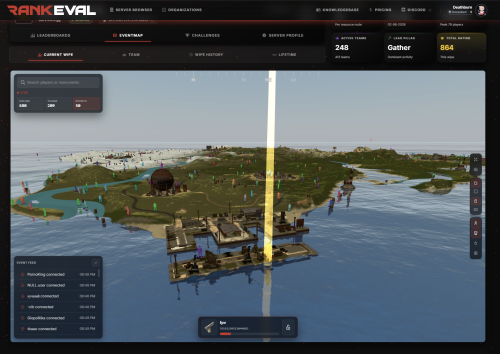 Excellent plugin — a serious upgrade for competitive Rust communities RankEval is one of the most impressive Rust server tools I’ve seen in a long time. It goes far beyond a basic leaderboard plugin and turns player stats into a full competitive ecosystem. The amount of data it tracks is excellent, and the way it presents that information through ranked profiles, leaderboards, wipe snapshots, challenges, stat categories, and 3D/event map analytics gives players a real reason to stay engaged throughout the wipe. For server owners, the control panel and configurable presets make it powerful without requiring constant manual work or custom development. What really stands out is how polished and complete the system feels. Player profiles, rank tiers, weapon mastery, rivalries, live/event map tracking, Discord integration, and server-side tracking all come together in a way that feels professional and modern. It adds meaningful progression and competition without forcing players to install anything client-side. For any Rust community that wants to improve retention, encourage competition, give players more visibility into their performance, and make wipes feel more alive, RankEval is an easy recommendation. Excellent work by the developer — this is the kind of plugin that can genuinely elevate a server.
-
- 1
-

-
- #statistics
- #rankings
- (and 6 more)
-
 An excellent observation and oversight tool that adds context, evidence bundles, and easy retrievability far beyond other demo-based systems.
- 5 comments
-
- 1
-
-
- #anticheat
- #demo
- (and 5 more)
-
 Excellent bot that works exactly as advertised! Highly recommended.
- 7 comments
-
- 1
-
-
- #discordbot
- #python
- (and 7 more)
-
Two Minor Suggestions: 1. Allow multiple VIP roles 2. In the "Map X Locked In" message, include a quick tally of how many total, regular, and VIP votes the non-winning maps get.
- 7 comments
-
- 1
-

-
- #discordbot
- #python
- (and 7 more)
-
 A significant amount of effort has been put into this solution by Deathburn to drive innovation and improvements. Given EAC's performance and effectiveness, AC for Rust is an area ripe for disruption and Galium is doing just that. Galium provides an added layer of detection, automated actions, and analytics that is otherwise missing. The future of the product seems extremely bright, and the current state already bridges a critical gap. I would recommend to other server owners.
- 2 comments
-
- 1
-
-
- #anticheat
- #moderation
- (and 15 more)
-
 This plugin is an impressive combination of clean UI, solving a widespread need in Rust, and functional player-focused features. So far we have not found any bugs. There have been quite a few plugins around the Rust world that have tried to fully implement usergroup title/tag toggling. Well done on solving it!
- 24 comments
-
- 1
-
-
- #title
- #betterchat
- (and 16 more)
-
Really nice work by the team!
-
 Thank you! Just a heads up, I don't believe you upversioned the plugin meta info in the .cs to 1.1.4 - it's flagging as requiring an update in UpdateChecker and other tools since CF shows 1.1.4 but its compiled as 1.1.3
- 22 comments
-
- 1
-
-
- #teamalerts
- #team
- (and 28 more)
-
Loaded plugin Team Tracker v1.1.3 by Whispers88 [216ms] Error while patching hook 'OnTurretAuthorize[022399]' (Invalid IL code in (wrapper dynamic-method) MonoMod.Utils.DynamicMethodDefinition:AutoTurret.AddSelfAuthorize_Patch0 (AutoTurret,BasePlayer): IL_00ad: ret ) at MethodInfo HarmonyLib.PatchFunctions.UpdateWrapper(MethodBase original, PatchInfo patchInfo) at MethodInfo HarmonyLib.PatchProcessor.Patch() at MethodInfo HarmonyLib.Harmony.Patch(MethodBase original, HarmonyMethod prefix, HarmonyMethod postfix, HarmonyMethod transpiler, HarmonyMethod finalizer) at bool Carbon.Hooks.HookEx.ApplyPatch() in /__w/Carbon/Carbon/Carbon.Core/Carbon/src/Hooks/HookEx.cs:line 173 A general error occured while installing 'OnTurretAuthorize[022399]' A hook request for 'OnHealingItemUse[a84db5]' received: - The current status is FAILURE: Signature for 'MedicalTool.GiveEffectsTo' not found - Check for possible errors on the log file A hook request for 'OnPlayerRevive[cb9359]' received: - The current status is FAILURE: Signature for 'MedicalTool.GiveEffectsTo' not found - Check for possible errors on the log file
-
 If you have not already received a solution, please feel free to DM.
 -
 This is a major issue with this release. The high criticality alerts need the player information within the embed. Otherwise it's rather pointless to have a different webhook config for these alerts.
 -
I receive this error when compiling on a server that already has AutoDemoRecord.cs loaded: [SmartSmartAntiTeam] Auto Demo Recorder plugin not found or disabled Running current version of Carbon & ADR Premium
-

Version 1.1.0
190 downloads
Adds admin-only commands to instantly close or open all player-placed doors on the server. Useful after server crashes/hangs when player's bases may be vulnerable if they're unable to immediately rejoin and close their doors. Features Closes or Opens All Player-Placed Doors: Admins can issue a single command to close or open every door on the map placed by a player. Admin-Only Commands: Restricted to players with Rust admin status to ensure no abuse or accidental use. Excludes Static World Doors: Only affects deployable doors placed by players (e.g., wooden, sheet metal, armored). Simple and Lightweight: No configuration file or persistent data. Instant effect with minimal server overhead. Configuration This plugin does not use a configuration file. All logic is hardcoded and designed for immediate use by server admins. Commands Command - Description /closedoors - Closes all open player-placed doors /opendoors - Opens all closed player-placed doors These commands must be run by an authenticated admin (authlevel 2) in chat. Permissions No additional permissions are required. Access is restricted to Rust server admins only. Installation Download the CloseDoors.cs file from the CloseDoors page. Place the file in your RustServer/oxide/plugins directory. Use the command oxide.reload CloseDoors to load the plugin. No configuration is necessary—it's ready to use out of the box. Usage Once installed, admins can run /closedoors or /opendoors from the in-game chat. /closedoors will force-close every player-placed door that is currently open. /opendoors will force-open every player-placed door that is currently closed. These commands will not affect world-placed or static doors (e.g., monument doors or puzzle doors). Troubleshooting If the plugin does not respond to commands: Ensure the plugin was properly placed in the oxide/plugins directory. Check that the plugin loaded successfully using oxide.plugins. Confirm you are logged in as an admin (authlevel 2) when issuing the commands. Use oxide.reload CloseDoors to force a refresh of the plugin. For additional help, view the server console or logs for error messages referencing CloseDoors.cs.Free -
 Excellent system that was very easy to setup for the first time. Discord Raid Alarm uses our already existing API from our linking system to easily handle pairing SteamIDs with the player's corresponding DiscordID to send the DM. The system works flawlessly and the option to self-host or use the multi-tenant bot was very appreciated. Dev is extremely responsive and reached out proactively to make sure everything was working well. 10/10 would recommend!
-
- 1
-
-
- #raid
- #raid alarm
- (and 5 more)
-
I fully agree with the stance in the original post. Plugins created completely by AI where the submitter cannot maintain and support the code themselves should not be allowed. AI-assisted development is fine and should be disclosed if AI has a major fingerprint on the codebase. The AI thumbnails aren't that problematic in my opinion, but some are really low-effort/quality with the trademark garbled AI text/phrases. It would take folks an extra 2-3 minutes to re-generate those to be higher quality or have the text removed.
-
All global chat messages trigger that error in the server console
-
Failed to call internal hook 'OnPlayerChat' on plugin 'ServerPop v1.1.4' [2032160890] (Object reference not set to an instance of an object) at void Oxide.Plugins.ServerPop.OnPlayerChat(BasePlayer player, string message, ChatChannel channel) in /home/container/carbon/plugins/ServerPop.cs:line 550 at object Oxide.Plugins.ServerPop.InternalCallHook(uint hook, object[] args) in ServerPop.cs/Internal:line 112 Failed to call internal hook 'OnPlayerChat' on plugin 'ServerPop v1.1.4' [2032160890] (Object reference not set to an instance of an object) at void Oxide.Plugins.ServerPop.OnPlayerChat(BasePlayer player, string message, ChatChannel channel) in /home/container/carbon/plugins/ServerPop.cs:line 550 at object Oxide.Plugins.ServerPop.InternalCallHook(uint hook, object[] args) in ServerPop.cs/Internal:line 112 Running the latest build of Carbon. The !pop command works fine, but this error is repeated in console frequently. It also appears to have broken the !wipe command which we DO NOT want the plugin to handle, its disabled in config, as we use a BM Trigger for this.
-
 Thank you so much for the update and details. I appreciate the response and all of the hard work behind-the-scenes. Looking forward to it!
- 124 comments
-
- 1
-
-
- #creative rust
- #building
- (and 1 more)
-
Any ETA on the release of 2.0?
- 124 comments
-
- 1
-
-
- #creative rust
- #building
- (and 1 more)
-
Bump
-
Yes both of those files are populated
-
Running fine now, but receiving errors when trying to use commands with the Discord bot: TypeError: Cannot read properties of undefined (reading 'Id') at /home/container/src/commands/vendingSearch.js:41:110 at Array.find (<anonymous>) at /home/container/src/commands/vendingSearch.js:41:72 at Array.filter (<anonymous>) at Object.run (/home/container/src/commands/vendingSearch.js:41:43) at Client.<anonymous> (/home/container/src/backend/establishConnection.js:49:21) at Client.emit (node:events:517:28) at InteractionCreateAction.handle (/home/container/node_modules/discord.js/src/client/actions/InteractionCreate.js:97:12) at module.exports [as INTERACTION_CREATE] (/home/container/node_modules/discord.js/src/client/websocket/handlers/INTERACTION_CREATE.js:4:36) at WebSocketManager.handlePacket (/home/container/node_modules/discord.js/src/client/websocket/WebSocketManager.js:354:31)
-
Took you a whole 5 minutes to reply with the correct solution! Worked like a charm, thanks Amino!
-
:/home/container$ node /home/container/index.js node:internal/modules/cjs/loader:1460 return process.dlopen(module, path.toNamespacedPath(filename)); ^ Error: /home/container/node_modules/canvas/build/Release/canvas.node: invalid ELF header at Module._extensions..node (node:internal/modules/cjs/loader:1460:18) at Module.load (node:internal/modules/cjs/loader:1203:32) at Module._load (node:internal/modules/cjs/loader:1019:12) at Module.require (node:internal/modules/cjs/loader:1231:19) at require (node:internal/modules/helpers:177:18) at Object.<anonymous> (/home/container/node_modules/canvas/lib/bindings.js:3:18) at Module._compile (node:internal/modules/cjs/loader:1364:14) at Module._extensions..js (node:internal/modules/cjs/loader:1422:10) at Module.load (node:internal/modules/cjs/loader:1203:32) at Module._load (node:internal/modules/cjs/loader:1019:12) { code: 'ERR_DLOPEN_FAILED' }
-
 We are currently this map for the launch of our Duo Vanilla server after the community voted for it. It's actual the first custom map in the history of Lone Wolf Rust. The feedback so far has been amazing both from players that have only ever played procgen AND veteran custom map players. Balanced, easily navigable, points of interest are spaced evenly and symmetrically. @Bxrflip says in the description "This map was designed from the ground up for people who love Rust.". Believe them, love was put into this one.
- 15 comments
-
- 2
-
-
- #custom procedural
- #custom cliffs
- (and 3 more)