




About Title Selector
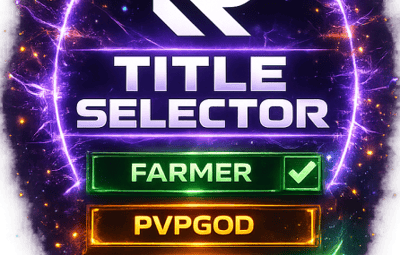
TITLE SELECTOR
Customize Chat Titles Without Losing Permission Groups
by romzar.games
Description
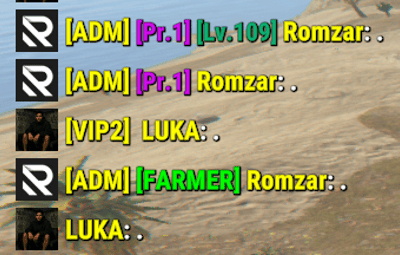
TitleSelector provides an intuitive UI for players to select, hide, or show their chat titles from BetterChat. It also integrates seamlessly with SkillTree, giving players independent control over their Level and Prestige indicators. Players can customize which titles appear in chat without losing their permission groups.
Key Features
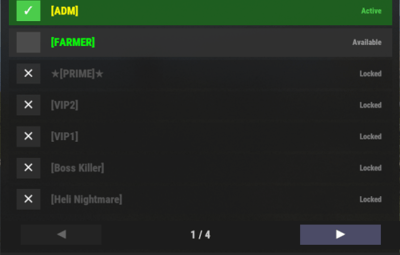
- Visual Title Selection — Clean modal UI with green/gray/orange/locked states
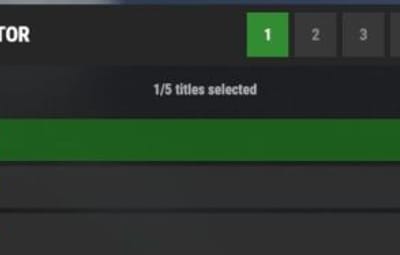
- Title Presets — 5 slots, quick-switch via buttons or keybinds
- Collectible Display — Shows locked titles players can work towards
- SkillTree Integration — Independent toggle for Level/Prestige indicators
- Hide All Option — One-click hide all titles, keep SkillTree/Clan visible
- Clan Tag Preservation — Clan tags always visible, even with Hide All
- Emoji Toggle — Hide emoji-only titles or strip emojis from mixed titles
- Permission-Based Title Limits — Different max titles per group/VIP tier
- Title Exclusion System — Prevent conflicting titles simultaneously
- Pagination — Handles large title collections with configurable pages
- Multi-language Support — Fully translatable via Oxide lang system
- Persistent Data — Auto-saved per-player, survives restarts/reloads
- BetterChatGradients Support — Native gradient color support
Installation
-
Upload
TitleSelector.cstooxide/plugins/orcarbon/plugins/ - Ensure BetterChat is installed and configured
-
Grant permission:
o.grant group default titleselector.use -
Reload the plugin if needed:
o.reload TitleSelector - (Optional) Customize the config and lang files
Dependencies
Required:
- BetterChat — hooks into BetterChat to modify title display
Optional:
- SkillTree — toggle Level/Prestige visibility
- Clans (Reborn) — clan tags forced visible
- BetterChatGradients — gradient colors render natively
Permissions
-
titleselector.use— Access to the title selector UI -
titleselector.default— Grants "default" max title limit (default: 3) -
titleselector.vip1— Grants "vip1" max title limit (default: 4) -
titleselector.vip2— Grants "vip2" max title limit (default: 5)
Permission names match keys in "Max titles per permission" config. Player gets the HIGHEST limit from all matching permissions.
Permission Examples:
# Grant to all players
o.grant group default titleselector.use
o.grant group default titleselector.default

# Grant VIP tiers
o.grant group vip titleselector.vip1
o.grant group vip+ titleselector.vip2

# Grant to specific player
o.grant user PlayerName titleselector.use
o.grant user 76561198000000000 titleselector.use
Commands
-
/title— Opens the Title Selector UI (main command) -
/titulo— Alternative command (configurable) -
/titulos— Alternative command (configurable) -
/titlepreset <1-5>— Switch to a specific preset -
titleselector.preset <1-5>— Console/bind command for preset switching
Configuration
File: oxide/config/TitleSelector.json or carbon/configs/TitleSelector.json
{
  "Allow hide all titles": true,
  "Allow toggle SkillTree (level + prestige)": true,
  "Allow toggle emoji titles": true,
  "Force show clan tags (Clans)": false,
  "Emoji patterns (regex)": [
    "\\s*:\\w+:\\s*"
  ],
  "Extra patterns (regex) - applied with emoji toggle": [
    "\\s*\\[#[\\w,\\s#]+\\]\\[\\+\\d+\\]\\s*:\\w+:\\s*\\[/\\+\\]\\[/#\\]\\s*",
    "\\s*\\[#[\\w,\\s#]+\\]\\s*:\\w+:\\s*\\[/#\\]\\s*",
    "\\s*<color=[^>]*>:\\w+:</color>\\s*"
  ],
  "Max titles per permission": {
    "default": 3,
    "master1": 4,
    "master2": 4,
    "master3": 5,
    "fullmaster": 5
  },
  "Default max titles (no permission)": 2,
  "Main command": "title",
  "Alternative commands": [
    "titulo",
    "titulos"
  ],
  "Ignored groups (hidden from UI)": [
    "default",
    "player",
    "guest"
  ],
  "Permanent groups (always shown)": [
    "admin"
  ],
  "Title exclusion groups (mutual exclusion)": [
    [
      "master1",
      "master2",
      "master3",
      "master4",
      "master5"
    ],
    [
      "bradleymaster1",
      "bradleymaster2"
    ],
    [
      "helimaster1",
      "helimaster2"
    ]
  ],
  "Items per page": 8,
  "UI - Background color": "0.1 0.1 0.1 0.95",
  "UI - Header color": "0.15 0.15 0.15 1",
  "UI - Available item color": "0.2 0.2 0.2 0.9",
  "UI - Locked item color": "0.12 0.12 0.12 0.7",
  "UI - Selected item color": "0.1 0.4 0.1 0.9",
  "UI - Close button color": "0.8 0.2 0.2 1",
  "UI - Active checkbox color": "0.3 0.8 0.3 1",
  "UI - Restricted item color": "0.35 0.25 0.1 0.9",
  "UI - Inactive checkbox color": "0.3 0.3 0.3 1",
  "UI - Edit mode button color": "0.4 0.35 0.15 1",
  "UI - Edit mode active color": "0.6 0.5 0.1 1",
  "Max preset name length": 16,
  "PlayerRanks integration": {
    "Enable PlayerRanks titles (requires AddTitleHoldersToGroup=true in PlayerRanks)": false,
    "Title color (hex)": "#FFD700",
    "Title size": 15,
    "Title prefix": "",
    "Title suffix": "",
    "Priority (lower = higher in list)": 500,
    "Suppress PlayerRanks third-party title in chat (recommended: also set MaxDisplayedTitles=0 in PlayerRanks)": true,
    "Refresh interval (seconds)": 60.0
  },
  "UltimateLeaderboard integration": {
    "Enable UltimateLeaderboard titles (requires 'Custom Titles' enabled in UltimateLeaderboard)": true,
    "Title color (hex)": "#7FFFD4",
    "Title size": 15,
    "Title prefix": "",
    "Title suffix": "",
    "Base priority (lower = higher in list; each title adds its own UltimateLeaderboard priority)": 600,
    "Suppress UltimateLeaderboard third-party title in chat (recommended: keeps only the titles the player selected)": true,
    "Refresh interval (seconds)": 60.0
  },
  "Title categories (filter dropdown) - group: [titles]": {
    "VIP": [
      "vip1",
      "vip2",
      "vip3",
      "vip_diamond"
    ],
    "Mestres": [
      "master1",
      "master2",
      "master3",
      "master4",
      "master5",
      "fullmaster"
    ],
    "Bradley": [
      "bradleyeasy",
      "bradleymedium",
      "bradleyhard",
      "bradleyexpert",
      "bradleyelite",
      "bradleynightmare",
      "bradleyinferno",
      "bradleyarmageddon",
      "bradleyapocalipse",
      "bradleyromzar",
      "bradleymaster1",
      "bradleymaster2"
    ],
    "Heli": [
      "helieasy",
      "helimedium",
      "helihard",
      "heliexpert",
      "helielite",
      "helinightmare",
      "heliinferno",
      "heliarmageddon",
      "heliultimato",
      "heliapocalipse",
      "helimaster1",
      "helimaster2"
    ],
    "Raid": [
      "raideasy",
      "raidmedium",
      "raidhard",
      "raidexpert",
      "raidnightmare"
    ],
    "Conquistas": [
      "bosskiller",
      "npcslayer",
      "dgmaster2",
      "semigod",
      "explorer",
      "tryhard"
    ],
    "Profissoes": [
      "farmer",
      "wildhunter",
      "rareminer",
      "fisherman"
    ],
    "Ranking": [
      "king",
      "prince",
      "noble",
      "admin"
    ],
    "Comunidade": [
      "discord",
      "legacy",
      "mentorado"
    ],
    "Temporadas": [
      "season012026",
      "season022026",
      "season032026",
      "season042026",
      "season052026"
    ]
  }
}
Configuration Options:
- Allow hide all titles — Enable/disable the "Hide All" button
- Allow toggle SkillTree — Enable/disable SkillTree toggle
- Allow toggle emoji titles — Enable/disable Emoji toggle
- Force show clan tags — Keep clan tags visible when hiding
- Emoji/Extra patterns — Regex patterns for emoji detection
- Max titles per permission — Named permission entries with limits
- Default max titles — Fallback when no permission matches
- Main/Alternative commands — Chat commands to open UI
- Ignored groups — BetterChat groups hidden from UI
- Permanent groups — Always-displayed groups
- Title exclusion groups — Mutually exclusive title lists
- Items per page — Titles per page in UI
- UI colors — Customize interface appearance
Title Exclusion System
Prevents conflicting titles from being active simultaneously.
{
  "Title exclusion groups (mutual exclusion)": [
    ["vip", "mvp", "elite"],
    ["admin", "moderator"]
  ]
}
- A player cannot have "vip" and "mvp" active simultaneously
- Selecting "mvp" when "vip" is active auto-deselects "vip"
- Player receives a chat notification about the conflict
- Restricted titles show in orange in the UI
Title Presets
Players can save up to 5 different title configurations:
- Each preset stores: selected titles, hide all, emoji toggle, skilltree toggle
- Switch via numbered buttons (1-5) in the UI header
- Active preset highlighted in green
-
Chat:
/titlepreset 3 -
Keybind:
bind f5 titleselector.preset 1 - Hook events fire for changed titles when switching
How It Works
-
Player with
titleselector.usepermission types/title - UI opens showing all available titles
- Titles organized by status: Active (green) | Available (gray) | Restricted (orange) | Locked
- Click titles to enable/disable them
- Use preset buttons (1-5) to save/switch configurations
- When no titles selected, BetterChat displays by priority
- Preferences saved automatically
Title States
- Available — Player owns it, interactive checkbox, click to toggle
- Selected — Green checkbox, displays in chat
- Restricted — Orange indicator, conflicts with selected title
- Locked — Collectible/goal, locked icon, cannot select
SkillTree Integration
- Toggle button in the Filters row of the UI
-
Controls Level
[Lv.X]and Prestige[Pr.X]visibility -
Uses
skilltree.notitlespermission internally
Emoji Toggle
-
Controls emoji-only titles (
:coffeecan:,
- Strips emojis from mixed titles (e.g., "Admin :star:" becomes "Admin")
- Works with selected titles and Hide All mode
- Extra patterns applied when emoji toggle is OFF
Gradient Collors Support
- Gradient colors render correctly when selecting titles
-
Supports hex colors:
#ff0000,#00ff00,#0000ff - Supports named colors: red, green, blue, yellow, orange, purple, pink, cyan, white, black, gray, gold, silver
-
Multi-color gradients:
red,orange,yellow,green - No additional configuration required
Clan Tag Preservation
- Clan tags remain visible even with "Hide All"
- Don't count towards max title limit
- Prevents hiding clan identity on solo/trio servers
- Requires Clans Reborn plugin
Hide All Feature
- One-click hide all BetterChat titles
- Respects SkillTree and Emoji toggle settings
- Clan tags preserved when configured
- "Show All" button reverses the action
Player Workflow
-
Type
/titleto open the UI - Browse titles using pagination
- Click checkboxes to select titles (up to max limit)
- Toggle SkillTree/Emoji visibility
- Use "Hide All" for quick hiding
- Save configurations using presets (1-5)
- Close UI — preferences saved automatically
Admin Workflow
- Install plugin with BetterChat dependency
- Configure ignored groups
- Set up permission-based max titles
- Configure exclusion groups if needed
- Set permanent groups
- Customize UI colors
- Grant permissions to groups
- Translate lang file if needed
API Methods
-
API_GetSelectedTitles(string odId)— ReturnsList<string>of selected titles -
API_IsHidingTitles(string odId)— Returnsboolhide status -
API_SetSelectedTitles(string odId, List<string> titles)— Set titles programmatically -
API_RefreshTitles()— Refresh title cache after config changes
Developer Hooks
-
OnTitleSelected(BasePlayer player, string groupName)— Fires on select and preset switch -
OnTitleDeselected(BasePlayer player, string groupName)— Fires on deselect, exclusion, and preset switch -
OnTitlesCleared(BasePlayer player, List<string> previousTitles)— Fires on Clear button
API Usage Example
[PluginReference] private Plugin TitleSelector;

void Example(BasePlayer player)
{
    var titles = TitleSelector?.Call<List<string>>(
        "API_GetSelectedTitles", player.UserIDString);

    var isHiding = TitleSelector?.Call<bool>(
        "API_IsHidingTitles", player.UserIDString) ?? false;

    TitleSelector?.Call("API_SetSelectedTitles",
        player.UserIDString, new List<string> { "vip", "donator" });

    TitleSelector?.Call("API_RefreshTitles");
}
Localization
File: oxide/lang/en/TitleSelector.json or carbon/lang/en/TitleSelector.json
{
  "NoPermission": "<color=#ff5555>You do not have permission.</color>",
  "BetterChatNotLoaded": "<color=#ff5555>BetterChat is not loaded!</color>",
  "TitleLocked": "<color=#ff5555>You do not own this title!</color>",
  "MaxTitlesReached": "<color=#ff5555>Maximum of {max} titles reached!</color>",
  "UITitle": "TITLE SELECTOR",
  "UIStatusHidden": "All titles are hidden",
  "UIStatusDefault": "Showing default titles (by priority)",
  "UIStatusSelected": "{count}/{max} titles selected",
  "UILocked": "Locked",
  "UISelected": "Active",
  "UIAvailable": "Available",
  "UIRestricted": "Restricted",
  "UIClear": "Clear",
  "UIHideAll": "Hide All",
  "UIShowAll": "Show All",
  "UIClose": "Close",
  "PresetSwitched": "<color=#55ff55>Preset {num} activated!</color>",
  "TitleExclusionRemoved": "<color=#ffaa55>Title removed (conflicts).</color>"
}
Troubleshooting
-
UI not opening? — Check
titleselector.usepermission - Titles not showing in chat? — Ensure BetterChat is loaded
- SkillTree toggles missing? — Install SkillTree + enable in config
- Titles missing from UI? — Check "Ignored groups" config
- Can't select more titles? — Max limit reached, check permissions
- Changes not saving? — Check data folder permissions
- Emoji toggle not working? — Enable in config
- Gradients broken? — Ensure hex colors are right
- Title shows "Restricted"? — Conflicts with selected title (exclusion groups)
-
Preset not switching? — Needs
titleselector.usepermission
Performance
- Lightweight and optimized
- Per-player data files with lazy loading
- UI rendered on-demand only
- Safe for high-population servers
Compatibility
- Requires BetterChat (mandatory)
- Optional: SkillTree, Clans
- Works with Oxide and Carbon
- No conflicts with other chat plugins
Use Cases
- VIP Customization — Let VIP players customize chat appearance
- VIP Tiers — Different limits per donation level
- Roleplay Servers — Choose titles that fit character
- Clean Chat — Minimalist players hide all titles
- Quick Switching — Presets for instant config swaps
- Exclusive Ranks — Exclusion groups prevent conflicts
- Clan Identity — Force clan tags for accountability
- Gradient Titles — Beautiful color gradients
- Collectibles — Motivate players to unlock titles
UltimateLeaderboard Integration
Leaderboard titles ([Hunter], [Killer], ...) become selectable entries in the
title menu, so players choose which one to display instead of having them all
forced into chat.
## Setup
**1. UltimateLeaderboard config** (`UltimateLeaderboard.json`)
```json
"Custom Titles": {
"Enabled": true,
"Working with BetterChat?": true,
"Max Titles": 5
}
2. TitleSelector config (TitleSelector.json)
"UltimateLeaderboard integration": {
"Enable UltimateLeaderboard titles ...": true
}
Reload both plugins. Titles are read straight from UltimateLeaderboard's config —
nothing to duplicate.
Set Max Titles to the number of titles you have
This is the one setting that decides whether the integration is worth anything.
Max Titles limits how many titles a player owns, not how many are shown.
Left at the default 1, a player only ever owns the highest-priority title —
every other title stays locked, and there is nothing to choose from.
Set it to the number of titles in your list. Players then own everything they
earned, and TitleSelector controls what actually appears in chat (using its own
titleselector.max.* permissions).
Expect a delay
Titles are only recalculated when UltimateLeaderboard finishes a leaderboard
cache cycle. With the default Leaderboard Cache Interval of 600, a player who
takes first place waits up to 10 minutes.
Do not drop that interval to a very low value to compensate — each cycle aborts
the one still running, so on a populated server the cycle never completes and
titles stop being assigned entirely. 300–600 is a safe range.
Grouping them in the filter
Leaderboard titles work with the category dropdown like any other title:
"Title categories (filter dropdown) - group: [titles]": {
"Leaderboard": [ "ul_Hunter", "ul_Builder", "ul_Gatherer", "ul_Killer" ],
"Ranks": [ "vip", "vip2" ]
}
© 2025-2026 romzar.games — All rights reserved.
Thank you for using Title Selector! Give your players control over their chat identity!