




About Better Fish Trap
Overview
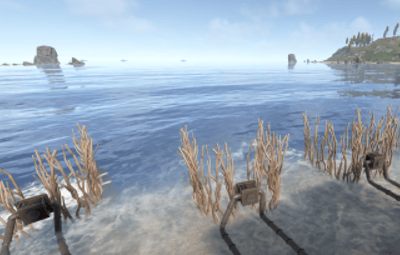
Better Fish Trap transforms the survival fish trap into a fully automated fishing station. It automatically attaches an Industrial Storage Adaptor to every fish trap placed on your server, making them compatible with the industrial conveyor system. Fish caught by the trap can be automatically routed through conveyor belts to furnaces, storage boxes, or any other industrial destination -- no manual looting required.
Beyond automation, the plugin includes three independent systems that work together: health protection to prevent traps from breaking, configurable fishing speed tiers based on permissions, and a full upgrade system where players spend currency to permanently improve individual traps, with independent 15-level speed and yield ladders. Each system can be enabled or disabled independently.
Features
Industrial Storage Adaptor Integration
- Automatically spawns a storage adaptor as a child entity of every survival fish trap
- Works with all industrial entities: conveyor belts, industrial splitters, industrial combiners
- Adaptor position and rotation are fully configurable to fit your server's aesthetic
- Existing adaptors are detected on server restart -- no duplicates created
- Adaptor inherits the fish trap owner's ID for authorization
Health Protection (3 Modes)
Fish traps take decay damage every time they catch a fish. This system prevents traps from breaking:
- Mode 1 - Prevent Damage: Saves the trap's health before damage is applied and restores it on the next tick. The trap briefly shows reduced health but recovers instantly.
- Mode 2 - Heal After Catch: Saves health and schedules a heal. Supports instant heal or a configurable delay in seconds.
- Mode 3 - Block Decay Damage: Completely blocks all decay-type damage to managed fish traps. Best performance -- the damage event is cancelled before any processing. This is the default and recommended mode.
Fishing Speed Control (Permission-Based)
Control how fast fish traps catch fish through a tiered permission system:
- The vanilla tick rate is 60 seconds per catch attempt
- Define unlimited custom tiers, each with its own tick rate, priority, and display name
- Players receive the speed from their highest-priority tier
- Players without any speed permission use the configurable default tick rate
- Tiers are fully customizable: add, remove, or rename as needed
Default tiers included:
| Tier | Permission | Tick Rate | Priority |
|---|---|---|---|
| VIP | betterfishtrap.speed.vip | 40s | 1 |
| Premium | betterfishtrap.speed.premium | 30s | 2 |
| Elite | betterfishtrap.speed.elite | 20s | 3 |
| Admin | betterfishtrap.speed.admin | 10s | 999 |
Upgrade System
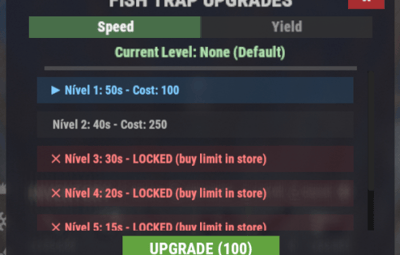
Players can upgrade individual fish traps through an in-game UI to improve their tick rate. This system is independent from the permission-based speed tiers -- upgrades take priority over permissions when present.
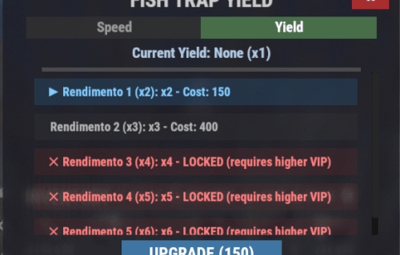
- 15 speed levels and 15 yield levels by default, fully configurable (add more or fewer). Speed changes how often a catch fires (2s floor); yield multiplies how much fish comes out per catch (up to x16) -- the two are independent and stack.
- Level caps: both ladders are capped by plan (No VIP through VIP 3). Levels above a player's cap render in red with a ✕ and can't be purchased
- 3 currency options: in-game items (scrap by default, supports custom items with skin ID), Economics, or ServerRewards
- Keep Attributes: When enabled, picking up an upgraded fish trap preserves its upgrade level. Placing it again restores the upgrade. Upgraded traps cannot stack with non-upgraded traps or traps of different levels.
- Access control: Restrict upgrades to the owner only, teammates/clanmates only, or allow anyone with the permission
- Clan integration: When "Only Teammates" is enabled, the plugin checks both native Rust teams AND the Clans plugin for membership and alliances
- Visual feedback: Configurable upgrade effect plays on each upgrade (default: stone upgrade sound)
- Full UI: Upgrade button and status indicator appear when looting a managed fish trap. A detailed modal shows all levels, current progress, costs, and the upgrade button.
Speed and yield upgrade levels (default config, 15 levels each):
| Level | Tick Rate | Yield Multiplier |
|---|---|---|
| 1 | 50s | x2 |
| 2 | 40s | x3 |
| 3 | 30s | x4 |
| 4 | 20s | x5 |
| 5 | 15s | x6 |
| 6 | 10s | x7 |
| 7 | 8s | x8 |
| 8 | 6s | x9 |
| 9 | 4s | x10 |
| 10 | 3s | x11 |
| 11 | 2.8s | x12 |
| 12 | 2.6s | x13 |
| 13 | 2.4s | x14 |
| 14 | 2.2s | x15 |
| 15 (MAX) | 2s | x16 |
Entry cost is 100 scrap for speed level 1 (60s -> 50s) and 150 scrap for yield level 1 (x1 -> x2). The last level of each ladder costs 450,000 scrap (speed) and 61,000 scrap (yield) respectively. Costs scale progressively between those two points -- see your config/BetterFishTrap.json after first load for the exact per-level values, which are fully editable.
Level caps by plan:
| Plan | Speed cap | Yield cap |
|---|---|---|
| No VIP | 30s (lvl 3) | x4 (lvl 3) |
| VIP 1 | 15s (lvl 5) | x6 (lvl 5) |
| VIP 2 | 8s (lvl 7) | x8 (lvl 7) |
| Diamond | 3s (lvl 10) | x11 (lvl 10) |
| VIP 3 | 2s (lvl 15) | x16 (lvl 15) |
Levels above a player's cap are shown in the upgrade menu but can't be purchased. Speed and yield are capped independently, though by default both use the same tier thresholds. Throughput relative to a stock trap (60s / x1): a no-VIP trap maxed at its cap (30s, x4) is 8x; a VIP 3 trap maxed on both ladders (2s, x16) is 480x.
Admin Tools
- Reset command: Removes all existing adaptors and reattaches them cleanly, reapplying all fishing speeds
- Toggle command: Instantly disable/enable the upgrade system server-wide for testing or performance debugging. When disabled, all traps revert to vanilla 60s tick rate. When re-enabled, all upgrades and permissions are reapplied.
Permissions
| Permission | Description |
|---|---|
| betterfishtrap.use | Required for fish traps to receive a storage adaptor. Grant to all players or specific groups. |
| betterfishtrap.admin | Access to admin commands (reset, toggle). |
| betterfishtrap.upgrade | Access to the upgrade UI and ability to upgrade traps. |
| betterfishtrap.speed. | Grants the player a specific fishing speed tier. Replace with the tier name defined in config (e.g., vip, premium, elite, admin). |
Commands
Chat Commands
| Command | Permission | Description |
|---|---|---|
| /fishtrap.reset | admin | Removes all adaptors and reattaches them to every fish trap on the server. Reapplies fishing speeds. |
| /fishtrap.toggle | admin | Toggles the upgrade system on/off server-wide. Useful for testing or debugging performance. |
Console Commands
| Command | Description |
|---|---|
| fishtrap.reset | Same as chat command, usable from server console or RCON. |
| fishtrap.toggle | Same as chat command, usable from server console or RCON. |
Configuration
Located at config/BetterFishTrap.json after first load.
{
  "Enabled": true,
  "AdaptorPosition": {
    "x": 0.0,
    "y": 0.5,
    "z": -0.8
  },
  "AdaptorRotation": {
    "x": -90.0,
    "y": 0.0,
    "z": 0.0
  },
  "Health Protection Settings": {
    "Enable Health Protection": true,
    "Protection Mode (1=Prevent Damage, 2=Restore Health, 3=Block Decay Damage)": 3,
    "Instant Heal (Mode 2 only)": true,
    "Heal Delay Seconds (Mode 2, if not instant)": 0.5
  },
  "Fishing Speed Settings": {
    "Enable Fishing Speed Modification": true,
    "Default Tick Rate (seconds) - Used when player has no speed permission": 60.0,
    "Speed Tiers - Permission: betterfishtrap.speed.{tier_name}": {
      "vip": {
        "Tick Rate (seconds)": 40.0,
        "Priority (higher = applied first if player has multiple)": 1,
        "Display Name": "VIP"
      }
    },
    "Info": "Vanilla tick rate is 60s. Lower = faster fishing. Players get highest priority tier they have permission for."
  },
  "Upgrade System Settings": {
    "Enable Upgrade System": true,
    "Currency Type (0 - Scrap | 1 - Economics | 2 - Server Rewards)": 0,
    "Currency Item (if type is 0)": {
      "Short Name": "scrap",
      "Skin ID": 0
    },
    "Keep Attributes When Removing": true,
    "Owner Only Can Upgrade": false,
    "Only Teammates Can Upgrade": true,
    "Upgrade Effect (empty = disabled)": "assets/bundled/prefabs/fx/build/promote_stone.prefab",
    "Tick Rate Upgrades": [
      {
        "Cost": 100,
        "Tick Rate (seconds)": 50.0,
        "Display Name": "Nível 1"
      },
      {
        "Cost": 250,
        "Tick Rate (seconds)": 40.0,
        "Display Name": "Nível 2"
      },
      {
        "Cost": 500,
        "Tick Rate (seconds)": 30.0,
        "Display Name": "Nível 3"
      },
      {
        "Cost": 1000,
        "Tick Rate (seconds)": 20.0,
        "Display Name": "Nível 4"
      },
      {
        "Cost": 2000,
        "Tick Rate (seconds)": 15.0,
        "Display Name": "Nível 5"
      },
      {
        "Cost": 5000,
        "Tick Rate (seconds)": 10.0,
        "Display Name": "Nível 6 (MAX)"
      }
    ],
    "Fish Yield Upgrades": [
      {
        "Cost": 150,
        "Multiplier": 2,
        "Display Name": "Rendimento 1 (x2)"
      },
      {
        "Cost": 400,
        "Multiplier": 3,
        "Display Name": "Rendimento 2 (x3)"
      },
      {
        "Cost": 1000,
        "Multiplier": 4,
        "Display Name": "Rendimento 3 (x4)"
      },
      {
        "Cost": 2500,
        "Multiplier": 5,
        "Display Name": "Rendimento 4 (x5)"
      },
      {
        "Cost": 4000,
        "Multiplier": 6,
        "Display Name": "Rendimento 5 (x6)"
      },
      {
        "Cost": 6000,
        "Multiplier": 7,
        "Display Name": "Rendimento 6 (x7)"
      }
    ],
    "Fish Yield Permission Tiers (betterfishtrap.yield.{tier} => Max Yield Level)": {
      "vip1": 3,
      "vip2": 4,
      "vip_diamond": 5,
      "vip3": 6,
      "admin": 999
    },
    "Default Base Yield Level (vip0 - yield cap for players with no VIP tier)": 2,
    "Speed Permission Tiers (betterfishtrap.speed.{tier} => Max Speed Level)": {
      "vip1": 3,
      "vip2": 4,
      "vip_diamond": 5,
      "vip3": 6,
      "admin": 999
    },
    "Default Base Speed Level (speed cap for players with no speed permission tier; set >= tier count to disable the gate)": 2
  }
}
Configuration Reference
General
| Setting | Type | Default | Description |
|---|---|---|---|
| Enabled | bool | true | Master switch. When false, no adaptors are attached and placement hooks are unsubscribed. |
| AdaptorPosition | Vector3 | (0, 0.3, 0) | Local position offset of the storage adaptor relative to the fish trap. |
| AdaptorRotation | Vector3 | (0, 0, 0) | Local rotation of the storage adaptor relative to the fish trap. |
Health Protection Settings
| Setting | Type | Default | Description |
|---|---|---|---|
| Enable Health Protection | bool | true | Enable or disable the health protection system. |
| Protection Mode | int | 3 | 1=Prevent damage, 2=Heal after catch, 3=Block all decay damage (recommended). |
| Instant Heal | bool | true | Mode 2 only. If true, heals on the next tick. |
| Heal Delay Seconds | float | 0.5 | Mode 2 only. Seconds to wait before healing. |
Fishing Speed Settings
| Setting | Type | Default | Description |
|---|---|---|---|
| Enable Fishing Speed Modification | bool | true | Enable or disable the fishing speed system. |
| Default Tick Rate | float | 60.0 | Tick rate in seconds for players without any speed permission. |
| Speed Tiers | Dictionary | 4 tiers | Each key is a permission suffix with tick rate, priority, and display name. |
Upgrade System Settings
| Setting | Type | Default | Description |
|---|---|---|---|
| Enable Upgrade System | bool | true | Enable or disable the upgrade UI and functionality. |
| Currency Type | int | 0 | 0=In-game item, 1=Economics, 2=ServerRewards. |
| Currency Item | object | scrap | Only used when Currency Type is 0. |
| Keep Attributes When Removing | bool | true | When true, picking up an upgraded trap preserves the upgrade level. |
| Owner Only Can Upgrade | bool | false | When true, only the player who placed the trap can upgrade it. |
| Only Teammates Can Upgrade | bool | true | When true, only owner, team members, or clan members can upgrade. |
| Upgrade Effect | string | promote_stone | Prefab path for the visual/sound effect on upgrade. |
| Tick Rate Upgrades | array | 15 levels | Array of speed upgrade levels with cost, tick rate, and display name. |
| Fish Yield Upgrades | array | 15 levels | Array of yield upgrade levels with cost, multiplier, and display name. Independent from the speed ladder. |
| Fish Yield Permission Tiers | dictionary | 5 tiers |
Maps a betterfishtrap.yield.{tier} permission to the maximum yield level it unlocks.
|
| Speed Permission Tiers | dictionary | 5 tiers |
Maps a betterfishtrap.speed.{tier} permission to the maximum speed level it unlocks.
|
| Default Base Yield Level | int | 2 | Yield cap for players with no yield permission tier. |
| Default Base Speed Level | int | 2 | Speed cap for players with no speed permission tier. |
Upgrade Priority System
The plugin uses a hybrid approach for determining a fish trap's tick rate:
- Upgrade level (highest priority) -- If the trap has been upgraded through the UI, that upgrade's tick rate is used.
- Permission tier (fallback) -- If the trap has no upgrade, the owner's highest-priority speed permission is used.
- Default tick rate (final fallback) -- If the owner has no speed permissions, the configured default tick rate is used.
This means a VIP player who also upgrades their trap will use the upgrade tick rate, not the VIP tier rate. Upgrades are per-trap, permissions are per-player.
Optional Dependencies
| Plugin | Usage |
|---|---|
| Economics | Alternative currency for the upgrade system (Currency Type = 1) |
| ServerRewards | Alternative currency for the upgrade system (Currency Type = 2) |
| Clans | When "Only Teammates Can Upgrade" is enabled, checks clan membership and alliances in addition to native Rust teams |
None of these are required. The plugin works standalone with the default item-based currency and native Rust teams.
Localization
The plugin ships with full language support for:
- English (en)
- Brazilian Portuguese (pt-BR)
All messages are registered through the Oxide/Carbon lang system and can be customized or extended by adding new language files.
Quick Start
- Install the plugin in your plugins folder.
- Grant the base permission to all players: oxide.grant group default betterfishtrap.use
- Grant upgrade access: oxide.grant group default betterfishtrap.upgrade
- (Optional) Grant speed tiers to VIP groups: oxide.grant group vip betterfishtrap.speed.vip
- (Optional) Grant yield tiers to VIP groups: oxide.grant group vip1 betterfishtrap.yield.vip1 (and vip2 / vip_diamond / vip3 as needed)
- Reload the plugin. All existing fish traps will receive storage adaptors automatically.
- Players open a fish trap to see the upgrade button and status. Clicking the upgrade button opens the full upgrade modal.