


Cobalt Studios
-
Posts
134 -
Joined
-
Last visited
-
Days Won
1
Content Type
Profiles
Warranty Claims
Downloads
Forums
Store
Services
Downloads Plus Support
DOWNLOADS EXTRA
Reels
Support Center
Everything posted by Cobalt Studios
-
Changed Status from Pending to Closed Changed Fixed In to 4.0.3
-
can you try work with V 4.0.3 and let me know if that fixes your issue.
-

Every server restart the plugin no longer loads until I delete the data file and reload the plugin
Cobalt Studios replied to SlayersRust's Support Report in Support
Changed Status from Pending to Closed Changed Fixed In to 4.0.3 -
Every server restart the plugin no longer loads until I delete the data file and reload the plugin
Cobalt Studios replied to SlayersRust's Support Report in Support
Thanks, SlayersRust. The issue has been fixed. -
Changed Status from Pending to Closed Changed Fixed In to 4.0.3
-
Thank, Papi. The issue has been fixed.
-
Changed Status from Pending to Not a Bug Changed Fixed In to 4.0.2
-
Changed Status from Pending to Closed Changed Fixed In to 4.0.2
-
Thanks Papi, I just posted a fix in 4.0.2. If you need anything else feel free to ask in the cobalt discord https://discord.gg/cobalt
-
Changed Status from Pending to Closed Changed Fixed In to 4.0.1
-
Thanks will check are you in the cobalt discord by any chance ?
-
HI Devs, This plugin is currently being re-written. I'll look into this issue and make sure its patched with the update. We have a support discord discord.gg/cobalt if you want to join.
-

Version 1.0.5
126 downloads
VehicleEditor allows players to modify their vehicles as they wish. Whether it's chairs, sofas, furnaces, recyclers, turrets, or lights – everything can be customized. This plugin provides players with the freedom to design their vehicles to their liking and make functional adjustments. Features: Vehicle Modification: Players can modify their vehicles by entering the command `/place` while standing next to a vehicle. Power Supply: Turrets and lights receive power automatically once the engine is running. Configurable Settings: Various parameters can be set in the configuration file, such as: Maximum number of vehicles that can be modified Number of items that can be placed Allowed items Allowed vehicles for modification Available Vehicles for Modification: Car Rowboat Minicopter Motorbike PedalBike Train Horse HotAirBalloon ScrapTransportHelicopter RHIB (Rigid Hull Inflatable Boat) TugBoat SnowMobile Locomotive Chat Commands: /place: Allows the modification of a vehicle when the player is standing next to it. /place true: When this is used, every vehicle created with the global setting will be added for everyone – when buying, spawning, everywhere. /edit to re-edit the vehicles Permissions: `vehicleeditor.modify1`: Allows players to modify their vehicles. `vehicleeditor.modify2`: Allows players to modify their vehicles. Video: Configuration Options: "VehicleEditor.car": { "EditVehicles": 1, "Car": true, "Rowboat": false, "Minicopter": false, "Motorbike": false, "PedalBike": false, "Train": false, "Horse": false, "HotAirBalloon": false, "ScrapTransportHelicopter": false, "RHIB": false, "TugBoat": false, "SnowMobile": false, "Locomotive": false, "NumberOfItems": 3, "ItemList": { "box.wooden": true, "box.wooden.large": true, "stash.small": true, "chair": true, "sofa": true, "autoturret": true, "recycler": true, "vendingmachine": true, "coffin.storage": true, "furnace": false, "industrial.wall.light.green": true, "industrial.wall.light.red": true, "industrial.wall.light": true, "storage_barrel_b": true, "storage_barrel_c": true, "xmas.lightstring": true, "electric.simplelight": true, "searchlight": true, "arcade.machine.chippy": true, "workbench1": true, "workbench2": true, "workbench3": true, "locker": true, "pookie.bear": true }, "AutoStromOnMotorStart": true, "VehicleMoveDistances": { "autoturret": { "BF": 10.0, "BCK": 15.0 } }, "GlobalSettings": true }, This plugin offers extensive customization of vehicles, greatly enhancing and personalizing the gameplay experience.$9.99 -
Version 1.0.1
21 downloads
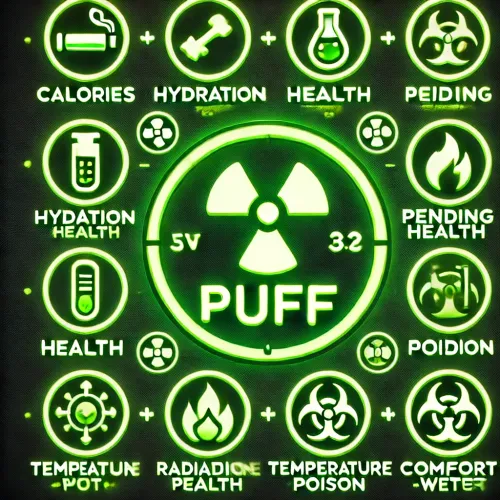
Description: The Puff plugin allows customization of food item effects based on item type and skin. It provides the ability to create and edit custom foods and their effects through a user-friendly GUI. Main Features: Adjust and Add Effects: - Wetness - Comfort - Temperature - PendingHealth - Poison - Bleeding - Radiation - Hydration - Health - Calories Create Custom Foods: Including Shortname and SkinId. Add Tea Effects to Any Food. Duration - how long tea effect will be active Amount - effect multiplier Chat Command: /food: Opens the main GUI for managing food items and their effects. Permissions: puff.opengui: Allows access to the GUI for managing food items and their effects. Notes: The plugin enables administrators to make detailed adjustments to the properties of food items. The GUI is designed to be user-friendly, providing an intuitive way to create new food items and edit their effects. Tea effects offer additional modifiers that can be added to any food item, enhancing the game's mechanics.$9.99 -

Version 1.0.0
9 downloads
ChestModifier is a plugin that adds customization options for various crates in the game, as well as their contents. - Enhance player gameplay diversity with new crates! You can customize banned items and categories, distributing crates accordingly! - Players can easily know what their crate contains - the plugin features a UI that informs the player about prohibited storage items! - Configure drops of modified items from corpses/crates. Permissions: chestmodifier.give - permission to give crates chestmodifier.helpmenu - permission to view the plugin UI Commands: [CHAT/CONSOLE] /cm.give 'key' 'player (leave blank to give to yourself)' - give a crate ChestModifier - Make the gaming experience on your server unique with new loot distribution options! { "Chests": { "test": { "Shortname": "box.wooden.large", "Skin id": 5, "Item name": "Large test box", "Capacity": 3, "Blacklisted items": [ { "Shortname": "rifle.ak", "Skin id": 0 }, { "Shortname": "sulfur.ore", "Skin id": 0 } ], "Allowed categories (still empty if allowed all)": [ "Attire", "Misc", "Items", "Component", "Ammunition", "Construction", "Traps", "Electrical", "Fun", "Food", "Weapon", "Resources", "Tool", "Medical" ], "Spawn chances": { "assets/bundled/prefabs/radtown/crate_basic.prefab": 5.0, "assets/bundled/prefabs/radtown/crate_elite.prefab": 100.0, "assets/prefabs/npc/scientist/scientist_corpse.prefab": 100.0 } }, "test1": { "Shortname": "box.wooden", "Skin id": 6, "Item name": "Small test box", "Capacity": 35, "Blacklisted items": [ { "Shortname": "rifle.lr300", "Skin id": 0 }, { "Shortname": "metal.ore", "Skin id": 0 } ], "Allowed categories (still empty if allowed all)": [ "Attire", "Misc", "Items", "Component", "Ammunition", "Construction", "Traps", "Weapon", "Resources", "Tool", "Medical" ], "Spawn chances": { "assets/bundled/prefabs/radtown/crate_basic.prefab": 100.0, "assets/bundled/prefabs/radtown/crate_elite.prefab": 5.0, "assets/prefabs/npc/scientist/scientist_corpse.prefab": 50.0 } } } }$12.99 -

Version 2.1.4
59 downloads
Create custom backpacks with varying capacities and properties Save on Death - Allow players to keep backpacks on death Item blacklist - Blacklist items from being placed in the backpack Lootspawns - Add custom backpacks to any loot spawn Admin Commands: /cb.give 'Backpack-Name' 'Player-Name/ID' - With this command, administrators or players with the appropriate permission can give a specific backpack to another player. Admin Commands: cbackpacks.give - allows the use of the cb.give command { "RemoveDefaultBackpacks": true, "Backpacks": { "rucksack": { "Shortname": "largebackpack", "SaveContentsOnDeath": true, "Capacity": 8, "ItemBlackList": [ "rifle.ak", "sulfur.ore", "lmg.m249" ] } }, "Command Names": { "give": "cb.give" }, "LootSpawns": { "assets/bundled/prefabs/radtown/crate_basic.prefab": { "rucksack": 100.0 } } } Credit to M&B Studios the original author of this plugin.$9.99 -

Version 1.0.1
22 downloads
This plugin has been superseded by If you own a copy of this plugin please DM @Cobalt Studios to transfer your license for free. Main Features: Player Data Tracking: Calculates kills, deaths, and the resulting KDR for each player. UI Customization: Four pre-made UI settings that can be completely changed in the configuration file. Commands: /kdr: Displays a list of players with their kills, deaths, and KDR values. /h.kdr to close the UI kdr.wipe [SteamID]: Clears the data for a specific player and resets everything to 0. Without a SteamID, all data is deleted. kdr.wipeall : Everything is deleted here Data Storage and Recovery: Player-specific data is persistently stored and reloaded on server restarts. Customizable UI Elements: Users can determine the appearance and arrangement of UI elements through the configuration file. Console Support: In addition to chat commands for players, console commands are available for administrators. { "Count NPC kills": false, "Count suicides": false, "Count players kills": false, "Selected Interface option (key)": "4",$5.99 -

Version 1.0.0
19 downloads
The "Teleport Gun” plugin allows players to teleport to the destination using a special weapon. Plugin Command and Permission: Command: /portgun Permission: teleportgun.use Configurability: The plugin's configuration file provides various customization options: Enable/disable teleport cooldown (TeleportCooldownEnabled) Set the duration of teleport cooldown in seconds (TeleportCooldownSeconds) Enable/disable blocking of teleports during combat (TeleportBlockDuringCombat) Set the duration of combat mode cooldown in seconds (CombatBlockCooldownSeconds) Specify the required skin ID for the teleport gun (RequiredTeleportGunSkinId) If you have any questions or problems, join my discord https://discord.gg/D2zTWCEnrN { "TeleportCooldownEnabled": false, "TeleportCooldownSeconds": 180, "TeleportBlockDuringCombat": false, "CombatBlockCooldownSeconds": 180, "RequiredTeleportGunSkinId": 2328155651 } If you have any questions or problems, join my discord https://discord.gg/D2zTWCEnrN$5.00 -
Version 1.0.1
16 downloads
The "ItemSpawn" plugin allows players with the appropriate permissions to spawn items in the game. Command Permissions: - itemspawn.everything - This permission allows a player to spawn any item. - itemspawn.listone - With this permission, players can spawn items from the "ListOne" defined in the configuration file. - itemspawn.listtwo - This permission allows players to spawn items from the "ListTwo" defined in the configuration file. Example: Let's assume you want to use the plugin to spawn the item "wood." You would need to enter the following command in the game: /spawnitem wood 10 In this example, the command "/spawnitem" is used, followed by "wood" (the name of the item to spawn) and "10" (the quantity of items to spawn). Please note that the player must have the appropriate permission to execute this command, and the item must be listed in either "ListOne" or "ListTwo" in the plugin's configuration file. So, the plugin allows players to spawn items based on their permissions and the lists defined in the plugin's configuration file. { "listone": [ "wood", "stones" ], "listtwo": [ "water.pistol", "bolt" ] } If you have any questions or problems, join my discord https://discord.gg/D2zTWCEnrN$3.99 -

Version 1.1.7
507 downloads
Multi permission based entity limit system Limit number of entities per player/group/team/clan UI config setup options Auto updating player permissions Chat Commands: /limits: Opens the user interface (UI) for managing entity limits Console Commands: ael.createnew <advancedentitylimit.NAME> <optional: copy from advancedentitylimit.NAME>: Adds new permissions for entities. Optionally, you can copy permissions from an existing entity limit. Player Permissions: advancedentitylimit.ui: Allows players to seethe UI. advancedentitylimit.default: Applies the default entity limits advancedentitylimit.vip: Applies the vip entity limits You can create custom permission groups to have various limits per group. Admin Permissions: advancedentitylimit.setlimit: Grants permission to set limits for entities. advancedentitylimit.createperm: Allows the creation of new permissions for entities. advancedentitylimit.admin: Provides full access. { "Auto-fill missing entities?": true, "Chat prefix": "<color=red>[Limits]</color>: ", "A message when the player reaches the maximum limit of objects": "You have <color=red>reached</color> the limit of this object ({0})", "Use teams for sum them constructions": false, "Use clans?": false, "Clans plugin for sum player constructions (Mevent, k1lly0u)": "Mevent" } Credit to @MuB-Studios the original author of this plugin$15.99- 81 comments
- 14 reviews
-
- 5
-

-

-
- #limit
- #advanceentitylimit
- (and 21 more)
-

Version 1.0.2
61 downloads
Description The VoiceLimiter plugin is a powerful tool for Rust servers that allows you to restrict the range of player voices. You can adjust the radius to your requirements in the configuration file to enhance the player experience on your server. Players have the option to select their voice range from four choices: Whisper, Normal, Loudly, and Scream. The server administrator can set the radius for each of these options in the configuration file. Features: - Players can choose their voice range (Whisper, Normal, Loudly, Scream), and the administrator can configure the radius values in the configuration file. - Players can use the "/voice show" command to display their current voice range as a sphere. They have two options to open the display: either as a permanently visible GUI or by using the "/voice" command. -In the GUI, the active voice range is highlighted with different colors (Whisper = Green, Normal = Yellow, Loudly = Orange, Scream = Red). -There's an option to manually open the GUI with the "/voice" command. In this case, images representing the selected voice range are displayed. These images disappear after a configurable time (default is 10 seconds). Commands: /voice: Opens the main menu of the VoiceLimiter plugin. /voice show: Displays the player's current voice range as a sphere. /voice increase <amount>: Increases the voice range by the specified amount (cannot exceed the maximum value set in the configuration). With the VoiceLimiter plugin, you can tailor the interaction among players on your Rust server by controlling the range of their voices. This plugin contributes to making the gaming environment on your server even more dynamic and enjoyable, enhancing the overall player experience.$10.00 -

Version 1.1.0
439 downloads
Features - AntiHack Protection: The plugin integrates with Rust's AntiHack system to prevent abuse of NoClip mode. - Building Privilege Checking: Players with noclip.ownbuildingprivilege or noclip.everywhereexceptbuildingblocked permissions are monitored to ensure they are within allowed areas. - Automatic Teleportation: Players who activate NoClip unauthorized in a building blockade area are teleported back to their last valid position. - Configuration File: Settings such as message texts and colors can be customized in the configuration file. Commands - /noclip (Chat Command): Toggles NoClip mode for the player. - noclip (Console Command): Same function as the chat command, but executable through the console. Permissions noclip.ownbuildingprivilege Allows activating NoClip within the player's own building privilege areas. Players cannot activate NoClip when outside a building privilege area. noclip.everywhereexceptbuildingblocked Allows activating NoClip everywhere except in areas protected by building blockades. Players will automatically be teleported back if they try to enter a building blockade area. noclip.everywhere Allows activating NoClip everywhere on the map without restrictions. noclip.godblock A special permission used in conjunction with the server command to block or allow specific commands for players. If you have any questions or problems, join my discord https://discord.gg/D2zTWCEnrN$9.99 -

Version 1.0.0
237 downloads
C4 Logger is a plugin that documents when and where users placed C4 The file is saved in the logs and the documentation looks like this [07/25/2023 14:54:34] "PlayerName" (Steam64ID) used C4 at position (-440.9276, 11.91947, -19.79667) If you have any questions or problems, join my discord https://discord.gg/D2zTWCEnrNFree -

Version 1.0.0
23 downloads
This plugin allows server owners to increase the number of sleeping bags based on player permission. You can define permissions and number of extra bags you would like to grant for each in the configuration file. ExtendedSleep.json Thanks to @beee for implementing/creating the plugin$6.99 -
Version 2.0.0
532 downloads
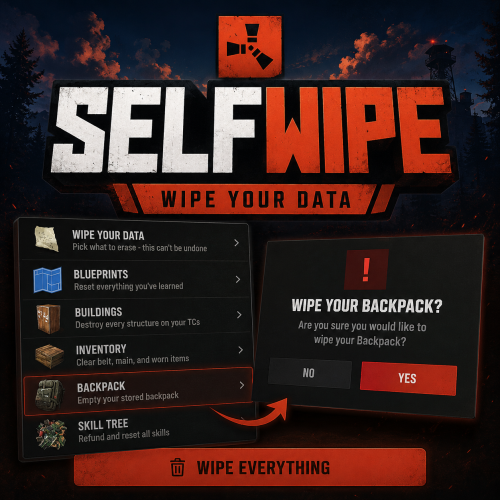
Rust Plugin · Self-service data wipe Give your Rust players a clean, safe way to reset their own progress SelfWipe allows players to selectively wipe their own blueprints, buildings, inventory, backpacks, and skill-tree progress through an in-game UI. Every action requires confirmation before it is performed, and administrators can reset all data for a specific player with a command. Warning — wipes are permanent. Players should be clearly informed that erased data cannot be restored. Features ✓ Clean in-game self-wipe menu ✓ Confirmation prompt before each wipe action ✓ Reset individual categories or wipe everything at once ✓ Blueprint reset ✓ Inventory wipe — belt, main inventory, and worn items ✓ Building removal tied to player-owned Tool Cupboards ✓ Backpack clearing through the Backpacks API ✓ Skill-tree reset through the server resetdata command ✓ Optional raid-block compatibility with NoEscape ✓ Configurable menu buttons, descriptions, icons, and commands ✓ Permission-based player access ✓ Administrative player-data reset command What each wipe option does Pick a single category, or run them all with one button. Blueprints Resets all learned blueprints for the player. Buildings Removes building entities tied to Tool Cupboards owned by the player — based on the cupboard owner, not everyone authorised on it. Inventory Clears the player's belt, main inventory, and worn items. Backpack Clears the player's stored backpack through the Backpacks API. Skill tree Runs resetdata <SteamID> — needs a skill-tree/progression plugin that provides the command. Wipe everything Runs all available wipe actions in sequence — still confirmed first. Commands & permissions Permission Description selfwipe.use Allows a player to open and use the SelfWipe menu. selfwipe.resetcommand Allows a non-admin to use the administrative resetall command. Player commands Open the self-wipe menu: /wipe The default command is /wipe (configurable). A secondary fixed command is also available: /wipeui Players need the selfwipe.use permission to use either command. Administrator command Admins, or players with selfwipe.resetcommand, can reset all supported data for another player: /resetall <SteamID/PlayerName> /resetall 76561198000000000 /resetall PlayerName Resets the target's blueprints, buildings, inventory, backpack, and skill tree. Configuration The configuration file is generated automatically after the plugin is first loaded. Every menu button — its text, description, icon, and command — is editable. { "Button list": [ { "Command": "SELF_WIPE BP", "Text": "Blueprints", "Description": "Reset everything you've learned", "Icon item shortname": "blueprintbase", "Icon skin id": 0, "Enable button": true }, { "Command": "SELF_WIPE BUILD", "Text": "Buildings", "Description": "Destroy every structure on your TCs", "Icon item shortname": "cupboard.tool", "Icon skin id": 0, "Enable button": true }, { "Command": "SELF_WIPE INVENTORY", "Text": "Inventory", "Description": "Clear belt, main, and worn items", "Icon item shortname": "box.wooden", "Icon skin id": 0, "Enable button": true }, { "Command": "SELF_WIPE BACKPACK", "Text": "Backpack", "Description": "Empty your stored backpack", "Icon item shortname": "largebackpack", "Icon skin id": 0, "Enable button": true }, { "Command": "SELF_WIPE SKILLTREE", "Text": "Skill tree", "Description": "Refund and reset all skills", "Icon item shortname": "techparts", "Icon skin id": 0, "Enable button": true } ], "Chat Command": "wipe" } Optional plugin support Backpacks Required for the Backpack wipe option. NoEscape Optional raid-block gating — players can't wipe while raid-blocked. Skill-tree plugin Any progression plugin that provides the resetdata command powers the Skill tree wipe. Installation 1 Drop SelfWipe.cs into oxide/plugins/ (or carbon/plugins/). 2 Grant selfwipe.use to players who may wipe their data. 3 Optional: install Backpacks, NoEscape, and a skill-tree plugin for those wipe options. 4 Config and language files generate automatically on first load. A clean, controlled way to start fresh Let players reset their own progress on demand — safely, with confirmation, and fully under your control. Works on Oxide and Carbon.$10.00- 45 comments
- 2 reviews
-
- 4
-

-
-
- #wipe
- #playerwipe
- (and 2 more)