
Works with
Optional integrations and compatible files.


About Self Wipe
|
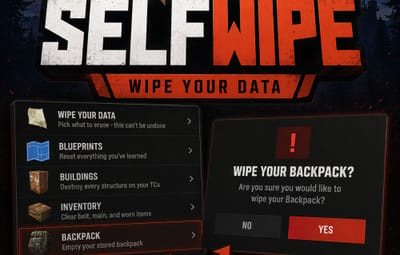
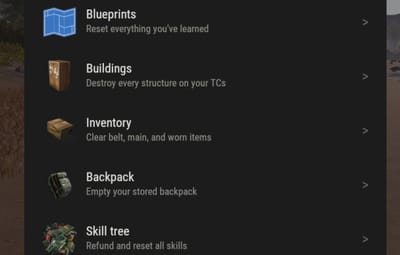
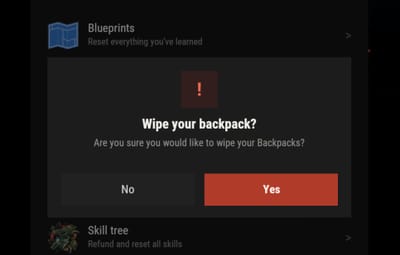
Rust Plugin · Self-service data wipe Give your Rust players a clean, safe way to reset their own progressSelfWipe allows players to selectively wipe their own blueprints, buildings, inventory, backpacks, and skill-tree progress through an in-game UI. Every action requires confirmation before it is performed, and administrators can reset all data for a specific player with a command. Warning — wipes are permanent. Players should be clearly informed that erased data cannot be restored. |
|||||||||||||||||||||||||||
Features
|
|||||||||||||||||||||||||||
What each wipe option doesPick a single category, or run them all with one button.
|
|||||||||||||||||||||||||||
Commands & permissions
Player commands Open the self-wipe menu: /wipe The default command is /wipe (configurable). A secondary fixed command is also available: /wipeui Players need the selfwipe.use permission to use either command. Administrator command Admins, or players with selfwipe.resetcommand, can reset all supported data for another player: /resetall <SteamID/PlayerName> /resetall 76561198000000000 /resetall PlayerName Resets the target's blueprints, buildings, inventory, backpack, and skill tree. |
|||||||||||||||||||||||||||
ConfigurationThe configuration file is generated automatically after the plugin is first loaded. Every menu button — its text, description, icon, and command — is editable. {
"Button list": [
{
"Command": "SELF_WIPE BP",
"Text": "Blueprints",
"Description": "Reset everything you've learned",
"Icon item shortname": "blueprintbase",
"Icon skin id": 0,
"Enable button": true
},
{
"Command": "SELF_WIPE BUILD",
"Text": "Buildings",
"Description": "Destroy every structure on your TCs",
"Icon item shortname": "cupboard.tool",
"Icon skin id": 0,
"Enable button": true
},
{
"Command": "SELF_WIPE INVENTORY",
"Text": "Inventory",
"Description": "Clear belt, main, and worn items",
"Icon item shortname": "box.wooden",
"Icon skin id": 0,
"Enable button": true
},
{
"Command": "SELF_WIPE BACKPACK",
"Text": "Backpack",
"Description": "Empty your stored backpack",
"Icon item shortname": "largebackpack",
"Icon skin id": 0,
"Enable button": true
},
{
"Command": "SELF_WIPE SKILLTREE",
"Text": "Skill tree",
"Description": "Refund and reset all skills",
"Icon item shortname": "techparts",
"Icon skin id": 0,
"Enable button": true
}
],
"Chat Command": "wipe"
}
|
|||||||||||||||||||||||||||
Optional plugin support
|
|||||||||||||||||||||||||||
Installation
|
|||||||||||||||||||||||||||
A clean, controlled way to start freshLet players reset their own progress on demand — safely, with confirmation, and fully under your control. Works on Oxide and Carbon. |
|||||||||||||||||||||||||||