codeboy
-
Posts
177 -
Joined
-
Last visited
-
Days Won
1
Content Type
Profiles
Warranty Claims
Downloads
Forums
Store
Services
Downloads Plus Support
DOWNLOADS EXTRA
Reels
Everything posted by codeboy
-
Changed Status from Pending to Work in Progress Changed Fixed In to Next Version
-
Hi! Great idea, it will be added as soon as I get home!
-
Hi! Thanks for using KillFeed If they're not being displayed right now, then there isn't compatibility yet, but I'll definitely add support for it. Unfortunately, no, that's not possible at the moment. Yes, you can fully customize the positions and sizes of any UI elements. Take a look through the configuration sections
-
 Hi! Forget to notify you that i added Input field on item in cart
 -
Hi! Great idea, ill add it in next patch, thank you!
-
Hi! Answered in discord
-
Hi! Answered in discord
- 14 comments
-
- 1
-

-
- #admin
- #adminpanel
- (and 15 more)
-
 Thanks! I will be glad if you leave a review after use
 -
Hi! I'll release a fix today, thanks
-
Ну в целом я понял. Давай вот так отвечу: 1) насчет шортнеймов ты, я думаю, прав. Но у меня есть планы создать конфигуратор как DLC и сделать процедурный парсинг конфига, а так же имплементировать конкретные плагины туда по запросам, что бы можно было еще больше это кастомизировать. Вероятно, сделаю список всех предметов, но пока что это не является приоритетом 2) Кнопки смены для и ночи и т.п. будет доступно когда выйдет версия 1.1.0, где будет добавлен раздел с кастомными кнопками, которые можно будет создавать под себя 3) Насчет ванильных событий - в планах сделать это как первую итерацию будущего EventManager, но он пока что ещё не начат Насчет последней фразы - ты прав, мой плагин не идеален, но ему всего 3 месяца как идее в целом. Я рад, что у него за месяц собралось достаточно человек и я уже услышал хорошие идеи от тебя и от других людей, спасибо вам
- 14 comments
-
- 1
-

-
- #admin
- #adminpanel
- (and 15 more)
-
Привет! Можешь, пожалуйста, описать как ты именно видишь отображение шортнеймов? И для чего это может быть полезно. Насчет полноэкранной темы - возможно, когда либо это появится, но конкретно сейчас плагин спроектирован так, что полноэкранная тема это полностью переписать весь CUI
-
Hi! Thanks for the review (I think you got the wrong thread and wrote to the discussion instead of the reviews). If you wish, I will add a setting for this to the plugin (you mean ESP, right?) About Bradley and Heli - If you really can't see them, then this is a bug. I don't think it's critical, so it will also appear in version 1.1.0
-
Version 1.0.0
7 downloads
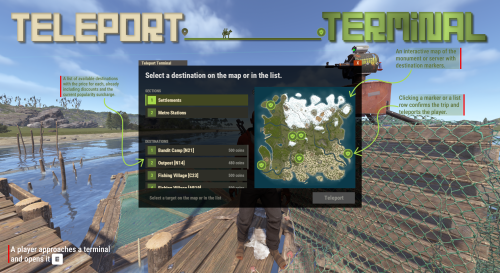
TeleportTerminal turns monuments into paid travel hubs. Players walk up, see a map, pay and travel. Each destination price scales with distance and with how popular that route is right now. READY ON DAY ONE Preset destinations and preconfigured NPC terminals are already placed on monuments. Turn it on, then customize or add your own. 01 - What a player sees A route board, not a blind teleport. Players approach a terminal and press E, or talk to its NPC. The panel makes each available route, its final price and its destination clear before they commit. At the terminal What it means DESTINATION LIST Available destinations show their final price, including discounts and the current popularity surcharge. MAP VIEW An interactive monument or server map shows all destination markers, prices and zoom. CONFIRM ROUTE Click a marker or a row, confirm the trip and travel. 02 - Terminal types Choose the presence that fits the monument. Teleport points can be placed on any monument, including train tunnels and lab modules. The plugin locates the correct spots on the map automatically. Type Use at the location NPC GUARD Configure its name, kit, clothing and belt. DECORATIVE PROP Use a terminal model that suits the setting. INVISIBLE POINT Keep the interaction with no model at all. 03 - Pricing model Prices react to traffic, then settle back down. A route begins with its distance, then becomes more expensive when everybody keeps using it. The result is a money sink players can read and respond to. Order Price signal 01 Distance base. The base price comes from the distance to the destination. 02 Popularity surcharge. Every trip raises a temporary surcharge, so popular routes cost more and traffic spreads out. 03 Gradual decay. The surcharge declines over time, so routes that fall out of favour become cheaper again without a config change. 04 Permission discounts. Discounts are applied last. 04 - Payment providers One config line selects how players pay. Switch providers without changing the terminal flow. If the selected economy plugin is missing, the terminal automatically falls back to Scrap instead of breaking. Provider Availability SERVERREWARDS Optional economy provider ECONOMICS Optional economy provider IQECONOMIC Optional economy provider SCRAP Built in, and the automatic fallback 05 - Built for placement Monument-ready by default, with room to make it yours. The preset network is usable immediately. When your server needs a different arrangement, the in-game tools take over without turning setup into a config-file task. Full in-game editor Create and move terminals, snap to the nearest monument, fine-tune position and rotation, manage destinations, set marker colour, size and icon, and edit NPC profiles. Changes save immediately. Visual prefab catalog Pick terminal models from a searchable catalog with previews instead of typing prefab names from memory. Destination permissions Gate any single destination behind a permission when certain routes should be reserved. Language files included English and Russian ship with the plugin. Every message lives in the language files. 06 - What an admin sees A separate edit mode for running the network. The same interface switches into a technical editing surface when an admin needs to place, tune or maintain terminals. EDITOR MODE / TERMINAL NETWORK PLACEMENT Snap to the nearest monument, then use precise movement, rotation and grid snapping. ROUTES Add and remove terminals and destinations, including single-destination permission gates. MARKERS Set marker colour, size and icon to match the server. NPC PROFILE Edit the NPC's name, kit, clothing and gear. 07 - Dependencies Install the requirements before you place the first terminal. HumanNPC and MonumentFinder are hard requirements. TeleportTerminal will not work without them. Required - plugin will not work without these HUMANNPC Required for NPC-type terminals. MONUMENTFINDER Required to detect monument locations, including train tunnels and lab modules. Optional economy plugins SERVERREWARDS / ECONOMICS / IQECONOMIC Install one only when you want payment through that provider instead of Scrap.$17.99-
- 4
-
-
-
- #teleport
- #teleportsystem
- (and 4 more)
-
Thanks for feedback! Update is ready for download, sorry for crash
-
Changed Status from Pending to Fixed Changed Fixed In to 1.1.7
-

Version 1.0.1
282 downloads
PowerfulWhitelist is a whitelist for Rust. It works on its own through chat andconsole commands with login enforcement, and if you also run PowerfulAdmin itadds an in-game management panel. >>> No dependencies required. Install PowerfulAdmin only if you want the UI. Works on its own. Commands, enforcement and storage run with no other plugin installed. PowerfulAdmin is optional and only adds the in-game panel. Three storage backends. Keep the list in a JSON file, a local SQLite database, or MySQL/MariaDB to share it across several servers. Instant rejection at the connect screen. Players who are not whitelisted are rejected during login (`CanUserLogin`), so they never spawn in. The list is held in memory, so the check is instant and there is no "join then kick" flash. Shared list across servers. Point every server at the same MySQL database and additions and removals show up on all of them. Two independent on/off switches. Right on the Whitelist page: a This server switch (local) and an In database switch (shared across every server on the same database). The whitelist enforces if either one is on. Auto-reconnect. If the database is briefly unreachable at boot, the plugin keeps retrying and starts enforcing as soon as it connects. In-game panel. Search, add and remove from a UI that follows your PowerfulAdmin theme (requires PowerfulAdmin). Admin options. Server owners and moderators can be let through automatically, there is a bypass permission, and you can optionally kick non-listed players the moment the whitelist starts enforcing. A dedicated Whitelist section in the Tools category: A status banner with two switches, This server (local on/off) and In database (shared on/off, shown when a database backend is used), plus an Enforce button to kick everyone not on the list. The whitelist is active if either switch is on. The whitelist with search (by name or SteamID) and pagination. Each entry shows the player avatar, name, SteamID, who added it and when. One-click Remove with a confirmation step. An + Add dialog with: 1. a SteamID input with live validation (green when valid, red when not); 2. a searchable, paged player picker that shows online status and hides players who are already whitelisted; 3. an avatar and name preview before you confirm. A whitelist status row in the player popup card (Listed / Allowed / Not listed). Colors, fonts and switches follow your active theme. Every action is written to PowerfulAdmin's Logs. JSON (default): a plain data file, nothing to configure. Good for a single server. SQLite: a local database file, created automatically. MySQL / MariaDB: share one whitelist across many servers. Switch backends and migrate your data from the Settings page (your current list is copied into the new backend), or check your MySQL connection first with the built-in Test connection button. With MySQL, each server refreshes the list on a short interval, so an addition or removal made on one server shows up on the others. The Whitelist page has two separate switches: This server (local, per-server) and In database (shared). Flip the database switch on one server and the whole network starts enforcing. The whitelist is active whenever either switch is on. /whitelist add <name|steamid> - add a player /whitelist remove <name|steamid> - remove a player /whitelist list [page] - list whitelisted players /whitelist on | off - enable / disable the whitelist (this server) /whitelist enforce - kick everyone not on the list /whitelist status - show state and count /whitelist help - show all commands >>> /wl ... - short alias for /whitelist pwl add <name|steamid> pwl remove <name|steamid> pwl list [page] pwl on | pwl off pwl enforce pwl status pwl help powerfulwhitelist.view - Open the Whitelist section and read the list powerfulwhitelist.manage - Add, remove, toggle on/off and enforce powerfulwhitelist.bypass - Always allowed to connect, even when not listed A default config is generated on first load (PowerfulWhitelist.json { "Enabled": false, "AllowAdmins": true, "KickOnEnable": true, "ServerName": "", "InfoUrl": "", "Storage": "Json", "SyncInterval": 60, "MySql": { "Host": "127.0.0.1", "Port": 3306, "Database": "powerfulwhitelist", "User": "root", "Password": "" } } The shared database on/off state (the In database switch on the panel) is stored in the database, not in this config. Storage, MySQL credentials and these options can also be changed live from the Settings page when PowerfulAdmin is installed. Drop PowerfulWhitelist.cs into your plugins folder (Carbon: carbon/plugins/, Oxide: oxide/plugins/). The plugin loads and uses a JSON data file by default. No setup is required to start whitelisting. Grant the permissions above to your staff groups. Add yourself and your players (/whitelist add <name|steamid>), then turn it on (/whitelist on). (Optional) For a shared/network whitelist, open the config (or the Settings page), set Storage to MySql, fill in your credentials, and apply. (Optional) Install PowerfulAdmin to get the in-game whitelist panel. For MySQL storage: MySQL 8.0+ or MariaDB 10.2+ (recommended). PowerfulAdmin is optional, needed only for the in-game panel. English and Russian are included out of the box. Every message lives in the language files, so you can translate or reword anything for your community.Free -
Changed Status from Work in Progress to Fixed
-
Changed Status from Pending to Work in Progress Changed Fixed In to 2.1.2
-
Hi! Send please your config and screenshots of problem in my dm
-
Changed Status from Work in Progress to Fixed
-
Changed Status from Work in Progress to Fixed
-

Version 1.0.2
62 downloads
Freeze a player in place, on the spot, for as long as you need. Three different kinds of freeze, a time limit, a reason, and a gun that does it from across the room. Use it when an admin needs a suspect to stop moving while a report is checked, another admin walks over, or a base is inspected. /freeze <nick|steamid> Freeze a player without ending the conversation. Standalone by default No dependency. No missing enforcement. Chat commands, console commands, enforcement and storage all work with no other plugin installed. PowerfulAdmin is optional and only adds the in-game panel. 01 - Three ways to freeze Choose the restraint that fits the situation. An admin picks the mode per freeze, so the punishment fits the situation. Screen The player's view is locked. They see the world, but cannot look around. In-world The player is pinned to their position. They can still look around, they simply cannot move. Mount The player is locked into a seat, visibly contained and unable to interact with anything. Admin control Each freeze can carry a duration and a reason, and an existing freeze can be extended or shortened without lifting it first. 02 - The Freeze Gun Freeze from across the room. A real item an admin carries. Shoot a player and they freeze on the spot for the default duration, with no typing and no target picking. Configured for your team Set the item type, custom name, skin, infinite ammo, damage blocking, and default duration. A revolver is the default item. Permission follows access Players who lose the freeze gun permission automatically lose the gun from their inventory. 03 - Time that holds Set a limit, or leave it open. Use 30m, 2h, 7d, or 1y, or leave duration empty for a freeze that lasts until an admin lifts it. Freezes survive relogs and server restarts. 04 - Optional PowerfulAdmin panel Manage every active freeze in one view. With PowerfulAdmin installed, a dedicated Freeze section follows whatever theme PowerfulAdmin is set to. Without it, the panel is simply not there and the plugin points admins to chat and console commands. Find and inspect Searchable, paginated active-freeze list with a summary by mode. Detail cards show reason, issuer, mode, start time, remaining time, and online status. Adjust deliberately Extend or adjust time straight from the card. Unfreeze includes a confirmation step so no freeze is lifted by a stray click. Create without typing SteamIDs Create a new freeze from a player picker with search. 05 - Commands Use chat or console with the same result. Core administration is available without the optional panel. Chat /freeze <nick|steamid> [duration] [mode] [reason] Freeze a player /unfreeze <nick|steamid> Lift a freeze /freezeinfo <nick|steamid> Freeze details /freezeui Open the panel /freezegun Take the freeze gun Console pf.freeze, pf.unfreeze, pf.info, pf.ui, pf.list, pf.gun.give 06 - Permissions Give each role only what it needs. powerfulfreeze.freeze Freeze players powerfulfreeze.unfreeze Lift freezes powerfulfreeze.view See the list and freeze details powerfulfreeze.gun Use the freeze gun powerfulfreeze.seevanishforfreezed Stay visible to frozen players while vanished 07 - Configure and localize Set the policy, then write it in your language. Configure the storage backend, whether freezes broadcast to server chat, whether the frozen player sees the reason, the server name used in messages, and the full freeze gun block. English and Russian ship with the plugin, and every string lives in the language files. 08 - For developers Freeze instead of only kicking. Anti-cheat plugins, report systems and chat filters usually only get to kick. With this API they can freeze instead - hold the suspect in place until a human looks at them. Every call is guarded and behaves the same on Oxide and Carbon. [PluginReference] private Plugin PowerfulFreeze; Reference the plugin from your own plugin. object API_Freeze(string steamId, string name, string duration, string reason, string by) Freezes a target. Invalid SteamID returns false. Empty name resolves from the online player then falls back to the SteamID. Duration accepts 30m, 2h, 7d, 1y; empty or unparseable means until lifted. Reason is shown when notifications are enabled; by is stored and logged. PowerfulFreeze?.Call("API_Freeze", steamId.ToString(), "Suspect", "15m", "Report under review", "AntiCheat"); Returns true if the request was accepted, false if the SteamID is invalid. object API_Unfreeze(string steamId, string by) Lifts an active freeze. by defaults to Server when empty. Returns false when the player is not currently frozen. PowerfulFreeze?.Call("API_Unfreeze", steamId.ToString(), "AntiCheat"); Example call to unfreeze a target. void OnPowerfulFreezeAdded(string steamId, string name, string reason, string by, long until) void OnPowerfulFreezeRemoved(string steamId, string name, string by) Hooks fire on every freeze and explicit unfreeze, whether it came from the panel, a command or the API. Use them for Discord logging or your own database. A measured way to stop movement while your team checks the facts. For Carbon and Oxide Rust servers. Fully standalone, with an optional PowerfulAdmin panel.$12.99 -
Changed Status from Pending to Work in Progress Changed Fixed In to Next Version
-
Hi! Yes, I have plans to make more avatars and names for victims