
codeboy
-
Posts
179 -
Joined
-
Last visited
-
Days Won
1
Content Type
Profiles
Warranty Claims
Downloads
Forums
Store
Services
Downloads Plus Support
DOWNLOADS EXTRA
Reels
Everything posted by codeboy
-
Changed Status from Pending to Work in Progress Changed Fixed In to Next Version
-
Hi! Yes, I have plans to make more avatars and names for victims
-
Changed Status from Pending to Work in Progress Changed Fixed In to Next Version
-
Hi! It goes back after save also? Any errors in console?
-

Version 1.2.0
153 downloads
One banlist. Every server covered. A complete, database-backed ban system for Rust. One banlist for your whole network, enforced at the loading screen, managed from a real in-game panel. /ban <name|steamid> [duration] [reason] Issue a real ban that follows the player across the network. Standalone by default No dependency required. The panel is optional. Commands, enforcement and storage work with nothing else installed. PowerfulAdmin only adds the in-game ban management panel. Start with the ban system you need now, then add the panel when your staff needs it. 01 - One banlist for the network Your own database. Not a text file waiting for a wipe. Run SQLite with zero setup, or point every server at MySQL or MariaDB when you need shared enforcement. A ban issued on one server applies on all of them instantly. SQLite first, shared storage later Bans live in SQLite with no setup, or in MySQL/MariaDB when your servers need the same records. Stopped before spawn Banned players are rejected during the connection handshake. No join-then-kick flash in the world. 02 - In-game management A real panel. Not another chat command. With PowerfulAdmin installed, a dedicated Bans section appears in Tools. Search, page, ban, extend and unban without leaving the UI your staff already knows. Search and act with context Pick a player, add a reason and duration, keep an internal comment, or extend an existing ban. Player card history Ban state and history sit on the PowerfulAdmin player card alongside Steam VAC and game ban status. 03 - Duration format Fast to type. Easy to scan. Expired bans are lifted lazily on the next check, so there is no sweep task burning server time. Anything that fails to parse falls back to a permanent ban. perm, 0, empty permanent 30 a plain number is MINUTES 45s · 90m · 2h · 1d seconds · minutes · hours · days 1d12h compound duration 1d2h30m combine freely, evaluated left to right 04 - Commands and permissions Console or chat. The same banlist either way. RCON and the server console run unrestricted. A player running the command needs the listed permission. Chat /ban <name|steamid> [duration] [reason] powerfulbans.ban /unban <name|steamid> powerfulbans.unban /baninfo <name|steamid> powerfulbans.view or .ban Console pb.ban <name|steamid> [duration] [reason] powerfulbans.ban pb.unban <name|steamid> powerfulbans.unban pb.info <name|steamid> powerfulbans.view pb.list [page] powerfulbans.view pb.migrate <sqlite|mysql> server console only 05 - Storage migration Start small. Move without losing a ban. A new server can start on SQLite with zero setup. When it grows into a network, move to a shared MySQL database later without losing a single ban. pb.migrate <sqlite|mysql> Run it from the server console to move the whole ban database between backends. It copies bans, history and cached Steam data, verifies row counts, then switches storage and saves the config. It refuses to begin when another migration is running, and does nothing when the target is already the current backend. Built for the bad day. Clear failures, useful controls. Configure SQLite or MySQL storage, broadcast settings, Steam ban checking with a recent-ban kick threshold, and reason templates shared with PowerfulAdmin. English and Russian ship with the plugin, including the loading-screen rejection text. If the database is unreachable, bans are refused with a clear message and the broken connection is reported on startup. 06 - Developer API Issue a real ban. Not just a kick. Anti-cheat plugins, report systems and chat filters can drive PowerfulBans directly. Every call is guarded and behaves identically on Oxide and Carbon. [PluginReference] private Plugin PowerfulBans; private bool BansReady() => PowerfulBans != null && PowerfulBans.Call("API_IsReady") is true; object API_IsReady() True when the database is connected and the schema is ready. Reads and writes are rejected while it is not ready. object API_Ban(string steamId, string name, string duration, string reason, string by, string comment = "") Written asynchronously. Invalid IDs return false; existing bans are never silently overwritten; an online target is kicked immediately. The comment is internal and never shown to the banned player. object API_Unban(string steamId, string by) Asynchronous. by defaults to "Server" and the call is a no-op when the player is not banned. object API_IsBanned(string steamId, Action<bool> callback) The result arrives through the callback, not the return value. The query also lazily expires temporary bans that have run out. void OnPowerfulBanAdded(...) void OnPowerfulBanRemoved(...) Added fires for new bans. Removed fires only on an explicit unban from a command, the UI or API_Unban, not when a temporary ban expires. PowerfulBans?.Call("API_Ban", steamId.ToString(), "Cheater", "perm", "Aimbot detected", "AntiCheat"); PowerfulBans?.Call("API_Ban", steamId.ToString(), "Player", "7d", "Toxic in chat", "ChatGuard", "3rd warning");$12.99 -
Changed Status from Work in Progress to Not a Bug Changed Fixed In from Next Version to 2.0.4
-
Excellent! Enjoy using my plugin, thanks for the feedback. If you have any questions, please write here or to my Discord. I'd also appreciate your feedback on your experience using the plugin and any suggestions for improvement! Best regards, codeboy
-
That's it, I understand what the problem is. This config is from an old plugin with the same name. Move config file to another location or delete it, and then reload it using the c.reload KillFeed command. Everything will be fine. I'm waiting for feedback
-
Hmm. Can you send me a config file? Its looks like configuration is corrupted or generated not correctly
-
Changed Status from Pending to Work in Progress Changed Fixed In to Next Version
-
Hi! Can you please tell me with what weapon you killed and who? If it is possible to upload a video, it can speed up the fix. I'm getting to it now
-
Version 1.3.0
551 downloads
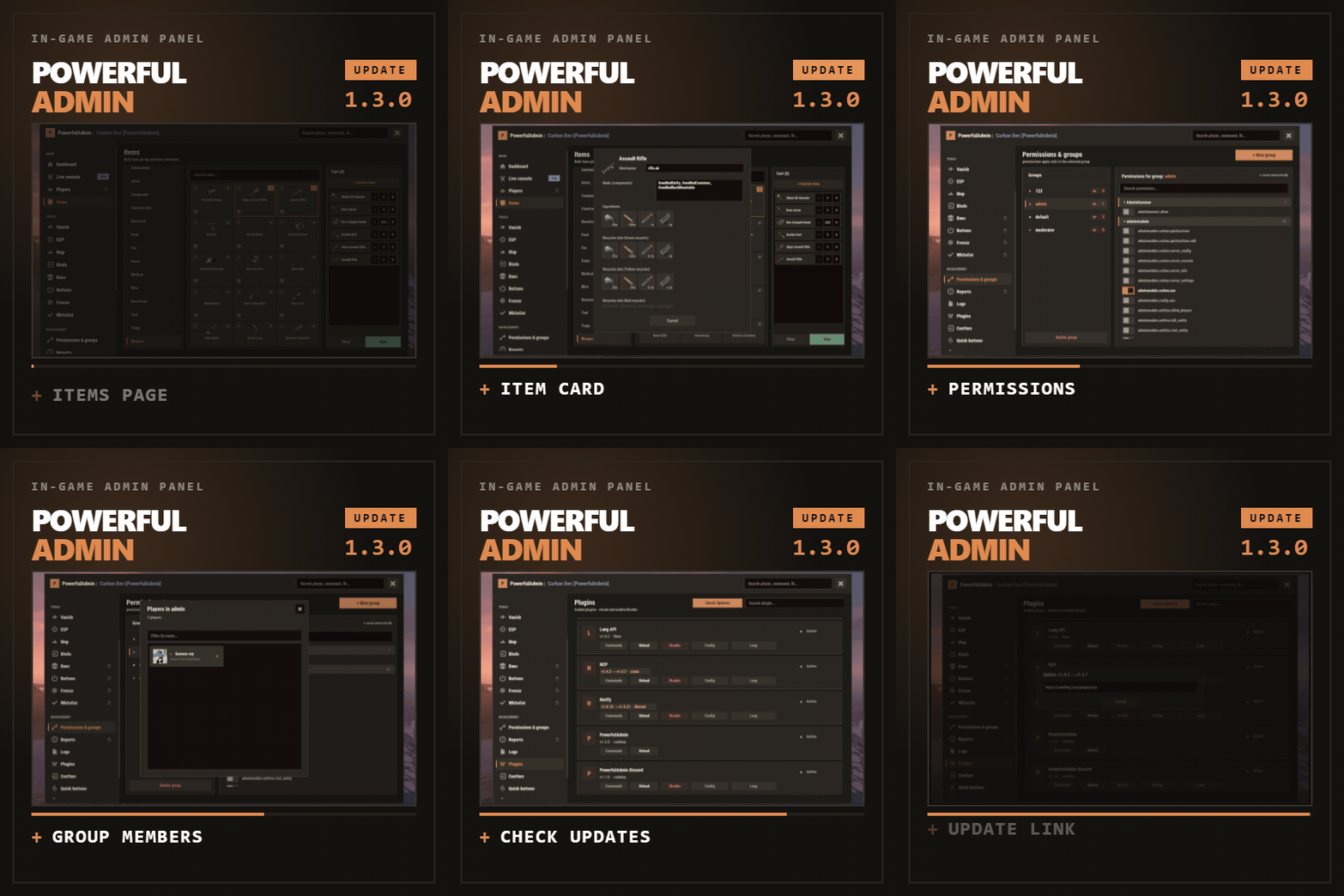
Our Discord Manage players, permissions and plugins from inside the game PowerfulAdmin is an admin panel you open inside Rust. Fifteen pages in the sidebar cover players, items, permissions, plugins, the live console, ConVars, a working server map and your own buttons. Four more tools work out in the world, on whatever you are looking at. Every page and every action has a permission of its own, so a junior moderator can use only what you grant. The panel is translated into seven languages Tip /padmin opens it. After that it is point and click, or a key you bound yourself New in 1.3.0: six things this version adds Items page Hand out items without opening a player card. Search the whole list, filter by category, pin favorites, fill a cart and give it to one player or to several at once. The i button opens an item's reference card: shortname and ID, stack size, the crafting recipe with workbench and craft time, and what it breaks down into in the green, yellow and red recycler Map clusters Markers that sit close together merge into one icon with a count and split apart again as you zoom in. Any cluster opens a list of what is inside, vehicles, shops and events included. A row selects the player, opens the object menu or teleports you. If you want every marker on its own, the Clusters switch next to the zoom buttons turns merging off Permissions page Search by a plugin's name and you get all of its permissions. A click on a plugin block's header folds it away. Every group shows how many players are in it, and the count opens the member list Seven languages German, Spaninh, French, Brazilian Portuguese and Simplified Chinese join English and Russian. With LangAPI installed, item names and descriptions follow each admin's game language too Update check A Check Updates button on the Plugins page runs the UpdateChecker plugin. A plugin with a newer version shows the old and new version on its card, and a click on the card opens the update link Heal and Vanish Heal has a Full mode: one click revives a wounded player, restores full health and refills food and water. Vanish has an optional switch that also turns noclip off when you leave Vanish The sidebar: fifteen pages, plus add-on sections The panel reopens on the page you left. Add-ons appear in the same sidebar, use the same permission system and follow the theme the admin picked Main Tools Management Add-ons Dashboard Vanish Permissions Bans (DLC) Live console ESP Logs Freeze (DLC) Players Server map Plugins Whitelist (DLC) Items Binds ConVars Quick buttons Appearance Settings Your own sections can go here too, through the API described at the bottom of this page Out in the world: tools that work on what you look at A lot of moderation happens in front of a base, a player or a locked crate. Four tools work right there, and none of them needs anything installed on the admin's client Vanish Vanish takes you out of networking, colliders, entity queries and the game's own AI target list. NPCs stop shooting and forget you were standing there. Radiation, cold, wetness, hunger, thirst and drowning stop affecting you, and Vanish puts everything back as it was when you switch it off. A silhouette for other admins, auto vanish on connect, opening locks and turning noclip on with Vanish are all optional, and each has a permission. Another switch, Turn off noclip with vanish, turns noclip off when you leave Vanish Admin hammer Hold a hammer, look at anything, and the HUD reads out the owner, position, health, upkeep, power, who is authorized, the code lock codes and what is in the container. Hold E to pick an action from the radial menu, then Shift+LMB runs it: delete, delete with gibs, delete the whole linked structure, edit the container contents, or on a hackable crate unlock it now and set its timer to any value you type Inspect Look at a player and act on them without typing a name. E opens their inventory, RMB opens their full card. An on-screen hint shows which key does what Server ESP The server draws it with the engine's own debug draw and sends it only to admins who hold the permission. Players and sleepers carry their name, HP and held item. Loot, boxes, cupboards, bags, traps, stashes, NPCs, scientists, turrets and vehicles each get their own colour. You set the radius, the opacity and the text size, and enemy, team and admin are coloured apart The player card: one card per player, awake or asleep The Players page is a searchable, paginated list of everyone the server has seen. The card holds the SteamID, live status, current session and total playtime, total Rust hours from the Steam API, groups, first and last seen, the balance if you run an economy plugin, and the IP behind a permission of its own. The actions sit below Heal Kill Strip Kick Ban Freeze Mute Teleport Inventory Spectate Give Blueprints Modifiers Vitals Permissions Notes Show on map Each of these has its own permission. Note Give works as a cart. Search the item list, stack up what you want, edit any quantity by clicking the number, then send the lot. The Items page has the same cart outside the card and can give to several players at once. Heal has a Full mode: one click revives a wounded player, restores full health, clears bleeding, poison, radiation and wetness and refills food, water and oxygen. Vitals reads the real limits off the prefab, so a raised max HP or a frozen metabolism survives death, respawn, reconnect and wipe The map, drawn inside the panel The map covers the island and the Deep Sea, with zoom. Each layer has its own switch, so the map shows only what you turn on Layers The layers are players, sleepers, cupboards, bags, stashes, cars, horses, air, shops, events and map notes. Cars, boats, submarines, trains, horses and player helicopters each have their own icon and an arrow showing where they are heading. The cargo ship, the cargo plane and the chinook are on the map with the rest Clusters Markers that sit close together merge into one icon with a count badge, so a crowded base or a busy spawn is not a pile of overlapping dots. Players, sleepers, notes, cupboards, bags, stashes, vehicles, shops and events all cluster, and the groups split apart as you zoom in. A click on any cluster opens a list of up to ten rows plus an "and N more" line. A row selects the player, opens the object menu or teleports you to the note. Rows for cars, horses, air, shops and events show the layer, the prefab or shop name, the owner if there is one and the grid square. With the map teleport permission a click on such a row takes you there. Without it the panel dims those rows. The badge gets an accent outline when the player you picked, their teammate or something that player owns is inside. Every clickable marker has a click area of at least 28 by 28 pixels, however small the icon. The Clusters switch next to the zoom buttons turns merging off and draws every marker on its own. It is on by default, and each admin's choice is saved Click an object Cupboards, bags and stashes open a menu that names the owners and shows their Steam avatars. From there you can teleport to it, open its inventory from where you are standing, or destroy it behind a confirmation. Each of the three actions has a separate permission, so a moderator can be allowed to look without being allowed to delete Heat PVP and raid heat build up from real kills and from explosive damage that landed, over a time window you set. The map shows where players are fighting and raiding right now Side panel Next to the map there is a player search and a card for whoever you picked, with the same actions as the full player card. Hold Shift and place a map note to teleport straight to it Server control: console, permissions, plugins, ConVars and logs Live console The console shows server output as it happens, filtered by category, with a command line and history. It can be switched off entirely for everyone in Settings Permissions The page lists every permission on the server, grouped under the plugin that owns it. Toggle per user or per group, create and delete groups, set a parent group, and search across thousands of entries. Search by a plugin's name to get all of its permissions, and fold any plugin block away with a click on its header. Each group shows how many players are in it. The count opens the member list with avatars, online status and a name filter, where a click on a member opens their card and the cross takes them out of the group. PowerfulAdmin's own permissions can be locked so nobody edits them from inside the panel Plugins Load, unload and reload anything on the server, then open its config and language files as a form and edit them without touching the filesystem. Editing is a separate permission from reloading, so an admin can restart a plugin without being able to rewrite it. With the UpdateChecker plugin installed, Check Updates puts the old and new version on the card of every plugin that has an update, and a click on that card opens the link to copy ConVars Edit server ConVars, grouped and searchable. The panel keeps them in its own cfg file and applies them again on boot, so your values survive a restart Logs The log records commands, chat, joins, leaves, errors and warnings, colour coded and capped at a number you choose. Companion plugins write into the same log through the API. Make it yours: buttons, binds, themes, storage and Discord Quick buttons Quick buttons turn your own console commands into buttons, each with an icon, a colour, an optional confirmation and a permission of its own. You decide where a button shows up: the player card, the map, the dashboard or the floating widget Binds The Binds page has ready bind lines for the panel, Vanish, god mode, noclip, ESP, the hammer, inspect and the map. Type the key you want, select the generated line, Ctrl+C, paste into F1. One key toggles both ways Appearance Each admin picks one of three themes: Rust, Midnight or Plum. Fonts are picked per slot, the window can be dragged, and the ESP text size is adjustable. Fonts without Cyrillic are marked in the picker Notifications Panel messages go through Notify or NCP if you have either installed, or through chat, or you can turn them off. You pick the provider in Settings and the add-ons follow it Storage SQLite is the default and needs no setup. MySQL is there for networks that share data between servers, JSON for people who prefer files. Moving between them is one click in Settings and the data comes along Discord An optional companion plugin ships in the same archive. It has a two way chat relay, feeds for bans, actions and errors, a bot with a live status line, and roles that decide who may run commands from Discord. You set it up in game, without editing a config file Permissions: twenty eight for pages and features You can give a trial moderator only Vanish and the player card, and give a head admin all of them. The panel greys out what an admin cannot reach instead of hiding it, so nobody has to guess why a page is missing Permission What it does powerfuladmin.use Open the panel at all powerfuladmin.players Player page and player cards powerfuladmin.items Items page powerfuladmin.map Map page powerfuladmin.map.teleport Teleport to an object on the map powerfuladmin.map.loot Open an object's inventory from the map powerfuladmin.map.remove Destroy an object from the map powerfuladmin.esp ESP page and the overlay itself powerfuladmin.vanish Vanish powerfuladmin.vanish.unlock Open locked doors and boxes while vanished powerfuladmin.hammer Admin hammer powerfuladmin.hammer.codes See code lock codes in the hammer HUD powerfuladmin.hammer.loot Edit container contents with the hammer powerfuladmin.plugins Plugin page, load and reload powerfuladmin.plugins.edit Edit plugin configs and language files powerfuladmin.economy See a player's balance powerfuladmin.economy.edit Change a player's balance powerfuladmin.console Live console page powerfuladmin.perms Permission manager powerfuladmin.logs Logs page powerfuladmin.convars ConVar editor powerfuladmin.quickbuttons Create and edit quick buttons powerfuladmin.settings Settings, storage and Discord powerfuladmin.godmode God mode toggle powerfuladmin.noclip Noclip toggle powerfuladmin.viewip Reveal player IP addresses powerfuladmin.candisablevitals Choose which status badges (Vanish, ESP, God, Noclip) show in your HUD powerfuladmin.countableondashboard Counts toward the admins online figure Tip On top of that, every action in the player card carries powerfuladmin.player.NAME, and every quick button you create carries powerfuladmin.quickbtn.NAME. You do not have to grant them one by one on day one: pa.setup <steamid or name> in the server console hands a player the whole set at once Commands: one in chat, three in console These four are the only commands, and the console ones are mainly there for key binds Command What it does /padmin Open the panel pa.open <page> Open the panel straight on a page, for example pa.open map pa.toggle <feature> Flip vanish, god, noclip, ESP, hammer or inspect. Called without a value it toggles, so one key does both directions pa.setup <steamid|name> Grant the full permission set to a player, once, on install Install Put the plugin into your plugins folder. It loads and writes a clean config on its own. Oxide and Carbon both work Run pa.setup with your name or steamid once in the server console Type /padmin in game to open the panel Optional, later, in Settings: switch to MySQL, connect Discord, add a Steam API key for Rust hours, and copy your binds out of the Binds page Optional, any time: install LangAPI for item names in each admin's game language, or UpdateChecker for the Check Updates button. The panel finds them on its own. Without LangAPI item names stay in English, and without UpdateChecker the button tells you it is missing Add-ons: Bans, Buttons, Freeze and Whitelist, sold separately Three companion plugins drop into the sidebar and share the card, the permissions and the storage backend Note Everything above this section works without them. PowerfulBans It keeps timed and permanent bans in its own database, with reason templates, per role duration caps, ban history and login enforcement. It also runs on its own, without the panel. PowerfulFreeze Freeze a player where they stand while you talk to them, from the card, the map or the world, with live countdowns and three freeze modes. PowerfulWhitelist Whitelisting for closed servers, with JSON, SQLite or MySQL storage and standalone commands of its own. Before you buy: common questions Will it lag my server? It is designed to keep the load low. Objects are pooled and buffers reused, only the element that changed repaints instead of the whole panel, saves are debounced, state is cached behind signatures, and ESP, inspect and the map run on intervals you can tune. None of it runs for an admin who is not using it Can a junior moderator abuse it? Only within the permissions you give them. Every page has a permission, every action in the player card has one, every quick button you make has one, and the plugin's own permissions can be locked so they cannot be edited from inside the panel Do I need a database? No. SQLite is the default and needs no configuration. MySQL is there for networks that want shared data, JSON for people who like plain files, and moving between them is one click in Settings Do I have to set up Discord or a Steam API key? Neither. Discord is optional and configured in game when you want it. The Steam key only fills in the total Rust hours figure on player cards. Without it that one line reads n/a and nothing else changes Can I manage players who are offline? Yes. Teleport to a sleeper, heal them, strip them, edit the inventory, mute, change permissions. Only the actions that need a live connection are disabled while a player is away What language does it speak? Seven: English, Russian, German, Spanish, French, Brazilian Portuguese and Simplified Chinese. Each admin sees the panel in their own game language. Every string lives in a language file, so adding another locale is a translation rather than a code change, and you can do it from inside the panel. With LangAPI installed, item names follow the admin's language as well I write plugins. Can I hook into it? Yes, and the section below shows how For developers: your plugin, inside the panel Any plugin can register its own sidebar section and draw inside the panel, in the player's language and in whichever theme the admin picked. Bans, Freeze and Whitelist are built on this same public API, so every release of those add-ons uses it [PluginReference] private Plugin PowerfulAdmin; var definition = new Dictionary<string, object> { ["id"] = "mystats", ["icon"] = "assets/icons/star.png", ["category"] = "nav.cat.tools", ["permission"] = "myplugin.view", ["title"] = (Func<BasePlayer, string>)(p => "My Stats"), ["hint"] = (Func<BasePlayer, string>)(p => "Kills, deaths, playtime"), ["open"] = (Action<BasePlayer>)OpenSection, ["cardRows"] = (Func<string, List<string[]>>)CardRows, ["settings"] = (Action<BasePlayer, CuiElementContainer, string, int>)DrawSettings, ["settingsHeight"] = (Func<BasePlayer, int>)(p => 180), ["popupActions"] = new Dictionary<string, Action<BasePlayer, ulong, string>> { ["ban"] = OnBan } }; PowerfulAdmin.Call("API_AddSection", definition); Only id is required. Every other key is optional, and the permission is registered for you if no plugin has claimed it yet. Read API_SectionContext on every render to get the parent layer, the body size, the padding, the player's language and the full theme palette, because the admin can switch themes while your page is open Method What it does API_AddSection(def) Register or replace a section API_RemoveSection(id) Unregister, call it in Unload API_OpenSection(player, id) Send a player to your section API_SectionContext(player) Geometry, language and palette for rendering API_ReopenPanel(player) Reopen the panel where it was API_RefreshPlayerCard(steamId) Repaint a player card after your data changes API_RefreshSettings(player) Repaint the settings page after saving a value API_Notify(player, message, isError) Notify through the admin's chosen provider API_Log(message, category) Write a line into the Logs page API_KnownPlayers() Every player the server has seen API_RustHours(steamId) Total Rust playtime from the Steam API, cached Support, updates and feature requests Send bug reports and feature requests to the LR Development Discord$39.99- 14 comments
- 14 reviews
-
- 6
-

-

-
- #admin
- #adminpanel
- (and 15 more)
-
Changed Status from Pending to Work in Progress Changed Fixed In to Next Version
-
Hi! Any errors in console?
-
Changed Status from Work in Progress to Fixed
-
Changed Status from Pending to Work in Progress Changed Fixed In to 2.0.1
-
Hello! Download v2.0.1 and delete previous lang files (/oxide/lang/KillFeed folder).
-
Changed Status from Pending to Fixed Changed Fixed In to 2.0.0
-
Changed Status from Pending to Closed
-
Version 1.1.2
34 downloads
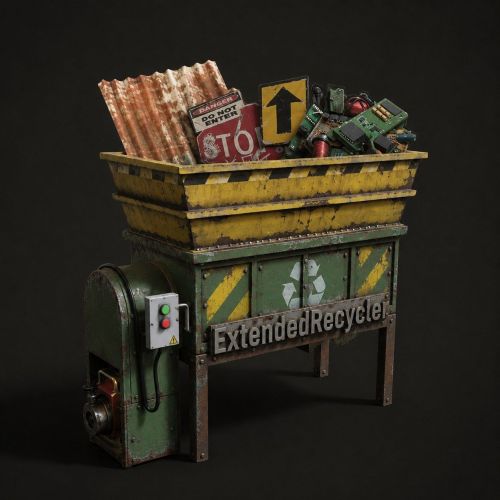
Recyclers with your rules. Built for the way your server runs. ExtendedRecycler turns recyclers into a configurable, distributable server feature for Carbon and Oxide. Define any number of recycler variants with their own speed and efficiency, hand them out as deployable or pocket items, and let players craft them in game. /recycler Open the craft menu. The chat command name is configurable. 01 - Custom recycler variants One item definition can behave differently anywhere. Add any number of variants to the config and give each one a unique Skin ID. A variant sets its own recycle time in seconds per item and recycle efficiency. Those values are separate inside and outside safe zones, so an Outpost recycler and a field recycler can share an item while following different rules. Rust stock efficiency is 0.6 in radtown and 0.4 at Outpost; a variant can use 1, 5, or another configured value. Unique Skin ID Every configured variant is identified by its own Skin ID, keeping variants distinct from the base recycler item. Safe zone settings Set recycle time and efficiency independently for safe zones and the rest of the map. 02 - Pocket recycler Open it from inventory. Leave nothing behind. A pocket variant is an inventory item. Right-click it and a private recycler opens on the spot, without leaving an entity standing in the world. Closing it returns every item still inside to the player before the recycler is removed. The plugin allows one open recycler per player, so the interaction stays contained to the active session. The private recycler exists only while the player is using it. It does not become a persistent world entity and its remaining contents are returned when the session closes. 03 - Placeable recycler Place a real entity. Share it like any recycler. A placeable variant is a deployable item. When placed, it spawns a real recycler entity at that position using the configured variant speed and efficiency. It behaves like a normal world recycler, including for other players who walk up to it. This gives server owners a direct choice between a personal temporary recycler and a shared physical recycler. Pocket A private temporary recycler opened from an inventory item. Placeable A deployable that creates a world recycler other players can use. 04 - In-game craft menu Craft both forms. See the cost before you commit. The configurable chat command opens a master-detail craft UI. A scrollable list of variants sits on the left, while the selected variant card sits on the right. Each variant can offer Pocket and Placeable as separate craftable forms with independent resource costs, and either form can be disabled. Cost tiles use the real in-game item icon and show a have/need counter. Affordability feedback 250 / 250 120 / 250 Specific Skin IDs Ingredients can require a particular Skin ID instead of only the base item, allowing custom currency items. The craft button is dimmed and inert until the player meets the cost. When crafting succeeds, the selected card refreshes in place. 05 - Permissions Three optional layers. Each check can stand alone. A per-variant permission can grant a pocket recycler as a permanent perk. Each variant has a Priority, and a player with several permissions opens the highest-priority virtual recycler through /vrec. A global permission can gate opening the craft menu, switching variants, and crafting. A variant can also have its own craft permission, keeping it visible to everyone or reserving it for a group. Leave a permission field empty and that check is skipped for everyone. 06 - Server reference Commands and permissions. The available commands and permission layers at a glance. Commands /recycler Open the craft menu. /vrec Open the best virtual recycler the player has permission for. er.give {name or userid} {config key} {pocket|placeable} Console or admin command to give a recycler item by partial nickname or SteamID. Permissions extendedrecycler.x1, extendedrecycler.x5 Example per-variant virtual recycler permissions from the default config. Any permission name can be used. Craft menu permission Configured under Craft menu. An empty value means everyone can use the menu. Per-variant craft permission Configured under Craft settings. An empty value means everyone can craft that variant. Configuration and language files generate on first load. Existing configurations migrate automatically without touching custom values, and duplicate Skin IDs are reported as a warning instead of breaking configuration load. ExtendedRecycler works on Carbon and Oxide.$14.99-
- 1
-

-
- #recycler
- #custom recycler
- (and 9 more)