codeboy
-
Posts
177 -
Joined
-
Last visited
-
Days Won
1
Content Type
Profiles
Warranty Claims
Downloads
Forums
Store
Services
Downloads Plus Support
DOWNLOADS EXTRA
Reels
Everything posted by codeboy
-
hi. are there any entries in the log file? Is everything working?
-
I tried to fix your exception and added logging to plugin. When exception throw again, send me log file "exceptions"
-
Changed Status from Pending to Work in Progress Changed Fixed In to Next Version
-
yes, I will check it on my server, of course. I just had to ask if you had the opportunity.
-
Have u carbon? Can u start recording the profiler until error was occured again and send me log export?
-
Hi, can you tell me who is killing whom when this error occurs?
-
 greetings! great idea, will be added in the next update
- 6 comments
-
- 1
-

-
- #spawnpoint
- #spawn
- (and 4 more)
-
Changed Status from Work in Progress to Closed Changed Fixed In from 1.0.1 to 1.0.2
-
Version 1.0.1
417 downloads
Spawn control Everyone starts in the same place. Exactly once. A new player's very first spawn lands on a position you picked - the starter zone, a settlement, the wipe-opening scene you built. From their second spawn onward the plugin steps aside completely and Rust's own random beach spawns take over. No zones to draw, no permissions to hand out, no ongoing upkeep. 01 Stand where you want them to appear, type one command /spawnpos writes your current coordinates into the config. That is the entire setup. 02 First join lands there, and only the first Every player is remembered after their first spawn, so nobody gets teleported back to the start when they die. 03 After that, vanilla behaviour returns Respawns go back to Rust's standard random spawn points across the map. The plugin stops interfering entirely. Wipe day Ready for the next map A saved position means nothing on a new map, and a list of already-spawned players means nothing either. Both are handled on wipe, each behind its own switch. Clear the spawned list Returning players are treated as new again, so the whole server opens the wipe from the same spot instead of scattering across the beach. Drop the stale position Coordinates from last month's map are wiped along with it, so nobody spawns inside a rock while you set the new one. Pin it to a monument instead With MonumentFinder installed the position is stored as an offset from a monument's centre, so it survives a new map without being reset at all. Good for Equal-start servers Starter zones and safe towns Roleplay settlements Scripted wipe openings Configuration { "Spawn position": { "x": 0.0, "y": 0.0, "z": 0.0 }, "Wipe already spawned players on map wipe?": false, "Delete spawn position on map wipe?": false, "Link to monument (requires MonumentFinder plugin). If not empty, Spawn position will be set as offset from monument center": "" } Support, updates and requests: LR Development DiscordFree- 6 comments
- 1 review
-
- 3
-

-
- #spawnpoint
- #spawn
- (and 4 more)
-
Changed Status from Pending to Work in Progress Changed Fixed In to 1.0.1
-
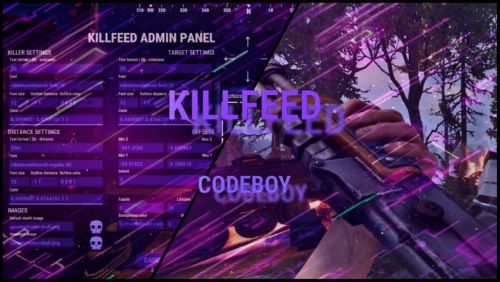
Version 2.2.2
502 downloads
A kill feed your players actually notice. Built in the game, not in a config. Show who killed whom, with what, from how far, with both Steam avatars. Build the whole thing in a live in-game editor instead of opening a JSON file. /kf.edit Open the full in-game editor with a preview that updates as you work. 01 - Built in the game, not in a config Edit against a live preview. No JSON, no reload cycle. Move elements with steppers and an arrow pad, recolour them, reposition the feed and switch themes in the same editor. Every change updates while you type. Position with intent Place the feed where it belongs using steppers and an arrow pad, then tune its direction and speed. Motion you can control New entries slide in. Expiring entries slide out and fade. Turn animation off entirely when you need a static feed. 02 - Steam avatars, zero dependencies Show the people behind the kill. Without another service to run. KillFeed draws the killer's and victim's actual Steam avatars through the game UI. There is no ImageLibrary requirement, no Steam API key and nothing extra to install. Icons for every encounter Bots, animals, Bradley and the patrol helicopter receive their own icons. Any entity can be mapped to a custom image. Private kills mode With one switch, each kill appears only to the killer and victim. Ideal for arenas, duels and private encounters. 03 - New: Discord live killfeed Bring the action to Discord. Without turning your channel into spam. The optional companion bot plugin relays kills through the Discord Webhooks. Kills are grouped into one message on an interval you set from 1 to 60 seconds, which keeps the webhook inside Discord's rate limits on a busy server instead of being throttled into silence. Embed or plain text Choose the output format, then set an embed title and colour. Configure it from the Discord section in the same in-game editor. Only the events you want Toggle PvP, NPC and animal kills, and deaths with no killer separately. Player names are escaped before sending. Line template placeholders {killer} {target} {weapon} {distance} {headshot} {killerid} {targetid} {reason} Use {reason} in the separate template for deaths with no killer. The companion plugin is optional, and the in-game feed works exactly as before without it. 04 - Three distinct themes Match your server's atmosphere. Keep the feed readable. Start with Rust, Midnight or Neon. Each theme keeps the feed crisp while letting you configure colours and outlines to fit your server. Rust Warm, grounded and familiar. Midnight Cool cyan for late-night servers. Neon Violet contrast with a sharper feel. 05 - Built for real servers Keep the feed where it belongs. Give players control. Control which kills reach the feed, exclude sensitive areas and let players decide what they see or share. Zones and monuments Use ZoneManager flags to hide kills involving players inside a chosen zone. Blacklist MonumentFinder monuments for arenas and event areas. Both filters are optional. Reliable and translatable One plugin file and bundled image pack. Use FileManager or ImageLibrary image loading, whichever you already run. Image references are validated on boot. English, Russian and German language files are included. 06 - Commands and permissions Simple to operate. Clear control for staff and players. Use the editor to shape the feed, then expose only the controls each player needs. Commands /kf.edit Open the in-game editor. Requires killfeed.admin. /killfeed Toggle your own feed on or off. Requires killfeed.use. Permissions killfeed.use See the feed and toggle it. killfeed.admin Open the in-game editor. killfeed.hidekillsfromfeed Hide this player's kills from everyone. killfeed.hidedeathsfromfeed Hide this player's deaths from everyone.$25.00 -
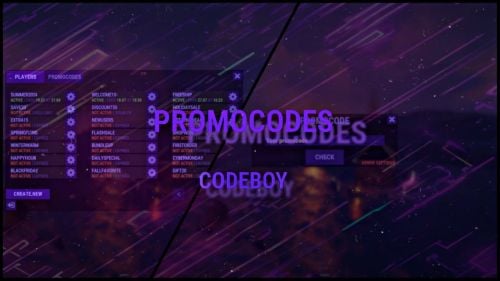
Version 1.0.2
45 downloads
The promo code plugin for Rust game provides the ability to reward players for entering a code word. This plugin includes a variety of settings and functionality for easy management and configuration of promo codes in the admin panel. Main Features Creation and Configuration of Promo Codes: Promo Code: The administrator can create unique promo codes. Item Configuration: The administrator can determine which items will be given when the promo code is activated. Item Parameters Shortname: The code word for issuing a specific item. SkinID: The skin identifier of the item. DisplayName: The displayed name of the item. Amount: The number of items given by the promo code. Flexible Settings Promo Code Duration: Ability to set an end date until which the promo code will be active. Usage Limit: Setting a limit on the number of times the promo code can be used. Command Configuration Ability to replace item issuance with the execution of a specific server command when the promo code is activated. Example Usage Admin usage Give admin permission - promocodes.admin Open UI with command (can be changed in config, default: /p) Creating a Promo Code: Create the promo code "SUMMER21". Set its expiration date to July 31. Set a usage limit of 100 times. Player usage Open UI with command (can be changed in config, default: /p) Enter promocode Press CHECK button Item Configuration Add an item: shortname - "rifle.ak", skinid - "123456", displayname - "AK-47 Elite", amount - 1. Add an item: shortname - "ammo.rifle", skinid - "0", displayname - "Rifle Ammo", amount - 100. Command Replacement Set the command "give %STEAMID% some_reward" to be executed when the promo code is activated instead of issuing items. Configuration file { "Cooldown for promocode": 65, "Commands to open UI": [ "promocode", "promo", "code", "pc", "p" ] }$9.99- 1 review
-
- 1
-
-
- #reward
- #promocode
- (and 7 more)