
Works with
Optional integrations and compatible files.
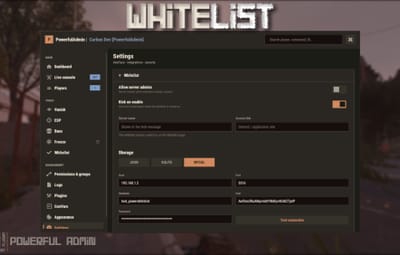
PowerfulWhitelist is a whitelist for Rust. It works on its own through chat andconsole commands with login enforcement, and if you also run PowerfulAdmin itadds an in-game management panel.
>>> No dependencies required. Install PowerfulAdmin only if you want the UI.

- Works on its own. Commands, enforcement and storage run with no other plugin installed. PowerfulAdmin is optional and only adds the in-game panel.
- Three storage backends. Keep the list in a JSON file, a local SQLite database, or MySQL/MariaDB to share it across several servers.
- Instant rejection at the connect screen. Players who are not whitelisted are rejected during login (`CanUserLogin`), so they never spawn in. The list is held in memory, so the check is instant and there is no "join then kick" flash.
- Shared list across servers. Point every server at the same MySQL database and additions and removals show up on all of them.
- Two independent on/off switches. Right on the Whitelist page: a This server switch (local) and an In database switch (shared across every server on the same database). The whitelist enforces if either one is on.
- Auto-reconnect. If the database is briefly unreachable at boot, the plugin keeps retrying and starts enforcing as soon as it connects.
- In-game panel. Search, add and remove from a UI that follows your PowerfulAdmin theme (requires PowerfulAdmin).
- Admin options. Server owners and moderators can be let through automatically, there is a bypass permission, and you can optionally kick non-listed players the moment the whitelist starts enforcing.

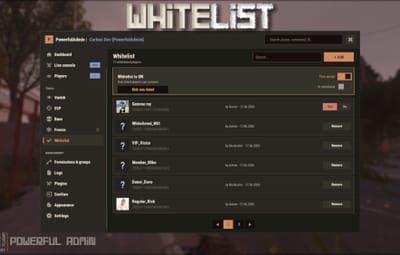
A dedicated Whitelist section in the Tools category:
- A status banner with two switches, This server (local on/off) and In database (shared on/off, shown when a database backend is used), plus an Enforce button to kick everyone not on the list. The whitelist is active if either switch is on.
- The whitelist with search (by name or SteamID) and pagination.
- Each entry shows the player avatar, name, SteamID, who added it and when.
- One-click Remove with a confirmation step.
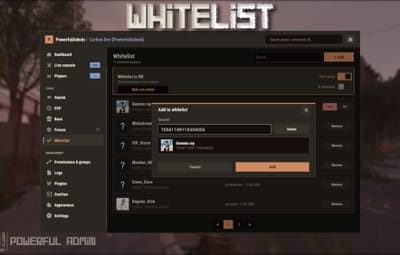
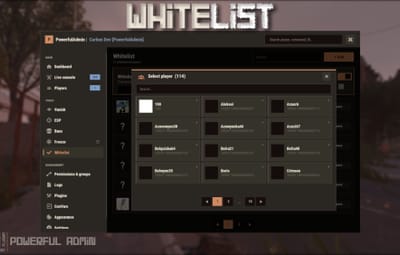
- An + Add dialog with:
1. a SteamID input with live validation (green when valid, red when not);
2. a searchable, paged player picker that shows online status and hides players who are already whitelisted;
3. an avatar and name preview before you confirm.
- A whitelist status row in the player popup card (Listed / Allowed / Not listed).
- Colors, fonts and switches follow your active theme.
Every action is written to PowerfulAdmin's Logs.

- JSON (default): a plain data file, nothing to configure. Good for a single server.
- SQLite: a local database file, created automatically.
- MySQL / MariaDB: share one whitelist across many servers.
Switch backends and migrate your data from the Settings page (your current list is
copied into the new backend), or check your MySQL connection first with the
built-in Test connection button.
With MySQL, each server refreshes the list on a short interval, so an addition or removal made on one server shows up on the others. The Whitelist page has two separate switches: This server (local, per-server) and In database (shared). Flip the database switch on one server and the whole network starts enforcing. The whitelist is active whenever either switch is on.


/whitelist add <name|steamid> - add a player
/whitelist remove <name|steamid> - remove a player
/whitelist list [page] - list whitelisted players
/whitelist on | off - enable / disable the whitelist (this server)
/whitelist enforce - kick everyone not on the list
/whitelist status - show state and count
/whitelist help - show all commands
>>> /wl ... - short alias for /whitelist

pwl add <name|steamid>
pwl remove <name|steamid>
pwl list [page]
pwl on | pwl off
pwl enforce
pwl status
pwl help

powerfulwhitelist.view - Open the Whitelist section and read the list
powerfulwhitelist.manage - Add, remove, toggle on/off and enforce
powerfulwhitelist.bypass - Always allowed to connect, even when not listed

A default config is generated on first load (PowerfulWhitelist.json
{
  "Enabled": false,
  "AllowAdmins": true,
  "KickOnEnable": true,
  "ServerName": "",
  "InfoUrl": "",
  "Storage": "Json",
  "SyncInterval": 60,
  "MySql": {
    "Host": "127.0.0.1",
    "Port": 3306,
    "Database": "powerfulwhitelist",
    "User": "root",
    "Password": ""
  }
}
The shared database on/off state (the In database switch on the panel) is
stored in the database, not in this config.
Storage, MySQL credentials and these options can also be changed live from the
Settings page when PowerfulAdmin is installed.

- Drop PowerfulWhitelist.cs into your plugins folder (Carbon: carbon/plugins/, Oxide: oxide/plugins/).
- The plugin loads and uses a JSON data file by default. No setup is required to start whitelisting.
- Grant the permissions above to your staff groups.
- Add yourself and your players (/whitelist add <name|steamid>), then turn it on (/whitelist on).
- (Optional) For a shared/network whitelist, open the config (or the Settings page), set Storage to MySql, fill in your credentials, and apply.
- (Optional) Install PowerfulAdmin to get the in-game whitelist panel.

- For MySQL storage: MySQL 8.0+ or MariaDB 10.2+ (recommended).
- PowerfulAdmin is optional, needed only for the in-game panel.

English and Russian are included out of the box. Every message lives in the language files, so you can translate or reword anything for your community.

//
//    object API_IsWhitelisted(string steamId)
//
//    steamId   target SteamID64 as a string.
//
//    Returns true if the player is allowed to connect: present in the
//    whitelist, OR holding the powerfulwhitelist.bypass permission, OR a
//    server admin while AllowAdmins is on. Returns false otherwise. Invalid
//    steamId -> false. Reads from the in-memory cache, so it is synchronous
//    and safe to call from CanUserLogin-style checks.

    if (PowerfulWhitelist?.Call("API_IsWhitelisted", steamId.ToString()) is true)
    {
        // player is allowed in
    }


//    object API_AddWhitelist(string steamId, string name)
//
//    steamId   target SteamID64 as a string.
//    name      display name stored with the record (falls back to the steamId
//              if empty).
//
//    Returns true if the entry was added, false if the steamId is invalid or
//    the player is already whitelisted. The change is written through to the
//    active backend (JSON / SQLite / MySQL). Records added via the API store
//    "API" as the author with a zero by-SteamID.

    PowerfulWhitelist?.Call("API_AddWhitelist", "76561198000000000", "Trusted Player");


//    object API_RemoveWhitelist(string steamId)
//
//    steamId   target SteamID64 as a string.
//
//    Returns true if an entry was removed, false if the steamId is invalid or
//    the player was not whitelisted. If the whitelist is enabled and the
//    player is online and no longer allowed, they are kicked.

    PowerfulWhitelist?.Call("API_RemoveWhitelist", steamId.ToString());


//    object API_IsEnabled()
//
//    Returns true if the whitelist is currently enforcing, false otherwise.
//    Enforcing means either the local "This server" switch is on, or (on a
//    database backend) the shared "In database" switch is on.

    if (PowerfulWhitelist?.Call("API_IsEnabled") is true)
    {
        // the whitelist is active
    }


//    object API_SetEnabled(bool enabled)
//
//    Turns the local "This server" switch on or off, the same as /whitelist
//    on|off. Saves the config. When it starts enforcing and KickOnEnable is
//    on, non-listed players online are kicked.
//
//    Returns true if the switch changed, false if it was already in that
//    state.

    PowerfulWhitelist?.Call("API_SetEnabled", true);


//    object API_SetDatabaseEnabled(bool enabled)
//
//    Turns the shared "In database" switch on or off. The state is stored in
//    the database, so every server on the same database picks it up (within
//    SyncInterval). Same kick behaviour as API_SetEnabled.
//
//    Returns true if the switch changed, false if it was already in that
//    state, or if the storage backend is JSON, or the database is not
//    connected.

    PowerfulWhitelist?.Call("API_SetDatabaseEnabled", true);


//    object API_GetState()
//
//    Returns a Dictionary<string, object> with the current state:
//
//        enforcing   bool    true if the whitelist is being enforced right now
//        server      bool    the local "This server" switch
//        database    bool    the shared "In database" switch (false on JSON)
//        storage     string  "Json", "Sqlite" or "MySql"
//        ready       bool    false while a database backend is not connected
//                            (everyone is let in until it is)
//        count       int     number of whitelisted players

    if (PowerfulWhitelist?.Call("API_GetState") is Dictionary<string, object> state)
    {
        Puts($"enforcing: {state["enforcing"]}, storage: {state["storage"]}, {state["count"]} entries");
    }


//    object API_GetWhitelist()
//
//    Returns a List<string[]>, one array per entry, in the form:
//
//        [ steamId, name, byName, bySteamId, createdUnixSeconds ]
//
//    All fields are strings. createdUnixSeconds is the Unix time (seconds) the
//    entry was added. bySteamId is "0" for entries added by the server/API.

    if (PowerfulWhitelist?.Call("API_GetWhitelist") is List<string[]> list)
    {
        foreach (var row in list)
            Puts($"{row[1]} ({row[0]}) added by {row[2]} / {row[3]}");
    }


// PowerfulWhitelist fires these so you can mirror changes to Discord, a web
// panel, stats, etc.

//    OnPowerfulWhitelistAdded(ulong steamId, string name, string by)
//
//        Fired when a new entry is added (manually, by command, or via
//        API_AddWhitelist). steamId is a ulong, not a string.

    private void OnPowerfulWhitelistAdded(ulong steamId, string name, string by)
    {
        Puts($"{name} ({steamId}) whitelisted by {by}");
    }

//    OnPowerfulWhitelistRemoved(ulong steamId, string by)
//
//        Fired when an entry is removed (command / UI / API_RemoveWhitelist).

    private void OnPowerfulWhitelistRemoved(ulong steamId, string by)
    {
        Puts($"{steamId} removed from the whitelist by {by}");
    }


// Storage notes:
//
//    The whitelist is kept in an in-memory cache for instant, synchronous
//    login checks, and written through to the active backend on every change:
//
//        Json    a local data file (default)
//        Sqlite  a local SQLite database file
//        MySql   a shared database for multi-server networks
//
//    With MySQL the cache is refreshed on a short interval (SyncInterval), so
//    additions/removals from other servers appear automatically. The Whitelist
//    page has two separate switches: "This server" (local) and "In database"
//    (shared); the shared state lives in the database, so flipping it on one
//    server enforces the whitelist on every server using the same database.
//
//    Switching the storage backend itself (Json / Sqlite / MySql) is done from
//    the Settings page or the config, not through the API.