Freeze a player in place, on the spot, for as long as you need.
Three different kinds of freeze, a time limit, a reason, and a gun that does it from across the room. Use it when an admin needs a suspect to stop moving while a report is checked, another admin walks over, or a base is inspected.
|
/freeze <nick|steamid>
|
Freeze a player without ending the conversation.
|
No dependency. No missing enforcement.
Chat commands, console commands, enforcement and storage all work with no other plugin installed. PowerfulAdmin is optional and only adds the in-game panel.
|
|
01 - Three ways to freeze
|
Choose the restraint that fits the situation.
An admin picks the mode per freeze, so the punishment fits the situation.
|
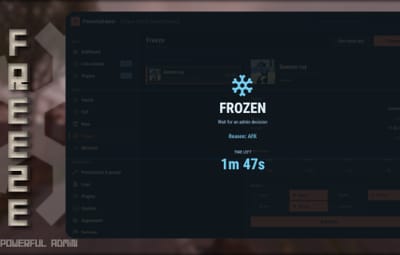
Screen
The player's view is locked. They see the world, but cannot look around.
|
In-world
The player is pinned to their position. They can still look around, they simply cannot move.
|
|
Mount
The player is locked into a seat, visibly contained and unable to interact with anything.
|
Admin control
Each freeze can carry a duration and a reason, and an existing freeze can be extended or shortened without lifting it first.
|
|
Freeze from across the room.
A real item an admin carries. Shoot a player and they freeze on the spot for the default duration, with no typing and no target picking.
|
Configured for your team
Set the item type, custom name, skin, infinite ammo, damage blocking, and default duration. A revolver is the default item.
|
Permission follows access
Players who lose the freeze gun permission automatically lose the gun from their inventory.
|
|
Set a limit, or leave it open.
Use 30m, 2h, 7d, or 1y, or leave duration empty for a freeze that lasts until an admin lifts it. Freezes survive relogs and server restarts.
|
|
04 - Optional PowerfulAdmin panel
|
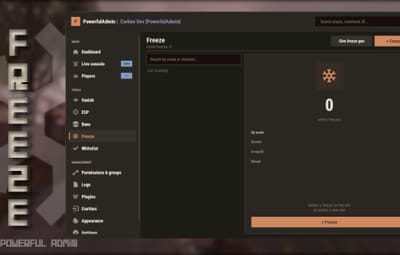
Manage every active freeze in one view.
With PowerfulAdmin installed, a dedicated Freeze section follows whatever theme PowerfulAdmin is set to. Without it, the panel is simply not there and the plugin points admins to chat and console commands.
|
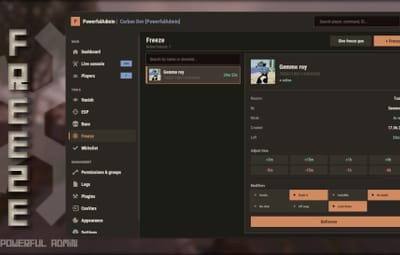
Find and inspect
Searchable, paginated active-freeze list with a summary by mode. Detail cards show reason, issuer, mode, start time, remaining time, and online status.
|
Adjust deliberately
Extend or adjust time straight from the card. Unfreeze includes a confirmation step so no freeze is lifted by a stray click.
|
|
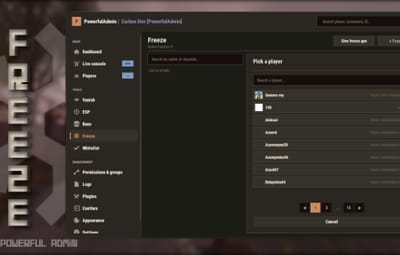
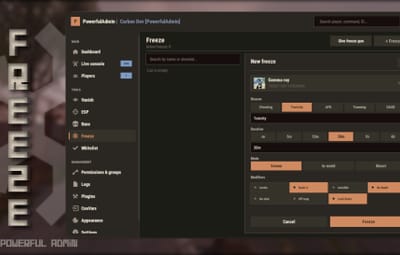
Create without typing SteamIDs
Create a new freeze from a player picker with search.
|
|
Use chat or console with the same result.
Core administration is available without the optional panel.
|
Chat
|
|
|
/freeze <nick|steamid> [duration] [mode] [reason]
|
Freeze a player
|
|
/unfreeze <nick|steamid>
|
Lift a freeze
|
|
/freezeinfo <nick|steamid>
|
Freeze details
|
|
/freezeui
|
Open the panel
|
|
/freezegun
|
Take the freeze gun
|
|
Console
|
|
|
pf.freeze, pf.unfreeze, pf.info, pf.ui, pf.list, pf.gun.give
|
|
Give each role only what it needs.
|
powerfulfreeze.freeze
|
Freeze players
|
|
powerfulfreeze.unfreeze
|
Lift freezes
|
|
powerfulfreeze.view
|
See the list and freeze details
|
|
powerfulfreeze.gun
|
Use the freeze gun
|
|
powerfulfreeze.seevanishforfreezed
|
Stay visible to frozen players while vanished
|
|
|
07 - Configure and localize
|
Set the policy, then write it in your language.
Configure the storage backend, whether freezes broadcast to server chat, whether the frozen player sees the reason, the server name used in messages, and the full freeze gun block. English and Russian ship with the plugin, and every string lives in the language files.
|
Freeze instead of only kicking.
Anti-cheat plugins, report systems and chat filters usually only get to kick. With this API they can freeze instead - hold the suspect in place until a human looks at them. Every call is guarded and behaves the same on Oxide and Carbon.
|
[PluginReference] private Plugin PowerfulFreeze;
|
Reference the plugin from your own plugin.
|
|
object API_Freeze(string steamId, string name, string duration, string reason, string by)
|
Freezes a target. Invalid SteamID returns false. Empty name resolves from the online player then falls back to the SteamID. Duration accepts 30m, 2h, 7d, 1y; empty or unparseable means until lifted. Reason is shown when notifications are enabled; by is stored and logged.
|
|
PowerfulFreeze?.Call("API_Freeze", steamId.ToString(), "Suspect", "15m", "Report under review", "AntiCheat");
|
Returns true if the request was accepted, false if the SteamID is invalid.
|
|
object API_Unfreeze(string steamId, string by)
|
Lifts an active freeze. by defaults to Server when empty. Returns false when the player is not currently frozen.
|
|
PowerfulFreeze?.Call("API_Unfreeze", steamId.ToString(), "AntiCheat");
|
Example call to unfreeze a target.
|
void OnPowerfulFreezeAdded(string steamId, string name, string reason, string by, long until)
void OnPowerfulFreezeRemoved(string steamId, string name, string by)
|
Hooks fire on every freeze and explicit unfreeze, whether it came from the panel, a command or the API. Use them for Discord logging or your own database.
|
|
|
A measured way to stop movement while your team checks the facts.
For Carbon and Oxide Rust servers. Fully standalone, with an optional PowerfulAdmin panel.
|
|


 1
1