
.png.e799f9ae86d7547185d8fa4b14f5f0b6.png)
Kaucsenta
-
Posts
227 -
Joined
-
Last visited
-
Days Won
1
Content Type
Profiles
Warranty Claims
Downloads
Forums
Store
Support
DOWNLOADS EXTRA
Services
Everything posted by Kaucsenta
-
Hello lengka, sorry, but i don't really get your question. Can you please explain it a bit better/more/different?
-
Version 1.5.1
132 downloads
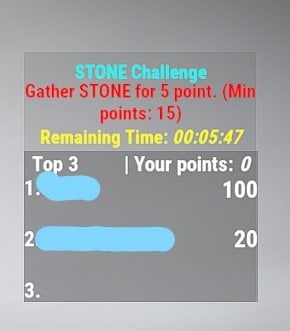
This plugin gives the possibility to trigger a timed event, with a random long time (choose randomly between min and max configured time). The event will choose randomly a type, KILL or Gather (prior the config), after it choose a random objective from the corresponding list. During the event, after the objective is triggered (for example: Sulfur ore mined completely, Barrel destroyed, Bear killed, Tree chopped down.. etc), the player will get point /objective. Top 3 player (or player group if there is even in the points) will get reward, if they reach the minimum configured point. If the Players not gain points, they will be not listed on the Scoreboard. Rewards can be claimed after the event(s) over. First event will start after 5 min as soon as the plugin loaded in. The plugin have several protection against wrong configuration. Only 1 event can be active at time. If the TIME related configurations allow overlay, the maximum event time will be set as (event_repeat_time_in_hour*60)-5 Minute, to not affect the next event start. If no event type enabled, no event will started and message will be written to the server console. If no reward or invalid reward number set in the configuration, list of rewards will be cleared, 0 and 1 will be added as default (see the meaning below). If ServerRewards/Economics plugin not installed, this type of reward will be not selected. Configuration Default configuration: { "_Plugin_Cfg_Version": { "Major": 1, "Minor": 2, "Patch": 0 }, "CCH_Challenge_color": "0.76 0.90 0.29 1", "CCH_Desc_color": "0.76 0.90 0.29 1", "CCH_ScoresPanel_color": "0.39 0.39 0.39 0.75", "CCH_Time_color": "0.76 0.90 0.29 1", "CCH_Top1_color": "1 1 1 1", "CCH_Top2_color": "1 1 1 1", "CCH_Top3_color": "1 1 1 1", "CCH_Top3_yourpoint_color": "1 1 1 1", "CCH_UIPanel_color": "0.39 0.39 0.39 0.5", "event_gather_type": "{\"tree\":15,\"metal\":15,\"sulfur\":15,\"stone\":15,\"barrel\":15,\"berry\":15,\"corn\":15,\"hemp\":15,\"mushroom\":15,\"pumpkin\":15,\"potato\":15,\"crate\":15,\"foodbox\":15,\"minecart\":15}", "event_gather_type_enabled": true, "event_kill_type": "{\"bear\":15,\"wolf\":15,\"boar\":15,\"murderer\":15,\"scientist\":15,\"scarecrow\":15}", "event_kill_type_enabled": true, "event_long_max_in_minute": 1, "event_long_min_in_minute": 1, "event_minimum_player": 1, "event_points_by_entity": 5, "event_repeat_time_in_hour": 2, "event_reward_type": "0, 1, 2, 3", "event_top1_reward": 18, "event_top2_reward": 12, "event_top3_reward": 6, "grownable_collect_enabled": false, "rp_reward_multiplier": 10.0, "economics_reward_multiplier": 10.0, "reminder_enabled": true, "reminder_time_in_minute" : 30 } Definition of configurations: event_gather_type - List of collect/gatherable items, next to them after the ":" the minimum points to earn reward. (For example not much foodbox or minecart spawned) event_gather_type_enable - Gather type of events can be disabled/enable event_kill_type - List of killable enemys, next to them after the ":" the minimum points to earn reward. (For example not much animal spawned) event_kill_type_enabled - Gather type of events can be disabled/enable event_long_max_in_minute - Minimum Time for a generated event (Time choosen randomly between min and max) event_long_min_in_minute - Maximum Time for a generated event (Time choosen randomly between min and max) event_minimum_player - Minimum Player number. Below this the event will not started event_points_by_entity - Point gained by gather/kill one of the objective event_repeat_time_in_hour - Events repeated in every given hour event_reward_type - 0 - (Bronze Easter Egg - item ID: 844440409) 1 - ( Small Halloween Bag item ID: 1319617282) 2 - RP from [ServerRewards plugin if installed, if not, it can not be choosen even if in the list](https://umod.org/plugins/server-rewards) event_top1_reward - Amount of choosen item/RP(base for a the rp_reward_multiplier below) for the first place event_top2_reward - Amount of choosen item/RP(base for a the rp_reward_multiplier below) for the second place event_top3_reward - Amount of choosen item/RP(base for a the rp_reward_multiplier below) for the third place grownable_collect_enabled - To avoid player advantage, with big crop farms, the growned crops can be disabled/enabled to count as a gathered objective rp_reward_multiplier - ServerRewards multiplier for the RP reward, if the event is generated to give RP as a reward. economics_reward_multiplier - Economics multiplier for the Economics reward, if the event is generated to give Economics as a reward. reminder_enabled - enable/disable the repeated reminder to the players with unclaimed reward reminder_time_in_minute - reminder time in minute format Colors: the first 3 number is the corresponding RGB color number, but between 0-1 with float numbers. So if you want to write an RGB, where the RED is 210, then the first number in the config will be 210/255=0.82. The last number is the opacity 0 is invisible, 1 the maximum. _Plugin_Cfg_Version - only present for compatibility check Commands /cch info - Show information about Custom Challenges /cch show - Show currently Active Challenge Scoreboard /cch hide - Hide Challenge Scoreboard /cch claim - Claim rewards after event(s) Localization English language file generated by default, texts supported by the language files. Logging Reported winner and claimed rewards stored in the oxide/logs folder.$15.00 -
Changed Status from Pending to Not a Bug
-
The plugin work on the following way: "The goal of this plugin to block the unwanted ladders and extra twig frames on player bases from random players, who has no right to build on the given place". It means, if you put a TC, and clear the authorized list, then NO PLAYER own the base, so the twig and ladder placement are allowed. If in the plugin, there was no Authorized player restriction, based on the placed TC, then it can lead a situation, that you are not able to build a base at all, without TC, because you are not of the owner of anything since there is no TC. The plugin is working based on TC protected buildings, not entity ownership.
-
Hello, i would suggest to add "nodeploy", "true" to the zonemanager zones. Without this, for example, the players was able do deploy doors and bypass some shotgun trap.
-
Changed Status from Pending to Closed Changed Fixed In to 1.0.0
-
What do you mean compatible with BotSpawn? It has effect on the Real Player items only, not the NPC wear items.
-

Version 1.3.2
1,174 downloads
Description The goal of this plugin to block the unwanted ladders and extra twig frames on player bases from random players, who has no right to build on the given place. This plugin is ideal for PVE servers, where the Player bases are not raidable. This plugin is working with the Raidable Bases plugin together, so the ladders and twig frames are allowed while the Raidable Bases are the targets. Localization English language file generated by default, texts supported by the language files. Donation: Check my other plugins as well or if you feel you would like to support me with the Donate link on the right side. Configuration Disable plugin feature true/false Permission antiladderandtwig.bypass - bypass plugin featureFree -

Version 3.0.1
2,050 downloads
Description The goal of this plugin to block the possibility to steal from other player planterboxes. It is ideal plugin for PVE servers to allow player to freely build anywhere without fear to lost the grown things. Only the owner (who put it down) of the planterbox have access to the grown vegetables/items, and the team members, Friends and Clan members. Permissions planterboxdefender.admin - to bypass the plugin restriction Dependencies Optional Clans (Clans or Rust:IO Clans) and Friends plugin dependency, in case of usage of them. Localization English language file generated by default, texts supported by the language files. Donation: Check my other plugins as well or if you feel you would like to support me with the Donate link on the right side.Free -
 Sorry, i see now your question. I'm working on this server, if you are interested to try it out: [HUN/ENG] Coimbrák-HardcorePVE
- 29 comments
-
- 1
-

-
- #durability
- #rust
- (and 7 more)
-
Thanks for the feedback.
-
Version 1.4.2
448 downloads
This plugin allow to the NPCs to hit and decrease the equipped armors durability. Currently the plugin choose randomly from the available equipped armors, what still has durability and not broken item, and extract the (total, maximum durability) * configured percentage value. Ideal plugin for PVE servers to avoid stacked up gears by the players. 3 different permission related value can be set, to support other plugins or vip/rank systems. It also has the feature to exclude weapons or tools from the function, up to the need. The plugin can work 3 different mode. 1 - no permission used at all -> normal percentages configured will be used. 2 - The player can have more then one permission, in this case always the HIGHER permission percentage value used combined with the class values. 3 - The player shall only have 1 permission, in this case i recommend to activate the "Permission check against multiple permission group" and optionally the "Warning agains multiple permission group (can flood the server console)" configuration, to set to True, and if a player by mistake got 2 different permission, the plugin feature will be skipped and a warning will be shown on the server console. Example: Bone Helmet - 100 Maximum durability/Condition point. LongDurabilityPercent configured to 1.0 percent. It will take 100 Hit, if only the Bone Helmet equipped, to make the item broken. Grouped up weapons for the Configurable categories: Meleeweapon : Anything, what is unhandled from Hit information point of view, and "grenade.beancan.entity.prefab", "bone_club.entity.prefab", "knife_bone.entity.prefab", "chainsaw.entity.prefab", "salvaged_cleaver.entity.prefab", "grenade.f1.entity.prefab", "flamethrower.entity.prefab", "flamethrower_fireball.prefab", "hacksaw.weapon.prefab", "butcherknife.entity.prefab", "pitchfork.entity.prefab", "sickle.entity.prefab", "hammer.entity.prefab", "hatchet.entity.prefab", "knife.combat.entity.prefab", "mace.entity.prefab", "machete.weapon.prefab", "militaryflamethrower.entity.prefab", "paddle.entity.prefab", "pickaxe.entity.prefab", "rock.entity.prefab", "axe_salvaged.entity.prefab", "hammer_salvaged.entity.prefab", "icepick_salvaged.entity.prefab", "explosive.satchel.entity.prefab", "stonehatchet.entity.prefab", "stone_pickaxe.entity.prefab", "spear_stone.entity.prefab", "longsword.entity.prefab", "salvaged_sword.entity.prefab", "torch.entity.prefab", "spear_wooden.entity.prefab" Closeweapon: Following weapons are considered as Close combat weapons: "double_shotgun.entity.prefab", "pistol_eoka.entity.prefab", "m92.entity.prefab", "nailgun.entity.prefab", "shotgun_waterpipe.entity.prefab", "python.entity.prefab", "pistol_revolver.entity.prefab", "shotgun_pump.entity.prefab", "pistol_semiauto.entity.prefab", "smg.entity.prefab", "spas12.entity.prefab" Longweapon : "mgl.entity.prefab", "semi_auto_rifle.entity.prefab", "thompson.entity.prefab", "rocket_launcher.entity.prefab", "mp5.entity.prefab", "l96.entity.prefab", "lr300.entity.prefab", "m249.entity.prefab", "m39.entity.prefab", "compound_bow.entity.prefab", "crossbow.entity.prefab", "ak47u.entity.prefab", "bow_hunting.entity.prefab" Additionally, BaseHelicopter, BradlyAPC, AutoTurret, Guntraps and Beartrap also considered as damage source to decreas armor, they are under Meleeweapon category at the moment, they use the same value as configured for MeleeDurabilityPercent Explosive: Not handled yet, only available for future usage. Permissions itemslostdurabilityonnpchit.protectplayer - Prevent armor damage. Basically disable the plugin for the players with this permission. itemslostdurabilityonnpchit.profile1 - permission percentage rank itemslostdurabilityonnpchit.profile2 - permission percentage rank itemslostdurabilityonnpchit.profile3 - permission percentage rank Configuration The settings and options for this plugin can be configured in the ItemsLostDurabilityonNPCHit.json file under the oxide/config directory. The use of a JSON editor or validation site such as jsonlint.com is recommended to avoid formatting issues and syntax errors. Suggested percentages see below. Anything that is higher than 1.5% seems feels too fast on client side. Experience example: 2 Metal item, 1 Sign skirt From 100% to all 3 item broken with 2 melee Attacker take 3 minute constant hit, with 0.5%. { "CloseDurabilityPercent": 0.75, "ExplosionDurabilityPercent": 0.0, "LongDurabilityPercent": 1.0, "MeleeDurabilityPercent": 0.5, "itemslostdurabilityonnpchit.profile1 permission percentage scale range: 0-X, 0.1f mean 10% of the original durability": 1.0, "itemslostdurabilityonnpchit.profile2 permission percentage scale range: 0-X, 0.1f mean 10% of the original durability": 1.0, "itemslostdurabilityonnpchit.profile3 permission percentage scale range: 0-X, 0.1f mean 10% of the original durability": 1.0, "Permission check agains multiple permission group": false, "Warning against multiple permission group (can flood the server console)": false, "CleanPermission on Wipe": true, "Pop off the armor from the player, if broken": false, "The popped of armor will be placed into the player inventory (if false, it will be dropped on the floor) [Only relevant, if \"Pop off the armor from the player, if broken\" configuration set to true]": false, } Localization No. Develop API No. Hooks No.$7.00- 29 comments
- 6 reviews
-
- 4
-
-
- #durability
- #rust
- (and 7 more)
.thumb.png.8fb9cb5db33376288eba94beb961d0c6.png)
